1
REMOTE CONTROL CONNECTION
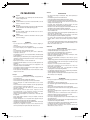
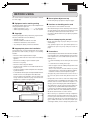
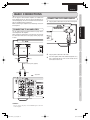
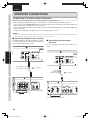
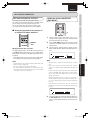
When connected to devices equipped with digital outputs,
such as CD transports or MD recorders, the unit can be used
as a D/A converter.
Note:
This unit can input linear PCM signals with sampling
frequencies of 32kHz, 44.1kHz, 48kHz, 64kHz, 88.2kHz, and
96kHz.
Please do not input signals other than linear PCM signals (such
as CD-ROM, Dolby Digital, DTS, or AAC signals). Signals
other than linear PCM may generate noise and damage the
speakers.
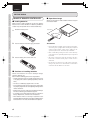
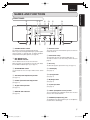
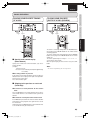
Connecting this player to additional Marantz audio equipment
using the supplied remote control cable enables remote control
of the connected equipment as a single audio system.
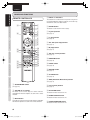
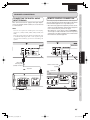
• When connecting equipment incorporating a remote sensor,
connect the “remote control out” connector of the equipment
to the “remote control in” jack of the CD player.
When doing this, set this player’s switch to “EXTERNAL.”
This will stop its remote control IR receiver from operating
and the player can now be controlled via the remote control
IR receiver of the attached equipment.
MODEL NO. SA-KI-PEAR
MODEL NO.
IN
IN
OUT
BASIC CONNECTIONS
CONNECTING THE DIGITAL AUDIO
INPUT TERMINAL
BASIC OPERATION
ADVANCED CONNECTIONS
NAMES AND FUNCTIONS
ENGLISH
OUT
OPTICAL COAXIAL OPTICAL
OPTICAL COAXIAL OPTICAL
ADVANCED CONNECTIONS
EXTERNAL
INTERNAL
EXTERNAL
INTERNAL
Optical digital
connecting cable
(available on market)
APPLICATION OPERATION
Set to “EXTERNAL.”
Remote connector cable
(supplied)
:
Signal flow
ANALOG IN/OUT
TROUBLESHOOTING
: Signal flow
DIGITAL IN/OUT
OPTICAL
L
R
MD
INPUT
MD COMMON
CD
OUTPUT
MD
MD/CD
INPUT OUTPUT
Amplifier
OTHERS
CD recorder, MD deck, AV amplifier, etc.
15
SA-KI PEARL_UN_01_Eng.indd 15
09.2.23 9:49:27 AM