1
AV9 Pre-amp. processor
Préamplificateur-processeur AV9
Vorverstärker/Prozessor AV9
AV9 Voorversterker Processor
Safety guidelines
CAUTION
ATTENTION
RISK OF ELECTRIC
SHOCK DO NOT OPEN
RISQUE DE CHOC ELECTRIQUE
NE PAS OUVRIR
CAUTION: To reduce the risk of electric shock, do not remove cover (or back). No user serviceable parts
inside. Refer servicing to qualified service personnel.
WARNING: To reduce the risk of fire or electric shock, do not expose this apparatus to rain or moisture.
The lightning flash with an arrowhead symbol within an equilateral triangle, is intended to alert the user to the presence
of uninsulated ‘dangerous voltage’ within the product’s enclosure that may be of sufficient magnitude to constitute a risk
of electric shock to persons.
The exclamation point within an equilateral triangle is intended to alert the user to the presence of important operating
and maintenance (servicing) instructions in the literature accompanying the product.
CAUTION: In Canada and the USA, to prevent electric shock, match the wide blade of the plug to the wide
slot in the socket and insert the plug fully into the socket.
Important safety instructions
This product is designed and manufactured to meet strict
quality and safety standards. However, you should be aware
of the following installation and operation precautions:
1. Take heed of warnings and instructions
You should read all the safety and operating instructions
before operating this appliance. Retain this handbook for
future reference and adhere to all warnings in the handbook
or on the appliance.
2. Water and moisture
10. Power-cord protection
Power supply cords should be routed so that they are not
likely to be walked on or pinched by items placed upon or
against them, paying particular attention to cords and plugs,
and the point where they exit from the appliance.
11. Grounding
This is a class 1 product and requires an earth connection.
Ensure that the grounding means of the appliance is not
defeated.
The presence of electricity near water can be dangerous. Do
not use the appliance near water – for example next to a
bathtub, washbowl, kitchen sink, in a wet basement or near
a swimming pool, etc.
12. Power lines
3. Object or liquid entry
If the unit has a stand-by function, a small amount of
current will continue to flow into the equipment in this
mode. Unplug the power cord of the appliance from the
outlet if left unused for a long period of time.
Take care that objects do not fall and liquids are not
spilled into the enclosure through any openings. Liquid
filled objects such as vases should not be placed on the
equipment.
4. Ventilation
Do not place the equipment on a bed, sofa, rug or similar
soft surface, or in an enclosed bookcase or cabinet, since
ventilation may be impeded. We recommend a minimum
distance of 50mm (2 inches) around the sides and top of the
appliance to provide adequate ventilation.
5. Heat
Locate the appliance away from naked flames or heat
producing equipment such as radiators, stoves or other
appliances (including other amplifiers) that produce heat.
6. Climate
The appliance has been designed for use in moderate
climates.
7. Racks and stands
Only use a rack or stand that is recommended for use with
audio equipment. If the equipment is on a portable rack it
should be moved with great care, to avoid overturning the
combination.
8. Cleaning
Locate any outdoor antenna/aerial away from power lines.
13. Non-use periods
14. Abnormal smell
If an abnormal smell or smoke is detected from the
appliance, turn the power off immediately and unplug the
unit from the wall outlet. Contact your dealer immediately.
15. Servicing
You should not attempt to service the appliance beyond that
described in this handbook. All other servicing should be
referred to qualified service personnel.
16. Damage requiring service
The appliance should be serviced by qualified service
personnel when:
A. the power-supply cord or the plug has been damaged,
or
B. objects have fallen, or liquid has spilled into the
appliance, or
C. the appliance has been exposed to rain, or
D. the appliance does not appear to operate normally or
exhibits a marked change in performance, or
E.
the appliance has been dropped or the enclosure
damaged.
Unplug the unit from the mains supply before cleaning.
The case should normally only require a wipe with a soft,
damp, lint-free cloth. Do not use paint thinners or other
chemical solvents for cleaning.
We do not advise the use of furniture cleaning sprays or
polishes as they can cause indelible white marks if the unit
is subsequently wiped with a damp cloth.
9. Power sources
Only connect the appliance to a power supply of the type
described in the operating instructions or as marked on the
appliance.
AV9
E-2
Safety compliance
This product has been designed to meet the IEC 60065
international electrical safety standard.
English
Contents
Safety guidelines ........................................ E-2
Important safety instructions ......................E-2
Safety compliance .....................................E-2
Before you start! ......................................... E-4
Introduction..............................................E-4
Using this handbook ..................................E-4
What’s in the box? .....................................E-4
Before making connections .........................E-5
Inserting batteries into the remote control ....E-6
Installation ................................................. E-7
Positioning the unit ....................................E-7
Cables......................................................E-7
Audio connections......................................E-8
Zone 2 connections....................................E-9
Video connections.................................... E-10
Control connections ................................. E-11
Trigger outputs........................................ E-11
Connecting to a power supply ................... E-11
Configuring the AV9 .................................. E-12
Basic Setup ............................................ E-13
Advanced Setup ...................................... E-17
Saving Settings, User Presets and Exiting the
Setup Menu ............................................ E-20
Front panel controls .................................. E-21
Remote control ......................................... E-22
Operating your AV9................................... E-23
Using the controls.................................... E-23
Using the Main menu screens .................... E-26
Using Zone 2 .......................................... E-28
Surround modes........................................ E-29
Introduction............................................ E-29
Digital multi-channel sources .................... E-29
Two-channel source modes ....................... E-30
Multi-channel source modes ...................... E-31
THX® Modes............................................ E-31
DSP Effects Modes ................................... E-33
About THX® cinema processing.................. E-33
Speaker Installation ................................. E-33
Troubleshooting ........................................ E-34
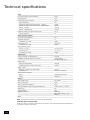
Technical specifications ............................ E-37
Utility software ........................................ E-38
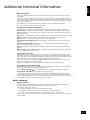
Additional technical information ............... E-38
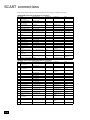
SCART connections ................................... E-39
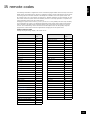
IR remote codes........................................ E-40
Guarantee ................................................. E-41
Worldwide Guarantee ............................... E-41
On line registration .................................. E-41
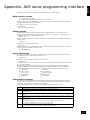
Appendix: AV9 serial programming interfaceE-42
Data transfer format ................................ E-42
Setting values ......................................... E-42
Query commands .................................... E-42
Command processing ............................... E-42
Command descriptions ............................. E-43
Environmental matters:
This handbook is printed in the U.K. on recycled paper,
and is itself fully recyclable and biodegradeable.
The paper used is from the ‘Revive’ range of papers,
manufactured in the U.K. by Robert Horne. In Revive,
75% of the paper is de-inked post-consumer waste, with
the remaining 25% being mill broke and virgin fibre. The
recycled pulps used in the production of this paper are
a combination of Totally Chlorine Free (TCF) giving zero
AOX and Elemental Chlorine Free (ECF) giving a resultant
AOX level of less than 0.5Kg per 1000Kg of pulp.
The small print:
< Manufactured under licence from Dolby Laboratories, Inc.
‘Dolby’, ‘Pro Logic’, ‘Surround EX’ and the double-D symbol are
trademarks of Dolby Laboratories.
Copyright © 1992–1999 Dolby Laboratories, Inc. All rights
reserved.
< Manufactured under license from Digital Theater Systems, Inc.
US Pat. No. 5,451,942, 5,956,674, 5,974,380, 5,978,762 and other
world-wide patents issued and pending.
‘DTS’, ‘DTS-ES Extended Surround’ and ‘Neo:6’ are trademarks of
Digital Theater Systems, Inc.
Copyright © 1996, 2000 Digital Theater Systems, Inc. All Rights
Reserved.
< Lucasfilm and THX are trademarks or registered trademarks of
Lucasfilm, Ltd.
Copyright © Lucasfilm Ltd. & TM.
Surround EX is a jointly developed technology of THX and Dolby
Laboratories, Inc. and is a trademark of Dolby Laboratories, Inc.
All
AV9
rights reserved. Used under authorization.
E-3
Before you start!
Introduction
Thank you for purchasing the Arcam AV9 Preamp processor.
The AV9 is a high-quality and high-performance home-cinema processor and audio pre-amplifier
built to Arcam’s quality design and manufacturing standards. It combines digital processing with high
performance audio and video components to bring you an unrivalled home-entertainment centre.
The AV9 allows switching and volume control of eight analogue and seven digital sources making it an
ideal companion for both home cinema and two-channel stereo systems. Since many of these source
components are also capable of putting video signals out, the AV9 includes broadcast-quality video
switching for composite-, S-video-, component-, RGB- and HDMI-video signals. There are inputs and
outputs for both tape and VCR, as well as a digital output; DVD-Audio and SACD can be connected via
the multichannel input. Control of the AV9 is either by front panel control buttons, IR remote control or
an RS232 port (which can also be used to upload future software enhancements).
The AV9 can be integrated with various types of power amplifiers and loudspeakers, including those
that are THX certified. The AV9 is itself THX certified, meaning it has passed the rigorous THX Ultra2
specification enabling it to reproduce THX Surround EX signals from Dolby Digital soundtracks.
The installation of the AV9 in a listening room is an important process which requires care at every
stage. For this reason, the installation information is very comprehensive and should be followed
carefully.
Using this handbook
This handbook has been designed to give you all the information you need to install, connect, set-up and
use the Arcam AV9. The remote control handset supplied with the equipment is also described.
It may be that the AV9 has been installed and set-up as part of your Hi-Fi installation by a qualified
Arcam dealer. In this case, you may wish to skip the sections of this handbook dealing with installation
and setting up the unit, and move directly to the sections dealing with using the player. Use the contents
list on page 3 to guide you to these sections.
Safety
Safety guidelines are set out on page 2 of this handbook. Many of these items are common sense
precautions, but for your own safety, and to ensure that you do not damage the unit, we recommend
that you read them.
This is a class 1 product and requires an earth connection.
Inserting batteries into the remote control
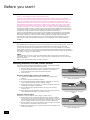
The remote control requires two ‘AA’ batteries to operate. To insert the batteries
into the remote control, please follow these instructions:
1.
Open the battery compartment cover on the back of the remote control.
2.
Insert two AA batteries into the battery compartment, following the
polarity indications given inside the compartment itself.
3.
Close the cover.
�
�
Notes on inserting the remote control batteries
<
Incorrect use of batteries can result in hazards such as leakage and
bursting.
<
<
Do not mix old and new batteries together.
1. Opening the cover of the remote control
battery compartment.
Do not use different kinds of battery together—although they may look
similar, different batteries may have different voltages.
<
Ensure that the plus (+) and minus (—) ends of each battery match the
indications in the battery compartment.
<
Remove batteries from equipment that is not going to be used for a
month or more.
<
When disposing of used batteries, please comply with governmental (or
other) regulations that apply in your country or area.
2. Inserting batteries into the remote
control.
Using the remote control
�
Please keep in mind the following when using the remote control:
AV9
E-4
<
Ensure that there are no obstacles between the remote control and the
remote sensor on the AV9. The remote has a range of about 7 metres. (If
the remote sensor is obscured, the remote control input jack on the rear
panel is available. Please contact your dealer for further information.)
<
Remote operation may become unreliable if strong sunlight or fluorescent
light is shining on the remote sensor of the AV9.
<
Replace the batteries when you notice a reduction in the operating range
of the remote control.
�
3. Closing the cover of the remote control
battery compartment.
English
Before making connections
Before connecting your equipment it is important to think about the following points, as these will affect
your choice of connections and subsequent use of the system.
Audio
Wherever possible, connect both analogue and digital outputs of digital sources. This enables use of
a digital input for the main zone with the corresponding analogue input used for recording onto an
analogue tape deck or VCR, or for the Zone 2 output.
Analogue video
The AV9 does not provide conversion between different video formats as this would result in degradation
of the video signal. This means simply that the AV9 does not convert between composite, S-video or
component video signals.
For example, if you are watching a composite input from a VCR you must view it from the composite
output of the AV9, as there will be no picture on the other outputs. Connect as follows:
<
VCR (composite) input and Monitor out (composite)
or, for a device with an S-video output, such as a DVD player, connect:
<
DVD (S-video) input and Monitor out (S-video)
The video quality hierarchy is as follows:
<
<
<
Component/RGB – highest
S-video – middle
Composite – lowest
If all the video inputs are connected simultaneously from one device, e.g., a DVD player, the AV9 will
select automatically the best format available.
Digital video (HDMI)
The AV9 is fitted with five HDMI inputs and one HDMI output, allowing switching of HDMI signals.
In most cases, HDMI provides the highest quality video connection between your source and
your display. The AV9 does not perform conversion between analogue audio/video and HDMI.
HDMI signals cannot be routed to Zone 2. If you are using an HDMI connection and you wish to
have the same audio and video in Zone 2, then you will need additionally to provide analogue
audio and video connections (as described above).
Zone 2
A line-level signal from the stereo analogue audio together with the composite video inputs are
available for Zone 2. The analogue inputs from source components are required because the AV9
provides no analogue-to-digital, DSP processing or digital-to-analogue conversion; the composite
video connections are required since the AV9 does not convert video formats.
For these reasons, we recommend that source devices that have a digital connection are also
connected to the analogue inputs. High quality YUV/RGB and S-video sources should also have
their composite outputs connected to the AV9 for use in Zone 2.
General
The inputs are named to make it easier to reference when connecting (e.g., ‘DVD’ or ‘VCR’).
They all have the same input circuit, however, so there is no reason why you should not connect
a different device to any of the inputs. For example, if you had two DVD players and the AV input
was not being used, then the second DVD player could be connected to the AV input.
HDMI (High Definition
Multimedia Interface)
supports both video
and audio on a single
digital connection for
use with DVD players,
digital TV, set-top
boxes, etc. HDMI was
developed to combine
the technologies of
High-bandwidth Digital
Content Protection
(HDCP) and the Digital
Visual Interface (DVI)
in one specification,
with the addition of
transmission of digital
audio information; HDCP
is used to protect digital
content transmitted to
DVI-compliant displays.
AV9
E-5
Installation
Serial
Control
control connections
Digital audio
inputs
Component video
connections
Composite & S-video
connections
Digital
output
DIGITAL INPUTS
REMOTE
OUT
IN
LOCAL
DVD
AV
1
Y/G
TAPE
HIGH QUALITY VIDEO
2
U/B
V/R
Y/G
U/B
VIDEO
V/R
ZONE 2
RS232
CONTROL
2
1
MONITOR OUT
TAPE
VIDEO
TRIGGERS
VCR
OUT
VCR
IN
AV
SAT
DVD
GND
MM
50/60Hz
100–240VAC~
MAX 40VA
12V
IN
TRIGGER ZONE 2
OUT
LEFT
TUNER
CENTRE
CD
VCR
SUB 2
L SURR
SAT
Y/G
U/B
LS BACK
LEFT
CENTRE
OUT
V/R
Y/G
L SURR
U/B
3
V/R
LS BACK
1/RGB 2/S-VIDEO
TUNER
CD
PROG
OUT
MC
TAPE
IN
OUT
VCR
IN
AV
SAT
DVD
AUDIO
L
GROUND
LIFT (IN)
R
RIGHT
SUB 1
SUB 3
R SURR
RS BACK
OUTPUTS
RIGHT
SUB
R SURR
RS BACK ZONE 2 OUT
Multichannel
outputs
Multichannel Zone 2
DVD-A/SACD output
inputs
Analogue audio
inputs and record
outputs
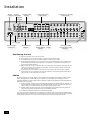
Positioning the unit
<
<
<
<
Place the processor on a level, firm surface.
<
Make sure the IR receiver on the front panel is unobstructed, otherwise this will impair the use
of the remote control. If line-of-sight is impractical, an infrared remote repeater can be used
with the rear panel IR connector.
<
Do not place your record deck on top of this unit or any other unit which is mains supplied.
Record decks are very sensitive to the noise generated by mains power supplies which will be
heard as ‘hum’ if the record deck is too close.
Avoid placing the unit in direct sunlight or near sources of heat or damp.
Do not place the unit on top of a power amplifier or other source of heat.
Ensure adequate ventilation. Do not place the unit in an enclosed space such as a bookcase or
closed cabinet unless there is good provision for ventilation. The processor is designed to run
warm during normal operation.
Cables
We recommend the use of high quality screened analogue, digital and video cables, as inferior quality
cables will degrade the overall quality of your system. Use only cables that are designed for the
particular application as other cables will have different impedance characteristics that will degrade the
performance of your system.
<
Video and digital connections must be made with cables that are designed for this purpose, i.e.,
coaxial cable with a 75Ω impedance. If substandard cables are used you may suffer from poor
picture quality such as ghost images and/or grainy picture quality (snow).
<
Speaker cables should be kept short, and low-impedance wire should be used throughout to
ensure efficient power transmission and to avoid audible distortion.
<
All cables should be kept as short as is practically possible.
It is good practice when connecting your equipment to make sure that the mains power supply cabling
is kept as far away as possible from your audio and video cables, as this will provide the best sound and
picture quality. Failure to do so may result in unwanted noise in the audio and video signals.
AV9
E-6
R
AUX/
PHONO
DVD-A/SACD IN
Ground lift
Power supply
connector
L
<
Wherever possible, connect both the analogue and digital outputs of digital sources. This enables
use of a digital input for the main zone and the corresponding analogue input for recording onto
an analogue tape deck or VCR, and for the Zone 2 output if used.
<
Take care to place the audio cables as far from any power supply cabling as is practically possible
to reduce hum and other noise problems.
English
Audio connections
Analogue audio inputs
SAT bl DVD.
DVD
3 TUNER, 4 CD, 6 TAPE IN, 8 VCR IN, 9 AV, bk SAT,
bo
bn
Connect the left and right inputs to the left and right outputs of your source equipment.
bm AUX/PHONO.
With the optional phono card installed, this input can be
connected directly to a record deck. This card caters for
both moving magnet and moving coil cartridges.
GND
MM
MC
TUNER
CD
OUT
TAPE
IN
OUT
VCR
IN
AV
SAT
DVD
L
If the optional phono card has not been installed, this input
will function identically to the other line inputs. For example
it can be connected to a second CD player.
bn MM/MC switch.
(This switch is available only if the optional phono card has
been installed.)
AUDIO
R
AUX/
PHONO
3 4 5 6 7 8 9 bk bl
bm
The switch on the back panel marked MM/MC is used to select
the correct sensitivity to match the cartridge fitted to the record deck, which is either moving magnet
(MM) or moving coil (MC).
If you are unsure which type of cartridge is fitted to your record deck, connect the record deck and
select the ‘MM’ setting on the switch. If, when tested, the output from the record deck is very quiet
compared with the CD or DVD inputs then your cartridge is probably a moving coil type cartridge. Turn
the AV9 off and select the ‘MC’ setting on the switch and test the record deck again.
Please note that if the AV9 is set to ‘MM’ and the record deck has a ‘MC’ cartridge fitted, testing these
together will not cause any damage to either the AV9 or the record deck.
bo GND.
This is the phono earth or ground terminal and is used to connect to a turntable earth lead (if fitted).
Note that this terminal must not be used as a safety (mains) earth.
Analogue record outputs
5 TAPE OUT, 7 VCR OUT.
Connect the left and right audio outputs sockets to the left and right input sockets of your cassette deck
or VCR (usually labelled ‘RECORD’). The VCR connections may also be used for a second tape deck.
Digital audio inputs
bp DVD, bq AV, br TAPE, bs TUNER, bt CD, ck VCR, cl SAT.
Connect these inputs to the digital ouputs of your available source equipment.
Notes:
<
Each of these seven digital inputs can be associated with different audio inputs (if
required), by use of the ‘Digital Settings’ page of the Setup menu.
<
The AV9 does not contain an RF decoder for Laserdisc with RF output.
bp bq br
DIGITAL INPUTS
DVD
AV
TAPE
OUT
TUNER
CD
Digital output
cm (Digital) OUT.
Connect this coaxial digital output to your digital recording device such as a CD-R, digital VCR or
minidisc player.
When a digital source is selected, the digital output will send an exact copy of the incoming digital
signal. For example, for a 5.1 digital source, the digital output will also be in 5.1 format.
SAT
VCR
cm bs bt ck cl
When an analogue-only source is selected, this is digitised by the AV9 and routed to the digital
outputs. The exception to this is when Neo:6 or Pro Logic IIx processing modes are selected. These
require extra processing power and the digital outputs will be muted when these modes are active.
These outputs are also muted if a source is selected where the only connection for that source is HDMI.
The digital audio from the HDMI link (if any) is not routed to these outputs.
Multi-channel DVD-A/SACD inputs
The multichannel input is suitable for use with sources that decode the surround channels internally,
such as DVD-A or SACD players.
The AV9 switches these analogue inputs directly to the analogue outputs via its volume control circuit.
cn cp cr ct
LEFT
CENTRE
LS
BACK
L SURR
This direct path maintains the best possible sound quality for DVD-A and SACD sources.
cn LEFT, co RIGHT, cp CENTRE, cq SUB, cr L SURR, cs R SURR.
Connect the equivalent audio outputs of your DVD-Audio or SACD player to these inputs.
ct LS BACK, and dk RS BACK.
These are available for formats requiring eight channels.
RIGHT
SUB
R SURR
DVD-A/SACD IN
RS
BACK
co cq cs dk
AV9
E-7
Analogue pre-amplifier outputs
dl dn dp dr dt
All these analogue outputs are buffered, have a low output impedance and are at line level.
They are able to drive long cables or several inputs in parallel if required.
dl LEFT, dm RIGHT, dn CENTRE.
LEFT
CENTRE
RIGHT
SUB/1
SUB/2
L/SURR
LS/BACK
SUB/3
R/SURR
RS/BACK
Connect these to the equivalent front channel inputs of your power amplifier.
do SUB 1.
Main subwoofer output. Connect this to the input of your active subwoofer, if you have one.
OUTPUTS
dp SUB 2, dq SUB 3.
dm do dq ds ek
do
Subwoofer auxiliary outputs 2 and 3. These are equivalent to
and allow the use of multiple
subwoofers. If you are using more than one subwoofer, please set the number used on the
subwoofer setting page. Refer to ‘Subwoofer Settings’, page 15.
dr L SURR.
Surround left output. Connect this output to the surround left power amplifier input.
ds R SURR.
Surround right output. Connect this output to the surround right power amplifier input.
dt LS BACK, ek RS BACK.
Surround back left and right outputs (only used in 7.1 channel systems). Connect these outputs to the
inputs of your LS back and RS back amplifiers.
Zone 2 connections
The AV9 allows independent routing and control of analogue audio and
composite video to a separate set of equipment, typically used for a second
living space, e.g., bedroom or lounge.
gp
gl gn
gr
REMOTE
Zone 2 receives only signals obtained by the AV9 from the analogue audio and
composite video inputs. The analogue inputs are required because there is no
analogue-to-digital, digital-to-analogue or DSP processing available for Zone 2
signals; as the AV9 does not convert video formats a composite signal must also
be connected from the source.
OUT
IN
LOCAL
ZONE 2
VIDEO
TRIGGERS
ZONE 2
OUT
For these reasons we recommend that source devices that have a digital
connection are also connected to the analogue inputs. High quality YUV/RGB and
S-video sources should also have their composite output connected to the AV9
for use in Zone 2.
12V
IN
TRIGGER ZONE 2
2
1
MONITOR OUT
1/RGB 2/S-VIDEO
PROG
gm go
gp Zone 2 OUT.
Connect these to a line level input on your Zone 2 amplifier.
go IN Zone 2.
This allows the AV9 to be controlled remotely from Zone 2 via infrared remote
control.
gr Zone 2 Composite video connection. Connect to your Zone 2 video
display using 75Ω low loss coaxial cable.
Zone 2 remote controller connection.
go
A receiver compatible with this connector
is available from Xantech (part no. 291-10).
Please contact a Xantech registered dealer for
this part, as ARCAM does not stock them.
See www.xantech.com for more information.
The 3.5mm jack plug for this connector is wired as
follows:
3.5mm stereo jack
Function
Tip
Signal
Ring
0V
Sleeve
12V,
30mA current-limited
This follows the Xantech standard for IR transmission
over wire.
AV9
E-8
English
Video connections
Important notes
As described on page 5, the AV9 performs no video format conversion between component, RGB,
S-video or composite.
Therefore, wherever possible, connect multiple video outputs from your video sources. This enables use
of the higher quality video connection for the main system and the corresponding S-video or composite
connection for the record and Zone 2 outputs.
For any video source to be viewed in Zone 2 you must have a composite video connection between the
source and the AV9.
Composite video connections
el MONITOR OUT 1.
Connect this output to the composite video input of your display device. (You will need an RCA phono-tophono, or, in Europe, a phono-to-SCART video cable to do this.)
em MONITOR OUT 2.
This is the same as el MONITOR OUT 1, and enables a second display device to be used; it can also
be used as a sync reference for a four-wire RGB signal.
ep VCR IN, eq AV, er SAT, es DVD.
Connect the composite video outputs of your source equipment to these inputs.
eo VCR OUT.
Connect to the composite video input of your video recorder.
en TAPE.
gr el em en eo ep eq er es
If you are using the tape loop for a second VCR then connect the
composite video from the VCR to this input.
VIDEO
ZONE 2
S-Video connections
et MONITOR OUT.
VIDEO
TRIGGERS
1/RGB 2/S-VIDEO
Connect this to the S-video input of your display device.
fn VCR IN, fo AV, fp SAT, fq DVD.
Connect the S-video outputs of your source equipment to these
inputs.
2
1
MONITOR OUT
TAPE
VCR
IN
VCR
OUT
SAT
AV
DVD
PROG
gsgt et fk fl fm fn fo fp fq
fm VCR OUT.
Connect this to the S-video input of your video recorder.
fl TAPE.
If you are using the tape loop for a second VCR then connect the S-video from the VCR to this input.
High quality (Component) video connections
These inputs are suitable for connection to component (YUV/ YCrCb) or RGB outputs. These
signals are usually available from a DVD player, set-top box or games console and offer the best
possible picture quality.
Generally, the component video standard is used in North America/NTSC regions, while RGB is
used in Europe.
fr
fs
HIGH QUALITY VIDEO
1
2
Y/G
U/B
V/R
Y/G
U/B
V/R
U/B
V/R
Y/G
U/B
V/R
fr VIDEO 1, fs VIDEO 2, ft VIDEO 3 inputs.
Connect the high-quality video outputs of your video sources to these inputs.
gk HIGH QUALITY VIDEO OUT.
Connect these sockets to the component video inputs of your display device.
Y/G
Important notes about HQ video inputs and outputs
OUT
gk
<
When you connect your devices to these connectors, take care to follow the letter/
colour coding for each input. No damage will occur if incorrectly connected, but
unusually coloured or unstable pictures will result.
<
In the ‘Video Settings’ setup menu, each of these three high quality component video inputs can
be individually allocated to one of the following inputs: DVD, SAT, TUNER, TAPE, CD, VCR or
AV.
<
<
You cannot mix component and RGB sources.
<
3
ft
The high quality component video inputs have sufficient bandwidth for line-doubled NTSC
(525/60) or PAL (625/50) video and US HDTV video signals. However, when used with such
signals the OSD is not overlaid on the picture but is output at standard interlaced NTSC or PAL
(525 or 625 line) rate on a solid background.
Initially, the high quality video inputs are all disabled. Before any HQ video input can be selected
it must be allocated to an input.
RGB 4-wire connection
Some video projectors and most European TV sets require the use of a 4-wire RGB connection,
where the ‘sync.’ signal is separate from RGB. In these cases, you need to use the composite video
MONITOR OUT 2 for the sync information. A special cable is available from your dealer for 4-wire RGB
connection to do this (described in the table of SCART connections at the back of the manual). If you
require further information on this connection type, please contact your dealer.
AV9
E-9
HDMI
An HDMI connection between a source and your display device offers (in most cases) the best
possible picture quality. This connection type is, however, the most limiting in terms of routing
and conversion.
HDMI
IN
DVD
OUT
SAT
The AV9 provides five HDMI inputs, labelled to match the other digital inputs. Each input may be
used for any HDMI source.
It is important to realise that analogue video sources cannot be routed by the AV9 to the HDMI output,
nor can the HDMI inputs be converted to analogue video (of any sort). The AV9 acts simply as a
switching device, selecting one of the inputs and routing it to the output.
Keeping the above in mind, it will be necessary (as with the high-quality analogue video connections),
to provide a composite video feed, in addition to the HDMI connection, if the video is to be routed to
Zone 2.
Control connections
gn IN LOCAL.
Use with a local IR receiver when the AV9 front panel IR receiver is obstructed.
go IN ZONE 2.
REMOTE
85 – 265VAC
MAX 40VA
gl (REMOTE) OUT.
This enables control of the source components remotely from Zone 2 or zone 1 using the
local input. Control is possible by either connecting to the source devices via the 3.5mm IR
jack (Arcam units only) or using an IR emitter stuck to the centre of the IR sensor window
on the source component (such as a Xantech 283MW mini emitter).
gq RS232 CONTROL.
Use with control devices having an RS232 serial port (for example, Crestron and AMX touch
screen controllers). This connection is also used for upgrading control software. See the
sections at the end of this manual for control and programming information.
gl gn
RS232
CONTROL
This allows the AV9 to be controlled remotely from Zone 2 via infrared remote control.
Connect to a remote IR receiver in Zone 2 to allow control of the AV9 from Zone 2.
IN
LOCAL
OUT
GROUND
LIFT (IN)
12V
IN
TRIGGER ZONE 2
gq
gm go
If you require further information on using any of these connections, please contact your dealer.
ZONE 2
Trigger outputs
VIDEO
TRIGGERS
There are three trigger output sockets on the AV9, each of which is a 3.5mm stereo jack with two
contacts, ‘tip’ and ‘ring’. See the tables for technical information on the trigger outputs.
gm 12V TRIGGER.
Use for remotely turning on and off power amps or source equipment for the main zone and Zone 2.
gs VIDEO TRIGGER 1, gt VIDEO TRIGGER 2.
The trigger outputs have different functions depending on how the Video
Status has been set (Screen Ctrl or SCART) in the ‘General Settings’ menu.
Connecting to a power supply
1 Power inlet.
2
1
MONITOR OUT
1/RGB 2/S-VIDEO
PROG
gsgt
Connection
Function
Voltage
Tip
Main zone on
On = 12V, 30mA
Off = 0V
Ring
Zone 2 on
On = 12V, 30mA
Off = 0V
Sleeve
Ground
0V
The AV9 has a universal input power supply that is compatible with mains
voltages between 85VAC and 265VAC.
2 GROUND LIFT (IN) button.
In complex setups which involve satellite inputs or radio aerials, grounding the unit may increase the
level of background hum or buzz in the loudspeakers, in which case press the GROUND LIFT button in to
lift the signal ground from the chassis ground.
Do not remove the safety earth from the mains cable under any circumstances.
RS232
CONTROL
Mains lead
The appliance is normally supplied with a moulded mains plug already fitted to the lead. Check that the
plug supplied with the unit fits your supply; if your mains plug is different, consult your Arcam dealer.
85 – 265VAC
MAX 40VA
If for any reason the plug needs to be removed, it must be disposed of immediately and securely, as it
is a potential shock hazard when inserted into the mains socket. Should you require a new mains lead,
contact your Arcam dealer.
Plugging in
Push the plug (IEC line socket) of the power cable supplied with the unit into the power input socket
1
(
) in the back of the unit. Make sure it is pushed in firmly.
Put the plug on the other end of the cable into your power supply socket and switch the socket on.
AV9
E-10
GROUND
LIFT (IN)
1
2
English
Configuring the AV9
The AV9 ‘Setup Menu’ has six ‘Basic’ and six ‘Advanced’ menu screens which take you through the
configuration process. The ‘Basic’ menus enable you to match your AV9 to your speakers. The ‘Advanced’
menus allow you to optimise the operation of your system. Screen shots of these menus are shown in
shaded boxes on the following pages.
The best way to set the AV9 up is using the on-screen display (OSD). To view the OSD for the
initial set up, use the composite video output to connect to your TV. This is because the
high quality video output has several display modes and may be incompatible with your display
device in the default configuration. The OSD will not be visible at all if you try to use an HDMI
connection.
The AV9 defaults to the NTSC video standard – most display devices can synchronise to this
automatically. For PAL-only display devices, press and hold the OK button for two seconds, when the
AV9 will change to the PAL video standard. As soon as a video signal is input to the AV9, it detects
automatically which standard it is and switches to it.
Entering setup mode
To enter the Setup menus press and hold the MENU button on the remote control, or on the front panel,
for at least two seconds. The ‘Setup Menu Index’ is displayed on your display device.
UNSTABLE OSD MENU DISPLAY?
Your AV9 may be in the wrong video standard mode. Press and hold the OK button for more than two
seconds to switch between the NTSC and PAL standard OSD mode.
Setup lock
To prevent tampering with the AV9 setup configuration you can ‘lock’ the menus by pressing the OK, TUNER
and DVD-A buttons simultaneously on the front panel. To unlock the AV9, press the same buttons again.
Setup Menu
The main ‘Setup Menu’ page allows you instant access to six ‘Basic’ and six ‘Advanced’
menus.
Setup Menu Index
They are listed side-by-side on the OSD on your display device. The selected line of the
menu is also displayed on the front panel of the AV9. Use the E remote control button
to go to page 1 from the menu heading, or use the navigation buttons to scroll down the
list to a specific page, then press OK to go directly to the page.
Basic
Advanced
1. General
1. Speaker Eq
2. Speaker Size 2. Video
3. Delays
3. Digital
4. Level Set 4. Zone 2
5. Subwoofer 5. Input Trim
6. THX
6. Input name
Save Setup takes you to the ‘Save Settings’ screen to allow you to save in one of the
five available presets.
Exit Setup exits the Setup menus without saving any changes.
Save Setup
Each of the following sections shows the screen that is displayed as you move through
the menus.
Exit Setup
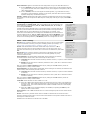
Navigating the setup menu
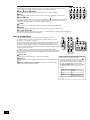
... BY USING THE REMOTE CONTROL
The Set-up menu can be navigated by using the cursor (arrow) keys on the remote control. This is by far
the easiest method.
1.
To enter the Set-up menu, press and hold the MENU button (which is located immediately under
the navigation buttons) for at least two seconds, until the Index page appears. (Pressing the
menu button for just a short time will take you to ‘Main Menu Screen 1’. If this happens, the
Main Menu can be closed by pressing MENU for a second time.)
2.
When the menu heading is highlighted, using the D and E keys will navigate between menu
pages. Using this method to navigate between pages the first time the unit is being configured
will help to ensure that no pages are missed out.
3.
Use the
4.
To change the setting for a particular menu item, highlight the item then use the
to cycle through the options for that item.
5.
Once you have set all the menu items on a page to have values that are appropriate for your
system, move the menu highlight to the top of the screen (the menu heading) and press E to
move to the next menu page.
6.
At any time, press the MENU button to return to the main Set-up menu index screen.
7.
To save the changes you have made, return to the Set-up menu index page and highlight the
‘Save Set-up’ item at the bottom of the screen. Press the OK button to save the settings. Press
OK again to exit the Set-up menu.
OK
MENU
B and C keys to navigate up and down the menu lines.
D and E keys
In addition to the above method of moving from page to page using the D and E keys, each menu
page can be accessed directly from the Set-up menu index page. This is achieved by using the cursor
keys to move the menu highlight to the desired page on the Index page, then pressing OK.
... BY USING THE BUTTONS ON THE FRONT PANEL OF THE AV9
The AV9 front panel controls can be used to configure the options. Follow the instructions given for using
the remote control, in this case using the EFFECT/6 button for ‘down’, the MODE/5 button for ‘up’ and
the volume control for left and right.
AV9
E-11
Basic Setup
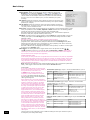
1 – General Settings:
1 - General Settings
Volume display: Allows you to select how volume is displayed. Choose from
Normal 0–82 (in 1dB steps), THX Ref –63dB to +19dB, and Fine 0–82 (in
0.5dB steps). We recommend setting this to THX Ref as this represents a
volume control around 0dB (the reference level) which is the same loudness
level of a movie in a movie theatre (once you have calibrated your system
correctly).
Volume Display: Normal 0-72
Max Volume: +72
Max On Volume: +20
Delay units: Imperial
OSD Mode:
Mixed
Video Status: SCART
HQ Video:
RGB
Sync On Green: Off
Max Volume: Limits the maximum volume setting the system can be turned up to.
This is a useful feature to prevent accidental overdriving of low power-handling
speakers (for example).
Max On Volume: Limits the maximum volume the system operates at when it is
first switched on. The system comes on at this volume if the last used (possibly
very loud) volume exceeds this value.
Delay units: Controls whether the delay settings for the speakers in surround modes (page 3 of this
menu) are specified in terms of Time, Imperial or Metric distances from the listening position.
Choose the measurement system that you feel most comfortable with.
Note that changing the units resets all distances/times to zero. It is therefore important to
choose the units (Time, Imperial or Metric) before set up.
OSD Mode: Controls how the on screen display is viewed. Mixed will overlap the OSD on top of the
existing video picture, while Full Page will give a full screen black background with the OSD
displayed in white.
Note that no on-screen display is available over the HDMI connection.
On video signals that have a sync. rate of greater than the normal interlaced rate (e.g.,
progressive scan, frame-scaled video, HDTV) the OSD will switch into Full Page mode (black
background) when the control menu is accessed. Any pop-up displays (such as the volume bar,
source selection information, etc) will be switched off.
Note that in Mixed mode, the highlight bar is black if video is present; it is blue if no video signal
is present or if in Full Page mode.
gm, gs
Video Status: This setting controls the trigger sockets on the rear panel of the AV9 (
gt
and
, described on page 10). It can be set either to Screen Ctrl or SCART. SCART mode is
useful only if you wish to use SCART connections from the AV9 (SCART refers to the multipole
A/V connector used on European A/V equipment).
SCREEN CONTROL MODE
In this mode, the AV9 provides two 12V signals that can be used to turn on (and off) compatable
devices that are physically remote from the AV9. For example, an electric projector screen could
be unrolled automatically when the AV9 is switched on by using one of these triggers. (Before
using this feature, ensure that the voltages given in the table below are suitable for the device
you are connecting the signal to.)
Note: When the ‘HQ Video’ line of the ‘General Settings’ page is set to ‘Component’ (rather than
‘RGB’), video trigger 1 behaves as listed in the table for Screen Ctrl mode.
SCART MODE
If you wish to make SCART connections from
the AV9, please refer to page 38 for details on
the type of lead you will need to use.
In SCART mode, seamless selection of
composite, S-video and RGB A/V TV inputs
is possible. This setting controls the triggers
into the display device to tell the display what
video type is being sent.
When switching to a source with associated
video input (e.g., DVD), if the AV9 detects the
presence of either an S-video or composite
video signal, it sets respectively either the
S-video or the composite SCART input-select
lines high. (If both signal types are detected
on that source input, then only the S-video
SCART input-select line is set high.) If it
supports this feature, the connected display
device will then switch automatically to the
correct input channel, following these signals.
SCART MODE: 1/RGB trigger output - connect to RGB SCART on your TV
Connector
Function
Voltage
Tip
RGB mode select
0V
Ring
RGB/composite SCART input
select (CVBS status)
Aspect ratio 4:3/16:9
Video present, aspect 4:3 = 12V
Video present, aspect 16:9 = 6V
No video signal = 0V
Ground
0V
Sleeve
SCART MODE: 2/S-VIDEO trigger output - connect to S-video SCART
(usually SCART no. 2) on your TV
Connector
Function
Voltage
Tip
Video source trigger
Any video source selected = 12V
No video source selected = 0V
Ring
S-video SCART input select
(CVBS status)
Aspect ratio 4:3/16:9
Aspect 4:3 = 12V
Aspect 16:9 = 6V
No video signal = 0V
Ground
0V
Sleeve
If an RGB video source is associated with an
input, the RGB input-select line is set high.
SCRN CTRL MODE: 1/RGB and 2/S-VIDEO
When ‘Sync On Green’ is set to ‘On’ (see
selected:
below), RGB video is detected by the AV9
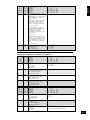
from the sync. signals. If ‘Sync On Green’ is
Connector
Function
set to ‘Off’, the AV9 will assume an RGB signal
Tip
Main zone on trigger
is present when sync. signals are detected
on the associated composite input. For this
Ring
Main zone on trigger
reason, note that if only a composite signal
is present when the AV9 has been configured
Sleeve
Ground
to expect RGB signals for that input, the AV9
will display a blank screen, not the composite
video signal.
AV9
E-12
trigger outputs with SCRN CTRL
Voltage
Main zone turned on = 12V
Main zone turned off = 0V
Main zone turned on = 12V
Main zone turned off = 0V
0V
This menu item can be configured to have a different setting for each input. Select the input to
be configured, then change this setting.
English
HQ Video: Allows selection of the high quality video output to match your display device. Choose
between RGB or Component.
This setting has no effect on the HDMI output.
The AV9 allows progressive scan and high definition TV (HDTV) signals to be passed through the
high quality component inputs to the high quality output. Note, however, that the OSD cannot
overlay text at any rate other than standard NTSC or PAL.
Sync On Green: This applies only if RGB video is used. On makes the AV9 feed the video
synchronisation signal out with the green signal. Some RGB-driven display devices require
this to lock on to the video signal coming in, while others need the video synchronisation on a
separate lead. Systems using SCART connections will normally have a four-wire system (i.e.,
with sync. on composite [CVBS] video) and, therefore, require Sync On Green to be set to Off.
Note: The Sync on Green menu option is not selectable when Component is selected as the
HQ video type.
2 – Speaker sizes
2 - Speaker Sizes
The size and number of loudspeakers are defined on this page of the OSD.
Definitions:
A Large speaker is one that is capable of handling a full range signal (i.e.,
20Hz–20kHz).
A Small speaker is one that is not capable of reproducing a deep bass signal (i.e.,
below 100Hz), for example a satellite speaker.
None is used when there is no speaker connected to that channel.
Auto Setup: Allows the setting of ‘standard configurations’ as in the table below:
Speaker
Config.1
Config.2
Config.3
Custom
THX
THX
Surr.Ex
Front L/R
Small
Large
Large
Sm/Lge
Small
THX
Small
THX
Centre
Small
Small
Small
Sm/Lge/None
Small
THX
Small
THX
Surr L/R
Small
Small
Large
Sm/Lge/None
Small
THX
Small
THX
Surr Back L/R
Small
Small
Small
Sm/None
None
Small
THX
Sub-woofer
Present
None
Present
Present/ None
Present
THX
Present
THX
5.1 Rears
Both
Both
Both
SurrL/R/
Surr Back L/R/
Both
Surr L/R
Both
Auto Setup:
Custom
Front L/R: Small
Centre:
Small
Surr.L/R:
Small
Surr.Back L/R: Small
Subwoofer: Present
Rears for 5.1: Both
Custom setting allows you to choose any combination of speakers to suit your system. Note that the
centre and rear speakers cannot be set to large if the front speakers are set to small.
THX automatically sets the speaker selections to the specified configuration for THX™ listening. This
automatically sets the surround back speakers to None‚ and all filters are set to 80Hz. This configuration
is not adjustable. Only select this if you are using a full set of THX™certified speakers.
THX Surr.EX automatically sets the speaker selections for a THX™ Surround EX setup with a pair of
surround speakers, a pair of surround back speakers and all filters set to 80Hz. This configuration is not
adjustable. Only select this if you are using a full set of THX™ certified speakers.
5.1 Rear Speakers defines how the speakers in a full ‘7.1’ installation handle 5.1 decoded sources.
<
Surr L/R redirects 5.1 surround signal to the surround left and right speakers. No signal will be
directed to the surround back left or right speakers.
<
Surr Back L/R redirects 5.1 surround signal to the surround back left and right speakers. No
signal will be directed to the surround left or right speakers.
<
Both redirects the 5.1 surround signal to both pairs of speakers with the signal to each set
reduced by 3dB.
AV9
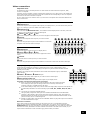
E-13
3 – Speaker delay settings
Note: Only enter these delay settings once you have specified what delay units (i.e.,
Time, Imperial or Metric) you will be using, or the information will be lost when
changing units. The measurement units can be specified on page 1 of this menu
(described on page 12).
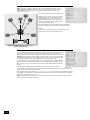
The speaker distance control automatically sets
the appropriate time delays required for all the
speakers in your system. To set up the correct
speaker distance, you must measure from the
usual listening position to the front of each
individual speaker in the system. If the delay
units are set to Time, then enter the delay in
milliseconds for each channel.
Sub
woofer
Centre
nt
Fro
left
e.g. 3m
(9ft)
Fro
n
righ t
t
e.g. 4m
(12ft)
3 - Delay Settings
Front Left: 3Ft
Centre:
3Ft
Front Right: 3Ft
Surr. Right: 3Ft
Surr. Back L+R 3Ft
Surr. Left: 3Ft
Subwoofer:
3Ft
The delay adjustment is not a substitute for proper speaker
placement, but helps to ensure accurate and correct signal
arrival times from all the channels to the primary listening
position.
No measurement can be entered for a speaker that is not
selected in the previous ‘Speaker Sizes’ menu.
e.g. 2m
(6ft)
Surr
left
Surr
back
left
Surr
right
Surr
back
right
Distance measurements for 5.1 [and 7.1]
speaker delay settings
4 – Level settings
It is very important to calibrate the speakers correctly to achieve an accurately-centred
sound stage. We recommend you use a sound pressure level meter (SPL meter) to
perform this part of the setup as it is difficult to judge the levels accurately by ear alone.
Manual is best for setting up with an SPL meter as the test tone will not change to the
next speaker until instructed by you. Auto is best for setting up by ear as the test tone
changes automatically to each speaker after a two second burst of sound.
On first installation, watch the OSD display as you cycle through the available speakers
with the test tone. Check that the speaker in use corresponds to that indicated on the
OSD. If there is an error then check and correct the system cabling before proceeding
further.
4 - Level Settings
Test Tone Cycle: Manual
Front L: ---I--- +0dB
Centre: ---I--- +0dB
Front R: ---I--- +0dB
Surr. R: ---I--- +0dB
Surr. BR: Not Present
Surr. BL: Not Present
Surr. L: ---I--- +0dB
Subwoofer: ---I--- +0dB
Select Speaker for Tone
To calibrate the speakers with an SPL meter, place the meter at ear level with the
microphone pointing towards the ceiling, when seated in the usual listening position. You will need to
set the meter to ‘C’‚ setting with a ‘slow’‚ response and to read 75dB SPL at the centre of the scale. This
volume is equivalent to normal conversation.
Each speaker can be finely tuned by 0.5dB increments to ±10dB. The output from each speaker needs to
be adjusted to the 75dB SPL sound level. No adjustments can be made for a speaker that is not selected
in the previous ‘Speaker Sizes’ menu.
Note: If you do not have an SPL meter, simply set the front left speaker to 0dB on the menu and then
match all the other speakers to this level.
AV9
E-14
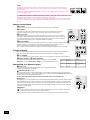
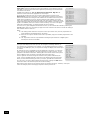
5 – Subwoofer Settings
Crossover Frequency: This setting defines the frequency at which bass redirection
begins. Frequencies below this level are redirected from ‘small’ speakers to the Fronts
or to the subwoofer; frequencies above this level are not redirected. The value for this
setting depends on your speakers, environment and taste, and is best determined by
experimentation.
The adjustment can be made in increments of 5Hz between 40Hz and 150Hz.
If THX or THX Surr.EX have been selected in the previous menus, the crossover
frequency will be set to THX specification at 80Hz.
5 - Subwoofer Settings
English
If no subwoofer was selected in the previous speaker menus you cannot adjust the
stereo sub level or the number of subwoofers.
Crossover Freq.: 80Hz THX
Stereo Mode:
Sat+Sub
LFE Level: ---I--- -0dB
DTS LFE Gain: 0dB Normal
Sub Stereo: ---I--- -0dB
DVD-A Sub Level: Normal
No. of Subwoofers: 1
Stereo Mode: Select between Large, Large+Sub or Sat+Sub.
If you have configured your system to have a subwoofer, then you have the flexibility to choose how
bass information is distributed between the front left/right speakers and the subwoofer when listening to
stereo sources. Choose the option which gives you the most solid even sounding bass (for best results
test with a set-up disc or live program material).
<
Large: Pure stereo information — all audio is sent to the front left and right speakers. Use this
setting if you have large front speakers.
Note that this option will override the setting configured on the ‘Speaker Sizes’ menu page.
<
Large+Sub: Pure stereo is fed to left and right and extracted bass is sent to the subwoofer. In
this case the low frequency information is, effectively, duplicated.
<
Sat+Sub: Use this setting if you have ‘Small’ satellite left and right speakers. Full bass
management is used in analogue stereo so that analogue sources are fed to the DSP where the
bass is filtered off left and right and redirected to the subwoofer.
Note that the above three Stereo Mode settings pass the audio through the DSP, which may degrade
the sound quality slightly. This can be avoided for the ‘Large’ setting by pressing the DIRECT button to
bypass the DSP processing.
LFE Level: Allows you to adjust the output level of the low frequency effects channel relative to the
other speakers in the system. This adjustment affects the loudness of movie low frequency effects such
as thunder, explosions, etc.
DTS LFE Gain: DTS soundtracks typically have the LFE track recorded 10dB lower than the main audio
tracks. It is, therefore, necessary to compensate for this by raising the LFE output level by 10dB, and
setting the DTS LFE gain to ‘Normal’ activates this compensation. Some DTS soundtracks have been
recorded with the LFE signal at the same levels as the main audio, however, and therefore require no
gain compensation. For these disks set the DTS LFE gain to -10dB.
<
<
Normal: This increases the LFE signal by 10dB and is the recommended setting for the AV9.
-10dB: This allows the LFE to pass directly to the output with no gain adjustment.
Unfortunately, there is no rule for determining which discs are recorded using which method. As a
general guide, however, it is only early DTS music discs that require the -10dB setting.
Sub Stereo: Allows you to trim the subwoofer output for stereo listening. Use this trim setting, with a
stereo source, to reduce the subwoofer output in stereo playback to an acceptable level. The subwoofer
level for stereo music often needs to be set at a lower level than that for cinema use. This depends on
various factors such as speakers, the types and styles of music to be played and personal taste.
DVD-A Sub Level: This setting allows compensation for subwoofer level gain from external decoders or
sources (such as DVD-A players).
When decoding digital inputs, the AV9 follows the convention for products of this type and sets the
subwoofer level 10dB higher than that of the other channels. Source products such as DVD-audio players
do not follow this pattern, however, setting the subwoofer level to be the same as the other channels.
This means that switching from material that has been decoded by the AV9 to that decoded externally
may mean that the subwoofer sounds very quiet. This setting provides for the removal of that difference
by allowing the subwoofer level of the DVD-A (multi-channel) input to be raised by 10dB.
<
<
Normal: This increases the DVD-A sub level by 10dB and is the default setting for the AV9.
Flat: This allows the DVD-A sub level to pass directly to the output with no gain adjustment.
If you are using the AV9 in combination with the multi-channel analogue outputs of an Arcam DVD-A
player, then this item should be set to +10dB.
No. of subwoofers: Allows you to set the number of subwoofers used in the system between 1 and 3.
All three subwoofer outputs are active all the time; this setting compensates the sub. output level for the
number of subwoofers in the system.
AV9
E-15
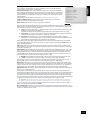
6 – THX Settings
THX Surr. EX: This can either be set to Auto or Manual and is only applicable when
playing either THX ‘Surround EX’-encoded material.
<
Auto The AV9 switches THX to THX Surr. EX when suitably encoded material
is detected (this can be temporarily overridden by pressing the THX button on
the AV9).
<
Manual The AV9 will not select THX Surr. EX automatically. It can however be
selected manually by pressing the THX button.
Dolby Digital Surround EX processing.
‘THX Surround EX’ and ‘Dolby Digital Surround EX’ processing are both indicated in
the same way in the digital audio stream received by the AV9. This means that audio
from a Dolby Digital Surround EX-encoded disc will cause the AV9 to switch to THX
Surround EX mode if the THX Surr. EX menu item is set to Auto. If you do not wish
this to happen, set the THX Surr. EX menu item to Manual; THX Surround EX or
Dolby Digital Surround EX decoding can then be selected by pressing the THX button
on the remote or front-panel.
Boundary Gain Compensation
THX Ultra2 Sub: THX Ultra2 specified subwoofers can deliver down to 20Hz, which
may be problematic in some rooms.
<
Set to No if the subwoofer being used is not a THX Ultra2 specified subwoofer,
is not capable of a good response to 20Hz, or you do not wish audio at this
level to be sent to your subwoofer.
<
Set to Yes If you are using a 20Hz subwoofer or a THX Ultra2 specified
subwoofer. When set to Yes, another menu option appears:
6 - THX Settings
THX Surr. EX: Auto
Boundary Gain Compensation
THX Ultra 2 Sub: No
Advanced Speaker Array
SurrBack L/R: 12 to 48in
6 - THX Settings
THX Surr. EX: Auto
Boundary Gain Compensation
THX Ultra 2 Sub: Yes
Boundary Gain Comp: On
Advanced Speaker Array
SurrBack L/R: 12 to 48in
Boundary Gain Compensation: Tailors the subwoofer low frequency response.
<
When set to On, this will roll off the very low frequency information coming from the subwoofer
so that any interactions and reinforcements from nearby boundaries (i.e., walls) can be
compensated for to reduce boom and overblown bass response. We recommend this setting for
smaller rooms.
<
When set to Off, the subwoofer output from the AV9 will remain flat to 20Hz.
Advanced Speaker Array: Set this distance to be the separation between the surround back left and
right speakers. This enables the AV9 to distribute the signal to the surround back speakers appropriately
to get the most accurate image for the soundstage.
Measurement units are in inches only (30cm = 12 inches).
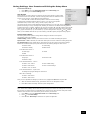
Advanced Setup
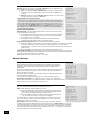
ADV 1 – Speaker Eq.
Allows adjustment of bass and treble management in 1dB steps (up to ±6dB) for
all speakers. Use these adjustments sparingly to compensate for speaker response
problems caused by positioning, adjacent surface textures, or mixed brands of
loudspeakers.
Work with one speaker on at a time, and as an example, use the bass control to reduce
boom problems for speakers placed in corners, and the treble control for speakers
placed near reflective surfaces.
We recommend trying to obtain a good speaker response by speaker placement first,
then apply speaker equalisation last.
The tone control nominal corner frequencies are at 100Hz and 8kHz, shelf type.
Adv 1 - Speaker Eq.
Bass
Treble
FL: --I-- +0dB --I-- +0dB
C: --I-- +0dB --I-- +0dB
FR: --I-- +0dB --I-- +0dB
SR: --I-- +0dB --I-- +0dB
SBR: --I-- +0dB --I-- +0dB
SBL: --I-- +0dB --I-- +0dB
SL: --I-- +0dB --I-- +0dB
Auto Stereo Tone Bypass: Yes
Auto Stereo Tone Bypass: Set to Yes if you wish to have any tone adjustments
made in ‘Main Menu Screen 1’ by-passed in analogue or digital mode. (Note that this does not switch the
AV9 into Direct mode, only sets the tone controls to zero.)
ADV 2 – Video Settings
This menu allows adjustment of the video settings for your AV9.
OSD: Selects whether the main zone OSD is on or off.
<
When set to On‚ all user adjustments that are made during the general use
of the AV9 are displayed on the screen. This includes the adjustment of the
volume control, the inputs selected and the setup menus.
<
When set to Off‚ you will have no displays of the general user adjustments
– only the setup menus and the main menus are displayed.
It is recommended you keep the OSD turned ON‚ since, if you cannot see the front
panel of the AV9, you will have no idea if any adjustments you have made to the
processor are correct or to your liking.
Adv 2 - Video Settings
OSD:
On
Video Input Aux: None
Video Input CD: None
Video Input Tuner: None
Video Input DVD-A: None
Audio and Video: Tracked
HQ Vid 1 Comp/RGB: None
HQ Vid 2 Comp/RGB: None
HQ Vid 3 Comp/RGB: None
Video Inputs: Composite and S-video inputs for DVD, Sat, AV, VCR and Tape have,
by default, their audio and video assigned to track each other. The four Video Input lines for Aux, CD,
Tuner and DVD-A allow you to assign a video source to these normally audio-only sources; additionally,
you can allocate the same video source to more than one audio input. This facility allows you to listen
to an audio source and view a separate video source at the same time – for example, you can listen to
radio while watching TV for a sports simulcast.
AV9
E-16
<
If set to Separate, then audio and video signals for video sources can be separately assigned
(e.g., DVD sound with video from a satellite receiver). Once assigned to be separate, audio and
video remain separate.
<
If set to Tracked, audio and video signals are linked together (e.g., DVD audio and video).
This setting is recommended for simplicity. In this mode, audio and video sources can still be
separated temporarily via ‘Main Menu Screen 1’.
English
Audio and Video: Applies to the audio and video assignments set up in the ‘Main Menu Screen 1’.
HQ Vid 1, 2 and 3: Allocates the high quality component or RGB video inputs to any source buttons.
For example, to use the component or RGB output on a DVD player with HQ Vid 1 input, select DVD in
the menu.
ADV 3 – Digital Settings
Coaxial inputs and Optical inputs. Each of the digital inputs can be assigned to any
of the eight stereo source buttons (AUX, CD, TUNER, TAPE, DVD, SAT, AV and VCR), or
can be assigned No Button.
The OSD menu lists the physical inputs, as per the back panel, on the left hand side of
the screen, and the buttons used to select the inputs are listed on the right hand side.
Each digital input can only be allocated to one source button. For example, if you
choose the ‘Co-axial DVD input’ to be assigned to the DVD button, then the choices for
the other digital inputs are: AUX, CD, TUNER, TAPE, SAT, AV, VCR and No Button. If you
wish to re-assign the Co-axial DVD input to a different button, then the DVD input must
be first set to something different (or No Button) before the re-assignment can occur.
Adv 3 - Digital Settings
Coaxial Inputs
DVD input: DVD button
AV input: AV button
Tape input: Tape button
Tuner input: Tuner button
CD input: CD button
Optical Inputs
VCR input: VCR button
Sat input: Sat button
ADV 4 – Zone 2 Settings
Max Vol 0–82: Limits the maximum volume setting for Zone 2. This is a useful feature
to prevent accidental overdriving of low power-handling speakers (for example). The
volume range is adjustable between –63dB and +19dB (i.e. from 0 to 82).
Fix Vol: This selects between fixed and variable audio output to Zone 2. If No is
selected, the output level can be controlled from Zone 2 or the main system. If you
want to fix the volume level, first set the Zone 2 volume to the desired level, then select
Yes.
Max On Vol 0–82: Limits the maximum volume Zone 2 operates at when it is first
switched on. Zone 2 comes on at this volume if the last used (possibly very loud)
volume exceeds this value.
Adv 4 - Zone 2 Settings
Max Vol 20-72: 72
Fix Vol:
No
Max On Vol 0-72: 20
Zone 1 Standby: Local Only
Zone 2 Standby: Local Only
Local OSD:
On
Zone 1 Control: Yes
Access:
All
Zone 1 Stand-by: This setting allows configuration of the meaning of the stand-by
command from the remote control, when received by the AV9 in Zone 1.
<
Local Only When the AV9 receives a stand-by command in Zone 1, only Zone 1 will be switched
to stand-by.
<
All Off When the AV9 receives a stand-by command in Zone 1, both Zone 1 and Zone 2 will be
switched to stand-by.
Note: the setting for Zone 1 Stand-by applies only for putting the AV9 into stand-by mode. Reactivating Zone 1 is always a local function.
Zone 2 Stand-by: This setting allows configuration of the meaning of the stand-by command from the
remote control, when received by the AV9 in Zone 2.
<
Local Only When the AV9 receives a stand-by command in Zone 2, only Zone 2 will be switched
to stand-by.
<
All Off When the AV9 receives a stand-by command in Zone 2, both Zone 1 and Zone 2 will be
switched to stand-by.
Note: the setting for Zone 2 Stand-by applies only for putting the AV9 into stand-by mode. Reactivating Zone 2 is always a local function.
Local OSD: Selects whether the Zone 2 OSD is on or off.
<
When set to On‚ all user adjustments that are made during the use of Zone 2 are displayed on
the Zone 2 video. This includes the adjustment of the volume control, the inputs selected and
the setup menus. It is recommended that Zone 2 OSD turned ON‚ as there is no other display
available in Zone 2.
<
When set to Off, all user adjustment displays are disabled, but pressing the MENU key still
displays the Zone 2 control menu.
Zone 1 Control: If set to Yes this allows Zone 2 to control and adjust inputs and user controls for the
main zone.
Access: This acts as a ‘parental control’ device to disable or enable access to sources for Zone 2.
Press the unwanted source button on the remote control handset or front panel to disable it for Zone 2.
Press again to enable the source.
Enabled sources are listed on the ‘Access’ line of the OSD.
AV9
E-17
ADV 5 – Input trims
Input trims: Allows the adjustment of the input sensitivity of the analogue inputs (in
Volts RMS) so that each one achieves the optimum dynamic range and sounds similar
in loudness to the others.
Available level settings are: Low 1V, Reference 2V, Medium 4V, High 8V. The
reference level of 2V should be appropriate for most inputs.
To ensure the correct level is set up, first ensure that all source levels are set to
Reference 2V. Find some loud music or use a 0dB reference signal from each source.
If the source activates the ‘Analogue CLIP’ indication at the bottom of the screen, then
adjust its level upwards to 4V or 8V, until the ‘Analogue CLIP’ indicator is no longer
there. Then repeat the adjustment process with every other input, selecting the lowest
voltage setting that does not activate the ‘Analogue CLIP’ indicator. If in doubt or a loud
signal is not available, then leave a source on the 2V setting. If you have a CD player
with built-in HDCD decoding, you should generally use the 4V setting.
Adv 5 - Input Trims
Aux: Reference 2V
DVD: Reference 2V
Sat: Reference 2V
AV: Reference 2V
VCR: Reference 2V
Tape: Reference 2V
CD: Reference 2V
Tuner: Reference 2V
DVD-A: Reference 2V
If a source is very quiet compared with the other sources you can increase its loudness by selecting the
Low 1V setting. Once set, we suggest you play some loud music from this source to check the ‘Analogue
CLIP’ indicator does not come on.
Notes:
<
The ‘Analogue CLIP’ detector is only active in the ‘Input Trims’ menu, and only responds to the
input indicated by the highlight bar on the screen.
<
When the Aux input is converted into a Phono (turntable) input, the sensitivity adjustment is still
available.
<
The ‘Input Trims’ control is only available for analogue inputs. Whenever a digital input is
selected, this control is overridden.
ADV 6 - Input name
The input name displayed for each input can be changed to something different, up
to a maximum of 13 characters. For example, if you are feeding signals from a games
console into the AUX input, then you may wish to change the display name of this input
to ‘console’.
On entering the menu, all possible sources are displayed on the screen. To rename an
input, move the screen highlight to the input name that you wish to change; you are
prompted to ‘Press OK to edit name’. Pressing OK on the remote control or front panel
causes a flashing cursor to appear on the first letter of the input name.
Use the Up/Down controls to change the character in the position indicated by the
cursor; use the Left/Right controls to move the cursor position along the input name.
When you have finished entering the name you require, press OK for a second time.
Adv 6 - Input Name
Aux: Phono/Aux
DVD: DVD
Sat: Sat
AV: AV
VCR: VCR
Tape: Tape
CD: CD
Tuner: Tuner
DVD-A: Multichannel
If, at any time, you wish to abort changing the input name, pressing the MENU button
returns the name of the selected input to its last saved setting.
Note that the input names are not stored as part of the presets (see below). Therefore, if the input
names are changed, these names apply irrespective of the preset in use.
AV9
E-18
To save the AV9 set-up:
1.
Press MENU to go to the Setup Menu Index at the Save Setup point.
2.
Press OK to go to the Save Settings menu.
User Presets
All the settings you have made on the previous screens can be saved as a user profile
and stored as one of five ‘Presets’. A choice of setup presets caters for different events
such as movies or sport, and for different user preferences.
3.
Press
B C to select the desired preset in which to save the setting.
To make these customised settings easier to retrieve, you can give each preset a
memorable name, such as ‘John’, ‘Jacky’, ‘Movies’, ‘Sport’, ‘Rock’, etc.
English
Saving Settings, User Presets and Exiting the Setup Menu
Save Settings
No Save - Return to index
Save as:Preset 1*
Preset 2
Preset 3
Preset 4
Preset 5
Press OK to edit- OK to save
The presets can be used to create different listening preferences. You may wish to set up different
presets for listening to music, watching DVD, watching TV material or for different listening positions.
To change the name of a preset, highlight it by using the navigation B and C buttons. Press the OK
button to edit. Using the B and C navigation buttons, cycle through and select lower case letters
(a…z), upper case letters (A…Z) and numbers (0…9). Move along the line using the D and E buttons.
When you are satisfied with the text you have written, press OK to specify the preset saving options.
Preset saving options
This menu gives you the option to change which settings are saved for each preset.
The following options are available:
Volume setting: If Yes is selected, the volume for Zone 1 is recalled on loading this preset.
Input source: If Yes is selected, the audio and video input souces are recalled on loading this preset.
Src specific items (Source-specific items): Each source has its own value for each of the settings
listed below. If Yes is selected, the preset stores all of the following settings for each source:
< Decode mode
< Downmix setting
< THX setting
< Effect mode
From Main Menu Screen 1:
< Video Type
< Bass
< Treble
From Main Menu Screen 2:
< Lip Sync.
< Record to Tape
< Record to VCR
From Advanced Menu 4 – Zone 2:
< Zone 2 max. volume
< Zone 2 fixed volume
< Zone 2 max. on volume
< Zone 2 OSD setting
< Zone 2 access settings
From Advanced Menu 5 – Input Trims:
< Analogue Input gain settings for all sources.
Other Zone 2 settings:
< Zone 2 audio source
< Zone 2 video source
Once you have specified the settings you wish to save, highlight the Save text and press OK.
4.
After the AV9 has finished saving, press OK to return to the ‘Setup Menu Index’.
5.
Press OK to select ‘Exit Setup’ and exit system configuration.
Exit without saving
If you choose to ‘Exit Setup’ without first saving the changes, then these new settings will be used by
the AV9 until you recall a preset or press FAV on the remote control, when the last used preset will be
recalled. This is the case even if the AV9 is put into stand-by or turned off.
1.
Press MENU to go to the Setup Menu Index at the Save Setup point.
2.
Press
3.
Press OK when Exit Setup is selected to exit system configuration.
E to select Exit Setup.
AV9
E-19
Front panel controls
1
bp
2 3 4
THX SURROUND EX
bo
AV8 PREAMP PROCESSOR
To n e
Vol:
An. PLII
+8
Movie
5
THX
EFFECT
MODE
DISPLAY
MENU
OK
6 7 8
DVD
SAT
AV
VCR
PHONO/AUX
CD
TUNER
TAPE
bk
9
DIRECT
DVD A
bl bm
1 Remote control receiver. This is positioned behind the FMJ badge. Ensure the receiver is in a
clear line of sight from the remote control for operation. If this is not possible, use a separate sensor
connected to the IR input on the rear panel.
2 THX. Selects between the available THX modes.
3 Effect. Selects between the available DSP effects modes for two-channel sources. All other modes
®
must be switched off first.
4 Mode. Selects between Stereo, Mono and the available surround modes for the current source.
5 Phones. This socket accepts headphones with an impedance rating between 32Ω and 600Ω, fitted
with a 1/4-inch stereo jack plug.
6 Display. This switches the display brightness between Off/Dim/Bright.
7 Menu. Selects the ‘Main Menu’ on the OSD. Also accesses the ‘Setup Menu Index’ when pressed for
two seconds.
8 OK. Used to enter selections made from operating menus. Also changes the OSD video standard
(PAL/NTSC) when pressed for two seconds.
9 Control knob. The control knob has two functions:
<
as a volume control, to adjust the output to the power amplifier(s) and headphones connected to
the AV9.
<
when used in the menus with the6EFFECT button and5MODE button, to navigate menu
options.
bk Source selectors. These buttons select the source connected to the corresponding input. A light
above the relevant button indicates which input is currently selected.
bl Direct. Stereo direct on/off. Provides a direct analogue path from analogue inputs to the left and
right front outputs. Switches off any sound processing modes and shuts down the DSP circuits for best
stereo sound quality.
bm Mute. Mutes all main analogue ouputs when selected.
bn Power. Switches the main power to the AV9 on and off.
Note: Once the unit is switched off, it should be left off for at least ten seconds before switching on
again.
bo Power/Standby LED. This indicates the status of the preamp processor. When first turned on,
the LED is yellow, to indicate that the AV9 is ‘initialising’. This changes to green when the AV9 is fully
powered and ready. Red indicates that the AV9 is in standby mode.
bp Tone Control Indicator. Indicates that bass or treble tone equalisation is currently active.
AV9
E-20
MUTE
POWER
bn
English
Remote control
The CR80 remote control is a multi-function unit that controls the AV9
and up to seven other devices. The instructions on this page only refer
to the control of the Arcam FMJ AV9.
For information on using the remote control for other devices, and a
full list of features, see the instruction booklet supplied with the CR80.
Device selection
IMPORTANT: Press the AMP button first to
operate the AV9.
Source selection
DVD – DVD input
SAT – Satellite input
VCR – Video Cassette Recorder input
CD – Compact Disc player input
AUX – Auxillary (line) input
TAPE – Tape (monitor) input
TUN – Tuner input
AV – AV input
MCH – DVD-A (multichannel) input
Press the relevant button once to select
input; press and hold to select the analogue
input if a digital input is present.
MUTE
SET
On/Standby
This allows the AV9 to be put into and taken
out of standby remotely.
SELECT DEVICE
CBL
DVD
VCR
TV
SAT
CD
AMP
AUX
1 DVD
2
4
5 AUX
6 TAPE
7 TUN
8 AV
9 MCH
MUTE
0 FM
CD
3
SAT
VCR
THX (THX mode)
Press once to mute the main system. Press
again (or use VOL +/–) to un-mute.
Use this button to cycle through available
THX modes.
AM
FX (DSP effects mode)
LAST
Use this button to cycle through effects
modes for two-channel sources.
THX
VOLUME +/–
SLEEP
VOL
CH
FX
Adjusts the volume.
A–B
SUB (Subwoofer trim)
SUB
MODE
Use this button to cycle through available
surround modes.
GUIDE
EXIT
MODE
OPEN
Allows a temporary trim of the subwoofer
level. Press SUB, then adjust using
the34buttons on the navigation panel.
Navigation buttons
OK
INFO
Arrow buttons allow navigation around the
menus on the AV9.
Confirm selection by pressing OK. Press and
hold the OK button to swap PAL/NTSC OSD
modes.
MENU
INFO
Press once to display the OSD report on
source inputs and processing mode.
MENU
Press to select the OSD Main menu.
SYN (Lip sync)
Press once to adjust the Lip sync audio
delay. Use the3and4navigation buttons.
Press again to exit the Lip sync function.
DIS (Display)
P.MODE
SUBT
TITLE
Press and hold for more than two seconds to
select the ‘Setup Menu Index’.
MENU
P–
P+
TM
FAV
ZOOM
AUDIO
MEM
RETURN
TST
SYN
DYN
SLP
ANGLE
SETUP
STATUS
SEARCH
DIS
TRM
1
2
FAV (Favourite)
Use this button to clear any temporary
adjustments and return to the current
preset settings.
Press to cycle through Off/Dim/Bright
illumination of the front panel display
The other buttons in this area are used for
DVD and Tuner control and do not effect the
AV9.
CR80
TRM (Speaker trim)
Press to display the OSD Speaker trim level
menu. TRM allows temporary adjustment of
speaker levels, using the navigation buttons.
Press again to exit the ‘Speaker Trim’
function.
NOTE
Remember to correctly install the two AA batteries
supplied before trying to use your remote control.
AV9
E-21
Operating your AV9
Introduction
For information display we recommend you use the OSD on your TV/screen whenever possible. However
all key information is also duplicated one line at a time on the front panel display of the AV9.
Using the controls
Switching on
Press the power button in. Between one and five seconds later, the power LED will then come on (first as
yellow), the front panel display window shows ‘ARCAM’, followed by ‘initialising’. This is followed by the
initial volume setting and the name of the input selected. After initialisation is complete, the power LED
changes colour to green.
Please wait until the unit has finished initialising before operating the AV9. It is recommended that if the
unit is switched off, you should wait at least 10 seconds before switching the unit back on.
Standby
The AV9 has a standby mode which can be entered by pressing STANDBY on the remote control. When in
standby mode the display is blank and the power LED glows red.
When not being used, the AV9 may be left in standby mode, as power consumption is low. If you are not
using your AV9 for several days we recommend you switch the unit completely off at the front panel.
To switch on from standby
Press one of the source buttons on the front panel or on the remote control, or use the standby button
on the remote control.
Front panel display
The AV9 is ready for use after about four seconds. This display window shows the
processing mode and initial volume setting.
To n e
Vol:
+8
Output channels in digital processing modes are indicated in the format: ‘3/2.1’,
where ‘3’ refers to the front channels, ‘2’ to the rear channels, and ‘.1’ to the
subwoofer channel.
Selecting a source
To select a particular source, press the
corresponding button on the front panel or on the
remote control. There are nine inputs available:
DVD, Sat, AV, VCR, Phono/Aux, CD, Tuner, Tape
and DVD-A (multichannel).
Movie
Recorded
format
Front
speakers
Surround
speakers
Subwoofer
Comment
3/2/1
3
2
Yes
Full 5.1 sound
3/2/0
3
2
No
5-channel sound, no LFE
3/0/0
3
No
No
3-channel sound, no LFE
2/0/0
2
No
No
Stereo (Dolby digital or DTS encoded)
On selecting a source, the AV9 will normally select
an active digital input in preference to an analogue
input. If you want to override the digital input and select the analogue input, press and hold the source
button for at least two seconds.
The processing mode and Stereo Direct functions are remembered and recalled for each input. The
digital input and high quality video input associated with each source may be customised in the setup
procedure.
The DVD-A input is intended for direct analogue pass-through of DVD Audio or SACD surround sources.
Apart from volume control and level trim, no processing modes are possible on this input.
Tape operation
The AV9 has a fully independent tape loop. This can be configured to record the source you are listening
to, or to record any other input using the Record to Tape option in ‘Main Menu Screen 2’.
Pressing the TAPE button will select audio from the tape input.
If the Record to Tape option is set to Source (its default setting), the tape LED will illuminate as well
as the previously selected input.
If the Record to Tape option is set to a specific input, the tape LED will illuminate as well as the input
selected in the Record to Tape menu item.
This indicates the tape loop is active and displays the source that will be recorded.
For example, if Record to Tape is set to Source and you want to record the CD input:
<
<
<
Select the CD input then put your recorder into record pause so that it will monitor its input.
Press the TAPE button – you can now listen to the sound actually being recorded by your tape
deck from the CD player.
If you select a different source from CD, the recording will change to this source.
If you want to record from CD while listening to the Tuner input:
<
<
Call up the ‘Main Menu Screen 2’ and set Record to Tape to CD.
Put your recorder into record pause so that it monitors its input then press the TAPE button.
You can now start the recording and listen to the sound actually being recorded by your tape
deck from the CD player.
AV9
E-22
An. PLII
<
Once the recording is running press the TUNER button to listen to the Tuner, the recording of the
CD will continue.
<
You can check the progress of the recording at any time by pressing the TAPE button again.
VCR Operation
<
<
Pressing the VCR button selects audio and video from the VCR input.
<
If the Record to VCR option is set to a specific input, the VCR LED illuminates as well as the
input selected in the VCR menu.
English
The AV9 has a fully independent VCR loop for audio and video (Composite and S-video only). This can
be configured to record the source you are watching to or to record any other input using the Record to
VCR option in the ‘Main Menu Screen 2’.
If the Record to VCR option is set to Source (its default setting), the VCR LED illuminates as
well as the previously selected input.
This indicates the VCR loop is active and displays the source that will be recorded.
For example, if Record to VCR is set to Source and you want to record the SAT input:
<
<
Select the SAT input then put your VCR into record pause so that it will monitor its input.
<
If you select a different source from SAT, the recording changes to this source.
Press the VCR button, and you can now watch the audio and video actually being recorded by
your VCR from the satellite system.
If you want to record from SAT while watching the AV input:
<
<
<
Call up the ‘Main Menu Screen 2’ and set Record to VCR to SAT.
<
Once the recording is running, or you have set the timer on the VCR, press the AV button to
watch the AV input. The recording of the SAT input continues or starts when the timer activates.
<
You can check the progress of the recording at any time by pressing the VCR button again.
Put your VCR into record pause so that it monitors its input, then press the VCR button.
You can now start the recording and watch the audio and video actually being recorded by your
VCR.
Stereo Direct
To listen to a pure analogue stereo input, press the DIRECT button. The Direct mode automatically
bypasses all processing and any surround functions. In Direct mode, digital processing is shut down to
improve the sound quality and reduces digital noise within the AV9 to an absolute minimum. The LED
above the DIRECT button on the front panel also lights to indicate this mode.
Note: When the digital processing is shut down, no digital output is available.
Volume control
It is important to realise that the position of the volume control indicator bar is not an accurate indication
of the power delivered to your loudspeakers. The AV9 often delivers its full output power long before
the volume control reaches its maximum position, particularly when listening to heavily recorded music.
In comparison, some movie sountracks can appear to be very quiet, as many directors like to keep the
maximum levels in reserve for special effect sequences.
If your system is set up as a THX-referenced configuration, the volume range covers –63dB to +19dB,
where 0dB is the THX reference level at which the movie director intended the movie to be reproduced.
If your room is small you may find this too loud, so reduce the level until you are comfortable.
Normal 0–82: the volume range covers 0 to 82 in 1dB steps.
Fine 0–82: The volume range covers 0 to 82 in 0.5dB steps
0dB THX Ref: The volume range covers –63dB to +19dB in 1dB steps.
Headphones
To use headphones with the AV9, plug the headphones into the socket on the left hand side of the front
panel.
When headphones are plugged into the headphones socket the outputs for the zone to which they are
assigned is muted. If that zone is zone 1 and it is in a surround sound mode, the audio will be downmixed to two channels (2.0). The two-channel down-mix is required so that the centre channel and
surround information can be heard via the headphones.
Note: If the headphones are selected to Zone 2, only analogue sources can be heard as there is no
digital-to-analogue conversion available for Zone 2.
To listen to Zone 2 using the headphones:
<
<
Call up ‘Main Menu Screen 1’ by pressing the MENU button.
<
<
Move the highlighted line to Headphone Out.
Navigate to screen 3 of the Main Menu by pressing the
the volume knob on the front panel.
Use the
E button on the remote, or by turning
E button on the remote, or use the volume knob to select Zone 2.
When listening to Zone 2 via the headphones, you can control the source and volume from ‘Main Menu
Screen 3’.
To select a source:
<
<
Move the highlighted line to Zone 2 Audio.
Use the
D E buttons to select the source you wish to hear.
To change the volume:
<
<
Move the highlighted line to Vol.
Use the
D E buttons to move the volume up and down.
Note: If the headphones are associated with Zone 2, the main volume control knob on the AV9 will not
adjust the headphone volume level as this only controls the main zone 1 volume setting.
AV9
E-23
Effects/FX
The EFFECT button (FX on the remote) cycles through the available
effect modes. The effects are only available when the AV9 is in stereo
mode.
Effect
Description
None
No effects active, stereo signal
For more information on the effects, see the section ‘DSP Effects
Modes’.
Music
Extracted ambience and centre information
Party
All speakers on
THX
Club
Small room
This button cycles through the available THX modes. The available
THX modes change depending on what mode the AV9 is in and what
source material is being played.
Hall
Medium reverberant room
Sport
Very reverberant with extracted ambience and dry
centre dialogue
Church
Long reverberant room
For more information on THX, see the section ‘THX Modes’ on
page 30.
SUB
This button on the remote allows temporary trim of the Subwoofer level. Press SUB, then adjust using
the D and E buttons.
FAV
Use this button on the remote to clear any temporary adjustments and return to the current or
‘favourite’ preset settings.
MUTE
Use this button to mute the local zone. Press again (or use VOL+/–) to un-mute. The Mute LED will light
when zone 1 output is muted.
MODE
Use this button to cycle through the available surround modes.
INFO
Press this button on the remote once to display the local OSD report on source inputs and processing
mode. The display times out after about three seconds.
SYN
Delays may be introduced into the video signal by external video processing equipment which causes
a mismatch between the audio and video timing. You will notice this by speech sound being out of
synchronisation with the lip movements in the video.
To compensate for this you can adjust the lip sync audio delay. Press SYN and use the
navigation buttons to change the delay. Press SYN again to exit the lip sync function.
D and E
DISplay
This allows you to select the illumination level of the front panel display. Press DISPLAY on the front
panel or DIS on the remote to cycle through the settings Off/Dim/Bright.
TRIM
This allows temporary adjustment of the speaker levels. Press TRM to access the OSD ‘Speaker Trims’
menu, using the navigation buttons to adjust the levels required. Press again to exit the trim function.
As this is a temporary adjustment, the trim levels are reset to 0 when the unit is turned off or the
selected input is changed, but are retained if the unit is put in standby. These temporary trim levels are
independent of the ‘Level Settings’ page found in the Setup Menu.
AV9
E-24
Using the Main menu screens
English
Three Main Menu screens allow day-to-day changes to be made to the way the AV9 operates. Examples
include adjusting the tone control for a particular input, recording one source while listening to another
or configuring the headphone output.
The three Main menu screens are available on your display device. The selected line of each screen is
also displayed on the front panel of the AV9. Each of the following sections has a picture showing the
screen that is displayed as you move through the menus.
Using the remote control
Briefly press the MENU button to enter ‘Main Menu Screen 1’. Use the navigation B and C buttons
to go up and down the menu respectively. The D and E buttons are used to alter the selection on the
highlighted line, or to change to the next screen if the menu heading is highlighted.
Using the front panel
Press the MENU button to enter the main menu. To cycle through the items on a menu, use
the6/EFFECT button to go down and5/MODE button to go up one line for each press. Use the volume
control knob for the 3 and 4 functions in order to cycle through the available choices, or to change the
menu page if the menu heading is highlighted.
Main menu screen 1
Vol: Shows the present volume being used for the main zone and can be adjusted from
here.
Preset: Cycles through user setup presets 1 to 5. These presets may have customised
names. (See ‘Advanced Setup’.)
Audio Input: This shows the current audio input source selected. The current audio
input can be changed when this line is highlighted using the source select buttons on
the front panel or the remote.
Changing the audio input also changes the video input to the same setting.
Video Input: This shows the current video input source selected. The current video
input can be changed when this line is highlighted using the source select buttons on
the front panel or the remote.
Main Menu Screen 1
Vol:----------I------- +0
Preset:
Preset 1
Audio Input: DVD
Video Input: DVD
Video Type: 4:3
Stereo Direct: Off
Bass:
THX
Treble:
THX
Balance:
THX
Changing the video input does not change the audio input, so you can watch a different input from the
one you are listening to.
If the audio and video are set to different inputs, they will be reset to be the same when the audio
input is next changed. However it is possible to set the AV9 so that they remain separated in the ‘Video
Settings’ in the Setup Menu.
For example, you may wish to watch a sports event from satellite but wish to listen to the commentary
from a radio broadcast.
Video Type: This line is only present if SCART mode has been set in the ‘General Settings’ in the Setup
Menu. It shows the video aspect ratio currently selected on the display. It can be set manually to 4:3 or
16:9, depending on which format you are feeding into the unit.
Stereo Direct: If Stereo direct is Off, the AV9 functions in its normal way.
If stereo direct is On, the AV9 uses the analogue input signal for the source, bypassing the digital
circuitry. In this mode, the AV9 functions like an analogue preamp: it also shuts down all the unused
digital circuitry for optimum stereo performance.
Note: In Direct mode no digital output is available.
Bass and Treble: These allow you to alter the bass and treble controls temporarily for all currently
active speakers. In the case of Stereo, this would only apply to the front left and right speakers. In
Effects, Pro Logic II Music, Dolby Digital and DTS modes (for example), this would apply to all present
speakers.
You can adjust the bass and treble by up to ±6dB. These adjustments are in addition to those made
in ‘Speaker Eq’ in the Setup Menu. However, the maximum overall tone control range for each speaker
using this screen plus the settings in ‘Speaker Eq’ is still ±6dB (not ±12dB).
Note: Bass and treble alterations are not available in THX mode, Stereo mode when ‘Audio Stereo Tone
Bypass’ is set to Yes, or in Stereo Direct mode.
Balance: To alter the sound balance temporarily between the front left and right speakers. You can alter
the sound stage to either the left or right by up to 10dB. Note that it is not possible to shift the audio
signal completely over to one channel.
Note: Balance alterations are not available in THX mode.
AV9
E-25
Main menu screen 2
Record to Tape: Allows any analogue input to be directed to the tape output,
independently of the input that is being listened to.
You cannot select tape as a record source: if allowed this would cause feedback through
the tape recorder.
If Record to VCR is set to the tape input, you cannot select the VCR input as a Record
to Tape option. If allowed this would cause feedback through the VCR.
Record to VCR: Allows any analogue audio, together with Composite or S-video input,
to be directed to the VCR output. The selection is independent of the input that is
currently being listened to or watched.
You cannot select VCR as a record source: if allowed this would cause feedback through
the VCR.
Main Menu Screen 2
Record to Tape: Source
Record to VCR: Source
Compression: Off
Lip Sync.:
+0ms
Pro Logic II Music Mode:
Dimension: +3
Centre Width: +3
Panorama: Off
If Record to Tape is set to the VCR input, you cannot select the tape input as a
Record to VCR option. If allowed this would cause feedback through the tape recorder.
Compression: Allows selection of two different compression ratios (medium and high) which are ideal
for late night listening. The compression effect increases the volume of the quiet passages and decreases
the volume of the louder passages. Compression can be disabled by setting to Off.
Compression is only available on Dolby Digital recordings and on some DTS recordings.
Lip Sync: Allows the introduction and adjustment of a time delay between the audio and video signals
to compensate for the sound and picture not being synchronised. This is normally required when extra
video processing is used in the system for line doubling or progressive scan video. The range of lip sync
delay is -5 to 220 milliseconds.
The other use for lip sync is when a DVD has been poorly mastered or a broadcast shows noticeable
delay between the video and audio.
The lip sync function works on all sources, unless Stereo Direct is selected. Lip sync is also directly
available on the SYN button on the remote control.
The lip sync adjustment can only correct for delayed video: if the audio is delayed, set lip sync to its
minimum.
Pro Logic II Music Mode
This allows the adjustment of the sound field for Dolby Pro Logic II Music decoding of two-channel
sources.
< Dimension: allows the user gradually to adjust the soundfield either towards the front or towards
the rear. Settings range from –3 to +3. We recommend ‘Dimension’ is set to 0
for normal use. This setting is used for Pro Logic II and Pro Logic IIx
< Centre Width: This setting controls the centre width, allowing
variable adjustment of the centre image for Pro Logic II and Pro Logic
IIx.
With Pro Logic decoding, dominant centre signals come only from the
centre speaker. If no centre speaker is present, the decoder splits
the centre signal equally to the left and right speakers to create a
‘phantom’ centre image. The Centre Width control allows variable
adjustment of the centre image so it may be heard only from the
centre speaker; only from the left/right speakers as a phantom image;
or from all three front speakers to varying degrees. We recommend
‘Centre Width’ is set to 3 for normal use.
< Pro Logic II/IIx Panorama: Extends the front centre image to
include the surround speakers for an exciting ‘wrap-around’ effect with
side-wall imaging.
Display
Centre spreading effect
0
No centre spreading
1
20.8°
2
28°
3
36°
4
54°
5
62°
6
69.8°
7
Phantom centre
Main menu screen 3
This page refers to Zone 2 functions. These are required if your system is installed
to send audio and video to a separate ‘Zone 2’ room, or you wish to make use of the
Zone 2 headphone facility.
Vol: Shows present volume being used in Zone 2 and can be adjusted from here. This
is also the volume control for the headphones output if it is assigned to Zone 2.
Headphone Out: Selects whether the audio signal being fed to the headphone socket
is the audio from zone 1 or Zone 2.
Zone 2 Audio: Selects which audio source is sent to Zone 2. The source can be
selected specifically, or can be set to Follow Zone 1.
Zone 2 Video: Only sources that have been allowed in the ‘Access’ line of ‘Zone 2
Settings’ in the Setup Menu can be selected. If Zone 2 is set to Follow Zone 1, and
zone 1 is on a disallowed input, no audio or video is available in Zone 2.
Main Menu Screen 3
Zone 2
Vol:--------------I--- +0
Headphone Out: Zone 1
Zone 2 Audio: Follow Zone 1
Zone 2 Video: Follow Zone 1
Zone 2 Status: On
Zone 2 Status: Turns Zone 2 output On or Off. This should be set to Off if no equipment is connected
to the Zone 2 outputs on the AV9.
Note: You cannot change the Zone 2 audio or video inputs unless Zone 2 is on. It takes about five
seconds to initialise Zone 2.
AV9
E-26
English
Using Zone 2
Introduction
Zone 2 provides the option for the occupants of the master bedroom, children’s room or
kitchen to view or listen to a different source at a different volume level from the main
zone (zone 1).
If a video feed is provided to Zone 2, then the following menu, unique to a Zone 2 IR
receiver, can be called up using the MENU button on a CR80 remote control.
Control via Zone 2 menu
Vol: Shows present volume being used in Zone 2, which can be adjusted from here.
Audio Input: This shows the current audio input source selected. The current audio
input can be changed when this line is highlighted, using the34navigation buttons.
Changing the audio input also changes the video input to the same setting.
Zone 2 Main Menu
Vol:----------------I- +0dB
Audio Input : DVD
Video Input : DVD
Record to Tape: Source
Record to VCR : Source
Zone 1 Status : On
Zone 1 Volume : +0dB
Zone 1 Audio : CD
Zone 1 Video : DVD
Video Input: This shows the current video input source selected. The current video
input can be changed when this line is highlighted, using the34navigation buttons.
Changing the video input does not change the audio input, so it is possible to watch a different input
from the one you are listening to.
Record to Tape: Allows any analogue input to be directed to the tape output, independently of the
input being listened to. You cannot select tape as a record source: if allowed, this would cause feedback
through the tape recorder.
Record to VCR: Allows any analogue audio input together with Composite or S-video input to be
directed to the VCR output. The selection is independent of the input that is currently being listened to or
watched.
You cannot select ‘VCR’ as a record source: if allowed this would cause feedback through the VCR.
Zone 1 Status: Shows the user status of zone 1 (the main zone). The status can be On (i.e., being
used) or Off (i.e., in standby mode).
Zone 1 Volume: Shows and allows adjustment of the volume in zone 1 (the main zone). This can be
locked out with the ‘Zone 1 Control’ line of ‘Zone 2 Settings’ in the Setup Menu.
Zone 1 Audio: Shows and allows adjustment of the audio selection in zone 1 (the main zone). This can
be locked out with the ‘Zone 1 Control’ line of ‘Zone 2 Settings’ in the Setup Menu.
Zone 1 Video: Shows and allows adjustment of the video selection in zone 1 (the main zone). This can
be locked out with the ‘Zone 1 Control’ line of ‘Zone 2 Settings’ in the Setup Menu.
AV9
E-27
Surround modes
Introduction
Your AV9 processor provides all the key decoding and processing modes for analogue and digital signals.
Modes for Digital sources
Digital recordings are usually encoded to include information about their format type. The AV9 detects
automatically the relevant format in a digital signal, such as Dolby Digital or DTS, and switches in the
appropriate decoding.
Modes For Analogue sources
Analogue recordings do not contain information about their encoding formats, so the desired decoding
mode – such as Dolby Pro Logic – needs to be selected manually.
Mode Memory
Dolby Digital or DTS audio data (sometimes collectively referred to as ‘bitstream’ sources) can be output
in three mix modes, selected using the MODE button:
<
<
<
Surround (e.g., five main channels plus a subwoofer for a 5.1 source)
Stereo Downmix
Mono Downmix
Two-channel audio, regardless of whether it is analogue or digital also can be output in three mix modes,
selected using the MODE button:
<
<
<
Surround (e.g., Dolby Pro Logic II Movie, Neo:6 Music, etc.)
Stereo (with effects applied for analogue or digital PCM)
Mono
The AV9 has a comprehensive memory that allows it to store the settings for each source button (except
for DVD-A output). Thus the decoding mode for the following three groups of source material can be
stored independently:
<
<
<
Dolby Digital (multi-channel) and DTS source material
Two-channel PCM and Analogue source material
Two-channel Dolby Digital source material
There is a link between the mix modes for multi-channel bitstream (e.g., 5.1) and two-channel bitstream
(2.0 or 2.1) sources. If a 5.1 source is played in Surround mix mode, the AV9 will remember this for
all bitstream sources (e.g., DTS-ES Matrix, Dolby Digital 3.0 etc.) and use the maximum number of
speakers the signal is encoded for. As a result, when a 2.0 or 2.1 bitstream is played the Surround mix
mode is recalled and the AV9 enters Dolby Pro Logic II Movie mode to try to recreate the surround
environment from what may be a Pro Logic encoded source. If you would rather listen to a 2.0 or 2.1
bitstream in ordinary stereo (with or without a subwoofer), press MODE to cycle through to the Stereo
mix mode (e.g., Dolby Digital 2/0.0 on the display). However, if the source becomes multi-channel
bitstream (e.g., 5.1) again, the AV9 will recall Stereo mix mode and therefore output a Stereo Downmix
of the multi-channel signal. Full surround output can be re-achieved by pressing MODE to cycle through
to the surround mode encoded on the disc.
Two-channel source modes
The following decoding and surround modes are available:
< For PCM or Analogue sources:
Mono
Stereo
Pro Logic II Movie
Pro Logic II Music
Pro Logic IIx Movie
Pro Logic IIx Music
Pro Logic Emulation
Neo:6 Cinema
Neo:6 Music
< For Dolby Digital 2.0 sources:
Pro Logic II Movie
Pro Logic II Music
Pro Logic IIx Movie
Pro Logic IIx Music
< For DTS 2.0 sources:
Mono
Stereo
Pro Logic II Movie
Note: Pro Logic IIx Music and Pro Logic IIx Movie options are selectable only when surroundback speakers are present.
Mono: The AV9 will combine the left and right audio channels from a stereo signal to produce a
mono signal. This can be of benefit when playing older audio recordings or VCR tapes, especially
mono LP records.
Analogue Stereo: In this mode the AV9 works as a conventional high quality audio amplifier.
Note that if the subwoofer is enabled in stereo mode, then some processing of the signal will be
carried out. For ultimate sound quality with analogue sources, therefore, select the Stereo Direct
function.
Digital Stereo: Decodes two-channel digital signals such as PCM signals from sources such as CDs
and some DVDs.
AV9
E-28
<
Movie Mode: This is intended for use with ‘cinematic’ material, which is mixed and monitored in
a calibrated multi-channel environment. Movie mode is a ‘fixed’ mode that is designed to give a
similar sound when listening using a home cinema system to that obtained in a cinema.
<
Music Mode: Stereo music is not designed for surround processing, although good surround
effects can be obtained through careful production. As the optimum decoding method varies
according to the recording, Music mode allows user adjustment of the processing characteristics.
Information about adjusting the Music mode by using ‘Dimension’ and ‘Centre Width’ controls
can be found in the ‘Main Menu Screen 2’ section.
English
Dolby Pro Logic II: Dolby Pro Logic II decoding is designed to produce a 5-channel output from
two channel source material.
There are two different modes available in Pro Logic II: ‘Movie’ and ‘Music’ modes, which are
intended for use as their names suggest. Due to the different recording methods used for movies
and music, it is recommended that the correct decoding mode for your source material is used
to obtain the best results.
Dolby Pro Logic IIx: Dolby Pro Logic IIx is an extension of the Dolby Pro Logic II matrix-decoding
method. The decoder allows the processor to derive seven outputs from a two or multi-channel
(up to 5.1 with EX) source to take better advantage of all amplifiers and speakers in a 7.1 setup.
There are two different modes available in Pro Logic IIx: Movie and Music modes. Due to the
different recording methods used for movies and music, you should select the correct decoding
mode for your source material.
Dolby Pro Logic Emulation: Dolby Pro Logic decoding is a legacy mode that is designed to produce
a five-channel output from two-channel source material. It should be used only when the
source material is encoded as Dolby Pro Logic; otherwise, we recommend the use of Dolby Pro
Logic II. This is because Pro Logic processing on straight stereo sources can sound muffled and
compressed.
DTS NEO:6: DTS Neo:6 provides up to six full-band channels of decoding from stereo material. The
AV9 will derive separate channels corresponding to the standard home theatre speaker layout.
<
Cinema: A movie mode designed to reproduce a movie theatre environment. Neo:6 technology
allows various sound elements within a channel or channels to be steered separately, and in a
way which follows the original presentation naturally.
<
Music: A music mode designed to produce a lively, high-integrity surround-effect from most twochannel music sources from all available speakers. Neo:6 music mode expands stereo recordings
into the five- or six-channel layout without diminishing the subtlety and integrity of the original
stereo recording.
Multi-channel source modes
Digital multi-channel source material is normally provided as ‘5.1 audio’. The ‘5.1 channels’ comprise of:
left, centre and right front speakers, two surround speakers and a low frequency effects (LFE) channel.
Since the LFE channel is not a full range channel, it is referred to as ‘.1’.
Surround systems decode and reproduce the 5.1 channels directly. Dolby Digital EX and DTS-ES
enhanced decoding systems create one extra rear channel from information buried in the two surround
signals of the 5.1 source. These EX and ES enhanced systems are sometimes referred to as ‘6.1’
systems. This extra surround back channel is normally reproduced through two separate loudspeakers,
creating a ‘7.1 system’.
5.1 Playback on 7.1 speaker systems
When listening to 5.1 channel digital recordings, such as Dolby Digital and DTS on a 7.1 channel speaker
system you will have two speakers producing no sound. These two surround back speakers can be
assigned the same signal as the surround speakers in the ‘Speaker Sizes’ page of the Set-up Menu.
When both the surround and surround back speakers are selected the volume from both will be reduced
by 3 dB to keep the sound levels in balance.
Decoding modes
The following modes are available for multi-channel digital sources. Special modes such as DTS-ES 6.1
Matrix and DTS-ES 6.1 Discrete are available only from the correct source material.
< For Dolby Digital sources:
< For DTS sources:
Dolby
Dolby
Dolby
Dolby
Dolby
Dolby
Dolby
Digital
Digital
Digital
Digital
Digital
Digital
Digital
5.1
5.1
5.1
Ex
5.1
5.1
5.1
Stereo Downmix
Mono Downmix
+ Pro Logic IIx Movie
+ Pro Logic IIx Music
Surround Ex
DTS 5.1
DTS 5.1 Stereo Downmix
DTS 5.1 Mono Downmix
DTS-ES 6.1 Matrix
DTS-ES 6.1 Discrete
Dolby Digital 5.1: The most commonly used sound format for DVD video, and is also the standard
for US digital television. Dolby Digital 5.1 sources deliver surround sound with five discrete fullrange channels; left, centre, right, surround left, and surround right, plus a low frequency effects
(LFE) channel.
Dolby Digital Ex: This is an extension to Dolby Digital decoding that provides a 6-channel output
from a 5-channel input. The extra channel is the centre-surround channel (for which the two
surround back speakers are used), and is derived from the left and right surround channel
information. This decode mode should be used only when the source material is ‘Surround
EX’ encoded (which is normally indicated on the disc packaging and should be detected
automatically by the AV9), but may be used at other times if desired.
AV9
E-29
Dolby Digital 5.1 Surround Ex: This is accessed from the MODE button. THX Surround Ex encoded
source material automatically selects THX Surround Ex selection (when activated).
DTS 5.1: Less common than the Dolby Digital format, but generally recognised within the audio
industry as being of superior sound quality. DTS 5.1 delivers surround sound with five full range
channels plus an LFE channel.
DTS-ES 6.1 Matrix: This is a 6.1 channel format based on DTS 5.1. It has the sixth channel matrix
encoded into the surround left and surround right channels. The sixth channel is a surround
centre channel and is directed to the surround back left and surround back right speakers.
DTS-ES 6.1 Discrete: This is a true discrete 6.1 channel sound format (unlike DTS-ES 6.1 Matrix
where the sixth (surround centre) channel information is extracted from the two surround
channels). DTS-ES 6.1 Discrete mode operates only on sources with DTS-ES 6.1 Discrete audio
encoding, such as certain DVD discs.
THX® Modes
THX processing offers additional performance benefits on top of the conventional decoding modes listed
earlier.
THX is an exclusive set of technologies and standards established by the world-renowned film production
company, Lucasfilm Ltd. THX grew from George Lucas’ personal desire to make your experience of the
film soundtrack, in both movie theatres and in your home theatre, as faithful as possible to what the
director intended.
Movie soundtracks are mixed in special movie theatres called dubbing stages and are designed to be
played back in movie theatres with similar equipment and conditions. This same soundtrack is then
transferred directly onto DVD, Laserdisc, VHS tape, etc., and is not changed for playback in a small
home theatre environment.
THX engineers developed patented technologies to translate accurately the sound from the movie
theatre environment into the home, correcting the tonal and spatial errors that would otherwise occur.
A full explanation of THX technologies is provided in the section ‘About THX Cinema Processing’. Available
THX modes are:
THX Cinema
THX Cinema mode provides the additional processing required for the optimal presentation of movies in
the home.
<
In Surround reproduction, this mode provides Re-Equalisation™, Timbre Matching™ and Adaptive
Decorrelation™ as necessary to all channels.
<
In Two-channel reproduction, this mode provides Re-Equalisation™ of the left and right
channels.
<
In Mono reproduction, this mode provides Re-Equalisation™ of the mono signal.
THX Ultra2 Cinema
THX Ultra2 Cinema mode plays 5.1 movies using all 7.1 speakers giving you the best possible movie
watching experience. In this mode, ASA (Advanced Speaker Array)™ processing blends the surround
speakers and surround back speakers providing the optimal mix of ambient and directional surround
sounds. See ‘About THX Cinema Processing’ for more information.
DTS-ES (6.1 Matrix and 6.1 Discrete) and Dolby Digital Surround EX encoded soundtracks will be
detected automatically if the appropriate flag has been encoded on the DVD.
Some Dolby Digital Surround EX soundtracks are missing the digital flag that allows automatic switching.
If you know that the movie that you are watching is encoded in Surround EX, you can select the THX
Surround EX playback mode manually.
THX Surround EX and Surround ES
Surround EX is a joint development of Dolby Laboratories and the THX division of Lucasfilm Ltd. In
a movie theatre, film soundtracks that have been encoded with Surround EX technology are able to
reproduce an extra channel which has been added during the mixing of the programme. This channel,
called surround back, places sounds behind the listener in addition to the front left, centre, front right,
surround left, surround right and LFE channels. This additional channel provides the opportunity for more
detailed imaging behind the listener and brings more depth, spacious ambience and sound localization
than with simple 5.1 reproduction. Movies that were created using the Surround EX technology, when
released into the home consumer market may exhibit wording to that effect on the packaging.
With appropriate material, the THX Surround EX mode will normally activate automatically, providing
this option has been enabled in the ‘THX Settings’ page of the Setup Menu. Some Dolby Digital Surround
EX soundtracks are missing the digital flag that allows automatic switching. If you know that the movie
that you are watching is encoded in Surround EX, you can select the THX Surround EX playback mode
manually.
You can also switch on the THX Surround EX mode during the playback of 5.1 channel material that is
not Surround EX encoded. In such case the information delivered to the surround back channels will be
programme-dependent and may or may not be very pleasing depending on the particular soundtrack
and the tastes of the individual listener.
THX MusicMode
For the replay of multichannel music the THX MusicMode can be selected. In this mode THX ASA
processing is applied to the surround channels of all 5.1 encoded music sources such as DTS and Dolby
Digital to provide a wide stable rear soundstage.
AV9
E-30
DSP Effects Modes
English
The AV9 has a number of effects modes that can be used to enhance a stereo signal and to make use of
the surround loudspeakers. DSP effects modes are only available with stereo source signals.
You can listen to the influence of any effect mode by playing a CD, then pressing pause, when the
decaying reverberation effect can be heard.
Available effects modes
Music: Music surround makes full use of the additional speakers placed at the centre, sides and rear of
the room. This effect uses ambiance extraction for the side and rear speakers and offers the most subtle
surround processing with no reverberation or reflections.
Party: The Party effect allows unprocessed stereo signals to be played over all speakers for background
music or for maximum acoustical output of the system.
Club: The Club effect generates reflections and short reverberation information to the front, side and
rear speakers. It simulates a small club venue, such as a Jazz Club.
Concert Hall: The Concert Hall effect generates the ambient information for the simulation of a medium
size hall. Reflections and medium length reverberation information are sent to all channels.
Sports: Sports stadium effect is ideal for use when watching live sports events which would normally
be in stereo. The open ambience of a sports stadium is actively recreated around you, except from the
centre channel which is kept clear for commentary.
Church: The Church effect uses a reverberation algorithm which emphasises rich, smooth reverberant
decay in large spaces. As its name suggests, it works well for simulating a space with long reverberation
time relative to its size, such as a large church or cathedral.
About THX® cinema processing
THX technology
Re-Equalization™
The tonal balance of a film soundtrack will be excessively bright and harsh when played back over
audio equipment in the home because film soundtracks were designed to be played back in large movie
theatres using very different professional equipment. Re-Equalization restores the correct tonal balance
for watching a movie soundtrack in a small home environment.
Timbre Matching™
The human ear changes our perception of a sound depending on the direction from which the sound is
coming. In a movie theatre, there is an array of surround speakers so that the surround information
is all around you. In a home theatre there are usually only two speakers located at either side of your
head. The Timbre Matching feature filters the information going to the surround speakers so that they
more closely match the tonal characteristics of the sound coming from the front speakers. This ensures
seamless panning between the front and surround speakers.
Adaptive Decorrelation™
In a movie theatre, a large number of surround speakers help create an enveloping surround sound
experience, but in a home theatre there are usually only two speakers. Two surround speakers can
sound like headphones that lack spaciousness and envelopment. The surround sounds will also collapse
into the closest speaker as you move away from the middle seating position. Adaptive decorrelation
slightly changes one surround channel’s time and phase relationship with respect to the other surround
channel. This expands the listening position and creates – with only two speakers – the same spacious
surround experience as in a movie theatre.
ASA (Advanced Speaker Array)™
ASA is a proprietary THX technology which processes the sound fed to two surround and two surround
back speakers to provide the optimal surround sound experience. ASA is used in two modes; THX Ultra2
Cinema and THX MusicMode.
THX Standards
Lucasfilm define a series of technical performance standards that equipment must exceed before it is
awarded THX certification. Several levels of performance standards are defined, the most demanding
standards are set for THX Ultra2. THX Ultra2 requirements cover every aspect of the product including
pre-amplifier performance and operation, video pass through, and hundreds of other parameters in both
the digital and analogue domain.
Before any home theatre component can be THX Ultra2 certified, it must incorporate all the technology
features above and also pass this rigorous series of quality and performance tests. Only then can a
product feature the THX Ultra2 logo, which is your guarantee that the home cinema products you
purchase will give you superb performance for many years to come.
A list of available DVD software titles encoded with Dolby Digital Surround EX technology can be found at
www.thx.com and www.dolby.com.
AV9
E-31
Speaker Installation
The AV9 allows you to connect up to seven channels of
amplification and three active subwoofers in the main
system. The output channels correspond to speakers
installed in the front left, centre, front right, surround
left, surround right, surround back left, surround back
right and an active subwoofer (see diagram).
All speakers, with the exception of the subwoofer, should
be arranged around your normal viewing/listening
position (see diagram). The subwoofer can be placed
almost anywhere and we recommend experimenting with
it in various positions to obtain the best result.
Front
left
Centre
Front
right
Subwoofer
Surround
right
Surround
left
Surround
Surround
The configuration and placement of your speakers
back left
back right
are very important. For THX surround EX playback we
recommend that you use a THX speaker system that
is certified by Lucasfilm Ltd. If you are not installing a
full THX surround EX system then ignore the instructions regarding the surround back left and right
loudspeakers.
Front left and right
Position your front left and right speakers to achieve a good stereo image for normal musical
reproduction as well as for the multichannel modes. If they are placed too close together there will be a
lack of spaciousness; if they are placed too far apart a stereo image will appear to have a large ‘hole’ in
the middle and will be presented in two halves. If there is no practical alternative to placing the speakers
widely apart, this effect can be overcome in music reproduction by using centre sound extraction from
the left and right speakers (see Dolby ProLogic II Music Mode).
Centre
The centre speaker allows for a more realistic reproduction of dialogue and centre sounds. The centre
speaker should have a similar tonal balance to the front left and right speakers and be positioned at a
similar height.
Surround left and right
The surround left and right speakers reproduce the ambient sound and effects present in a multichannel
home cinema system and should be installed approximately one metre higher than the listener’s ears.
Surround back left and right
The surround back left and right speakers are used to add extra depth and better sound localisation
and should be installed approximately one metre higher than the listener’s ears. Place the two surround
back speakers such that there is an arc of approximately 150 degrees between each surround back
speaker and the centre speaker. The surround back speakers should face the front of the room as shown
in the diagram to provide the largest ‘sweet spot’. You will then need to measure the distance between
the two surround back speakers and set the ‘Advanced Speaker Array’ line of the ‘THX Settings’ menu
accordingly.
Subwoofer
A subwoofer will greatly improve the bass performance of your system. This is useful for reproducing
special cinema effects, especially where a dedicated LFE (Low-Frequency Effects) channel is available, as
with many Dolby Digital or DTS encoded discs.
Multiple subwoofers may be required for larger installations, particularly in rooms of a timber frame
construction. Multiple subwoofers need care in placement because there may be cancellation effects
between the units. Seek expert advice on multiple subwoofer placement.
AV9
E-32
English
Troubleshooting
There are no lights on the unit:
Check that:
<
the power cord is plugged into the AV9 and the mains socket outlet it is plugged into is switched
on.
<
the power button is pressed in.
If a red LED is present, the AV9 is in standby mode. Press any source button on the front panel or on the
remote control.
The unit responds erratically or not at all to the remote control:
Check that:
<
<
there are fresh batteries in the remote control.
the Remote IR receiver window is visible and you are pointing the remote control towards it.
The front panel display is blank:
Check that:
<
<
the display hasn’t been turned off. Press the DIS button on the remote control.
the AV9 is not in ‘Programming mode’ by turning it off, waiting ten seconds then switching back
on again.
No picture is produced:
Check that:
<
your viewing device is turned on and switched to display your AV9. Test by pressing the MENU
button on the AV9 or AV9 remote and look for the AV9 ‘Main Menu Screen 1’ displayed on your
device.
<
<
<
the correct video input is selected on the AV9
the video source is on, is operating normally, and is in ‘play’ mode if appropriate.
you have the same video connection between the video source and the AV9 as between the AV9
and your viewing device. For example, composite video is used from the source to the AV9, and
from the AV9 to the display device.
The video source is different to the audio:
Check that:
<
the video and audio inputs are correctly selected in ‘Main Menu Screen 1’. Press MENU, then
change either the video or audio source by first using the navigation B and C buttons, then
use the source buttons to select the correct input.
<
the digital audio inputs and HQ video inputs are correctly assigned to their sources on the
‘Digital Settings’ page in the Setup Menu.
There are bright edges or ‘ghosts’ on the picture:
Check that:
<
Check that the cables used for analogue video connections (not HDMI) are designed to carry
video (i.e., they are 75Ω coaxial cables).
<
Ensure that the ‘Sharpness’ control on your video display device is switched off or set near
minimum.
<
If this problem occurs when using an HDMI connection, try using a shorter cable. In general,
HDMI signals cannot be run over such long cables as analogue signals.
There is no on screen display (OSD):
Check that:
<
<
your video display device is connected to your AV9 correctly.
<
if you are using a component display, check that the AV9 is set for component video. See the
‘Basic Setup’ section.
the on screen display has not been turned off on the ‘Video Settings’ or ‘Zone 2 Settings’ pages
(for zone 1 and Zone 2 respectively) in the Setup Menu.
No OSD will be visible on the HDMI output.
OSD Display is pink/red
If a component video signal is fed into the AV9 when the ‘HQ Video’ setting is set to RGB you will have a
pink/red OSD.
To correct this you must set the ‘HQ Video’ line on the General Settings menu to ‘Component’.
No On Screen Display (OSD) overlaid on video:
The AV9 cannot overlay video onto progressive scan or HDTV signals. In this case, the AV9 creates a full
screen display with a black background for the menus and turns off the pop up messages.
AV9
E-33
No sound is produced:
Check that:
<
<
<
the correct input has been selected.
<
<
<
your power amplifier(s) are turned on and working correctly.
the source equipment is on, is operating normally, and is in ‘play’ mode if appropriate.
the volume is turned up to a reasonable level and ‘MUTE’ is not displayed on the front panel
display.
you have assigned the digital input to the correct source button.
If the HDMI connection is in use for video, have you made analogue connections for the audio?
If possible, plug some head-phones into the AV9. If sound can be heard through these, then the
problem in likely to be ‘down-stream’ of the AV9 (check your power-amps. and speakers). If no
sound can be heard through the headphones, ensure that the source (CD player, cassette deck, etc.)
is generating audio and has been selected on the AV9.
The sound is poor or distorted:
Check that:
<
the cables to that source and to the power amplifier are making a good connection. If necessary
withdraw the cable from the connector and plug it back in again. (Turn the power off before
doing this)
<
you have not excessively reduced the input sensitivity on the ‘Input Trims’ page in the Setup
Menu if an analogue input has been selected. Check that the input is not clipping by using the
‘Analogue Settings’ page.
<
you have selected the correct size of speakers to suit your system on the ‘Speaker Sizes’ page in
the Setup Menu.
Sound only comes from some of the speakers:
Check that:
<
<
you have an appropriate surround sound source selected and playing.
<
<
<
<
<
<
<
the DVD player has been set to output ‘Bitstream’ audio on the digital output.
the DVD disc is encoded in the appropriate format, and that the correct format has been
selected in the Disc start menu of the DVD player (if applicable).
the display window indicates that the disc you are playing is a multichannel recording.
all the speakers are correctly connected to the power amp, and are secure.
you have not selected ‘Stereo’ in the mode selection.
your speaker balance is correct.
all amplifiers are turned on and all channels are working correctly.
after setup, that you have configured your AV9 to include all the speakers in your system.
Unable to select Dolby Digital or DTS decoding modes:
The AV9 can only apply Dolby Digital and DTS decoding to sources which have been encoded in the
same format.
Check that:
<
<
<
a digital source is selected and connected.
<
the DVD player has been set to output ‘Bitstream’ audio on the digital output.
the source is playing appropriately encoded material.
the DVD disc is encoded in the appropriate format, and that the correct format has been
selected in the Disc start menu of the DVD player (if applicable).
When playing a Dolby Digital DVD, the AV9 selects Dolby Pro Logic:
Check that:
<
<
you have a digital connection from your DVD player.
sometimes Dolby Digital DVD discs contain material at either the beginning or the end of the
main movie that is not in full 5.1 format, but in two-channel or Pro Logic encoding.
Hum on an analogue input:
Check that:
<
all cables are making a good connection. If necessary withdraw the cable from the connector and
plug it fully in again. (Turn the power off before doing this)
<
<
the connections inside the source cable connector are not broken or badly soldered.
<
try switching the ground lift switch on the back panel.
if the hum originates only when one particular source component is connected, that an aerial,
cable or dish connection to this source is ground isolated. Contact your installation contractor.
There is radio or television reception interference:
Check:
AV9
E-34
<
where the interference is coming from. Switch off each source component in turn, then any
other equipment. Most electronic equipment does generate low levels of interference.
<
<
<
try re-arranging cabling from the nuisance source away from other cabling
ensure that the cabling used is high quality, specified for its purpose, and is properly screened.
if the problem persists contact your installer.
The source switching changes randomly or freezes on one source:
<
English
Check that:
there are no static or impulse interference problems caused by nearby power equipment
switching, e.g., heating or air conditioning control. Switch the AV9 off, wait ten seconds, then
switch it on again to clear an operating problem. Contact your installer if the problem returns or
persists.
Zone 2 is changing the source inputs in the main zone:
Check that, on the ‘Zone 2 Settings’ page of the Setup Menu, you have set the ‘Zone 1 Control’ line
to No.
Volume is always too loud when I turn the system on for the main zone or Zone 2:
Check that the ‘Max On Volume’ line of ‘General Settings’ or ‘Zone 2 Settings’ pages in the Setup
Menu. They will need adjusting to a lower level.
You can’t select a particular input in Zone 2:
Check that you have not blocked that particular input using the ‘Access’ line of ‘Zone 2 Settings’ in
the Setup Menu.
When Zone 2 is put into standby, the main zone is also turned off:
Check that the ‘Zone 2 Standby’ line of ‘Zone 2 Settings’ in the Setup Menu is set to Local Only.
Component Video connection to AV9 only:
It is possible to configure the AV9 by using the front panel as the selected line of the menu is displayed
on the front panel, however it is easier using the OSD on your display device.
If you are using only a component connection to your display device it is possible to turn the HQ video
output on and therefore view the OSD information with just a few buttons of the remote control as listed
below.
<
<
Turn the AV9 on and wait for it to initialise
<
Press4554in sequence.
Press and hold the MENU button on the remote control for two seconds. The front panel display
will indicate ‘Setup Menu Index’.
The OSD information is now displayed on your display device.
Unable to alter settings in Setup Menus:
To prevent tampering with the AV9 setup configuration you can ‘lock’ the menus by pressing the OK,
TUNER and DVD-A buttons simultaneously on the front panel. To unlock the AV9 press the same
buttons again.
Unstable OSD on screen display:
The AV9 defaults to the NTSC video standard: most display devices can sync to this automatically.
For PAL-only display devices, press and hold the OK button for two seconds: this will switch the video
standard to PAL. Repeating this returns the AV9 to the NTSC video standard.
Feedback when making digital recording:
As the AV9 has only one analogue-to-digital converter (ADC), it is not possible to use a tape monitor
loop when making a digital recording. If you try to do this, the tape analogue input is directed to
the ADC (so that the tape input can have DSP processing), converting it to digital and feeding it
to the digital output. This creates a loop through the digital recorder.
Digital recorders should not be used with the analogue tape monitor if you are using digital output
from the AV9.
No Zone 2 audio when playing DTS film:
The DV27 (and most other two-channel DVD players) cannot output a stereo decoded version of the
DTS signal – its analogue outputs are muted when playing back DTS films. If you want to watch
a DVD in both the Main zone and Zone 2, please use the Dolby Digital sound track.
Strange aspect ratio of video in Zone 2:
The DV27 (and other DVD players) can only decode video to one aspect ratio at a time. If you are
using wide screen in the Main zone, then wide screen information will also be fed to Zone 2.
To overcome this, either set the film to 4:3 for the main zone when you want to use Zone 2 as well,
or change the Zone 2 display to a wide screen capable type.
Unable to adjust bass and treble controls:
Bass and treble is not available in THX mode. For Analogue Stereo and Digital Stereo modes, check
that the ‘Auto Stereo Tone Bypass’ line of ‘Speaker Eq’ in the Setup Menu is set to No.
Unable to adjust balance control:
Balance is not available in THX mode.
Digital signal drops out when other electrical appliances turn on (heating, fridge, freezer,
etc.):
If a poor quality or incorrect type of cable has been used for the digital inputs, they can pick up
electrical noise. Change the cable to a 75Ω low loss coaxial type.
Check the connections have not oxidised. Clean the connectors with contact cleaner if they appear
oxidised.
AV9
E-35
Technical specifications
Audio
Line input sensitivity (set to Reference)
2V rms
Input impedance
10kΩ
Preamp output level (nominal)
2V rms
Output impedance
25Ω
Signal/noise ratio (unwtd 20Hz–20kHz) – analogue
>100dB
Signal/noise ratio (unwtd 20Hz–20kHz) – digital (24-bit)
>98dB
THD+N – analogue
0.0012%
THD+N – digital (24-bit)
0.0015%
Headphone maximum output level into 600Ω
Output impedance
5V p-p
5Ω
Video inputs and outputs
Input and output impedance
75Ω
Composite video level
1V
HF response to (–3dB)
S-video level (Y/C)
HF response to (–3dB)
12MHz
1V / 0.28V
12MHz
HQ (component) video
level (Y / Cr / Cb)
1V / 0.5V / 0.5V
level (R / G / B)
1V / 1V / 1V
HF response to (–3dB)
300MHz
Digital inputs
Coaxial connection (level/impedance)
0.5V/75Ω
Acceptable sampling frequencies, all inputs
44.1kHz, 48kHz,
(and 96kHz stereo only)
Digital output
Output level/impedance
0.5V/75Ω
Sampling frequency in ADC output mode
44.1kHz
Trigger outputs
Output D.C. voltage (excl. RGB status)
12V ±1V
Allowable load
30mA max (min 400Ω)
Remote inputs and output
Signal
modulated 36kHz carrier
Coding
Philips RC-5
General
Mains voltage range
85V to 265V
Power consumption
35VA
Power consumption (standby)
32VA
Dimensions Width x Depth x Height (including feet)
433mm x 360mm x 130mm
Weight (net)
9kg
Weight (packed)
14kg
Supplied accessories
Mains lead,
CR80 remote control, 2 x AA
batteries
E&OE
NOTE: All specification values are typical unless otherwise stated.
Continual improvement policy
Arcam has a policy of continual improvement for its products. This means that designs and specifications
are subject to change without notice.
AV9
E-36
English
Additional technical information
Radio interference
The AV9 is a digital audio device which has been designed to very high standards of electromagnetic
compatibility.
The unit can radiate RF (radio frequency) energy. In some cases this can cause interference with FM
and AM radio reception. If this is the case, keep the AV9 player and its connecting cables as far from the
tuner and its aerials as possible. Connecting the AV9 and the tuner to different mains sockets can also
help to reduce interference.
EU COUNTRIES – These products have been designed to comply with directive 89/336/EEC.
USA – These products comply with FCC requirements.
Processing component Specifications
The following list of chipsets used in the AV9 is provided for the interest of technical enthusiasts:
SPDIF receiver: Crystal Semiconductor CS8415A – a 96kHz digital audio interface receiver chipset.
ADC: AKM AK5383 – a 24-bit, 96kHz, 128x oversampling two-channel A/D converter for professional
digital audio systems.
DAC: WM8740 – a 24-bit 96kHz very high performance stereo DAC designed for home theatre systems.
Volume control: Burr-Brown PGA2310 digitally controlled stereo analogue volume control.
OSD: STV5730 – a high performing chipset used for on screen displays.
Video switching composite/S-video: Rohm BA7625 – a high performance chipset used for video
switching.
Video switching YUV/RGB: Elantec EL4332 – a very high performing broadcast quality chipset
designed for component video multiplexing.
DSP: Crystal Semiconductor CS49326 and CS49330 – these are 24-bit 96kHz multi-standard DSP
decoders.
Micro controller: Hitachi HD64F2329VF25 – provides three serial communications ports, a watchdog
timer, and 384KB flash-updated memory.
Locking the setup menu
With the facility for up to five preset setups, and the ability to temporarily trim many settings, there
should little need to use the Setup Menus once the system is fully installed. Many of the AV9 settings
in the Setup Menus require specialist knowledge and measurement. Access to the Setup Menus may be
locked out to prevent changes being made to the settings by inexperienced users.
To lock the setup menus, press the OK, TUNER and DVD-A buttons on the front panel together at the
same time. ‘Setup Menus Locked’ is displayed.
Similarly, to unlock the menus, press the same three buttons together at the same time.
Programming via the RS232 input
Re-programming the AV9 with new operating software is possible via the RS232 control input, but this
should only be carried out by trained technical personnel.
gq with a suitable lead to the re-programming computer. Locate the
fk which is adjacent to the S-video inputs.
Use the RS232 Connection
Programming button
To re-program, the AV9 must first be turned off. Press and hold the PROG button while powering up
the AV9. Note that the front display is blank in programming mode. Follow the operating instructions
provided with the update software. When reprogramming is complete, turn the AV9 off then on again ten
seconds later to restore normal operation with the new software.
Utility software
AV9 Programmer
The AV9 programmer utility allows future software upgrades to be installed and allows backup and
restoration of the unit’s settings via the RS232 port on the back of the AV9.
The following equipment is required:
<
<
<
IBM PC compatible computer running Windows 98 or later.
Software – ARCAM AV9 Programmer utility (included on the AV9 CD-ROM).
Lead – RS232 9-way female D-type to 9-way female D-type (i.e., a null modem).
Full Instructions on how to install and operate the Programmer utility are available in the root directory
of the CD-ROM.
AV9
E-37
SCART connections
These pinouts describe the signal connections between the AV9 and your display device input.
SCART RGB cable with audio back to processor
Pin
Signal
Connector type
Connector Pin
Cable Type
Label
1
Audio output B (right)
from TV Tuner
RCA Phono (1)
Centre
Coaxial cable (1)
Audio out R
2
Audio input B (right)
Not connected
3
Audio output A (left)
from TV Tuner
RCA Phono (2)
Centre
Coaxial cable (2)
Audio out L
4
Ground (audio)
RCA Phono
(1 and 2)
Sleeve
Coaxial cable
(1 and 2)
5
Ground (blue)
RCA Phono (3)
Sleeve
Coaxial cable (3)
6
Audio input A (left)
Not connected
7
Blue input
RCA Phono (3)
Centre
Coaxial cable (3)
Blue
8
RGB/composite SCART
input select (CVBS
status)
Stereo Mini Jack 3.5mm
Ring
Screened twin cable
Trigger RGB
9
Ground (green)
RCA Phono (4)
Sleeve
Coaxial cable (4)
10
Comms data 2
Not connected
11
Green input
RCA Phono (4)
Centre
Coaxial cable (4)
12
Comms data 1
Not connected
13
Ground (red)
RCA Phono (5)
Sleeve
Coaxial cable (5)
14
Ground (comms)
Not connected
15
Red input
RCA Phono (5)
Centre
Coaxial cable (5)
16
RGB mode select
Stereo Mini Jack 3.5mm
Tip
Screened twin cable
17
Ground (video input &
output)
RCA Phono (6 and 7)
Sleeve
Coaxial cable
(6 and 7)
18
Ground (RGB switching
control)
Stereo Mini Jack 3.5mm
Sleeve
Screened cable
19
Video output
(composite)
RCA Phono (6)
Centre
Coaxial cable (6)
Comp out
20
Video input (composite)
RCA Phono (7)
Centre
Coaxial cable (7)
RGB sync
(Comp in)
21
Common ground (shield)
SCART
Sleeve
Overall Cable Screen
Green
Red
SCART S-video cable with audio back to processor
Pin
Signal
Connector Type
Connector Pin
Cable Type
1
Audio output B (right)
from TV Tuner
RCA Phono (1)
Centre
Coaxial cable (1)
Audio out R
Audio out L
Not connected
2
3
Audio output A (left)
from TV Tuner
RCA Phono (2)
Centre
Coaxial cable (2)
4
Ground (audio)
RCA Phono (1 and 2)
Screen
Coaxial cable
(1 and 2)
Ring
Screened cable
Trigger S-video
Pin 2
Coaxial cable (3)
screen
S-video
Pin 4
Coaxial cable (3)
centre
S-video
S-video
5
Not connected
6
Not connected
Not connected
7
8
CVBS (AV control)
Stereo Mini Jack 3.5mm
9
Not connected
10
Not connected
11
Not connected
Not connected
12
13
Ground (chroma)
15
S-video Mini DIN
Not connected
14
Chroma input
S-video Mini DIN
Not connected
16
17
Ground (video input &
output)
S-video Mini DIN
Pin 1
Coaxial cable (4)
screen
18
Ground (S-video SCART
input select)
Stereo Mini Jack 3.5mm
Sleeve
Screened twin cable
Pin 3
Coaxial cable (4)
centre
Not connected
19
AV9
E-38
Label
20
Video input (luma)
S-video Mini DIN
21
Common ground (shield)
SCART
Overall Cable Screen
S-video
English
IR remote codes
The following information is supplied for owners of advanced programmable remote controls, such as the
Philips ‘Pronto’ and similar devices, where it is possible to program remote codes directly into the device.
The coding system for the AV9 is based on the Philips RC-5 standard. The main system control uses
RC-5 system code ‘16’, so for example, to program in a ‘Standby’ command, use the command ‘16-124’.
Zone 2 also uses RC-5 system code 16 as standard, as Zone 2 is normally operated in a separate room
using a standard (system code 16) remote control.
Changing the system code for Zone 2 (or zone 1) from ‘16’ to ‘19’ is possible, but this is only necessary
for non-standard use of Zone 2. A specially programmed remote control will be required if the system
code is changed. The CR80 remote control has system code 19 functions only for Zone 2 in memory
as code ‘1213’. Alternatively, remote controls such as the Philips ‘Pronto’ can be specially computer
programmed. Consult Arcam customer support about changing the remote system code.
Table of remote codes
Example for programming; Display = RC-5 code 16–59
Command
Command
code
Command
Command
code
Standby
124
THX off
113
On
123
THX Cinema mode
114
Power toggle
12
THX Ultra2 Cinema mode
115
Display
59
THX Music mode
116
Menu
82
THX Surround EX
117
Info
55
Effect off
63
Mute
119
Effect: Music
64
Un-mute
120
Effect: Party
65
Mute toggle
13
Effect: Club
66
Volume up
16
Effect: Hall
67
Volume down
17
Effect: Sport
68
Sat input
0
Effect: Church
69
AV input
2
Preset 1
72
Tuner input
3
Preset 2
73
DVD input
4
Preset 3
74
Tape input
5
Preset 4
75
VCR input
6
Preset 5
76
CD input
7
Nav up
86
Aux input
8
Nav down
85
DVD-A input
9
Nav left
81
Direct on
78
Nav right
80
Direct off
79
OK
87
Direct toggle
10
Trim menu
37
Modes
32
Sub trim
51
THX modes
28
Lip sync
50
Effects modes
70
Restore (‘Fav’)
14
Prologic IIx Movie
104
Sat video
19
Prologic IIx Music
105
AV video
20
Mono mode
106
DVD video
22
Stereo mode
107
Tape video
23
Dolby PL 2 Movie mode
108
VCR video
24
Dolby PL2 Music mode
109
Video type
126
Dolby Pro Logic Emulation
110
DTS Neo:6 Cinema mode
111
DTS Neo:6 Music mode
112
AV9
E-39
Guarantee
Worldwide Guarantee
This entitles you to have the unit repaired free of charge, during the first two years after purchase, at
any authorised Arcam distributor provided that it was originally purchased from an authorised Arcam
dealer or distributor. This period can be extended to five years if the completed registration card is
returned to Arcam. Arcam can take no responsibility for defects arising from accident, misuse, abuse,
wear and tear, neglect or through unauthorised adjustment and/or repair, neither can they accept
responsibility for damage or loss occurring during transit to or from the person claiming under the
guarantee.
The warranty covers parts and labour costs for two years from the purchase date (five years upon
registration). After this time you must pay for both parts and labour costs. The warranty does not
cover transportation costs at any time.
Claims under guarantee
This equipment should be packed in the original packing and returned to the dealer from whom it was
purchased, or failing this, directly to the Arcam distributor in the country of residence. It should be
sent ‘carriage prepaid’ by a reputable carrier — NOT by post. No responsibility can be accepted for the
unit whilst in transit to the dealer or distributor and customers are therefore advised to insure the unit
against loss or damage whilst in transit.
For further details contact Arcam at:
Arcam Customer Support Department,
Pembroke Avenue,
Waterbeach,
CAMBRIDGE, CB5 9QR,
England
If you have a problem, always contact your dealer in the first instance. If your dealer is unable to answer
any query regarding this or any other Arcam product please contact Arcam Customer Support and we
will do our best to help you.
On line registration
You can register your Arcam product on line at: www.arcam.co.uk
AV9
E-40
This section of the document details the serial command set of the AV9 software.
Data transfer format
<
<
Transfer rate: 38,400bps.
1 start bit, 8 data bits, 1 stop bit, no parity, no flow control.
Command lines must be terminated by an ASCII line feed (0x0A hexadecimal) and be no longer than
64 bytes (including the line feed terminator).
For example: to turn zone 1 on, send:
Z1PWR1<lf>
where <lf> is an ASCII line feed.
Setting values
As well as setting options directly to specific values, as described above, current values may be
incremented or decremented by following the command with a + (increment) or – (decrement). For
example, to increment the decode mode in zone 1:
Z1DEC+<lf>
If a zone is not specified, the command is carried out in relation to zone 1. For example, to decrement
the THX mode:
Z1THX-<lf>
would produce identical results to using:
THX-<lf>
Multiple commands may be placed on a single command line if separated by a semicolon. For example,
to turn on zone 1 and switch to the tuner, use:
Z1PWR1;Z1AUD2<lf>
Query commands
The current values of a small subset of settings may be queried, by preceding the command with a ?.
For example, to query the mute status of Zone 2, use:
?Z2MUT<lf>
If Zone 2 mute is ON, the AV9 responds with the message:
Z2MUT1<lf>
This response gives the zone it is reporting on (Z2 in this case), the setting (MUT), and the current value
(a 1, showing it as ON).
In order to keep the RS232 controller informed of the current state of the AV9, certain changes in
configuration/state will result in the AV9 automatically sending messages, just as if they had been
queried using the method above. Changes in the following items will result in an RS232 response:
<
<
<
<
<
Zone Status
Zone 1 Audio
Zone 1 Video
Decode Mode
Effect Mode
<
<
<
<
<
THX Mode
Zone 1 Volume
Audio Signal Type
Current Preset
Direct Mode
Command processing
Command processing begins when the first semicolon separator of line feed terminator is received. If
there is an error in the command an error message FAIL is sent back. If the command is executed
successfully, the command is echoed back to the sender.
In the command tables below, one or more of the following parameters may be used:
Param.
Description
?
Query Option. The value can be queried by putting a ? before the command.
z
x
Zone selection. The zone can be selected by putting a z before the command. Values are Z1 (for zone 1) or
Z2 (for Zone 2).
On/Off, Yes/No. The value can be set by putting an x after the command. Values are 1 (for On/Yes) or 0 (for
Off/No).
y
Value. The value can be set by putting a y after the command. Values have various ranges, as described in
the tables below.
i
Input Source. The source can be set by putting an i after the command. Values are in the range 0 to 9,A,B
as follows:
0 = None/Not Connected, 1 = Source, 2 = AUX, 3 = CD, 4 = TUNER, 5 = DVD, 6 = SAT,
7 = AV, 8 = MULTICHANNEL, 9 = TAPE, A = VCR, B = Follow Zone 1.
s
Channel/Speaker Select. Values are in the range 0 to 8 as follows:
0 = Centre, 1 = Front Left, 2 = Front Right, 3 = Surr. Left, 4 = Surr. Right,
5 = Surr. Back Left, 6 = Surr. Back Right, 7 = Subwoofer, 8 = All/Master.
AV9
E-41
English
Appendix: AV9 serial programming interface
Command descriptions / Descriptions des commandes /
Beschreibung der Befehle / Opvraagcommando’s
?zPWR
MUT
?zMUT
EFF
?EFF
THX
?THX
DEC
?DEC
Response/
Réponse/
Werte/
Antwoord
Parameters/
Paramètres/
Parameters/
Parameters
PWR
Description/
Description/
Beschreibung/
Beschrijving
Command/
Commande/
Befehl/
Commando
Query commands / Commandes d’interrogation /
Abfragebefehle / Vraagcommando’s
g Query Power State
f Interroger état M/A
d Ein/Aus abfragen
n Spanningsstatus opvraag
zPWRx, z = zone.
g Query Mute State
f Interroger état mute
d Stummschaltung abfragen
n Geluidsonderdrukkings-status
zMUTx, z = zone.
opvraag
g Query Effect Mode
f Interroger mode effet
d Effektmodus abfragen
n Effectenmode opvraag
EFFy, y = 0 — 7:
0 = Off, 1 = Music, 2 = Party, 3 = Club,
4 = Hall, 5 = Sport, 6 = Church, 7 = Next effect.
g Query THX Mode
f Interroger mode THX
d THX-Modus abfragen
n THX mode opvraag
THXy, y = 0 — 4:
0 = Off, 1 = THX Cinema, 2 = THX Ultra2 Cinema,
3 = THX MusicMode, 4 = THX SurrEX
g Query Decode/Downmix Mode
f Interroger mode décodage/
DECy
mixage
d Decodier-/Abmischmodus
abfragen
n Decodering/Terugschroeven mode
opvraag
If Audio = Analogue or PCM, y = 0 — 6:
0 = Mono, 1 = Stereo,
2 = Pro Logic II Movie, 3 = Pro Logic II Music,
4 = Pro Logic, 5 = Neo:6 Cinema, 6 = Neo:6 Music,
7 = Pro Logic IIx Movie, 8 = Pro Logic IIx Music
If Audio = Dolby Stereo
2 = Pro Logic II Movie, 3 = Pro Logic II Music, 4 = Pro Logic
IIx Movie, 5 = Pro Logic IIx Music
If Audio = Dolby Multichannel
4 = Pro Logic IIx Movie, 5 = Pro Logic IIx Music, 6 = Dolby
Digital Surround EX
AV9
E-42
DIR
?DIR
VOL
?zVOL
AUD
?zAUD
VID
?zVID
SIG
?zSIG
If Audio = Digital Surround (Dolby or DTS), y = 0 — 2:
0 = Mono Downmix, 1 = Stereo Downmix, 2 = No Downmix.
g Query Direct State
f Interroger état direct
d Direktmodus abfragen
n Rechtstreeks status opvraag
DIRx
g Query Volume
f Interroger volume
d Lautstärke abfragenz
n Volume status opvraag
zVOLy, z = zone, y = -63 to +19:
-63 = –63dB
+19 = +19dB
g Query Audio Source
f Interroger source audio
d Audioquelle abfragen
n Audiobron status opvraag
zAUDi, z = zone.
g Query Video Source
f Interroger source vidéo
d Videoquelle abfragen
n Videobron status opvraag
zVIDi, z = zone.
g Query Audio Signal Type
f Interroger type de signal audio
d Audiosignaltyp abfragen
n Audiosignaal type opvraag
zSIGy, z = zone, y = 0 — 20:
0 = Analogue, 1 = PCM, 2 = Dolby Digital 1+1,
3 = Dolby Digital 1/0, 4 = Dolby Digital 2/0, 5 = Dolby Digital 3/0,
6 = Dolby Digital 2/1, 7 = Dolby Digital 3/1, 8 = Dolby Digital 2/2,
9 = Dolby Digital 3/2, 10 = Dolby Digital EX, 11 = DTS 1/0,
12 = DTS 1+1, 13 = DTS 2/0, 14 = DTS 3/0, 15 = DTS 2/1,
16 = DTS 3/1, 17 = DTS 2/2, 18 = DTS 3/2, 19 = DTS-ES Matrix,
20 = DTS-ES Discrete.
English
g Query Zone Status.
f Interroger état Zone
d Zustand der Zone abfragen
n Zone status opvraag
Response/
Réponse/
Werte/
Antwoord
Parameters/
Paramètres/
Parameters/
Parameters
?zSTS
Description/
Description/
Beschreibung/
Beschrijving
Command/
Commande/
Befehl/
Commando
STS
g Reports the current state of Audio, Video, Volume, Mute,
Audio Signal Type, *Decode/Downmix Mode, *Effect Mode,
*THX Mode.
* Zone 1 only
f Renvoie l’état actuel audio, vidéo, volume, mute, ‘Audio
Signal Type’, *Mode décodage/mixage, *Mode effet, *Mode
THX.
* Zone 1 seulement
d Gibt den aktuellen Zustand von Audio, Video,
Lautstärke, Stummschaltung, Audiosignaltyp,
*Decodier-/Abmischmodus, *Effektmodus und *THX-Modus
aus.
*Nur für Zone 1
n Rapporteert de gangbare status op gebied van Audio,
Video, Volume, Geluidsonderdukking, Audiosignaal type,
*Decodering/ Terugschroeven mode, *Effecten mode,
*THX mode.
* Zone 1 uitsluitend.
PRE
?PRE
TRM
?TRMs
BSA
?BSA
TBA
?TBA
BAL
?BAL
VDT
?VDT
RCT
?RCT
RCV
?RCV
COM
?COM
LIP
?LIP
HED
?HED
g Query Current Preset
f Interroger présélection actuelle
d Aktuelle Voreinstellung abfragen
n Gangbare preselectie opvraag
PREy, y = 1 — 5.
g Query Trims
f Interroger trims
d Trimms abfrage
n Instelling opvraag
TRMsy, y = -10 — +10:
-10 = –10dB
+10 = +10dB
in 0.5dB steps
g Query Bass Trim
f Interroger trim grave
d Tiefen-Trimm abfragen
n Lage toneninstelling opvraag
BSAy, y = -6 — +6:
-6 = –6dB
+6 = +6dB
g Query Treble Trim
f Interroger trim aigu
d Höhen-Trimm abfragen
n Hoge toneninstelling opvraag
TBAy, y = -6 — +6:
-6 = –6dB
+6 = +6dB
g Query Balance
f Interroger balance
d Balance abfragen
n Balans opvraag
BALy, y = -10 — +10:
-10 = +10dB Left/Gauche/Links/Links
+10 = +10dB Right/Droite/Rechts/Rechts
g Query Video Type
f Interroger format image
d Seitenverhältnis abfragen
n Videotype opvraag
VDTy, y = 0 — 1:
0 = 4:3, 1 = 16:9.
g Query Record To Tape
f Interroger ‘Record to Tape’
d Bandaufzeichnung abfragen
n Bandopname opvraag
g Query Record To VCR
f Interroger ‘Record to VCR’
d Videoaufzeichnung abfragen
n VCR opname opvraag
RCTi
RCVi
g Query Compression
f Interroger compression
d Komprimierung abfragen
n Compressiegraad opvraag
COMy, y = 0 — 2:
0 = Off/Arrêt/Aus/Uit
1 = Medium/Moyenne/Medium/Medium
2 = High/Haute/High/Hoog
g Query Lip Sync
f Interroger synchronisation
d Lippen-synchronisation abfragen
n Lippensynchronisatie opvraag
LIPy, y = -1 — +44:
-1 = –5ms
+44 = +220ms
g Query Headphone Out
f Interroger sortie casque
d Kopfhörerausgang abfragen
n Koptelefoonuitgang opvraag
HEDz, z = 0 — 1
0 = Zone 1, 1 = Zone 2
AV9
E-43
FAN
zFANx
EFF
?EFFy
THX
?THXy
DEC
?DECy
Parameterwaarden
?zMUTx
Mögliche
Werte/
MUT
Valeurs des
paramètres/
?zPWRx
Parameter
values/
Parameters/
Paramètres/
Parameters/
Parameters
PWR
Description/
Description/
Beschreibung/
Beschrijving
Command/
Commande/
Befehl/
Commando
General operation commands / Commandes de foncionnenment général /
Allgemeine Betriebsbefehle / Commando’s algemene werking
g Power on/off
f Power marche/arrêt
d Gerät ein/aus
n Spanningsstatus aan/uit
g Mute on/off
f Mute marche/arrêt
d Stummschaltung ein/aus
n Geluidsonderdrukking (Mute)
aan/uit
g Force Analogue
f Forcer analogique
d Analog erzwingen
n Geforceerd analoog
g Effect Mode Selection
f Sélectionner mode effet
d Effektmodus
n Effectenmode selectie
y = 0 — 7:
0 = Off, 1 = Music, 2 = Party, 3 = Club, 4 = Hall, 5 = Sport,
6 = Church, 7 = Next effect.
g THX Mode Selection
f Sélectionner mode THX
d THX-Modus
n THX mode selectie
y = 0 — 4:
0 = Off, 1 = THX Cinema, 2 = THX Ultra2 Cinema,
3 = THX MusicMode, 4 = THX SurrEX
g Decode/Downmix Mode Selection
f Sélectionner mode décodage/
If Audio = Analogue or PCM, y = 0 — 6:
0 = Mono, 1 = Stereo, 2 = Pro Logic II Movie,
3 = Pro Logic II Music, 4 = Pro Logic, 5 = Neo:6 Cinema,
6 = Neo:6 Music
mixage
d Decodier-/Abmischmodus
n Decodering/Terugschroeven mode
selectie
If Audio = Dolby Stereo
2 = Pro Logic II Movie, 3 = Pro Logic II Music, 4 = Pro Logic
IIx Movie, 5 = Pro Logic IIx Music
If Audio = Dolby Multichannel
4 = Pro Logic IIx Movie, 5 = Pro Logic IIx Music, 6 = Dolby
Digital Surround EX
If Audio = Digital Surround (Dolby or DTS), y = 0 — 2:
0 = Mono Downmix, 1 = Stereo Downmix, 2 = No Downmix.
DIS
g VFD Display
f Luminosité affichage
d VFD-Display
n VFD Display
RES
g Restore Preset
f Rétablir présélection
d Voreinstellung wiederherstellen
n Preselectie herstellen
INF
SIG
AV9
E-44
g Current Source information (on
OSD)
f Information source actuelle (sur
l’écran)
d Aktuelle Quelle (auf dem OSD)
g Gangbare broninformatie (op
OSD)
?zSIG
g Current Audio Signal Type
f Type signal audio actuel
d Aktueller Audiosignaltyp
n Gangbaar audiosignaal type
English
Parameterwaarden
Mögliche
Werte/
Description/
Description/
Beschreibung/
Beschrijving
g Zone Status. Displays current
Valeurs des
paramètres/
Parameters/
Paramètres/
Parameters/
Parameters
?zSTS
Parameter
values/
Command/
Commande/
Befehl/
Commando
STS
state of Audio, Video, Volume, Mute,
Audio Signal Type, *Decode/Downmix
Mode, *Effect Mode, *THX Mode.
* Zone 1 only
f État Zone. Affiche l’état actuel
audio, vidéo, volume, mute, type
signal audio, *mode décodage/
mixage, *mode effet, *mode THX.
* Zone 1 seulement.
d Zustand der Zone. Zeigt den
aktuellen Zustand von Audio, Video,
Lautstärke, Stummschaltung,
Audiosignaltyp, *Decodier-/
Abmischmodus, *Effektmodus und
*THX-Modus an.
*Nur für Zone 1
n Zone status opvraag. Duidt de
gangbare status op gebied van Audio,
Video, Volume, Mute, Audio-signaal
type, *Decodering/Terugschroeven
mode, *Effecten mode, *THX mode
aan.
*Zone 1 uitsluitend.
TRM
TRMsy
g Trim Levels
f Niveaux trim
d Trimm-Pegel
n Instellingsniveaus
y = -10 — +10:
-10 = –10dB
+10 = +10dB
in 0.5dB steps
VDTy
DIR
?DIRx
BAL
BALy
Parameterwaarden
Mögliche
Werte/
g Audio source selection
f Sélectionner source audio
d Audioquelle wählen
n Audiobron selectie
g Video source selection
f Sélectionner source vidéo
d Videoquelle wählen
n Videobron selectie
g Video Type
f Format image
d Seitenverhältnis
n Video Type
Parameterwaarden
VDT
y = 1 — 5.
Mögliche
Werte/
?zVIDi
Valeurs des
paramètres/
VID
g Preset Select
f Sélectionner présélection
d Voreinstellung wählen
n Preselectie selectie
Valeurs des
paramètres/
?zAUDi
Parameter
values/
AUD
y = -53 — +19:
-63 = –63dB
+19 = +19dB
Parameter
values/
PREy
Description/
Description/
Beschreibung/
Beschrijving
PRE
g Volume
f Volume
d Lautstärke
n Volume
Description/
Description/
Beschreibung/
Beschrijving
Parameters/
Paramètres/
Parameters/
Parameters
?zVOLy
Parameters/
Paramètres/
Parameters/
Parameters
VOL
Command/
Commande/
Befehl/
Commando
Command/
Commande/
Befehl/
Commando
Main menu commands / Commandes menu principal /
Befehle des Hauptmenüs /Hoofdmenu commando’s
y = 0 — 1:
0 = 4:3,
1 = 16:9.
g Stereo Direct
f Stéréo direct
d Stereo-Direktmodus
n Stereo rechtstreeks
g Balance
f Balance
d Balance
n Balans
y = -10 — +10:
-10 = +10dB Left/Gauche/Links/Links
+10 = +10dB Right/Droite/Rechts/Rechts
AV9
E-45
RCT
RCTi
RCV
RCVi
COM
COMy
LIP
LIPy
DIM
DIMy
g Record To Tape Select
f Sélectionner ‘Record To Tape’
g Bandaufzeichnung auswählen
n Bandopname selectie
g Record To VCR Select
f Sélectionner ‘Record To VCR’
d Videoaufzeichnung auswählen
n VCR opname selectie
g Compression
f Compression
d Komprimierung
n Compressie
y
0
1
2
g Lip Sync Control
f Synchronisation son/image
d Lippen-synchronisation
n Lippensynchronisatie controle
y = -1 — +44:
-1 = –5ms
+44 = +220ms
g Pro Logic II MusicMode Dimension
f Pro Logic II MusicMode Dimension
d Pro Logic II Music-Modus
y = 0 — 6:
=
=
=
=
0 — 2:
Off/Arrêt/Aus/Uit
Medium/Moyenne/Medium/Medium
High/Haute/High/Hoog
0 = +3, …, 6 = –3
(Dimension)
n Pro Logic II Muziek Mode
dimensie
CTW
PAN
CTWy
PANx
g Pro Logic II Music Mode Centre
Width
f Pro Logic II Music Mode Centre
Width
d Pro Logic II Music-Modus (Breite
in der Mitte)
n Pro Logic II Muziek Mode center
breedte
g Pro Logic II MusicMode Panorama
f Pro Logic II MusicMode Panorama
d Pro Logic II Music-Modus
y=0—7
(y is the Centre Width setting for Pro Logic II and Pro Logic
IIx, from 0 to 7)
(x is the Panorama setting for Pro Logic II and Pro Logic IIx
MusicMode)
(Panorama)
n Pro Logic II Muziek Mode
panorama
HED
AV9
E-46
HEDz
g Headphone Out
f Sortie casque
d Kopfhörerausgang
n Koptelefoonuitgang
HEDz, z = 0 — 1
0 = Zone 1, 1 = Zone 2
English
Setup commands – Basic / Commandes de base /
Befehle des Setup-Menüs (Basic) / Set-up commando’s – basis
MXO
zMXOy
g Maximum Volume
f Volume max.
d Max. Lautstärke
n Maximaal volume
For Zone 1: y = -43 — +19:
-43 = –43dB
+19 = +19dB
g Max On Volume
f Volume max. à la mise en marche
d Max. Lautstärke beim Einschalten
n Maximaal volume bij het
For Zone 1: y = -63 — +19:
-63 = –63dB
+19 = +19dB
aanzetten
DYU
DYUy
OMD
OMDy
VST
VSTy
HQV
HQVy
SYG
SYGx
=
=
=
=
Parameterwaarden
zMXVy
y
0
1
2
Mögliche
Werte/
MXV
g Volume Display
f Affichage volume
d Lautstärkeanzeige
n Volume Display
Valeurs des
paramètres/
VDSy
Parameter
values/
Parameters/
Paramètres/
Parameters/
Parameters
VDS
Description/
Description/
Beschreibung/
Beschrijving
Command/
Commande/
Befehl/
Commando
GENERAL / GÉNÉRALES / ALLGEMEINE EINSTELLUNGEN / GENERAAL
0 — 2:
Normal/Normal/Normal/Normal
dB ref/Réf. dB/dB-Bezug/dB ref.
Fine/Fin/Fein/Fine
For Zone 2: y = 20 — 82
For Zone 2: y = 20 — 82
g Delay Units
f Unités de retard
d Verzögerungseinheit
n Vertragingseenheden
y
0
1
2
g OSD Mode
f Mode affichage sur l’écran
d OSD-Modus
n OSD Mode
y = 0 — 1:
0 = Full Page/Pleine page/Ganze Seite/Volledige bladzijde
1 = Mixed/Mélangé/Gemischt/Gemengd
g Video Status
f État vidéo
d Videostatus
n Video Status
y = 0 — 1:
0 = Scart
1 = Screen Control
g HQ Video
f Vidéo HQ
d HQ-Video
n HQ Video
y = 0 — 1:
0 = RGB
1 = Component
=
=
=
=
0 — 2:
Imperial
Metric
Time
g Sync On Green
f Synch. sur vert
d Sync On Green
n Synchronisatie op groen
5P1
5P1y
Parameterwaarden
SSZsy
Mögliche
Werte/
SSZ
Valeurs des
paramètres/
ASTy
Parameter
values/
Parameters/
Paramètres/
Parameters/
Parameters
AST
Description/
Description/
Beschreibung/
Beschrijving
Command/
Commande/
Befehl/
Commando
BASIC SPEAKERS / ENCEINTES / LAUTSPRECHERFORMAT / LUIDSPREKERS
g Auto Setup
f Auto Setup (réglage auto.)
d Autom. Setup
n Automatische Set-up
y = 0 — 5:
0 = THX, 1 = THX SurrEX, 2 = Config. 1,
3 = Config. 2, 4 = Config. 3, 5 = Custom.
g Speaker Size
f Taille des enceintes
d Lautsprechergröße
n Luidspreker afmetingen
y = 0 — 2:
0 = None/Aucune/Keine/Geen
1 = Small/Present / Petite/Présente /
Klein/vorhanden / Klein/aanwezig
2 = Large/Grande/Groß/Groot
g 5.1 Rears
f Arrières 5.1
d 5.1 hinten
n 5.1 Achter
y
0
1
2
=
=
=
=
0 — 2:
Surr L/R
SurrBack L/R
Both
Parameterwaarden
y:
if ‘Imperial’: 0 — 38ft 8in, in 4inch steps
if ‘Metric’: 0 — 12.0 metres, in 0.1m steps
if ‘Time’: 0 — 52.5 milliseconds, in 0.5ms steps
Mögliche
Werte/
g Speaker Delays
f Retards enceintes
d Lautsprecher-verzögerung
n Luidspreker vertragingstijden
Valeurs des
paramètres/
DLYsy
Parameter
values/
Parameters/
Paramètres/
Parameters/
Parameters
DLY
Description/
Description/
Beschreibung/
Beschrijving
Command/
Commande/
Befehl/
Commando
DELAY / RETARDS / VERZÖGERUNG / VERTRAGING
AV9
E-47
g Speaker Level settings
f Réglages des niveaux enceintes
d Lautsprecherpegel
n Luidspreker niveau-instellingen
Parameterwaarden
Mögliche
Werte/
Valeurs des
paramètres/
LVLsy
Parameter
values/
Parameters/
Paramètres/
Parameters/
Parameters
LVL
Description/
Description/
Beschreibung/
Beschrijving
Command/
Commande/
Befehl/
Commando
LEVELS / NIVEAUX / PEGELEINSTELLUNGEN / NIVEAUS
y = -10 — +10:
-10 = –10dB
+10 = +10dB
in 0.5dB steps
LFE
LFEy
DLF
DLFy
SST
SSTy
DAL
DALy
NSW
NSWy
Parameterwaarden
STMy
Mögliche
Werte/
STM
Valeurs des
paramètres/
CRFy
Parameter
values/
Parameters/
Paramètres/
Parameters/
Parameters
CRF
Description/
Description/
Beschreibung/
Beschrijving
Command/
Commande/
Befehl/
Commando
SUB / CAISSON DE GRAVE / SUBWOOFER /SUB
g Crossover Frequency
f Fréquence charnière
d Schnittfrequenz
n Crossover frequentie
y = 0 — 22:
0 = 40Hz
22 = 150Hz
in 5Hz steps
g Stereo Mode
f Mode stéréo
d Stereomodus
n Stereo mode
y
0
1
2
g LFE Level
f Niveau LFE
d LFE-Pegel
n LFE niveau
y = -10 — 0:
-10 = –10dB
0 = 0dB
g DTS LFE Gain
f Gain DTS LFE
d DTS-LFE-Verstärkung
n DTS LFE winst
y = 0 — 1:
0 = 0dB Normal
1 = –10dB.
g Sub Stereo
f Caisson stéréo
d Sub-Stereo
n Sub stereo
y = -10 — 0:
-10 = –10dB
0 = 0dB
g DVD-A Sub Level
f Niveau caisson DVD-A
d Sub-Pegel für DVD-A
n DVD-A sub niveau
y = 0 — 1:
0 = Flat (0dB)
1 = Normal (+10dB)
g No. of Subwoofers
f Nombre de caissons
d Anzahl der Subwoofer
n Aantal subwoofers
y=1—3
- 0 — 2:
= Large+Sub
= Sat+Sub
= Large.
g THX Surround EX Flag detection
f Détection THX Surround EX
d THX Surround EX Kennzeichenerkennung
n THX Surround EX
markeringsdetectie
U2S
U2Sx
BGC
BGCx
ASA
ASAy
g THX Ultra 2 Sub
f Caisson THX Ultra 2
d THX Ultra 2 – Sub
n THX Ultra 2 Sub
g Boundary Gain Compensation
f ‘Boundary Gain Compensation’
d Grenzverstärkungsausgleich
n Omtrekbegrensde
winstcompensatie
g Advanced Speaker Array
f ‘Advanced Speaker Array’
d Advanced Speaker Array
n Geavanceerde
luidsprekeropstelling
AV9
E-48
y
0
1
2
=
=
=
=
0 — 2:
0–12’
12–48’
48’+
Parameterwaarden
Mögliche
Werte/
Valeurs des
paramètres/
TEXx
Parameter
values/
Parameters/
Paramètres/
Parameters/
Parameters
TEX
Description/
Description/
Beschreibung/
Beschrijving
Command/
Commande/
Befehl/
Commando
THX / THX / THX /THX
English
Setup commands – Advanced / Réglages : Commandes avancées /
Befehle des Setup-Menüs (Advanced) / Set-up commando’s – geavanceerd
STB
STBx
g Bass Levels
f Niveaux grave
d Tiefenpegel
n Lage tonen niveaus
y = -6 — +6:
-6 = –6dB
+6 = +6dB
g Treble Levels
f Niveau aigu
d Höhenpegel
n Hoge tonen niveaus
y = -6 — +6:
-6 = –6dB
+6 = +6dB
Parameterwaarden
TRBsy
Mögliche
Werte/
TRB
Valeurs des
paramètres/
BASsy
Parameter
values/
Parameters/
Paramètres/
Parameters/
Parameters
BAS
Description/
Description/
Beschreibung/
Beschrijving
Command/
Commande/
Befehl/
Commando
ADV 1 – SPEAKER EQ / ENCEINTES / LAUTSPRECHER EQUALIZER / LUIDSPREKER
g Auto Stereo Tone Bypass
f ‘Auto Stereo Tone Bypass’
d Autom. Stereoklang-Umgehung
n Auto Stereo Toonregeling
overbrugging
VIC
VICi
VIT
VITi
VIM
VIMi
ANV
ANVy
HQS
HQSyi
Parameterwaarden
VIAi
Mögliche
Werte/
VIA
Valeurs des
paramètres/
zOSDx
Parameter
values/
Parameters/
Paramètres/
Parameters/
Parameters
OSD
Description/
Description/
Beschreibung/
Beschrijving
Command/
Commande/
Befehl/
Commando
ADV 2 – VIDEO / VIDÉO / VIDEO / VIDEO
g OSD
f Affichage sur l’écran
g OSD
n OSD
g Video Input AUX
f Entrée vidéo AUX
d Videoeingang – AUX
n Video-ingang AUX
g Video Input CD
f Entrée vidéo CD
d Videoeingang – CD
n Video-ingang CD
g Video Input Tape
f Entrée vidéo Tape
d Videoeingang – Band
n Video-ingang Tape
g Video Input Multichannel
f Entrée vidéo multicanal
d Videoeingang – Mehrkanal
n Video-ingang Meerkanalen
g Audio and Video
f Audio et vidéo
d Audio und Video
n Audio en Video
y = 0 — 1:
0 = Tracked
1 = Separate.
g HQ Video Setting
f Réglage vidéo HQ
d HQ-Videoeinstellungen
n HQ Video Instelling
y
0
1
2
=
=
=
=
0 — 2:
HQ Vid 1
HQ Vid 2
HQ Vid 3.
g Digital Inputs
f Entrées numériques
d Digitale Eingänge
n Digitale ingangen
Parameterwaarden
Mögliche
Werte/
Valeurs des
paramètres/
DIGyi
Parameter
values/
Parameters/
Paramètres/
Parameters/
Parameters
DIG
Description/
Description/
Beschreibung/
Beschrijving
Command/
Commande/
Befehl/
Commando
ADV 3 – DIGITAL / NUMÉRIQUE / DIGITALE / DIGITAAL
y = 0 — 6:
Coaxial:
0 = DVD Input, 1 = AV Input, 2 = Tape Input, 3 = Tuner
Input, 4 = CD Input
Optical:
5 = VCR Input, 6 = SAT Input
i= source assigned / la source affectée / durch Quelle
zugewiesen / toegekende bron
AV9
E-49
CZI
CZIx
ACC
ACCix
Parameterwaarden
zSBYy
Mögliche
Werte/
SBY
Valeurs des
paramètres/
FVLx
Parameter
values/
Parameters/
Paramètres/
Parameters/
Parameters
FVL
Description/
Description/
Beschreibung/
Beschrijving
Command/
Commande/
Befehl/
Commando
ADV 4 – ZONE 2 / ZONE 2 / ZONE 2 / ZONE 2
g Zone 2 Fix Volume
f Volume fixe Zone 2
d Feste Lautstärke von Zone 2
n Zone 2 vast volume
g Standby
f Veille
d Stand-by
n Stand-by
y = 0 — 1:
0 =Local Only
1 = All Off.
g Zone 1 Control
f Zone 1 Control
d Zone 1 – Steuerung
n Zone 1 controle
g Zone 2 Access
f Accès Zone 2
d Zone 2 – Zugriff
n Zone 2 toegang
x:
0 =None
1 = All.
g Analogue Settings
f Réglages analogiques
d Analogeinstellungen
n Analoge instellingen
Parameterwaarden
Mögliche
Werte/
Valeurs des
paramètres/
ANSiy
Parameter
values/
Parameters/
Paramètres/
Parameters/
Parameters
ANS
Description/
Description/
Beschreibung/
Beschrijving
Command/
Commande/
Befehl/
Commando
ADV 5 – INPUT TRIMS / ANALOGIQUE / EINGANGS-TRIMMS /ANALOOG
i= source assigned / la source affectée / durch Quelle
zugewiesen / toegekende bron
y
0
1
2
3
=
=
=
=
=
0 — 3:
Low 1V
Reference 2V
Medium 4V
High 8V
g Input Name
f Nom d’entrée
d Eingangsname
n Ingangsnaam
Parameterwaarden
Mögliche
Werte/
Valeurs des
paramètres/
INPin
Parameter
values/
Parameters/
Paramètres/
Parameters/
Parameters
INP
Description/
Description/
Beschreibung/
Beschrijving
Command/
Commande/
Befehl/
Commando
ADV 6 – INPUT NAME / NOM D’ENTRÉE / EINGANGSNAME /INGANGSNAAM
g i: input number
n: new input name, <14 characters.
f i: le numéro des entrées
n: le nouveau nom de l’entrée <14 caractères
d i: die Eingangsnummer
n: der neue Eingangsname <14 Zeichen
n i: het ingangsnummer
n: de nieuwe ingangsnaame <14 tekens
AV9
E-50
English
Parameterwaarden
y = 0 — 5:
0 = Current Preset / Présélection Actuelle / Aktuelle
Voreinstellung / Gangbare preselectie
1 = Preset 1, 2 = Preset 2, …, 5 = Preset 5.
Mögliche
Werte/
g Save Preset
f Mémoriser présélection
d Voreinstellung speichern
n Save preselectie
Valeurs des
paramètres/
SAVy
p 0p 1p 2p 3p 4
Parameter
values/
Parameters/
Paramètres/
Parameters/
Parameters
SAV
Description/
Description/
Beschreibung/
Beschrijving
Command/
Commande/
Befehl/
Commando
Save Settings / Mémoriser les réglages /
Einstellungen Speichern / Save instellingen
p 0: 1 = Save volume / Enregistrer le volume /
Lautstärke speichern / Volume opslaan
p 1: 1 = Save input source / Enregistrer la source /
Eingangsquelle speichern / Ingangsbron opslaan
p 2: 1 = Save source-spec. items /
Enregistrer les éléments spécifiques à la source /
Quellspezifische Einstellungen speichern /
Bronspecifieke items opslaan
p 3: 1 = Save Z2 settings /
Enregistrer les réglages de zone 2 /
Z2-Einstellungen speichern /
Instellingen van Zone 2 opslaan
p 4: 1 = Save record loop setting /
Enregistrer les réglages de boucle d’enregistrement /
Aufnahmeschleifen-Einstellungen speichern /
Opnamelusinstelling opslaan
PNM
PNMyn
g Preset Name
f Nom de présélection
d Name d. Voreinstellung
n Preselectie naam
y = 0 — 5:
0 = Current Preset,
1 = Preset 1, 2 = Preset 2, …, 5 = Preset 5.
n = <15 characters.
SCT
SCTyn
Parameterwaarden
SCMx
Mögliche
Werte/
SCM
g RC5 System Code
f Code système RC-5
d RC5-Systemcode
n RC5 Systeemcode
Valeurs des
paramètres/
zRC5y
Parameter
values/
Parameters/
Paramètres/
Parameters/
Parameters
RC5
Description/
Description/
Beschreibung/
Beschrijving
Command/
Commande/
Befehl/
Commando
Engineering Settings / Réglages techniques /
Technikeinstellungen / Engineering instellingen
y = 0 — 5:
0 = RC5 Code 16,
1= RC5 Code 19.
g Scrolling Message
f Message déroulant
d Laufende Meldung
n Afrollende boodschap
g Scrolling Text Select
f Sélectionner texte déroulant
d Laufenden Text auswählen
n Afrollende tekstkeuze
y = 0 — 8.
g If y = 0, then n can be a string of your choice. If no
string is given, the default is used.
f Si y = 0, alors n peut être une suite de caractères de
votre choix. Si aucune suite est fournie, la suite par défaut
est utilisée.
d Ist y = 0, kann n eine beliebige Zeichenkette
sein. Wenn Sie keine Zeichenkette angeben, wird die
Standardeinstellung verwendet.
n Als y = 0, kan n een string naar uw keuze kan zijn. De
string bij verstek wordt gebruikt indien er geen opgegeven
wordt.
EPE
g EEPROM Erase (Restore Defaults)
f Effacer la mémoire EEPROM
(rétablir les valeurs par défaut)
d EEPROM löschen (Standard
wiederherstellen)
n EEPROM uitwissen (instellingen bij
verstek herstellen)
DIA
DIAx
FPR
FPRx
g Diagnostics
f Diagnostiques
d Diagnose
n Diagnostiek
g Front Panel IR Receiver
f Capteur IR sur la face avant
d IR-Empfänger an der Vorderseite
n Frontpaneel IR ontvanger
AV9
E-51
LOC
Parameterwaarden
Mögliche
Werte/
Valeurs des
paramètres/
Parameter
values/
Description/
Description/
Beschreibung/
Beschrijving
Parameters/
Paramètres/
Parameters/
Parameters
Command/
Commande/
Befehl/
Commando
Multi-button presses / Touches multiples /
Drücken mehrerer Tasten / Meerdere toetsen drukacties
g Setup Menu Lock
f Verrouiller les menus de réglage
d Setup-Menü sperren
n Instelmenu vergrendeling
TST
g Test VFD and LEDs
f Tester affichage et LEDs
d Display und LEDs testen
n Test VFD and LED’s
PLL
g PLL Status
f État PLL
d PLL-Status
n PLL Status
RCM
g RC5 Decode Mode
f Mode décodage RC-5
d RC5-Decodiermodus
n RC5 Decodeingsmode
gy
fy
dy
ny
1
1
1
1
g Display Basic Setup Menus
f Afficher menus de réglages de
g y = 1 — 6 to display each of the Basic Setup menus.
f y = 1 — 6 pour afficher chacun des menus de réglages
base
d Setup-Menüs – Basic anzeigen
n Basis Set-up menu’s aanduiding
A
Ay
SM
=
=
=
=
duiden.
—
—
—
—
Parameterwaarden
By
g Display Main menus
f Afficher menus principaux
d Hauptmenü anzeigen
n Hoofdmenu’s aanduiding
Mögliche
Werte/
B
Valeurs des
paramètres/
My
Parameter
values/
Parameters/
Paramètres/
Parameters/
Parameters
M
Description/
Description/
Beschreibung/
Beschrijving
Command/
Commande/
Befehl/
Commando
Menu Access / Accès aux menus / Menüzugriff / Menutoegang
3 to display each of the Main menus.
3 pour afficher chacun des menus principaux.
3, je nach gewünschter Hauptmenüseite.
3 om iedere menu van de hoofdmenu’s aan te
de base.
d y = 1 — 6 , je nach gewünschtem Untermenü.
n y = 1 — 6 om iedere menu van de basis set-up menu’s
aan te duiden.
g Display Advanced Setup Menus
f Afficher menus de réglages
g y = 1 — 5 to display each of the Advanced Setup
avancés
d Setup-Menüs – Advanced
anzeigen
n Geavanceerde Set-up menu’s
aanduiding
f y = 1 — 5 pour afficher chacun des menus de réglages
menus.
avancés.
d y = 1 — 5, je nach gewünschtem Untermenü.
n y = 1 — 5 om iedere menu van de geavanceerde set-up
menu’s aan te duiden.
g Display Setup Menu
f Afficher ‘Setup Menu’
d Setup-Menü anzeigen
n Set-up menu aanduiding
SS
g Display Save Settings Menu
f Afficher menu ‘Save Settings’
d Menü „Save Settings‘ anzeigen
n Save instelling menu aanduiding
SV
g Display Software Versions Menu
f Afficher menu versions logiciel
d Menü „Software Versions‘
anzeigen
n Software versies menu aanduiding
EM
TM
AV9
E-52
EMy
g Display Engineering Menu
f Afficher menu technique
d Menü „Engineering‘ anzeigen
n Engineering menu aanduiding
g Display Trims Menu
f Afficher menu Trims
d Menü „Input Trims‘ anzeigen
n Instellingsmenu’s aanduiding
g y = 1 — 2 to display each of the Engineering menus.
f y égale 1 ou 2 pour afficher chacun des menus
Techniques.
d y kann zwischen 1 und 2 liegen, je nach gewünschtem
Untermenü.
n y kan om iedere menu van de engineeringsmenu’s aan
te duiden een waarde tussen 1 to 2 innemen.
English
Parameterwaarden
Mögliche
Werte/
Valeurs des
paramètres/
Parameter
values/
Description/
Description/
Beschreibung/
Beschrijving
Parameters/
Paramètres/
Parameters/
Parameters
Command/
Commande/
Befehl/
Commando
LS
g Display LipSync Shortcut
f Afficher raccourci synchronisation
d Verknüpfung zu „LipSync‘
anzeigen
n Lippensynchronisatie kortweg
aanduiding
SW
g Display Subwoofer Shortcut
f Afficher raccourci caisson
d Verknüpfung zu „Subwoofer‘
anzeigen
n Subwoofer kortweg aanduiding
Mögliche
Werte/
Parameterwaarden
Parameterwaarden
Valeurs des
paramètres/
Parameter
values/
Mögliche
Werte/
U
Description/
Description/
Beschreibung/
Beschrijving
Parameters/
Paramètres/
Parameters/
Parameters
Command/
Commande/
Befehl/
Commando
Navigation / Navigation / Pfeiltasten / Navigatie
g Up
f Haut
d Nach oben
n Omhoog
D
g Down
f Bas
d Nach unten
n Omlaag
L
g Left
f Gauche
d Nach links
n Links
R
g Right
f Droite
d Nach rechts
n Rechts
O
M
Valeurs des
paramètres/
Parameter
values/
Description/
Description/
Beschreibung/
Beschrijving
Parameters/
Paramètres/
Parameters/
Parameters
Command/
Commande/
Befehl/
Commando
Simulated Button Presses / Simulation de touches /
Simulierte Tasten / Gesimuleerde toetsindrukken
g OK
f OK
d OK
n OK
g Menu
f Menu
d Menü
n Menu
AV9
E-53
Pembroke Avenue, Waterbeach, CAMBRIDGE CB5 9QR, England
Issue B
SH170