1
 Integrated lithium-ion battery, chargeable via USB (two-meter charging cable included)
Programmable turbo mode for all buttons (only available in Game Controller Mode)
Technical data is subject to change without notice.
INSTALLATION
Scope of delivery
In the snakebyte idroid:con package you will find:
1x idroid:con controller
1x USB charging cable
1x quick-start user guide
If any part is missing or obviously broken please contact your dealer immediately.
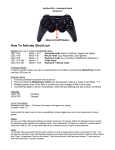
idroid:con Controller Modes
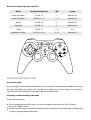
The idroid:con offers five fundamentally different operating modes as well as a variation of the game
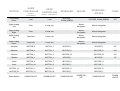
controller mode. You’ll find a detailed overview of the functions of all the buttons in each mode in the
supplement to this guide.
Game Controller Mode (1)
HID (Human Interface Device) gamepad with 12 digital action buttons, two analog sticks and a
digital D-pad. In this mode, the triggers are digital. Sony PlayStation-style functionality.
Game Controller Mode supports programmable turbo mode for buttons. For more information, see
the “Using turbo mode” section below.
Pressing the on/off button once will swap the functions of the D-pad and the left analog stick.
Game Controller Mode (2)
HID gamepad with 10 digital action buttons, two analog thumbsticks, two analog triggers and a
digital D-pad. In this mode, the trigger buttons are analog. Xbox 360-style functionality.
Game Controller Mode supports programmable turbo mode for buttons. For more information, see
the “Using turbo mode” section below.
Pressing the on/off button once will swap the functions of the D-pad and the left analog stick.
Keyboard Mode
Emulating an HID keyboard allows you to map game functions to specific buttons on the idroid:con
(also known as “button mapping”). This mode can be helpful for games that lack native support for
the idroid:con. In this mode, the D-pad and left analog stick offer the same functionality. The left
thumbstick is purely digital in this mode.
Mouse Mode
Emulating a standard mouse allows you to operate touch-screen-controlled Android applications
and games that do not require multitouch. Move the mouse cursor with the right analog stick. The
two shoulder buttons represent the left and right mouse buttons, respectively.