1
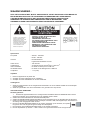
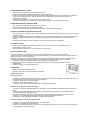
WARNING:
TO PREVENT FIRE OR SHOCK HAZARD, DO NOT EXPOSE THIS APPLIANCE TO RAIN OR MOISTURE.
DO NOT REMOVE COVER. PILOT LAMPS SOLDERED IN PLACE. NO USER SERVICEABLE PARTS
INSIDE. REFER SERVICING TO QUALIFIED SERVICE PERSONNEL.
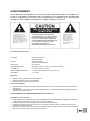
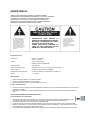
CAUTION
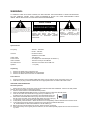
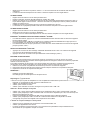
The lighting flash with arrowhead symbol, within
an equilateral triangle, is intended to alert user to
the presence of uninsulated "dangerous voltage"
within the product's enclosure that may be of
sufficient magnitude to constitute risk of electric
shock to persons.
RISK OF ELECTRIC
SHOCK DO NOT OPEN
CAUTION: TO REDUCE THE RISK OF
ELECTRIC SHOCK, DO NOT REMOVE
COVER
(OR BACK).
NO
USER
–
SERVICEABLE PARTS INSIDE. REFER
SERVICING
TO
QUALIFIED SERVICE
PERSONNEL.
The exclamation point within an
equilateral triangle is intended to
alert user to the presence of
important
operating
and
maintenance (servicing) instruction
in the literature accompanying the
appliance.
Specifications
Frequency
Antenna
:
:
:
Audio output
Power source
USB 2.0 PORT
SD CARD SLOT
Speaker
:
:
:
:
:
AM 530 - 1600 KHz
FM 88 - 108 MHz
FM Wire Antenna
AM Built-in Ferrite Bar
700 mW max
AC Adaptor AC 230V/50Hz(DC 9V 600mA *)
The limit of this port is 4GB Max
The limit of the Card size is 4GB max
1 x 4 "(3W)
Unpacking
1.
2.
3.
Remove the plastic bag covering the unit.
Remove the AC/DC ADAPTOR from the packaging.
Remove the black wire tie from the A/C ADAPTOR.
Power Source
1.
2.
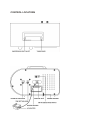
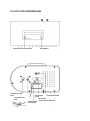
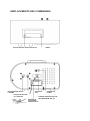
Plug the small end of the supplied ADAPTOR into the 9V DC INPUT JACK on the back of the unit.
Insert the 2-pin plug of the AC ADAPTOR into an appropriate 230V AC Mains wall outlet socket.
USB & SD CARD OPERATION
SD Card operation:
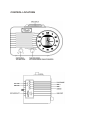
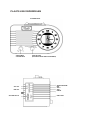
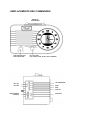
1. Switch the unit ON by turning the power ON-OFF SWITCH/VOLUME CONTROL switch to the ON position
and turn the Sound Volume to mid-range position.
2. Switch Function Switch to the Radio/SD/USB position.
3. Switch the AM/FM/USB/SD Band switch (on the back panel) to select the SD/USB mode.
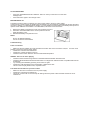
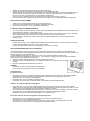
4. Insert an SD Card with stored MP3 songs (size up to 4GB max, not
supplied) into the card slot in the direction as indicated below the slot.
5. Press the PLAY/PAUSE BUTTON to play the music tracks stored on
the SD Card. The green ACC LED will flash whilst the music is playing.
7. To pause the music, press the PLAY/PAUSE BUTTON again.
8. In Play Mode, press the SKIP+ / SKIP- BUTTON once or repeatedly until the desired track has been found.
9. To stop playing the music stored on the SD Card, press the PLAY/PAUSE BUTTON.
AT THIS STAGE, DO NOT DISCONNECT THE SD CARD yet!
10 Before removing the SD Card from the slot, switch the main unit off first
11 Press the memory card in gently & then release it, the card will be partially ejected and can then be removed
by hand.