1
ENGLISH
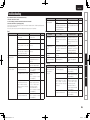
Switching the unit display
Title name
Artist name
Files created in the following formats and stored on a USB memory
device can be played.
These settings are not reflected when “iPod Ctrl=>” is set to
“1 Direct” (vpage 26)
File format
nnMaximum number of playable files and folders
MP3
32/44.1/
48 kHz
nnFile format
WMA
32/44.1/
48 kHz
(Not displayed)
REMAIN
Track elapsed time
Track remaining time
MP3 (MPEG-1 Audio Layer-3)
WMA (Windows Media Audio)
MPEG-4/AAC (Advanced Audio Coding)
WAV (LINEAR PCM)
AAC
LINEAR
PCM
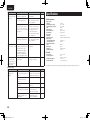
For MPEG-1 Audio
Layer3,
32 – 320 kbps
CBR: 48 – 320
VBR: Peak 384
(display corresponds
to average bit rate
value)
32/44.1/
8 – 320 kbps
48 kHz
Linear PCM:
PCM 32/44.1/48
kHz
Linear PCM: 16 bit
Those other
than the above,
not supported.
Extension
.mp3
.wma
.m4a
.wav
Only music files that are not copyright-protected can be played on
this set.
•Contents downloaded from pay sites on the Internet are copyright
protected. Also, files encoded in WMA format when ripped from a
CD, etc., on a computer may be copyright protected, depending on
the computer’s settings.
Explanation of terms
Troubleshooting
1 Press 2 to stop playback.
2 Disconnect the iPod cable from the USB port.
Maximum number of files in a folder: 65,535
Maximum number of folders: 700
Bit rate
Advanced operations
Switching the time display
During playback, press [TIME].
The time display changes in the following order each time [TIME] is
pressed.
Playable MP3/WMA file
Sampling
frequency
Advanced connections
NOTE
ID3-Tags (Ver.1.x and 2.x)
META-Tags (Compatible with title, artist and album names)
Basic operation
Setting which information is displayed first
You can set which information is displayed first when [TEXT] is
pressed.
For details on the settings, see “File Info (File information display
selection)” (vpage 26).
nnTag data
nnUSB-Compatible file systems
“FAT16” or “FAT32”
•If the USB memory device is divided into multiple partitions, only
the top drive can be selected.
Album name
Disconnecting the iPod
Playable USB memory formats
Basic connections
During playback, press [TEXT].
The information changes in the following order each time [TEXT] is
pressed.
Playing a USB memory device
Getting started
Playback iPod®
Specifications
Index
18
1.CD6004U_ENG_02A_0706.indd
18
2011/07/14
15:56:40