1
2 Hardware Configuration
The DSCLP-100 is automatically configured at boot time by the
computer's BIOS or operating system. There are no required switches or jumpers
to set for installation.
This chapter lists a number of optional jumper settings that control various
hardware features. Jumpers J2, J4-J5 are grouped together at the end of the board
opposite the D-type connector (D-25 for DSCLP, D-9 for SSCLP). Any changes
from the factory default should be made before installing the DSCLP-100 in the
computer.
2.1 Factory Default Configuration
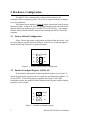
Figure 2 shows the jumper configuration as shipped from the factory, with
two spare jumpers applied in neutral positions. Remove one or both and apply as
shown in following sections to set optional features.
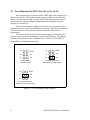
J2
SPAD
J4
X4
J5
X2
Figure 2 --- Factory default jumper configuration
2.2 Enable Scratchpad Register (SPAD, J2)
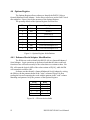
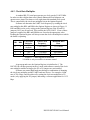
In the default configuration, an Interrupt Status Register (see section 4.3)
and an Options Register (see section 4.4) replace the scratchpad (base address + 7)
of each UART. If the SPAD jumper is applied as in Figure 3, the UART
scratchpad registers are enabled, and the Interrupt Status Register and the Options
Register are not available.
J2
SPAD
J4
X4
J5
X2
Figure 3 --- Enable scratchpad registers
7
DSCLP/SSCLP-100 User's Manual