1
6 Display messages
6 Display messages
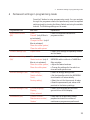
Message
Cause/Result
Action
‘Fill water tank’
The water tank is empty. You
cannot prepare any products.
T Fill the water tank (see Chapter 1
‘Preparing and using for the first time –
Filling the water tank’).
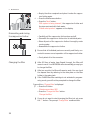
‘Empty coffee
grounds container’
The coffee grounds container is
full. You cannot prepare any
products.
T Empty the coffee grounds container
and the drip tray (see Chapter 3 ‘Daily
operation – Daily maintenance’).
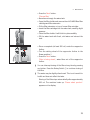
‘Empty drip tray’
The drip tray is full. You cannot
prepare any products.
T Empty the drip tray.
T Clean and dry the metal contacts on
the back of the drip tray.
‘Drip tray not
fitted’
The drip tray is not inserted
correctly or is not inserted at all.
You cannot prepare any products.
T Fit the drip tray.
‘Please press the
Rotary Switch.’
The IMPRESSA is prompting you
to perform a rinse or continue a
maintenance programme that
was already started.
T Press the Rotary Switch to start the
rinse or to continue the maintenance
programme.
‘Fill bean
container’
The bean container is empty. You
cannot prepare any products.
T Fill the bean container (see Chapter 1
‘Preparing and using for the first time –
Filling the bean container’).
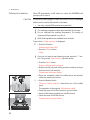
‘Rinse the milk
system’
The IMPRESSA is prompting you
to rinse the milk system.
T Press the Rotary Switch to start
rinsing the milk system.
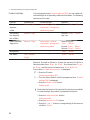
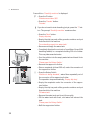
‘Change filter’
The filter cartridge no longer
works.
T Replace the CLARIS Blue filter
cartridge (see Chapter 5 ‘Maintenance –
Changing the filter’).
‘Clean machine’
The IMPRESSA is prompting you
to clean it.
T Perform cleaning (see Chapter 5
‘Maintenance – Cleaning the machine’).
‘Decalcify
machine’
The IMPRESSA is prompting you
to descale it.
T Perform descaling (see Chapter 5
‘Maintenance – Descaling the
machine’).
‘Not enough
ground coffee’
There is insufficient ground coffee
in the machine; the IMPRESSA
stops the operation.
T The next time you prepare a beverage, add more ground coffee (see
Chapter 2 ‘Preparation – Ground
coffee’).
41