1
2. Setting up the monitor
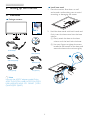
Install base stand
2. Setting up the monitor
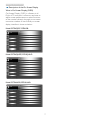
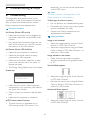
1. Place the monitor face down on soft
and smooth surface taking care to avoid
scratching or damaging the screen.
2.1 Installation
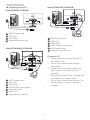
Package contents
237E4
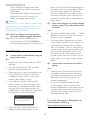
2. Hold the base stand with both hands and
firmly insert the base stand into the base
column.
(1) Gently attach the base to the base
column until the latch locks the base.
(2) Use your fingers to tighten the screw
located at the bottom of the base, and
secure the base to the column tightly.
AC/DC Adapter
MHL (optional)
2
Audio cable (optional)
HDMI (optional)
VGA (optional)
DVI (optional)
Note
Use only the AC/DC adapter model: Philips
ADPC1245(237E4 LHAB), ADPC1236(237E4
LSB/ LHSB),ADS-65LSI-19-1 19065G (237E4
QHAD/QSD/ QHSD )
1
4