1
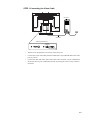
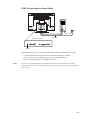
STEP 1-Connecting the Video Cable
VIDEO CABLE
VIDEO CABLE
CONNECTIONS ON UNDERSIDE
DVI 24 PIN
CONNECTOR
FEMALE 15-PIN
VIDEO CONNECTOR
•
•
•
•
Tilt the screen up and back to access the connection ports.
Connect the 15-pin video cable (the ferrite bead end) or 24-pin DVI-D cable to the video
port on your PC.
Connect the other end of the video cable to the video connector on your touchmonitor.
Secure the cable to your touchmonitor and PC by turning the screws on the connector
clockwise.
2-8