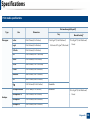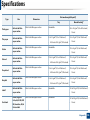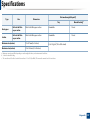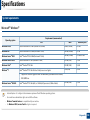
1
User’s Guide
SCX-465x/465xN/4021S/4321NS Series
SCX-465xF/4521FS/4521HS Series
SCX-465xFN/465xHN/4521NS Series
BASIC
BASIC
This guide provides information concerning installation, basic operation and
troubleshooting on windows.
ADVANCED
This guide provides information about installation, advanced configuration, operation and
troubleshooting on various OS environments.
Some features may not be available depending on models or countries.
BASIC
1. Introduction
3. Maintenance
Key benefits
5
Ordering supplies and accessories
68
Features by models
7
Available supplies
69
Useful to know
14
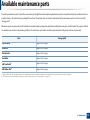
Available maintenance parts
70
About this user’s guide
15
Storing the toner cartridge
71
Safety information
16
Redistributing toner
73
Machine overview
21
Replacing the toner cartridge
75
Control panel overview
25
Monitoring the supplies life
77
Turning on the machine
29
Setting the toner low alert
78
Installing the driver locally
30
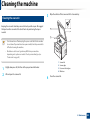
Cleaning the machine
79
Reinstalling the driver
31
Tips for moving & storing your machine
83
2. Menu Overview and Basic Setup
4. Troubleshooting
Menu overview
33
Tips for avoiding paper jams
85
Machine’s basic settings
36
Clearing original document jams
86
Media and tray
38
Clearing paper jams
91
Basic printing
52
Understanding the status LED
94
Basic copying
58
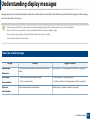
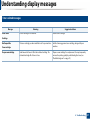
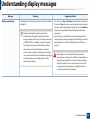
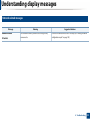
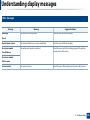
Understanding display messages
96
Basic scanning
62
Basic faxing
63
2
BASIC
5. Appendix
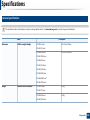
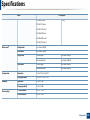
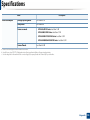
Specifications
102
Regulatory information
112
Copyright
124
3
1. Introduction
This chapter provides information you need to know before using the machine.
• Key benefits
5
• Features by models
7
• Useful to know
14
• About this user’s guide
15
• Safety information
16
• Machine overview
21
• Control panel overview
25
• Turning on the machine
29
• Installing the driver locally
30
• Reinstalling the driver
31
Key benefits
Environmentally friendly
Convenience
• To save toner and paper, this machine supports Eco feature (see "Eco
printing" on page 56).
• Easy Capture Manager allows you to easily edit and print whatever you
captured using the Print Screen key on the keyboard (see "Easy Capture
Manager" on page 199).
• To save paper, you can print multiple pages on one single sheet of paper
(see "Using advanced print features" on page 169).
• To save paper, you can print on both sides of the paper (double-sided
printing) (Manual) (see "Using advanced print features" on page 169).
• To save electricity, this machine automatically conserves electricity by
substantially reducing power consumption when not in use.
Fast high resolution printing
• Samsung Easy Printer Manager and Printing Status is a program that
monitors and informs you of the machine’s status and allows you to
customize the machine’s settings (see "Using Samsung Printer Status" on
page 213).
• Samsung Easy Document Creator is an application to help users compile
and share large documents or other scanned or faxed information digitally.
(see "Using Samsung Easy Document Creator" on page 205).
• AnyWeb Print helps you screen-capture, preview, scrap, and print the
screen of Windows Internet Explorer more easily, than when you use the
ordinary program (see "Samsung AnyWeb Print" on page 200).
• Smart Update allows you to check for the latest software and install the
latest version during the printer driver installation process. This is available
only for Windows.
• You can print with a resolution of up to 1,200 x 1,200 dpi effective output.
• Fast, on-demand printing.
- up to 24 ppm (A4/Letter).
• If you have Internet access, you can get help, support application, machine
drivers, manuals, and order information from the Samsung website,
www.samsung.com > find your product > Support or Downloads.
Key benefits
Wide range of functionality and application support
• Supports various paper sizes (see "Print media specifications" on page 105).
• Print watermark: You can customize your documents with words, such as
“CONFIDENTIAL” (see "Using advanced print features" on page 169).
• Print posters: The text and pictures of each page of your document are
magnified and printed across the multiple sheets of paper and can then be
taped together to form a poster (see "Using advanced print features" on
page 169).
• You can print in various operating systems (see "System requirements" on
page 108).
• Your machine is equipped with a USB interface and/or a network interface.
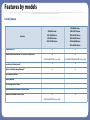
Features by models
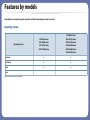
Some features and optional goods may not be available depending on model or country.
Operating System
SCX-465x Series
SCX-465xN Series
SCX-4021S Series
SCX-4321NS Series
SCX-465xF Series
SCX-4521FS Series
SCX-4521HS Series
SCX-465xFN Series
SCX-465xHN Series
SCX-4521NS Series
Windows
●
●
Macintosh
●
●
Linux
●
●
Operating System
Unix
(●: Included, Blank: Not available)
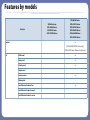
Features by models
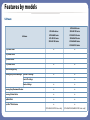
Software
Software
SPL printer driver
SCX-465x Series
SCX-465xN Series
SCX-4021S Series
SCX-4321NS Series
SCX-465xF Series
SCX-4521FS Series
SCX-4521HS Series
SCX-465xFN Series
SCX-465xHN Series
SCX-4521NS Series
●
●
●
●
●
●
PCL printer driver
PS printer driver
XPS printer driver
Direct Printing Utility
Samsung Easy Printer Manager Scan to PC settings
●
Fax to PC settings
●
●
Samsung Easy Document Creator
●
●
Samsung Printer Status
●
●
AnyWeb Print
●
●
SyncThru™ Web Service
●
●
(SCX-465xN/4321NS Series only)
(SCX-465xFN/465xHN/4521NS Series only)
Device Settings
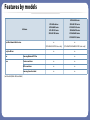
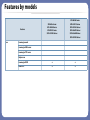
Features by models
Software
SyncThru Admin Web Service
Easy Eco Driver
SCX-465x Series
SCX-465xN Series
SCX-4021S Series
SCX-4321NS Series
SCX-465xF Series
SCX-4521FS Series
SCX-4521HS Series
SCX-465xFN Series
SCX-465xHN Series
SCX-4521NS Series
●
●
(SCX-465xN/4321NS Series only)
(SCX-465xFN/465xHN/4521NS Series only)
●
●
●
Fax
Samsung Network PC Fax
Scan
Twain scan driver
●
●
WIA scan driver
●
●
Samsung Scan Assistant
●
●
(●: Included, Blank: Not available)
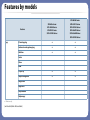
Features by models
Variety feature
SCX-465x Series
SCX-465xN Series
SCX-4021S Series
SCX-4321NS Series
SCX-465xF Series
SCX-4521FS Series
SCX-4521HS Series
SCX-465xFN Series
SCX-465xHN Series
SCX-4521NS Series
Hi-Speed USB 2.0
●
●
Network Interface Ethernet 10/100 Base TX wired LAN
●
●
(SCX-465xN/4321NS Series only)
(SCX-465xFN/465xHN/4521NS Series only)
Eco printing (Control panel)
●
●
Duplex (2-sided) printing (Manual)a
●
●
●
●
Features
USB memory interface
Memory module
Mass Storage Device (HDD)
Duplex Automatic Document Feeder (DADF)
Automatic Document Feeder (ADF)
(SCX-465xN/4321NS Series only)
Features by models
Features
SCX-465x Series
SCX-465xN Series
SCX-4021S Series
SCX-4321NS Series
SCX-465xF Series
SCX-4521FS Series
SCX-4521HS Series
SCX-465xFN Series
SCX-465xHN Series
SCX-4521NS Series
●
Handset
(SCX-4655HN/4521HS Series only)
(SCX-4521NS Series Chinese model only)
Fax
Multi-send
●
Delay send
●
Priority send
●
Duplex send
Secure receive
●
Duplex print
Send/ Receive forward - fax
Send/ Receive forward - email
Send/ Receive forward - server
●
Features by models
SCX-465x Series
SCX-465xN Series
SCX-4021S Series
SCX-4321NS Series
SCX-465xF Series
SCX-4521FS Series
SCX-4521HS Series
SCX-465xFN Series
SCX-465xHN Series
SCX-4521NS Series
Scanning to WSD
●
●
Scan to PC
●
●
Features
Scan
Scanning to email
Scanning to SMB server
Scanning to FTP server
Duplex scan
Features by models
Copy
Features
SCX-465x Series
SCX-465xN Series
SCX-4021S Series
SCX-4321NS Series
SCX-465xF Series
SCX-4521FS Series
SCX-4521HS Series
SCX-465xFN Series
SCX-465xHN Series
SCX-4521NS Series
ID card copying
●
●
Reduced or enlarged copying
●
●
Collation
●
●
2-up/4-up
●
●
Adjust background
●
●
Poster
Clone
Book
Margin shift
Edge erase
Gray enhance
Duplex copy
a. Windows only.
(●: Included, Blank: Not available)
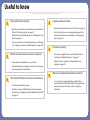
Useful to know
The machine does not print.
A paper jam has occurred.
• Open the print queue list and remove the document from the
list (see "Canceling a print job" on page 53).
• Open and close the front door. (see "Front view" on page 22).
• Remove the driver and install it again (see "Installing the driver
locally" on page 30).
• Select your machine as your default machine in your Windows
(see "Setting your machine as a default machine" on page 168).
• Check the instructions on removing jammed paper in this
manual and troubleshoot accordingly (see "Clearing paper
jams" on page 91).
Printouts are blurry.
Where can I purchase accessories or supplies?
• The toner level might be low or uneven. Shake the toner
cartridge (see "Redistributing toner" on page 73).
• Inquire at a Samsung distributor or your retailer.
• Replace the toner cartridge (see "Replacing the toner
cartridge" on page 75).
• Visit www.samsung.com/supplies. Select your country/region
to view product service information.
Where can I download the machine’s driver?
The status LED flashes or remains constantly on.
• Turn the product off and on again.
• Check the meanings of LED indications in this manual and
troubleshoot accordingly (see "Understanding the status LED"
on page 94).
• You can get help, support application, machine drivers,
manuals, and order information from the Samsung website,
www.samsung.com > find your product > Support or
Downloads.
About this user’s guide
This user's guide provides information for your basic understanding of the
machine as well as detailed steps to explain machine usage.
•
Read the safety information before using the machine.
•
If you have a problem using the machine, refer to the troubleshooting
chapter.
•
Terms used in this user’s guide are explained in the glossary chapter.
•
All illustrations in this user’s guide may differ from your machine depending
on its options or model you purchased.
•
The screenshots in this administrator’s guide may differ from your machine
depending on the machine’s firmware/driver version.
•
The procedures in this user’s guide are mainly based on Windows 7.
2
General icons
Icon
Text
Description
Caution
Gives users information to protect the machine from
possible mechanical damage or malfunction.
Note
Provides additional information or detailed
specification of the machine function and feature.
1
Conventions
Some terms in this guide are used interchangeably, as below:
•
Document is synonymous with original.
•
Paper is synonymous with media, or print media.
•
Machine refers to printer or MFP.
1. Introduction
15
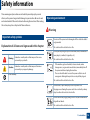
Safety information
These warnings and precautions are included to prevent injury to you and
others, and to prevent any potential damage to your machine. Be sure to read
and understand all of these instructions before using the machine. After reading
this section, keep it in a safe place for future reference.
4
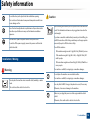
Operating environment
Warning
3
Important safety symbols
Do not use if the power cord is damaged or if the electrical outlet is
not grounded.
Explanation of all icons and signs used in this chapter
Warning
Hazards or unsafe practices that may result in severe
personal injury or death.
Caution
Hazards or unsafe practices that may result in minor
personal injury or property damage.
Do not attempt.
This could result in electric shock or fire.
Do not place anything on top of the machine (water, small metal or
heavy objects, candles, lit cigarettes, etc.).
This could result in electric shock or fire.
• If the machine gets overheated, it releases smoke, makes
strange noises, or generates an odd odor, immediately turn off
the power switch and unplug the machine.
• The user should be able to access the power outlet in case of
emergencies that might require the user to pull the plug out.
This could result in electric shock or fire.
Do not bend, or place heavy objects on the power cord.
Stepping on or allowing the power cord to be crushed by a heavy
object could result in electric shock or fire.
Do not remove the plug by pulling on the cord; do not handle the
plug with wet hands.
This could result in electric shock or fire.
1. Introduction
16
Safety information
5
Caution
During an electrical storm or for a period of non-operation,
remove the power plug from the electrical outlet.
Operating method
Caution
This could result in electric shock or fire.
Be careful, the paper output area is hot.
Do not forcefully pull the paper out during printing.
Burns could occur.
It can cause damage to the machine.
If the machine has been dropped, or if the cabinet appears
damaged, unplug the machine from all interface connections and
request assistance from qualified service personnel.
Be careful not to put your hand between the machine and paper
tray.
Otherwise, this could result in electric shock or fire.
You may get injured.
If the machine does not operate properly after these instructions
have been followed, unplug the machine from all interface
connections and request assistance from qualified service
personnel.
Be care when replacing paper or removing jammed paper.
Otherwise, this could result in electric shock or fire.
If the plug does not easily enter the electrical outlet, do not
attempt to force it in.
Call an electrician to change the electrical outlet, or this could
result in electric shock.
Do not allow pets to chew on the AC power, telephone or PC
interface cords.
New paper has sharp edges and can cause painful cuts.
When printing large quantities, the bottom part of the paper
output area may get hot. Do not allow children to touch.
Burns can occur.
When removing jammed paper, do not use tweezers or sharp metal
objects.
It can damage the machine.
Do not allow too many papers to stack up in the paper output tray.
It can damage the machine.
This could result in electric shock or fire and/or injury to your pet.
1. Introduction
17
Safety information
Do not block or push objects into the ventilation opening.
Caution
This could result in elevated component temperatures which can
cause damage or fire.
Use of controls or adjustments or performance of procedures other
than those specified herein may result in hazardous radiation
exposure.
This machine's power reception device is the power cord.
To switch off the power supply, remove the power cord from the
electrical outlet.
Before moving the machine, turn the power off and disconnect all
cords. The information below are only suggestions based on the
units weight.
If you have a medical condition that prevents you from lifting, do
not lift the machine. Ask for help, and always use the appropriate
amount of people to lift the device safety.
Then lift the machine:
•
If the machine weighs under 20 kg (44.09 lbs), lift with 1 person.
•
If the machine weighs 20 kg (44.09 lbs) - 40kg (88.18 lbs), lift
with 2 people.
•
If the machine weighs more than 40 kg (88.18 lbs), lift with 4 or
more people.
6
Installation / Moving
Warning
The machine could fall, causing injury or machine damage.
Do not place the machine on an unstable surface.
Do not place the machine in an area with dust, humidity, or water
leaks.
This could result in electric shock or fire.
The machine could fall, causing injury or machine damage.
Use only No.26 AWGa or larger, telephone line cord, if necessary.
Otherwise, it can cause damage to the machine.
Make sure you plug the power cord into a grounded electrical
outlet.
Otherwise, this could result in electric shock or fire.
1. Introduction
18
Safety information
7
Use the power cord supplied with your machine for safe
operation. If you are using a cord which is longer than 2 meters (6
feet) with a 110V machine, then the gauge should be 16 AWG or
larger.
Otherwise, it can cause damage to the machine, and could result
in electric shock or fire.
Do not put a cover over the machine or place it in an airtight
location, such as a closet.
If the machine is not well-ventilated, this could result in fire.
Do not overload wall outlets and extension cords.
This can diminish performance, and could result in electric shock
or fire.
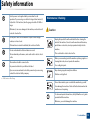
Maintenance / Checking
Caution
Unplug this product from the wall outlet before cleaning the
inside of the machine. Do not clean the machine with benzene,
paint thinner or alcohol; do not spray water directly into the
machine.
This could result in electric shock or fire.
The machine should be connected to
When you are working inside the machine replacing supplies or
cleaning the inside, do not operate the machine.
the power level which is specified on the label.
You could get injured.
If you are unsure and want to check the power level you are using,
contact the electrical utility company.
Keep cleaning supplies away from children.
Children could get hurt.
a. AWG: American Wire Gauge
Do not disassemble, repair or rebuild the machine by yourself.
It can damage the machine. Call a certified technician when the
machine needs repairing.
To clean and operate the machine, strictly follow the user's guide
provided with the machine.
Otherwise, you could damage the machine.
1. Introduction
19
Safety information
Keep the power cable and the contact surface of the plug clean
from dust or water.
When storing supplies such as toner cartridges, keep them away
from children.
Otherwise, this could result in electric shock or fire.
Toner dust can be dangerous if inhaled or ingested.
• Do not remove any covers or guards that are fastened with
screws.
Using recycled supplies, such as toner, can cause damage to the
machine.
• Fuser units should only be repaired by a certified service
technician. Repair by non-certified technicians could result in
fire or electric shock.
In case of damage due to the use of recycled supplies, a service
fee will be charged.
• The machine should only be repaired by a Samsung service
technician.
When toner gets on your clothing, do not use hot water to wash
it.
Hot water sets toner into fabric. Use cold water.
8
Supply usage
When changing the toner cartridge or removing jammed paper,
be careful not to let toner dust touch your body or clothes.
Toner dust can be dangerous if inhaled or ingested.
Caution
Do not disassemble the toner cartridge.
Toner dust can be dangerous if inhaled or ingested.
Do not burn any of the supplies such as toner cartridge or fuser
unit.
This could cause an explosion or uncontrollable fire.
1. Introduction
20
Machine overview
9
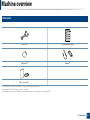
Accessories
Power cord
Quick installation guide
Software CDa
Handsetb
Misc. accessoriesc
a. The software CD contains the print drivers, user’s guide, and software applications.
b. Handset model only (see "Features by models" on page 7).
c. Miscellaneous accessories included with your machine may vary by country of purchase and specific model.
1. Introduction
21
Machine overview
10
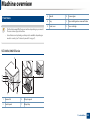
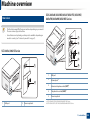
Front view
3
Handle
8
Scanner glass
4
Tray
9
Paper width guide on a manual feeder
5
Front cover
10
Toner cartridge
• This illustration may differ from your machine depending on your model.
There are various types of machine.
• Some features and optional goods may not be available depending on
model or country (see "Features by models" on page 7).
SCX-465x/4021S Series
1
8
9
7
6
5
2
10
4
3
1
Scanner lid
6
Output support
2
Control panel
7
Output tray
1. Introduction
22
Machine overview
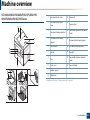
SCX-465xN/4321NS/465xF/4521FS/4521HS/
465xFN/465xHN/4521NS Series
1
1
Document feeder cover
11
2
Document feeder guide
cover
12
2
3
3
9
8
14
5
Control panel
15
Document feeder input tray
6
Handle
16
Handseta
17
Paper width guide on a manual
feeder
18
Toner cartridge
7
6
11
Paper width guide on a document
feeder
Document feeder output
support
5
7
13
Scanner glass
4
4
10
Document feeder output tray
Scanner lid
Tray
8
Front cover
9
Output support
10
Output tray
Document feeder input support
13 14
12
16
15
a. Handset model only (see "Features by models" on page 7).
18
17
1. Introduction
23
Machine overview
SCX-465xN/4321NS/465xF/4521FS/4521HS/
465xFN/465xHN/4521NS Series
11
Rear view
• This illustration may differ from your machine depending on your model.
There are various types of machine.
• Some features and optional goods may not be available depending on
model or country (see "Features by models" on page 7).
1
2
SCX-465x/4021S Series
3
4
5
1
1
USB port
2
Network porta
3
Extension telephone socket (EXT.)b
4
Telephone line socket (LINE)b
5
Power receptacle
2
1
USB port
2
Power receptacle
a. SCX-465xN/4321NS/465xFN/465xHN/4521NS Series
b. SCX-465xF/4521FS/4521HS/465xFN/465xHN/4521NS Series
1. Introduction
24
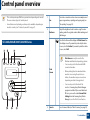
Control panel overview
• This control panel may differ from your machine depending on its model.
There are various types of control panels.
• Some features and optional goods may not be available depending on
model or country (see "Features by models" on page 7).
1
Eco
Turn into eco mode to reduce toner consumption and
paper usage when pc-printing and copying only (see
"Eco printing" on page 56).
Darkness
Adjust the brightness level to make a copy for easier
reading, when the original contains faint markings and
dark images.
2
12
Press this button and the display will Print Screen? on
the display screen. If you want to print only the active
screen, select the Active. If you want to print the whole
screen, select Full.
SCX-465x/465xN/4021S/4321NS Series
• Print Screen can only be used in the
Windows and Macintosh operating systems.
Print
Screen
• You can only use this function with USBconnected machine.
• When printing the active window/whole
monitor screen using the print screen
button, the machine may use more toner
depending on what is being printed.
• You can only use this function if the
machine’s Samsung Easy Printer Manager
program is installed. If you are a Macintosh
OS user, you need to enable Screen Print
Settings from the Samsung Easy Printer
Manager to use the Print Screen feature.
3
Scan to
Sends scanned data (see "Basic Scanning" on page 62).
1. Introduction
25
Control panel overview
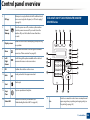
13
4
ID Copy
Allows you to copy both sides of an ID card like a driver’s
license on a single side of paper (see "ID card copying"
on page 60).
Power/
Wakeup
Turns the power on or off, or wakes up the machine
from the power save mode. If you need to turn the
machine off, press this button for more than three
seconds.
Display screen
Shows the current status and displays prompts during
an operation.
Menu
Opens Menu mode and scrolls through the available
menus (see "Menu overview" on page 33).
5
6
7
8
Left/
Right
Arrows
Scrolls through the options available in the selected
menu and increases or decreases values.
9
OK
Confirms the selection on the screen.
10
11
12
13
Back
Start
Stop/
Clear
Status LED
SCX-465xF/4521FS/4521HS/465xFN/465xHN/
4521NS Series
Sends you back to the upper menu level.
Starts a job.
Stops an operations at any time.
Indicates the status of your machine (see
"Understanding the status LED" on page 94).
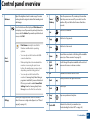
1
Eco
Turn into eco mode to reduce toner consumption and
paper usage when pc-printing and copying only (see
"Eco printing" on page 56).
1. Introduction
26
Control panel overview
2
Darkness
Adjust the brightness level to make a copy for easier
reading, when the original contains faint markings and
dark images.
Press this button and the display will Print Screen? on
the display screen. If you want to print only the active
screen, select the Active. If you want to print the whole
screen, select Full.
Print
Screen
3
ID Copy
4
Power/
Wakeup
5
6
Fax
Copy
Turns the power on or off, or wakes up the machine
from the power save mode. If you need to turn the
machine off, press this button for more than three
seconds.
Switches to Fax mode.
Switches to Copy mode.
• Print Screen can only be used in the
Windows and Macintosh operating
systems.
7
• You can only use this function with USBconnected machine.
8
• When printing the active window/whole
monitor screen using the print screen
button, the machine may use more toner
depending on what is being printed.
9
• You can only use this function if the
machine’s Samsung Easy Printer Manager
program is installed. If you are a Macintosh
OS user, you need to enable Screen Print
Settings from the Samsung Easy Printer
Manager to use the Print Screen feature.
10 OK
Confirms the selection on the screen.
11
Sends you back to the upper menu level.
Allows you to copy both sides of an ID card like a
driver’s license on a single side of paper (see "ID card
copying" on page 60).
12
Scan
Menu
Left/
Right
Arrows
Back
Start
Switches to Scan mode.
Opens Menu mode and scrolls through the available
menus (see "Menu overview" on page 33).
Scrolls through the options available in the selected
menu and increases or decreases values.
Starts a job.
13 Stop/
Clear
Stops an operations at any time.
14
Indicates the status of your machine (see
"Understanding the status LED" on page 94).
Status LED
1. Introduction
27
Control panel overview
14
15
Numeric keypad
Dials a number or enters alphanumeric characters (see
"Keypad letters and numbers" on page 166).
On Hook
Dial
When you press this button, you can hear a dial tone.
Then enter a fax number. It is similar to making a call
using speaker phone (see "Receiving manually in Tel
mode" on page 195).
Redial/
Pause
Redials the recently sent fax number or received caller
ID in ready mode, or inserts a pause(-) into a fax
number in edit mode (see "Redialing the fax number"
on page 189).
16
17
18 Address
Book
Allows you to store frequently used fax numbers or
search for stored fax numbers.
19
Shows the current status and displays prompts during
an operation.
Display screen
Adjusting the control panel
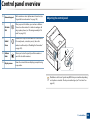
Illustrations on this user’s guide may differ from your machine depending
on its options or models. Check your machine type (see "Front view" on
page 22).
1. Introduction
28
Turning on the machine
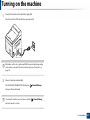
1
Connect the machine to the electricity supply first.
Turn the switch on if the machine has a power switch.
Illustrations on this user’s guide may differ from your machine depending
on its options or models. Check your machine type (see "Front view" on
page 22).
2
Power is turned on automatically.
SCX-465x/4021S/465xN/4321NS Series press
(Power/Wakeup)
button on the control panel.
If you want to turn the power off, press and hold
(Power/Wakeup)
button for about 3 seconds.
1. Introduction
29
Installing the driver locally
A locally connected machine is a machine directly attached to your computer
using the cable. If your machine is attached to a network, skip the following
steps below and go on to installing a network connected machine’s driver (see
"Installing driver over the network" on page 138).
• If you are a Macintosh or Linux operating systems user, refer to the
"Installation for Macintosh" on page 129 or "Installation for Linux" on
page 131.
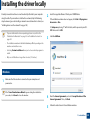
2
Insert the supplied software CD into your CD-ROM drive.
If the installation window does not appear, click Start > All programs >
Accessories > Run.
X:\Setup.exe replacing “X” with the letter, which represents your CDROM drive and click OK.
3
Select Install Now.
4
Read the License Agreement, and select I accept the terms of the
License Agreement. Then, click Next.
5
Follow the instructions in the installation window.
• The installation window in this User’s Guide may differ depending on the
machine and interface in use.
• Selecting Custom Installation allows you to choose which programs to
install.
• Only use a USB cable no longer than 3 meters (118 inches).
15
Windows
1
Make sure that the machine is connected to your computer and
powered on.
If the “Found New Hardware Wizard” appears during the installation
procedure, click Cancel to close the window.
1. Introduction
30
Reinstalling the driver
If the printer driver does not work properly, follow the steps below to reinstall
the driver.
16
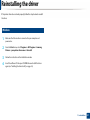
Windows
1
Make sure that the machine is connected to your computer and
powered on.
2
From the Start menu, select Programs or All Programs > Samsung
Printers > your printer driver name > Uninstall.
3
4
Follow the instructions in the installation window.
Insert the software CD into your CD-ROM drive and install the driver
again (see "Installing the driver locally" on page 30).
1. Introduction
31
2. Menu Overview and
Basic Setup
This chapter provides information about the overall menu structure and the basic setup options.
• Menu overview
33
• Machine’s basic settings
36
• Media and tray
38
• Basic printing
52
• Basic copying
58
• Basic scanning
62
• Basic faxing
63
Menu overview
The control panel provides access to various menus to setup the machine or use
the machine’s functions.
• Some menus may not appear on the display depending on options or
models. If so, it is not applicable to your machine.
• Some menu names may differ from your machine depending on its
options or the models.
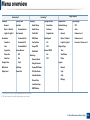
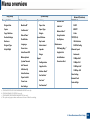
• The menus are described in the Advanced Guide (see "Useful Setting
Menus" on page 150).
1
Accessing the menu
1
Select the Fax, Copy, or Scan button on the control panel depending on
the feature to be used.
2
Select
(Menu) until the menu you want appears on the bottom line
of the display and press OK.
3
4
5
6
Press the arrows until the needed menu item appears and press OK.
If the setting item has sub menus, repeat step 3.
Press OK to save the selection.
Press
(Stop/Clear) to return to the ready mode.
2. Menu Overview and Basic Setup
33
Menu overview
Fax Featurea
Darkness
Normal
Dark+1- Dark+5
Light+5- Light+1
Resolution
Priority Send
Fax Setupa
Sending
Send Fax
Forward to Fax
Rcv. Forward
Copy Feature
Change Default
Resolution
Reduce/Enlarge
Off
Redial Term
Darkness
Darkness
Auto
Prefix Dial
Original Size
Normal
Enhance Lev.1
Auto Report
Dark+1- Dark+5
Enhance Lev.2
Light+5- Light+1
Erase Lev.1-Erase Lev.4
ECM Mode
Standard
Forward to PC
Fax Confirm
On
Fine
Forward&Print
Image TCR
Off
Secure Receive
Dial Modeb
Photo Fax
Off
Color Fax
On
Receive Mode
Print
Ring To Answer
Original Size
Adjust Bkgd.
Redial Times
Forward to Fax
Super Fine
Original Size
Receiving
Manual TX/RX
Original Type
Text
On
Text/Photo
Off
Photo
Layout
Multi Send
Add Page
Stamp RCV Name
Normal
Delay Send
Cancel Job
RCV Start Code
2-Up
Auto Reduction
4-Up
Discard Size
ID Copy
Junk Fax Setup
DRPD Modeb
a. SCX-465xF/4521FS/4521HS/465xFN/465xHN/4521NS Series only.
b. This option may not be available depending on your country.
2. Menu Overview and Basic Setup
34
Menu overview
Copy setup
Change Default
Machine Setup
Machine IDa
Paper Size
Copies
Fax Numbera
Paper Type
Reduce/Enlarge
Darkness
Original Type
Adjust Bkgd
Date & Timea
Clock Modea
Language
Power Save
Auto Power Offb
Wakeup Event
Margin
Sound/Volume
Key Sound
Alarm Sound
TCP/IP(IPv4)
Scedule Jobsa
DHCP
Junk Faxa
BOOTP
Network Conf.c
Static
Usage Counter
TCP/IP(IPv6)
Fax Optionsa
IPv6 Activate
Maintenance
DHCPv6 Config
d
Speaker
CLR Empty Msg.
Ringer
Supplies Life
Automatic
Serial Number
10Mbps Half
TonerLow Alert
10Mbps Full
Report
Ethernet Speed
System Timeout
Configuration
Job Timeout
Supplies Info.
100Mbps Half
Altitude Adj.
Address Booka
100Mbps Full
Auto Continue
Paper Substit.
Toner Save
Eco Settings
a.
b.
c.
d.
Paper Setup
Original Size
Copy Collation
Networkc(Continue)
System Setup
Fax Confirma
Fax Senta
Fax Receiveda
Clear Setting
Network Conf.
Protocol Mgr.
SCX-465xF/4521FS/4521HS/465xFN/465xHN/4521NS Series only.
SCX-465x/465xN/4021S/4321NS Series only.
SCX-465xN/4321NS/465xFN/465xHN/4521NS Series only.
This option only appears when small amount of toner is left in the cartridge.
2. Menu Overview and Basic Setup
35
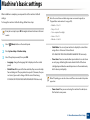
Machine’s basic settings
After installation is complete, you may want to set the machine's default
settings.
To change the machine’s default settings, follow these steps:
Enter the correct time and date using arrows or numeric keypad (see
"Keypad letters and numbers" on page 166).
• Month = 01 to 12
• Day = 01 to 31
It may be necessary to press OK to navigate to lower-level menus for some
models.
• Year = requires four digits
• Hour = 01 to 12
• Minute = 00 to 59
1
2
3
Select
(Menu) button on the control panel.
•
Press System Setup > Machine Setup.
Clock Mode: You can set your machine to display the current time
using either a 12-hour or 24-hour format.
SCX-465xF/4521FS/4521HS/465xFN/465xHN/4521NS Series only.
Select the option you want, then press OK.
•
Language: change the language that is displayed on the control
panel.
•
Date & Time: When you set the time and date, they are used in delay
fax and delay print. They are printed on reports. If, however, they are
not correct, you need to change it for the correct time being.
SCX-465xF/4521FS/4521HS/465xFN/465xHN/4521NS Series only.
•
Toner Save: Toner save mode allows your machine to use less toner
on each page. Activating this mode extends the life of the toner
cartridge beyond what one would experience in the normal mode,
but it reduces print quality.
When PC-printing, you can also turn on or off toner save mode in the printer
properties.
•
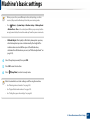
Power Save: When you are not using the machine for a while, use
this feature to save power.
2. Menu Overview and Basic Setup
36
Machine’s basic settings
• When you press the power/Wakeup button, start printing, or a fax is
received, the product will wake up from the power saving mode.
• Press
(Menu) > System Setup > Machine Setup > Wakeup Event
> Button Press > On on the control panel. When you press any button
except power button, the machine wake up from the power save mode.
•
4
5
6
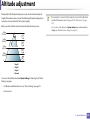
Altitude Adjust: Print quality is affected by atmospheric pressure,
which atmospheric pressure is determined by the height of the
machine above sea level. Before you set the altitude value,
determine the altitude where you are (see "Altitude adjustment" on
page 165).
Select the option you want, then press OK.
Press OK to save the selection.
Press
(Stop/Clear) to return to ready mode.
Refer to below links to set other settings useful for using the machine.
• See "Entering various characters" on page 166.
• See "Keypad letters and numbers" on page 166.
• See "Setting the paper size and type" on page 46.
2. Menu Overview and Basic Setup
37
Media and tray
This chapter provides information on how to load print media into your
machine.
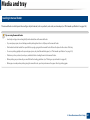
• Using print media that does not meet these specifications may cause
problems or require repairs. Such repairs are not covered by Samsung’s
warranty or service agreements.
2
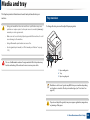
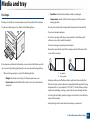
Tray overview
To change the size, you need to adjust the paper guides.
• Make sure not to use the inkjet photo paper with this machine. It could
cause damage to the machine.
• Using inflammable print media can cause a fire.
• Use designated print media (see "Print media specifications" on page
105).
1
The use of inflammable media or foreign materials left in the printer may
lead to overheating of the unit and, in rare cases may cause a fire.
3
2
1 Paper width guide
2 Tray
3 Paper Length guide
Illustrations on this user’s guide may differ from your machine depending
on its options or models. Check your machine type (see "Front view" on
page 22).
If you do not adjust the guide, it may cause paper registration, image skew,
or jamming of the paper.
2. Menu Overview and Basic Setup
38
Media and tray
3
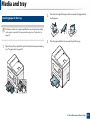
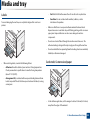
Loading paper in the tray
2
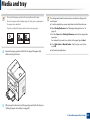
Flex or fan the edge of the paper stack to separate the pages before
loading papers.
3
Place the paper with the side you want to print facing up.
Illustrations on this user’s guide may differ from your machine depending
on its options or models. Check your machine type (see "Front view" on
page 22).
1
Open the tray. Then, adjust the tray size to the media size you are loading
(see "Tray overview" on page 38).
2
1
2. Menu Overview and Basic Setup
39
Media and tray
• Do not push the paper guide too far causing the media to warp.
• Do not use a paper with a leading-edge curl, it may cause a paper jam or
the paper can be wrinkled.
• If you do not adjust the paper guide, it may cause paper jams.
4
Squeeze the paper guide and slide it to the edge of the paper stack
without causing it to bend.
5
When you print a document, set the paper type and size for the tray (see
"Setting the paper size and type" on page 46).
The settings made from the machine driver override the settings on the
control panel.
a To print in application, open an application and start the print menu.
b Open Printing Preferences (see "Opening printing preferences" on
page 54).
c Press the Paper tab in Printing Preferences, and select an appropriate
paper type.
For example, if you want to use a label, set the paper type to Label.
d Select Auto Select (or Manual Feeder , Tray1) in paper source, then
press OK.
e Start printing in application.
2. Menu Overview and Basic Setup
40
Media and tray
4
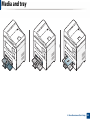
Loading in manual feeder
The manual feeder can hold special sizes and types of print material, such as postcards, note cards, and envelopes (see "Print media specifications" on page 105).
Tips on using the manual feeder
• Load only one type, size and weight of print media at time in the manual feeder.
• To prevent paper jams, do not add paper while printing when there is still paper in the manual feeder.
• Print media should be loaded face up with the top edge going into the manual feeder first and be placed in the center of the tray.
• To ensure printing quality and to prevent paper jams, only load the available paper (see "Print media specifications" on page 105).
• Flatten any curl on postcards, envelopes, and labels before loading them into the manual feeder.
• When printing on special media, you must follow the loading guidelines (see "Printing on special media" on page 43).
• When papers overlap when printing using the manual feeder, open tray and remove the papers then try printing again.
2. Menu Overview and Basic Setup
41
Media and tray
2. Menu Overview and Basic Setup
42
Media and tray
5
Types
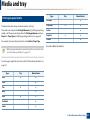
Printing on special media
Tray
●
Envelope
The table below shows the special media usable in each tray.
Preprinted
The media is also shown in the Printing Preferences. To get the higest printing
quality, select the proper media type from the Printing preferences window >
Paper tab > Paper Type (see "Opening printing preferences" on page 54).
Cotton
For example, if you want to print on labels, select Labels for Paper Type.
Recycled
Archive
Manual feeder
●
●
●
●
●
●
(●: Included, Blank: Not available)
• When using special media, we recommend you feed one sheet at a time
(see "Print media specifications" on page 105).
To see for paper weights for each sheet, refer to "Print media specifications" on
page 105.
Types
Plain
Tray
Manual feeder
●
●
●
Thick
Thin
●
●
Bond
Color
●
●
●
CardStock
●
Labels
●
2. Menu Overview and Basic Setup
43
Media and tray
Envelope
Printing successfully on envelopes depends upon the quality of the envelopes.
To print an envelope, place it as shown in the following figure.
-
Condition: should not be wrinkled, nicked, nor damaged.
-
Temperature: should resist the heat and pressure of the machine
during operation.
•
Use only well-constructed envelopes with sharp and well-creased folds.
•
Do not use stamped envelopes.
•
Do not use envelopes with clasps, snaps, windows, coated lining, selfadhesive seals, or other synthetic materials.
•
Do not use damaged or poorly made envelopes.
•
Be sure the seam at both ends of the envelope extends all the way to the
corner of the envelope.
If envelopes are printed out with wrinkles, creases, or black bold lines, open the
rear cover and try printing again. Keep the rear cover opened during printing.
•
When selecting envelopes, consider the following factors:
-
Weight: should not exceed 90 g/m2 otherwise; jams may occur.
-
Construction: should lie flat with less than 6 mm curl and should not
contain air.
1
2
Acceptable
Unacceptable
•
Envelopes with a peel-off adhesive strip or with more than one flap that
folds over to seal must use adhesives compatible with the machine’s fusing
temperature for 0.1 second about 170°C (338 °F). The extra flaps and strips
might cause wrinkling, creasing, or jams, and may even damage the fuser.
•
For the best print quality, position margins no closer than 15 mm from the
edges of the envelope.
•
Avoid printing over the area where the envelope’s seams meet.
2. Menu Overview and Basic Setup
44
Media and tray
Labels
To avoid damaging the machine, use only labels designed for use in laser
printers.
•
When selecting labels, consider the following factors:
-
Adhesives: Should be stable at your machine’s fusing temperature.
Check your machine’s specifications to view the fusing temperature
(about 170°C (338°F)).
-
Arrangement: Only use labels with no exposed backing between them.
Labels can peel off sheets that have spaces between the labels, causing
serious jams.
-
Curl: Must lie flat with no more than 13 mm of curl in any direction.
-
Condition: Do not use labels with wrinkles, bubbles, or other
indications of separation.
•
Make sure that there is no exposed adhesive material between labels.
Exposed areas can cause labels to peel off during printing, which can cause
paper jams. Exposed adhesive can also cause damage to machine
components.
•
Do not run a sheet of labels through the machine more than once. The
adhesive backing is designed for only a single pass through the machine.
•
Do not use labels that are separating from the backing sheet or are wrinkled,
bubbled, or otherwise damaged.
Card stock/ Custom-sized paper
•
In the software application, set the margins to at least 6.4 mm (0.25 inches)
away from the edges of the material.
2. Menu Overview and Basic Setup
45
Media and tray
Preprinted paper
6
Setting the paper size and type
When loading preprinted paper, the printed side should be facing up with an
uncurled edge at the front. If you experience problems with paper feeding, turn
the paper around. Note that print quality is not guaranteed.
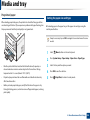
After loading paper in the paper tray, set the paper size and type using the
control panel buttons.
It may be necessary to press OK to navigate to lower-level menus for some
models.
•
Must be printed with heat-resistant ink that will not melt, vaporize, or
release hazardous emissions when subjected to the machine’s fusing
temperature for 0.1 second (about 170°C (338°F)).
•
Preprinted paper ink must be non-flammable and should not adversely
affect machine rollers.
•
Before you load preprinted paper, verify that the ink on the paper is dry.
During the fusing process, wet ink can come off preprinted paper, reducing
print quality.
1
2
3
4
5
Select
(Menu) button on the control panel.
Press System Setup > Paper Setup > Paper Size or Paper Type.
Select the tray and the option you want.
Press OK to save the selection.
Press
(Stop/Clear) to return to ready mode.
2. Menu Overview and Basic Setup
46
Media and tray
7
• The settings set from the machine driver override the settings on the
control panel.
a To print from an application, open an application and start the print
menu.
b Open Printing Preferences (see "Opening printing preferences" on
page 54).
c Press the Paper tab and select an appropriate paper.
• If you want to use special-sized paper such as billing paper, select the
Paper tab > Size > Edit... and set Custom Paper Size Settings in the
Printing Preferences (see "Opening printing preferences" on page 54).
Using the output support
The surface of the output tray may become hot if you print a large number
of pages at once. Make sure that you do not touch the surface, and do not
allow children near it.
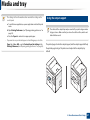
The printed pages stack on the output support, and the output support will help
the printed pages to align. The printer sends output to the output tray by
default.
2. Menu Overview and Basic Setup
47
Media and tray
8
9
Preparing originals
•
Do not load paper smaller than 142 x 148 mm (5.6 x 5.8 inches) or larger than
216 x 356 mm (8.5 x 14 inches).
•
Do not attempt to load the followings of paper, in order to prevent paper
jam, low print quality and machine damage.
-
Carbon-paper or carbon-backed paper
-
Coated paper
-
Onion skin or thin paper
-
Wrinkled or creased paper
-
Curled or rolled paper
-
Torn paper
•
Remove all staples and paper clips before loading.
•
Make sure any glue, ink, or correction fluid on the paper is completely dry
before loading.
•
Do not load originals that include different sizes or weights of paper.
•
Do not load booklets, pamphlets, transparencies, or documents with other
unusual characteristics.
Loading originals
You can use the scanner glass or the document feeder to load an original for
copying, scanning, and sending a fax.
Illustrations on this user’s guide may differ from your machine depending
on its options or models. Check your machine type (see "Front view" on
page 22).
On the scanner glass
Using the scanner glass, you can copy or scan originals. You can get the best
scan quality, especially for colored or gray-scaled images. Make sure that no
originals are in the document feeder. If an original is detected in the document
feeder, the machine gives it priority over the original on the scanner glass.
2. Menu Overview and Basic Setup
48
Media and tray
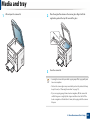
1
Lift and open the scanner lid.
2
Place the original face down on the scanner glass. Align it with the
registration guide at the top left corner of the glass.
3
Close the scanner lid.
• Leaving the scanner lid open while copying may affect copy quality and
toner consumption.
• Dust on the scanner glass may cause black spots on the printout. Always
keep it clean (see "Cleaning the machine" on page 79).
• If you are copying a page from a book or magazine, lift the scanner lid
until its hinges are caught by the stopper and then close the lid. If the
book or magazine is thicker than 30 mm, start copying with the scanner
lid open.
2. Menu Overview and Basic Setup
49
Media and tray
• Be careful not to break the scanner glass. You may get hurt.
2
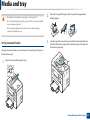
Flex or fan the edge of the paper stack to separate the pages before
loading originals.
3
Load the original face up into the document feeder input tray. Make sure
that the bottom of the original stack matches the paper size marked on
the document input tray.
• Do not put hands while closing the scanner lid. The scanner lid may fall
on your hands and get hurt.
• Do not look the light from inside of the scanner while copying or
scanning. It is harmful to eyes.
In the document feeder
Using the document feeder, you can load up to 40 sheets of paper (80 g/m2, 20
lbs bond) for one job.
1
Open the document feeder guide cover.
2. Menu Overview and Basic Setup
50
Media and tray
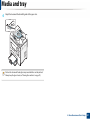
4
Adjust the document feeder width guides to the paper size.
Dust on the document feeder glass may cause black lines on the printout.
Always keep the glass clean (see "Cleaning the machine" on page 79).
2. Menu Overview and Basic Setup
51
Basic printing
For special printing features, refer to the Advanced Guide (see "Using
advanced print features" on page 169).
3
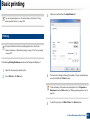
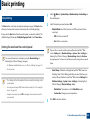
Select your machine from the Select Printer list.
4
The basic print settings including the number of copies and print range
are selected within the Print window.
10
Printing
If you are a Macintosh or Linux operating systems user, refer to the
Advanced Guide (see "Macintosh printing" on page 176 or "Linux printing"
on page 177).
The following Printing Preferences window is for Notepad in Windows 7.
1
2
Open the document you want to print.
Select Print from the File menu.
To take advantage of the advanced printing features, click Properties or
Preferences from the Print window (see "Opening printing preferences" on
page 54).
5
To start the print job, click OK or Print in the Print window.
2. Menu Overview and Basic Setup
52
Basic printing
11
Canceling a print job
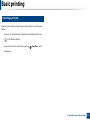
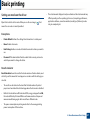
If the print job is waiting in the print queue or print spooler, cancel the job as
follows:
•
You can access this window by simply double-clicking the machine icon
(
•
) in the Windows task bar.
You can also cancel the current job by pressing
(Stop/Clear) on the
control panel.
2. Menu Overview and Basic Setup
53
Basic printing
12
Opening printing preferences
4
Click Properties or Preferences.
• The Printing Preferences window that appears in this user’s guide may
differ depending on the machine in use.
• When you select an option in Printing Preferences, you may see a
warning mark
or . An
mark means you can select that certain
option but it is not recommended, and an
mark means you cannot
select that option due to the machine’s setting or environment.
1
2
3
Open the document you want to print.
Select Print from the file menu. The Print window appears.
Select your machine from the Select Printer.
You can check the machine’s current status pressing the Printer Status
button (see "Using Samsung Printer Status" on page 213).
2. Menu Overview and Basic Setup
54
Basic printing
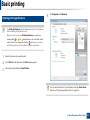
Using a favorite setting
Select more options and click
(Update), settings will be added to the
Presets you made. To use a saved setting, select it from the Presets dropdown list. The machine is now set to print according to the settings you
have selected.
The Presets option, which is visible on each preferences tab except for the
Samsung tab, allows you to save the current preferences for future use.
To save a Presets item, follow these steps:
To delete saved settings, select it from the Presets drop-down list and click
1
2
(Delete).
Change the settings as needed on each tab.
You can also restore the printer driver’s default settings by selecting
Default Preset from the Presets drop-down list.
Enter a name for the item in the Presets input box.
13
Using help
Click the option you want to know on the Printing Preferences window and
press F1 on your keyboard.
3
Click
saved.
(Add). When you save Presets, all current driver settings are
2. Menu Overview and Basic Setup
55
Basic printing
14
Eco printing
The Eco function cuts toner consumption and paper usage. The Eco function
allows you to save print resources and lead you to eco-friendly printing.
1
Select
(Menu) > System Setup > Machine Setup > Eco Settings on
the control panel.
2
Select the option you want and press OK.
•
If you press the Eco button from the control panel, eco mode is enabled. The
default setting of Eco mode is Multiple Pages per Side (2) and Toner Save.
Default Mode: Select this to turn on or off the eco mode. (Toner
save/2-up)
-
Off: Set the eco mode off.
-
On: Set the eco mode on.
Setting Eco mode on the control panel
If you set the eco mode on with a password from the SyncThru™ Web
Service (Settings tab > Machine Settings > System > Eco > Settings) or
Samsung Easy Printer Manager (Device Settings > Eco), the On force
message appears. You have to enter the password to change the eco mode
status.
You can set the machine’s settings by using the Device Settings in
Samsung Easy Printer Manager program.
• For Windows and Macintosh users, see "Device Settings" on page 212.
• For Linux users.
•
• The settings set from the machine’s driver override the settings on the
control panel.
• Accessing menus may differ from model to model (see "Accessing the
menu" on page 33).
• It may be necessary to press OK to navigate to lower-level menus for
some models.
3
Select Temp.: Follow the settings from Syncthru™ Web Service or
Samsung Easy Printer Manager. Before you select this item, you
must set the eco function in SyncThru™ Web Service (Settings tab >
Machine Settings > System > Eco > Settings) or Samsung Easy
Printer Manager (Device Settings > Eco).
-
Default Eco: The machine is set to Default Eco mode.
-
Custom Eco: Change any necessary values.
Press OK to save the selection.
2. Menu Overview and Basic Setup
56
Basic printing
Setting eco mode on the driver
Open the Eco tab to set Eco mode. When you see the eco image (
means the eco mode is currently enabled.
•
), that
The actual amount displayed is only an estimate as the actual amount may
differ depending on the operating system used, computing performance,
application software, connection method, media type [thickness], media
size, job complexity, etc.
Eco options
•
Printer Default: Follows the settings from the machine's control panel.
•
None: Disables Eco mode.
•
Eco Printing: Enables eco mode. Activate the various Eco items you want to
use.
•
Password: If the administrator fixed to enable the Eco mode, you have to
enter the password to change the status.
Result simulator
Result Simulator shows the results of reduced emission of carbon dioxide, used
electricity, and the amount of saved paper in accordance with the settings you
selected.
•
The results are calculated on the basis that the total number of printed
paper is one hundred without a blank page when the Eco mode is disabled.
•
Refers to the calculation coefficient about CO2, energy, and paper from IEA,
the index of Ministry of Internal Affairs and Communication of Japan and
www.remanufacturing.org.uk. Each model has a different index.
•
The power consumption in printing mode refers to the average printing
power consumption of this machine.
2. Menu Overview and Basic Setup
57
Basic copying
16
For special printing features, refer to the Advanced Guide (see "Copy menu"
on page 152).
Changing the settings for each copy
Your machine provides default settings for copying so that you can quickly and
easily make a copy.
15
Basic copy
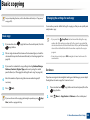
1
If your machine has a
(copy) button.
2
Place a single document face down on the document glass, or load the
documents face up into the document feeder (see "Loading originals" on
page 48).
3
If you want to customize the copy settings including Reduce/Enlarge,
Darkness, Contrast, Original Type, and more by using the control
panel buttons (see "Changing the settings for each copy" on page 58).
4
Enter the number of copies using the arrow or number keypad, if
necessary.
5
Press
• If you press the
(Stop/Clear) button twice while setting the copy
options, all of the options you have set for the current copy job will be
canceled and returned to their default status. Or, they will automatically
return to their default status after the machine completes the copy in
progress.
(copy) button on the control panel, Press the
Darkness
If you have an original containing faint marking and dark images, you can adjust
the brightness to make a copy that is easier to read.
(Start).
If you need to cancel the copying job during the operation, press
• It may be necessary to press OK to navigate to lower-level menus for
some models.
(Stop/
1
If your machine has a
(copy) button.
2
Select
(copy) button on the control panel, Press the
(Menu) > Copy Feature > Darkness on the control panel.
Clear) and the copying will stop.
2. Menu Overview and Basic Setup
58
Basic copying
3
Select the option you want and press OK.
For example, the Light+5 being the lightest, and the Dark+5 being the
darkest.
4
Press
(Stop/Clear) to return to ready mode.
Reduced or enlarged copy
You can reduce or enlarge the size of a copied image from 25% to 400% from the
document feeder or scanner glass.
• This feature may not be available depending on model or optional goods
(see "Variety feature" on page 10).
Original
• If the machine set to Eco mode, reduce and enlarge features are not
available.
The original setting is used to improve the copy quality by selecting the
document for the current copy job.
1
If your machine has a
(copy) button.
2
3
Select
(copy) button on the control panel, Press the
(Menu) > Copy Feature > Original Type on the control panel.
Select the option you want and press OK.
•
Text: Use for originals containing mostly text.
•
Text/Photo: Use for originals with mixed text and photographs.
If texts in the printout is blurry, select Text to get the clear texts.
•
4
To select from the predefined copy sizes
1
If your machine has a
(copy) button.
2
Select
panel.
3
4
Select the option you want and press OK.
Press
(copy) button on the control panel, Press the
(Menu) > Copy Feature > Reduce/Enlarge on the control
(Stop/Clear) to return to ready mode.
Photo: Use when the originals are photographs.
Press
(Stop/Clear) to return to ready mode.
2. Menu Overview and Basic Setup
59
Basic copying
To scale the copy by directly entering the scale rate
• The original must be placed on the scanner glass to use this feature.
1
If your machine has a
(copy) button.
(copy) button on the control panel, Press the
2
Select
(Menu) > Copy Feature > Reduce/Enlarge > Custom on the
control panel.
3
4
5
Enter the copy size you want using the numeric keypad.
Press OK to save the selection.
Press
• If the machine set to Eco mode, this feature is not available.
Depending on the model, the operating procedure may differ.
1
2
Press ID Copy on the control panel.
3
4
Place Front Side and Press [Start] appears on the display.
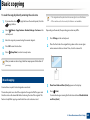
Place the front side of an original facing down on the scanner glass
where arrows indicate as shown. Then, close the scanner lid.
(Stop/Clear) to return to ready mode.
When you make a reduced copy, black lines may appear at the bottom of
your copy.
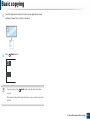
17
ID card copying
Your machine can print 2-sided originals on one sheet.
The machine prints one side of the original on the upper half of the paper and
the other side on the lower half without reducing the size of the original. This
feature is helpful for copying a small-sized item such as business card.
Press
(Start).
Your machine begins scanning the front side and shows Place Back Side
and Press [Start].
2. Menu Overview and Basic Setup
60
Basic copying
5
Turn the original over and place it on the scanner glass where arrows
indicate as shown. Then, close the scanner lid.
6
Press
(Start) button.
• If you do not press the
copied.
(Start) button, only the front side will be
• If the original is larger than the printable area, some portions may not be
printed.
2. Menu Overview and Basic Setup
61
Basic scanning
For special scanning features, refer to the Advanced Guide (see "Scan
features" on page 182).
If you see Not Available message, check the port connection, or select
Enable Scan from Device Panel in Samsung Easy Printer Manager >
Switch to advanced mode > Scan to PC Settings.
18
Basic Scanning
3
Select the scan destination you want and press OK.
Default setting is My Documents.
This is the normal and usual procedure for scanning originals.
This is a basic scanning method for USB-connected machine.
• You can create and save the frequently used settings as a profile list. Also
you can add and delete the profile and save each profile to a different
path.
• It may be necessary to press OK to navigate to lower-level menus for
some models.
• To change the Samsung Easy Printer Manager >
advanced mode > Scan to PC Settings.
• If you want to scan using the network, refer to the Advanced Guide (see
"Scanning from network connected machine" on page 183).
1
Place a single document face down on the document glass, or load the
documents face up into the document feeder (see "Loading originals" on
page 48).
2
If your machine has a
(scan) button on the control panel, Select
(scan) > Scan to PC on the control panel.
Switch to
4
5
Select the option you want and press OK.
Scanning begins.
Scanned image is saved in computer’s C:\Users\users name\My
Documents. The saved folder may differ, depending on your operating
system or the application you are using.
OR
Press Scan to on the control panel.
2. Menu Overview and Basic Setup
62
Basic faxing
19
• This function is not supported for SCX-465x/4021S/465xN/4321NS Series
(see "Control panel overview" on page 25).
• For special faxing features, refer to the Advanced Guide (see "Fax
features" on page 189).
Preparing to fax
Before you send or receive a fax, you need to connect the supplied line cord to
your telephone wall jack (see "Rear view" on page 24). Refer to the Quick
Installation Guide how to make a connection. The method of making a
telephone connection is different from one country to another.
• You cannot use this machine as a fax via the internet phone. For more
information ask your internet service provider.
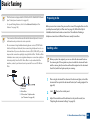
20
• We recommend using traditional analog phone services (PSTN: Public
Switched Telephone Network) when connecting telephone lines to use
a fax machine. If you use other Internet services (DSL, ISDN, VolP), you can
improve the connection quality by using the Micro-filter. The Micro-filter
eliminates unnecessary noise signals and improves connection quality or
Internet quality. Since the DSL Micro-filter is not provided with the
machine, contact your Internet service provider for use on DSL Microfilter.
1 Line port
2 Micro filter
3 DSL modem / Telephone line
(see "Rear view" on page 24).
Sending a fax
When you place the originals, you can use either the document feeder or
the scanner glass. If the originals are placed on both the document feeder
and the scanner glass, the machine will read the originals on the document
feeder first, which has higher priority in scanning.
1
Place a single document face down on the document glass, or load the
documents face up into the document feeder (see "Loading originals" on
page 48).
2
3
Select
(fax) on the control panel.
Adjust the resolution and the darkness to suit your fax needs (see
"Adjusting the document settings" on page 65).
2. Menu Overview and Basic Setup
63
Basic faxing
4
Enter the destination fax number (see "Keypad letters and numbers" on
page 166).
5
Press
(Start) on the control panel. The machine starts to scan and
send the fax to the destinations.
• If you want to send a fax directly from your computer, use Samsung
Network PC Fax (see "Sending a fax in the computer" on page 190).
• When you want to cancel a fax job, press
machine starts transmission.
(Stop/Clear) before the
• If you used the scanner glass, the machine shows the message asking to
place another page.
Sending a fax manually
Perform the following to send a fax using
1
Place a single document face down on the document glass, or load the
documents face up into the document feeder (see "Loading originals" on
page 48).
2
3
Select
4
5
6
Press
(fax) on the control panel.
Adjust the resolution and the darkness to suit your fax needs (see
"Adjusting the document settings" on page 65).
(On Hook Dial) on the control panel or lift the handset.
Enter a fax number using the number keypad on the control panel.
Press
(Start) on the control panel when you hear a high-pitched fax
signal from the remote fax machine.
Sending a fax to multiple destinations
(On Hook Dial) on the control
panel.
If your machine is a handset model, you can send a fax using the handset
(see "Variety feature" on page 10).
You can use the multiple send feature, which allows you to send a fax to multiple
locations. Originals are automatically stored in memory and sent to a remote
station. After transmission, the originals are automatically erased from memory.
You cannot send faxes with this feature if you chosen super fine as an option
or if the fax is in color.
2. Menu Overview and Basic Setup
64
Basic faxing
1
2
3
4
5
Place a single document face down on the document glass, or load the
documents face up into the document feeder (see "Loading originals" on
page 48).
Select
Multi send report is printed after sending faxes.
Adjust the resolution and the darkness to suit your fax needs (see
"Adjusting the document settings" on page 65).
Select
21
Receiving a fax
(Menu) > Fax Feature > Multi Send on the control panel.
Enter the number of the first receiving fax machine and press OK.
the
Your machine is preset Fax mode at the factory. When you receive a fax, the
machine answers the call on a specified number of rings and automatically
receives the fax.
(Address book) button.
Enter the second fax number and press OK.
The display asks you to enter another fax number to send the document.
7
When you have finished entering fax numbers, select No at the Another
No.? prompt and press OK.
The machine begins sending the fax to the numbers you entered in the
order in which you entered them.
(fax) on the control panel.
You can press speed dial numbers or select a group dial number using
6
8
To enter more fax numbers, press OK when Yes appears and repeat
steps 5 and 6.
• You can add up to 10 destinations.
• Once you have entered a group dial number, you cannot enter another
group dial number.
22
Adjusting the document settings
Before starting a fax, change the following settings according to your original’s
status to get the best quality.
It may be necessary to press OK to navigate to lower-level menus for some
models.
2. Menu Overview and Basic Setup
65
Basic faxing
Resolution
The default document settings produce good results when using typical textbased originals. However, if you send originals that are of poor quality, or
contain photographs, you can adjust the resolution to produce a higher quality
fax.
1
2
Select
panel.
(fax) >
•
Photo Fax: Originals containing shades of gray or photographs.
•
Color Fax: Original with colors.
• Memory transmission is not available in this mode.
• You can only send a color fax if the machine you are communicating with
supports color fax reception and you send the fax manually.
(Menu) > Fax Feature > Resolution on the control
3
Press
(Stop/Clear) to return to ready mode.
Select the option you want and press OK.
•
Standard: Originals with normal sized characters.
Darkness
•
Fine: Originals containing small characters or thin lines or originals
printed using a dot-matrix printer.
You can select the degree of darkness of the original document.
•
Super Fine: Originals containing extremely fine detail. Super Fine
mode is enabled only if the machine with which you are
communicating also supports the Super Fine resolution.
• For memory transmission, Super Fine mode is not available. The
resolution setting is automatically changed to Fine.
• When your machine is set to Super Fine resolution and the fax machine
with which you are communicating does not support Super Fine
resolution, the machine transmits using the highest resolution mode
supported by the other fax machine.
The darkness setting is applied to the current fax job. To change the default
setting (see "Fax menu" on page 155).
1
Select
panel.
2
3
Select a darkness level you want.
Press
(fax) >
(Menu) > Fax Feature > Darkness on the control
(Stop/Clear) to return to ready mode.
2. Menu Overview and Basic Setup
66
3. Maintenance
This chapter provides information about purchasing supplies, accessories and maintenance parts available for your
machine.
• Ordering supplies and accessories
68
• Available supplies
69
• Available maintenance parts
70
• Storing the toner cartridge
71
• Redistributing toner
73
• Replacing the toner cartridge
75
• Monitoring the supplies life
77
• Setting the toner low alert
78
• Cleaning the machine
79
• Tips for moving & storing your machine
83
Ordering supplies and accessories
Available accessories may differ from country to country. Contact your sales representatives to obtain the list of available supplies, and maintenance parts.
To order Samsung-authorized supplies, accessories, and maintenance parts, contact your local Samsung dealer or the retailer where you purchased your machine.
You can also visit www.samsung.com/supplies, and then select your country/region to obtain the contact information for service.
3. Maintenance
68
Available supplies
When supplies reach the end of their life spans, you can order the followings of supplies for your machine:
Type
Toner cartridge
Average yielda
Approx. 2,500 pages
Region Ab
Part name
MLT-D117S
SCX-D4725A
a. Declared yield value in accordance with ISO/IEC 19752. The number of pages may be affected by operating environment, printing interval, graphics, media type and media size.
b. Region A: China, India, Nepal, Bangladesh
Depending on the options, percentage of image area and job mode used, the toner cartridge’s lifespan may differ.
When purchasing new toner cartridges or other supplies, these must be purchased in the same country as the machine you are using. Otherwise, new toner
cartridges or other supplies will be incompatible with your machine due to different configurations of toner cartridges and other supplies according to the specific
country conditions.
Samsung does not recommend using non-genuine Samsung toner cartridge such as refilled or remanufactured toner. Samsung cannot guarantee non-genuine
Samsung toner cartridge's quality. Service or repair required as a result of using non-genuine Samsung toner cartridges will not be covered under the machine’s
warranty.
3. Maintenance
69
Available maintenance parts
To purchase maintenance parts, contact the source where you bought the machine. Replacing maintenance parts can be performed only by an authorized service
provider, dealer, or the retailer where you bought the machine. The warranty does not cover the replacement of any maintenance parts once it has reached its
“Average yield”.
Maintenance parts are replaced at specific intervals to avoid print quality and paper feed problems resulting from worn parts, see table below. The purpose of which
is to maintain your machine in top working condition. The maintenance parts below should be replaced when the life span of each item has been met.
Average yielda
Parts
Transfer Roller
Approx. 50,000 pages
Fuser Unit
Approx. 50,000 pages
Pick-Up Roller
Approx. 50,000 pages
Feed Roller
Approx. 50,000 pages
ADF Feed Rollerb
Approx. 20,000 pages
ADF Rubber Padb
Approx. 20,000 pages
a. It will be affected by the operating system used, computing performance, application software, connecting method, media, media size and job complexity.
b. This feature may not be available depending on model or optional goods (see "Variety feature" on page 10).
3. Maintenance
70
Storing the toner cartridge
Toner cartridges contain components that are sensitive to light, temperature
and humidity. Samsung suggests users follow these recommendations to
ensure optimal performance, highest quality, and longest life from your new
Samsung toner cartridge.
Store this cartridge in the same environment in which the printer will be used.
This should be in controlled temperature and humidity conditions. The toner
cartridge should remain in its original and unopened package until installation
– if original packaging is not available, cover the top opening of the cartridge
with paper and store in a dark cabinet.
Opening the cartridge package prior to use dramatically shortens its useful shelf
and operating life. Do not store on the floor. If the toner cartridge is removed
from the printer, follow the instructions below to store the toner cartridge
properly.
•
Store the cartridge inside the protective bag from the original package.
•
Store lying flat (not standing on end) with the same side facing up as if it
were installed in the machine.
•
Do not store consumables in any of the following conditions:
-
Temperature greater than 40°C (104°F).
-
Humidity range less than 20% or greater than 80%.
-
An environment with extreme changes in humidity or temperature.
-
Direct sunlight or room light.
-
Dusty places.
-
A car for a long period of time.
-
An environment where corrosive gases are present.
-
An environment with salty air.
1
Handling instructions
•
Do not touch the surface of the photoconductive drum in the cartridge.
•
Do not expose the cartridge to unnecessary vibrations or shock.
•
Never manually rotate the drum, especially in the reverse direction; this can
cause internal damage and toner spillage.
2
Toner cartridge usage
Samsung Electronics does not recommend or approve the use of non-Samsung
brand toner cartridges in your printer including generic, store brand, refilled, or
remanufactured toner cartridges.
Samsung’s printer warranty does not cover damage to the machine caused
by the use of a refilled, remanufactured, or non-Samsung brand toner
cartridges.
3. Maintenance
71
Storing the toner cartridge
3
Estimated cartridge life
Estimated cartridge life (the life of the toner cartridge yield) depends on the
amount of toner that print jobs require. The actual print yield may vary
depending on the print density of the pages you print on, operating
environment, percentage of image area, printing interval, media type and/or
media size. For example, if you print a lot of graphics, the consumption of the
toner is higher and you may need to change the cartridge more often.
3. Maintenance
72
Redistributing toner
When the toner cartridge is near the end of its life:
•
White streaks or light printing occurs and/or density variation side to side.
If this happens, you can temporarily improve print quality by redistributing the remaining toner in the cartridge. In some cases, white streaks or light printing will still
occur even after you have redistributed the toner.
Illustrations on this user’s guide may differ from your machine depending on its options or models. Check your machine type (see "Front view" on page 22).
• To prevent damage to the toner cartridge, do not expose it to light for more than a few minutes. Cover it with a piece of paper, if necessary.
• Do not touch the green area of the toner cartridge. Use the handle on the cartridge to avoid touching this area.
• Do not use sharp objects such as a knife or scissors to open the toner cartridge package. They might scratch the drum of the cartridge.
• If toner gets on your clothing, wipe it off with a dry cloth and wash clothing in cold water. Hot water sets toner into fabric.
3. Maintenance
73
Redistributing toner
3. Maintenance
74
Replacing the toner cartridge
Click this link to open an animation about replacing a toner cartridge.
• Shake the toner cartridge thoroughly, it will increase the initial print quality.
• Illustrations on this user’s guide may differ from your machine depending on its options or models. Check your machine type (see "Front view" on page 22).
• To prevent damage to the toner cartridge, do not expose it to light for more than a few minutes. Cover it with a piece of paper, if necessary.
• Do not touch the green area of the toner cartridge. Use the handle on the cartridge to avoid touching this area.
• Do not use sharp objects such as a knife or scissors to open the toner cartridge package. They might scratch the drum of the cartridge.
• If toner gets on your clothing, wipe it off with a dry cloth and wash clothing in cold water. Hot water sets toner into fabric.
3. Maintenance
75
Replacing the toner cartridge
When a toner cartridge has reached the end of life, the machine will stop printing.
3. Maintenance
76
Monitoring the supplies life
If you experience frequent paper jams or printing problems, check the number of pages the machine has printed or scanned. Replace the corresponding parts, if
necessary.
• It may be necessary to press OK to navigate to lower-level menus for some models.
1
2
3
Select
(Menu) > System Setup > Maintenance > Supplies Life on the control panel.
Select the option you want and press OK.
•
Total: Displays the total number of pages printed.
•
ADF Scan: Displays the number of pages printed by using the document feeder. Document feeder models only.
•
Platen Scan: Displays the number of pages scanned by using scanner glass.
•
Supplies Info.: Prints the supply information page.
Press
(Stop/Clear) to return to ready mode.
3. Maintenance
77
Setting the toner low alert
If the amount of toner in the cartridge is low, a message or LED informing the user to change the toner cartridge appears. You can set the option for whether or not
this message or LED appears.
• It may be necessary to press OK to navigate to lower-level menus for some models.
1
2
3
Select
(Menu) > System Setup > Maintenance > TonerLow Alert on the control panel.
Select the option you want.
Press OK to save the selection.
3. Maintenance
78
Cleaning the machine
If printing quality problems occur or if you use your machine in a dusty environment, you need to clean your machine regularly to keep it in the best printing
condition and use your machine longer.
• Cleaning the cabinet of the machine with cleaning materials containing large amounts of alcohol, solvents, or other strong substances can discolor or distort the
cabinet.
• If your machine or the surrounding area is contaminated with toner, we recommend you use a cloth or tissue dampened with water to clean it. If you use a vacuum
cleaner, toner blows in the air and might be harmful to you.
4
Cleaning the outside
Clean the machine cabinet with a soft, lint-free cloth. Dampen the cloth slightly with water, but be careful not to let any water drip onto or into the machine.
3. Maintenance
79
Cleaning the machine
5
Cleaning the inside
During the printing process, paper, toner, and dust particles can accumulate inside the machine. This buildup can cause print quality problems, such as toner specks
or smearing. Cleaning the inside of the machine clears and reduces these problems.
• To prevent damage to the toner cartridge, do not expose it to light for more than a few minutes. Cover it with a piece of paper, if necessary.
• Do not touch the green area of the toner cartridge. Use the handle on the cartridge to avoid touching this area.
• Use a dry lint free cloth when cleaning the inside of the machine, be careful not to damage the transfer roller or any other inside parts. Do not use solvents such
as benzene or thinner. Printing quality problems can occur and cause damage to the machine.
• Use a dry lint-free cloth to clean the machine.
• Turn the machine off and unplug the power cord. Wait for the machine to cool down. If your machine has a power switch, turn the power switch off before
cleaning the machine.
• Illustrations on this user’s guide may differ from your machine depending on its options or models. Check your machine type (see "Front view" on page 22).
• When opening a scan unit, hold the document feeder and scan unit together.
3. Maintenance
80
Cleaning the machine
3. Maintenance
81
Cleaning the machine
6
Cleaning the scan unit
3
Keeping the scan unit clean helps ensure the best possible copies. We suggest
that you clean the scan unit at the start of each day and during the day as
needed.
Wipe the surface of the scanner until it is clean and dry.
4
1
3
2
• Turn the machine off and unplug the power cord. Wait for the machine
to cool down. If your machine has a power switch, turn the power switch
off before cleaning the machine.
• Illustrations on this user’s guide may differ from your machine
depending on its options or models. Check your machine type (see
"Front view" on page 22).
1
2
1
2
3
4
Slightly dampen a soft, lint-free cloth or paper towel with water.
Scanner lid
Scanner glass
Document feeder glass
White bar
Lift and open the scanner lid.
4
Close the scanner lid.
3. Maintenance
82
Tips for moving & storing your machine
•
When moving the machine, do not tilt or turn it upside down. Otherwise, the inside of the machine may be contaminated by toner, which can cause damage to
the machine or reduce print quality.
•
When moving the machine, make sure at least two people are holding the machine securely.
3. Maintenance
83
4. Troubleshooting
This chapter gives helpful information for what to do if you encounter an error.
• Tips for avoiding paper jams
85
• Clearing original document jams
86
• Clearing paper jams
91
• Understanding the status LED
94
• Understanding display messages
96
This chapter gives helpful information for what to do if you encounter an error. If your machine
has a display screen, check the message on the display screen first to solve the error.
If you cannot find a solution to your problem in this chapter, refer to the Troubleshooting
chapter in the Advanced Guide (see "Troubleshooting" on page 219).
If you cannot find a solution in the User's Guide or the problem persists, call for service.
Tips for avoiding paper jams
By selecting the correct media s, most paper jams can be avoided. To avoid paper jams, refer to the following guidelines:
•
Ensure that the adjustable guides are positioned correctly (see "Tray overview" on page 38).
•
Do not remove paper from the tray while your machine is printing.
•
Flex, fan, and straighten paper before loading.
•
Do not use creased, damp, or highly curled paper.
•
Do not mix papers in a tray.
•
Use only recommended print media (see "Print media specifications" on page 105).
4. Troubleshooting
85
Clearing original document jams
When an original document jams in the document feeder, a warning message appears on the display.
To avoid tearing the document, remove the jammed document slowly and carefully.
To prevent document jams, use the scanner glass for thick, thin or mixed paper- originals.
4. Troubleshooting
86
Clearing original document jams
1
Original paper jam in front of scanner
• Illustrations on this user’s guide may differ from your machine depending on its options or models. Check your machine type (see "Front view" on page 22).
• This troubleshooting may not be available depending on model or optional goods (see "Variety feature" on page 10).
4. Troubleshooting
87
Clearing original document jams
2
Original paper jam inside of scanner
• Illustrations on this user’s guide may differ from your machine depending on its options or models. Check your machine type (see "Front view" on page 22).
• This troubleshooting may not be available depending on model or optional goods (see "Variety feature" on page 10).
4. Troubleshooting
88
Clearing original document jams
4. Troubleshooting
89
Clearing original document jams
3
Original paper jam in exit area of scanner
• Illustrations on this user’s guide may differ from your machine depending on its options or models. Check your machine type (see "Front view" on page 22).
• This troubleshooting may not be available depending on model or optional goods (see "Variety feature" on page 10).
1
2
Remove any remaining pages from the document feeder.
Gently remove the jammed paper from the document feeder.
4. Troubleshooting
90
Clearing paper jams
To avoid tearing the paper, pull the jammed paper out slowly and gently.
4
In tray
Click this link to open an animation about clearing a jam.
Illustrations on this user’s guide may differ from your machine depending on its options or models. Check your machine type (see "Front view" on page 22).
4. Troubleshooting
91
Clearing paper jams
5
Inside the machine
Click this link to open an animation about clearing a jam.
• The fuser area is hot. Take care when removing paper from the machine.
• Illustrations on this user’s guide may differ from your machine depending on its options or models. Check your machine type (see "Front view" on page 22).
4. Troubleshooting
92
Clearing paper jams
4. Troubleshooting
93
Understanding the status LED
The color of the LED indicates the machine's current status.
• Some LEDs may not be available depending on model or country (see "Control panel overview" on page 25).
• To resolve the error, look at the error message and its instructions from the troubleshooting part (see "Understanding display messages" on page 96).
• You also can resolve the error with the guideline from the computers’s Samsung Printing Status program window (see "Using Samsung Printer Status" on page
213 ).
• If the problem persists, call a service representative.
LED
Status
Status
Off
Green
Red
Description
The machine is off-line.
Blinking
When the backlight blinks, the machine is receiving or printing data.
On
• The machine is on-line and can be used.
Blinking
• A minor error has occurred and the machine is waiting for the error to be cleared. Check the display message. When the problem
is cleared, the machine resumes.
• Small amount of toner is left in the cartridge. The estimated cartridge lifea of toner is close. Prepare a new cartridge for
replacement. You may temporarily increase the printing quality by redistributing the toner (see "Redistributing toner" on page
73).
On
• A toner cartridge has almost reached its estimated cartridge lifea. It is recommended to replace the toner cartridge (see
"Replacing the toner cartridge" on page 75).
• The cover is opened. Close the cover.
• There is no paper in the tray when receiving or printing data. Load paper in the tray.
• The machine has stopped due to a major error. Check the display message (see "Understanding display messages" on page 96).
• A paper jam has occurred (see "Clearing paper jams" on page 91).
4. Troubleshooting
94
Understanding the status LED
LED
(
)
Power /
Wakeup
Eco
Status
Blue
Green
Description
On
The machine is in power save mode.
Off
The machine is in ready mode or machine’s power is off.
On
Eco mode is on.
The default setting of Eco mode is 2-up and toner save.
Off
Eco mode is off.
a. Estimated cartridge life means the expected or estimated toner cartridge life, which indicates the average capacity of print-outs and is designed pursuant to ISO/IEC 19752. The number of pages
may be affected by operating environment, percentage of image area, printing interval, graphics, media and media size. Some amount of toner may remain in the cartridge even when red LED is
on and the printer stops printing.
4. Troubleshooting
95
Understanding display messages
Messages appear on the control panel display to indicate the machine’s status or errors. Refer to the tables below to understand the messages’ and their meaning,
and correct the problem, if necessary.
• If a message is not in the table, reboot the power and try the printing job again. If the problem persists, call a service representative.
• When you call for service, provide the service representative with the contents of display message.
• Some messages may not appear on the display depending on the options or models.
• [error number] indicates the error number.
6
Paper Jam-related messages
Message
Document jam.
Meaning
Suggested solutions
Clear the jam (see "Clearing original document jams" on page 86).
Remove jam
The loaded original document has jammed in the document
feeder.
Jam or empty
• Paper has jammed in the paper feed area.
• Clear the jam (see "In tray" on page 91).
Door open&close
• There is no paper in tray.
• Load paper in tray (see "Loading paper in the tray" on page 39).
Paper Jam
Paper has jammed in the inside machine.
Clear the jam (see "Inside the machine" on page 92).
inside machine
4. Troubleshooting
96
Understanding display messages
7
Toner-related messages
Message
Install Toner
Meaning
Suggested solutions
A toner cartridge is not installed.
Install a toner cartridge.
The toner cartridge you have installed is not for your machine.
Install a Samsung-genuine toner cartridge, designed for your
machine.
Small amount of toner is left in the indicated cartridge. The
estimated cartridge life of toner is close.
Prepare a new cartridge for a replacement. You may temporarily
increase the printing quality by redistributing the toner (see
"Redistributing toner" on page 73).
Cartridge
Not Compatible
Toner cartridge
Prepare new cartridge
4. Troubleshooting
97
Understanding display messages
Message
Replace new cartridge
Meaning
Suggested solutions
The indicated toner cartridge has almost reached its estimated
cartridge life.
• You can choose Stop or Continue as shown on the control panel.
If you select Stop, the printer stops printing and you cannot print
any more without changing the cartridge. If you select Continue,
the printer keeps printing but the printing quality cannot be
guaranteed.
Estimated cartridge life means the expected or
estimated toner cartridge life, which indicates the
average capacity of print-outs and is designed pursuant
to ISO/IEC 19752 (see "Available supplies" on page 69).
The number of pages may be affected by operating
environment, percentage of image area, printing
interval, media, percentage of image area, and media
size. Some amount of toner may remain in the cartridge
even when replace new cartridge appears and the
machine stops printing.
• Replace the toner cartridge for the best print quality when this
message appears. Using a cartridge beyond this stage can result in
printing quality issues (see "Replacing the toner cartridge" on
page 75).
Samsung does not recommend using a non-genuine
Samsung toner cartridge such as refilled or remanufactured.
Samsung cannot guarantee a non-genuine Samsung toner
cartridge's quality. Service or repair required as a result of
using non-genuine Samsung toner cartridges will not be
covered under the machine warranty.
4. Troubleshooting
98
Understanding display messages
8
Network-related messages
Message
Network Problem:
IP Conflict
Meaning
The network IP address you have set is being used by
someone else.
Suggested solutions
Check the IP address and reset it if necessary (see "Printing a network
configuration report" on page 135).
4. Troubleshooting
99
Understanding display messages
9
Misc. messages
Message
Door Open
Meaning
Suggested solutions
The cover is not securely latched.
Close the cover until it locks into place.
Door of scanner is open.
The document feeder cover is not securely latched.
Close the cover until it locks into place.
Error [error number]
The machine unit cannot be controlled.
Reboot the power and try the printing job again. If the problem
persists, please call for service.
The scanner is locked.
Reboot the power. If the problem persists, please call for service.
Close it
Turn off then on
Error [error number]
Call for service
Scanner Locked
4. Troubleshooting
100
5. Appendix
This chapter provides product specifications and information concerning applicable regulations.
• Specifications
102
• Regulatory information
112
• Copyright
124
Specifications
1
General specifications
The specification values listed below are subject to change without notice. See www.samsung.com for possible changes in information.
Items
Dimension
Width x Length x Height
Description
SCX-465x Series
410 x 295 x 341mm
SCX-4021S Series
SCX-465xN Series
410 x 295 x 388 mm
SCX-4321NS Series
SCX-465xF Series
SCX-4521FS Series
SCX-4521HS Series
SCX-465xFN Series
SCX-465xHN Seriesa
SCX-4521NS Series
Weight
Machine with consumables
SCX-465x Series
8.6 Kg
SCX-4021S Series
SCX-465xN Series
9.6 Kg
SCX-4321NS Series
5. Appendix
102
Specifications
Items
Description
SCX-465xF Series
9.7 Kg
SCX-4521FS Series
SCX-4521HS Seriesa
SCX-465xFN Series
SCX-465xHN Seriesa
SCX-4521NS Seriesa
Noise Levelb
Ready mode
Less than 26 dB (A)
Print mode
Less than 53 dB (A)
Copy mode
Scanner glass
Less than 53 dB (A)
Document feeder
Less than 55 dB (A)
Scanner glass
Less than 52 dB (A)
Document feeder
Less than 54 dB (A)
Scan mode
Temperature
Humidity
Power ratingc
Operation
10 to 32°C (50 to 89.6°F)
Storage (packed)
-20 to 40°C (-4 to 104°F)
Operation
20 to 80% RH
Storage (packed)
10 to 90% RH
110 volt models
AC 110 - 127 V
220 volt models
AC 220 - 240 V
5. Appendix
103
Specifications
Items
Power consumption
Description
Average operating mode
Less than 450 W
Ready mode
Less than 65W
Power save mode
• SCX-465x/4021S Series: Less than 1.0 W
• SCX-465xN/4321NS Series: Less than 1.1 W
• SCX-465xF4521FS/4521HS Series: Less than 1.3 W
• SCX-465xFN/465xHN/4521NS Series: Less than 1.5 W
Power off mode
Less than 0.45 W
a. Dimensions and weight are measured without a handset.
b. Sound Pressure Level, ISO 7779. Configuration tested: basic machine installation, A4 paper, simplex printing.
c. See the rating label on the machine for the correct voltage (V), frequency (hertz) and of current (A) for your machine.
5. Appendix
104
Specifications
2
Print media specifications
Print media weight/Capacitya
Type
Size
Dimensions
Tray
Plain paper
Manual feedingb
Letter
216 x 279 mm (8.5 x 11 inches)
71 to 85 g/m2 (19 to 23 lbs bond)
71 to 85 g/m2 (19 to 23 lbs bond)
Legal
216 x 356 mm (8.5 x 14 inches)
• 250 sheets of 75 g/m2 (21 lbs bond)
• 1 sheet
US Folio
216 x 330 mm (8.5 x 13 inches)
A4
210 x 297 mm (8.27 x 11.69 inches)
Oficio
216 x 343 mm (8.5 x 13.5 inches)
JIS B5
182 x 257 mm (7.17 x 10.12 inches)
ISO B5
176 x 250 mm (6.93 x 9.84 inches)
Executive
184 x 267 mm (7.25 x 10.5 inches)
A5
148 x 210 mm (5.83 x 8.27 inches)
A6
105 X 148 mm (4.12 x 5.83 inches)
Unavailable
Envelope Monarch
98 x 191 mm (3.87 x 7.5 inches)
Unavailable
Envelope No. 10
105 x 241 mm (4.12 x 9.5 inches)
Envelope DL
110 x 220 mm (4.33 x 8.66 inches)
Envelope C5
162 x 229 mm (6.38 x 9.02 inches)
75 to 90 g/m2 (20 to 24 lbs bond)
• 1 sheet
Envelope
5. Appendix
105
Specifications
Print media weight/Capacitya
Type
Size
Dimensions
Tray
Refer to the Plain
paper section
Refer to the Plain paper section
Refer to the Plain paper section
Thin paper
Refer to the Plain
paper section
Refer to the Plain paper section
Cotton
Refer to the Plain
paper section
Refer to the Plain paper section
Colored
Refer to the Plain
paper section
Refer to the Plain paper section
Pre-printed
Refer to the Plain
paper section
Refer to the Plain paper section
Recycled
Refer to the Plain
paper section
Labelsc
Refer to the Plain
paper section
Refer to the Plain paper section
Refer to the Plain paper section
Card stock
Letter, Legal, US
Folio, A4, JIS B5, ISO
B5, Executive, A5,A6
Postcard 4x6
Thick paper
Unavailable
Manual feedingb
86 to 120 g/m2 (23 to 32 lbs bond)
• 1 sheet
60 to 70 g/m2 (16 to 19 lbs bond)
60 to 70 g/m2 (16 to 19 lbs bond)
• 260 sheets of 60 g/m2 (16 lbs bond)
• 1 sheet
Unavailable
75 to 90 g/m2 (20 to 24 lbs bond)
• 1 sheet
75 to 90 g/m2 (20 to 24 lbs bond)
75 to 90 g/m2 (20 to 24 lbs bond)
• 240 sheets of 80 g/m2 (21 lbs bond)
• 1 sheet
75 to 90 g/m2 (20 to 24 lbs bond)
75 to 90 g/m2 (20 to 24 lbs bond)
• 240 sheets of 80 g/m2 (21 lbs bond)
• 1 sheet
60 to 90 g/m2 (16 to 24 lbs bond)
60 to 90 g/m2 (16 to 24 lbs bond)
• 250 sheets of 75 g/m2 (21 lbs bond)
• 1 sheet
Unavailable
120 to 150 g/m2 (32 to 40 lbs bond)
• 1 sheet
Unavailable
121 to 163 g/m2 (32 to 43 lbs bond)
• 1 sheet
5. Appendix
106
Specifications
Print media weight/Capacitya
Type
Size
Dimensions
Tray
Manual feedingb
Bond paper
Refer to the Plain
paper section
Refer to the Plain paper section
Unavailable
• 1 sheet
Archive
Refer to the Plain
paper section
Refer to the Plain paper section
Unavailable
• 1 sheet
Minimum size (custom)
76 x 127 mm (3 x 5 inches)
60 to 163 g/m2 (16 to 43 lbs bond)
Maximum size (custom)
216 x 356 mm (8.5 x 14 inches)
a. Maximum capacity may differ depending on media weight, thickness, and environmental conditions.
b. 1 sheet for manual feeding.
c. The smoothness of the labels used in this machine is 100 to 250 (sheffield). This means the numeric level of smoothness.
5. Appendix
107
Specifications
3
System requirements
Microsoft® Windows®
Requirement (recommended)
Operating system
CPU
RAM
free HDD space
Windows® 2000
Intel® Pentium® II 400 MHz (Pentium III 933 MHz)
64 MB (128 MB)
600 MB
Windows® XP
Intel® Pentium® III 933 MHz (Pentium IV 1 GHz)
128 MB (256 MB)
1.5 GB
Windows Server® 2003
Intel® Pentium® III 933 MHz (Pentium IV 1 GHz)
128 MB (512 MB)
1.25 GB to 2 GB
Windows Server® 2008
Intel® Pentium® IV 1 GHz (Pentium IV 2 GHz)
512 MB (2 GB)
10 GB
Windows Vista®
Intel® Pentium® IV 3 GHz
512 MB (1 GB)
15 GB
Windows® 7
Intel® Pentium® IV 1 GHz 32-bit or 64-bit processor or higher
1 GB (2 GB)
16 GB
512 MB (2 GB)
10 GB
• Support for DirectX® 9 graphics with 128 MB memory (to enable the Aero theme).
• DVD-R/W Drive
Windows Server® 2008 R2
Intel® Pentium® IV 1 GHz (x86) or 1.4 GHz (x64) processors (2 GHz or faster)
• Internet Explorer 6.0 or higher is the minimum requirement for all Windows operating systems.
• Users who have administrator rights can install the software.
• Windows Terminal Services is compatible with your machine.
• For Windows 2000, Services Pack 4 or higher is required.
5. Appendix
108
Specifications
Macintosh
Requirements (Recommended)
Operating system
CPU
Mac OS X 10.4
Mac OS X 10.5
RAM
Free HDD space
• Intel® processors
• 128 MB for a powerPC based Mac (512 MB)
• PowerPC G4/G5
• 512 MB for an Intel-based Mac (1 GB)
• Intel® processors
512 MB (1 GB)
1 GB
1 GB
• 867 MHz or faster Power PC G4/G5
Mac OS X 10.6
• Intel® processors
1 GB (2 GB)
1 GB
Mac OS X 10.7
• Intel® processors
2 GB
4 GB
5. Appendix
109
Specifications
Linux
Items
Operating system
Requirements
Redhat® Enterprise Linux WS 4, 5 (32/64 bit)
Fedora 5 ~ 13 (32/64 bit)
SuSE Linux 10.1 (32 bit)
OpenSuSE® 10.2, 10.3, 11.0, 11.1, 11.2 (32/64 bit)
Mandriva 2007, 2008, 2009, 2009.1, 2010 (32/64 bit)
Ubuntu 6.06, 6.10, 7.04, 7.10, 8.04, 8.10, 9.04, 9.10, 10.04 (32/64 bit)
SuSE Linux Enterprise Desktop 10, 11 (32/64 bit)
Debian 4.0, 5.0 (32/64 bit)
CPU
Pentium IV 2.4GHz (Intel Core™2)
RAM
512 MB (1GB)
Free HDD space
1 GB (2 GB)
5. Appendix
110
Specifications
4
Network environment
Network models only (see "Features by models" on page 7).
You need to set up the network protocols on the machine to use it as your network machine. The following table shows the network environments supported by the
machine.
Items
Specifications
Network interface
• Ethernet 10/100 Base-TX Wired Lan
Network operating system
• Windows® 2000, Windows® XP, Windows Server® 2003, Windows Vista®, Windows® 7, Windows Server® 2008 R2
• Various Linux OS
• Mac OS X 10.4 ~10.7
Network protocols
• TCP/IPv4
• DHCP, BOOTP
• DNS, WINS, Bonjour, SLP, UPnP
• Standard TCP/IP Printing (RAW), LPR, IPP, WSD
• SNMPv 1/2/3, HTTP
• TCP/IPv6 (DHCP, DNS, RAW, LPR, SNMPv 1/2/3, HTTP, IPSec)
5. Appendix
111
Regulatory information
This machine is designed for a normal work environment and certified with
several regulatory statements.
When using this product, these basic safety precautions should always be
followed to reduce risk of fire, electric shock, and injury to persons:
5
Laser safety statement
The printer is certified in the U.S. to conform to the requirements of DHHS 21
CFR, chapter 1 Subchapter J for Class I(1) laser products, and elsewhere is
certified as a Class I laser product conforming to the requirements of IEC 608251 : 2007.
Class I laser products are not considered to be hazardous. The laser system and
printer are designed so there is never any human access to laser radiation above
a Class I level during normal operation, user maintenance or prescribed service
condition.
Warning
Never operate or service the printer with the protective cover removed from
laser/scanner assembly. The reflected beam, although invisible, can damage
your eyes.
5. Appendix
112
Regulatory information
6
8
Ozone safety
Power saver
This product’s ozone emission rate is under 0.1 ppm. Because
ozone is heavier than air, keep the product in a place with good
ventilation.
This printer contains advanced energy conservation technology that
reduces power consumption when it is not in active use.
When the printer does not receive data for an extended period of
time, power consumption is automatically lowered.
7
ENERGY STAR and the ENERGY STAR mark are registered U.S. marks.
Mercury Safety
For more information on the ENERGY STAR program see http://
www.energystar.gov
For ENERGY STAR certified models, the ENRGY STAR label will be on
your machine. Check if your machine is ENERGY STAR certified.
Contains Mercury, Dispose According to Local, State or Federal
Laws.(U.S.A. only)
9
Recycling
Recycle or dispose of the packaging material for this product in an
environmentally responsible manner.
5. Appendix
113
Regulatory information
10
11
China only
Correct disposal of this product (Waste electrical &
electronic equipment)
(Applicable in the european union and other
european countries with separate collection
systems)
This marking on the product, accessories or literature indicates that the
product and its electronic accessories (e.g. charger, headset, USB cable)
should not be disposed of with other household waste at the end of
their working life. To prevent possible harm to the environment or
human health from uncontrolled waste disposal, please separate these
items from other s of waste and recycle them responsibly to promote the
sustainable reuse of material resources.
Household users should contact either the retailer where they
purchased this product, or their local government office, for details of
where and how they can take these items for environmentally safe
recycling.
Business users should contact their supplier and check the terms and
conditions of the purchase contract. This product and its electronic
accessories should not be mixed with other commercial wastes for
disposal.
5. Appendix
114
Regulatory information
(The United States of America only)
Dispose unwanted electronics through an approved recycler. To find the nearest
recycling location, go to our website: www.samsung.com/recyclingdirect Or
call, (877) 278 - 0799
12
Taiwan only
13
This equipment has been tested and found to comply with the limits for a Class
B digital device, pursuant to Part 15 of the FCC Rules. These limits are designed
to provide reasonable protection against harmful interference in a residential
installation. This equipment generates, uses and can radiate radio frequency
energy and, if not installed and used in accordance with the instructions, may
cause harmful interference to radio communications. However, there is no
guarantee that interference will not occur in a particular installation. If this
equipment does cause harmful interference to radio or television reception,
which can be determined by turning the equipment off and on, the user is
encouraged to try to correct the interference by one or more of the following
measures:
•
Reorient or relocate the receiving antenna.
•
Increase the separation between the equipment and receiver.
•
Connect the equipment into an outlet on a circuit different from that to
which the receiver is connected.
•
Consult the dealer or experienced radio TV technician for help.
Radio frequency emissions
FCC information to the user
This device complies with Part 15 of the FCC Rules. Operation is subject to the
following two conditions:
•
This device may not cause harmful interference, and
•
This device must accept any interference received, including interference
that may cause undesired operation.
Change or modifications not expressly approved by the manufacturer
responsible for compliance could void the user's authority to operate the
equipment.
5. Appendix
115
Regulatory information
Canadian radio interference regulations
This digital apparatus does not exceed the Class B limits for radio noise
emissions from digital apparatus as set out in the interference-causing
equipment standard entitled “Digital Apparatus”, ICES-003 of the Industry and
Science Canada.
Cet appareil numérique respecte les limites de bruits radioélectriques
applicables aux appareils numériques de Classe B prescrites dans la norme sur le
matériel brouilleur: “Appareils Numériques”, ICES-003 édictée par l’Industrie et
Sciences Canada.
14
The FCC has set a general guideline of 20 cm (8 inches) separation between the
device and the body, for use of a wireless device near the body (this does not
include extremities). This device should be used more than 20 cm (8 inches)
from the body when wireless devices are on. The power output of the wireless
device (or devices), which may be embedded in your printer, is well below the
RF exposure limits as set by the FCC.
This transmitter must not be collocated or operation in conjunction with any
other antenna or transmitter.
Operation of this device is subject to the following two conditions: (1) This
device may not cause harmful interference, and (2) this device must accept any
interference received, including interference that may cause undesired
operation of the device.
United States of America
Federal Communications Commission (FCC)
Wireless devices are not user serviceable. Do not modify them in any way.
Modification to a wireless device will void the authorization to use it.
Contact manufacturer for service.
Intentional emitter per FCC Part 15
Low power, Radio LAN devices (radio frequency (RF) wireless communication
devices), operating in the 2.4 GHz/5 GHz Band, may be present (embedded) in
your printer system. This section is only applicable if these devices are present.
Refer to the system label to verify the presence of wireless devices.
Wireless devices that may be in your system are only qualified for use in the
United States of America if an FCC ID number is on the system label.
5. Appendix
116
Regulatory information
FCC Statement for Wireless LAN use:
16
Germany only
While installing and operating this transmitter and antenna combination
the radio frequency exposure limit of 1m W/cm2 may be exceeded at
distances close to the antenna installed. Therefore, the user must maintain
a minimum distance of 20cm from the antenna at all times. This device
cannot be colocated with another transmitter and transmitting antenna.
17
Turkey only
15
Russia only
5. Appendix
117
Regulatory information
18
19
Canada only
This product meets the applicable Industry Canada technical specifications. / Le
present materiel est conforme aux specifications techniques applicables
d’Industrie Canada.
The Ringer Equivalence Number (REN) is an indication of the maximum number
of devices allowed to be connected to a telephone interface. The termination of
an interface may consist of any combination of devices subject only to the
requirement that the sum of the RENs of all the devices not exceed five. / L’indice
d’equivalence de la sonnerie (IES) sert a indiquer le nombre maximal de
terminaux qui peuvent etre raccordes a une interface telephonique. La
terminaison d’une interface peut consister en une combinaison quelconque de
dispositifs, a la seule condition que la somme d’indices d’equivalence de la
sonnerie de tous les dispositifs n’excede pas cinq.
Fax Branding
The Telephone Consumer Protection Act of 1991 makes it unlawful for any
person to use a computer or other electronic device to send any message via a
telephone facsimile machine unless such message clearly contains in a margin
at the top or bottom of each transmitted page or on the first page of the
transmission the following information:
1 the date and time of transmission
2 identification of either business, business entity or individual sending the
message; and
3 telephone number of either the sending machine, business, business entity
or individual.
The Telephone Company may make changes in its communications facilities,
equipment operations or procedures where such action is reasonably required
in the operation of its business and is not inconsistent with the rules and
regulations in FCC Part 68. If such changes can be reasonably expected to render
any customer terminal equipment incompatible with telephone company
communications facilities, or require modification or alteration of such terminal
equipment, or otherwise materially affect its use or performance, the customer
shall be given adequate notice in writing, to allow the customer an opportunity
to maintain uninterrupted service
5. Appendix
118
Regulatory information
20
FCC Regulations state that changes or modifications to this equipment not
expressly approved by the manufacturer could void the user’s authority to
operate this equipment. In the event that terminal equipment causes harm
to the telephone network, the telephone company should notify the
customer that service may be stopped. However, where prior notice is
impractical, the company may temporarily cease service, providing that
they:
Ringer Equivalence Number
The Ringer Equivalence Number and FCC Registration Number for this machine
may be found on the label located on the bottom or rear of the machine. In some
instances you may need to provide these numbers to the telephone company.
The Ringer Equivalence Number (REN) is a measure of the electrical load placed
on the telephone line, and is useful for determining whether you have
“overloaded” the line. Installing several s of equipment on the same telephone
line may result in problems making and receiving telephone calls, especially
ringing when your line is called. The sum of all Ringer Equivalence Numbers of
the equipment on your telephone line should be less than five in order to assure
proper service from the telephone company. In some cases, a sum of five may
not be usable on your line. If any of your telephone equipment is not operating
properly, you should immediately remove it from your telephone line, as it may
cause harm to the telephone network.
The equipment complies with Part 68 of the FCC rules and the requirements
adopted by the ACTA. On the rear of this equipment is a label that contains,
among other information, a product identifier in the format US:AAAEQ##TXXXX.
If requested, this number must be provided to the telephone company.
a promptly notify the customer.
b give the customer an opportunity to correct the equipment problem.
c inform the customer of the right to bring a complaint to the Federal
Communication Commission pursuant to procedures set out in FCC
Rules and Regulations Subpart E of Part 68.
You should also know that:
•
Your machine is not designed to be connected to a digital PBX system.
•
If you intend to use a computer modem or fax modem on the same phone
line as your machine, you may experience transmission and reception
problems with all the equipment. It is recommended that no other
equipment, except for a regular telephone, share the line with your
machine.
•
If your area experiences a high incidence of lightning or power surges, we
recommend that you install surge protectors for both the power and the
telephone lines. Surge protectors can be purchased from your dealer or
telephone and electronic specialty stores.
5. Appendix
119
Regulatory information
•
When programming emergency numbers and/or making test calls to
emergency numbers, use a non-emergency number to advise the
emergency service dispatcher of your intentions. The dispatcher will give
you further instructions on how to actually test the emergency number.
•
This machine may not be used on coin service or party lines.
•
This machine provides magnetic coupling to hearing aids.
You may safely connect this equipment to the telephone network by means of
a standard modular jack, USOC RJ-11C.
If you cut off the moulded plug, get rid of it straight away.
You cannot rewire the plug and you may receive an electric shock if you
plug it into a socket.
Important warning:
You must earth this machine.
The wires in the mains lead have the following color code:
21
Replacing the Fitted Plug (for UK Only)
• Green and Yellow: Earth
• Blue: Neutral
Important
The mains lead for this machine is fitted with a standard (BS 1363) 13 amp plug
and has a 13 amp fuse. When you change or examine the fuse, you must re-fit
the correct 13 amp fuse. You then need to replace the fuse cover. If you have lost
the fuse cover, do not use the plug until you have another fuse cover.
Contact the people from you purchased the machine.
The 13 amp plug is the most widely used in the UK and should be suitable.
However, some buildings (mainly old ones) do not have normal 13 amp plug
sockets. You need to buy a suitable plug adaptor. Do not remove the moulded
plug.
• Brown: Live
If the wires in the mains lead do not match the colors marked in your plug, do
the following:
You must connect the green and yellow wire to the pin marked by the letter “E”
or by the safety ‘Earth symbol’ or colored green and yellow or green.
You must connect the blue wire to the pin which is marked with the letter “N” or
colored black.
You must connect the brown wire to the pin which is marked with the letter “L”
or colored red.
You must have a 13 amp fuse in the plug, adaptor, or at the distribution board.
5. Appendix
120
Regulatory information
22
Declaration of conformity (European countries)
Approvals and Certifications
Hereby, Samsung Electronics, declares that this [SCX-465x Series/
SCX-4021S Series] is in compliance with the essential requirements
and other relevant provisions of Low Voltage Directive (2006/95/EC),
EMC Directive (2004/108/EC).
Hereby, Samsung Electronics, declares that this [SCX-465xN Series/
SCX-4321NS Series/SCX-465xF Series/SCX-4521FS Series/SCX4521HS Series/SCX-465xFN Series/SCX-465xHN Series/SCX-4521NS
Series] is in compliance with the essential requirements and other
relevant provisions of R&TTE Directive 1999/5/EC.
The declaration of conformity may be consulted at
www.samsung.com, go to Support > Download center and enter
your printer (MFP) name to browse the EuDoC.
January 1, 1995: Council Directive 2006/95/EC Approximation of the laws of
the member states related to low voltage equipment.
January 1, 1996: Council Directive 2004/108/EC, approximation of the laws of
the Member States related to electromagnetic compatibility.
March 9, 1999: Council Directive 1999/5/EC on radio equipment and
telecommunications terminal equipment and the mutual recognition of their
conformity. A full declaration, defining the relevant Directives and referenced
standards can be obtained from your Samsung Electronics Co., Ltd.
representative.
EC Certification
Certification to 1999/5/EC Radio Equipment & Telecommunications Terminal
Equipment Directive (FAX)
This Samsung product has been self-certified by Samsung for pan-European
single terminal connection to the analogue public switched telephone network
(PSTN) in accordance with Directive 1999/5/EC. The product has been designed
to work with the national PSTNs and compatible PBXs of the European
countries:
In the event of problems, you should contact the Euro QA Lab of Samsung
Electronics Co., Ltd. in the first instance.
The product has been tested against TBR21. To assist in the use and application
of terminal equipment which complies with this standard, the European
Telecommunication Standards Institute (ETSI) has issued an advisory document
(EG 201 121) which contains notes and additional requirements to ensure
network compatibility of TBR21 terminals. The product has been designed
against, and is fully compliant with, all of the relevant advisory notes contained
in this document.
5. Appendix
121
Regulatory information
23
Israel only
5. Appendix
122
Regulatory information
24
China only
5. Appendix
123
Copyright
© 2012 Samsung Electronics Co., Ltd. All rights reserved.
This user’s guide is provided for information purposes only. All information included herein is subject to change without notice.
Samsung Electronics is not responsible for any direct or indirect damages, arising from or related to use of this user’s guide.
•
Samsung and the Samsung logo are trademarks of Samsung Electronics Co., Ltd.
•
Microsoft, Windows, Windows Vista, Windows 7, and Windows Server 2008 R2 are either registered trademarks or trademarks of Microsoft Corporation.
•
Microsoft, Internet Explorer, Excel, Word, PowerPoint, and Outlook are either registered trademarks or trademarks of Microsoft Corporation in the United States
and other countries.
•
Google, Picasa, and Google Docs are either registered trademarks or trademarks of Google Inc.
•
True, LaserWriter, and Macintosh are trademarks of Apple Computer, Inc.
•
All other brand or product names are trademarks of their respective companies or organizations.
Refer to the 'LICENSE.txt' file in the provided CD-ROM for the open source license information.
REV. 1.03
5. Appendix
124
User’s Guide
SCX-465x/465xN/4021S/4321NS Series
SCX-465xF/4521FS/4521HS Series
SCX-465xFN/465xHN/4521NS Series
ADVANCED
ADVANCED
This guide provides information about installation, advanced configuration,
operation and troubleshooting on various OS environments.
Some features may not be available depending on models or countries.
BASIC
This guide provides information concerning installation, basic operation and troubleshooting
on windows.
ADVANCED
1. Software Installation
4. Special Features
Installation for Macintosh
129
Altitude adjustment
165
Reinstallation for Macintosh
130
Entering various characters
166
Installation for Linux
131
Registering authorized users
167
Reinstallation for Linux
132
Printing features
168
Scan features
182
Fax features
189
2. Using a Network-Connected
Machine
5. Useful Management Tools
Useful network programs
134
Wired network setup
135
Easy Capture Manager
199
Installing driver over the network
138
Samsung AnyWeb Print
200
IPv6 configuration
147
Easy Eco Driver
201
Using SyncThru™ Web Service
202
Using Samsung Easy Document Creator
205
Using Samsung Easy Printer Manager
210
213
3. Useful Setting Menus
Before you begin reading a chapter
151
Using Samsung Printer Status
Copy menu
152
Using the Linux Unified Driver Configurator 215
Fax menu
155
System setup
158
126
ADVANCED
6. Troubleshooting
Paper feeding problems
220
Power and cable connecting problems
221
Printing problems
222
Printing quality problems
226
Copying problems
234
Scanning problems
235
Faxing problems
237
Operating system problems
239
127
1. Software Installation
This chapter provides instructions for installing essential and helpful software for use in an environment where the
machine is connected via a cable. A locally connected machine is a machine directly attached to your computer using
the cable. If your machine is attached to a network, skip the following steps below and go on to installing a network
connected machine’s driver (see "Installing driver over the network" on page 138).
• Installation for Macintosh
129
• Reinstallation for Macintosh
130
• Installation for Linux
131
• Reinstallation for Linux
132
• If you are a Windows OS user, refer to the Basic Guide for installing the machine’s driver (see
"Installing the driver locally" on page 30).
• Only use a USB cable no longer then 3 meter (118 inches).
Installation for Macintosh
1
2
3
4
5
6
7
8
9
10
Make sure that the machine is connected to your computer and
powered on.
14
Open the Applications folder > Utilities > Print Setup Utility.
•
Insert the supplied software CD into your CD-ROM drive.
Double-click the CD-ROM icon that appears on your Macintosh desktop.
15
Click Add on the Printer List.
•
Double-click the MAC_Installer folder > Uninstaller OS X icon.
Click Continue.
16
Click Agree to agree to the license agreement.
17
For Mac OS X 10.5 -10.7, click the “+” folder icon; a display window
will pop up.
Click Default Browser and find the USB connection.
•
Read the license agreement and click Continue.
For Mac OS X 10.5 -10.7, open the Applications folder > System
Preferences and click Print & Fax.
For Mac OS X 10.5-10.7, click Default and find the USB connection.
For Mac OS X 10.4, if Auto Select does not work properly, select Samsung
in Print Using and your machine name in Model.
When the message that warns that all applications will close on your
computer appears, click Continue.
•
Click Continue on the User Options Pane.
Your machine appears on the Printer List, and is set as the default
machine.
Click Install. All components necessary for machine operations will be
installed.
18
For Mac OS X 10.5-10.7, if Auto Select does not work properly, select
Select a driver to use... and your machine name in Print Using.
Click Add.
If you click Customize, you can choose individual components to install.
To install the fax driver:
11
12
Enter the password and click OK.
13
After the installation is finished, click Quit or Restart.
Installing software requires you to restart your computer. Click Continue
Installation.
a Open the Applications folder > Samsung > Fax Queue Creator.
b Your machine appears on the Printer List
c Select machine to use and click Create button
1. Software Installation
129
Reinstallation for Macintosh
If the printer driver does not work properly, uninstall the driver and reinstall it.
1
Make sure that the machine is connected to your computer and
powered on.
2
3
4
5
6
Insert the supplied software CD into your CD-ROM drive.
Double-click the CD-ROM icon that appears on your Macintosh desktop.
Double-click the MAC_Installer folder > Uninstaller OS X icon.
Enter the password and click OK.
When the uninstall is done, click OK.
If a machine has already been added, delete it from the Print Setup Utility
or Print & Fax.
1. Software Installation
130
Installation for Linux
You need to download Linux software packages from the Samsung website to
install the printer software (http://www.samsung.com > find your product >
Support or Downloads).
1
The installation program added the Unified Driver Configurator desktop icon
and the Unified Driver group to the system menu for your convenience. If you
have any difficulties, consult the on-screen help that is available through your
system menu or from the driver package Windows applications, such as Unified
Driver Configurator or Image Manager.
Installing the Unified Linux Driver
1
Make sure that the machine is connected to your computer and
powered on.
2
When the Administrator Login window appears, type “root” in the
Login field and enter the system password.
You must log in as a super user (root) to install the machine software. If you
are not a super user, ask your system administrator.
3
From the Samsung website, download the Unified Linux Driver package
to your computer.
4
5
6
7
Right-click the Unified Linux Driver package and extract the package.
Double click cdroot > autorun.
When the welcome screen appears, click Next.
When the installation is complete, click Finish.
1. Software Installation
131
Reinstallation for Linux
If the printer driver does not work properly, uninstall the driver and reinstall it.
1
Make sure that the machine is connected to your computer and
powered on.
2
When the Administrator Login window appears, type “root” in the
Login field and enter the system password.
You must log in as a super user (root) to uninstall the printer driver. If you
are not a super user, ask your system administrator.
3
Open Terminal program. When the Terminal screen appears, type in the
following.
[root@localhost root]#cd /opt/Samsung/mfp/uninstall/
[root@localhost uninstall]#./uninstall.sh
4
5
Click Next.
Click Finish.
1. Software Installation
132
2. Using a NetworkConnected Machine
This chapter gives you step-by-step instructions for setting up a network connected machine and software.
• Useful network programs
134
• Wired network setup
135
• Installing driver over the network
138
• IPv6 configuration
147
Supported optional devices and features may differ according to your model (see "Features by
models" on page 7).
Useful network programs
There are several programs available to setup the network settings easily in a
network environment. For the network administrator especially, managing
several machines on the network is possible.
• Before using the programs below, set the IP address first.
• Some features and optional goods may not be available depending on
model or country (see "Features by models" on page 7).
2
SyncThru™ Web Admin Service
Web-based machine management solution for network administrators.
SyncThru™ Web Admin Service provides you with an efficient way of managing
network devices and lets you remotely monitor and troubleshoot network
machines from any site with corporate internet access.
•
Download this program from http://solution.samsungprinter.com.
1
3
SyncThru™ Web Service
The web server embedded on your network machine allows you to do the
following tasks (see "Using SyncThru™ Web Service" on page 202).
•
Check the supplies information and status.
•
Customize machine settings.
•
Set the email notification option. When you set this option, the machine
status (toner cartridge shortage or machine error) will be sent to a certain
person's email automatically.
•
Configure the network parameters necessary for the machine to connect to
various network environments.
SetIP wired network setup
This utility program allows you to select a network interface and manually
configure the IP addresses for use with the TCP/IP protocol.
•
See "IPv4 configuration using SetIP (Windows)" on page 135.
•
See "IPv4 configuration using SetIP (Macintosh)" on page 136.
•
See "IPv4 configuration using SetIP (Linux)" on page 137.
• The machine that does not support the network port, it will not be able
to use this feature (see "Rear view" on page 24).
• TCP/IPv6 is not supported by this program.
2. Using a Network-Connected Machine
134
Wired network setup
4
5
Printing a network configuration report
Setting IP address
You can print Network Configuration Report from the machine’s control panel
that will show the current machine’s network settings. This will help you to set
up a network.
• The machine that does not support the network interface, it will not be
able to use this feature (see "Rear view" on page 24).
• TCP/IPv6 is not supported by this program.
•
Press the
(Menu) button on the control panel and select Network >
Network Conf. (Network Configuration).
Using this Network Configuration Report, you can find your machine’s MAC
address and IP address.
First, you have to set up an IP address for network printing and managements.
In most cases a new IP address will be automatically assigned by a DHCP
(Dynamic Host Configuration Protocol) server located on the network.
For example:
•
MAC Address: 00:15:99:41:A2:78
•
IP Address: 169.254.192.192
IPv4 configuration using SetIP (Windows)
Before using the SetIP program, disable the computer firewall from Control
Panel > Security Center > Windows Firewall.
1
Install this program from the supplied CD-ROM by double-click
Application > SetIP > Setup.exe.
2
3
4
5
Follow the instructions in the installation window.
Connect your machine to the network with a network cable.
Turn on the machine.
From the Windows Start menu, select All Programs > Samsung
Printers > SetIP > SetIP.
2. Using a Network-Connected Machine
135
Wired network setup
6
Click the
icon (third from left) in the SetIP window to open the TCP/
IP configuration window.
7
Enter the machine’s new information into the configuration window as
follows. In a corporate intranet, you may need to have this information
assigned by a network manager before proceeding.
IPv4 configuration using SetIP (Macintosh)
Before using the SetIP program, disable the computer firewall from System
Preferences > Security > Firewall.
The following instructions may vary from your model.
Find the machine’s MAC address from the Network Configuration Report
(see "Printing a network configuration report" on page 135) and enter it
without the colons. For example, 00:15:99:29:51:A8 becomes
0015992951A8.
8
1
2
Connect your machine to the network with a network cable.
3
Double-click the file and Safari will automatically open, then select
Trust. The browser will open the SetIPapplet.html page that shows the
printer’s name and IP address information.
4
Click the
icon (third from left) in the SetIP window to open the TCP/
IP configuration window.
5
Enter the machine’s new information into the configuration window. In
a corporate intranet, you may need to have this information assigned by
a network manager before proceeding.
Insert the Installation CD-ROM, and open the disk window, select
MAC_Installer > MAC_Printer > SetIP > SetIPapplet.html.
Click Apply, and then click OK. The machine will automatically print the
Network Configuration Report. Confirm that all the settings are
correct.
2. Using a Network-Connected Machine
136
Wired network setup
Find the machine’s MAC address from the Network Configuration Report
(see "Printing a network configuration report" on page 135) and enter it
without the colons. For example, 00:15:99:29:51:A8 becomes
0015992951A8.
6
7
Select Apply, then OK, and OK again.
Find the machine’s MAC address from the Network Configuration Report
(see "Printing a network configuration report" on page 135) and enter it
without the colons. For example, 00:15:99:29:51:A8 becomes
0015992951A8.
5
The machine will automatically print the Network Configuration
Report.
Quit Safari.
IPv4 configuration using SetIP (Linux)
Before using the SetIP program, disable the computer firewall from System
Preferences or Administrator.
The following instructions may vary from your model or operating systems.
1
2
3
4
Open /opt/Samsung/mfp/share/utils/.
Double-click the SetIPApplet.html file.
Click to open the TCP/IP configuration window.
Enter the machine’s new information into the configuration window. In
a corporate intranet, you may need to have this information assigned by
a network manager before proceeding.
2. Using a Network-Connected Machine
137
Installing driver over the network
• Some features and optional goods may not be available depending on
model or country (see "Features by models" on page 7).
3
Select Install Now.
• The machine that does not support the network interface, it will not be
able to use this feature (see "Rear view" on page 24).
6
Windows
1
Make sure that the machine is connected to the network and powered
on. Also, your machine’s IP address should have been set (see "Setting IP
address" on page 135).
If the “Found New Hardware Wizard” appears during the installation
procedure, click Cancel to close the window.
2
Insert the supplied software CD into your CD-ROM drive.
The Custom Installation allows you to select the machine’s connection and
choose individual components to install. Follow the instructions on the
window.
4
Read License Agreement, and select I accept the terms of the License
Agreement. Then, click Next.
The program searches for the machine.
2. Using a Network-Connected Machine
138
Installing driver over the network
If your machine is not found on the network or locally, an error message
appears. Select the option you want and click Next.
5
The searched machines will be shown on the screen. Select the one you
wish to use and click OK.
Following command-line are effective and operated when command is
used with /s or /S. But /h, /H or /? are exceptional commands that can be
operated solely.
Command- line
/s or
If the driver searched only one machine, the confirmation window appears.
6
Follow the instructions in the installation window.
Silent installation Mode
Silent installation mode is an installation method that does not require any user
intervention. Once you start the installation, the machine driver and software
are automatically installed on you computer. You can start the silent installation
by typing /s or /S in the command window.
Command-line Parameters
Definition
Starts silent installation.
/S
/p”<port name>” or Specifies printer port.
/P”<port name>”
Network Port will
be created by use
of Standard TCP/IP
Port monitor. For
local port, this port
must exist on
system before
being specified by
command.
Description
Installs machine drivers
without prompting any UIs
or user intervention.
Printer port name can be
specified as IP address,
hostname, USB local port
name or IEEE1284 port
name.
For example:
•
/p”xxx.xxx.xxx.xxx” in
where, “xxx.xxx.xxx.xxx”
means IP address for
network printer. /
p”USB001”, /P”LPT1:”, /
p”hostname”
Following table shows commands that can be used in the command window.
2. Using a Network-Connected Machine
139
Installing driver over the network
Command- line
Definition
/a”<dest_path>” or
Specifies destination path
for installation.
/A”<dest_path>”
The destination
path should be a
fully qualified path.
Description
Since machine drivers
should be installed on the
OS specific location, this
command applies to only
application software.
Command- line
/x or
/X
/up”<printer
name>” or
Specifies printer name.
Printer instance shall be
/N”<Printer name>” created as specified printer
name.
With this parameter, you can
add printer instances as your
wishes.
/nd or
It indicates installed
machine driver will not be
the default machine driver
on your system if there are
one or more printer drivers
installed. If there is no
installed machine driver on
your system, then this
option won’t be applied
because Windows OS will set
installed printer driver as a
default machine driver.
/n”<Printer name>”
or
/ND
Commands not to set the
installed driver as a default
machine driver.
/UP”<printer
name>”
/d or
/D
/v”<share name>”
or
/V”<share name>”
Definition
Description
Uses existing machine
driver files to create printer
instance if it is already
installed.
This command provides a
way to install a printer
instance that uses installed
printer driver files without
installing an additional
driver.
Removes only specified
printer instance and not
the driver files.
This command provides a
way to remove only
specified printer instance
from your system without
effecting other printer
drivers. It will not remove
printer driver files from your
system.
Uninstalls all device drivers
and applications from your
system.
This command will remove
all installed device drivers
and application software
from your system.
Shares installed machine
and add other available
platform drivers for Point &
Print.
It will install all supported
Windows OS platform’s
machine drivers to system
and share it with specified
<share name> for point and
print.
2. Using a Network-Connected Machine
140
Installing driver over the network
Command- line
/o or
/O
/f”<log filename>”
or
Definition
Description
Opens Printers and Faxes
folder after installation.
This command will open
Printers and Faxes folder
after the silent installation.
Specifies log filename.
It will create a log file to a
specified folder.
/F”<log filename>”
The default log file is
created in the system temp
folder if not specified.
/h, /H or /?
Shows Command-line Usage.
7
8
Click Agree to agree to the license agreement.
9
Click Continue on the User Options Pane.
If you have not set the IP address yet, click Set IP address and refer to "IPv4
configuration using SetIP (Macintosh)" on page 136. If you want to set the
wireless setting, refer to.
10
7
1
2
3
4
5
6
Insert the supplied software CD into your CD-ROM drive.
Double-click the CD-ROM icon that appears on your Macintosh desktop.
Click Install. All components necessary for machine operations will be
installed.
If you click Customize, you can choose individual components to install.
Macintosh
Make sure that the machine is connected to your network and powered
on.
When the message which warns that all applications will close on your
computer appears, click Continue.
11
12
Enter the password and click OK.
13
After the installation is finished, click Quit or Restart.
Installing software requires you to restart your computer. Click Continue
Installation.
Double-click the MAC_Installer folder > Installer OS X icon.
Click Continue.
Read the license agreement and click Continue.
2. Using a Network-Connected Machine
141
Installing driver over the network
14
Open the Applications folder > Utilities > Print Setup Utility.
•
15
•
For Mac OS X 10.5-10.7, if Auto Select does not work properly, choose
Select Printer Software and your machine name in Print Using.
21
For Mac OS X 10.5-10.7, click the “+” icon. A display window will pop
up.
Click Add.
Your machine appears in the Printer List, and is set as the default
machine.
For Mac OS X 10.4, click IP Printer.
•
17
For Mac OS X 10.5-10.7, open the Applications folder > System
Preferences and click Print & Fax.
For Mac OS X 10.4, if Auto Select does not work properly, select Samsung
in Print Using and your machine name in Model.
Click Add on the Printer List.
•
16
20
For Mac OS X 10.5-10.7, click IP.
To install the fax driver:
a Open the Applications folder > Samsung > Fax Queue Creator.
b Your machine appears on the Printer List.
c Select machine to use and Click Create button.
Select HP Jetdirect - Socket in Protocol.
When printing a document containing many pages, printing performance
may be enhanced by choosing Socket for Printer Type option.
8
18
19
Enter the machine’s IP address in the Address input field.
Enter the queue name in the Queue input field. If you cannot determine
the queue name for your machine server, try using the default queue
first.
Linux
You need to download Linux software packages from the Samsung website to
install the printer software (http://www.samsung.com > find your product >
Support or Downloads).
2. Using a Network-Connected Machine
142
Installing driver over the network
Install the Linux driver and add network printer
1
2
3
4
5
6
7
8
9
10
11
12
Add a network printer
Make sure that the machine is connected to your network and powered
on. Also, your machine’s IP address should have been set.
1
2
3
4
5
6
7
8
Download the Unified Linux Driver package from the Samsung website.
Extract the Download file and open the new directory.
Double-click the cdroot folder > autorun icon.
The Samsung installer window opens. Click Next.
The add printer wizard window opens. Click Next.
Select network printer and click Search button.
The machine’s IP address and model name appears on list field.
Double-click the Unified Driver Configurator.
Click Add Printer.
The Add printer wizard window opens. Click Next.
Select Network printer and click the Search button.
The printer’s IP address and model name appears on list field.
Select your machine and click Next.
Enter the printer description and click Next.
After the machine is added, click Finish.
9
Select your machine and click Next.
UNIX
Input the printer description and Next.
After the machine is added, click Finish.
• Make sure your machine supports the UNIX operating system before
installing the UNIX printer driver (see "Operating System" on page 7).
When installation is done, click Finish.
• The commands are marked with ”, when typing the commands, do not
type “.
• Some features and optional goods may not be available depending on
model or country (see "Operating System" on page 7).
2. Using a Network-Connected Machine
143
Installing driver over the network
To use the UNIX printer driver, you have to install the UNIX printer driver
package first, then setup the printer. You can download the UNIX printer driver
package from the Samsung website ((http://www.samsung.com > find your
product > Support or Downloads).
6
“./install”
install is the installer script file which is used to install or uninstall the
UNIX Printer Driver package.
Use “chmod 755 install” command to give the permission to the
installer script.
Installing the UNIX printer driver package
The installation procedure is common for all variants of UNIX OS mentioned.
1
From the Samsung website, download and unpack the UNIX Printer
Driver package to your computer.
2
Acquire root privileges.
“su -”
3
Copy the appropriate driver archive to the target UNIX computer.
Run the install script.
7
8
Execute the “. /install –c” command to verify installation results.
Run “installprinter” from the command line. This will bring up the Add
Printer Wizard window. Setup the printer in this window referring to
the following procedures.
On some UNIX OS, for example on Solaris 10, just added printers may not be
enabled and/or may not accept jobs. In this case run the following two
commands on the root terminal:
“accept <printer_name>”
See administration guide of your UNIX OS for details.
4
“enable <printer_name>”
Unpack the UNIX printer driver package.
For example, on IBM AIX, use the following commands.
“gzip -d < enter the package name | tar xf -”
5
Go to the unpacked directory.
2. Using a Network-Connected Machine
144
Installing driver over the network
Uninstalling the printer driver package
The utility should be used to delete the printer installed in the system.
a Run “uninstallprinter” command from the terminal.
It will open the Uninstall Printer Wizard.
The installed printers are listed in the drop-down list.
b Select the printer to be deleted.
c Click Delete to delete the printer from the system.
d Execute the “. /install –d” command to uninstall the whole package.
e To verify removal results, execute the “. /install –c” command.
4
5
6
Specify any printer description in the Description field. This is optional.
Specify the printer location in the Location field.
Type the IP address or DNS name of the printer in the Device textbox for
network-connected printers. On IBM AIX with jetdirect Queue type,
only the DNS name is possible-numeric IP address is not allowed.
7
Queue type shows the connection as lpd or jetdirect in the
corresponding list box. Additionally, usb type is available on Sun Solaris
OS.
8
Select Copies to set the number of copies.
To re-install it, use the command “. /install” to reinstall the binaries.
Setting up the printer
To add the printer to your UNIX system, run ‘installprinter’ from the command
line. This will bring up the Add Printer Wizard window. Setup the printer in this
window according to the following steps:
1
2
3
Type the name of the printer.
Select the appropriate printer model from the model list.
Enter any description corresponding to the type of the printer in the
Type field. This is optional.
2. Using a Network-Connected Machine
145
Installing driver over the network
9
10
11
12
Check the Collate option to receive copies already sorted.
Check the Reverse Order option to receive copies in the reverse order.
Check the Make Default option to set this printer as default.
Click OK to add the printer.
2. Using a Network-Connected Machine
146
IPv6 configuration
IPv6 is supported properly only in Windows Vista or higher.
6
7
• Some features and optional goods may not be available depending on
model or country (see "Features by models" on page 7 or "Menu
overview" on page 33).
Click Add a local printer in the Add Printer windows.
The Add Printer Wizard window appears. Follow the instructions in the
window.
If the machine does not work in the network environment, activate IPv6.
Refer to the next section followed by.
• If the IPv6 network seems to not be working, set all the network setting
to the factory defaults and try again using Clear Setting.
In the IPv6 network environment, follow the next procedure to use the IPv6
address.
10
From the control panel
1
2
3
Connect your machine to the network with a network cable.
4
5
Select Start > Control Panel > Printers and Faxes.
Turn on the machine.
Activating IPv6
1
2
3
4
5
Press the
(Menu) button on the control panel.
Press Network > TCP/IP (IPv6) > IPv6 Activate.
Select On and press OK.
Turn the machine off and turn it on again.
Reinstall your printer driver.
Print a Network Configuration Report that will check IPv6 addresses
(see "Printing a network configuration report" on page 135).
Click Add a printer in the left pane of the Printers and Faxes windows.
2. Using a Network-Connected Machine
147
IPv6 configuration
Setting IPv6 addresses
11
From the SyncThru™ Web Service
The machine supports the following IPv6 addresses for network printing and
managements.
•
Link-local Address: Self-configured local IPv6 address (Address starts with
FE80).
•
Stateless Address: Automatically configured IPv6 address by a network
router.
•
Stateful Address: IPv6 address configured by a DHCPv6 server.
•
Manual Address: Manually configured IPv6 address by a user.
DHCPv6 address configuration (Stateful)
For models that do not have the display screen on the control panel, you
need to access SyncThru™ Web Service first using the IPv4 address and
follow the below procedure to use IPv6.
1
Access a web browser, such as Internet Explorer, from Windows. Enter
the machine IP address (http://xxx.xxx.xxx.xxx) in the address field and
press the Enter key or click Go.
2
If it’s your first time logging into SyncThru™ Web Service you need to
log-in as an administrator. Type in the below default ID and password.
We recommend you to change the default password for security
reasons.
If you have a DHCPv6 server on your network, you can set one of the following
options for default dynamic host configuration.
1
2
3
Press the
(Menu) button on the control panel.
•
ID: admin
•
Password: sec00000
Press Network > TCP/IP (IPv6) > DHCPv6 Config.
Press OK to select the required value you want.
•
DHCPv6 Addr.: Always use DHCPv6 regardless of router request.
•
DHCPv6 Off: Never use DHCPv6 regardless of router request.
•
Router: Use DHCPv6 only when requested by a router.
3
When the SyncThru™ Web Service window opens, move the mouse
cursor over the Settings of the top menu bar and then click Network
Settings.
4
5
Click TCP/IPv6 on the left pane of the website.
Check the IPv6 Protocol check box to activate IPv6.
2. Using a Network-Connected Machine
148
IPv6 configuration
6
Check the Manual Address check box. Then, the Address/Prefix text
box is activated.
7
Enter the rest of the address (e.g.,:3FFE:10:88:194::AAAA. “A” is the
hexadecimal 0 through 9, A through F).
8
9
Choose the DHCPv6 configuration.
Click the Apply button.
Using SyncThru™ Web Service
1
Start a web browser, such as Internet Explorer, that supports IPv6
addressing as a URL.
2
Select one of the IPv6 addresses (Link-local Address, Stateless
Address, Stateful Address, Manual Address) from Network
Configuration Report (see "Printing a network configuration report" on
page 135).
3
Enter the IPv6 addresses (e.g.,: http://[FE80::215:99FF:FE66:7701]).
Address must be enclosed in '[ ]' brackets.
2. Using a Network-Connected Machine
149
3. Useful Setting Menus
This chapter explains how to browse the current status of your machine, and the method of setting for advanced
machine setup.
• Before you begin reading a chapter
151
• Copy menu
152
• Fax menu
155
• System setup
158
Before you begin reading a chapter
This chapter explains all the features available for this series' models to help users easily understand the features.
You can check the features available for each model in the Basic Guide (see "Menu overview" on page 33).
The following are tips for using this chapter
•
The control panel provides access to various menus to set up the machine or use the machine’s functions. These menus can be accessed by pressing
•
Some menus may not appear on the display depending on options or models. If so, it is not applicable to your machine.
•
For models that do not have the
•
Some menu names may differ from your machine depending on its options or the models.
(Menu).
(Menu) on the control panel, this feature is not applicable (see "Control panel overview" on page 25).
3. Useful Setting Menus
151
Copy menu
1
Item
Copy feature
Some menus may not appear in the display depending on options or
models. If so, it is not applicable to your machine (see "Menu overview" on
page 33).
Description
Darkness
Adjusts the brightness level to make a copy that is
easier to read, when the original contains faint
markings and dark images (see "Darkness" on page 58)
Original Type
Improves the copy quality by selecting the document
type for the current copy job (see "Original" on page 59)
To change the menu options:
1
•
If your machine has a
(copy) button.
Press
(copy) button on the control panel, Press the
(Menu) > Copy Feature on the control panel.
Item
Original Size
Description
Sets the image size.
Reduces or enlarges the size of a copied image (see
"Reduced or enlarged copy" on page 59).
Reduce/Enlarge
If the machine is set Eco mode, reduce and
enlarge features are not available.
3. Useful Setting Menus
152
Copy menu
Item
Description
Item
Prints an image without its background. This copy
feature removes the background color and can be
helpful when copying an original containing color in
the background, such as a newspaper or a catalog.
Adjusts the layout format such as ID copy, 2/4-up.
2-up or 4-up
Reduces the size of the original images and prints 2 or 4
pages onto one sheet of paper.
2
3
4
1
2
1
Description
Adjust Bkgd
• Off: Does not use this feature.
• Auto: Optimizes the background.
• Enhance Lev.1~2: The higher the number is, the
more vivid the background is.
• Erase Lev.1~4: The higher the number is, the lighter
the background is.
This copy feature is available only when you
load originals into the document feeder.
Layout
ID copy
Your machine can print 2-sided originals on one sheet.
The machine prints one side of the original on the
upper half of the paper and the other side on the
lower half without reducing the size of the original.
This feature is helpful for copying a small-sized item
such as business card.
• The original must be placed on the scanner
glass to use this feature.
• If the machine set to Eco mode, this feature
is not available.
3. Useful Setting Menus
153
Copy menu
2
Copy Setup
Some menus may not appear in the display depending on options or
models. If so, it is not applicable to your machine (see "Menu overview" on
page 33).
To change the menu options:
Press
(copy) >
Item
Change Default
(Menu) > Copy Setup on the control panel.
Description
The copy options can be set to those most frequently
used.
3. Useful Setting Menus
154
Fax menu
3
Item
Fax Feature
Description
Sends a fax to multiple destinations (see "Sending a fax
to multiple destinations" on page 64).
Some menus may not appear in the display depending on options or
models. If so, it is not applicable to your machine (see "Menu overview" on
page 33).
Multi Send
You cannot send a color fax using this feature.
Sets your machine to send a fax at a later time when you
will not be present (see "Delaying a fax transmission" on
page 191).
To change the menu options:
•
Press
(fax) >
(Menu)> Fax Feature on the control panel.
Item
You cannot send a color fax using this feature.
Description
Darkness
Adjusts the brightness level to scan an original that is
easier to read, when the original contains faint
markings and dark images (see "Darkness" on page 66).
Resolution
The default document settings procedure good results
when using typical text-based originals. However, if you
send originals that are of poor quality, or contain
photographs, you can adjust the resolution to produce
a higher quality fax (see "Resolution" on page 66).
Original Size
Delay Send
Priority Send
Sets the image size.
Send Forward
Scans the original into memory and immediately
transmits it when the current operation is finished.
Priority transmission will interrupt a sending to multiple
destinations between stations (example, when the
transmission to station A ends, before transmission to
station B begins) or between redial attempts (see
"Sending a priority fax" on page 192).
Set to forward received and sent faxes to other
destinations. If you are out of office but have to receive
the fax, this feature may be useful.
• See "Forwarding a sent fax to another destination"
on page 192.
3. Useful Setting Menus
155
Fax menu
Item
Rcv. Forward
Description
Forwards the received a fax. If you are out of office but
have to receive the fax, this feature may be useful.
• See "Forwarding a received fax" on page 193.
Secure Receive
Add Page
Cancel Job
Stores the received fax in memory without printing out.
To print received documents, you need to enter the
password. You can prevent your received faxes from
being accessed by unauthorized people (see "Receiving
in secure receiving mode" on page 196).
To change the menu options:
•
Press
(fax) >
Item
(Menu) > Fax Setup > Sending on the control panel.
Description
Redial Times
Sets the number of redial attempts. If you enter 0, the
machine will not redial.
Redial Term
Sets the time interval before automatic redialling.
Adds additional documents to a reserved delay fax job
(see "Adding documents to a reserved fax" on page
191).
Prefix Dial
Sets a prefix of up to five digits. This number dials
before any automatic dial number is started. It is useful
for accessing a PABX exchange.
Cancels the delayed fax job which is saved in memory
(see "Canceling a reserved fax job" on page 192).
ECM Mode
Sends faxes using error correction mode (ECM) to
makes sure the faxes are sent smoothly without any
error. It may take more time.
Fax Confirm
Sets the machine to print a report whether a fax
transmission was successfully completed or not. If you
select On-Error, the machine prints a report only when
a transmission is not successful.
Image TCR
Prints a transmission report with a minimized image of
the first page of the fax sent.
Dial Mode
Sets the dialing mode to either tone or pulse. This
setting may not be available depending on your
country.
4
Sending setup
Some menus may not appear in the display depending on options or
models. If so, it is not applicable to your machine (see "Menu overview" on
page 33).
3. Useful Setting Menus
156
Fax menu
5
Item
Receiving setup
Some menus may not appear in the display depending on options or
models. If so, it is not applicable to your machine (see "Menu overview" on
page 33).
Auto Reduction
Automatically reduces an incoming fax page to fit the
size of the paper loaded in the machine.
Discard Size
Discards a specific length from the end of the received
fax.
Junk Fax Setup
Blocks any unwanted faxes that you stored in the
memory as junk fax numbers. This setting may not be
available depending on your country.
DRPD Mode
Enables a user to use a single telephone line to answer
several different telephone numbers. You can set the
machine to recognize different ring patterns for each
number. This setting may not be available depending
on your country (see "Receiving faxes using DRPD
mode" on page 196).
To change the menu options:
•
Press
(fax) >
Item
(Menu) > Fax Setup > Receiving on the control panel.
Description
Receive Mode
Selects the default fax receiving mode.
Ring To Answer
Specifies the number of times the machine rings before
answering an incoming call.
Stamp RCV Name
Automatically prints the page number, and the date
and time of reception at the bottom of each page of a
received fax.
Rcv Start Code
Initiates fax reception from an extension phone
plugged into the EXT socket on the back of the
machine. If you pick up the extension phone and hear
fax tones, enter the code. It is preset to *9* at the
factory.
Description
3. Useful Setting Menus
157
System setup
6
Item
Machine setup
Description
Sets how long the machine waits before going to power
save mode.
Some menus may not appear in the display depending on options or
models. If so, it is not applicable to your machine (see "Menu overview" on
page 33).
Power Save
When the machine does not receive data for an extended
period of time, power consumption is automatically
lowered.
Auto Power Off
When the machine does not receive action for a specific
time, power turns off automatically.
To change the menu options:
•
Press
Item
(Menu) > System Setup > Machine Setup on the control panel.
Description
Machine ID
Sets the machine ID which will be printed at the top of
each fax page that you send.
Fax Number
Sets the fax number which will be printed at the top of
each fax page that you send.
Date & Time
Sets the date and time.
Clock Mode
Selects the format for displaying time between 12 hr. and
24 hr.
Language
System Timeout
Sets the time that the machine remembers previously
used copy settings. After the timeout, the machine
restores the default copy settings.
You can set the condition to wake up from power-save
mode. Set the item on.
• Off: When you press Power/Wakeup button, the
machine wake up from the power save mode.
Wakeup Event
• On: The machine wake up by doing one of the actions
below.
- Pressing any button including Power/Wakeup
button.
- Inserting paper in the document feeder.
- Opening or Closing the paper tray.
Sets the language of the text that appears on the control
panel display.
3. Useful Setting Menus
158
System setup
Item
Description
Item
Determine whether or not the machine continues
printing when it detects the paper does not match the
paper settings.
Auto Continue
Allows you to save print resources and enables ecofriendly printing.
• Default Mode: Select whether to turn the Eco mode
on or off.
• Off: If a paper mismatch occurs, the machine waits
until you insert the correct paper.
• On: If a paper mismatch occurs, an error message will
display. The machine waits for about 30 second, then
automatically clear the message and continue
printing.
Altitude Adj.
Optimize print quality according to the machine’s
altitude.
Paper Substit.
Automatically substitutes the printer driver’s paper size
to prevent the paper mismatch between Letter and A4.
For example, if you have A4 paper in the tray but you set
the paper size to Letter in the printer driver, the machine
prints on A4 paper and vice versa.
Toner Save
Activating this mode extends the life of your toner
cartridge and reduces your cost per page beyond what
one would experience in the normal mode, but it reduces
print quality.
Description
Eco Settings
On force (On-Forced): Sets the Eco mode on with
password. If a user wants to turn the Eco mode
on/off, the user needs to enter the password.
• Select Template (Select Temp.): Selects the eco
template set from the SyncThru™ Web Service.
3. Useful Setting Menus
159
System setup
7
8
Paper setup
Sound / Volume
Some menus may not appear in the display depending on options or
models. If so, it is not applicable to your machine (see "Menu overview" on
page 33).
Some menus may not appear in the display depending on options or
models. If so, it is not applicable to your machine (see "Menu overview" on
page 33).
To change the menu options:
To change the menu options:
•
•
Press
Item
(Menu) > System Setup > Paper Setup on the control panel.
Description
Paper Size
Sets the paper size as A4, Letter, or other paper sizes,
according to your requirements.
Paper Type
Chooses the type of the paper for each tray.
Margin
Sets the margins for the document.
Press
(Menu) > System Setup > Sound/Volume on the control panel.
Item
Description
Key Sound
Turns the key sound on or off. With this option set to on,
a tone sounds each time a key is pressed.
Alarm Sound
Turns the alarm sound on or off. With this option set to
on, an alarm tone sounds when an error occurs or fax
communication ends.
3. Useful Setting Menus
160
System setup
9
Item
Description
Report
Turns on or off the sounds from the telephone line
through the speaker, such as a dial tone or a fax tone.
With this option set to Comm. which means the speaker
is on until the remote machine answers.
Speaker
You can adjust the volume level using On Hook
Dial. You can adjust the speaker volume only
when the telephone line is connected.
a Press
(fax) on the control panel.
b Press On Hook Dial. A dial tone sounds from
the speaker.
c Press the arrows until you hear the volume you
want.
d Press On Hook Dial to save the change and
return to ready mode.
Ringer
Adjusts the ringer volume. For the ringer volume, you can
select off, low, middle, and high level.
Some menus may not appear in the display depending on options or
models. If so, it is not applicable to your machine (see "Menu overview" on
page 33).
To change the menu options:
•
Press
(Menu) > System Setup > Report on the control panel.
Item
Description
Configuration
Prints a report on the machine's overall
configuration.
Supplies Info.
Prints supplies’ information page.
Address Book
Prints all of the email addresses currently stored
in the machine’s memory.
Fax Confirm
Prints a transmission report including the fax
number, the number of pages, the elapsed time
of the job, the communication mode, and the
communication results for fax job. You can set up
your machine to automatically print a
transmission confirmation report after each fax
job.
3. Useful Setting Menus
161
System setup
10
Item
Description
Fax Sent
Prints information on the faxes you have recently
sent.
Fax Received
Prints information on the faxes you have recently
received.
Scheduled Jobs
Prints the document list currently stored for
delayed faxes along with the starting time and
type of each operation.
Maintenance
Some menus may not appear in the display depending on options or
models. If so, it is not applicable to your machine (see "Menu overview" on
page 33).
To change the menu options:
JunkFax
Prints the fax numbers specified as junk fax
numbers.
Network Conf.
Prints information on your machine’s network
connection and configuration.
Usage Counter
Prints a usage page. The usage page contains the
total number of pages printed.
CLR Empty Msg.
When toner cartridge is empty, this option appears. You
can clear the empty message.
Fax Options
Prints the information of a fax reports.
Supplies Life
Shows the supply life indicators (see "Monitoring the
supplies life" on page 77.)
TonerLow Alert
Customizes the level to alert toner low or toner empty
(see "Setting the toner low alert" on page 78).
Serial Number
Shows the machine’s serial number. When you call for
service or register as a user on the Samsung website, you
can find this.
•
Press
(Menu) > System Setup > Maintenance on the control panel.
Item
Description
3. Useful Setting Menus
162
System setup
11
Option
Network setup
Network Conf.
Some menus may not appear in the display depending on options or
models. If so, it is not applicable to your machine (see "Menu overview" on
page 33).
•
Press
Description
This list shows information on your machine’s network
connection and configuration.
You can sets whether to use Ethernet on or off.
Protocol Mgr.
You can sets whether to use SyncThru™ Web Service or
not.
(Menu)> Network on the control panel,
Option
Description
Selects the appropriate protocol and configure
parameters to use the network environment.
TCP/IP (IPv4)
There are lots of parameters to be set. If you are
not sure, leave as is, or consult the network
administrator.
TCP/IP (IPv6)
Selects this option to use the network environment
through IPv6 (see "IPv6 configuration" on page 147).
Ethernet Speed
Configure the network transmission speed.
Clear Setting
Reverts the network settings to the default values.
(Reboot required.)
3. Useful Setting Menus
163
4. Special Features
This chapter explains special copying, scanning, faxing, and printing features.
• Altitude adjustment
165
• Entering various characters
166
• Registering authorized users
167
• Printing features
168
• Scan features
182
• Fax features
189
• The procedures in this chapter are mainly based on Windows 7.
• It may be necessary to press OK to navigate to lower-level menus for some models.
Altitude adjustment
Print quality is affected by atmospheric pressure, which is determined by the
height of the machine above sea level. The following information will guide you
on how to set your machine for the best print quality.
Before you set the altitude value, determine the altitude where you are.
4,000 m
(13,123 ft)
• If your machine is connected to the network, you can set the altitude via
SyncThru™ Web Service (see "Using SyncThru™ Web Service" on page
202).
• You can also set the altitude in System Setup option on the machine’s
display (see "Machine’s basic settings" on page 36).
1
3,000 m
(9,842 ft)
2
2,000 m
(6,561 ft)
3
1,000 m
(3,280 ft)
4
0
1
2
3
4
High 3
High 2
High 1
Normal
You can set the altitude value from Device Settings in Samsung Easy Printer
Manager program.
•
For Windows and Macintosh users, see "Device Settings" on page 212.
•
For Linux users.
4. Special Features
165
Entering various characters
As you perform various tasks, you may need to enter names and numbers. For
example, when you set up your machine, you enter your name or your
company’s name, and the fax number. When you store fax numbers or email
addresses in memory, you may also enter the corresponding names.
1
Entering alphanumeric characters
Press the button until the correct letter appears on the display. For example, to
enter the letter O, press 6, labeled with MNO. Each time you press 6, the display
shows a different letter, M, N, O, m, n, o and finally 6. To find the letter that you
want to enter, see "Keypad letters and numbers" on page 166.
• You can enter a space by pressing 1 twice.
• To delete the last digit or character, press the left/right or up/down arrow
button.
Key
Assigned numbers, letters, or characters
1
@/.’1
2
ABCabc2
3
DEFdef3
4
GHIghi4
5
JKLjkl5
6
MNOmno6
7
PQRSpqrs7
8
TUVtuv8
9
WXYZwxyz9
0
&+-,0
*
*%^_~!#$()[]
(These symbols are available when you type for network authentication.)
#
2
Keypad letters and numbers
#=|?":{}<>;
(These symbols are available when you type for network authentication.)
• Special character sets may differ from your machine depending on its
options or the models.
• Some of the follow key values may not appear depending on the job you
are doing.
4. Special Features
166
Registering authorized users
This feature may not be available depending on model or optional goods
(see "Features by models" on page 7).
If you have connected your machine to a network and set up the network
parameters correctly, you can scan and send images over the network. To send
a scanned image through email or via network server safely, you must register
account information of authorized users to your local machine using SyncThru™
Web Service.
1
Access the SyncThru™ Web Service (see "Using SyncThru™ Web Service"
on page 202).
2
3
Click Login on the upper right of the SyncThru™ Web Service website.
7
8
Click User Profile > Add.
Enter User Name, Login ID, Password, Confirm Password, E-mail
Address, and Fax Number.
You can easily add individual address if you check Yes for Add individual(s)
after this group is created.
9
Click Apply.
Type in the ID and Password then click Login. We recommend you to
change the default password for security reasons.
•
ID: admin
•
Password: sec00000
4
5
Click Security > User Access Control > Authentication.
6
Click OK in the confirmation pop-up window.
Select Local Authentication in the Authentication Method, and click
Apply.
4. Special Features
167
Printing features
• For basic printing features, refer to the Basic Guide (see "Basic printing"
on page 52).
If you want to change the settings for each print job, change it in Printing
Preferences.
• This feature may not be available depending on model or optional goods
(see "Features by models" on page 7).
4
Setting your machine as a default machine
3
Changing the default print settings
1
2
3
4
Click the Windows Start menu.
Select Control Panel > Devices and Printers.
Right-click on your machine.
1
2
3
4
Click the Windows Start menu.
Select Control Panel > Devices and Printers.
Select your machine.
Right-click your machine and select Set as Default Printer.
Select Printing preferences.
If Printing preferences has a ►, you can select other printer drivers
connected to the selected printer.
If Printing preferences has a ►, you can select other printer drivers
connected to the selected printer.
5
6
Change the settings on each tab.
Click OK.
4. Special Features
168
Printing features
5
Using advanced print features
1
Check the Print to file box in the Print window.
2
3
Click Print.
XPS printer driver: used to print XPS file format.
• See "Features by models" on page 7.
• The XPS printer driver can be installed only on Windows Vista OS or
higher.
• Install optional memory when an XPS job does not print because the
printer is out of memory.
• For models that provide XPS driver on the software CD:
- You can install the XPS printer driver when you insert the software CD
into your CD-ROM drive. When the installation window appears,
select Advanced Installation > Custom Installation. You can select
the XPS printer driver in the Select Software and Utilities to Install
window.
• For models that provide XPS driver from the Samsung website,
www.samsung.com > find your product> Support or downloads.
Type in the destination path and the file name, and then click OK.
For example, c:\Temp\file name.
Printing to a file (PRN)
You will sometimes need to save the print data as a file.
If you type in only the file name, the file is automatically saved in My
Documents, Documents and Settings, or Users. The saved folder may
differ, depending on your operating system or the application you are
using.
4. Special Features
169
Printing features
Understanding special printer features
You can use advanced printing features when using your machine.
To take advantage of the printer features provided by your printer driver, click Properties or Preferences in the application’s Print window to change the print
settings. The machine name, that appears in the printer properties window may differ depending on the machine in use.
• Some menus may not appear on the display depending on options or models. If so, it is not applicable to your machine.
• Select the Help menu or click the
on page 55).
Item
button from the window or press F1 on your keyboard and click on any option you want to know about (see "Using help"
Description
Multiple Pages per Side Selects the number of pages to print on a single sheet of paper. To print more than one page per sheet, the pages will be reduced in size and
arranged in the order you specify. You can print up to 16 pages on one sheet.
Poster Printing
Prints a single-page document onto 4 (Poster 2x2), 9 (Poster 3x3), or 16 (Poster 4x4) sheets of paper, for the purpose of pasting the sheets
together to form one poster-size document.
Select the Poster Overlap value. Specify Poster Overlap in millimeters or inches by selecting the radio button on the upper right of Basic tab
to make it easier to paste the sheets together.
4. Special Features
170
Printing features
Item
Description
Prints your document on both sides of a sheet of paper and arranges the pages so that the paper can be folded in half after printing to produce
a booklet.
Booklet Printinga
• If you want to make a booklet, you need to print on Letter, Legal, A4, US Folio, or Oficio sized print media.
8
9
• The Booklet Printing option is not available for all paper sizes. Select the available paper Size option under the Paper tab to see
what paper sizes are available.
• If you select an unavailable paper size, this option can be automatically canceled. Select only available paper (paper without
mark).
• Double-sided
Printing
• Double-sided
Printing (Manual)a
or
Print on both sides of a sheet of paper (duplex). Before printing, decide how you want your document oriented.
• You can use this feature with Letter, Legal, A4, US Folio or Oficio sized paper
• If your machine does not have a duplex unit, you should complete the printing job manually. The machine prints every other page
of the document first. After that, a message appears on your computer.
• Skip Blank Pages feature does not work when you select the duplex option.
4. Special Features
171
Printing features
Item
Description
• Double-sided
Printing
• Printer Default: If you select this option, this feature is determined by the settings you have selected on the control panel of the machine.
This option is available only when you use the PCL/XPS printer driver.
• Double-sided
• None: Disables this feature.
a
Printing (Manual)
• Long Edge: This option is the conventional layout used in bookbinding.
• Short Edge: This option is the conventional layout used in calendars.
• Reverse Double-Sided Printing: Check this option to reverse the print order when duplex printing. This option is not available when you
use Double-sided Printing (Manual).
Paper Options
Changes the size of a document to appear larger or smaller on the printed page by entering in a percentage by which to enlarge or decrease
the document.
Watermark
The watermark option allows you to print text over an existing document. For example, you use it when you want to have large gray letters
reading “DRAFT” or “CONFIDENTIAL” printed diagonally across the first page or all pages of a document.
4. Special Features
172
Printing features
Item
Watermark
(Creating a watermark)
Watermark
(Editing a watermark)
Watermark
(Deleting a watermark)
Description
a To change the print settings from your software application, access Printing Preferences.
b Click the Advanced tab, select Edit from the Watermark drop-down list. The Edit Watermarks window appears.
c Enter a text message in the Watermark Message box.
You can enter up to 256 characters. The message displays in the preview window.
a
b
c
d
e
To change the print settings from your software application, access Printing Preferences.
Click the Advanced tab, select Edit from the Watermark drop-down list. The Edit Watermarks window appears.
Select the watermark you want to edit from the Current Watermarks list and change the watermark message and options.
Click Update to save the changes.
Click OK or Print until you exit the Print window.
a
b
c
d
To change the print settings from your software application, access Printing Preferences.
Click the Advanced tab, select Edit from the Watermark drop-down list. The Edit Watermarks window appears.
Select the watermark you want to delete from the Current Watermarks list and click Delete.
Click OK or Print until you exit the Print window.
This option is available only when you use the PCL/SPL printer driver (see "Software" on page 8).
Overlaya
An overlay is text and/or images stored in the computer hard disk drive (HDD) as a special file format that can be printed on any document.
Overlays are often used to take the place of letterhead paper. Rather than using preprinted letterhead, you can create an overlay containing
exactly the same information that is currently on your letterhead. To print a letter with your company’s letterhead, you do not need to load
preprinted letterhead paper in the machine: just print the letterhead overlay on your document.
To use a page overlay, you must create a new page overlay containing your logo or image.
• The overlay document size must be the same as the document you print with the overlay. Do not create an overlay with a
watermark.
• The resolution of the overlay document must be the same as that of the document you will print with the overlay.
4. Special Features
173
Printing features
Item
Overlaya
(Creating a new page
overlay)
Overlaya
(Using a page overlay)
Overlaya
(Deleting a page
overlay)
Description
a
b
c
d
To save the document as an overlay, access Printing Preferences.
Click the Advanced tab, and select Edit from the Text drop-down list. Edit Overlay window appears.
In the Edit Overlay window, click Create.
In the Save As window, type a name up to eight characters in the File name box. Select the destination path, if necessary (The default is
C:\Formover).
e Click Save. The name appears on the Overlay List.
f Click OK or Print until you exit the Print window.
The file is not printed. Instead, it is stored on your computer hard disk drive.
a Click the Advanced tab.
b Select the desired overlay from the Text drop-down list.
c If the overlay file you want does not appear in the Text drop-down list, select Edit... from the list and click Load. Select the overlay file you
want to use.
If you have stored the overlay file you want to use in an external source, you can also load the file when you access the Open window.
After you select the file, click Open. The file appears in the Overlay List box and is available for printing. Select the overlay from the Overlay
List box.
d If necessary, check Confirm Page Overlay When Printing box. If this box is checked, a message window appears each time you submit a
document for printing, asking you to confirm printing an overlay on your document.
If this box is not checked and an overlay has been selected, the overlay automatically prints with your document.
e Click OK or Print until you exit the Print window.
a
b
c
d
e
f
In the Printing Preferences window, click the Advanced tab.
Select Edit in the Text drop down list.
Select the overlay you want to delete from the Overlay List box.
Click Delete.
When a confirming message window appears, click Yes.
Click OK or Print until you exit the Print window. You can delete page overlays that you no longer use.
4. Special Features
174
Printing features
Item
Description
•
This feature is available only if you have installed the optional memory or mass storage device (HDD) (see "Variety feature" on page
10).
• Some menus may not appear on the display depending on options or models. If so, it is not applicable to your machine.
• Print Mode: The default Print Mode is Normal, which is for printing without saving the printing file in the memory.
- Normal: This mode prints without storing your document in the optional memory.
Print Mode
- Proof: This mode is useful when you print more than one copy. You can print one copy first to check, then print the rest of the copies
later.
- Confidential: This mode is used for printing confidential documents. You need to enter a password to print.
- Store: Select this setting to save a document in the mass storage device (HDD) without printing.
- Store and Print: This mode is used when printing and storing document at the same time.
- Spool: This option can be useful when handling large amounts of data. If you select this setting, the printer spools the document into
the mass storage device (HDD) and then prints it from the mass storage device (HDD) queue, decreasing the computer’s work load.
- Print Schedule: Select this setting to print the document at a specified time.
• User ID: This option is used when you need to find a saved file using the control panel.
• Job Name: This option is used when you need to find a saved file using the control panel.
Encrypts printing data first, and transmits it to the machine. This feature protects the printing information even though the data is snatched
on a network.
Job Encryption
Job Encryption feature is enabled only when the mass storage device (HDD) is installed. The mass storage device (HDD) is used to
decrypt the printing data (see "Variety feature" on page 10).
a. This option is not available when you use XPS driver.
4. Special Features
175
Printing features
Changing printer settings
6
Macintosh printing
You can use advanced printing features when using your machine.
Some features may not be available depending on models or options. It
means that the features are not supported.
Printing a document
When you print with a Macintosh, you need to check the printer driver settings
in each application you use. Follow the steps below to print from a Macintosh:
1
2
Open the document to print.
3
Choose your paper size, orientation, scaling, other options, and make
sure that your machine is selected. Click OK.
4
5
6
Open the File menu and click Page Setup (Document Setup in some
applications).
Open the File menu and click Print.
Choose the number of copies and indicate which pages to print.
Open an application and select Print from the File menu. The machine name,
which appears in the printer properties window, may differ depending on the
machine in use. Except for the name, the composition of the printer properties
window is similar to the following.
Printing multiple pages on one sheet
You can print more than one page on a single sheet of paper. This feature
provides a cost-effective way to print draft copies.
1
2
Open an application, and select Print from the File menu.
3
4
Select the other options to use.
Select Layout from the drop-down list under Orientation. In the Pages
per Sheet drop-down list, select the number of pages you want to print
on one sheet of paper.
Click Print.
The machine prints the selected number of pages to print on one sheet
of paper.
Click Print.
4. Special Features
176
Printing features
Printing on both sides of the paper
Some features may not be available depending on models or options. It
means that the features are not supported (see "Variety feature" on page
10).
Using help
Click the question mark on the bottom-left corner of the window and click on
the topic you want to know about. A pop-up window appears with information
about that option's feature, which is provided from the driver.
Before printing in the duplex mode, decide on which edge you will be binding
your finished document. The binding options are, as follows:
•
Long-Edge Binding: This option is the conventional layout used in book
binding.
•
Short-Edge Binding: This option is the type often used with calendars.
1
2
3
4
5
From your Macintosh application, select Print from the File menu.
Select Layout from the drop-down list under Orientation.
7
Select a binding orientation from the Two-Sided option.
Linux printing
Select the other options to use.
Click Print and the machine prints on both sides of the paper.
Some features may not be available depending on models or options. It
means that the features are not supported.
If you print more than 2 copies, the first copy and the second copy might
print on the same sheet of paper. Avoid printing on both sides of paper
when you are printing more than 1 copy.
4. Special Features
177
Printing features
Printing from applications
There are a lot of Linux applications that allow you to print using Common UNIX
Printing System (CUPS). You can print on your machine from any such
application.
1
2
3
Open an application, and select Print from the File menu
4
Change the print job properties using the following four tabs displayed
at the top of the window.
5
6
7
Click Apply to apply the changes and close the Properties window.
Click OK in the LPR GUI window to start printing.
The Printing window appears, allowing you to monitor the status of your
print job.
To abort the current job, click Cancel.
Select Print directly using lpr.
Printing files
In the LPR GUI window, select the model name of your machine from the
printer list and click Properties.
•
General: Changes the paper size, the paper type, and the
orientation of the documents. It enables the duplex feature, adds
start and end banners, and changes the number of pages per sheet.
You can print many different types of files on your machine using the standard
CUPS, directly from the command line interface. The CUPS lpr utility allows you
to do that, but the driver’s package replaces the standard lpr tool by a much
more user-friendly LPR GUI program.
To print any document file:
1
Automatic/manual duplex printing may not be available depending on
models. You can alternatively use the lpr printing system or other
applications for odd-even printing.
•
Text: Specifies the page margins and set the text options, such as
spacing or columns.
•
Graphics: Sets image options that are used when printing image
files, such as color options, image size, or image position.
•
Advanced: Sets the print resolution, paper source, and destination.
Enter lpr <file_name> from the Linux shell command line and press
Enter. The LPR GUI window appears.
When you type only lpr and press Enter, the Select file(s) to print
window appears first. Just select any files you want to print and click
Open.
2
In the LPR GUI window, select your machine from the list, and change
the print job properties.
3
Click OK to start printing.
4. Special Features
178
Printing features
Configuring Printer Properties
8
Unix printing
Using the Printer Properties window provided by the Printers configuration,
you can change the various properties for your machine as a printer.
1
Some features may not be available depending on models or options. It
means that the features are not supported (see "Features by models" on
page 7).
Open the Unified Driver Configurator.
If necessary, switch to Printers configuration.
2
3
Select your machine on the available printers list and click Properties.
The Printer Properties window appears.
The following five tabs display at the top of the window:
•
•
Connection: Allows you to view or select another port. If you change
the machine port from USB to parallel or vice versa while in use, you
must re-configure the machine port in this tab.
•
Driver: Allows you to view or select another machine driver. By
clicking Options, you can set the default device options.
•
Jobs: Shows the list of print jobs. Click Cancel job to cancel the
selected job and select the Show completed jobs check box to see
previous jobs on the job list.
•
4
General: Allows you to change the printer location and name. The
name entered in this tab displays on the printer list in Printers
configuration.
Classes: Shows the class that your machine is in. Click Add to Class
to add your machine to a specific class or click Remove from Class
to remove the machine from the selected class.
Proceeding the print job
After installing the printer, choose any of the image, text, PS or HPGL files to
print.
1
Execute “printui <file_name_to_print>” command.
For example, if you are printing “document1”
printui document1
This will open the UNIX Printer Driver Print Job Manager in which the
user can select various print options.
2
3
4
Select a printer that has been already added.
Select the printing options from the window such as Page Selection.
Select how many copies are needed in Number of Copies.
Click OK to apply the changes and close the Printer Properties window.
4. Special Features
179
Printing features
To take advantage of the printer features provided by your printer driver,
press Properties.
5
Press OK to start the print job.
Automatic/manual duplex printing may not be available depending on
models. You can alternatively use the lpr printing system or other
applications for odd-even printing.
•
Multiple pages: Print several pages on one side of the paper.
•
Page Border: Choose any of the border styles (e.g., Single-line hairline,
Double-line hairline)
Changing the machine settings
The UNIX printer driver Print Job Manager in which the user can select various
print options in printer Properties.
The following hot keys may also be used: “H” for Help, “O” for OK, “A” for Apply,
and “C” for Cancel.
General tab
•
Paper Size: Set the paper size as A4, Letter, or other paper sizes, according
to your requirements.
•
Paper Type: Choose the type of the paper. Options available in the list box
are Printer Default, Plain, and Thick.
•
Paper Source: Select from which tray the paper is used. By default, it is Auto
Selection.
•
Orientation: Select the direction in which information is printed on a page.
•
Duplex: Print on both sides of paper to save paper.
Image tab
In this tab, you can change the brightness, resolution, or image position of your
document.
Text tab
Set the character margin, line space, or the columns of the actual print output.
HPGL/2 tab
•
Use only black pen: To print all graphics in black.
•
Fit plot to page: Fit the entire graphic into a single page.
4. Special Features
180
Printing features
Margins tab
•
Use Margins: Set the margins for the document. By default, margins are not
enabled. The user can change the margin settings by changing the values in
the respective fields. Set by default, these values depend on the page size
selected.
•
Unit: Change the units to points, inches, or centimeters.
Printer-Specific Settings tab
Select various options in the JCL and General frames to customize various
settings. These options are specific to the printer and depend on the PPD file.
4. Special Features
181
Scan features
•
TWAIN: TWAIN is the one of a preset imaging applications. Scanning an
image launches the selected application, enabling you to control the
scanning process. This feature can be used via the local connection or the
network connection (see "Scanning from image editing program" on page
184).
•
Samsung Scan Assistant/Samsung Easy Document Creator: You can use
this program to scan images or documents.
• For basic scanning features, refer to the Basic Guide (see "Basic scanning"
on page 62).
• This feature may not be available depending on model or optional goods
(see "Features by models" on page 7).
• The maximum resolution that can be achieved depends upon various
factors, including computer speed, available disk space, memory, the
size of the image being scanned, and bit depth settings. Thus, depending
on your system and what you are scanning, you may not be able to scan
at certain resolutions, especially using enhanced dpi.
•
9
Basic scanning method
-
See "Scanning with Samsung Scan Assistant" on page 185.
-
See "Using Samsung Easy Document Creator" on page 205.
WIA: WIA stands for Windows Images Acquisition. To use this feature, your
computer must be connected directly with the machine via an USB cable
(see "Scanning using the WIA driver" on page 185).
This feature may not be available depending on model or optional goods
(see "Variety feature" on page 10).
You can scan the originals with your machine via an USB cable or the network.
The following methodoloqies can be used for scanning your documents:
•
Scan to PC: Scan the originals from the control panel. Then, the scanned
data will be stored in the connected computers My Documents folder (see
"Basic Scanning" on page 62).
4. Special Features
182
Scan features
10
11
Setting the scan settings in the computer
Scanning from network connected machine
This feature may not be available depending on model or optional goods
(see "Features by models" on page 7).
1
Open Samsung Easy Printer Manager (see "Using Samsung Easy
Printer Manager" on page 210).
2
3
4
Select the appropriate machine from the Printer List.
Select Scan to PC Settings menu.
Make sure the printer driver is installed on your computer using the software CD,
since the printer driver includes the scan program (see "Installing the driver
locally" on page 30).
1
Select the option you want.
•
Scan Activation: Determines whether or not scanning is enabled on
the device.
•
Basic tab: Contains settings related to general scan and device
settings.
•
5
The machine that does not support the network interface, it will not be able
to use this feature (see "Rear view" on page 24).
Image tab: Contains settings related to image altering.
Place a single document face down on the document glass, or load the
documents face up into the document feeder (see "Loading originals" on
page 48).
If you see Not Available message, check the port connection.
2
Select your registered computer ID, and enter the Password if
necessary.
Press Save > OK.
4. Special Features
183
Scan features
12
• ID is the same ID as the registered scan ID for Samsung Easy Printer
Manager >
Scanning from image editing program
Switch to advanced mode > Scan to PC Settings.
• Password is the 4 digit number registered password for Samsung Easy
Printer Manager >
Switch to advanced mode > Scan to PC
You can scan and import documents at the image editing software such as
Adobe Photoshop, if the software is TWAIN-compliant. Follow the steps below
to scan with TWAIN-compliant software:
Settings.
3
4
1
Make sure that the machine is connected to your computer and
powered on.
2
Place a single document face down on the document glass, or load the
documents face up into the document feeder (see "Loading originals" on
page 48).
3
4
5
6
Open an application, such as Adobe Photoshop.
Select the option you want and press OK.
Scanning begins.
Scanned image is saved in computer’s C:\Users\users name\My
Documents. The saved folder may differ, depending on your operating
system or the application you are using.
Click File > Import, and select the scanner device.
Set the scan options.
Scan and save your scanned image.
4. Special Features
184
Scan features
13
14
Scanning using the WIA driver
Your machine supports the Windows Image Acquisition (WIA) driver for
scanning images. WIA is one of the standard components provided by Microsoft
Windows 7 and works with digital cameras and scanners. Unlike the TWAIN
driver, the WIA driver allows you to scan and easily adjust images without using
additional software:
Scanning with Samsung Scan Assistant
You need to download Samsung Scan Assistant software from the Samsung
website to install the printer software (http://www.samsung.com > find your
product > Support or Downloads).
• This feature may not be available depending on model or optional goods
(see "Features by models" on page 7).
The WIA driver works only on Windows OS (not supported Windows 2000)
with a USB port.
1
Make sure that the machine is connected to your computer and
powered on.
2
Place a single document face down on the document glass, or load the
documents face up into the document feeder (see "Loading originals" on
page 48).
3
Click Start > Control Panel > Hardware and Sound > Devices and
Printers.
4
5
6
7
Right-click on device driver icon in Printers and Faxes > Start Scan.
New Scan application appears.
Choose your scanning preferences and click Preview to see your
preferences affect the picture.
• You can use the OCR (Optical Character Reader) feature from Samsung
Scan Assistant program.
1
Make sure that the machine is connected to your computer and
powered on.
2
Place a single document face down on the document glass, or load the
documents face up into the document feeder (see "Loading originals" on
page 48).
3
Click Start > All programs > Samsung Printers, and start Samsung
Scan Assistant. For Macintosh, Applications folder > Samsung folder >
Scan Assistant.
Select the Help menu or click the
button from the window and click on
any option you want to know about.
Scan and save your scanned image.
4. Special Features
185
Scan features
4
5
Set the scan options.
If scanning does not operate in Image Capture, update Mac OS to the latest
version. Image Capture operates properly in Mac OS X 10.4.7 or higher.
Click Scan.
15
Macintosh scanning
Scanning from network connected machine
Scanning from USB connected machine
1
Make sure that the machine is connected to your computer and
powered on.
2
Place a single document face down on the document glass, or load the
documents face up into the document feeder (see "Loading originals" on
page 48).
3
Start Applications and click Image Capture.
If No Image Capture device connected message appears, disconnect the
USB cable and reconnect it. If the problem continues, refer to the Image
Capture’s help.
4
5
Select the option you want.
Network model only (see "Features by models" on page 7).
1
2
Make sure that your machine is connected to a network.
3
4
Start Applications and click Image Capture.
Place a single document face down on the document glass, or load the
documents face up into the document feeder (see "Loading originals" on
page 48).
According to OS, follow steps below.
•
For 10.4
-
Click Devices > Browse Devices on Menu bar.
-
Select your machine in Twain devices option. Make sure that Use
TWAIN software checkbox is checked.
Scan and save your scanned image.
4. Special Features
186
Scan features
-
Click Connect.
If a warning message appears, click Change Port.. to select port,
or If TWAIN UI appears, click Change Port.. from the Preference
tab and select a new port.
•
•
5
6
For 10.5
-
Click Devices > Browse Devices on Menu bar.
-
Make sure that Connected checkbox is checked beside your
machine in Bonjour Devices.
-
If you want to scan using TWAIN, refer to the Mac OS X10.4 steps
above.
For 10.6 -10.7, select your device below SHARED.
16
Linux scanning
Scanning
1
Make sure that the machine is connected to your computer and
powered on.
2
3
4
Double-click the Unified Driver Configurator on your desktop.
Click the
button to switch to Scanners Configuration.
Select the scanner on the list.
Set the scan options on this program.
Scan and save your scanned image.
• If scanning does not operate in Image Capture, update Mac OS to the
latest version. Image Capture operates properly Mac OS X 10.4.7 or
higher.
• For more information, refer to the Image Capture’s help.
• You can also scan using TWAIN-compliant software, such as Adobe
Photoshop.
4. Special Features
187
Scan features
5
6
7
8
Click Properties.
Place a single document face down on the document glass, or load the
documents face up into the document feeder (see "Loading originals" on
page 48).
From the Scanner Properties window, click Preview.
The document is scanned and the image preview appears in the
Preview Pane.
10
11
Select the option you want.
Scan and save your scanned image.
For later use, you can save as your scan settings and add it to the Job Type
drop-down list.
Editing an image with Image Manager
The Image Manager application provides you with menu commands and tools
to edit your scanned image.
9
Drag the pointer to set the image area to be scanned in the Preview
Pane.
4. Special Features
188
Fax features
18
• For basic faxing features, refer to the Basic Guide (see "Basic faxing" on
page 63).
Redialing the fax number
• This function is not supported for SCX-465x/465xN/4021S/4321NS (see
"Control panel overview" on page 25).
1
2
Press
(Redial/Pause) button on the control panel.
Select the fax number you want.
Ten recently sent fax numbers with ten received Caller IDs are shown.
17
Automatic redialing
3
When the number you have dialed is busy or there is no answer when you send
a fax, the machine automatically redials the number. The redial time depends on
the country's factory default setting.
When the display shows Retry Redial?, press
When an original is loaded in the document feeder, the machine
automatically begins to send.
If an original is placed on the scanner glass, select Yes to add another
page. Load another original and press OK. When you have finished,
select No when Another Page? appears.
(Start) button to redial the
19
number without waiting. To cancel the automatic redialing, press
Stop/Clear).
(Cancel or
To change the time interval between redials and the number of redial attempts.
1
2
3
Press
panel.
(fax) >
(Menu)> Fax Setup > Sending on the control
Select Redial Times or Redial Term you want.
Confirming a transmission
When the last page of your original has been sent successfully, the machine
beeps and returns to ready mode.
When something goes wrong while sending your fax, an error message appears
on the display. If you receive an error message, press
to clear the message and try to send the fax again.
(Cancel or Stop/Clear)
Select the option you want.
4. Special Features
189
Fax features
You can set your machine to print a confirmation report automatically each
time sending a fax is completed. Press
(fax) >
> Sending > Send Report on the control panel.
(Menu) > Fax Setup
4
5
Click Print or OK.
Enter the recipients’ numbers and select the option
20
Sending a fax in the computer
This feature may not be available depending on model or optional goods
(see "Features by models" on page 7).
You can send a fax from your computer without going to the machine.
To send a fax from your computer, the Samsung Network PC Fax program
must be installed. This program will be installed when you installed the printer
driver.
1
2
Open the document to be sent.
Select Print from the File menu.
The Print window will be displayed. It may look slightly different
depending on your application.
3
Select the Help menu or click the
button from the window and click on
any option you want to know about.
6
Click Send.
Select Samsung Network PC Fax from the Print window
4. Special Features
190
Fax features
21
Delaying a fax transmission
You can set your machine to send a fax at a later time when you will not be
present. You cannot send a color fax using this feature.
1
Place a single document face down on the document glass, or load the
documents face up into the document feeder.
2
3
4
5
6
7
Press
9
You can check the list of delayed fax jobs.
Press
(Menu) > System Setup > Report > Schedule Jobs on the
control panel.
Adjust the resolution and the darkness to suit your fax needs.
Press
The original is scanned into memory before transmission.
The machine returns to ready mode. The display reminds you that you
are in ready mode and that a delayed fax is set.
(fax) on the control panel.
(Menu) > Fax Feature > Delay Send on the control panel.
Enter the number of the receiving fax machine and press OK.
The display asks you to enter another fax number to send the document.
To enter more fax numbers, press OK when Yes highlights and repeat
steps 5.
• You can add up to 10 destinations.
• Once you entered a group dial number, you cannot enter another group
dial numbers anymore.
8
If you set a time earlier than the current time, the fax will be sent at that time
on the following day.
Enter the job name and the time.
Adding documents to a reserved fax
1
Place a single document face down on the document glass, or load the
documents face up into the document feeder.
2
Press
panel.
3
Select the fax job and press OK.
(fax) >
(Menu) > Fax Feature > Add Page on the control
When you have finished, select No when Another Page? appears. The
machine scans the original into memory.
4
Press
(Cancel or Stop/Clear) to return to ready mode.
4. Special Features
191
Fax features
Canceling a reserved fax job
1
2
3
Press
panel.
(fax) >
5
If an original is placed on the scanner glass, select Yes to add another
pages. Load another original and press OK.
When you have finished, select No when Another Page? appears.
(Menu) > Fax Feature > Cancel Job on the control
The machine starts to scan and send a fax to destinations.
Select the fax job you want and press OK.
23
Press OK when Yes highlights.
Forwarding a sent fax to another destination
The selected fax is deleted from memory.
4
Press
(Stop/Clear) to return to ready mode.
You can set the machine to forward the received or sent fax to other destination
by a fax, an email or a server. If you are out of office but have to receive the fax,
this feature may be useful.
22
Sending a priority fax
• When you forward a fax by an email, you must first set the mail server and
IP address in SyncThru™ Web Service (see "Using SyncThru™ Web
Service" on page 202).
This function is used when a high priority fax need to be sent ahead of reserved
operations. The original is scanned into memory and immediately transmitted
when the current operation is finished.
• Though you sent or received a color fax, the data is forwarded in
grayscale.
1
Place a single document face down on the document glass, or load the
documents face up into the document feeder.
1
Place a single document face down on the document glass, or load the
documents face up into the document feeder.
2
Press
(Fax) >
control panel.
2
Press
(fax) >
(Menu) > Fax Feature > Forward > Fax > Send
Forward > On on the control panel.
3
4
Enter the destination fax number and press OK.
(Menu) > Fax Feature > Priority Send on the
Enter the job name and press OK.
4. Special Features
192
Fax features
• Forward options may not be available depending on model or optional
goods (see "Variety feature" on page 10).
Forward options may not be available depending on model or optional
goods (see "Variety feature" on page 10).
• To set the machine to print out a fax when fax forwarding has been
completed, select Forward&Print.
3
4
Enter the destination fax number, email address, or server address and
press OK.
Press
(Cancel or Stop/Clear) to return to ready mode.
Subsequent sent faxes will be forwarded to the specified fax machine.
24
Forwarding a received fax
You can set the machine to forward the received or sent fax to other destination
by a fax, an email or a server. If you are out of office but have to receive the fax,
this feature may be useful.
Though you sent or received a color fax, the data is forwarded in grayscale.
2
Enter the destination fax number, email address, or server address and
press OK.
3
4
Enter the starting tim and ending time, then press OK.
Press
(Cancel or Stop/Clear) to return to ready mode.
Subsequent sent faxes will be forwarded to the specified fax machine.
25
Receiving a fax in the computer
• This feature may not be available depending on model or optional goods
(see "Features by models" on page 7).
• To use this feature, set the option on the control panel:
1
Press
(fax) >
(Menu) > Fax Feature > Forward > Fax, E-mail, or
Server > Receive Forward or RCV Forward > Forward on the control
panel.
Press
(fax) >
control panel.
(Menu) > Fax Feature > Forward > PC > On the
4. Special Features
193
Fax features
1
2
3
4
Open the Samsung Easy Printer Manager.
Select the appropriate machine from the Printer List.
Select Fax to PC Settings menu.
26
Changing the receive modes
1
Press
(fax) >
(Menu) > Fax Setup > Receiving > Receive Mode
on the control panel.
2
Select the option you want.
Use Enable Fax Receiving from Device to change the fax settings.
•
Image Type: Convert the received faxes to PDF or TIFF.
•
Save Location: Select location to save the converted faxes.
•
Prefix: Select prefix.
•
Print received fax: After receiving the fax, set prints information for
the received fax.
•
Notify me when complete: Set to show the popup window to
notify receiving a fax.
•
Open with default application: After receiving the fax, open it with
default application.
•
None: After receiving a fax, the machine does not notify the user or
opens the application.
•
Fax: Answers an incoming fax call and immediately goes into the fax
reception mode.
•
Tel: Receives a fax by pressing
(Start) button.
•
5
(On Hook Dial) and then
Ans/Fax: Is for when an answering machine attached to your
machine. Your machine answers an incoming call, and the caller can
leave a message on the answering machine. If the fax machine
senses a fax tone on the line, the machine automatically switches to
Fax mode to receive the fax.
To use the Ans/Fax mode, attach an answering machine to the EXT socket
on the back of your machine.
Press Save > OK.
•
DRPD: You can receive a call using the Distinctive Ring Pattern
Detection (DRPD) feature. Distinctive Ring is a telephone company
service which enables an user to use a single telephone line to
answer several different telephone numbers. For further details, see
"Receiving faxes using DRPD mode" on page 196.
4. Special Features
194
Fax features
Press OK.
• If you have set your machine to this mode and your answering machine
is switched off, or no answering machine is connected to EXT socket,
your machine automatically goes into Fax mode after a predefined
number of rings.
Press
• If the answering machine has a user-selectable ring counter, set the
machine to answer incoming calls within 1 ring.
This setting may not be available depending on your country.
3
4
(Cancel or Stop/Clear) to return to ready mode.
• If the machine is in Tel mode, disconnect or switch off the answering
machine with the fax machine. Otherwise, the outgoing message from
the answering machine will interrupt your phone conversation.
27
Receiving manually in Tel mode
29
You can receive a fax call by pressing
pressing
(On Hook Dial) button and then
(Start) when you hear a fax tone. If your machine has a handset,
Receiving faxes with an extension telephone
you can answer calls using the handset (see "Features by models" on page 7).
When you are using an extension telephone connected to the EXT socket, you
can receive a fax from someone you are talking to on the extension telephone,
without going to the fax machine.
28
Receiving in Answering Machine/Fax mode
To use this mode, you must attach an answering machine to the EXT socket on
the back of your machine. If the caller leaves a message, the answering machine
stores the message. If your machine detects a fax tone on the line, it
automatically starts to receive the fax.
When you receive a call on the extension phone and hear fax tones, press the
keys *9* on the extension phone. The machine receives the fax.
*9* is the remote receive code preset at the factory. The first and the last
asterisks are fixed, but you can change the middle number to whatever you
want.
While you are talking over the telephone connected to the EXT socket, copy
and scan features are not available.
4. Special Features
195
Fax features
30
• DRPD must be set up again if you re-assign your fax number, or connect
the machine to another telephone line.
Receiving faxes using DRPD mode
• After DRPD has been set up, call your fax number again to verify that the
machine answers with a fax tone. Then have a call placed to a different
number assigned to that same line to be sure the call is forwarded to the
extension telephone or answering machine plugged into the EXT socket.
This setting may not be available depending on your country. Distinctive Ring is
a telephone company service which enables an user to use a single telephone
line to answer several different telephone numbers. This feature is often used by
answering services who answer telephones for many different clients and need
to know which number someone is calling in on to properly answer the phone.
31
This setting may not be available depending on your country.
1
Select
(fax) >
(Menu) > Fax Setup > Receiving > DRPD Mode
> Waiting Ring on the control panel.
2
3
Call your fax number from another telephone.
When your machine begins to ring, do not answer the call. The machine
requires several rings to learn the pattern.
When the machine completes learning, the display shows Completed
DRPD Setup. If the DRPD setup fails, Error DRPD Ring appears.
4
Receiving in secure receiving mode
This feature may not be available depending on model or optional goods
(see "Features by models" on page 7).
You may need to prevent your received faxes from being accessed by
unauthorized people. Turn on secure receiving mode, then all incoming faxes
go into memory. You can print the incoming faxes with entering the password.
To use the secure receiving mode, activate the menu from
(fax) >
(Menu) > Fax Feature > Secure Receive on the control panel.
Press OK when DRPD appears and start over from step 2.
4. Special Features
196
Fax features
Printing received faxes
33
Printing sent fax report automatically
1
Select
(fax) >
(Menu) > Fax Feature > Secure Receive > Print
on the control panel.
2
3
Enter a four-digit password and press OK.
The machine prints all of the faxes stored in memory.
32
Receiving faxes in memory
You can set the machine to print a report with detailed information about the
previous 50 communication operations, including time and dates.
1
Press
(fax) >
control panel.
2
Press
(Menu) > Fax Setup > Auto Report > On on the
(Cancel or Stop/Clear) to return to ready mode.
Since your machine is a multi-tasking device, it can receive faxes while you are
making copies or printing. If you receive a fax while you are copying or printing,
your machine stores incoming faxes in its memory. Then, as soon as you finish
copying or printing, the machine automatically prints the fax.
If fax is received and being printed, other copy and print jobs cannot be
processed at the same time.
4. Special Features
197
5. Useful Management
Tools
This chapter introduces management tools provided to help you make full use of your machine.
• Easy Capture Manager
199
• Samsung AnyWeb Print
200
• Easy Eco Driver
201
• Using SyncThru™ Web Service
202
• Using Samsung Easy Document Creator
205
• Using Samsung Easy Printer Manager
210
• Using Samsung Printer Status
213
• Using the Linux Unified Driver Configurator
215
Easy Capture Manager
• This feature may not be available depending on model or optional goods (see "Software" on page 8).
• Available for Windows OS users only (see "Software" on page 8).
Capture your screen and launch Easy Capture Manager by simply pressing the Print Screen key. Now you can easily print your captured screen as captured or edited.
5. Useful Management Tools
199
Samsung AnyWeb Print
• This feature may not be available depending on model or optional goods (see "Software" on page 8).
• Available for Windows and Macintosh OS users only (see "Software" on page 8).
This tool helps you screen-capture, preview, scrap, and print Windows Internet Explorer pages more easily, than when you use an ordinary program. Click Start > All
programs > Samsung Printers > Samsung AnyWeb Print > Download the latest version to link to the website where the tool is available for download.
5. Useful Management Tools
200
Easy Eco Driver
• This feature may not be available depending on model or optional goods (see "Software" on page 8).
• Available for Windows OS users only (see "Software" on page 8).
With the Easy Eco Driver, you can apply Eco features to save paper and toner before printing. To use this application, Start Easy Eco Driver before printing job
checkbox in the printer properties should be checked.
Easy Eco Driver also allows you simple editing such as removing images and texts, changing fonts, and more. You can save frequently used settings as a preset.
How to use:
1 Open a document to print.
2 Print the document.
A preview window appears.
3 Select the options you want to apply to the document.
You can see the preview of the applied features.
4 Click Print.
5. Useful Management Tools
201
Using SyncThru™ Web Service
1
2
• Internet Explorer 6.0 or higher is the minimum requirement for
SyncThru™ Web Service.
• SyncThru™ Web Service explanation in this user’s guide may differ from
your machine depending on its options or models.
Click Login on the upper right of the SyncThru™ Web Service website.
Type in the ID and Password then click Login. We recommend you to
change the default password for security reasons.
•
ID: admin
•
Password: sec00000
• Network model only (see "Software" on page 8).
2
1
SyncThru™ Web Service overview
Accessing SyncThru™ Web Service
1
Access a web browser, such as Internet Explorer, from Windows.
Enter the machine IP address of your printer (http://xxx.xxx.xxx.xxx) in
the address field and press the Enter key or click Go.
2
Some tabs may not appear depending on your model.
Your machine’s embedded website opens.
Logging into SyncThru™ Web Service
Before configuring options in SyncThru™ Web Service, you need to log-in as an
administrator. You can still use SyncThru™ Web Service without logging in but
you won’t have access to Settings tab and Security tab.
Information tab
This tab gives you general information about your machine. You can check
things, such as remaining amount of toner. You can also print reports, such as an
error report.
•
Active Alerts: Shows the alerts that have occurred in the machine and their
severity.
•
Supplies: Shows how many pages are printed and amount of toner left in
the cartridge.
5. Useful Management Tools
202
Using SyncThru™ Web Service
•
Usage Counters: Shows the usage count by print types: simplex and
duplex.
Maintenance tab
•
Current Settings: Shows the machine’s and network’s information.
•
Print information: Prints reports such as system related reports, e-mail
address, and font reports.
This tab allows you to maintain your machine by upgrading firmware and
setting contact information for sending emails. You can also connect to
Samsung website or download drivers by selecting the Link menu.
Settings tab
•
Firmware Upgrade: Upgrade your machine’s firmware.
•
Contact Information: Shows the contact information.
•
Link: Shows links to useful sites where you can download or check
information.
This tab allows you to set configurations provided by your machine and
network. You need to log-in as an administrator to view this tab.
3
•
Machine Settings tab: Sets options provided by your machine.
•
Network Settings tab: Shows options for the network environment. Sets
options such as TCP/IP and network protocols.
Setting the system administrator’s information
This setting is necessary for using the e-mail notification option.
Security tab
Some menus may not appear in the display depending on options or
models. If so, it is not applicable to your machine.
This tab allows you to set system and network security information. You need to
log-in as an administrator to view this tab.
•
System Security: Sets the system administrator’s information and also
enables or disables machine features.
•
Network Security: Sets settings for IPv4/IPv6 filtering, and Authentication
servers.
1
Start a web browser, such as Internet Explorer, from Windows.
Enter the machine IP address (http://xxx.xxx.xxx.xxx) in the address field
and press the Enter key or click Go.
2
Your machine’s embedded website opens.
5. Useful Management Tools
203
Using SyncThru™ Web Service
3
4
From the Security tab, select System Security > System Administrator
5
Click Apply.
Enter the name of the administrator, phone number, location, and email
address.
5. Useful Management Tools
204
Using Samsung Easy Document Creator
Samsung Easy Document Creator is an application to help users scan, compile,
and save documents in multiple formats, including .epub format. These
documents can be shared via social networking sites or fax. Whether you’re a
student needing to organize research from the library or a stay-at-home mom
sharing scanned pictures from last year’s birthday party, Easy Document Creator
will provide you with the necessary tools.
The screenshot may differ depending on operating system you are using.
• Availabe for Windows OS users only.
• Windows XP or higher and Internet Explorer 6.0 or higher is the minimum
requirement for Samsung Easy Document Creator.
• Samsung Easy Document Creator is installed automatically when you
install the machine software.
4
Understanding Samsung Easy Document Creator
To open the program:
Select Start > Programs or All Programs > Samsung Printers > Samsung
Easy Document Creator > Samsung Easy Document Creator.
The Samsung Easy Document Creator interface is comprised of various basic
sections as described in the table that follows:
Click the information button to see the program’s version
information.
1
(Information)
(Help)
Click the help button to get the information of any option
you want to use.
5. Useful Management Tools
205
Using Samsung Easy Document Creator
Quick Scan
Automatically scans with the settings provided in
Configuration. You can pre-set the options such as image
type, document size, resolution, or file type (see "Quick
Scanning" on page 207).
Scan
Provides more in-depth options for scanning documents
on a one-by-one basis (see "Scanning" on page 207).
2
SNS Upload
4
SNS Upload will only be available after
Microsoft®.NET Framework 3.5 Service Pack 1 has
been installed (http://www.microsoft.com/
download/en/details.aspx?id=22) and Windows
XP or higher and Internet Explorer 7.0 or higher are
required
Text Converting will only be available after
installing the optical character recognition (OCR)
software proivided in a separate installation file.
3
• Image Scanning: Use for scanning single or mulitple
pictures.
• Document Scanning: Use for scanning documents
with text or text and images.
5
• Text Converting: Use for scanning documents that
need to be saved in an editable text format.
E-Book
Conversion
Provides the ability to scan multiple documents in as one
e-book or convert existing files into an e-book format
(.epub file) (see "Converting to an E-Book" on page 208).
Send Fax
Provides the ability to directly fax a document from Easy
Document Creator if the Samsung Network PC Fax driver
is installed (see "Sending a fax in the computer" on page
190).
• Book Scanning: Use for scanning books with the
flatbed scanner.
• Favorites: User-created favorites for frequently-used
scan settings.
Provides an easy and quick way to upload files to a variety
of social networking sites (SNS). Scan an image directly or
select an existing image to upload to Facebook, Flickr,
Picasa, Google Docs, or Twitter (see "Scanning to a Social
Networking Site" on page 208).
6
If the Samsung Network PC Fax driver is not
installed, this will be grayed out.
7
Configuration
Provides the options for a Common and Quick Scan.
8
Device Name
Shows the scanning/faxing device ready to use.
5. Useful Management Tools
206
Using Samsung Easy Document Creator
Search
If you cannot see any device ready to use, click this button
to find a device.
9
Click Search Now to automatically search for all
devices to which you have access.
5
Click Scan to scan a final image or Prescan to get another preview
image.
6
7
Select to Save to Location, Send to E-mail, or Send to SNS.
Click on Save (Saving a Scan), Send ( E-mailing a Scan), or Share (
Uploading).
If there is room on the document glass, more than one item can be scanned
Click the Help ( ) button from the upper-right corner of the window and
click on any option you want to know about.
at the same time. Use the
tool to make multiple selection areas.
5
Using features
Scanning
Quick Scanning
Configuring Quick Scan
To set up the Quick Scan options:
1
2
3
4
Place a single document face down on the document glass, or load the
documents face up into the document feeder (see "Loading originals" on
page 48).
Click Scan from the home screen.
1
2
3
Click Configuration from the home screen.
Click on Default to use the default settings, or select your own options.
Click Apply to save changes.
Select the type of scanning or a favorites then click Start.
Make adjustments to the image (Scan Settings and More Options).
5. Useful Management Tools
207
Using Samsung Easy Document Creator
Using Quick Scan
1
2
3
4
Place a single document face down on the document glass, or load the
documents face up into the document feeder (see "Loading originals" on
page 48).
Click Quick Scan from the home screen.
Select a save location for the scanned images.
Click Save to save the image.
Upload Existing File
1
2
3
4
5
Scanning to a Social Networking Site
1
2
3
4
Place a single document face down on the document glass, or load the
documents face up into the document feeder (see "Loading originals" on
page 48).
Click SNS Upload from the home screen.
Select the site and click Add Image to find the file to upload.
Select a social networking site to send the image and click Next.
Follow the instructions in each social networking site.
Converting to an E-Book
Scan Directly
1
Place a single document face down on the document glass, or load the
documents face up into the document feeder (see "Loading originals" on
page 48).
2
Click E-Book Conversion from the home screen.
Click Scan to SNS > Start.
Click Scan.
Click Existing File to SNS > Start.
If there are some problems on accessing or uploading to each SNS site due
to a network environment issue, it's needed to check security limitations
established in your network with network administrator. To guarantee
correct functioning of SNS upload in Samsung Easy Document Creator,
unrestricted network environment is needed for HTTPS communication.
Click Scan More to scan another image with the same settings.
Scan Directly
Click SNS Upload from the home screen.
5. Useful Management Tools
208
Using Samsung Easy Document Creator
3
4
Click Scan to E-Book > Start.
5
Click Save.
Enter a name and author to be used as metatag information for the
.epub file, a file name, and select a save location.
Convert Existing Files
1
2
3
4
Click E-Book Conversion from the home screen.
5
Click Save.
Click Existing File to E-Book > Start.
Click Add Image to find the file to convert.
4
5
Click Send Fax.
6
Click Send.
Enter the fax information (recipient’s number, cover page information,
etc).
6
Plug-ins
Easy Document Creator will also create new plug-ins for Microsoft PowerPoint,
Word, and Excel. These new plug-ins will be in a new Easy Document Creator
menu on the applications’ menu bars: Scan to Office, Send Fax, and E-Book.
Enter a name and author to be used as metatag information for the
.epub file, a file name, and select a save location.
Sending a Fax
1
Place a single document face down on the document glass, or load the
documents face up into the document feeder (see "Loading originals" on
page 48).
2
3
Click Send Fax from the home screen.
Click add file and locate the file to fax.
5. Useful Management Tools
209
Using Samsung Easy Printer Manager
• This feature may not be available depending on model or optional goods
(see "Software" on page 8).
• Available for Windows and Macintosh OS users only (see "Software" on
page 8).
Open the Applications folder > Samsung folder > Samsung Easy Printer
Manager.
The Samsung Easy Printer Manager interface is comprised of various basic
sections as described in the table that follows:
• For Windows, Internet Explorer 6.0 or higher is the minimum
requirement for Samsung Easy Printer Manager.
The screenshot may differ depending on operating system you are using.
Samsung Easy Printer Manager is an application that combines Samsung
machine settings into one location. Samsung Easy Printer Manager combines
device settings as well as printing environments, settings/actions and
launching. All of these features provide a gateway to conveniently use your
Samsung machine. Samsung Easy Printer Manager provides two different user
interfaces for the user to choose from: the basic user interface and the advanced
user interface. Switching between the two interfaces is easy: just click a button.
7
Understanding Samsung Easy Printer Manager
To open the program:
For Windows,
Select Start > Programs or All Programs > Samsung Printers > Samsung
Easy Printer Manager > Samsung Easy Printer Manager.
For Macintosh,
Printer list
1
The Printer List displays printers installed on your
computer and network printers added by network
discovery (Windows only).
5. Useful Management Tools
210
Using Samsung Easy Printer Manager
Printer
information
2
This area gives you general information about your
machine. You can check information, such as the machine’s
model name, IP address (or Port name), and machine
status.
Application
information
Includes links for changing to the advanced settings
(switching UI), refresh, preference setting, summary, help,
and about.
The
button is used to change the user
interface to the advanced settings user interface
(see "Advanced settings user interface overview"
on page 212).
Displays Quick links to machine specific functions. This
section also includes links to applications in the advanced
settings.
4
If you connect your machine to a network, the
SyncThru™ Web Service icon is enabled.
You can view the online User’s Guide.
Troubleshooting button: This button opens the
Troubleshooting Guide when an error occurs.
You can directly open the necessary section in the
user’s guide.
3
Quick links
Contents area
Displays information about the selected machine,
remaining toner level, and paper. The information will vary
based on the machine selected. Some machines do not
have this feature.
Order supplies
Click on the Order button from the supply ordering
window. You can order replacement toner cartridge(s)
from online.
5
6
Select the Help menu or click the
button from the window and click on
any option you want to know about.
5. Useful Management Tools
211
Using Samsung Easy Printer Manager
Fax to PC Settings
8
Advanced settings user interface overview
The advanced user interface is intended to be used by the person responsible
for managing the network and machines.
This menu includes settings related to the basic fax functionality of the selected
device.
•
Disable: If Disable is On, incoming faxes will not be received on this device.
•
Enable Fax Receiving from Device: Enables faxing on the device and allow
more options to be set.
Some menus may not appear in the display depending on options or
models. If so, it is not applicable to your machine.
Alert Settings (Windows only)
Device Settings
You can configure various machine settings such as machine setup, paper,
layout, emulation, network, and print information.
This menu includes settings related to error alerting.
•
Printer Alert: Provides settings related to when alerts will be received.
•
Email Alert: Provides options relating to receiving alerts via email.
•
Alert History: Provides a history of device and toner related alerts.
Scan to PC Settings
This menu includes settings to create or delete scan to PC profiles.
•
Scan Activation: Determines whether or not scanning is enabled on the
device.
•
Basic tab: Contains settings related general scan and device settings.
•
Image tab: Contains settings related to image altering.
Job Accounting
Provides querying of quota information of the specified job accounting user.
This quota information can be created and applied to devices by job accounting
software such as SyncThru™ or CounThru™ admin software.
5. Useful Management Tools
212
Using Samsung Printer Status
The Samsung Printer Status is a program that monitors and informs you of the
machine status.
Icon
• The Samsung Printer Status window and its contents shown in this user’s
guide may differ depending on the machine or operating system in use.
Mean
Normal
The machine is in ready mode and experiencing no
errors or warnings.
Warning
The machine is in a state where an error might occur in
the future. For example, it might be in toner low status,
which may lead to toner empty status.
Error
The machine has at least one error.
• Check the operating system(s) that are compatible with your machine
(see "Specifications" on page 102).
• Available for Windows OS users only (see "Software" on page 8).
Description
9
Samsung Printer Status overview
If an error occurs while operating, you can check the error from the Samsung
Printer Status. Samsung Printer Status is installed automatically when you install
the machine software.
You can also launch Samsung Printer Status manually. Go to the Printing
Preferences, click the Basic tab > Printer Status button.
These icons appear on the Windows task bar:
Toner Level
You can view the level of toner remaining in each
toner cartridge. The machine and the number of
toner cartridge(s) shown in the above window may
differ depending on the machine in use. Some
machines do not have this feature.
Option
You can set printing job alert related settings.
1
2
5. Useful Management Tools
213
Using Samsung Printer Status
3
Order Supplies
You can order replacement toner cartridge(s) from
online.
User’s Guide
You can view the online User’s Guide.
This button opens the Troubleshooting
Guide when an error occurs. You can directly
open the troubleshooting section in the
user’s guide.
4
5
Close
Close the window.
5. Useful Management Tools
214
Using the Linux Unified Driver Configurator
The Unified Driver Configurator is a tool primarily intended for configuring
machine devices. You need to install Unified Linux Driver to use Unified Driver
Configurator (see "Installation for Linux" on page 131).
After the driver is installed on your Linux system, the Unified Driver Configurator
icon will automatically be created on your desktop.
10
Opening Unified Driver Configurator
1
Double-click the Unified Driver Configurator on the desktop.
You can also click the Startup Menu icon and select Samsung Unified
Driver > Unified Driver Configurator.
2
Click each button on the left to switch to the corresponding
configuration window.
1 Printer Configuration
2 Port Configuration
5. Useful Management Tools
215
Using the Linux Unified Driver Configurator
Printers tab
To use the on screen help, the Help or
3
button from the window.
After changing the configurations, click Exit to close the Unified Driver
Configurator.
View the current system’s printer configuration by clicking on the machine icon
button on the left side of the Unified Driver Configurator window.
11
Printers configuration
Printers configuration has the two tabs: Printers and Classes.
1
Switches to Printers configuration.
2
Shows all of the installed machines.
3
Shows the status, model name, and URI of your machine.
5. Useful Management Tools
216
Using the Linux Unified Driver Configurator
The printer control buttons are, as follows:
•
Refresh: Renews the available machines list.
•
Add Printer: Allows you to add a new machines.
•
Remove Printer: Removes the selected machine.
•
Set as Default: Sets the current selected machine as a default machine.
•
Stop/Start: Stops/starts the machine.
•
Test: Allows you to print a test page to ensure the machine is working
properly.
•
Properties: Allows you to view and change the printer’s properties.
Classes tab
The Classes tab shows a list of available machine classes.
1
Shows all of the machine classes.
2
Shows the status of the class and the number of machines in the class.
•
Refresh: Renews the classes list.
•
Add Class: Allows you to add a new machine class.
•
Remove Class: Removes the selected machine class.
5. Useful Management Tools
217
Using the Linux Unified Driver Configurator
12
Ports configuration
In this window, you can view the list of available ports, check the status of each
port and release a port that is stalled in a busy state when its owner has
terminated the job for any reason.
1
Switches to Ports configuration.
2
Shows all of the available ports.
3
Shows the port type, device connected to the port, and status.
•
Refresh: Renews the available ports list.
•
Release port: Releases the selected port.
5. Useful Management Tools
218
6. Troubleshooting
This chapter gives helpful information for what to do if you encounter an error.
• Paper feeding problems
220
• Power and cable connecting problems
221
• Printing problems
222
• Printing quality problems
226
• Copying problems
234
• Scanning problems
235
• Faxing problems
237
• Operating system problems
239
Paper feeding problems
Condition
Suggested solutions
Paper jams during printing.
Clear the paper jam.
Paper sticks together.
• Check the maximum paper capacity of the tray.
• Make sure that you are using the correct type of paper.
• Remove paper from the tray and flex or fan the paper.
• Humid conditions may cause some paper to stick together.
Multiple sheets of paper do not feed.
Different types of paper may be stacked in the tray. Load paper of only one type, size, and weight.
Paper does not feed into the machine.
• Remove any obstructions from inside the machine.
• Paper has not been loaded correctly. Remove paper from the tray and reload it correctly.
• There is too much paper in the tray. Remove excess paper from the tray.
• The paper is too thick. Use only paper that meets the specifications required by the machine.
The paper keeps jamming.
• There is too much paper in the tray. Remove excess paper from the tray. If you are printing on special materials, use the
manual feeding in tray.
• An incorrect type of paper is being used. Use only paper that meets the specifications required by the machine.
• There may be debris inside the machine. Open the front cover and remove any debris.
Envelopes skew or fail to feed correctly.
Ensure that the paper guides are against both sides of the envelopes.
6. Troubleshooting
220
Power and cable connecting problems
Click this link to open an animation about solving power problems.
Condition
The machine is not receiving power,
or the connection cable between the
computer and the machine is not
connected properly.
Suggested solutions
• Connect the machine to the electricity supply first. If the machine has a
(Power/Wakeup) button on the control,
press it.
• Disconnect the machine’s cable and reconnect it.
6. Troubleshooting
221
Printing problems
Condition
The machine does not
print.
Possible cause
The machine is not receiving power.
Suggested solutions
Connect the machine to the electricity supply first. If the machine has a
(Power/
Wakeup) button on the control, press it.
The machine is not selected as the default
machine.
Select your machine as your default machine in Windows.
Check the machine for the following:
• The cover is not closed. Close the cover.
• Paper is jammed. Clear the paper jam (see "Clearing paper jams" on page 91).
• No paper is loaded. Load paper (see "Loading paper in the tray" on page 39).
• The toner cartridge is not installed. Install the toner cartridge (see "Replacing the toner cartridge" on page 75).
• Make sure the protect cover and sheets are removed from the toner cartridge (see "Replacing the toner cartridge" on page 75).
If a system error occurs, contact your service representative.
The connection cable between the computer and
the machine is not connected properly.
Disconnect the machine cable and reconnect it (see "Rear view" on page 24).
The connection cable between the computer and
the machine is defective.
If possible, attach the cable to another computer that is working properly and print a job.
You can also try using a different machine cable.
The port setting is incorrect.
Check the Windows printer settings to make sure that the print job is sent to the correct
port. If the computer has more than one port, make sure that the machine is attached to
the correct one.
6. Troubleshooting
222
Printing problems
Condition
The machine does not
print.
Possible cause
Suggested solutions
The machine may be configured incorrectly.
Check the Printing Preferences to ensure that all of the print settings are correct.
The printer driver may be incorrectly installed.
Uninstall and reinstall the machine’s driver.
The machine is malfunctioning.
Check the display message on the control panel to see if the machine is indicating a
system error. Contact a service representative.
The document size is so big that the hard disk
space of the computer is insufficient to access the
print job.
Get more hard disk space and print the document again.
The output tray is full.
Once the paper is removed from the output tray, the machine resumes printing.
The machine selects print
materials from the wrong
paper source.
The paper option that was selected in the
Printing Preferences may be incorrect.
For many software applications, the paper source selection is found under the Paper tab
within the Printing Preferences (see "Opening printing preferences" on page 54).
Select the correct paper source. See the printer driver help screen (see "Using help" on
page 55).
A print job is extremely
slow.
The job may be very complex.
Reduce the complexity of the page or try adjusting the print quality settings.
Half the page is blank.
The page orientation setting may be incorrect.
Change the page orientation in your application (see "Opening printing preferences" on
page 54). See the printer driver help screen (see "Using help" on page 55).
The paper size and the paper size settings do not
match.
Ensure that the paper size in the printer driver settings matches the paper in the tray.
The machine cable is loose or defective.
Disconnect the machine cable and reconnect. Try a print job that you have already
printed successfully. If possible, attach the cable and the machine to another computer
that you know works and try a print job. Finally, try a new machine cable.
The machine prints, but
the text is wrong,
garbled, or incomplete.
Or, ensure that the paper size in the printer driver settings matches the paper selection
in the software application settings you use (see "Opening printing preferences" on
page 54).
6. Troubleshooting
223
Printing problems
Condition
Pages print, but they are
blank.
Possible cause
Suggested solutions
The wrong printer driver was selected.
Check the application’s printer selection menu to ensure that your machine is selected.
The software application is malfunctioning.
Try printing a job from another application.
The operating system is malfunctioning.
Exit Windows and reboot the computer. Turn the machine off and back on again.
The toner cartridge is defective or out of toner.
Redistribute the toner, if necessary.
If necessary, replace the toner cartridge.
• See "Redistributing toner" on page 73.
• See "Replacing the toner cartridge" on page 75.
The file may have blank pages.
Check the file to ensure that it does not contain blank pages.
Some parts, such as the controller or the board,
may be defective.
Contact a service representative.
The machine does not
print PDF files correctly.
Some parts of graphics,
text, or illustrations are
missing.
Incompatibility between the PDF file and the
Acrobat products.
Printing the PDF file as an image may enable the file to print. Turn on Print As Image
from the Acrobat printing options.
The print quality of
photos is not good.
Images are not clear.
The resolution of the photo is very low.
Reduce the photo size. If you increase the photo size in the software application, the
resolution will be reduced.
Before printing, the
machine emits vapor near
the output tray.
Using damp paper can cause vapor during
printing.
This is not a problem. Just keep printing.
It will take longer to print when you print a PDF file as an image.
6. Troubleshooting
224
Printing problems
Condition
Possible cause
Suggested solutions
The machine does not
print special-sized paper,
such as billing paper.
Paper size and paper size setting do not match.
Set the correct paper size in the Custom in Paper tab in Printing Preferences (see
"Opening printing preferences" on page 54).
The printed billing paper
is curled.
The paper type setting does not match.
Change the printer option and try again. Go to Printing Preferences, click Paper tab,
and set type to Thin (see "Opening printing preferences" on page 54).
6. Troubleshooting
225
Printing quality problems
If the inside of the machine is dirty or paper has been loaded improperly, there might be a reduction in print quality. See the table below to clear the problem.
Condition
Light or faded print
Suggested solutions
• If a vertical white streak or faded area appears on the page, the toner supply is low. Install a new toner cartridge (see "Replacing the
toner cartridge" on page 75).
• The paper may not meet paper specifications; for example, the paper may be too moist or rough.
• If the entire page is light, the print resolution setting is too low or the toner save mode is on. Adjust the print resolution and turn
the toner save mode off. See the help screen of the printer driver.
• A combination of faded or smeared defects may indicate that the toner cartridge needs cleaning. Clean the inside of your machine
(see "Cleaning the machine" on page 79).
• The surface of the LSU part inside the machine may be dirty. Clean the inside of your machine (see "Cleaning the machine" on page
79). If these steps do not correct the problem, contact a service representative.
The top half of the paper is
printed lighter than the rest of
the paper
The toner might not adhere properly to this type of paper.
• Change the printer option and try again. Go to Printing Preferences, click the Paper tab, and set the paper type to Recycled (see
"Opening printing preferences" on page 54).
6. Troubleshooting
226
Printing quality problems
Condition
Toner specks
Suggested solutions
• The paper may not meet specifications; for example, the paper may be too moist or rough.
• The transfer roller may be dirty. Clean the inside of your machine (see "Cleaning the machine" on page 79).
A aB bC c
A aB bC c
A aB bC c
A aB bC c
A aB bC c
Dropouts
• The paper path may need cleaning. Contact a service representative (see "Cleaning the machine" on page 79).
If faded areas, generally rounded, occur randomly on the page:
• A single sheet of paper may be defective. Try reprinting the job.
A aBb C
A aBb C
A aBb C
A aBb C
A aBb C
• The moisture content of the paper is uneven or the paper has moist spots on its surface. Try a different brand of paper.
• The paper lot is bad. The manufacturing processes can cause some areas to reject toner. Try a different kind or brand of paper.
• Change the printer option and try again. Go to Printing Preferences, click the Paper tab, and set type to Thick (see "Opening
printing preferences" on page 54).
If these steps do not correct the problem, contact a service representative.
White Spots
If white spots appear on the page:
• The paper is too rough and a lot of dirt from paper falls to the inner components within the machine, so the transfer roller may be
dirty. Clean the inside of your machine (see "Cleaning the machine" on page 79).
• The paper path may need cleaning. Clean the inside of your machine (see "Cleaning the machine" on page 79).
If these steps do not correct the problem, contact a service representative.
6. Troubleshooting
227
Printing quality problems
Condition
Vertical lines
Suggested solutions
If black vertical streaks appear on the page:
• The surface (drum part) of the toner cartridge inside the machine has probably been scratched. Remove the toner cartridge and
install a new one (see "Replacing the toner cartridge" on page 75).
If white vertical streaks appear on the page:
• The surface of the LSU part inside the machine may be dirty. Clean the inside of your machine (see "Cleaning the machine" on page
79). If these steps do not correct the problem, contact a service representative.
Black or color background
If the amount of background shading becomes unacceptable:
• Change to a lighter weight paper.
• Check the environmental conditions: very dry conditions or a high level of humidity (higher than 80% RH) can increase the amount
of background shading.
• Remove the old toner cartridge and install a new one (see "Replacing the toner cartridge" on page 75).
• Thoroughly redistribute the toner (see "Redistributing toner" on page 73).
Toner smear
• Clean the inside of the machine (see "Cleaning the machine" on page 79).
• Check the paper type and quality.
• Remove the toner cartridge and install a new one (see "Replacing the toner cartridge" on page 75).
6. Troubleshooting
228
Printing quality problems
Condition
Vertical repetitive defects
Suggested solutions
If marks repeatedly appear on the printed side of the page at even intervals:
• The toner cartridge may be damaged. If you still have the same problem, remove the toner cartridge and, install a new one (see
"Replacing the toner cartridge" on page 75).
• Parts of the machine may have toner on them. If the defects occur on the back of the page, the problem will likely correct itself after
a few more pages.
• The fusing assembly may be damaged. Contact a service representative.
Background scatter
A
Background scatter results from bits of toner randomly distributed on the printed page.
• The paper may be too damp. Try printing with a different batch of paper. Do not open packages of paper until necessary so that
the paper does not absorb too much moisture.
• If background scatter occurs on an envelope, change the printing layout to avoid printing over areas that have overlapping seams
on the reverse side. Printing on seams can cause problems.
• If background scatter covers the entire surface area of a printed page, adjust the print resolution through your software application
or in Printing Preferences (see "Opening printing preferences" on page 54). Ensure the correct paper type is selected. For example:
If Thicker Paper is selected, but Plain Paper actually used, an overcharging can occur causing this copy quality problem.
• If you are using a new toner cartridge, redistribute the toner first (see "Redistributing toner" on page 73).
Toner particles are around bold
characters or pictures
The toner might not adhere properly to this type of paper.
• Change the printer option and try again. Go to Printing Preferences, click the Paper tab, and set the paper type to Recycled (see
"Opening printing preferences" on page 54).
• Ensure the correct paper type is selected.
6. Troubleshooting
229
Printing quality problems
Condition
Suggested solutions
Misformed characters
• If characters are improperly formed and producing hollow images, the paper stock may be too slick. Try different paper.
Page skew
• Ensure that the paper is loaded properly.
A aBb
A aBb C
A aBb C
A aBb C
A aBb C c
Cc
Curl or wave
• Check the paper type and quality.
• Ensure that the guides are not too tight or too loose against the paper stack.
• Ensure that the paper is loaded properly.
• Check the paper type and quality. Both high temperature and humidity can cause paper curl.
• Turn the stack of paper over in the tray. Also try rotating the paper 180° in the tray.
6. Troubleshooting
230
Printing quality problems
Condition
Wrinkles or creases
Suggested solutions
• Ensure that the paper is loaded properly.
• Check the paper type and quality.
• Turn the stack of paper over in the tray. Also try rotating the paper 180° in the tray.
Back of printouts are dirty
• Check for leaking toner. Clean the inside of the machine (see "Cleaning the machine" on page 79).
Solid color or black pages
• The toner cartridge may not be installed properly. Remove the cartridge and reinsert it.
A
• The toner cartridge may be defective. Remove the toner cartridge and install a new one (see "Replacing the toner cartridge" on
page 75).
• The machine may require repairing. Contact a service representative.
6. Troubleshooting
231
Printing quality problems
Condition
Loose toner
Suggested solutions
• Clean the inside of the machine (see "Cleaning the machine" on page 79).
• Check the paper type and quality.
• Remove the toner cartridge and then, install a new one (see "Replacing the toner cartridge" on page 75).
If the problem persists, the machine may require repair. Contact a service representative.
Character voids
Character voids are white areas within parts of characters that should be solid black:
• You may be printing on the wrong surface of the paper. Remove the paper and turn it around.
A
Horizontal stripes
• The paper may not meet paper specifications.
If horizontally aligned black streaks or smears appear:
• The toner cartridge may be installed improperly. Remove the cartridge and reinsert it.
• The toner cartridge may be defective. Remove the toner cartridge and install a new one (see "Replacing the toner cartridge" on
page 75).
If the problem persists, the machine may require repairing. Contact a service representative.
6. Troubleshooting
232
Printing quality problems
Condition
Curl
Suggested solutions
If the printed paper is curled or paper does not feed into the machine:
• Turn the stack of paper over in the tray. Also try rotating the paper 180° in the tray.
• Change the printer’s paper option and try again. Go to Printing Preferences, click the Paper tab, and set type to Thin (see
"Opening printing preferences" on page 54).
• An unknown image
Your machine is probably being used at an altitude of 1,000 m (3,281 ft) or above.
repetitively appears on a few
The high altitude may affect the print quality, such as loose toner or light imaging. Change the altitude setting for your machine (see
sheets
"Altitude adjustment" on page 165).
• Loose toner
• Light print or contamination
occurs
6. Troubleshooting
233
Copying problems
Condition
Suggested solutions
Copies are too light or too dark. Adjust the darkness in copy feature to lighten or darken the backgrounds of copies (see "Changing the settings for each copy" on page
58).
Smears, lines, marks, or spots
appear on copies.
• If the defects are on the original, adjust darkness in copy feature to lighten the background of your copies.
Copy image is skewed.
• Ensure that the original is aligned with the registration guide.
• If there are no defects on the original, clean the scan unit (see "Cleaning the scan unit" on page 82).
• The transfer roller may be dirty. Clean the inside of your machine (see "Cleaning the machine" on page 79).
Blank copies print out.
Ensure that the original is face down on the scanner glass or face up in the document feeder.
If these steps do not correct the problem, contact a service representative.
Image rubs off the copy easily.
• Replace the paper in the tray with paper from a new package.
• In high humidity areas, do not leave paper in the machine for extended periods of time.
Frequent copy paper jams
occur.
• Fan the paper, then turn it over in the tray. Replace the paper in the tray with a fresh supply. Check/adjust the paper guides, if
necessary.
• Ensure that the paper is the proper type and weight (see "Print media specifications" on page 105).
• Check for copy paper or pieces of copy paper remaining in the machine after a paper jam has been cleared.
Toner cartridge produces fewer
copies than expected before
running out of toner.
• Your originals may contain pictures, solids, or heavy lines. For example, your originals may be forms, newsletters, books, or other
documents that use more toner.
• The scanner lid may be left open while copies are being made.
• Turn the machine off and back on.
6. Troubleshooting
234
Scanning problems
Condition
The scanner does not work.
Suggested solutions
• Make sure that you place the original to be scanned face down on the scanner glass, or face up in the document feeder (see
"Loading originals" on page 48).
• There may not be enough available memory to hold the document you want to scan. Try the Prescan function to see if that works.
Try lowering the scan resolution rate.
• Check that the machine printer cable is connected properly.
• Make sure that the machine printer cable is not defective. Switch the printer cable with a known good cable. If necessary, replace
the printer cable.
• Check that the scanner is configured correctly. Check scan setting in the SmarThru Office or the application you want to use to make
certain that the scanner job is being sent to the correct port (for example, USB001).
The unit scans very slowly.
• Check if the machine is printing received data. If so, scan the document after the received data has been printed.
• Graphics are scanned more slowly than text.
• Communication speed slows in scan mode because of the large amount of memory required to analyze and reproduce the scanned
image. Set your computer to the ECP printer mode through BIOS setting. It will help to increase the speed. For details about how
to set BIOS, refer to your computer user’s guide.
6. Troubleshooting
235
Scanning problems
Condition
Suggested solutions
Message appears on your
computer screen:
• There may be a copying or printing job in progress. Try your job again when that job is finished.
• Device can’t be set to the H/W
mode you want.
• The machine printer cable may be improperly connected or the power may be off.
• Port is being used by another
program.
• Ensure that the machine is properly connected and the power is on, then restart your computer.
• Port is disabled.
• The selected port is currently being used. Restart your computer and try again.
• The scanner driver is not installed or the operating environment is not set up properly.
• The USB cable may be improperly connected or the power may be off.
• Scanner is busy receiving or
printing data. When the
current job is completed, try
again.
• Invalid handle.
• Scanning has failed.
6. Troubleshooting
236
Faxing problems
Condition
Suggested solutions
The machine is not working,
there is no display, or the
buttons are not working.
• Unplug the power cord and plug it in again.
No dial tone.
• Check that the phone line is properly connected (see "Rear view" on page 24).
• Ensure that there is power being supplied to the electrical outlet.
• Ensure that the power is turned on.
• Check that the phone socket on the wall is working by plugging in another phone.
The numbers stored in memory
do not dial correctly.
Make sure that the numbers are stored in memory correctly. To check that, print an address book list.
The original does not feed into
the machine.
• Make sure that the paper is not wrinkled and you are inserting it in correctly. Check that the original is the right size, not too thick
or thin.
• Make sure that the document feeder is firmly closed.
• The document feeder rubber pad may need to be replaced. Contact a service representative (see "Available maintenance parts" on
page 70).
Faxes are not received
automatically.
• The receiving mode should be set to fax (see "Changing the receive modes" on page 194).
• Make sure that there is paper in the tray (see "Print media specifications" on page 105).
• Check to see if the display shows any error message. If it does, clear the problem.
The machine does not send.
• Make sure that the original is loaded in the document feeder or on the scanner glass.
• Check the fax machine you are sending to, to see if it can receive your fax.
The incoming fax has blank
spaces or is of poor-quality.
• The fax machine sending you the fax may be faulty.
• A noisy phone line can cause line errors.
• Check your machine by making a copy.
• A toner cartridge has almost reached its estimated cartridge life. Replace the toner cartridge (see "Replacing the toner cartridge"
on page 75).
6. Troubleshooting
237
Faxing problems
Condition
Suggested solutions
Some of the words on an
incoming fax are stretched.
The fax machine sending the fax had a temporary document jam.
There are lines on the originals
you sent.
Check your scan unit for marks and clean it (see "Cleaning the scan unit" on page 82).
The machine dials a number,
but the connection with the
other fax machine fails.
The other fax machine may be turned off, out of paper, or cannot answer incoming calls. Speak with the other machine operator and
ask them to solve the problem on their side.
Faxes do not store in memory.
There may not be enough memory space to store the fax. If the display indicating the memory status shows, delete any faxes you no
longer need from the memory, and then try to store the fax again. Call for service.
Blank areas appear at the
bottom of each page or on
other pages, with a small strip
of text at the top.
You may have chosen the wrong paper settings in the user option setting. Check the paper size and type again.
6. Troubleshooting
238
Operating system problems
1
Common Windows problems
Condition
Suggested solutions
“File in Use” message appears
during installation.
Exit all software applications. Remove all software from the startup group, then restart Windows. Reinstall the printer driver.
“General Protection Fault”,
“Exception OE”, “Spool 32”, or
“Illegal Operation” messages
appear.
Close all other applications, reboot Windows and try printing again.
“Fail To Print”, “A printer
timeout error occurred”
message appear.
These messages may appear during printing. Just keep waiting until the machine finishes printing. If the message appears in ready
mode or after printing has completed, check the connection and/or whether an error has occurred.
Refer to the Microsoft Windows User’s Guide that came with your computer for further information on Windows error messages.
6. Troubleshooting
239
Operating system problems
2
Common Macintosh problems
Condition
The machine does not print PDF files
correctly. Some parts of graphics, text, or
illustrations are missing.
Suggested solutions
Printing the PDF file as an image may enable the file to print. Turn on Print As Image from the Acrobat printing options.
It will take longer to print when you print a PDF file as an image.
Some letters are not displayed normally
during cover page printing.
Mac OS cannot create the font while printing the cover page. The English alphabet and numbers are displayed normally on
the cover page.
When printing a document in Macintosh
with Acrobat Reader 6.0 or higher, colors
print incorrectly.
Make sure that the resolution setting in your machine driver matches the one in Acrobat Reader.
Refer to the Macintosh User’s Guide that came with your computer for further information on Macintosh error messages.
6. Troubleshooting
240
Operating system problems
3
Common Linux problems
Condition
The machine does not print.
Suggested solutions
• Check if the printer driver is installed in your system. Open Unified Driver Configurator and switch to the Printers tab in the Printers
configuration window to look at the list of available machines. Make sure that your machine is displayed on the list. If not, open
Add new printer wizard to set up your device.
• Check if the machine is started. Open Printers configuration and select your machine from the printers list. Look at the description
in the Selected printer pane. If its status contains Stopped, press the Start button. Normal operation of the machine should be
restored. The “stopped” status might be activated when some problems in printing occur.
• Check if your application has special print options such as “-oraw”. If “-oraw” is specified in the command line parameter, then
remove it to print properly. For Gimp front-end, select “print” -> “Setup printer” and edit the command line parameter in the
command item.
Some color images come out all
black.
This is a known bug in Ghostscript (until GNU Ghostscript version 7.05) when the base color space of the document is indexed color
space and it is converted through CIE color space. Because Postscript uses CIE color space for Color Matching System, you should
upgrade Ghostscript on your system to at least GNU Ghostscript version 7.06 or later. You can find recent Ghostscript versions at
www.ghostscript.com.
Some color images come out in
unexpected color.
This is a known bug in Ghostscript (until GNU Ghostscript version 7.xx) when the base color space of the document is indexed RGB
color space and it is converted through CIE color space. Because Postscript uses CIE color space for Color Matching System, you should
upgrade Ghostscript on your system to at least GNU Ghostscript version 8.xx or later. You can find recent Ghostscript versions at
www.ghostscript.com.
The machine does not print
whole pages, and output is
printed on half the page.
It is a known problem that occurs when a color machine is used on version 8.51 or earlier of Ghostscript, 64-bit Linux OS, and has been
reported to bugs.ghostscript.com as Ghostscript Bug 688252.The problem is solved in AFPL Ghostscript v. 8.52 or above. Download
the latest version of AFPL Ghostscript from http://sourceforge.net/projects/ghostscript/ and install it to solve this problem.
6. Troubleshooting
241
Operating system problems
Condition
I cannot scan via Gimp Frontend.
Suggested solutions
Check if Gimp Front-end has Xsane:Device dialog. on the Acquire menu. If not, you should install Xsane plug-in for Gimp on the your
computer. You can find Xsane plug-in package for Gimp on Linux distribution CD or Gimp home page. For the detailed information,
refer to the Help for Linux distribution CD or Gimp Front-end application.
If you wish to use another kind of scan application, refer to application’s Help.
“Cannot open port device file”
error message appears when
printing a document.
Avoid changing print job parameters (e.q., via LPR GUI) while a print job is in progress. Known versions of CUPS server break the print
job whenever print options are changed and then try to restart the job from the beginning. Since Unified Linux Driver locks the port
while printing, the abrupt termination of the driver keeps the port locked and unavailable for subsequent print jobs. If this situation
occurs, try to release the port by selecting Release port in the Port configuration window.
The machine does not appear
on the scanners list.
• Ensure your machine is attached to your computer, connected properly via the USB port, and is turned on.
• Ensure the scanner driver for your machine is installed in your system. Open Unified Linux Driver configurator, switch to Scanners
configuration, then press Drivers. Make sure that driver with a name corresponding to your machine's name is listed in the window.
• Ensure the port is not busy. Since functional components of machine (printer and scanner) share the same I/O interface (port), the
situation of simultaneous access of different user applications to the same port is possible. To avoid possible conflicts, only one of
them at a time is allowed to gain control over the device. The other user will encounter “device busy” response. This usually
happens when starting a scan procedure. An appropriate message box appears.
To identify the source of the problem, open the Ports configuration and select the port assigned to your scanner, port's symbol /
dev/mfp0 corresponds to LP:0 designation displayed in the scanners’ options, /dev/mfp1 relates to LP:1, and so on. USB ports start
at /dev/mfp4, so scanner on USB:0 relates to /dev/mfp4 respectively and so forth sequentially. In the Selected port pane, you can
see if the port is occupied by another application. If this is the case, you should either wait for completion of the current job or press
the Release port button, if you are sure that the present port application is not functioning properly.
The machine does not scan.
• Ensure a document is loaded into the machine, ensure your machine is connected to the computer.
• If there is an I/O error while scanning.
Refer to the Linux User’s Guide that came with your computer for further information on Linux error messages.
6. Troubleshooting
242
Contact SAMSUNG worldwide
If you have any comments or questions regarding Samsung products, contact
the Samsung customer care center.
Country/Region
Customer Care Center
Web Site
ALBANIA
42 27 5755
www.samsung.com
ARGENTINE
0800-333-3733
www.samsung.com
Country/Region
0-800-05-555
www.samsung.com
AUSTRALIA
1300 362 603
www.samsung.com
AUSTRIA
0810-SAMSUNG
(7267864, € 0.07/min)
www.samsung.com
AZERBAIJAN
088-55-55-555
www.samsung.com
BAHRAIN
8000-4726
www.samsung.com
BELARUS
810-800-500-55-500
www.samsung.com
BELGIUM
02-201-24-18
www.samsung.com/be
(Dutch)
Web Site
CAMEROON
7095-0077
www.samsung.com
CANADA
1-800-SAMSUNG (726-7864)
www.samsung.com/ca
www.samsung.com/
ca_fr (French)
CHILE
ARMENIA
Customer Care Center
800-SAMSUNG (726-7864)
www.samsung.com
From mobile 02-482 82 00
CHINA
400-810-5858
www.samsung.com
COLOMBIA
01-8000112112
www.samsung.com
COSTA RICA
0-800-507-7267
www.samsung.com
COTE D’LVOIRE
8000 0077
www.samsung.com
CROATIA
062 SAMSUNG (062 726 7864)
www.samsung.com
CYPRUS
8009 4000 only from landline
www.samsung.com
CZECH REPUBLIC
800-SAMSUNG (800-726786)
www.samsung.com
www.samsung.com/
be_fr (French)
Samsung Electronics Czech and Slovak, s.r.o., Oasis Florenc,
Sokolovská 394/17, 180 00, Praha 8
BOLIVIA
800-10-7260
www.samsung.com
DENMARK
70 70 19 70
www.samsung.com
BOSNIA
05 133 1999
www.samsung.com
DOMINICA
1-800-751-2676
www.samsung.com
BRAZIL
0800-124-421
www.samsung.com
ECUADOR
1-800-10-7267
www.samsung.com
EGYPT
08000-726786
www.samsung.com
4004-0000
BULGARIA
07001 33 11
www.samsung.com
Contact SAMSUNG worldwide
243
Contact SAMSUNG worldwide
Country/Region
Customer Care Center
Web Site
EIRE
0818 717100
www.samsung.com
EL SALVADOR
800-6225
www.samsung.com
ESTONIA
800-7267
www.samsung.com
FINLAND
030-6227 515
www.samsung.com
FRANCE
01 48 63 00 00
www.samsung.com
GERMANY
01805 - SAMSUNG
(726-7864 € 0,14/min)
www.samsung.com
GEORGIA
8-800-555-555
www.samsung.com
GHANA
0800-10077
www.samsung.com
Country/Region
INDIA
Customer Care Center
1800 1100 11
Web Site
www.samsung.com
3030 8282
1800 3000 8282
1800 266 8282
INDONESIA
0302-200077
GREECE
80111-SAMSUNG (80111 726
7864) only from land line
www.samsung.com
(+30) 210 6897691 from mobile
and land line
GUATEMALA
1-800-299-0013
www.samsung.com
HONDURAS
800-27919267
www.samsung.com
HONG KONG
(852) 3698-4698
www.samsung.com/hk
www.samsung.com/
hk_en/
HUNGARY
06-80-SAMSUNG (726-7864)
www.samsung.com
0800-112-8888
www.samsung.com
021-5699-7777
IRAN
021-8255
www.samsung.com
ITALY
800-SAMSUNG (726-7864)
www.samsung.com
JAMAICA
1-800-234-7267
www.samsung.com
JAPAN
0120-327-527
www.samsung.com
JORDAN
800-22273
www.samsung.com
KAZAKHSTAN
8-10-800-500-55-500
(GSM:7799)
www.samsung.com
KENYA
0800 724 000
www.samsung.com
KOSOVO
+381 0113216899
www.samsung.com
KUWAIT
183-2255
www.samsung.com
KYRGYZSTAN
00-800-500-55-500
www.samsung.com
LATVIA
8000-7267
www.samsung.com
LITHUANIA
8-800-77777
www.samsung.com
Contact SAMSUNG worldwide
244
Contact SAMSUNG worldwide
Country/Region
Customer Care Center
Web Site
LUXEMBURG
261 03 710
www.samsung.com
MALAYSIA
1800-88-9999
www.samsung.com
MACEDONIA
023 207 777
www.samsung.com
MEXICO
01-800-SAMSUNG (726-7864)
www.samsung.com
MOLDOVA
00-800-500-55-500
www.samsung.com
MONGOLIA
www.samsung.com
MONTENEGRO
020 405 888
www.samsung.com
MOROCCO
080 100 2255
www.samsung.com
NIGERIA
0800-726-7864
www.samsung.com
NETHERLANDS
0900-SAMSUNG (0900-7267864)
(€ 0,10/min)
www.samsung.com
NEW ZEALAND
0800 SAMSUNG (0800 726 786)
www.samsung.com
NICARAGUA
00-1800-5077267
www.samsung.com
NORWAY
815-56 480
www.samsung.com
OMAN
800-SAMSUNG (726-7864)
www.samsung.com
PANAMA
800-7267
www.samsung.com
PERU
0-800-777-08
www.samsung.com
Country/Region
PHILIPPINES
Customer Care Center
1-800-10-SAMSUNG(726-7864)
for PLDT
Web Site
www.samsung.com
1-800-3-SAMSUNG(726-7864) for
Digitel
1-800-8-SAMSUNG(726-7864) for
Globe
02-5805777
POLAND
0 801-1 SAMSUNG (172-678)
www.samsung.com
+48 22 607-93-33
PORTUGAL
808 20-SAMSUNG (808 20 7267)
www.samsung.com
PUERTO RICO
1-800-682-3180
www.samsung.com
ROMANIA
08010 SAMSUNG (08010 726
7864) only from landline
www.samsung.com
(+40) 21 206 01 10 from mobile
and land line
RUSSIA
8-800-555-55-55
www.samsung.com
SAUDI ARABIA
9200-21230
www.samsung.com
SENEGAL
800-00-0077
www.samsung.com
SERBIA
0700 SAMSUNG (0700 726 7864)
www.samsung.com
SINGAPORE
1800-SAMSUNG (726-7864)
www.samsung.com
Contact SAMSUNG worldwide
245
Contact SAMSUNG worldwide
Country/Region
SLOVAKIA
Customer Care Center
Web Site
Country/Region
Customer Care Center
Web Site
0800-SAMSUNG
(0800-726-7864)
www.samsung.com
U.S.A
1-800-SAMSUNG (726-7864)
www.samsung.com
UKRAINE
0-800-502-000
www.samsung.com/ua
SOUTH AFRICA
0860-SAMSUNG (726-7864)
www.samsung.com
SPAIN
902-1-SAMSUNG(902 172 678)
www.samsung.com
SWEDEN
0771 726 7864 (SAMSUNG)
www.samsung.com
UZBEKISTAN
8-10-800-500-55-500
www.samsung.com
SWITZERLAND
0848-SAMSUNG
(7267864, CHF 0.08/min)
www.samsung.com/ch
VENEZUELA
0-800-100-5303
www.samsung.com
www.samsung.com/
ch_fr(French)
VIETNAM
1 800 588 889
www.samsung.com
TADJIKISTAN
8-10-800-500-55-500
www.samsung.com
TAIWAN
0800-329-999
www.samsung.com
www.samsung.com/
ua_ru
0266-026-066
TANZANIA
0685 88 99 00
www.samsung.com
THAILAND
1800-29-3232
www.samsung.com
02-689-3232
TRINIDAD &
TOBAGO
1-800-SAMSUNG (726-7864)
www.samsung.com
TURKEY
444 77 11
www.samsung.com
U.A.E
800-SAMSUNG (726-7864)
www.samsung.com
UGANDA
0800-300 300
www.samsung.com
U.K
0330 SAMSUNG (7267864)
www.samsung.com
Contact SAMSUNG worldwide
246
Glossary
ADF
The following glossary helps you get familiar with the product by
understanding the terminologies commonly used with printing as well as
mentioned in this user’s guide.
802.11
802.11 is a set of standards for wireless local area network (WLAN)
communication, developed by the IEEE LAN/MAN Standards Committee (IEEE
802).
802.11b/g/n
802.11b/g/n can share same hardware and use the 2.4 GHz band. 802.11b
supports bandwidth up to 11 Mbps, 802.11n supports bandwidth up to 150
Mbps. 802.11b/g/n devices may occasionally suffer interference from
microwave ovens, cordless telephones, and Bluetooth devices.
An Automatic Document Feeder (ADF) is a scanning unit that will automatically
feed an original sheet of paper so that the machine can scan some amount of the
paper at once.
AppleTalk
AppleTalk is a proprietary suite of protocols developed by Apple, Inc for
computer networking. It was included in the original Macintosh (1984) and is
now deprecated by Apple in favor of TCP/IP networking.
BIT Depth
A computer graphics term describing the number of bits used to represent the
color of a single pixel in a bitmapped image. Higher color depth gives a broader
range of distinct colors. As the number of bits increases, the number of possible
colors becomes impractically large for a color map. 1-bit color is commonly
called as monochrome or black and white.
Access point
Access Point or Wireless Access Point (AP or WAP) is a device that connects
wireless communication devices together on wireless local area networks
(WLAN), and acts as a central transmitter and receiver of WLAN radio signals.
BMP
A bitmapped graphics format used internally by the Microsoft Windows
graphics subsystem (GDI), and used commonly as a simple graphics file format
on that platform.
Glossary
247
Glossary
BOOTP
Coverage
Bootstrap Protocol. A network protocol used by a network client to obtain its IP
address automatically. This is usually done in the bootstrap process of
computers or operating systems running on them. The BOOTP servers assign
the IP address from a pool of addresses to each client. BOOTP enables 'diskless
workstation' computers to obtain an IP address prior to loading any advanced
operating system.
It is the printing term used for a toner usage measurement on printing. For
example, 5% coverage means that an A4 sided paper has about 5% image or text
on it. So, if the paper or original has complicated images or lots of text on it, the
coverage will be higher and at the same time, a toner usage will be as much as
the coverage.
CSV
CCD
Charge Coupled Device (CCD) is a hardware which enables the scan job. CCD
Locking mechanism is also used to hold the CCD module to prevent any damage
when you move the machine.
Comma Separated Values (CSV). A type of file format, CSV is used to exchange
data between disparate applications. The file format, as it is used in Microsoft
Excel, has become a de facto standard throughout the industry, even among
non-Microsoft platforms.
Collation
DADF
Collation is a process of printing a multiple-copy job in sets. When collation is
selected, the device prints an entire set before printing additional copies.
A Duplex Automatic Document Feeder (DADF) is a scanning unit that will
automatically feed and turn over an original sheet of paper so that the machine
can scan on both sides of the paper.
Control Panel
Default
A control panel is a flat, typically vertical, area where control or monitoring
instruments are displayed. They are typically found in front of the machine.
The value or setting that is in effect when taking a printer out of its box state,
reset, or initialized.
Glossary
248
Glossary
DHCP
Dot Matrix Printer
A Dynamic Host Configuration Protocol (DHCP) is a client-server networking
protocol. A DHCP server provides configuration parameters specific to the DHCP
client host requesting, generally, information required by the client host to
participate on an IP network. DHCP also provides a mechanism for allocation of
IP addresses to client hosts.
A dot matrix printer refers to a type of computer printer with a print head that
runs back and forth on the page and prints by impact, striking an ink-soaked
cloth ribbon against the paper, much like a typewriter.
DIMM
Dots Per Inch (DPI) is a measurement of resolution that is used for scanning and
printing. Generally, higher DPI results in a higher resolution, more visible detail
in the image, and a larger file size.
Dual Inline Memory Module (DIMM), a small circuit board that holds memory.
DIMM stores all the data within the machine like printing data, received fax data.
DPI
DRPD
DLNA
The Digital Living Network Alliance (DLNA) is a standard that allows devices on
a home network to share information with each other across the network.
Distinctive Ring Pattern Detection. Distinctive Ring is a telephone company
service which enables a user to use a single telephone line to answer several
different telephone numbers.
DNS
Duplex
The Domain Name Server (DNS) is a system that stores information associated
with domain names in a distributed database on networks, such as the Internet.
A mechanism that will automatically turn over a sheet of paper so that the
machine can print (or scan) on both sides of the paper. A printer equipped with
a Duplex Unit can print on both sides of paper during one print cycle.
Glossary
249
Glossary
Duty Cycle
Ethernet
Duty cycle is the page quantity which does not affect printer performance for a
month. Generally the printer has the lifespan limitation such as pages per year.
The lifespan means the average capacity of print-outs, usually within the
warranty period. For example, if the duty cycle is 48,000 pages per month
assuming 20 working days, a printer limits 2,400 pages a day.
Ethernet is a frame-based computer networking technology for local area
networks (LANs). It defines wiring and signaling for the physical layer, and frame
formats and protocols for the media access control (MAC)/data link layer of the
OSI model. Ethernet is mostly standardized as IEEE 802.3. It has become the most
widespread LAN technology in use during the 1990s to the present.
ECM
EtherTalk
Error Correction Mode (ECM) is an optional transmission mode built into Class 1
fax machines or fax modems. It automatically detects and corrects errors in the
fax transmission process that are sometimes caused by telephone line noise.
A suite of protocols developed by Apple Computer for computer networking. It
was included in the original Macintosh (1984) and is now deprecated by Apple
in favor of TCP/IP networking.
Emulation
FDI
Emulation is a technique of one machine obtaining the same results as another.
Foreign Device Interface (FDI) is a card installed inside the machine to allow a
third party device such as a coin operated device or a card reader. Those devices
allow the pay-for-print service on your machine.
An emulator duplicates the functions of one system with a different system, so
that the second system behaves like the first system. Emulation focuses on exact
reproduction of external behavior, which is in contrast to simulation, which
concerns an abstract model of the system being simulated, often considering its
internal state.
FTP
A File Transfer Protocol (FTP) is a commonly used protocol for exchanging files
over any network that supports the TCP/IP protocol (such as the Internet or an
intranet).
Glossary
250
Glossary
Fuser Unit
Mass storage device (HDD)
The part of a laser printer that fuses the toner onto the print media. It consists of
a heat roller and a pressure roller. After toner is transferred onto the paper, the
fuser unit applies heat and pressure to ensure that the toner stays on the paper
permanently, which is why paper is warm when it comes out of a laser printer.
Mass storage device (HDD), commonly referred to as a hard drive or hard disk, is
a non-volatile storage device which stores digitally-encoded data on rapidly
rotating platters with magnetic surfaces.
IEEE
Gateway
A connection between computer networks, or between a computer network
and a telephone line. It is very popular, as it is a computer or a network that
allows access to another computer or network.
The Institute of Electrical and Electronics Engineers (IEEE) is an international
non-profit, professional organization for the advancement of technology
related to electricity.
IEEE 1284
Grayscale
A shades of gray that represent light and dark portions of an image when color
images are converted to grayscale; colors are represented by various shades of
gray.
The 1284 parallel port standard was developed by the Institute of Electrical and
Electronics Engineers (IEEE). The term "1284-B" refers to a specific connector
type on the end of the parallel cable that attaches to the peripheral (for example,
a printer).
Halftone
Intranet
An image type that simulates grayscale by varying the number of dots. Highly
colored areas consist of a large number of dots, while lighter areas consist of a
smaller number of dots.
A private network that uses Internet Protocols, network connectivity, and
possibly the public telecommunication system to securely share part of an
organization's information or operations with its employees. Sometimes the
term refers only to the most visible service, the internal website.
Glossary
251
Glossary
IP address
IPX/SPX
An Internet Protocol (IP) address is a unique number that devices use in order to
identify and communicate with each other on a network utilizing the Internet
Protocol standard.
IPX/SPX stands for Internet Packet Exchange/Sequenced Packet Exchange. It is a
networking protocol used by the Novell NetWare operating systems. IPX and
SPX both provide connection services similar to TCP/IP, with the IPX protocol
having similarities to IP, and SPX having similarities to TCP. IPX/SPX was
primarily designed for local area networks (LANs), and is a very efficient protocol
for this purpose (typically its performance exceeds that of TCP/IP on a LAN).
IPM
The Images Per Minute (IPM) is a way of measuring the speed of a printer. An IPM
rate indicates the number of single-sided sheets a printer can complete within
one minute.
IPP
The Internet Printing Protocol (IPP) defines a standard protocol for printing as
well as managing print jobs, media size, resolution, and so forth. IPP can be used
locally or over the Internet to hundreds of printers, and also supports access
control, authentication, and encryption, making it a much more capable and
secure printing solution than older ones.
ISO
The International Organization for Standardization (ISO) is an international
standard-setting body composed of representatives from national standards
bodies. It produces world-wide industrial and commercial standards.
ITU-T
The International Telecommunication Union is an international organization
established to standardize and regulate international radio and
telecommunications. Its main tasks include standardization, allocation of the
radio spectrum, and organizing interconnection arrangements between
different countries to allow international phone calls. A -T out of ITU-T indicates
telecommunication.
Glossary
252
Glossary
ITU-T No. 1 chart
LED
Standardized test chart published by ITU-T for document facsimile
transmissions.
A Light-Emitting Diode (LED) is a semiconductor device that indicates the status
of a machine.
JBIG
MAC address
Joint Bi-level Image Experts Group (JBIG) is an image compression standard with
no loss of accuracy or quality, which was designed for compression of binary
images, particularly for faxes, but can also be used on other images.
Media Access Control (MAC) address is a unique identifier associated with a
network adapter. MAC address is a unique 48-bit identifier usually written as 12
hexadecimal characters grouped in pairs (e. g., 00-00-0c-34-11-4e). This address
is usually hard-coded into a Network Interface Card (NIC) by its manufacturer,
and used as an aid for routers trying to locate machines on large networks.
JPEG
Joint Photographic Experts Group (JPEG) is a most commonly used standard
method of lossy compression for photographic images. It is the format used for
storing and transmitting photographs on the World Wide Web.
LDAP
MFP
Multi Function Peripheral (MFP) is an office machine that includes the following
functionality in one physical body, so as to have a printer, a copier, a fax, a
scanner and etc.
The Lightweight Directory Access Protocol (LDAP) is a networking protocol for
querying and modifying directory services running over TCP/IP.
Glossary
253
Glossary
MH
NetWare
Modified Huffman (MH) is a compression method for decreasing the amount of
data that needs to be transmitted between the fax machines to transfer the
image recommended by ITU-T T.4. MH is a codebook-based run-length
encoding scheme optimized to efficiently compress white space. As most faxes
consist mostly of white space, this minimizes the transmission time of most
faxes.
A network operating system developed by Novell, Inc. It initially used
cooperative multitasking to run various services on a PC, and the network
protocols were based on the archetypal Xerox XNS stack. Today NetWare
supports TCP/IP as well as IPX/SPX.
MMR
Organic Photo Conductor (OPC) is a mechanism that makes a virtual image for
print using a laser beam emitted from a laser printer, and it is usually green or
rust colored and has a cylinder shape.
Modified Modified READ (MMR) is a compression method recommended by ITUT T.6.
Modem
OPC
An imaging unit containing a drum slowly wears the drum surface by its usage
in the printer, and it should be replaced appropriately since it gets worn from
contact with the cartridge development brush, cleaning mechanism, and paper.
A device that modulates a carrier signal to encode digital information, and also
demodulates such a carrier signal to decode transmitted information.
Originals
MR
The first example of something, such as a document, photograph or text, etc,
which is copied, reproduced or translated to produce others, but which is not
itself copied or derived from something else.
Modified Read (MR) is a compression method recommended by ITU-T T.4. MR
encodes the first scanned line using MH. The next line is compared to the first,
the differences determined, and then the differences are encoded and
transmitted.
Glossary
254
Glossary
OSI
PostScript
Open Systems Interconnection (OSI) is a model developed by the International
Organization for Standardization (ISO) for communications. OSI offers a
standard, modular approach to network design that divides the required set of
complex functions into manageable, self-contained, functional layers. The layers
are, from top to bottom, Application, Presentation, Session, Transport, Network,
Data Link and Physical.
PostScript (PS) is a page description language and programming language used
primarily in the electronic and desktop publishing areas. - that is run in an
interpreter to generate an image.
Printer Driver
PABX
A program used to send commands and transfer data from the computer to the
printer.
A private automatic branch exchange (PABX) is an automatic telephone
switching system within a private enterprise.
Print Media
PCL
The media like paper, envelopes, labels, and transparencies which can be used
in a printer, a scanner, a fax or, a copier.
Printer Command Language (PCL) is a Page Description Language (PDL)
developed by HP as a printer protocol and has become an industry standard.
Originally developed for early inkjet printers, PCL has been released in varying
levels for thermal, dot matrix printer, and laser printers.
PPM
Pages Per Minute (PPM) is a method of measurement for determining how fast
a printer works, meaning the number of pages a printer can produce in one
minute.
PDF
Portable Document Format (PDF) is a proprietary file format developed by
Adobe Systems for representing two dimensional documents in a device
independent and resolution independent format.
Glossary
255
Glossary
PRN file
RADIUS
An interface for a device driver, this allows software to interact with the device
driver using standard input/output system calls, which simplifies many tasks.
Protocol
Remote Authentication Dial In User Service (RADIUS) is a protocol for remote
user authentication and accounting. RADIUS enables centralized management
of authentication data such as usernames and passwords using an AAA
(authentication, authorization, and accounting) concept to manage network
access.
A convention or standard that controls or enables the connection,
communication, and data transfer between two computing endpoints.
Resolution
PS
The sharpness of an image, measured in Dots Per Inch (DPI). The higher the dpi,
the greater the resolution.
See PostScript.
SMB
PSTN
The Public-Switched Telephone Network (PSTN) is the network of the world's
public circuit-switched telephone networks which, on industrial premises, is
usually routed through the switchboard.
Server Message Block (SMB) is a network protocol mainly applied to share files,
printers, serial ports, and miscellaneous communications between nodes on a
network. It also provides an authenticated Inter-process communication
mechanism.
Glossary
256
Glossary
SMTP
TCR
Simple Mail Transfer Protocol (SMTP) is the standard for e-mail transmissions
across the Internet. SMTP is a relatively simple, text-based protocol, where one
or more recipients of a message are specified, and then the message text is
transferred. It is a client-server protocol, where the client transmits an email
message to the server.
Transmission Confirmation Report (TCR) provides details of each transmission
such as job status, transmission result and number of pages sent. This report can
be set to print after each job or only after failed transmissions.
SSID
Service Set Identifier (SSID) is a name of a wireless local area network (WLAN). All
wireless devices in a WLAN use the same SSID in order to communicate with
each other. The SSIDs are case-sensitive and have a maximum length of 32
characters.
Tagged Image File Format (TIFF) is a variable-resolution bitmapped image
format. TIFF describes image data that typically come from scanners. TIFF
images make use of tags, keywords defining the characteristics of the image that
is included in the file. This flexible and platform-independent format can be
used for pictures that have been made by various image processing
applications.
Subnet Mask
Toner Cartridge
The subnet mask is used in conjunction with the network address to determine
which part of the address is the network address and which part is the host
address.
A kind of bottle or container used in a machine like a printer which contains
toner. Toner is a powder used in laser printers and photocopiers, which forms
the text and images on the printed paper. Toner can be fused by by a
combination of heat/pressure from the fuser, causing it to bind to the fibers in
the paper.
TCP/IP
TIFF
The Transmission Control Protocol (TCP) and the Internet Protocol (IP); the set of
communications protocols that implement the protocol stack on which the
Internet and most commercial networks run.
Glossary
257
Glossary
TWAIN
Watermark
An industry standard for scanners and software. By using a TWAIN-compliant
scanner with a TWAIN-compliant program, a scan can be initiated from within
the program. It is an image capture API for Microsoft Windows and Apple
Macintosh operating systems.
A watermark is a recognizable image or pattern in paper that appears lighter
when viewed by transmitted light. Watermarks were first introduced in Bologna,
Italy in 1282; they have been used by papermakers to identify their product, and
also on postage stamps, currency, and other government documents to
discourage counterfeiting.
UNC Path
WEP
Uniform Naming Convention (UNC) is a standard way to access network shares
in Window NT and other Microsoft products. The format of a UNC path is:
\\<servername>\<sharename>\<Additional directory>
URL
Uniform Resource Locator (URL) is the global address of documents and
resources on the Internet. The first part of the address indicates what protocol to
use, the second part specifies the IP address or the domain name where the
resource is located.
Wired Equivalent Privacy (WEP) is a security protocol specified in IEEE 802.11 to
provide the same level of security as that of a wired LAN. WEP provides security
by encrypting data over radio so that it is protected as it is transmitted from one
end point to another.
WIA
Windows Imaging Architecture (WIA) is an imaging architecture that is originally
introduced in Windows Me and Windows XP. A scan can be initiated from within
these operating systems by using a WIA-compliant scanner.
USB
WPA
Universal Serial Bus (USB) is a standard that was developed by the USB
Implementers Forum, Inc., to connect computers and peripherals. Unlike the
parallel port, USB is designed to concurrently connect a single computer USB
port to multiple peripherals.
Wi-Fi Protected Access (WPA) is a class of systems to secure wireless (Wi-Fi)
computer networks, which was created to improve upon the security features of
WEP.
Glossary
258
Glossary
WPA-PSK
WPA-PSK (WPA Pre-Shared Key) is special mode of WPA for small business or
home users. A shared key, or password, is configured in the wireless access point
(WAP) and any wireless laptop or desktop devices. WPA-PSK generates a unique
key for each session between a wireless client and the associated WAP for more
advanced security.
WPS
The Wi-Fi Protected Setup (WPS) is a standard for establishing a wireless home
network. If your wireless access point supports WPS, you can configure the
wireless network connection easily without a computer.
XPS
XML Paper Specification (XPS) is a specification for a Page Description Language
(PDL) and a new document format, which has benefits for portable document
and electronic document, developed by Microsoft. It is an XML-based
specification, based on a new print path and a vector-based deviceindependent document format.
Glossary
259
Index
A
F
copying
AnyWeb Print
200
authorized users
registering
167
basic copying
58
reducing or enlarging copies
59
tray setting
buttons
eco
25, 26
id copy
26, 27
numeric keypad
28
print screen
25
scan to
25
wps
25, 27
C
cleaning
inside
80
outside
79
scan unit
82
cleaning a machine
79
control panel
25
convention
15
copy
general setup
152
55
fax
adding documents to a reserved fax
189
D
default settings
B
favorites settings, for printing
46
driver installation
Unix
143
canceling a reserved fax job
192, 194
delaying a fax transmission
191
forwarding a received fax to another
destination
193, 192
general setup
E
191,
155
Printing sent fax report automatically 197
easy document creator
configuration
205
206, 208
receiving a fax in the computer 193, 197,
195,
196, 195, 196, 195, 189
sending a fax in the computer
device name
206
e-book conversion
206
fax feature
plug-in
209
fax sending
quick scan
scan
SNS scanning
eco printing
entering character
error message
206, 207
206, 207, 206, 209
208, 206
56
166
96
multi sending
190, 192
189
64
faxing
adjusting darkness
66
preparing to fax
63
receiving in Fax mode
65
features
5
machine features
150
print media feature
105
Index 260
Index
front view
unifled driver configurator
22
linux scanning
G
215, 137
multi-purpose tray
187
loading
general icons
15
general settings
158
paper in manual feeder/multi-purpose tray
41,
39
glossary
247
special media
43
loading originals
60
J
48
152, 154, 155, 161
machine setup
machine status
jam
clearing original document
tips for avoiding paper jams
86, 91
85
152, 154, 155, 161
L
LCD display
printing
241
driver installation for network connected
142,
131, 132
printer properties
scanning
using SetIP
macintosh scanning
Linux
common Linux problems
scanning
179, 177
maintenance parts
176
menu overview
142
141
143
138
general setup
163
SetIP program
wired network setup
136
186
70
111, 134
147
135, 136, 137
135
n-up printing
186, 109
Macintosh
176
O
overlay printing
create
174
41
delete
174
33
print
174
manual feeder/multi-purpose tray
loading
driver installation
Linux
Macintosh
UNIX
Windows
IPv6 configuration
240
driver installation for network connected
141,
129, 130
browsing the machine status 152, 154, 155,
161
43
installing environment
Macintosh
common Macintosh problems
using special media
network
M
machine information
41
N
I
id copy
tips on using
187
Index 261
Index
P
Windows
Macintosh
placing a machine
adjusting the altitude
preparing originals type
45
envelope
44
labels
45
preprinted paper
setting the paper size
105
46
46, 43
print resolution set
Linux
setting as a default machine
48
card stock
output support
169
165
print media
178
UNIX
168
Linux
177
Macintosh
176
multiple pages on one sheet of paper
Macintosh
176
66
S
safety
information
16
symbols
16
Macintosh
176
Samsung Printer Status
213
UNIX
179
Scan Assitant
185
168
scan feature
182
Scanning
239
problems
Scanning with Samsung Scan Assitant 185
scanning
copying problems
234
basic information
182
faxing problems
237
Linux scanning
187
paper feeding problems 220, 221, 222, 226
Macintosh scanning
186
scanning problems
Scanning from image editing program 184,
183,
185
235
R
changing the default print settings
faxing
177
operating system problems
213
resolution
Linux
problem
179
printing
printing a document
179
printing feature
printer status
general information
168, 170
printing a document
printer preferences
Linux
52
177
rear view
regulatiory information
24
112
reports
machine information
158,
152, 155, 156, 157,
161, 162
service contact numbers
243
SetIP program
135
Special features
164
specifications
102
print media
105
status
26, 27
Index 262
Index
U
supplies
available supplies
69
estimated toner cartridge life
72
monitoring the supplies life
77
ordering
69
driver installation for network connected
143
replacing toner cartridge
75
printing
SyncThru Web Service
understanding the status LED
94
UNIX
179
Unix
general information
202
SyncThru™ Web Service
202
system requirements
110
USB cable
driver installation 30, 31, 129, 131, 130, 132
T
using help
toner cartridge
estimated life
72
handling instructions
71
non-Samsung and refilled
71
redistributing toner
storing
73, 75
71
tray
adjusting the width and length
38
changing the tray size
38
loading paper in manual
feeder/multi-purpose tray
41
setting the paper size and type
46
Using the output support
55, 177
47
W
watermark
create
173
delete
173
edit
173
Windows
common Windows problems
239
driver installation for network connected
138,
30, 31
system requirements
108
using SetIP
135
Index 263