1
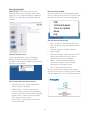
2. Setting up the monitor
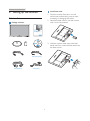
Install base stand
2. Setting up the monitor
1. Place the monitor face down on soft
and smooth surface taking care to avoid
scratching or damaging the screen.
2.1 Installation
2. Attach the base column with the monitor
until it clicks into position.
Package contents
Register your product and get support at
226V3LA
www.philips.com/welcome
Quick
Start
TH
70G2
1C181 3
01
B
3. Hold the monitor base stand with both
hands and firmly insert the base stand into
the base column.
M3
2
26V
2
SmartControl software
Monitor drivers
Audio cable (optional)
VGA (optional)
DVI (optional)
4