1
ENVIRONMENTAL RECEPTION EFFECTS
The temperature station obtains the accurate time with wireless technology. Same as all wireless
devices, the reception is maybe affected by the following circumstances:
•
•
•
•
•
•
•
•
•
Long transmitting distance
Nearby mountains and valleys
Among tall buildings
Near freeway, railway, airports, high voltage cable etc.
Near construction site
Inside concrete buildings
Near electrical appliances (computers, TV’s, etc)
Inside moving vehicles
Near metallic structures
Place the station at a location with optimal signal, i.e. close to a window and away from metal
surfaces or electrical appliances.
QUICK SETUP
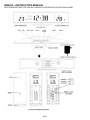
Step 1 Keep the station and outdoor sensor next to each other. Slide opens the battery cover at the
back of the outdoor sensor. Make sure the channel selector is set at position 1 (top position), then
insert 2 x AAA batteries (not included) into the outdoor sensor by observing the correct "+/-" polarity
signs inside the battery compartment. Replace the battery cover. Only one sensor is receivable by
the station.
Step 2 Insert the AC/DC adaptor to any 230V AC household outlet. Then insert the DC jack to the
back case of the station.
Step 3 Slide open the battery cover at the back of the station. Insert 2 x AAA batteries (not included)
into the outdoor sensor by observing the correct "+/-" polarity signs inside the battery compartment.
Replace the battery cover.
Step 4 Peel off the protective label on the front. The temperature station is ready to work for you.
The station will receive data signal from the outdoor sensor in few seconds. Then place the outdoor
sensor in a dry and shaded area outdoor.
Insert the holder to the bottom of the outdoor transmitter for desktop or insert it to the back of the
transmitter for wall mount purpose.
EN.2