1
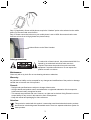
Step 3 (if applicable): Some mobile phones require the “Headset” option to be selected on the mobile
phone, for the retro hand set to function.
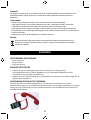
Step 4: Please ensure that volume on your mobile phone is set to HIGH. Also ensure that the retro
hand set volume is set to High (please see picture below).
Volume Button on the Retro Handset
Safety precautions:
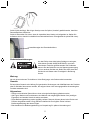
To reduce risk of electric shock, this product should ONLY be
opened by an authorized technician when service is
required. Disconnect the product from mains and other
equipment if a problem should occur. Do not expose the
product to water or moisture.
Maintenance:
Clean only with a dry cloth. Do not use cleaning solvents or abrasives.
Warranty:
No guarantee or liability can be accepted for any changes and modifications of the product or damage
caused due to incorrect use of this product.
General:
- Designs and specifications are subject to change without notice.
- All logos brands and product names are trademarks or registered trademarks of their respective
holders and are hereby recognized as such.
- This manual was produced with care. However, no rights can be derived. König Electronic can not
accept liability for any errors in this manual or their consequences.
- Keep this manual and packaging for future reference.
Attention:
This product is marked with this symbol. It means that used electrical and electronic products
should not be mixed with general household waste. There is a separate collections system for
these products.
3