1
ENGLISH
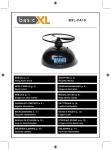
Flying Rocket Alarm Clock
ATTENTION!
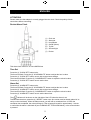
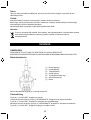
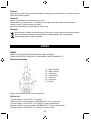
Please make sure the adapter is correctly plugged into the clock. Check the polarity of both
connections before connecting.
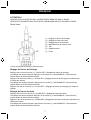
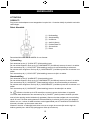
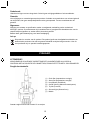
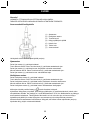
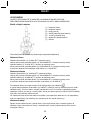
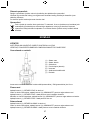
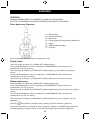
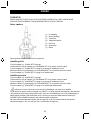
Rocket Alarm Clock
(1)
(2)
(3)
(4)
(5)
(6)
(7)
Clock set
Alarm set
Hour/Minute
On/Off (Alarm)
Try Me
Snooze/Light
Rocket
This alarm clock works on 12 hours AM/PM time
Time Set
Press the (1) “CLOCK SET” button twice.
The hours will flash. Press the (3) “HOUR/MINUTE” button to adjust the hour’s value.
Press the (1) “CLOCK SET” button once to skip to the minute settings.
The minutes will flash. Press the (3) “HOUR/MINUTE” button to adjust the minute’s value.
Press the (1) “CLOCK SET” button once to set the time.
Alarm Set
Press the (2) “ALARM SET” button twice.
The hours will flash. Press the (3) “HOUR/MINUTE” button to adjust the hour’s value.
Press the (2) “ALARM SET” button once to skip to the minute settings.
The minutes will flash. Press the (3) “HOUR/MINUTE” button to adjust the minute’s value.
Press the (2) “ALARM SET” button once to set the alarm time.
The
indicator will be shown on the right side of the LCD when the alarm is set.
To deactivate the alarm, press the (4) “ON/OFF” button once (the rocket must be already placed in its
cavity on the clock base). When the alarm sounds, you will hear a countdown from 10. After the
countdown has completed, the rocket will launch. Then a beep will sound for approximately 1 minute
or until either the alarm is switched off (see TURNING OFF THE ALARM below), or the snooze button
is pressed.
2