1
OE2i Headphones_ENG.fm Page 8 Friday, July 1, 2011 12:25 PM
Tab 6, 12
Tab 5, 11
Tab 4, 10, 16 Tab 3, 9, 15 Tab 2, 8, 14
English
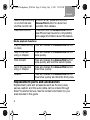
Switch to an incoming While on a call, press and hold the
or on-hold call and
Answer/End button for about two
end the current call
seconds, then release.
Use Voice Control
Press and hold the Answer/End button.
See iPhone User Guide for compatibility
and usage information about this feature.
Media playback functions
Play or pause a song Press and release the Answer/End button.
or video
Skip to the next
song or chapter
Press and release the Answer/End button
twice quickly.
Fast-forward
Press and release the Answer/End button
twice quickly and hold the second press.
Go to the previous
song or chapter
Press and release the Answer/End button
three times quickly.
Rewind
Press and release the Answer/End button
three times quickly and hold the third press.
Replacement parts and accessories
Replacement parts and accessories such as the carry case,
earcup cushion, and the audio cable can be ordered through
Bose® Customer Service. See the contact information for your
area included in this guide.
8