1
HP Pavilion dm4 Entertainment PC
Maintenance and Service Guide
© Copyright 2010 Hewlett-Packard
Development Company, L.P.
Microsoft and Windows are U.S. registered
trademarks of Microsoft Corporation.
Bluetooth is a trademark owned by its
proprietor and used by Hewlett-Packard
Company under license. SD Logo is a
trademark of its proprietor.
Bluetooth is a trademark owned by its
proprietor and used by Hewlett-Packard
Company under license. Intel and Core are
trademarks or registered trademarks of Intel
Corporation in the United States and other
countries. Microsoft and Windows are either
trademarks or registered trademarks of
Microsoft Corporation in the United States
and/or other countries. SD Logo is a
trademark of its proprietor.
The information contained herein is subject
to change without notice. The only
warranties for HP products and services are
set forth in the express warranty statements
accompanying such products and services.
Nothing herein should be construed as
constituting an additional warranty. HP shall
not be liable for technical or editorial errors
or omissions contained herein.
First Edition: April 2010
Document Part Number: 609889-001
MSG revision history
Revision
Publication date
Description
A
August 2010
●
Updated commodities in the following location:
●
Updated bottom components illustration in the following location: Bottom
components on page 15.
●
Updated the component replacement procedures for the hard drive in the
following location: Hard drive on page 57.
●
Updated the component replacement procedures for the optical disk drive in
the following location: Optical drive on page 60.
●
Added new supported hard drives to spare parts listings in the following
locations: Computer major components on page 19, Mass storage devices
on page 29, Sequential part number listing on page 31, Hard drive
on page 57.
●
Added newly supported WLAN modules to spare parts listings in the following
locations: Computer major components on page 19, Sequential part number
listing on page 31, WLAN module on page 50.
●
Updated hard drive specifications in the following location: Hard drive
specifications on page 99.
●
Added newly supported processors to spare parts listings in the following
locations: Computer major components on page 19, Sequential part number
listing on page 31, and Processor on page 90
●
Added newly supported system boards to spare parts listings in the following
locations: Computer major components on page 19, Sequential part number
listing on page 31, and System board on page 83
●
Added newly supported hard drives to spare parts listings in the following
locations: Computer major components on page 19, Sequential part number
listing on page 31, and Hard drive on page 57
●
Added newly supported keyboards to spare parts listings in the following
locations: Computer major components on page 19 and Sequential part
number listing on page 31
B
November 2010
iii
iv
MSG revision history
Safety warning notice
WARNING! To reduce the possibility of heat-related injuries or of overheating the computer, do not
place the computer directly on your lap or obstruct the computer air vents. Use the computer only on a
hard, flat surface. Do not allow another hard surface, such as an adjoining optional printer, or a soft
surface, such as pillows or rugs or clothing, to block airflow. Also, do not allow the AC adapter to
contact the skin or a soft surface, such as pillows or rugs or clothing, during operation. The computer
and the AC adapter comply with the user-accessible surface temperature limits defined by the
International Standard for Safety of Information Technology Equipment (IEC 60950).
v
vi
Safety warning notice
Table of contents
1 Product description ........................................................................................................... 1
2 External component identification ..................................................................................... 6
Identifying the hardware ...........................................................................................................
Top components .......................................................................................................................
TouchPad .................................................................................................................
Lights .......................................................................................................................
6
7
7
8
Power button and fingerprint reader ............................................................................ 9
Keys ...................................................................................................................... 10
Front components ................................................................................................................... 11
Right-side components ............................................................................................................ 11
Left-side components ............................................................................................................... 12
Display components ............................................................................................................... 14
Bottom components ................................................................................................................ 15
Wireless antennas .................................................................................................................. 16
Additional hardware components ............................................................................................ 17
3 Illustrated parts catalog .................................................................................................. 18
Serial number location ............................................................................................................ 18
Computer major components ................................................................................................... 19
Display assembly components ................................................................................................. 27
Plastics Kit ............................................................................................................................. 28
Mass storage devices ............................................................................................................. 29
Miscellaneous parts ................................................................................................................ 30
Sequential part number listing .................................................................................................. 31
4 Removal and replacement procedures ............................................................................ 38
Preliminary replacement requirements ....................................................................................... 38
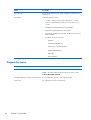
Tools required ......................................................................................................... 38
Service considerations ............................................................................................. 38
Plastic parts ............................................................................................. 38
Cables and connectors ............................................................................. 39
Drive handling ......................................................................................... 39
vii
Grounding guidelines .............................................................................................. 40
Electrostatic discharge damage .................................................................. 40
Packaging and transporting guidelines ........................................ 41
Workstation guidelines .............................................................. 41
Equipment guidelines ................................................................. 42
Component replacement procedures ........................................................................................ 43
Serial number ......................................................................................................... 43
Computer feet ......................................................................................................... 44
Battery ................................................................................................................... 45
SIM ....................................................................................................................... 46
Memory module ...................................................................................................... 47
RTC battery ............................................................................................................ 49
WLAN module ........................................................................................................ 50
WWAN module ..................................................................................................... 55
Hard drive ............................................................................................................. 57
Optical drive .......................................................................................................... 60
Keyboard ............................................................................................................... 62
Top cover ............................................................................................................... 64
Fingerprint reader board .......................................................................................... 67
Power button board ................................................................................................. 69
Display assembly .................................................................................................... 70
USB board ............................................................................................................. 76
Power connector cable ............................................................................................ 77
Bluetooth module .................................................................................................... 79
Speaker assembly ................................................................................................... 81
System board ......................................................................................................... 83
Fan/heat sink assembly ........................................................................................... 85
Processor ............................................................................................................... 90
5 Setup Utility .................................................................................................................... 92
Starting Setup Utility ............................................................................................................... 92
Using Setup Utility .................................................................................................................. 92
Changing the language of Setup Utility ...................................................................... 92
Navigating and selecting in Setup Utility .................................................................... 93
Displaying system information ................................................................................... 93
Restoring default settings in Setup Utility ..................................................................... 94
Exiting Setup Utility ................................................................................................. 94
Setup Utility menus ................................................................................................................. 95
Main menu ............................................................................................................. 95
Security menu ......................................................................................................... 95
System Configuration menu ...................................................................................... 95
Diagnostics menu .................................................................................................... 96
viii
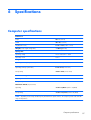
6 Specifications ................................................................................................................. 97
Computer specifications .......................................................................................................... 97
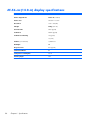
35.56-cm (14.0-in) display specifications .................................................................................. 98
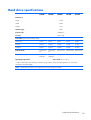
Hard drive specifications ........................................................................................................ 99
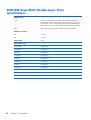
DVD±RW SuperMulti Double-Layer Drive specifications ............................................................ 100
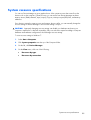
System resource specifications ............................................................................................... 101
7 Backup and recovery .................................................................................................... 102
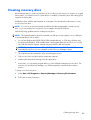
Creating recovery discs ........................................................................................................ 103
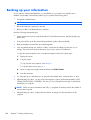
Backing up your information .................................................................................................. 104
Using Windows Backup and Restore ....................................................................... 105
Using system restore points ..................................................................................... 105
When to create restore points .................................................................. 105
Create a system restore point ................................................................... 105
Restore to a previous date and time .......................................................... 106
Performing a recovery .......................................................................................................... 106
Recovering from the recovery discs .......................................................................... 106
Recovering from the dedicated recovery partition (select models only) ......................... 106
8 Connector pin assignments ........................................................................................... 108
Audio-out (headphone) ......................................................................................................... 108
Audio-in (microphone) .......................................................................................................... 108
External monitor ................................................................................................................... 109
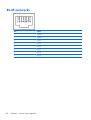
RJ-45 (network) .................................................................................................................... 110
HDMI ................................................................................................................................. 111
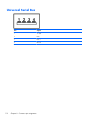
Universal Serial Bus .............................................................................................................. 112
9 Power cord set requirements ........................................................................................ 113
Requirements for all countries or regions ................................................................................. 113
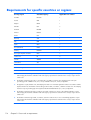
Requirements for specific countries or regions .......................................................................... 114
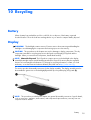
10 Recycling .................................................................................................................... 115
Battery ................................................................................................................................ 115
Display ............................................................................................................................... 115
Index ............................................................................................................................... 121
ix
x
1
Product description
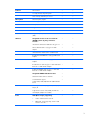
Category
Description
Discrete
UMA
Product Name
HP Pavilion dm4 Entertainment PC
√
√
Processors
Intel® Core™ i7 processor
640M, 2.80-GHz (SC turbo up to 3.33 GHz), 4-MB
L3 cache
√
√
620M, 2.66-GHz (SC turbo up to 3.33 GHz), 4-MB
L3 cache
√
√
580M, 2.66-GHz (SC turbo up to 3.33 GHz), 3-MB
L3 cache
√
√
560M, 2.66-GHz (SC turbo up to 3.2 GHz), 3-MB
L3 cache
√
√
540M, 2.53-GHz (SC turbo up to 3.06 GHz), 3-MB
L3 cache
√
√
520M, 2.40-GHz (SC turbo up to 2.93 GHz), 3-MB
L3 cache
√
√
480M, 2.66-GHz. 3-MB L3 cache
√
√
460M, 2.53-GHz 3-MB L3 cache
√
√
450M, 2.40-GHz, 3-MB L3 cache
√
√
430M, 2.26-GHz (SC turbo to 2.53-GHz) 3-MB L3
cache
√
√
Chipset
Intel HM55 Express
√
√
Graphics
Switchable discrete graphics
√
Intel Core i5 processors
ATi Park Pro (ATI Mobility Radeon™ HD5450 with
512-MB of dedicated video memory [64-MB×16
DDR3, 4 pcs, 800-MHz])
ATI Mobility Radeon™ HD6370 with 1024-MB of
dedicated video memory [128-MB×16 DDR3, 800MHz])
√
1
ATI Mobility Radeon™ HD5470 with 512-MB of
dedicated video memory (128-MB×16 DDR3, 800MHz)
√
√
Intel HD Graphics with shared video memory
(memory size is dynamic change)
Unified Memory Architecture (UMA
Panel
Memory
Hard drives
35.56-cm (14.0-in) HD LED BrightView (1366 x
768 resolution)
√
√
16:9 ultra wide aspect ratio
√
√
2 SODIMM slots
√
√
Customer-accessible and upgradable
√
√
Supports up to 8 GB of system memory
√
√
DDR3, 1066-MHz, dual-channel memory (DDR3
1333 MHz downgraded to DDR3 1066 MHz)
√
√
Supports the following configurations:
√
√
Accelerometer protection support
√
√
Supports the following 9.5-mm, 6.35-cm (2.5-in)
SATA hard drives
√
√
√
√
√
√
●
8 GB (4 GB×2)
●
6 GB (2 GB×2 + 4 GB+1)
●
4 MB (2 GB×2 or 4 GBx1)
●
3 GB (1 GB×1 + 2 GB×1)
●
2 GB (2 GB×1)
●
2 MB (1 GB×2)
●
1 GB (1 GB×1)
●
750 GB, 7200 and 5400 rpm
●
640 GB, 7200 and 5400 rpm
●
500 GB, 7200 rpm
●
320 GB, 7200 rpm
●
250 GB, 7200 rpm
●
160 GB Solid-state drive
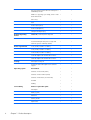
Supports the following solid-state drive:
●
Optical drives
160-GB
Supports the following 9.5-mm (0.50-in) tray load,
fixed, SATA drive:
DVD±R/RW SuperMulti DL Drive
2
Chapter 1 Product description
HP TrueVision
√
√
Low light, fixed (no tilt), activity LED
√
√
640 × 480 by 24 frames per second
√
√
One microphone, digital
√
√
Noise suppression
√
√
Dolby Advanced Audio, HD audio
√
√
Supports Microsoft Premium requirements
√
√
Altec Lansing speakers
√
√
Ethernet
Integrated 10/100/1000 network interface card
(NIC)
√
√
Wireless
Integrated wireless local area network
(WLAN) options by way of wireless
module:
√
√
Intel Centrino Wireless-N 1000 802.11b/g/n 1x2
√
√
Atheros AR9285 802.11 a/b/g/n 2x2 WiFi
adapter
√
√
Intel® Centrino® Advanced–N + WiMAX 6250
√
√
Broadcom 43224AGN 802.11a/b/g/draft-n WiFi
Adapter
√
√
Broadcom 4313AGN 802.11a/b/g/draft-n WiFi
Adapter
√
√
Broadcom 4313 802.11b/g/n 1x1 WiFi and 2070
Bluetooth 2.1+EDR Combo Adapter
√
√
Realink RT3090BC4 802.11b/g/n 1x1 WiFi and
Bluetooth 2.1+EDR Combo Adapter
√
√
Integrated WWAN and GPS function:
√
Qualcomm module with two antennas
√
5 band antenna support:
2100/1800/1900/800/900 with additional GPS
band
√
5-in-1 Digital Media Slot; supports SD, MMC, MS,
Mspro, xD
√
√
Supports mini versions of SD, MMC, and MS Duo
with adapter (adapter not included)
√
√
VGA (Dsub 15-pin) supporting:
√
√
Camera
Microphone
Audio
External media card
Ports
●
1600 x 1200 resolution at 75 Hz
●
VGA (Dsub 15-pin) supporting 1920 x 1200
resolution at 75 Hz
3
Keyboard/pointing
devices
Power requirements
Hot plug/unplug and auto detect for wide-aspect or
standard-aspect video
√
√
HDMI v1.3 supporting up to 1080p, 1920 x 1200
@ 60 Hz DVI mode
√
√
USB 2.0 (3)
√
√
RJ-45
√
√
Audio-in (microphone)
√
√
Audio-out (headphone)
√
√
Smart-pin AC adapter plug
√
√
35.56-cm (14.0-inch) full-size keyboard
√
√
Dura-coat island style keyboard
√
√
TouchPad with Mylar click pad cover (taps and
multitouch gestures enabled by default)
√
√
9-cell (93-Wh) 2.80-Ah Li-ion battery
√
√
6-cell (62-Wh) 2.80-Ah Li-ion battery
√
√
6-cell (55-Wh) 2.55-Ah Li-ion battery
√
√
√
65-W AC adapter with Smart-Pin DC connector
Security
Operating system
Serviceability
4
Chapter 1 Product description
90-W AC adapter with Smart-Pin DC connector
√
Kensington Security Lock
√
√
Fingerprint reader with Digital Persona Software
Support
√
√
Preinstalled:
√
√
Windows 7 Professional (64 bit)
√
√
Windows 7 Home Premium (64 bit)
√
√
Windows 7 Home Basic (32 and 64 bit)
√
√
FreeDOS
√
√
RedFlag
√
√
End-user replaceable parts:
√
√
AC adapter
√
√
Battery (system)
√
√
Hard drive
√
√
Memory module
√
√
Optical drive
√
√
Mini-card device
√
√
SIM
√
√
5
2
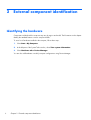
External component identification
Identifying the hardware
Components included with the computer may vary by region and model. The illustrations in this chapter
identify the standard features on most computer models.
To see a list of hardware installed in the computer, follow these steps:
1.
Select Start > My Computer.
2.
In the left pane of the System Tasks window, select View system information.
3.
Select Hardware tab > Device Manager.
You can also add hardware or modify computer configurations using Device Manager.
6
Chapter 2 External component identification
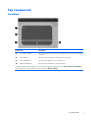
Top components
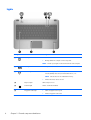
TouchPad
Component
Description
(1)
TouchPad on/off button
Turns the TouchPad on and off. Quickly double-tap the button to turn the TouchPad
on and off.
(2)
TouchPad zone*
Moves the pointer and selects or activates items on the screen.
(3)
Left TouchPad button*
Functions like the left button on an external mouse.
(4)
Right TouchPad button*
Functions like the right button on an external mouse.
*This table describes factory settings. To view or change pointing device preferences, select Start > Devices and Printers.
Then, right-click the icon representing your device, and select Mouse settings.
Top components
7
Lights
Component
(1)
Description
Power light
●
White: Power is on.
●
Blinking White: The computer is in the Sleep state.
NOTE:
Another power light is located on the left side of the computer.
(2)
Mute light
Amber: Speaker sound is off.
(3)
Wireless light
●
White: An integrated wireless device, such as a wireless local area
network (WLAN) device and/or a Bluetooth® device, is on.
NOTE:
●
8
Wireless devices are enabled at the factory.
Amber: All wireless devices are off.
(4)
Caps lock light
White: Caps lock is on.
(5)
TouchPad light
Amber: TouchPad is disabled.
(6)
Fingerprint reader light
●
White: Fingerprint read is good.
●
Amber: Fingerprint read is bad.
Chapter 2 External component identification
Power button and fingerprint reader
Component
Description
(1)
●
When the computer is off, press the button to turn on the
computer.
●
When the computer is on, press the button briefly to initiate
Sleep.
●
When the computer is in the Sleep state, press the button
briefly to exit Sleep.
●
When the computer is in Hibernation, press the button briefly
to exit Hibernation.
Power button*
If the computer has stopped responding and Windows® shutdown
procedures are ineffective, press and hold the power button for at
least 5 seconds to turn off the computer.
To learn more about your power settings, select Start > Control
Panel > System and Security > Power Options.
(2)
Fingerprint reader
Allows a fingerprint logon to Windows, instead of a password
logon.
*This table describes factory settings. For information about changing factory settings, refer to the user guides located in Help
and Support.
Top components
9
Keys
10
Component
Description
(1)
esc key
Displays system information when pressed in combination with the
fn key.
(2)
fn key
Displays system information when pressed in combination with the
esc key.
(3)
Windows logo key
Displays the Windows Start menu.
(4)
Windows applications key
Displays a shortcut menu for items beneath the pointer.
(5)
Action keys
Execute frequently used functions.
Chapter 2 External component identification
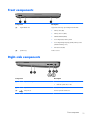
Front components
Component
Description
(1)
Supports the following optional digital card formats:
(2)
Digital Media Slot
Speakers (2)
●
Memory Stick (MS)
●
Memory Stick Pro (MSP)
●
MultiMediaCard (MMC)
●
Secure Digital (SD) Memory Card
●
Secure Digital High Capacity (SDHC) Memory Card
(standard and large size)
●
xD-Picture Card (XD)
Produce sound.
Right-side components
Component
(1)
Description
Optical drive light
●
On: The optical drive is being accessed.
●
Off: The optical drive is idle.
(2)
Optical drive
Reads/writes optical discs.
(3)
USB ports (2)
Connect optional USB devices.
Front components
11
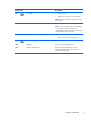
Component
(4)
(5)
Description
Battery light
Power connector
●
White: The computer is connected to external
power and the battery is fully charged.
●
Amber: The computer is connected to external
power and the battery is charging.
●
Blinking: A battery that is the only available
power source has reached a low battery level.
When the battery reaches a critical battery
level, the battery light continues to blink.
Connects an AC adapter.
Left-side components
Component
(1)
Description
Security cable slot
Attaches an optional security cable to the
computer.
NOTE: The security cable is designed to act as a
deterrent, but it may not prevent the computer from
being mishandled or stolen.
12
(2)
External monitor port
Connects an optional external display, such as a
monitor or projector, to the computer.
(3)
Audio-in (microphone) jack
Connects an optional computer headset
microphone, stereo array microphone, or monaural
microphone.
(4)
Audio-out (headphone) jack
Produces sound when connected to optional
powered stereo speakers, headphones, ear buds, a
headset, or television audio.
(5)
Drive light
●
White: The hard drive is being accessed.
●
Amber: HP ProtectSmart Hard Drive Protection
has temporarily parked the hard drive.
Chapter 2 External component identification
Component
(6)
Description
Power light
●
On: Power is on.
●
Blinking: The computer is in the Sleep state.
NOTE: Another power light is located next to the
power button.
(7)
Vents (3)
Enable airflow to cool internal components.
NOTE: The computer fan starts up automatically
to cool internal components and prevent
overheating. It is normal for the internal fan to cycle
on and off during routine operation.
(8)
RJ-45 (network) lights
●
White: The network is connected.
●
Amber: The network is showing activity.
(9)
RJ-45 (network) jack
Connects a network cable.
(10)
HDMI port
Connects an optional HDMI device.
(11)
Combo eSATA/USB port
Connects an optional USB device or highperformance eSATA components, such as an
eSATA external hard drive.
Left-side components
13
Display components
14
Component
Description
(1)
Internal display switch
Turns off the display if the display is closed while the power is on.
(2)
Webcam light
White: The webcam is in use.
(3)
Webcam
Records video and captures still photographs.
(4)
Internal microphone
Record sound.
Chapter 2 External component identification
Bottom components
Component
Description
(1)
Battery bay
Holds the battery.
(2)
Battery release latch
Releases the battery from the battery bay.
(3)
Vents (6)
Enable airflow to cool internal components.
NOTE: The computer fan starts up automatically to cool internal
components and prevent overheating. It is normal for the internal
fan to cycle on and off during routine operation.
(4)
Hard drive bay
Holds the hard drive.
(5)
Memory/Wireless module compartment
Holds a wireless LAN module, a wireless WAN module, and
memory modules.
NOTE: To prevent an unresponsive system, replace the wireless
module only with a wireless module authorized for use in the
computer by the governmental agency that regulates wireless
devices in your country or region. If you replace the module and
then receive a warning message, remove the module to restore
computer functionality, and then contact technical support through
Help and Support.
Bottom components
15
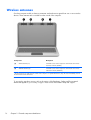
Wireless antennas
On select computer models, at least two antennas send and receive signals from one or more wireless
devices. These antennas are not visible from the outside of the computer.
Component
Description
(1)
WLAN antennas (2)*
Send and receive wireless signals to communicate with wireless
local area networks (WLANs).
(2)
WWAN antennas (2)*
Send and receive wireless signals to communicate with wireless
wide-area networks (WWANs).
*The antennas are not visible from the outside of the computer. For optimal transmission, keep the areas immediately around
the antennas free from obstructions.
To see wireless regulatory notices, refer to the section of the Regulatory, Safety and Environmental
Notices that applies to your country or region. These notices are located in Help and Support.
16
Chapter 2 External component identification
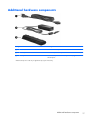
Additional hardware components
Component
Description
(1)
Power cord*
Connects an AC adapter to an AC outlet.
(2)
AC adapter
Converts AC power to DC power.
(3)
Battery*
Powers the computer when the computer is not plugged into
external power.
*Batteries and power cords vary in appearance by region and country.
Additional hardware components
17
3
Illustrated parts catalog
Serial number location
When ordering parts or requesting information, provide the computer serial number and model number
located in the battery bay of the computer.
18
●
Product name (1). This is the product name affixed to the front of the computer.
●
Serial number (s/n) (2). This is an alphanumeric identifier that is unique to each product.
●
Part number/Product number (p/n) (3). This number provides specific information about the
product's hardware components. The part number helps a service technician to determine what
components and parts are needed.
●
Warranty period (4). This number describes the duration (in years) of the warranty period for the
computer.
●
Model description (5). This is the alphanumeric identifier used to locate documents, drivers, and
support for the computer.
Chapter 3 Illustrated parts catalog
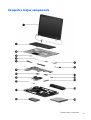
Computer major components
Computer major components
19
Item
Description
(1)
35.56 cm (14.0-in), WXGA, HD, BrightView display assembly
Spare part number
NOTE: See Display assembly components on page 27 for more display assembly
internal component spare part information.
(2)
20
For use in models equipped with WWAN
613667-001
For use in models not equipped with WWAN
608207-001
Keyboards
For use in Brazil
608222-201
For use in English and French Canada
608222-121
For use in Europe, the Middle East, and Asia
608022-B31
For use in France
608022-051
For use in Germany
608022-041
For use in Japan
608022-291
For use in Latin America
608222-161
For use in the Netherlands
608022-DH1
For use in Russia
608222–251
For use in Saudi Arabia
608022-171
For use in South Korea
608222-AD1
For use in Spain
608022-071
For use in Switzerland
608022-BG1
For use in Taiwan
608222-AB1
For use in Thailand
608222-281
For use in Turkey
608022-141
For use in the United Kingdom
608022-031
For use in the United States
608222-001
(3)
Top cover (includes Touchpad)
608224-001
(4)
Power button board (includes cable)
608226-001
(5)
Fingerprint reader board
608225-001
(6)
Speaker assembly (includes cable)
608232-001
(7)
USB board (includes cable)
608277-001
(8)
Power connector cable (includes power connector and cable)
608273-001
(9)
System board (includes replacement thermal material)
For use in models equipped with 1 GB of HD5450 discrete graphics memory
616244-001
For use in models equipped with 512 MB of HD5450 discrete graphics memory
608203-001
Chapter 3 Illustrated parts catalog
Item
(10)
Description
Spare part number
For use in models equipped with 512 MB of HD5470 discrete graphics memory
621044-001
For use in models equipped with 1 GB of HD5470 discrete graphics memory
621045-001
For use in models equipped with 512 MB of HD6370 discrete graphics memory
630713-001
For use in models equipped with 1 GB of HD6370 discrete graphics memory
630714-001
For use in models equipped with UMA graphics
608204-001
For use in models equipped with WiMAX and UMA graphics
633863-001
Processor (includes replacement thermal material)
Intel Core i7 processor, Dual Core
●
640M, 2.80Hz (SC turbo up to 3.33-GHz), 4-MB L3 cache
625826-001
●
620M, 2.26-GHz (SC turbo up to 3.33-GHz), 4-MB L3 cache)
587259-001
Intel Core i5 processors, Dual Core
(11)
(12)
●
580M, 2.66-GHz (SC turbo up to 3.33-GHz), 3-MB L3 cache)
625825-001
●
560M, 2.66-GHz (SC turbo up to 3.2-GHz) 3-MB L3 cache)
625824-001
●
540M, 2.53-GHz, (SC turbo up to 3.06-GHz) 3-MB L3 cache)
594188-001
●
520M, 2.40-GHz (SC turbo up to 2.93-GHz), 3-MB L3 cache)
594187-001
●
480M, 2.66-GHz, 3-MB L3 cache
634693-001
●
460M, 2.53-GHz, 3-MB L3 cache
626039-001
●
450M, 2.40-GHz, 3-MB L3 cache
613585-001
●
430M, 2.26-GHz, 3-MB L3 cache
597624-001
Fan/heatsink assembly (includes replacement thermal material)
For use in models equipped with UMA graphics
608229-001
For use in models equipped with discrete graphics
608231-001
Bluetooth module
537921-001
NOTE: The Bluetooth module cable is included in the Misc Cable Kit, spare part number
608227-001.
(13)
HP un2420 Broadband Module (WWAN)
(14)
WLAN modules
531993-001
Atheros AR9285 802.11 a/b/g/n 2x2 WiFi adapter
580101-001
For use in Canada, the Cayman Islands, Guam, Puerto Rico, the United States, and the US
Virgin Islands
Computer major components
21
Item
Description
Spare part number
Atheros AR9285 802.11 a/b/g/n 2x2 WiFi adapter
580101-002
Afghanistan, Albania, Algeria, Andorra, Angola, Antigua and Barbuda, Argentian,
Armenia, Aruba, Australia, Austria, Azerbaijan, Bahamas, Bahrain, Barbados, Belgium,
Belize, Benin, Bermuda, Bhutan, Bosnia and Herzegovina, Botswana, Brazil, British Virgin
Islands, Brunei, Bulgaria, Burkina Faso, Burundi, Cambodia, Cameroon, Cape Verde,
Central African Republic, Chad, Chile, People's Republic of China, Colombia, Comoros,
Congo, Costa Rica, Croatia, Cyprus, Czech Republic, Denmark, Djibouti, Dominica,
Dominican Republic, East Timor, Ecuador, Egypt, El Salvador, Equatorial Guinea, Eritrea,
Estonia, Ethiopia, Fiji, Finland, France, French Guiana, Gabon, Gambia, Georgia,
Germany, Ghana, Gibraltar, Greece, Grenada, Guadeloupe, Guatemala, Guinea,
Guinea-Bissau, Guyana, Haiti, Honduras, Hong Kong, Hungary, Iceland, India, Indonesia,
Ireland, Italy, Ivory Coast, Jamaica, Japan, Jordan, Kazakhstan, Kenya, Kiribati, Kuwait,
Kyrgyzstan, Laos, Latvia, Lebanon, Lesotho, Liberia, Liechtenstein, Lithuania, Luxembourg,
Macedonia, Madagascar, Malawi, Malaysia, Maldives, Mali, Malta, Marshall Islands,
Martinique, Mauritania, Mauritius, Mexico, Micronesia, Monaco, Mongolia, Montenegro,
Morocco, Mozambique, Namibia, Nauru, Nepal, the Nether Antilles, Netherlands, New
Zealand, Nicaragua, Niger, Nigeria, Norway, Oman, Palau, Panama, Papua New
Guinea, Paraguay, Peru, Philippines, Poland, Portugal, Republic of Moldova, Romania,
Rwanda, Samoa, San Marino, Sao Tome and Principe, Saudi Arabia, Senegal, Serbia
and Montenegro, Seychelles, Sierra Leone, Singapore, Slovakia, Slovenia, Solomon
Islands, Somalia, South Africa, South Korea, Spain, Sri Lanka, St. Kitts and Nevis, St.
Lucia, St. Vincent and the Grenadines, Suriname, Swaziland, Sweden, Switzerland, Syria,
Taiwan, Tajikistan, Tanzania, Thailand, Togo, Tonga, Trinidad and Tobago, Tunisia,
Turkey, Turkmenistan, Tuvalu, Uganda, United Arab Emirates, United Kingdom, Uruguay,
Uzbekistan, Vanuatu, Venezuela, Vietnam, Yemen, Zaire, Zambia, and Zimbabwe
Intel Centrino Wireless-N 1000 802.11b/g/n 1x2
593530-001
For use in Andorra, Antigua and Barbuda, Argentina, Aruba, Australia, Austria,
Azerbaijan, Bahamas, Bahrain, Barbados, Belgium, Bermuda, Bolivia, Bosnia and
Herzegovina, Brazil, Brunei, Bulgaria, Canada, the Cayman Islands, Chile, People's
Republic of China, Colombia, Costa Rica, Croatia, Cyprus, the Czech Republic, Denmark,
the Dominican Republic, Ecuador, Egypt, El Salvador, Estonia, Finland, France, French
Guiana, Georgia, Germany, Ghana, Greece, Guadeloupe, Guam, Guatemala, Haiti,
Honduras, Hong Kong, Hungary, Iceland, India, Indonesia, Ireland, Israel, Italy, Ivory
Coast, Jamaica, Japan, Jordan, Kenya, Kuwait, Kyrgyzstan, Latvia, Lebanon, Liechtenstein,
Lithuania, Luxembourg, Malawi, Malaysia, Malta, Martinique, Mauritius, Mexico,
Monaco, Montenegro, Morocco, the Nether Antilles, Netherlands, New Zealand,
Nicaragua, Nigeria, Norway, Oman, Pakistan, Panama, Paraguay, Peru, Philippines,
Poland, Portugal, Puerto Rico, Qatar, Romania, San Marino, Saudi Arabia, Senegal,
Singapore, Slovakia, Slovenia, South Africa, South Korea, Spain, Sri Lanka, Sweden,
Switzerland, Taiwan, Tanzania, Thailand, Trinidad and Tobago, Turkey, Ukraine, United
Arab Emirates, United Kingdom, Uruguay, the US Virgin Islands, the United States,
Venezuela, and Vietnam
Broadcom 43224AGN 802.11a/b/g/draft-n WiFi Adapter
For use in Antigua and Barbuda, Aruba, the Bahamas, Barbados, Belize, Canada, Guam,
Guinea, Haiti, Jamaica, the Nether Antilles, Puerto Rico, St. Kitts and Nevis, St. Lucia, St.
Vincent and the Grenadines, Suriname, the US Virgin Islands, and the United States
22
Chapter 3 Illustrated parts catalog
582564-001
Item
Description
Spare part number
Broadcom 43224AGN 802.11a/b/g/draft-n WiFi Adapter
582564-002
For use in Albania, Algeria, Andorra, Angola, Argentina, Armenia, Australia, Austria,
Azerbaijan, Bahrain, Belarus, Belgium, Benin, Bermuda, Bhutan, Bolivia, Bosnia and
Herzegovina, Botswana, Brazil, the British Virgin Islands, Brunei, Bulgaria, Burkina Faso,
Burundi, Cambodia, Cameroon, Cape Verde, the Cayman Islands, Central African
Republic, Chad, Chile, People's Republic of China, Colombia, Comoros, Congo, Costa
Rica, Croatia, Cyprus, the Czech Republic, Denmark, Djibouti, Dominica, the Dominican
Republic, East Timor, Ecuador, Egypt, El Salvador, Equitorial Guinea, Eritrea, Estonia,
Ethiopia, Fiji Finland, France, French Guiana, Gabon, Gambia, Georgia, Germany,
Ghana, Gibraltar, Greece, Grenada, Guadeloupe, Guatemala, Guinea, Guinea-Bissa,
Honduras, Hong Kong, Hungary, Iceland, India, Ireland, Italy, Ivory Coast, Japan, Jordan,
Kazakhstan, Kenya, Kiribati, Kuwait, Kyrgyzstan, Laos, Latvia, Lebanon, Lesotho, Liberia,
Liechtenstein, Lithuania, Luxembourg, Macedonia, Madagascar, Malawi, Malaysia
Maldives, Mali, Malta, Marshall Islands, Martinique, Mauritania, Mauritius, Mexico,
Micronesia, Monaco, Mongolia, Montenegro, Morocco, Mozambique, Namibia, Nauru,
Nepal, Netherlands, New Zealand, Nicaragua, Niger, Nigeria, Norway, Oman, Palau,
Panama, Papua New Guinea, Paraguay, Peru, Philippines, Poland, Portugal, Qatar,
Republic of Moldova, Romania, Rwanda, Samoa, San Marino, Sao Tome and Principe,
Saudi Arabia, Senegal, Serbia and Montenegro, Seychelles, Sierra Leone, Singapore,
Slovakia, Slovenia, Solomon Islands, Somalia, South Africa, South Korea, Spain, Sri
Lanka, Swaziland, Sweden, Switzerland, Taiwan, Tajikistan, Tanzania, Thailand, Togo,
Tonga, Trinidad and Tobago, Tunisia, Turkey, Turkmenistan, Tuvalu, Uganda, United Arab
Emirates, United Kingdom, Uruguay, Uzbekistan, Vanuatu, Venezuela, Vietnam, Yemen,
Zaire, Zambia, and Zimbabwe
Broadcom 4313AGN 802.11a/b/g/draft-n WiFi Adapter
593836-001
For use in Afghanistan, Albania, Algeria, Andorra, Angola, Antigua and Barbuda,
Argentina, Armenia, Aruba, Australia, Austria, Azerbaijan, Bahamas, Bahrain,
Bangladesh, Barbados, Belarus, Belgium, Belize, Benin, Bermuda, Bhutan, Bolivia, Bosnia
and Herzegovina, Botswana, Brazil, the British Virgin Islands, Brunei, Bulgaria, Burkina
Faso, Burundi, Cambodia, Cameroon, Canada, Cape Verde, the Cayman Islands, Central
African Republic, Chad, People's Republic of China, Colombia, Comoros, Congo, Costa
Rica, Croatia, Cyprus, the Czech Republic, Denmark, Djibouti, Dominica, the Dominican
Republic, East Timor, Ecuador, Egypt, El Salvador, Equitorial Guinea, Eritrea, Estonia,
Ethiopia, Fiji, Finland, France, French Guiana, Gabon, Gambia, Georgia, Germany,
Ghana, Gibraltar, Greece, Grenada, Guadeloupe, Guam, Guatemala, Guinea, GuineaBissa, Guyana, Haiti, Honduras, Hong Kong, Hungary, Iceland, India, Iraq, Ireland, Israel,
Italy, Ivory Coast, Jamaica, Japan, Jordan, Kazakhstan, Kenya, Kiribati, Kuwait,
Kyrgyzstan, Laos, Latvia, Lebanon, Lesotho, Liberia, Martinique, Liechtenstein, Lithuania,
Luxembourg, Macedonia, Madagascar, Malawi, Malaysia, Maldives, Mali, Malta,
Marshall Islands, Mauritania, Mauritius, Mexico, Micronesia, Monaco, Mongolia,
Montenegro, Morocco, Mozambique, Namibia, Nauru, Nepal, the Nether Antilles, the
Netherlands, New Zealand, Nicaragua, Niger, Nigeria, Norway, Oman, Pakistan, Palau,
Panama, Papua New Guinea, Paraguay, Puerto Rico, Peru, Philippines, Poland, Portugal,
Qatar, Republic of Moldova, Romania, Russia, Rwanda, Samoa, San Marino, Sao Tome
and Principe, Saudi Arabia, Senegal, Serbia and Montenegro, Seychelles, Sierra Leone,
Singapore, Slovakia, Slovenia, Solomon Islands, Somalia, South Africa, South Korea,
Spain, Sri Lanka, St. Kitts and Nevis, St. Lucia, St. Vincent and the Grenadines, Suriname,
Swaziland, Sweden, Switzerland, Syria, Taiwan, Tajikistan, Tanzania, Thailand, Togo,
Tonga, Trinidad and Tobago, Tunisia, Turkey, Turkmenistan, Tuvalu, Uganda, Ukraine, the
United Arab Emirates, the United Kingdom, Uruguay, the United States, the US Virgin
Islands, Uzbekistan, Vanuatu, Venezuela, Vietnam, Yemen, Zaire, Zambia, and Zimbabwe
Computer major components
23
Item
Description
Spare part number
Broadcom 4313 802.11b/g/n 1x1 WiFi and 2070 Bluetooth 2.1+EDR
Combo Adapter
600370-001
For use in Afghanistan, Albania, Algeria, Andorra, Angola, Antigua and Barbuda,
Argentina, Armenia, Aruba, Australia, Austria, Azerbaijan, Bahamas, Bahrain,
Bangladesh, Barbados, Belarus, Belgium, Belize, Benin, Bermuda, Bhutan, Bolivia, Bosnia
and Herzegovina, Botswana, Brazil, the British Virgin Islands, Brunei, Bulgaria, Burkina
Faso, Burundi, Cambodia, Cameroon, Canada, Cape Verde, the Cayman Islands, Central
African Republic, Chad, Chile, the People's Republic of China, Colombia, Comoros,
Congo, Costa Rica, Croatia, Cyprus, Czech Republic, Denmark, Djibouti, Dominica, the
Dominican Republic, East Timor, Ecuador, Egypt, El Salvador, Equitorial Guinea, Eritrea,
Estonia, Ethiopia, Fiji, Finland, France, French Guiana, Gabon, Gambia, Georgia,
Germany, Ghana, Gibraltar, Greece, Grenada, Guadeloupe, Guam, Guatemala, Guinea,
Guinea-Bissa, Guyana, Haiti, Honduras, Hong Kong, Hungary, Iceland, India, Indonesia,
Iraq, Ireland, Israel, Italy, Ivory Coast, Jamaica, Japan, Jordan, Kazakhstan, Kenya,
Kiribati, Kuwait, Kyrgyzstan, Laos, Latvia, Lebanon, Lesotho, Liberia, Liechtenstein,
Lithuania, Luxembourg, Macedonia, Madagascar, Malawi, Malaysia, Maldives, Mali,
Malta, Marshall Islands, Martinique, Mauritania, Mauritius, Mexico, Micronesia, Monaco,
Mongolia, Montenegro, Morocco, Mozambique, Namibia, Nauru, Nepal, the Nether
Antilles, the Netherlands, New Zealand, Nicaragua, Niger, Nigeria, Norway, Oman,
Pakistan, Palau, Panama, Papua New Guinea, Paraguay, Peru, Philippines, Poland,
Portugal, Puerto Rico, Qatar, the Republic of Moldova, Romania, Russia, Rwanda, Samoa,
San Marino, Sao Tome and Principe, Saudi Arabia, Senegal, Serbia and Montenegro,
Seychelles, Sierra Leone, Singapore, Slovakia, Slovenia, Solomon Islands, Somalia, South
Africa, South Korea, Sri Lanka, St. Kitts and Nevis, St. Lucia, St. Vincent and the
Grenadines, Suriname, Swaziland, Sweden, Switzerland, Taiwan, Tajikistan, Tanzania,
Thailand, Togo, Tonga, Trinidad and Tobago, Tunisia, Turkey, Turkmenistan, Tuvalu,
Uganda, Ukraine, the United Arab Emirates, the United Kingdom, the United States,
Uruguay, the US Virgin Islands, Uzbekistan, Vanuatu, Venezuela, Vietnam, Yemen, Zaire,
Zambia, and Zimbabwe
24
Chapter 3 Illustrated parts catalog
Item
Description
Spare part number
Realink RT3090BC4 802.11b/g/n 1x1 WiFi and Bluetooth 2.1+EDR Combo
Adapter
602992-001
For use in Afghanistan, Albania, Algeria, Andorra, Angola, Antigua and Barbuda,
Argentina, Armenia, Aruba, Australia, Austria, Azerbaijan, Bahamas, Bahrain, Barbados,
Belarus, Belgium, Belize, Benin, Bermuda, Bhutan, Bolivia, Bosnia and Herzegovina,
Botswana, Brazil, British Virgin Islands, Brunei, Bulgaria, Burkina Faso, Burundi,
Cambodia, Cameroon, Canada, Cape Verde, the Cayman Islands, Central African
Republic, Chad, Chile, the People's Republic of China, Colombia, Comoros, Congo, Costa
Rica, Croatia, Cyprus, the Czech Republic, Denmark, Djibouti, Dominica, the Dominican
Republic, East Timor, Ecuador, Egypt, El Salvador, Equitorial Guinea, Eritrea, Estonia,
Ethiopia, Fiji, Finland, France, French Guiana, Gabon, Gambia, Georgia, Germany,
Ghana, Gibraltar, Greece, Grenada, Guadeloupe, Guam, Guatemala, Guinea, GuineaBissa, Guyana, Haiti, Honduras, Hong Kong, Hungary, Iceland, India, Indonesia, Ireland,
Israel, Italy, Ivory Coast, Jamaica, Japan, Jordan, Kazakhstan, Kenya, Kiribati, Kuwait,
Kyrgyzstan, Laos, Latvia, Lebanon, Lesotho, Liberia, Liechtenstein, Lithuania, Luxembourg,
Macedonia, Madagascar, Malawi, Malaysia, Maldives, Mali, Malta, the Marshall Islands,
Martinique, Mauritania, Mauritius, Mexico, Micronesia, Monaco, Mongolia, Montenegro,
Morocco, Mozambique, Namibia, Nauru, Nepal, the Nether Antilles, the Netherlands,
New Zealand, Nicaragua, Niger, Nigeria, Norway, Oman, Pakistan, Palau, Panama,
Papua New Guinea, Paraguay, Peru, the Philippines, Poland, Portugal, Puerto Rico, the
Republic of Moldova, Romania, Russia, Rwanda, Samoa, San Marino, Sao Tome and
Principe, Saudi Arabia, Senegal, Serbia and Montenegro, Seychelles, Sierra Leone,
Singapore, Slovakia, Slovenia, the Solomon Islands, Somalia, South Africa, South Korea,
Spain, Sri Lanka, St. Kitts and Nevis, St. Lucia, St. Vincent and Grenadines, Suriname,
Swaziland, Sweden, Switzerland, Syria, Taiwan, Tajikistan, Tanzania, Thailand, Togo,
Tonga, Trinidad and Tobago, Tunisia, Turkey, Turkmenistan, Tuvalu, Uganda, Ukraine, the
United Arab Emirates, the United Kingdom, Uruguay, the US Virgin Islands, the United
States, Uzbekistan, Vanuatu, Venezuela, Vietnam, Yemen, Zaire, Zambia, and Zimbabwe
Intel® Centrino® Advanced–N + WiMAX 6250
619997-001
Intel® Centrino® Advanced–N + WiMAX 6250 for use in the United States
(15)
(16)
Memory modules (PC3-10600, 1333-MHz)
4096-MB
599092-001
2048-MB
598856-001
1024-MB
598859-001
Battery
9-cell, 93-WH (2.80-Ah) Li-ion
593550-001
6-cell, 62-WH (2.80-Ah) Li-ion
593562-001
6-cell, 55-WH (2.55-Ah) Li-ion
593554-001
(17)
Base enclosure (includes modem cable and optical drive cable)
608223-001
(18)
Hard drive (includes hard drive bracket)
NOTE:
The hard drive cable is included in the Misc Cable Kit, spare part number 608227-001.
750-GB, 5400 RPM (replaces 622394-001)
603787-001
750-GB, 5400 RPM (replaced by 603787-001)
622394-001
750-GB, 7200 RPM
633252-001
Computer major components
25
Item
(19)
26
Description
Spare part number
640-GB, 5400 RPM (replaces 608219-001)
603785-001
640-GB, 5400 RPM (replaced by 603785-001)
608219-001
640-GB, 7200 RPM
621046-001
500-GB, 7200 RPM
608218-001
320-GB, 7200 RPM
608217-001
250-GB, 7200 RPM
608216-001
160-GB solid-state drive
608215-001
DVD±RW SuperMulti DL Drive (12.7 mm optical drive, fixed)
608221-001
Chapter 3 Illustrated parts catalog
Display assembly components
Item
Description
Spare part number
(1)
Display bezel
608209-001
(2)
Webcam module
615744-001
(3)
Display panel, Brightview, high-definition, 35.56 cm (14.0-in) (includes display panel
cable)
For use in models without WWAN
608206-001
For use in models with WWAN
613666-001
Display assembly components
27
Item
Description
Spare part number
(3)
Display hinge cover
608210-001
(4a)
Webcam cable
(4b)
Antennas and cables
(5)
Display hinge cover
608210-001
(6)
Display bracket
608214-001
(7)
Display back cover
608208-001
Display Screw Kit (not illustrated; includes screws and screw covers)
608212-001
Display cable kit (not illustrated)
608211-001
Display cable kit for models equipped with WWAN (not illustrated)
630284-001
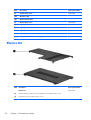
Plastics Kit
Item
28
Description
Spare part number
Plastics kit
608233-001
(1)
Wireless/memory module mini-card compartment cover (includes captive screw)
(2)
Hard drive bay cover (includes captive screws)
Chapter 3 Illustrated parts catalog
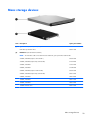
Mass storage devices
Item
Description
(1)
Optical drive (12.7 mm, SATA, fixed)
DVD±RW SuperMulti DL Drive
(2)
Spare part number
608221-001
Hard drive (include hard drive bracket)
NOTE:
The hard drive cable is included in the Misc Cable Kit, spare part number 608227-001.
750-GB, 5400 RPM (replaces 622394-001 )
603787-001
750-GB, 5400 RPM (replaced by 603787-001)
622394-001
750-GB, 7200 RPM
633252-001
640-GB, 7200 RPM
621046-001
640-GB, 5400 RPM (replaces 608219-001)
603785-001
640-GB, 5400 RPM (replaced by 603785-001)
608219-001
500-GB, 7200 RPM
608218-001
320-GB, 7200 RPM
608217-001
250-GB, 7200 RPM
608216-001
160-GB solid-state drive
608215-001
Mass storage devices
29
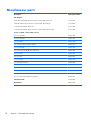
Miscellaneous parts
Description
Spare part number
AC adapters
90-W Smart AC adapter with power factor correction (PFC), RC/V 3W
613153-001
90-W AC adapter with power factor correction (PFC), RC/V EM 3W
613160-001
65-W Smart AC adapter, RC/V 3W
613152-001
65-W Smart AC adapter with power factor correction (PFC), RC/V EM 3W
613161-001
Power cord, AC, 3 wire, black, 1.83-m
30
For use in Argentina
490371-D01
For use in Australia
490371-011
For use in Brazil
490371-202
For use in the People's Republic of China
490371-AA1
For use in Denmark
490371-081
For use in Europe, the Middle East, and Africa
490371-021
For use in India
490371-D61
For use in Italy
490371-061
For use in Japan
490371-291
For use in North America
490371-001
For use in South Korea
490371-AD1
For use in Switzerland
490371-111
For use in Taiwan
490371-AB1
For use in Thailand
490371-201
For use in the United Kingdom and Singapore
490371-031
Thermal pad kit
634366-001
RTC battery
449137-001
Chapter 3 Illustrated parts catalog
Description
Spare part number
Rubber feet
608228-001
Screw Kit
608234-001
●
Phillips M2.0x2.0 broadhead screw
●
Phillips M2.0x3.0 screw
●
Phillips M2.0x4.0 screw
●
Phillips M2.0x5.0 screw
●
Phillips M2.5x5.0 screw
●
Phillips M2.5x6.5 screw
●
Phillips M2.5x7.0 screw
●
Phillips M3.0x3.0 screw
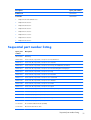
Sequential part number listing
Spare part
number
Description
449137-001
RTC battery
490371-001
Power cord, AC, 3-pin, black, 1.83-m, for use in North America
490371-011
Power cord, AC, 3-pin, black, 1.83-m, for use in Australia
490371-021
Power cord, AC, 3-pin, black, 1.83-m, for use in Europe, the Middle East, and Africa
490371-031
Power cord, AC, 3-pin, black, 1.83-m, for use in the United Kingdom and Singapore
490371-061
Power cord, AC, 3-pin, black, 1.83-m, for use in Italy
490371-081
Power cord, AC, 3-pin, black, 1.83-m, for use in Demmark
490371-111
Power cord, AC, 3-pin, black, 1.83-m, for use in Switzerland
490371-201
Power cord, AC, 3-pin, black, 1.83-m, for use in Thailand
490371-202
Power cord, AC, 3-pin, black, 1.83-m, for use in Brazil
490371-291
Power cord, AC, 3-pin, black, 1.83-m, for use in Japan
490371-AA1
Power cord, AC, 3-pin, black,1.83-m, for use in the People's Republic of China
490371-AB1
Power cord, AC, 3-pin, black,1.83-m, for use in Taiwan
490371-AD1
Power cord, AC, 3-pin, black,1.83-m, for use in South Korea
490371-D01
Power cord, AC, 3-pin, black,1.83-m, for use in Argentina
490371-D61
Power cord, AC, 3-pin, black,1.83-m, for use in India
531993-001
HP un2420 Broadband Module (WWAN)
537921-001
Bluetooth module without cable
Sequential part number listing
31
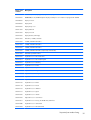
32
Spare part
number
Description
580101-001
Atheros AR9285 802.11 a/b/g/n 2x2 WiFi adapter for use in Canada, the Cayman Islands, Guam, Puerto
Rico, the United States, and the US Virgin Islands
580101-002
Atheros AR9285 802.11 a/b/g/n 2x2 WiFi adapter for use in Afghanistan, Albania, Algeria, Andorra,
Angola, Antigua and Barbuda, Argentian, Armenia, Aruba, Australia, Austria, Azerbaijan, Bahamas,
Bahrain, Barbados, Belgium, Belize, Benin, Bermuda, Bhutan, Bosnia and Herzegovina, Botswana, Brazil,
British Virgin Islands, Brunei, Bulgaria, Burkina Faso, Burundi, Cambodia, Cameroon, Cape Verde, Central
African Republic, Chad, Chile, People's Republic of China, Colombia, Comoros, Congo, Costa Rica,
Croatia, Cyprus, Czech Republic, Denmark, Djibouti, Dominica, Dominican Republic, East Timor, Ecuador,
Egypt, El Salvador, Equatorial Guinea, Eritrea, Estonia, Ethiopia, Fiji, Finland, France, French Guiana,
Gabon, Gambia, Georgia, Germany, Ghana, Gibraltar, Greece, Grenada, Guadeloupe, Guatemala,
Guinea, Guinea-Bissau, Guyana, Haiti, Honduras, Hong Kong, Hungary, Iceland, India, Indonesia, Ireland,
Italy, Ivory Coast, Jamaica, Japan, Jordan, Kazakhstan, Kenya, Kiribati, Kuwait, Kyrgyzstan, Laos, Latvia,
Lebanon, Lesotho, Liberia, Liechtenstein, Lithuania, Luxembourg, Macedonia, Madagascar, Malawi,
Malaysia, Maldives, Mali, Malta, Marshall Islands, Martinique, Mauritania, Mauritius, Mexico, Micronesia,
Monaco, Mongolia, Montenegro, Morocco, Mozambique, Namibia, Nauru, Nepal, the Nether Antilles,
Netherlands, New Zealand, Nicaragua, Niger, Nigeria, Norway, Oman, Palau, Panama, Papua New
Guinea, Paraguay, Peru, Philippines, Poland, Portugal, Republic of Moldova, Romania, Rwanda, Samoa,
San Marino, Sao Tome and Principe, Saudi Arabia, Senegal, Serbia and Montenegro, Seychelles, Sierra
Leone, Singapore, Slovakia, Slovenia, Solomon Islands, Somalia, South Africa, South Korea, Spain, Sri
Lanka, St. Kitts and Nevis, St. Lucia, St. Vincent and the Grenadines, Suriname, Swaziland, Sweden,
Switzerland, Syria, Taiwan, Tajikistan, Tanzania, Thailand, Togo, Tonga, Trinidad and Tobago, Tunisia,
Turkey, Turkmenistan, Tuvalu, Uganda, United Arab Emirates, United Kingdom, Uruguay, Uzbekistan,
Vanuatu, Venezuela, Vietnam, Yemen, Zaire, Zambia, and Zimbabwe
582564-001
Broadcom 43224AGN 802.11a/b/g/draft-n WiFi Adapter for use in Antigua and Barbuda, Aruba, the
Bahamas, Barbados, Belize, Canada, Guam, Guinea, Haiti, Jamaica, the Nether Antilles, Puerto Rico, St.
Kitts and Nevis, St. Lucia, St. Vincent and the Grenadines, Suriname, the US Virgin Islands, and the United
States
582564-002
Broadcom 43224AGN 802.11a/b/g/draft-n WiFi Adapter for use in Albania, Algeria, Andorra, Angola,
Argentina, Armenia, Australia, Austria, Azerbaijan, Bahrain, Belarus, Belgium, Benin, Bermuda, Bhutan,
Bolivia, Bosnia and Herzegovina, Botswana, Brazil, the British Virgin Islands, Brunei, Bulgaria, Burkina Faso,
Burundi, Cambodia, Cameroon, Cape Verde, the Cayman Islands, Central African Republic, Chad, Chile,
People's Republic of China, Colombia, Comoros, Congo, Costa Rica, Croatia, Cyprus, the Czech Republic,
Denmark, Djibouti, Dominica, the Dominican Republic, East Timor, Ecuador, Egypt, El Salvador, Equitorial
Guinea, Eritrea, Estonia, Ethiopia, Fiji Finland, France, French Guiana, Gabon, Gambia, Georgia,
Germany, Ghana, Gibraltar, Greece, Grenada, Guadeloupe, Guatemala, Guinea, Guinea-Bissa, Honduras,
Hong Kong, Hungary, Iceland, India, Ireland, Italy, Ivory Coast, Japan, Jordan, Kazakhstan, Kenya, Kiribati,
Kuwait, Kyrgyzstan, Laos, Latvia, Lebanon, Lesotho, Liberia, Liechtenstein, Lithuania, Luxembourg,
Macedonia, Madagascar, Malawi, Malaysia Maldives, Mali, Malta, Marshall Islands, Martinique,
Mauritania, Mauritius, Mexico, Micronesia, Monaco, Mongolia, Montenegro, Morocco, Mozambique,
Namibia, Nauru, Nepal, Netherlands, New Zealand, Nicaragua, Niger, Nigeria, Norway, Oman, Palau,
Panama, Papua New Guinea, Paraguay, Peru, Philippines, Poland, Portugal, Qatar, Republic of Moldova,
Romania, Rwanda, Samoa, San Marino, Sao Tome and Principe, Saudi Arabia, Senegal, Serbia and
Montenegro, Seychelles, Sierra Leone, Singapore, Slovakia, Slovenia, Solomon Islands, Somalia, South
Africa, South Korea, Spain, Sri Lanka, Swaziland, Sweden, Switzerland, Taiwan, Tajikistan, Tanzania,
Thailand, Togo, Tonga, Trinidad and Tobago, Tunisia, Turkey, Turkmenistan, Tuvalu, Uganda, United Arab
Emirates, United Kingdom, Uruguay, Uzbekistan, Vanuatu, Venezuela, Vietnam, Yemen, Zaire, Zambia, and
Zimbabwe
587259-001
Intel Core i7 620M Dual Core processor, 2.26-GHz (SC turbo up to 3.33-GHz), 4-MB L3 cache)
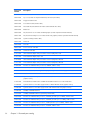
Chapter 3 Illustrated parts catalog
Spare part
number
Description
593530-001
Intel Centrino Wireless-N 1000 802.11b/g/n 1x2 for use in Andorra, Antigua and Barbuda, Argentina,
Aruba, Australia, Austria, Azerbaijan, Bahamas, Bahrain, Barbados, Belgium, Bermuda, Bolivia, Bosnia and
Herzegovina, Brazil, Brunei, Bulgaria, Canada, the Cayman Islands, Chile, People's Republic of China,
Colombia, Costa Rica, Croatia, Cyprus, the Czech Republic, Denmark, the Dominican Republic, Ecuador,
Egypt, El Salvador, Estonia, Finland, France, French Guiana, Georgia, Germany, Ghana, Greece,
Guadeloupe, Guam, Guatemala, Haiti, Honduras, Hong Kong, Hungary, Iceland, India, Indonesia, Ireland,
Israel, Italy, Ivory Coast, Jamaica, Japan, Jordan, Kenya, Kuwait, Kyrgyzstan, Latvia, Lebanon, Liechtenstein,
Lithuania, Luxembourg, Malawi, Malaysia, Malta, Martinique, Mauritius, Mexico, Monaco, Montenegro,
Morocco, the Nether Antilles, Netherlands, New Zealand, Nicaragua, Nigeria, Norway, Oman, Pakistan,
Panama, Paraguay, Peru, Philippines, Poland, Portugal, Puerto Rico, Qatar, Romania, San Marino, Saudi
Arabia, Senegal, Singapore, Slovakia, Slovenia, South Africa, South Korea, Spain, Sri Lanka, Sweden,
Switzerland, Taiwan, Tanzania, Thailand, Trinidad and Tobago, Turkey, Ukraine, United Arab Emirates,
United Kingdom, Uruguay, the US Virgin Islands, the United States, Venezuela, and Vietnam
593550-001
9-cell, 93-WH (2.80-Ah) Li-ion battery
593562-001
6-cell 62-WH (2.80-Ah) Li-ion battery
593554-001
6-cell 55-WH (2.55Ah) Li-ion battery
593836-001
Broadcom 4313AGN 802.11a/b/g/draft-n WiFi Adapter for use in Afghanistan, Albania, Algeria,
Andorra, Angola, Antigua and Barbuda, Argentina, Armenia, Aruba, Australia, Austria, Azerbaijan,
Bahamas, Bahrain, Bangladesh, Barbados, Belarus, Belgium, Belize, Benin, Bermuda, Bhutan, Bolivia,
Bosnia and Herzegovina, Botswana, Brazil, the British Virgin Islands, Brunei, Bulgaria, Burkina Faso,
Burundi, Cambodia, Cameroon, Canada, Cape Verde, the Cayman Islands, Central African Republic, Chad,
People's Republic of China, Colombia, Comoros, Congo, Costa Rica, Croatia, Cyprus, the Czech Republic,
Denmark, Djibouti, Dominica, the Dominican Republic, East Timor, Ecuador, Egypt, El Salvador, Equitorial
Guinea, Eritrea, Estonia, Ethiopia, Fiji, Finland, France, French Guiana, Gabon, Gambia, Georgia,
Germany, Ghana, Gibraltar, Greece, Grenada, Guadeloupe, Guam, Guatemala, Guinea, Guinea-Bissa,
Guyana, Haiti, Honduras, Hong Kong, Hungary, Iceland, India, Iraq, Ireland, Israel, Italy, Ivory Coast,
Jamaica, Japan, Jordan, Kazakhstan, Kenya, Kiribati, Kuwait, Kyrgyzstan, Laos, Latvia, Lebanon, Lesotho,
Liberia, Martinique, Liechtenstein, Lithuania, Luxembourg, Macedonia, Madagascar, Malawi, Malaysia,
Maldives, Mali, Malta, Marshall Islands, Mauritania, Mauritius, Mexico, Micronesia, Monaco, Mongolia,
Montenegro, Morocco, Mozambique, Namibia, Nauru, Nepal, the Nether Antilles, the Netherlands, New
Zealand, Nicaragua, Niger, Nigeria, Norway, Oman, Pakistan, Palau, Panama, Papua New Guinea,
Paraguay, Puerto Rico, Peru, Philippines, Poland, Portugal, Qatar, Republic of Moldova, Romania, Russia,
Rwanda, Samoa, San Marino, Sao Tome and Principe, Saudi Arabia, Senegal, Serbia and Montenegro,
Seychelles, Sierra Leone, Singapore, Slovakia, Slovenia, Solomon Islands, Somalia, South Africa, South
Korea, Spain, Sri Lanka, St. Kitts and Nevis, St. Lucia, St. Vincent and the Grenadines, Suriname, Swaziland,
Sweden, Switzerland, Syria, Taiwan, Tajikistan, Tanzania, Thailand, Togo, Tonga, Trinidad and Tobago,
Tunisia, Turkey, Turkmenistan, Tuvalu, Uganda, Ukraine, the United Arab Emirates, the United Kingdom,
Uruguay, the United States, the US Virgin Islands, Uzbekistan, Vanuatu, Venezuela, Vietnam, Yemen, Zaire,
Zambia, and Zimbabwe
594187-001
Intel Core i5 520M Dual Core processor, 2.40-GHz (SC turbo up to 2.93-GHz), 3-MB L3 cache)
594188-001
Intel Core i5 540M Dual Core processor, 2.53-GHz (SC turbo up to 3.06-GHz), 3-MB L3 cache)
597624-001
Intel Core i5 430M Dual Core processor (2.26-GHz, 3-MB L3 cache)
598856-001
Memory module, 2048-MB, PC3 10600, 1333-MHz
598859-001
Memory module, 1024-MB, PC3 10600, 1333-MHz
599092-001
Memory module, 4096-MB, PC3 10600, 1333-MHz
Sequential part number listing
33
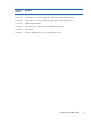
34
Spare part
number
Description
600370-001
Broadcom 4313 802.11b/g/n 1x1 WiFi and 2070 Bluetooth 2.1+EDR Combo Adapter for use in
Afghanistan, Albania, Algeria, Andorra, Angola, Antigua and Barbuda, Argentina, Armenia, Aruba,
Australia, Austria, Azerbaijan, Bahamas, Bahrain, Bangladesh, Barbados, Belarus, Belgium, Belize, Benin,
Bermuda, Bhutan, Bolivia, Bosnia and Herzegovina, Botswana, Brazil, the British Virgin Islands, Brunei,
Bulgaria, Burkina Faso, Burundi, Cambodia, Cameroon, Canada, Cape Verde, the Cayman Islands, Central
African Republic, Chad, Chile, the People's Republic of China, Colombia, Comoros, Congo, Costa Rica,
Croatia, Cyprus, Czech Republic, Denmark, Djibouti, Dominica, the Dominican Republic, East Timor,
Ecuador, Egypt, El Salvador, Equitorial Guinea, Eritrea, Estonia, Ethiopia, Fiji, Finland, France, French
Guiana, Gabon, Gambia, Georgia, Germany, Ghana, Gibraltar, Greece, Grenada, Guadeloupe, Guam,
Guatemala, Guinea, Guinea-Bissa, Guyana, Haiti, Honduras, Hong Kong, Hungary, Iceland, India,
Indonesia, Iraq, Ireland, Israel, Italy, Ivory Coast, Jamaica, Japan, Jordan, Kazakhstan, Kenya, Kiribati,
Kuwait, Kyrgyzstan, Laos, Latvia, Lebanon, Lesotho, Liberia, Liechtenstein, Lithuania, Luxembourg,
Macedonia, Madagascar, Malawi, Malaysia, Maldives, Mali, Malta, Marshall Islands, Martinique,
Mauritania, Mauritius, Mexico, Micronesia, Monaco, Mongolia, Montenegro, Morocco, Mozambique,
Namibia, Nauru, Nepal, the Nether Antilles, the Netherlands, New Zealand, Nicaragua, Niger, Nigeria,
Norway, Oman, Pakistan, Palau, Panama, Papua New Guinea, Paraguay, Peru, Philippines, Poland,
Portugal, Puerto Rico, Qatar, the Republic of Moldova, Romania, Russia, Rwanda, Samoa, San Marino, Sao
Tome and Principe, Saudi Arabia, Senegal, Serbia and Montenegro, Seychelles, Sierra Leone, Singapore,
Slovakia, Slovenia, Solomon Islands, Somalia, South Africa, South Korea, Sri Lanka, St. Kitts and Nevis, St.
Lucia, St. Vincent and the Grenadines, Suriname, Swaziland, Sweden, Switzerland, Taiwan, Tajikistan,
Tanzania, Thailand, Togo, Tonga, Trinidad and Tobago, Tunisia, Turkey, Turkmenistan, Tuvalu, Uganda,
Ukraine, the United Arab Emirates, the United Kingdom, the United States, Uruguay, the US Virgin Islands,
Uzbekistan, Vanuatu, Venezuela, Vietnam, Yemen, Zaire, Zambia, and Zimbabwe
602992-001
Realink RT3090BC4 802.11b/g/n 1x1 WiFi and Bluetooth 2.1+EDR Combo Adapter for use in
Afghanistan, Albania, Algeria, Andorra, Angola, Antigua and Barbuda, Argentina, Armenia, Aruba,
Australia, Austria, Azerbaijan, Bahamas, Bahrain, Barbados, Belarus, Belgium, Belize, Benin, Bermuda,
Bhutan, Bolivia, Bosnia and Herzegovina, Botswana, Brazil, British Virgin Islands, Brunei, Bulgaria, Burkina
Faso, Burundi, Cambodia, Cameroon, Canada, Cape Verde, the Cayman Islands, Central African Republic,
Chad, Chile, the People's Republic of China, Colombia, Comoros, Congo, Costa Rica, Croatia, Cyprus, the
Czech Republic, Denmark, Djibouti, Dominica, the Dominican Republic, East Timor, Ecuador, Egypt, El
Salvador, Equitorial Guinea, Eritrea, Estonia, Ethiopia, Fiji, Finland, France, French Guiana, Gabon,
Gambia, Georgia, Germany, Ghana, Gibraltar, Greece, Grenada, Guadeloupe, Guam, Guatemala,
Guinea, Guinea-Bissa, Guyana, Haiti, Honduras, Hong Kong, Hungary, Iceland, India, Indonesia, Ireland,
Israel, Italy, Ivory Coast, Jamaica, Japan, Jordan, Kazakhstan, Kenya, Kiribati, Kuwait, Kyrgyzstan, Laos,
Latvia, Lebanon, Lesotho, Liberia, Liechtenstein, Lithuania, Luxembourg, Macedonia, Madagascar, Malawi,
Malaysia, Maldives, Mali, Malta, the Marshall Islands, Martinique, Mauritania, Mauritius, Mexico,
Micronesia, Monaco, Mongolia, Montenegro, Morocco, Mozambique, Namibia, Nauru, Nepal, the Nether
Antilles, the Netherlands, New Zealand, Nicaragua, Niger, Nigeria, Norway, Oman, Pakistan, Palau,
Panama, Papua New Guinea, Paraguay, Peru, the Philippines, Poland, Portugal, Puerto Rico, the Republic of
Moldova, Romania, Russia, Rwanda, Samoa, San Marino, Sao Tome and Principe, Saudi Arabia, Senegal,
Serbia and Montenegro, Seychelles, Sierra Leone, Singapore, Slovakia, Slovenia, the Solomon Islands,
Somalia, South Africa, South Korea, Spain, Sri Lanka, St. Kitts and Nevis, St. Lucia, St. Vincent and
Grenadines, Suriname, Swaziland, Sweden, Switzerland, Syria, Taiwan, Tajikistan, Tanzania, Thailand,
Togo, Tonga, Trinidad and Tobago, Tunisia, Turkey, Turkmenistan, Tuvalu, Uganda, Ukraine, the United
Arab Emirates, the United Kingdom, Uruguay, the US Virgin Islands, the United States, Uzbekistan, Vanuatu,
Venezuela, Vietnam, Yemen, Zaire, Zambia, and Zimbabwe
603785-001
640-GB, 5400 RPM hard drive (replaces 608219-001)
603787-001
750-GB, 5400 RPM hard drive (replaces 622394-001)
608203-001
System board (includes replacement thermal material) for use in models with 512 MB of HD5450 discrete
graphics memory
608204-001
System board (includes replacement thermal material) for use in models with UMA graphics subsystem
Chapter 3 Illustrated parts catalog
Spare part
number
Description
608206-001
35.56 cm (14.0-in) display panel, high definition, Brightview for use in models without WWAN
608207-001
35.56 cm (14.0-in) WXGA Brightview display assembly for use in models not equipped with WWAN
608208-001
Display enclosure
608209-001
Display bezel
608210-001
Display hinge cover
608211-001
Display Cable Kit
608212-001
Display Screw Kit
608214-001
Display bracket (with hinges)
608215-001
Hard drive, 160-GB, solid state
608216-001
250-GB, 7200 RPM hard drive
608217-001
320-GB, 7200 RPM hard drive
608218-001
500-GB, 7200 RPM hard drive
608219-001
640-GB, 5400 RPM hard drive (replaced by 603785-001)
608221-001
DVD±RW SuperMulti DL Drive
608222-001
Keyboard for use in the United States
608222-031
Keyboard for use in the United Kingdom
608222-041
Keyboard for use in Germany
608222-051
Keyboard for use in France
608222-071
Keyboard for use in Spain
608222-121
Keyboard for use in English and French Canada
608222-141
Keyboard for use in Turkey
608222-161
Keyboard for use in Latin America
608222-171
Keyboard for use in Saudi Arabia
608222-201
Keyboard for use in Brazil
608222–251
Keyboard for use in Russia
608222-281
Keyboard for use in Thailand
608222-291
Keyboard for use in Japan
608222-AB1
Keyboard for use in Taiwan
608222-AD1
Keyboard for use in South Korea
608222-B31
Keyboard for use in Europe, the Middle East, and Africa
608222-BG1
Keyboard for use in Switzerland
608222-DH1
Keyboard for use in the Netherlands
Sequential part number listing
35
36
Spare part
number
Description
608223-001
Base enclosure
608224-001
Top cover (includes Touchpad and bracket, button board, and cable)
608225-001
Fingerprint reader board
608226-001
Power button board (includes cable)
608227-001
Misc Cable Kit (includes Bluetooth module cable and hard drive cable)
608228-001
Rubber feet
608229-001
Fan/heat sink for use in models with UMA graphics (includes replacement thermal material)
608231-001
Fan/heat sink assembly for use in models with discrete graphics (includes replacement thermal material)
608232-001
Speaker assembly (includes cable)
608233-001
Plastics Kit
608234-001
Screw Kit
608273-001
Power connector with cable
608277-001
USB board with cable
613152-001
90-W Smart AC adapter with power factor correction (PFC), RC/V 3W
613153-001
65-W Smart AC adapter, RC/V 3W
613160-001
90-W Smart AC adapter with power factor correction (PFC), RC/V EM 3W
613161-001
65-W Smart AC adapter with power factor correction (PFC), RC/V EM 3W
613585-001
Intel Core i5 450M Dual Core processor (2.40-GHz, 3-MB L3 cache)
613666-001
35.56 cm (14.0-in) display panel, high definition, BrightView for use in models with WWAN
613667-001
35.56 cm (14.0-in) WXGA Brightview display assembly for use in models equipped with WWAN
615744-001
Webcam module
616244-001
System board (includes replacement thermal material) for use in models with 1 GB of HD5450 discrete
graphics memory
619997-001
Intel® Centrino® Advanced–N + WiMAX 6250 WLAN module for use in the United States
621044-001
System board for use in models equipped with 512 MB of HD5470 discrete graphics memory
621045-001
System board for use in models equipped with 1 GB of HD5470 discrete graphics memory
621046-001
640-GB, 7200 RPM hard drive
622394-001
750-GB, 5400 RPM hard drive (replaced by 603787-001)
625824-001
Intel Core i5 560M Dual Core processor, 2.66-GHz, (SC turbo up to 3.2-GHz), 3-MB L3 cache
625825-001
Intel Core i5 580M Dual Core processor, 2.66-GHz, (SC turbo up to 3.33-GHz), 3-MB L3 cache
625826-001
Intel Core i7 640M Dual Core processor, 2.80Hz (SC turbo up to 3.33-GHz), 4-MB L3 cache
626309-001
Intel Core i5 460M Dual Core processor, 2.53-GHz, 3-MB L3 cache
Chapter 3 Illustrated parts catalog
Spare part
number
Description
630284-001
Display cable kit for models equipped with WWAN
630713-001
System board for use in models equipped with 512 MB of HD6370 discrete graphics memory
630714-001
System board for use in models equipped with 1 GB of HD6370 discrete graphics memory
633252-001
750-GB, 7200 RPM hard drive
633863-001
System board for use in models equipped with WiMAX and UMA graphics
634336-001
Thermal pad kit
634693-001
Intel Core i5 480M Dual Core processor, 2.66-GHz, 3-MB L3 cache
Sequential part number listing
37
4
Removal and replacement
procedures
Preliminary replacement requirements
Tools required
You will need the following tools to complete the removal and replacement procedures:
●
Flat-bladed screwdriver
●
Magnetic screwdriver
●
Phillips P0 and P1 screwdrivers
Service considerations
The following sections include some of the considerations that you must keep in mind during
disassembly and assembly procedures.
NOTE: As you remove each subassembly from the computer, place the subassembly (and all
accompanying screws) away from the work area to prevent damage.
Plastic parts
Using excessive force during disassembly and reassembly can damage plastic parts. Use care when
handling the plastic parts. Apply pressure only at the points designated in the maintenance instructions.
38
Chapter 4 Removal and replacement procedures
Cables and connectors
CAUTION: When servicing the computer, be sure that cables are placed in their proper locations
during the reassembly process. Improper cable placement can damage the computer.
Cables must be handled with extreme care to avoid damage. Apply only the tension required to unseat
or seat the cables during removal and insertion. Handle cables by the connector whenever possible. In
all cases, avoid bending, twisting, or tearing cables. Be sure that cables are routed in such a way that
they cannot be caught or snagged by parts being removed or replaced. Handle flex cables with
extreme care; these cables tear easily.
Drive handling
CAUTION: Drives are fragile components that must be handled with care. To prevent damage to the
computer, damage to a drive, or loss of information, observe these precautions:
Before removing or inserting a hard drive, shut down the computer. If you are unsure whether the
computer is off or in Hibernation, turn the computer on, and then shut it down through the operating
system.
Before handling a drive, be sure that you are discharged of static electricity. While handling a drive,
avoid touching the connector.
Before removing a diskette drive or optical drive, be sure that a diskette or disc is not in the drive and
be sure that the optical drive tray is closed.
Handle drives on surfaces covered with at least one inch of shock-proof foam.
Avoid dropping drives from any height onto any surface.
After removing a hard drive, an optical drive, or a diskette drive, place it in a static-proof bag.
Avoid exposing a hard drive to products that have magnetic fields, such as monitors or speakers.
Avoid exposing a drive to temperature extremes or liquids.
If a drive must be mailed, place the drive in a bubble pack mailer or other suitable form of protective
packaging and label the package “FRAGILE.”
Preliminary replacement requirements
39
Grounding guidelines
Electrostatic discharge damage
Electronic components are sensitive to electrostatic discharge (ESD). Circuitry design and structure
determine the degree of sensitivity. Networks built into many integrated circuits provide some
protection, but in many cases, ESD contains enough power to alter device parameters or melt
silicon junctions.
A discharge of static electricity from a finger or other conductor can destroy static-sensitive devices or
microcircuitry. Even if the spark is neither felt nor heard, damage may have occurred.
An electronic device exposed to ESD may not be affected at all and can work perfectly throughout a
normal cycle. Or the device may function normally for a while, then degrade in the internal layers,
reducing its life expectancy.
CAUTION: To prevent damage to the computer when you are removing or installing internal
components, observe these precautions:
Keep components in their electrostatic-safe containers until you are ready to install them.
Use nonmagnetic tools.
Before touching an electronic component, discharge static electricity by using the guidelines described
in this section.
Avoid touching pins, leads, and circuitry. Handle electronic components as little as possible.
If you remove a component, place it in an electrostatic-safe container.
The following table shows how humidity affects the electrostatic voltage levels generated by different
activities.
CAUTION: A product can be degraded by as little as 700 V.
Typical electrostatic voltage levels
Relative humidity
Event
40
10%
40%
55%
Walking across carpet
35,000 V
15,000 V
7,500 V
Walking across vinyl floor
12,000 V
5,000 V
3,000 V
Motions of bench worker
6,000 V
800 V
400 V
Removing DIPS from plastic tube
2,000 V
700 V
400 V
Removing DIPS from vinyl tray
11,500 V
4,000 V
2,000 V
Removing DIPS from Styrofoam
14,500 V
5,000 V
3,500 V
Removing bubble pack from PCB
26,500 V
20,000 V
7,000 V
Packing PCBs in foam-lined box
21,000 V
11,000 V
5,000 V
Chapter 4 Removal and replacement procedures
Packaging and transporting guidelines
Follow these grounding guidelines when packaging and transporting equipment:
●
To avoid hand contact, transport products in static-safe tubes, bags, or boxes.
●
Protect ESD-sensitive parts and assemblies with conductive or approved containers or packaging.
●
Keep ESD-sensitive parts in their containers until the parts arrive at static-free workstations.
●
Place items on a grounded surface before removing items from their containers.
●
Always be properly grounded when touching a component or assembly.
●
Store reusable ESD-sensitive parts from assemblies in protective packaging or nonconductive
foam.
●
Use transporters and conveyors made of antistatic belts and roller bushings. Be sure that
mechanized equipment used for moving materials is wired to ground and that proper materials
are selected to avoid static charging. When grounding is not possible, use an ionizer to dissipate
electric charges.
Workstation guidelines
Follow these grounding workstation guidelines:
●
Cover the workstation with approved static-shielding material.
●
Use a wrist strap connected to a properly grounded work surface and use properly grounded tools
and equipment.
●
Use conductive field service tools, such as cutters, screwdrivers, and vacuums.
●
When fixtures must directly contact dissipative surfaces, use fixtures made only of static-safe
materials.
●
Keep the work area free of nonconductive materials, such as ordinary plastic assembly aids and
Styrofoam.
●
Handle ESD-sensitive components, parts, and assemblies by the case or PCM laminate. Handle
these items only at static-free workstations.
●
Avoid contact with pins, leads, or circuitry.
●
Turn off power and input signals before inserting or removing connectors or test equipment.
Preliminary replacement requirements
41
Equipment guidelines
Grounding equipment must include either a wrist strap or a foot strap at a grounded workstation.
●
When seated, wear a wrist strap connected to a grounded system. Wrist straps are flexible straps
with a minimum of one megohm ±10% resistance in the ground cords. To provide proper ground,
wear a strap snugly against the skin at all times. On grounded mats with banana-plug connectors,
use alligator clips to connect a wrist strap.
●
When standing, use foot straps and a grounded floor mat. Foot straps (heel, toe, or boot straps)
can be used at standing workstations and are compatible with most types of shoes or boots. On
conductive floors or dissipative floor mats, use foot straps on both feet with a minimum of one
megohm resistance between the operator and ground. To be effective, the conductive strips must
be worn in contact with the skin.
The following grounding equipment is recommended to prevent electrostatic damage:
●
Antistatic tape
●
Antistatic smocks, aprons, and sleeve protectors
●
Conductive bins and other assembly or soldering aids
●
Nonconductive foam
●
Conductive tabletop workstations with ground cords of one megohm resistance
●
Static-dissipative tables or floor mats with hard ties to the ground
●
Field service kits
●
Static awareness labels
●
Material-handling packages
●
Nonconductive plastic bags, tubes, or boxes
●
Metal tote boxes
●
Electrostatic voltage levels and protective materials
The following table lists the shielding protection provided by antistatic bags and floor mats.
42
Material
Use
Voltage protection level
Antistatic plastic
Bags
1,500 V
Carbon-loaded plastic
Floor mats
7,500 V
Metallized laminate
Floor mats
5,000 V
Chapter 4 Removal and replacement procedures
Component replacement procedures
This chapter provides removal and replacement procedures.
There are as many as 75 screws, in 12 different sizes, that must be removed, replaced, or loosened
when servicing the computer. Make special note of each screw size and location during removal and
replacement.
Serial number
The serial number label, located in the battery bay of the computer, provides important information that
you may need when contacting technical support.
●
Product name (1). This is the product name affixed to the front of the computer.
●
Serial number (s/n) (2). This is an alphanumeric identifier that is unique to each product.
●
Part number/Product number (p/n) (3). This number provides specific information about the
product's hardware components. The part number helps a service technician to determine what
components and parts are needed.
●
Warranty period (4). This number describes the duration (in years) of the warranty period for the
computer.
●
Model description (5). This is the alphanumeric identifier used to locate documents, drivers, and
support for the computer.
Component replacement procedures
43
Computer feet
Description
Spare part number
Rubber Feet Kit
608228-001
The computer feet are adhesive-backed rubber pads. The feet attach to the base enclosure in the
locations illustrated below.
44
Chapter 4 Removal and replacement procedures
Battery
Description
Spare part number
9-cell, 93-WH (2.80-Ah) Li-ion
593550-001
6-cell, 55-WH (2.55Ah) Li-ion
593554-001
6-cell, 62-WH (2.80-Ah) Li-ion
593562-001
Before disassembling the computer, follow these steps:
1.
Shut down the computer. If you are unsure whether the computer is off or in Hibernation, turn the
computer on, and then shut it down through the operating system.
2.
Disconnect all external devices connected to the computer.
3.
Disconnect the power from the computer by first unplugging the power cord from the AC outlet
and then unplugging the AC adapter from the computer.
Remove the battery:
1.
Turn the computer upside down on a flat surface.
2.
Slide the battery release latch (1) to release the battery.
3.
Pivot the battery (2) upward and lift it out of the computer (3).
To insert the battery, insert the rear edge of the battery into the battery bay and pivot the front edge
downward until the battery is seated. The battery release latch automatically locks the battery into
place.
Component replacement procedures
45
SIM
NOTE: This section applies only to computer models with WWAN capability.
NOTE: If there is a SIM inserted in the SIM slot, it must be removed before disassembling the
computer. Be sure that the SIM is reinserted in the SIM slot after reassembling the computer.
Before removing the SIM, follow these steps:
1.
Shut down the computer. If you are unsure whether the computer is off or in Hibernation, turn the
computer on, and then shut it down through the operating system.
2.
Disconnect all external devices connected to the computer.
3.
Disconnect the power from the computer by first unplugging the power cord from the AC outlet
and then unplugging the AC adapter from the computer.
4.
Remove the battery (see Battery on page 45).
Remove the SIM:
1.
Press in on the SIM (1). The module is partially ejected from the SIM slot.
2.
Remove the SIM (2) from the SIM slot.
Reverse this procedure to install the SIM.
46
Chapter 4 Removal and replacement procedures
Memory module
Description
Spare part number
4096-MB, PC3 10600, 1333-MHz
599092-001
2048-MB, PC3 10600, 1333-MHz
598856-001
1024-MB, PC3 10600, 1333-MHz
598859-001
Before removing the memory module, follow these steps:
1.
Shut down the computer. If you are unsure whether the computer is off or in Hibernation, turn the
computer on, and then shut it down through the operating system.
2.
Disconnect all external devices connected to the computer.
3.
Disconnect the power from the computer by first unplugging the power cord from the AC outlet
and then unplugging the AC adapter from the computer.
4.
Remove the battery (see Battery on page 45).
Remove the memory module:
1.
Turn the computer upside down with the front toward you.
2.
Loosen the two Phillips PM2.5×5.0 captive screws (1) that secure the memory/wireless module
compartment cover to the computer.
3.
Lift the left side of the cover (2), swing it forward, and remove it (3). The memory/wireless
compartment cover is included in the plastics kit, spare part number 608233-001.
4.
Spread the retaining tabs (1) on each side of the memory module slot to release the memory
module. (The edge of the module opposite the slot rises away from the computer.)
Component replacement procedures
47
5.
Remove the module (2) by pulling it away from the slot at an angle.
NOTE: Memory modules are designed with a notch (3) to prevent incorrect insertion into the
memory module slot.
Reverse this procedure to install a memory module.
48
Chapter 4 Removal and replacement procedures
RTC battery
Description
Spare part number
RTC battery
449137-001
Before removing the RTC battery, follow these steps:
1.
Shut down the computer. If you are unsure whether the computer is off or in Hibernation, turn the
computer on, and then shut it down through the operating system.
2.
Disconnect all external devices connected to the computer.
3.
Disconnect the power from the computer by first unplugging the power cord from the AC outlet
and then unplugging the AC adapter from the computer.
4.
Remove the battery (see Battery on page 45).
5.
Hard drive cover (see Hard drive on page 57).
Remove the RTC battery:
1.
Turn the system board upside down.
2.
Release the RTC battery from the clips on the system board (1).
3.
Remove the RTC battery (2).
Reverse this procedure to install the RTC battery.
Component replacement procedures
49
WLAN module
NOTE: The WLAN module and the WWAN module are not interchangeable.
Description
Spare part
number
Atheros AR9285 802.11 a/b/g/n 2x2 WiFi adapter
580101-001
For use in Canada, the Cayman Islands, Guam, Puerto Rico, the United States, and the US Virgin Islands
Atheros AR9285 802.11 a/b/g/n 2x2 WiFi adapter
580101-002
For use in Afghanistan, Albania, Algeria, Andorra, Angola, Antigua and Barbuda, Argentian, Armenia,
Aruba, Australia, Austria, Azerbaijan, Bahamas, Bahrain, Barbados, Belgium, Belize, Benin, Bermuda,
Bhutan, Bosnia and Herzegovina, Botswana, Brazil, British Virgin Islands, Brunei, Bulgaria, Burkina Faso,
Burundi, Cambodia, Cameroon, Cape Verde, Central African Republic, Chad, Chile, People's Republic
of China, Colombia, Comoros, Congo, Costa Rica, Croatia, Cyprus, Czech Republic, Denmark, Djibouti,
Dominica, Dominican Republic, East Timor, Ecuador, Egypt, El Salvador, Equatorial Guinea, Eritrea,
Estonia, Ethiopia, Fiji, Finland, France, French Guiana, Gabon, Gambia, Georgia, Germany, Ghana,
Gibraltar, Greece, Grenada, Guadeloupe, Guatemala, Guinea, Guinea-Bissau, Guyana, Haiti,
Honduras, Hong Kong, Hungary, Iceland, India, Indonesia, Ireland, Italy, Ivory Coast, Jamaica, Japan,
Jordan, Kazakhstan, Kenya, Kiribati, Kuwait, Kyrgyzstan, Laos, Latvia, Lebanon, Lesotho, Liberia,
Liechtenstein, Lithuania, Luxembourg, Macedonia, Madagascar, Malawi, Malaysia, Maldives, Mali,
Malta, Marshall Islands, Martinique, Mauritania, Mauritius, Mexico, Micronesia, Monaco, Mongolia,
Montenegro, Morocco, Mozambique, Namibia, Nauru, Nepal, the Nether Antilles, Netherlands, New
Zealand, Nicaragua, Niger, Nigeria, Norway, Oman, Palau, Panama, Papua New Guinea, Paraguay,
Peru, Philippines, Poland, Portugal, Republic of Moldova, Romania, Rwanda, Samoa, San Marino, Sao
Tome and Principe, Saudi Arabia, Senegal, Serbia and Montenegro, Seychelles, Sierra Leone,
Singapore, Slovakia, Slovenia, Solomon Islands, Somalia, South Africa, South Korea, Spain, Sri Lanka,
St. Kitts and Nevis, St. Lucia, St. Vincent and the Grenadines, Suriname, Swaziland, Sweden,
Switzerland, Syria, Taiwan, Tajikistan, Tanzania, Thailand, Togo, Tonga, Trinidad and Tobago, Tunisia,
Turkey, Turkmenistan, Tuvalu, Uganda, United Arab Emirates, United Kingdom, Uruguay, Uzbekistan,
Vanuatu, Venezuela, Vietnam, Yemen, Zaire, Zambia, and Zimbabwe
Intel Centrino Wireless-N 1000 802.11b/g/n 1x2
593530-001
For use in Andorra, Antigua and Barbuda, Argentina, Aruba, Australia, Austria, Azerbaijan, Bahamas,
Bahrain, Barbados, Belgium, Bermuda, Bolivia, Bosnia and Herzegovina, Brazil, Brunei, Bulgaria,
Canada, the Cayman Islands, Chile, People's Republic of China, Colombia, Costa Rica, Croatia, Cyprus,
the Czech Republic, Denmark, the Dominican Republic, Ecuador, Egypt, El Salvador, Estonia, Finland,
France, French Guiana, Georgia, Germany, Ghana, Greece, Guadeloupe, Guam, Guatemala, Haiti,
Honduras, Hong Kong, Hungary, Iceland, India, Indonesia, Ireland, Israel, Italy, Ivory Coast, Jamaica,
Japan, Jordan, Kenya, Kuwait, Kyrgyzstan, Latvia, Lebanon, Liechtenstein, Lithuania, Luxembourg,
Malawi, Malaysia, Malta, Martinique, Mauritius, Mexico, Monaco, Montenegro, Morocco, the Nether
Antilles, Netherlands, New Zealand, Nicaragua, Nigeria, Norway, Oman, Pakistan, Panama, Paraguay,
Peru, Philippines, Poland, Portugal, Puerto Rico, Qatar, Romania, San Marino, Saudi Arabia, Senegal,
Singapore, Slovakia, Slovenia, South Africa, South Korea, Spain, Sri Lanka, Sweden, Switzerland,
Taiwan, Tanzania, Thailand, Trinidad and Tobago, Turkey, Ukraine, United Arab Emirates, United
Kingdom, Uruguay, the US Virgin Islands, the United States, Venezuela, and Vietnam
Broadcom 43224AGN 802.11a/b/g/draft-n WiFi Adapter
For use in Antigua and Barbuda, Aruba, the Bahamas, Barbados, Belize, Canada, Guam, Guinea, Haiti,
Jamaica, the Nether Antilles, Puerto Rico, St. Kitts and Nevis, St. Lucia, St. Vincent and the Grenadines,
Suriname, the US Virgin Islands, and the United States
50
Chapter 4 Removal and replacement procedures
582564-001
Description
Spare part
number
Broadcom 43224AGN 802.11a/b/g/draft-n WiFi Adapter
582564-002
For use in Albania, Algeria, Andorra, Angola, Argentina, Armenia, Australia, Austria, Azerbaijan,
Bahrain, Belarus, Belgium, Benin, Bermuda, Bhutan, Bolivia, Bosnia and Herzegovina, Botswana, Brazil,
the British Virgin Islands, Brunei, Bulgaria, Burkina Faso, Burundi, Cambodia, Cameroon, Cape Verde,
the Cayman Islands, Central African Republic, Chad, Chile, People's Republic of China, Colombia,
Comoros, Congo, Costa Rica, Croatia, Cyprus, the Czech Republic, Denmark, Djibouti, Dominica, the
Dominican Republic, East Timor, Ecuador, Egypt, El Salvador, Equitorial Guinea, Eritrea, Estonia,
Ethiopia, Fiji Finland, France, French Guiana, Gabon, Gambia, Georgia, Germany, Ghana, Gibraltar,
Greece, Grenada, Guadeloupe, Guatemala, Guinea, Guinea-Bissa, Honduras, Hong Kong, Hungary,
Iceland, India, Ireland, Italy, Ivory Coast, Japan, Jordan, Kazakhstan, Kenya, Kiribati, Kuwait,
Kyrgyzstan, Laos, Latvia, Lebanon, Lesotho, Liberia, Liechtenstein, Lithuania, Luxembourg, Macedonia,
Madagascar, Malawi, Malaysia Maldives, Mali, Malta, Marshall Islands, Martinique, Mauritania,
Mauritius, Mexico, Micronesia, Monaco, Mongolia, Montenegro, Morocco, Mozambique, Namibia,
Nauru, Nepal, Netherlands, New Zealand, Nicaragua, Niger, Nigeria, Norway, Oman, Palau,
Panama, Papua New Guinea, Paraguay, Peru, Philippines, Poland, Portugal, Qatar, Republic of
Moldova, Romania, Rwanda, Samoa, San Marino, Sao Tome and Principe, Saudi Arabia, Senegal,
Serbia and Montenegro, Seychelles, Sierra Leone, Singapore, Slovakia, Slovenia, Solomon Islands,
Somalia, South Africa, South Korea, Spain, Sri Lanka, Swaziland, Sweden, Switzerland, Taiwan,
Tajikistan, Tanzania, Thailand, Togo, Tonga, Trinidad and Tobago, Tunisia, Turkey, Turkmenistan,
Tuvalu, Uganda, United Arab Emirates, United Kingdom, Uruguay, Uzbekistan, Vanuatu, Venezuela,
Vietnam, Yemen, Zaire, Zambia, and Zimbabwe
Broadcom 4313AGN 802.11a/b/g/draft-n WiFi Adapter
593836-001
For use in Afghanistan, Albania, Algeria, Andorra, Angola, Antigua and Barbuda, Argentina, Armenia,
Aruba, Australia, Austria, Azerbaijan, Bahamas, Bahrain, Bangladesh, Barbados, Belarus, Belgium,
Belize, Benin, Bermuda, Bhutan, Bolivia, Bosnia and Herzegovina, Botswana, Brazil, the British Virgin
Islands, Brunei, Bulgaria, Burkina Faso, Burundi, Cambodia, Cameroon, Canada, Cape Verde, the
Cayman Islands, Central African Republic, Chad, People's Republic of China, Colombia, Comoros,
Congo, Costa Rica, Croatia, Cyprus, the Czech Republic, Denmark, Djibouti, Dominica, the Dominican
Republic, East Timor, Ecuador, Egypt, El Salvador, Equitorial Guinea, Eritrea, Estonia, Ethiopia, Fiji,
Finland, France, French Guiana, Gabon, Gambia, Georgia, Germany, Ghana, Gibraltar, Greece,
Grenada, Guadeloupe, Guam, Guatemala, Guinea, Guinea-Bissa, Guyana, Haiti, Honduras, Hong
Kong, Hungary, Iceland, India, Iraq, Ireland, Israel, Italy, Ivory Coast, Jamaica, Japan, Jordan,
Kazakhstan, Kenya, Kiribati, Kuwait, Kyrgyzstan, Laos, Latvia, Lebanon, Lesotho, Liberia, Martinique,
Liechtenstein, Lithuania, Luxembourg, Macedonia, Madagascar, Malawi, Malaysia, Maldives, Mali,
Malta, Marshall Islands, Mauritania, Mauritius, Mexico, Micronesia, Monaco, Mongolia, Montenegro,
Morocco, Mozambique, Namibia, Nauru, Nepal, the Nether Antilles, the Netherlands, New Zealand,
Nicaragua, Niger, Nigeria, Norway, Oman, Pakistan, Palau, Panama, Papua New Guinea, Paraguay,
Puerto Rico, Peru, Philippines, Poland, Portugal, Qatar, Republic of Moldova, Romania, Russia, Rwanda,
Samoa, San Marino, Sao Tome and Principe, Saudi Arabia, Senegal, Serbia and Montenegro,
Seychelles, Sierra Leone, Singapore, Slovakia, Slovenia, Solomon Islands, Somalia, South Africa, South
Korea, Spain, Sri Lanka, St. Kitts and Nevis, St. Lucia, St. Vincent and the Grenadines, Suriname,
Swaziland, Sweden, Switzerland, Syria, Taiwan, Tajikistan, Tanzania, Thailand, Togo, Tonga, Trinidad
and Tobago, Tunisia, Turkey, Turkmenistan, Tuvalu, Uganda, Ukraine, the United Arab Emirates, the
United Kingdom, Uruguay, the United States, the US Virgin Islands, Uzbekistan, Vanuatu, Venezuela,
Vietnam, Yemen, Zaire, Zambia, and Zimbabwe
Component replacement procedures
51
Description
Spare part
number
Realink RT3090BC4 802.11b/g/n 1x1 WiFi and Bluetooth 2.1+EDR Combo Adapter
602992-001
For use in Afghanistan, Albania, Algeria, Andorra, Angola, Antigua and Barbuda, Argentina, Armenia,
Aruba, Australia, Austria, Azerbaijan, Bahamas, Bahrain, Barbados, Belarus, Belgium, Belize, Benin,
Bermuda, Bhutan, Bolivia, Bosnia and Herzegovina, Botswana, Brazil, British Virgin Islands, Brunei,
Bulgaria, Burkina Faso, Burundi, Cambodia, Cameroon, Canada, Cape Verde, the Cayman Islands,
Central African Republic, Chad, Chile, the People's Republic of China, Colombia, Comoros, Congo,
Costa Rica, Croatia, Cyprus, the Czech Republic, Denmark, Djibouti, Dominica, the Dominican Republic,
East Timor, Ecuador, Egypt, El Salvador, Equitorial Guinea, Eritrea, Estonia, Ethiopia, Fiji, Finland,
France, French Guiana, Gabon, Gambia, Georgia, Germany, Ghana, Gibraltar, Greece, Grenada,
Guadeloupe, Guam, Guatemala, Guinea, Guinea-Bissa, Guyana, Haiti, Honduras, Hong Kong,
Hungary, Iceland, India, Indonesia, Ireland, Israel, Italy, Ivory Coast, Jamaica, Japan, Jordan,
Kazakhstan, Kenya, Kiribati, Kuwait, Kyrgyzstan, Laos, Latvia, Lebanon, Lesotho, Liberia, Liechtenstein,
Lithuania, Luxembourg, Macedonia, Madagascar, Malawi, Malaysia, Maldives, Mali, Malta, the
Marshall Islands, Martinique, Mauritania, Mauritius, Mexico, Micronesia, Monaco, Mongolia,
Montenegro, Morocco, Mozambique, Namibia, Nauru, Nepal, the Nether Antilles, the Netherlands,
New Zealand, Nicaragua, Niger, Nigeria, Norway, Oman, Pakistan, Palau, Panama, Papua New
Guinea, Paraguay, Peru, the Philippines, Poland, Portugal, Puerto Rico, the Republic of Moldova,
Romania, Russia, Rwanda, Samoa, San Marino, Sao Tome and Principe, Saudi Arabia, Senegal, Serbia
and Montenegro, Seychelles, Sierra Leone, Singapore, Slovakia, Slovenia, the Solomon Islands, Somalia,
South Africa, South Korea, Spain, Sri Lanka, St. Kitts and Nevis, St. Lucia, St. Vincent and Grenadines,
Suriname, Swaziland, Sweden, Switzerland, Syria, Taiwan, Tajikistan, Tanzania, Thailand, Togo, Tonga,
Trinidad and Tobago, Tunisia, Turkey, Turkmenistan, Tuvalu, Uganda, Ukraine, the United Arab Emirates,
the United Kingdom, Uruguay, the US Virgin Islands, the United States, Uzbekistan, Vanuatu, Venezuela,
Vietnam, Yemen, Zaire, Zambia, and Zimbabwe
Broadcom 4313 802.11b/g/n 1x1 WiFi and 2070 Bluetooth 2.1+EDR Combo Adapter
600370-001
For use in Afghanistan, Albania, Algeria, Andorra, Angola, Antigua and Barbuda, Argentina, Armenia,
Aruba, Australia, Austria, Azerbaijan, Bahamas, Bahrain, Bangladesh, Barbados, Belarus, Belgium,
Belize, Benin, Bermuda, Bhutan, Bolivia, Bosnia and Herzegovina, Botswana, Brazil, the British Virgin
Islands, Brunei, Bulgaria, Burkina Faso, Burundi, Cambodia, Cameroon, Canada, Cape Verde, the
Cayman Islands, Central African Republic, Chad, Chile, the People's Republic of China, Colombia,
Comoros, Congo, Costa Rica, Croatia, Cyprus, Czech Republic, Denmark, Djibouti, Dominica, the
Dominican Republic, East Timor, Ecuador, Egypt, El Salvador, Equitorial Guinea, Eritrea, Estonia,
Ethiopia, Fiji, Finland, France, French Guiana, Gabon, Gambia, Georgia, Germany, Ghana, Gibraltar,
Greece, Grenada, Guadeloupe, Guam, Guatemala, Guinea, Guinea-Bissa, Guyana, Haiti, Honduras,
Hong Kong, Hungary, Iceland, India, Indonesia, Iraq, Ireland, Israel, Italy, Ivory Coast, Jamaica, Japan,
Jordan, Kazakhstan, Kenya, Kiribati, Kuwait, Kyrgyzstan, Laos, Latvia, Lebanon, Lesotho, Liberia,
Liechtenstein, Lithuania, Luxembourg, Macedonia, Madagascar, Malawi, Malaysia, Maldives, Mali,
Malta, Marshall Islands, Martinique, Mauritania, Mauritius, Mexico, Micronesia, Monaco, Mongolia,
Montenegro, Morocco, Mozambique, Namibia, Nauru, Nepal, the Nether Antilles, the Netherlands,
New Zealand, Nicaragua, Niger, Nigeria, Norway, Oman, Pakistan, Palau, Panama, Papua New
Guinea, Paraguay, Peru, Philippines, Poland, Portugal, Puerto Rico, Qatar, the Republic of Moldova,
Romania, Russia, Rwanda, Samoa, San Marino, Sao Tome and Principe, Saudi Arabia, Senegal, Serbia
and Montenegro, Seychelles, Sierra Leone, Singapore, Slovakia, Slovenia, Solomon Islands, Somalia,
South Africa, South Korea, Sri Lanka, St. Kitts and Nevis, St. Lucia, St. Vincent and the Grenadines,
Suriname, Swaziland, Sweden, Switzerland, Taiwan, Tajikistan, Tanzania, Thailand, Togo, Tonga,
Trinidad and Tobago, Tunisia, Turkey, Turkmenistan, Tuvalu, Uganda, Ukraine, the United Arab Emirates,
the United Kingdom, the United States, Uruguay, the US Virgin Islands, Uzbekistan, Vanuatu, Venezuela,
Vietnam, Yemen, Zaire, Zambia, and Zimbabwe
Intel® Centrino® Advanced–N + WiMAX 6250 WLAN module
For use in the United States
52
Chapter 4 Removal and replacement procedures
619997-001
Before removing the WLAN module, follow these steps:
1.
Shut down the computer. If you are unsure whether the computer is off or in Hibernation, turn the
computer on, and then shut it down through the operating system.
2.
Disconnect all external devices connected to the computer.
3.
Disconnect the power from the computer by first unplugging the power cord from the AC outlet
and then unplugging the AC adapter from the computer.
4.
Remove the battery (see Battery on page 45).
5.
Remove the memory/wireless module compartment cover (see Memory module on page 47).
Remove the WLAN module:
1.
Turn the computer upside down with the front toward you.
2.
Disconnect the two WLAN antenna cables (1) from the WLAN module.
3.
Remove the two Phillips PM2.0×4.0 screws (2) that secure the WLAN module to the computer.
(The edge of the module opposite the slot rises away from the computer.)
Component replacement procedures
53
4.
Remove the WLAN module (3) by pulling it away from the slot at an angle.
CAUTION: To prevent an unresponsive system, replace the wireless module only with a wireless
module authorized for use in the computer by the governmental agency that regulates wireless
devices in your country or region. If you replace the module and then receive a warning message,
remove the module to restore computer functionality, and then contact technical support through
Help and Support.
NOTE: WLAN modules are designed with a notch (4) to prevent incorrect insertion into the
WLAN module slot.
Reverse this procedure to install a WLAN module.
54
Chapter 4 Removal and replacement procedures
WWAN module
NOTE: The WWAN module and the WLAN module are not interchangeable.
Description
Spare part number
HP un2420 Broadband Module (WWAN)
531993-001
Before removing the WWAN module, follow these steps:
1.
Shut down the computer. If you are unsure whether the computer is off or in Hibernation, turn the
computer on, and then shut it down through the operating system.
2.
Disconnect all external devices connected to the computer.
3.
Disconnect the power from the computer by first unplugging the power cord from the AC outlet
and then unplugging the AC adapter from the computer.
4.
Remove the battery (see Battery on page 45).
5.
Remove the memory/wireless module compartment cover (see Memory module on page 47).
Remove the WWAN module:
1.
Turn the computer upright with the front toward you.
2.
Disconnect the two WWAN antenna cables (1) from the WWAN module.
3.
Remove the two Phillips PM2.0×4.0 screws (2) that secure the WWAN module to the computer.
(The edge of the module opposite the slot rises away from the computer.)
Component replacement procedures
55
4.
Remove the WWAN module (3) by pulling it away from the slot at an angle.
NOTE: WWAN modules are designed with a notch (4) to prevent incorrect insertion into the
WWAN module slot.
Reverse the above procedure to install the WWAN module.
56
Chapter 4 Removal and replacement procedures
Hard drive
NOTE: All hard drive spare part kits include a hard drive bracket.
NOTE: The hard drive cable is included in the Misc Cable Kit, spare part number 608227-001.
Description
Spare part number
750-GB, 7200 RPM
633252-001
750-GB, 5400 RPM (replaces 622394-001)
603787-001
750-GB, 5400 RPM (replaced by 603787-001)
622394-001
640-GB, 7200 RPM
621046-001
640-GB, 5400 RPM (replaces 608219-001)
603785-001
640-GB, 5400 RPM (replaced by 603785-001)
608219-001
500-GB, 7200 RPM
608218-001
320-GB, 7200 RPM
608217-001
250-GB, 7200 RPM
608216-001
160-GB solid-state drive
608215-001
Before removing the hard drive, follow these steps:
1.
Shut down the computer. If you are unsure whether the computer is off or in Hibernation, turn the
computer on, and then shut it down through the operating system.
2.
Disconnect all external devices connected to the computer.
3.
Disconnect the power from the computer by first unplugging the power cord from the AC outlet
and then unplugging the AC adapter from the computer.
4.
Remove the battery (see Battery on page 45).
5.
Remove the memory/wireless module compartment cover (see Memory module on page 47)
Remove the hard drive:
1.
Position the computer with the front toward you.
2.
Loosen the two captive Phillips PM2.5×5.0 screws (1) that secure the hard drive cover to the
computer.
Component replacement procedures
57
58
3.
Lift the cover up at an angle (2) and remove it (3). The hard drive cover is included in the plastics
kit, spare part number 608233-001.
4.
Disconnect the hard drive cable from the system board (1).
5.
Lift the hard drive out of the hard drive bay (2).
6.
If it is necessary to replace the hard drive bracket (also called the protective cover), disconnect the
hard drive cable (1) from the hard drive.
Chapter 4 Removal and replacement procedures
7.
Remove the four Phillips PM3.0×3.0 screws (2) and cover (3) only If the hard drive does not
already have these components preassembled.
Reverse this procedure to reassemble and install the hard drive.
Component replacement procedures
59
Optical drive
Description
Spare part number
DVD±RW SuperMulti DL Drive
608221-001
Before removing the optical drive, follow these steps:
1.
Shut down the computer. If you are unsure whether the computer is off or in Hibernation, turn the
computer on, and then shut it down through the operating system.
2.
Disconnect all external devices connected to the computer.
3.
Disconnect the power from the computer by first unplugging the power cord from the AC outlet
and then unplugging the AC adapter from the computer.
4.
Remove the battery (see Battery on page 45).
5.
Remove the memory/wireless module compartment cover (see Memory module on page 47).
6.
Remove the hard drive cover (see Hard drive on page 57).
Remove the optical drive:
60
1.
Position the computer upside down with the front toward you.
2.
Remove the Phillips PM2.5x5.0 screw (1) that secures the optical drive to the computer.
3.
Use a flat-bladed screwdriver or similar tool to push the drive bracket (2) to release the optical
drive.
4.
Remove the optical drive (3).
5.
If it is necessary to remove the drive bezel, insert the end of a paper clip into the release access
hole (1) in the optical drive bezel. Press in gently until the tray is released.
Chapter 4 Removal and replacement procedures
6.
Firmly pull outward on the open tray (2) until the drive slides out.
7.
Press the bezel release button (1), lift the bezel at an angle (2), and remove the bezel (3).
8.
If it is necessary to replace the optical drive bracket, position the optical drive with the optical
drive bracket toward you.
9.
Remove the two Phillips PM2.0×3.0 screws (1) that secure the optical drive bracket to the optical
drive.
10. Remove the optical drive bracket (2).
Component replacement procedures
61
Reverse the above procedure to reassemble and install the optical drive.
Keyboard
Description
Spare part number
Keyboard for use in Brazil
608222-201
Keyboard for use in English and French Canada
608222-121
Keyboard for use in Europe, the Middle East, and Asia
608222-B31
Keyboard for use in France
608222-051
Keyboard for use in Germany
608222-041
Keyboard for use in Japan
608222-291
Keyboard for use in Latin America
608222-161
Keyboard for use in the Netherlands
608222-DH1
Keyboard for use in Russia
608222-251
Keyboard for use in Saudi Arabia
608222-171
Keyboard for use in South Korea
608222-AD1
Keyboard for use in Spain
608222-071
Keyboard for use in Switzerland
608222-BG1
Keyboard for use in Taiwan
608222-AB1
Keyboard for use in Thailand
608222-281
Keyboard for use in Turkey
608222-141
Keyboard for use in the United Kingdom
608222-031
Keyboard for use in the United States
608222-001
Before removing the keyboard, follow these steps:
62
1.
Shut down the computer. If you are unsure whether the computer is off or in Hibernation, turn the
computer on, and then shut it down through the operating system.
2.
Disconnect all external devices connected to the computer.
3.
Disconnect the power from the computer by first unplugging the power cord from the AC outlet
and then unplugging the AC adapter from the computer.
4.
Remove the battery (see Battery on page 45).
5.
Remove the memory/wireless compartment cover (see Memory module on page 47).
6.
Remove the hard drive cover (see Hard drive on page 57).
Chapter 4 Removal and replacement procedures
Remove the keyboard:
1.
Turn the computer upside down with the front toward you.
2.
Remove the two Phillips PM2.5×6.5 screws that secure the keyboard to the computer.
3.
Turn the computer right-side up with the front toward you.
4.
Open the computer as far as possible.
5.
Release the top edge of the keyboard by lifting it up to disengage the keyboard from the tabs on
the top cover (1).
6.
Rotate the keyboard over until it rests on the palm rest (2).
7.
Release the zero insertion force (ZIF) connector to which the keyboard cable is attached and
disconnect the keyboard cable (3) from the system board.
8.
Remove the keyboard.
Reverse this procedure to install the keyboard.
Component replacement procedures
63
Top cover
Description
Spare part number
Top cover (includes Touchpad and bracket, button board, and cable)
608224-001
Before removing the top cover, follow these steps:
1.
Shut down the computer. If you are unsure whether the computer is off or in Hibernation, turn the
computer on, and then shut it down through the operating system.
2.
Disconnect all external devices connected to the computer.
3.
Disconnect the power from the computer by first unplugging the power cord from the AC outlet
and then unplugging the AC adapter from the computer.
4.
Remove the following components:
a.
Battery (see Battery on page 45)
b.
Hard drive (see Hard drive on page 57)
c.
Optical drive (see Optical drive on page 60)
d.
Keyboard (see Keyboard on page 62)
Remove the top cover:
64
1.
Turn the computer upside down with the front toward you.
2.
Remove the two feet near the battery (1) and the 11 Phillips PM2.5×7.0 screws (2) that secure
the top cover to the base enclosure. Two of the screws are under the feet.
Chapter 4 Removal and replacement procedures
3.
Remove the six Phillips PM2.0x2.0 broadhead screws that secure the top cover to the base
enclosure.
4.
Turn the computer right-side up with the front toward you.
5.
Open the computer as far as possible.
6.
Remove the four Phillips PM2.0×4.0 screws that secure the top cover to the base enclosure, and
then disengage the top cover from the base enclosure and lift the top cover up enough to gain
access to the cables.
7.
Release the ZIF connector to which the power button board is connected and disconnect the cable
from the system board (1).
Component replacement procedures
65
8.
Release the ZIF connector to which the TouchPad button board cable is connected and disconnect
the cable from the system board (2).
9.
Release the ZIF connector to which the fingerprint reader board cable is connected and disconnect
the cable from the system board (3).
10. Remove the top cover from the base enclosure.
Reverse this procedure to install the top cover.
66
Chapter 4 Removal and replacement procedures
Fingerprint reader board
Description
Spare part number
Fingerprint reader board
608225-001
Before removing the fingerprint reader board, follow these steps:
1.
Shut down the computer. If you are unsure whether the computer is off or in Hibernation, turn the
computer on, and then shut it down through the operating system.
2.
Disconnect all external devices connected to the computer.
3.
Disconnect the power from the computer by first unplugging the power cord from the AC outlet
and then unplugging the AC adapter from the computer.
4.
Remove the battery (see Battery on page 45).
5.
Remove the following components:
a.
Hard drive (see Hard drive on page 57)
b.
Optical drive (see Optical drive on page 60)
c.
Keyboard (see Keyboard on page 62)
d.
Top cover (see Top cover on page 64)
Remove the fingerprint reader board:
1.
Turn the top cover upside down, with the front toward you.
2.
Remove the Phillips PM2.0×3.0 screw (1) that secures the fingerprint reader board and bracket to
the top cover.
3.
Release the ZIF connector on the fingerprint reader board and disconnect the cable (2) from the
connector.
4.
Remove the fingerprint reader board bracket (3) from the top cover.
Component replacement procedures
67
5.
Remove the fingerprint reader board (4) from the top cover.
Reverse the above procedure to install the fingerprint reader board.
NOTE: To reinstall, place the board into the slot, and then place the bracket over it by setting the
right side of bracket into the slots. Then replace the screw.
68
Chapter 4 Removal and replacement procedures
Power button board
Description
Spare part number
Power button board (includes cable)
608226-001
Before removing the power button board, follow these steps:
1.
Shut down the computer. If you are unsure whether the computer is off or in Hibernation, turn the
computer on, and then shut it down through the operating system.
2.
Disconnect all external devices connected to the computer.
3.
Disconnect the power from the computer by first unplugging the power cord from the AC outlet
and then unplugging the AC adapter from the computer.
4.
Remove the battery (see Battery on page 45).
5.
Remove the following components:
a.
Hard drive (see Hard drive on page 57)
b.
Optical drive (see Optical drive on page 60)
c.
Keyboard (see Keyboard on page 62)
d.
Top cover (see Top cover on page 64)
Reverse this procedure to install the power button board.
Remove the power button board:
1.
Turn the top cover upside down with the rear edge toward you.
2.
Remove the two Phillips PM2.0×3.0 screws (1) that secure the power button board to the top
cover.
Component replacement procedures
69
3.
Remove the power button board (2).
Reverse the above procedure to install the power button board.
Display assembly
Description
Spare part number
35.56 cm (14.0-in) WXGA Brightview display assembly for use in models equipped with WWAN
613667-001
35.56 cm (14.0-in) WXGA Brightview display assembly for use in models not equipped with
WWAN
608207-001
Before removing the display assembly, follow these steps:
70
1.
Shut down the computer. If you are unsure whether the computer is off or in Hibernation, turn the
computer on, and then shut it down through the operating system.
2.
Disconnect all external devices connected to the computer.
3.
Disconnect the power from the computer by first unplugging the power cord from the AC outlet
and then unplugging the AC adapter from the computer.
4.
Remove the battery (see Battery on page 45).
5.
Disconnect the wireless antenna cables from the WLAN module (see WLAN module on page 50).
6.
Remove the following components:
a.
WLAN module (see WLAN module on page 50)
b.
WWAN module (see WWAN module on page 55)
c.
Keyboard (see Keyboard on page 62)
Chapter 4 Removal and replacement procedures
d.
Optical drive (see Optical drive on page 60)
e.
Top cover (see Top cover on page 64)
Remove the display assembly:
1.
Turn the computer display-side up, with the front toward you.
2.
Open the display as far as possible.
3.
Disconnect the display panel cable (1) from the system board.
4.
Remove the four black Phillips PM2.5×6.5 screws (2) that secure the display assembly to the
computer.
CAUTION: Support the display assembly when removing the display screws in the following
steps. Failure to support the display assembly can result in damage to the assembly and other
components.
5.
Remove the wireless antenna cables from the hole (3) built into the base enclosure.
6.
Remove the display assembly (4).
NOTE: In the left main display hinge, screws populate the right and left holes in the hinge (no
screw in the middle hole). In the right main hinge, screws populate the left two holes in the hinge.
Component replacement procedures
71
7.
If it is necessary to remove the display brackets, remove the two Phillips PM2.0×3.0 screws (1)
that secure the brackets to base enclosure, and the remove the brackets (2).
8.
If it is necessary to replace any of the display assembly internal components, remove the following
screw covers and screws. The display screw covers are included in the Display Screw Kit, spare
part number 608212-001.
(1) Two Mylar screw covers on the display bezel bottom edge
(2) Two Phillips PM2.5×5.0 screws
9.
72
Flex the inside edge of the top (1), the left and right sides (2), and the bottom (3) of the display
bezel until the bezel disengages from the display back cover.
Chapter 4 Removal and replacement procedures
10. Remove the display bezel (4). The display bezel is available using spare part number
608209-001.
11. If it is necessary to replace the webcam module, lift the webcam from the double-sided tape on the
display back cover (1), disconnect the webcam cable (2) from the module, and remove the
webcam. The webcam is available using spare part number 615744-001.
12. If it is necessary to replace the display panel, remove the four Phillips PM2.0×5.0 screws (1) that
secure the display panel to the display enclosure.
Component replacement procedures
73
13. Remove the cable from the routing path (2) along the bottom of the enclosure, disconnect the
display panel cable from the HP logo light cable (3), and then lift the panel from the enclosure
(4). The display panel is available using the spare part number 608206-001 for models without
WWAN and 613666-001 for models with WWAN.
NOTE: The hinge cover screws are thicker than the other screws.
14. If it is necessary to replace the display cable, follow these steps:
74
a.
Turn the display panel upside down in front of you.
b.
Disengage the webcam cable from the glue securing it to the back of the display (1).
c.
Peel back the tape that secures the display cable to the display (2).
d.
Unplug the display cable from the display (3).
e.
Remove the display cable from the display (4).
Chapter 4 Removal and replacement procedures
The display cable is available in the Display Cable Kit, spare part number 608211-001.
15. If it is necessary to replace the display bracket and hinges, remove the two Phillips PM2.5×5.0
screws (1) that secure the brackets to the display.
16. Remove the display hinges (2) from the display. The display bracket and hinge set is available
using spare part number 608214-001.
NOTE: Note the WLAN antenna routing path through the right hinge (3).
NOTE: The silver screws go on the outside of the hinges.
17. If it is necessary to replace the wireless antennas and cables, remove the adhesive strip (1) that
secures each antenna to the display back cover.
18. Remove the antennas from the clips (2) built into the top of the display enclosure.
19. Remove the wireless antennas and cables (3) from the display enclosure. The wireless antennas
and cables are included in the Display Cable Kit, spare part number 608211-001.
Reverse this procedure to reassemble and install the display assembly.
Component replacement procedures
75
USB board
Description
Spare part number
USB board (includes cable)
608277-001
Before removing the USB board, follow these steps:
1.
Shut down the computer. If you are unsure whether the computer is off or in Hibernation, turn the
computer on, and then shut it down through the operating system.
2.
Disconnect all external devices connected to the computer.
3.
Disconnect the power from the computer by first unplugging the power cord from the AC outlet
and then unplugging the AC adapter from the computer.
4.
Remove the battery (see Battery on page 45).
5.
Remove the following components:
a.
Hard drive (see Hard drive on page 57)
b.
Optical drive (see Optical drive on page 60)
c.
Keyboard (see Keyboard on page 62)
d.
Top cover (see Top cover on page 64)
Remove the USB board:
76
1.
Position the computer upright with the right side toward you.
2.
Disconnect the USB board cable (1) from the system board.
3.
Remove the Phillips PM2.5×5.0 screw (2) that secures the USB board to the base enclosure.
Chapter 4 Removal and replacement procedures
4.
Lift the USB board straight up (3) to remove it from the computer.
Reverse this procedure to install the USB board.
NOTE: When reinstalling note that the screw goes into the upper hole.
Power connector cable
Description
Spare part number
Power connector cable (includes cable and connector)
608273-001
Before removing the power connector cable, follow these steps:
1.
Shut down the computer. If you are unsure whether the computer is off or in Hibernation, turn the
computer on, and then shut it down through the operating system.
2.
Disconnect all external devices connected to the computer.
3.
Disconnect the power from the computer by first unplugging the power cord from the AC outlet
and then unplugging the AC adapter from the computer.
4.
Remove the battery (see Battery on page 45).
5.
Remove the following components:
a.
Hard drive (see Hard drive on page 57)
b.
Optical drive (see Optical drive on page 60)
c.
Keyboard (see Keyboard on page 62)
Component replacement procedures
77
d.
Top cover (see Top cover on page 64)
e.
USB board (see USB board on page 76)
Remove the power connector cable:
1.
Turn the computer upright with the right side toward you.
2.
Disconnect the power connector cable (1) from the system board.
3.
Remove the two Phillips PM2.5×5.0 screws (2) that secure the power connector cable to the base
enclosure.
4.
Lift the bracket from the connector (3).
5.
Remove the power connector (4) from the base enclosure.
Reverse this procedure to install the power connector cable.
78
Chapter 4 Removal and replacement procedures
Bluetooth module
NOTE: The Bluetooth module cable is included in the Misc Cable Kit, spare part number
608227-001.
Description
Spare part number
Bluetooth module
537921-001
Before removing the Bluetooth module, follow these steps:
1.
Shut down the computer. If you are unsure whether the computer is off or in Hibernation, turn the
computer on, and then shut it down through the operating system.
2.
Disconnect all external devices connected to the computer.
3.
Disconnect the power from the computer by first unplugging the power cord from the AC outlet
and then unplugging the AC adapter from the computer.
4.
Remove the battery (see Battery on page 45).
5.
Remove the following components:
a.
Hard drive (see Hard drive on page 57)
b.
Optical drive (see Optical drive on page 60)
c.
Keyboard (see Keyboard on page 62)
d.
Top cover (see Top cover on page 64)
Remove the Bluetooth module:
1.
Position the computer upright with the front toward you.
2.
Lift the tape near the system board connector (1) that secures the Bluetooth module cable to the
system board.
3.
Disconnect the cable from the system board (2).
Component replacement procedures
79
4.
Remove the Bluetooth module and cable from the slot in the base enclosure (3), while noting the
cable routing path atop the speaker (4).
Reverse the above procedure to install the Bluetooth module.
80
Chapter 4 Removal and replacement procedures
Speaker assembly
Description
Spare part number
Speaker assembly
608232-001
Before removing the speaker assembly, follow these steps:
1.
Shut down the computer. If you are unsure whether the computer is off or in Hibernation, turn the
computer on, and then shut it down through the operating system.
2.
Disconnect all external devices connected to the computer.
3.
Disconnect the power from the computer by first unplugging the power cord from the AC outlet
and then unplugging the AC adapter from the computer.
4.
Remove the battery (see Battery on page 45).
5.
Remove the following components:
a.
Optical drive (see Optical drive on page 60)
b.
Keyboard (see Keyboard on page 62)
c.
Top cover (see Top cover on page 64)
d.
Bluetooth module (see Bluetooth module on page 79).
Remove the speaker assembly:
1.
Position the computer upright with the front toward you.
2.
Disconnect the speaker cable from the system board (1).
3.
Remove the Phillips PM2.0×4.0 screw (2) that secures the speaker assembly to the base
enclosure.
Component replacement procedures
81
4.
Lift the speaker assembly straight up (3) to remove it from the base enclosure.
Reverse this procedure to install the speaker assembly.
82
Chapter 4 Removal and replacement procedures
System board
NOTE: All system board kits include replacement thermal material.
Description
Spare part number
System board for use in models with 1 GB of HD5450 discrete graphics memory
616244-001
System board for use in models with 512 MB of HD5450 discrete graphics memory
608203-001
System board for use in HM55 models with 512 MB of HD5470 discrete graphics memory
621044-001
System board for use in HM55 models with 1 GB of HD5470 discrete graphics memory
621045-001
System board for use in HM55 models with 512 MB of HD6370 discrete graphics memory
630713-001
System board for use in HM55 models with 1 GB of HD6370 discrete graphics memory
630714-001
System board for use in models with UMA graphics
608204-001
System board for use in HM55 models with WiMAX and UMA graphics
633863-001
When replacing the system board, be sure that the following components are removed from the
defective system board and installed on the replacement system board:
●
SIM (see SIM on page 46)
●
RTC battery (see RTC battery on page 49)
●
Memory modules (see Memory module on page 47)
●
WLAN module (see WLAN module on page 50)
●
WWAN module (see WWAN module on page 55)
●
Fan/heat sink assembly (see Fan/heat sink assembly on page 85)
●
Processor (see Processor on page 90)
Before removing the system board, follow these steps:
1.
Shut down the computer. If you are unsure whether the computer is off or in Hibernation, turn the
computer on, and then shut it down through the operating system.
2.
Disconnect all external devices connected to the computer.
3.
Disconnect the power from the computer by first unplugging the power cord from the AC outlet
and then unplugging the AC adapter from the computer.
4.
Remove the battery (see Battery on page 45).
5.
Remove the following components:
a.
Hard drive (see Hard drive on page 57)
b.
WLAN module (see WLAN module on page 50)
c.
WWAN module (see WWAN module on page 55)
Component replacement procedures
83
d.
Optical drive (see Optical drive on page 60)
e.
Keyboard (see Keyboard on page 62)
f.
Top cover (see Top cover on page 64)
g.
Speaker assembly (see Speaker assembly on page 81)
h.
Display assembly (see Display assembly on page 70)
i.
USB board (see USB board on page 76)
j.
Power connector cable (see Power connector cable on page 77)
1.
Turn the computer upright with the left side toward you.
2.
Remove the three Phillips PM2.5×5.0 screws (1) that secure the system board to the computer.
3.
Loosen the captive screw in the fan sink that secures the system board (2).
4.
Lift the right side of the system board (3).
5.
Release the system board by sliding it to the right at an angle (4) until the connectors on the left
side of the system board clear the base enclosure, and then remove the system board.
Reverse the preceding procedure to install the system board.
84
Chapter 4 Removal and replacement procedures
Fan/heat sink assembly
NOTE: All fan/heat sink assembly kits include replacement thermal material.
Description
Spare part number
Fan/heat sink assembly for use in models with UMA graphics
608229-001
Fan/heat sink assembly for use in models with discrete graphics
608231-001
NOTE: To properly ventilate the computer, allow at least a 7.6-cm (3-inch) clearance on the right
side and rear panel of the computer. The computer uses an electric fan for ventilation. The fan is
controlled by a temperature sensor and is designed to turn on automatically when high temperature
conditions exist. These conditions are affected by high external temperatures, system power
consumption, power management/battery conservation configurations, battery fast charging, and
software requirements. Exhaust air is displaced through the ventilation grill located on the left side of
the computer.
Before removing the fan/heat sink assembly, follow these steps:
1.
Shut down the computer. If you are unsure whether the computer is off or in Hibernation, turn the
computer on, and then shut it down through the operating system.
2.
Disconnect all external devices connected to the computer.
3.
Disconnect the power from the computer by first unplugging the power cord from the AC outlet
and then unplugging the AC adapter from the computer.
4.
Remove the battery (see Battery on page 45).
5.
Remove the following components:
a.
Hard drive (see Hard drive on page 57)
b.
WLAN module (see WLAN module on page 50)
c.
WWAN module (see WWAN module on page 55)
d.
Optical drive (see Optical drive on page 60)
e.
Keyboard (see Keyboard on page 62)
f.
Top cover (see Top cover on page 64)
g.
Speaker assembly (see Speaker assembly on page 81)
h.
Power connector cable (see Power connector cable on page 77)
i.
USB board (see USB board on page 76).
j.
Display assembly (see Display assembly on page 70)
k.
System board (see System board on page 83)
Remove the fan/heat assembly (fan/heat sink appearance may vary):
Component replacement procedures
85
NOTE: Steps 1 through 4 apply to computers with discrete subsystem memory on the system board.
Steps 5 through 7 apply to computers with UMA subsystem memory.
1.
Turn the system board upside down.
2.
Disconnect the fan cable from the system board.
3.
Follow the sequence embossed on heat sink to loosen the six Phillips PM2.5×7.0 captive screws
(1) that secure the fan/heat sink assembly to the system board.
NOTE: Due to the adhesive quality of the thermal material located between the fan/heat sink
assembly and system board components, it may be necessary to move the fan/heat sink assembly
from side to side to detach the assembly.
86
Chapter 4 Removal and replacement procedures
4.
Remove the fan/heat sink assembly (2).
The thermal material must be thoroughly cleaned from the surfaces of the fan/heat sink assembly
(1), (3) and the processor (2) and graphics processor (3) on the system board each time the fan/
heat sink assembly is removed. Thermal pads and thermal paste must be installed on all surfaces
before the fan/heat sink assembly is reinstalled.
The following illustration shows the locations for thermal material on systems with discrete graphics
subsystems.
NOTE: Steps 5 through 7 apply to computers with UMA subsystem memory on the system
board. Steps 1 through 4 apply to computers with discrete subsystem memory.
Component replacement procedures
87
5.
Disconnect the fan cable from the system board.
6.
Follow the sequence embossed on heat sink to loosen the four Phillips PM2.5×7.0 captive screws
(1) that secure the fan/heat sink assembly to the system board.
NOTE: Due to the adhesive quality of the thermal material located between the fan/heat sink
assembly and system board components, it may be necessary to move the fan/heat sink assembly
from side to side to detach the assembly.
88
Chapter 4 Removal and replacement procedures
7.
Remove the fan/heat sink assembly (2).
The thermal material must be thoroughly cleaned from the surface of the processor component (1) and
the fan/heat sink assembly (2) each time the fan/heat sink assembly is removed. Thermal pads and
thermal paste must be installed on all surfaces before the fan/heat sink assembly is reinstalled.
NOTE: Thermal pads and thermal paste are included with all fan/heat sink assembly, system board,
and processor spare part kits.
The following illustration shows the locations for thermal material on systems with UMA graphics
subsystems.
Reverse this procedure to install the fan/heat sink assembly.
Component replacement procedures
89
Processor
NOTE: All processor spare part kits include thermal material.
Description
Spare part number
Intel Core i7 640M Dual Core processor, 2.80-GHz (SC turbo up to 3.33-GHz), 4-Mb L3 cache)
625286-001
Intel Core i7 620M Dual Core processor, 2.26-GHz (SC turbo up to 3.33-GHz), 4-Mb L3 cache)
587259-001
Intel Core i5 580M Dual Core processor, 2.66-GHz (SC turbo up to 3.33-GHz), 3-MB L3 cache
625825-001
Intel Core i5 560M Dual Core processor, 2.66-GHz (SC turbo up to 3.2-GHz), 3-MB L3 cache
625824-001
Intel Core i5 540M Dual Core processor, 2.53-GHz, (SC turbo up to 3.60-GHz), 3-MB L3 cache)
594188-001
Intel Core i5 520M Dual Core processor, 2.40-GHz (SC turbo up to 2.93-GHz), 3-MB L3 cache)
594187-001
Intel Core i5 480M Dual Core processor, 2.66-GHz, 3-MB L3 cache
634693-001
Intel Core i5 460M Dual Core processor, 2.53-GHz, 3-MB L3 cache
626039-001
Intel Core i5 450M Dual Core processor, 2.40-GHz, 3-MB L3 cache
613585-001
Intel Core i5 430M Dual Core processor, 2.26-GHz, 3-MB L3 cache
597624-001
Before removing the processor, follow these steps:
90
1.
Shut down the computer. If you are unsure whether the computer is off or in Hibernation, turn the
computer on, and then shut it down through the operating system.
2.
Disconnect all external devices connected to the computer.
3.
Disconnect the power from the computer by first unplugging the power cord from the AC outlet
and then unplugging the AC adapter from the computer.
4.
Remove the battery (see Battery on page 45).
5.
Remove the following components:
a.
Hard drive (see Hard drive on page 57)
b.
WLAN module (see WLAN module on page 50)
c.
WWAN module (see WWAN module on page 55)
d.
Optical drive (see Optical drive on page 60)
e.
Keyboard (see Keyboard on page 62)
f.
Top cover (see Top cover on page 64)
g.
Speaker assembly (see Speaker assembly on page 81)
h.
Power connector cable (see Power connector cable on page 77)
i.
USB board (see USB board on page 76)
j.
Display assembly (see Display assembly on page 70)
Chapter 4 Removal and replacement procedures
k.
System board (see System board on page 83)
l.
Fan/heat sink assembly (see Fan/heat sink assembly on page 85)
Remove the processor:
1.
Turn the processor locking screw (1) one-half turn counterclockwise until you hear a click.
2.
Lift the processor (2) straight up and remove it.
NOTE: The gold triangle (3) on the processor must be aligned with the triangle icon (4)
embossed on the processor socket when you install the processor.
Reverse this procedure to install the processor.
Component replacement procedures
91
5
Setup Utility
Starting Setup Utility
Setup Utility is a ROM-based information and customization utility that can be used even when your
Windows operating system is not working.
NOTE: The fingerprint reader cannot be used to access Setup Utility.
The utility reports information about the computer and provides settings for startup, security, and other
preferences.
To start Setup Utility:
▲
Open Setup Utility by turning on or restarting the computer. While the “Press the ESC key for
Startup Menu” message is displayed in the lower-left corner of the screen, press f10.
– or –
1.
Open Setup Utility by turning on or restarting the computer. While the “Press the ESC key for
Startup Menu” message is displayed in the lower-left corner of the screen, press esc.
2.
When the Startup Menu is displayed, press f10.
Using Setup Utility
Changing the language of Setup Utility
The following procedure explains how to change the language of Setup Utility. If Setup Utility is not
already running, begin at step 1. If Setup Utility is already running, begin at step 2.
1.
Open Setup Utility by turning on or restarting the computer. While the “Press the ESC key for
Startup Menu” message is displayed in the lower-left corner of the screen, press f10.
– or –
Open Setup Utility by turning on or restarting the computer. While the “Press the ESC key for
Startup Menu” message is displayed in the lower-left corner of the screen, press esc. When the
Startup Menu is displayed, press f10.
92
2.
Use the arrow keys to select System Configuration > Language, and then press enter.
3.
Use the arrow keys to select a language, and then press enter.
Chapter 5 Setup Utility
4.
When a confirmation prompt with your language selected is displayed, press enter.
5.
To save your change and exit Setup Utility, use the arrow keys to select Exit > Exit Saving
Changes, and then press enter.
Your change goes into effect immediately.
Navigating and selecting in Setup Utility
Because Setup Utility is not Windows based, it does not support the TouchPad. Navigation and
selection are by keystroke.
●
To choose a menu or a menu item, use the arrow keys.
●
To choose an item in a list or to toggle a field, for example an Enable/Disable field, use either the
arrow keys or f5 or f6.
●
To select an item, press enter.
●
To close a text box or return to the menu display, press esc.
●
To display additional navigation and selection information while Setup Utility is open, press f1.
Displaying system information
The following procedure explains how to display system information in Setup Utility. If Setup Utility is
not open, begin at step 1. If Setup Utility is open, begin at step 2.
1.
Open Setup Utility by turning on or restarting the computer. While the “Press the ESC key for
Startup Menu” message is displayed in the lower-left corner of the screen, press f10.
– or –
Open Setup Utility by turning on or restarting the computer. While the “Press the ESC key for
Startup Menu” message is displayed in the lower-left corner of the screen, press esc. When the
Startup Menu is displayed, press f10.
2.
Select the Main menu. System information such as the system time and date, and identification
information about the computer is displayed.
3.
To exit Setup Utility without changing any settings, use the arrow keys to select Exit > Exit
Discarding Changes, and then press enter.
Using Setup Utility
93
Restoring default settings in Setup Utility
The following procedure explains how to restore the Setup Utility default settings. If Setup Utility is not
already running, begin at step 1. If Setup Utility is already running, begin at step 2.
1.
Open Setup Utility by turning on or restarting the computer. While the “Press the ESC key for
Startup Menu” message is displayed in the lower-left corner of the screen, press f10.
– or –
Open Setup Utility by turning on or restarting the computer. While the “Press the ESC key for
Startup Menu” message is displayed in the lower-left corner of the screen, press esc. When the
Startup Menu is displayed, press f10.
2.
Use the arrow keys to select Exit > Load Setup Defaults, and then press enter.
3.
When the Setup Confirmation is displayed, press enter.
4.
To save your change and exit Setup Utility, use the arrow keys to select Exit > Exit Saving
Changes, and then press enter.
The Setup Utility default settings go into effect when the computer restarts.
NOTE: Your password, security, and language settings are not changed when you restore the factory
default settings.
Exiting Setup Utility
You can exit Setup Utility with or without saving changes.
●
To exit Setup Utility and save your changes from the current session:
If the Setup Utility menus are not visible, press esc to return to the menu display. Then, use the
arrow keys to select Exit > Exit Saving Changes, and then press enter.
●
To exit Setup Utility without saving your changes from the current session:
If the Setup Utility menus are not visible, press esc to return to the menu display. Then, use the
arrow keys to select Exit > Exit Discarding Changes, and then press enter.
After either choice, the computer restarts in Windows.
94
Chapter 5 Setup Utility
Setup Utility menus
The menu tables in this section provide an overview of Setup Utility options.
NOTE: Some of the Setup Utility menu items listed in this chapter may not be supported by your
computer.
Main menu
Select
To do this
System information
●
View and change the system time and date.
●
View identification information about the computer.
●
View specification information about the processor, memory size,
system BIOS, and keyboard controller version (select models only).
Security menu
Select
To do this
Administrator password
Enter, change, or delete an administrator password.
Power-On Password
Enter, change, or delete a power-on password.
System Configuration menu
Select
To do this
Language Support
Change the Setup Utility language.
Button Sound (select models only)
Enable/disable the capacitive button tapping sound.
Virtualization Technology (select models only)
Enable/disable the processor Virtualization Technology.
Processor C6 State (select models only)
Enable/disable the processor C6 sleep state.
LAN Power Saving (select models only)
Enable/disable LAN Power Saving. When enabled, saves power when
the computer is in DC mode.
Card Reader/1394 Power Saving (select models
only)
Enable/disable Card Reader/1394 Power Saving.
Setup Utility menus
95
Select
To do this
Fan Always On
Enable/disable Fan Always On. When enabled, the computer fan will
always be on.
Boot Options
Set the following boot options:
●
f10 and f12 Delay (seconds)―Set the delay for the f10 and f12
functions of Setup Utility in intervals of 5 seconds each (0, 5, 10,
15, 20).
●
CD-ROM boot―Enable/disable boot from CD-ROM.
●
Floppy boot―Enable/disable boot from diskette.
●
Internal Network Adapter boot―Enable/disable boot from Internal
Network Adapter.
●
Boot Order―Set the boot order for:
◦
Hard drive
◦
Internal CD/DVD ROM drive
◦
USB Diskette on Key/USB hard disk
◦
USB CD/DVD ROM drive
◦
USB floppy
◦
Network adapter
Diagnostics menu
Select
To do this
Hard Disk Self Test
Run a comprehensive self test on the hard drive.
NOTE: On models with two hard drives, this menu option is called
Primary Hard Disk Self Test.
96
Secondary Hard Disk Self Test (select models only)
Run a comprehensive self test on a secondary hard drive.
Memory Test
Run a diagnostic test on the system memory.
Chapter 5 Setup Utility
6
Specifications
Computer specifications
Dimensions
Depth
22.8 cm (8.98 in)
Width
34.8 cm (13.70 in)
Height (front to rear)
2.5 to 3.2 cm (0.98 to 1.26 in)
Weight (lowest weight configuration)
< 2.00 kg (4.42 lbs)
Input power
Operating voltage
18.5 V dc @ 4.74 A – 90 W
Operating current
4.74 A
Temperature
Operating (not writing to optical disc)
0°C to 35°C (32°F to 95°F)
Operating (writing to optical disc)
5°C to 35°C (41°F to 95°F)
Nonoperating
-20°C to 60°C (-4°F to 140°F)
Relative humidity
Operating
10% to 90%
Nonoperating
5% to 95%
Maximum altitude (unpressurized)
Operating
-15 m to 3,048 m (-50 ft to 10,000 ft)
Nonoperating
-15 m to 12,192 m (-50 ft to 40,000 ft)
NOTE: Applicable product safety standards specify thermal limits for plastic surfaces. The computer operates well within this
range of temperatures.
Computer specifications
97
35.56-cm (14.0-in) display specifications
Dimensions
Active diagonal size
35.56 cm (14.00 in)
Active area
309.399 x 173.952
Resolution
1366 × 768 (HD)
Weight
320 g (0.71 lbs)
Contrast ratio
500:1 (typical)
Luminance
200 nits (typical)
Luminance uniformity
1.4 (typical)
1.6 (max)
98
Lifetime (1/2 luminance)
12,000 hours
Backlight
LED
Response time
8 ms (typical)
Surface treatment
BV
Total power consumption
2.8 W
Viewing angle
SVA
Chapter 6 Specifications
Hard drive specifications
750-GB*
640-GB*
500-GB*
320-GB*
250-GB*
Dimensions
Height
9.5 mm
Width
70 mm
Weight
101 g
Interface type
SATA
Transfer rate
100 MB/sec
Security
ATA security
Seek times (typical read, including setting)
Single track
1.0 ms
1.0 ms
1.0 ms
1.5 ms
2.0 ms
Average
14.0 ms
14.0 ms
14.0 ms
12.0 ms
12.0 ms
Maximum
22.0 ms
22.0 ms
22.0 ms
22.0 ms
22.0 ms
Logical blocks
1,465,149,1
68
1,250,263,7
28
976,773,168
625,142,448
488,397,168
Disc rotational speed
5400 and
7200 rpm
5400 and
7200 rpm
7200 rpm
7200 rpm
7200 rpm
Operating temperature
5°C to 55°C (41°F to 131°F)
*1 GB = 1 billion bytes when referring to hard drive storage capacity. Actual accessible capacity is less. Actual drive
specifications may differ slightly.
NOTE:
Certain restrictions and exclusions apply. Contact technical support for details.
Hard drive specifications
99
DVD±RW SuperMulti Double-Layer Drive
specifications
Applicable disc
Read
CD-DA, CD+(E)G, CD-MIDI, CD-TEXT, CD-ROM, CD-ROM XA, MIXED
MODE CD, CD-I, CD-I Bridge (Photo-CD, Video CD), Multisession CD (PhotoCD, CD-EXTRA, Portfolio, CD-R, CD-RW), CD-R, CD-RW, DVD-ROM (DVD-5,
DVD-9, DVD-10, DVD-18), DVD-R, DVD-RW, DVD+R, DVD+RW, DVD-RAM
Write
CD-R and CD-RW, DVD+R, DVD+RW, DVD-R, DVD-RW, DVD-RAM
Random access time
DVD
< 230 ms
CD
< 175 ms
Cache buffer
2 MB
Data transfer rate
100
24X CD-ROM
3,600 KB/sec
8X DVD-ROM
10,800 KB/sec
24X CD-R
3,600 KB/sec
16X CD-RW
2,400 KB/sec
8X DVD+R
10,800 KB/sec
4X DVD+RW
5,400 KB/sec
8X DVD-R
10,800 KB/sec
4X DVD-RW
5,400 KB/sec
2.4X DVD+R(9)
2,700 KB/sec
5X DVD-RAM
6,750 KB/sec
Transfer mode
Multiword DMA Mode
Chapter 6 Specifications
System resource specifications
You can use Device Manager to get a graphical view of the system resources that control how the
devices work on the computer. System resources you can access from Device Manager are direct
memory access (DMA) channels, input/output (I/O) ports, interrupt request (IRQ) lines, and memory
addresses.
If two devices require the same resource and create a device conflict, you can manually change the
resource settings in Device Manager to be sure each setting is unique.
CAUTION: Improperly changing resource settings can disable your hardware and cause your
computer to malfunction or become inoperable. Only users who have expert knowledge of computer
hardware and hardware configurations should change resource settings.
To view resource settings in Windows 7:
1.
Select Start > Computer.
2.
Click System properties near the top of the Computer folder.
3.
On the left, click Device Manager.
4.
On the View menu, click one of the following:
●
Resources by type
●
Resources by connection
System resource specifications
101
7
Backup and recovery
Recovery after a system failure is as complete as your most current backup. HP recommends that you
create recovery discs immediately after software setup. As you add new software and data files, you
should continue to back up your system on a regular basis to maintain a reasonably current backup.
Tools provided by the operating system and HP Recovery Manager software are designed to help you
with the following tasks for safeguarding your information and restoring it in case of a system failure:
●
Creating a set of recovery discs (Recovery Manager software feature). Recovery discs are used to
start up (boot) your computer and restore the operating system and software programs to factory
settings in case of system failure or instability.
●
Backing up your information regularly to protect your important system files.
●
Creating system restore points (operating system feature). System restore points allow you to
reverse undesirable changes to your computer by restoring the computer to an earlier state.
●
Recovering a program or driver (Recovery Manager software feature). This feature helps you
reinstall a program or driver without performing a full system recovery.
●
Performing a full system recovery (Recovery Manager software feature). With Recovery Manager,
you can recover your full factory image if you experience system failure or instability. Recovery
Manager works from a dedicated recovery partition (select models only) on the hard drive or from
recovery discs you create.
NOTE: Computers with a solid-state drive (SSD) may not have a recovery partition. Recovery
discs have been included for computers that do not have a partition. Use these discs to recover
your operating system and software. To check for the presence of a recovery partition, select
Start, right-click Computer, click Manage, and then click Disk Management. If the partition
is present, an HP Recovery drive is listed in the window.
102
Chapter 7 Backup and recovery
Creating recovery discs
HP recommends that you create recovery discs to be sure that you can restore your system to its original
factory state if you experience serious system failure or instability. Create these discs after setting up the
computer for the first time.
Handle these discs carefully and keep them in a safe place. The software allows the creation of only
one set of recovery discs.
NOTE: You can use an optional external optical drive (purchased separately) to create recovery
discs, or you can purchase recovery discs for your computer from the HP Web site.
Note the following guidelines before creating recovery discs:
NOTE: The external hard drive must be connected to a USB port on the computer, not to a USB port
on an external device such as a hub.
●
You will need high-quality DVD-R, DVD+R, BD-R (writable Blu-ray), or CD-R discs. All these discs
are purchased separately. DVDs and BDs have a much higher capacity than CDs. If you use CDs,
up to 20 discs may be required, whereas only a few DVDs or BDs are required.
NOTE: Read-write discs, such as CD-RW, DVD±RW, double-layer DVD±R, and BD-RE
(rewritable Blu-ray) discs, are not compatible with the Recovery Manager software.
●
The computer must be connected to AC power during this process.
●
Only one set of recovery discs can be created per computer.
●
Number each disc before inserting it into the optical drive.
●
If necessary, you can exit the program before you have finished creating the recovery discs. The
next time you open Recovery Manager, you will be prompted to continue the disc creation
process.
To create a set of recovery discs:
1.
Select Start > All Programs > Recovery Manager > Recovery Disk Creation.
2.
Follow the on-screen instructions.
Creating recovery discs
103
Backing up your information
As you add new software and data files, you should back up your system on a regular basis to
maintain a reasonably current backup. Back up your system at the following times:
●
At regularly scheduled times
NOTE: Set reminders to back up your information periodically.
●
Before the computer is repaired or restored
●
Before you add or modify hardware or software
Note the following when backing up:
●
Create system restore points using the Windows® System Restore feature, and periodically copy
them to disc.
●
Store personal files in the Documents library and back up this folder periodically.
●
Back up templates stored in their associated programs.
●
Save customized settings in a window, toolbar, or menu bar by taking a screen shot of your
settings. The screen shot can be a time-saver if you have to reset your preferences.
To copy the screen and paste it into a word-processing document, follow these steps:
1.
Display the screen.
2.
Copy the screen:
To copy only the active window, press alt+prt sc.
To copy the entire screen, press prt sc.
3.
Open a word-processing document, and then select Edit > Paste.
4.
Save the document.
●
You can back up your information to an optional external hard drive, a network drive, or discs.
●
When backing up to discs, use any of the following types of discs (purchased separately): CD-R,
CD-RW, DVD+R, DVD-R, or DVD±RW. The discs you use will depend on the type of optical drive
installed in your computer.
NOTE: DVDs store more information than CDs, so using them for backup reduces the number of
recovery discs required.
●
104
When backing up to discs, number each disc before inserting it into the optical drive of the
computer.
Chapter 7 Backup and recovery
Using Windows Backup and Restore
To create a backup using Windows Backup and Restore, follow these steps:
NOTE: Be sure that the computer is connected to AC power before you start the backup process.
NOTE: The backup process may take over an hour, depending on file size and the speed of the
computer.
1.
Select Start > All Programs > Maintenance > Backup and Restore.
2.
Follow the on-screen instructions to set up and create a backup.
NOTE: Windows includes the User Account Control feature to improve the security of your computer.
You may be prompted for your permission or password for tasks such as installing software, running
utilities, or changing Windows settings. Refer to Help and Support for more information.
Using system restore points
When you back up your system, you are creating a system restore point. A system restore point allows
you to save and name a snapshot of your hard drive at a specific point in time. You can then recover
back to that point if you want to reverse subsequent changes made to your system.
NOTE: Recovering to an earlier restore point does not affect data files saved or e-mails created since
the last restore point.
You also can create additional restore points to provide increased protection for your system files and
settings.
When to create restore points
●
Before you add or extensively modify software or hardware
●
Periodically, whenever the system is performing optimally
NOTE: If you revert to a restore point and then change your mind, you can reverse the restoration.
Create a system restore point
1.
Select Start > Control Panel > System and Security > System.
2.
In the left pane, click System Protection.
3.
Click the System Protection tab.
4.
Under Protection Settings, select the disk for which you want to create a restore point.
5.
Click Create.
6.
Follow the on-screen instructions.
Backing up your information
105
Restore to a previous date and time
To revert to a restore point (created at a previous date and time), when the computer was functioning
optimally, follow these steps:
1.
Select Start > Control Panel > System and Security > System.
2.
In the left pane, click System protection.
3.
Click the System Protection tab.
4.
Click System Restore.
5.
Follow the on-screen instructions.
Performing a recovery
NOTE: You can recover only files that you have previously backed up. HP recommends that you use
HP Recovery Manager to create a set of recovery discs (entire drive backup) as soon as you set up your
computer.
Recovery Manager software allows you to repair or restore the system if you experience system failure
or instability. Recovery Manager works from recovery discs or from a dedicated recovery partition
(select models only) on the hard drive. However, if your computer includes a solid-state drive (SSD), you
may not have a recovery partition. If that is the case, recovery discs have been included with your
computer. Use these discs to recover your operating system and software.
NOTE: Windows has its own built-in repair features, such as System Restore. If you have not already
tried these features, try them before using Recovery Manager.
NOTE: Recovery Manager recovers only software that was preinstalled at the factory. Software not
provided with this computer must be downloaded from the manufacturer's Web site or reinstalled from
the disc provided by the manufacturer.
Recovering from the recovery discs
To restore the system from the recovery discs:
1.
Back up all personal files.
2.
Insert the first recovery disc into the optical drive and restart the computer.
3.
Follow the on-screen instructions.
Recovering from the dedicated recovery partition (select models
only)
NOTE: Computers with an SSD may not have a recovery partition. If the computer does not have a
recovery partition, you will not be able to recover using this procedure. Recovery discs have been
included for computers that do not have a partition. Use these discs to recover your operating system
and software.
106
Chapter 7 Backup and recovery
On some models, you can perform a recovery from the partition on the hard drive, accessed by
pressing either the Start button or f11. This restores the computer to its factory condition.
To restore the system from the partition, follow these steps:
1.
Access Recovery Manager in either of the following ways:
●
Select Start > All Programs > Recovery Manager > Recovery Manager.
– or –
●
Turn on or restart the computer, and then press esc while the “Press the ESC key for Startup
Menu” message is displayed at the bottom of the screen. Then, press f11 while the “Press
<F11> for recovery” message is displayed on the screen.
2.
Click System Recovery in the Recovery Manager window.
3.
Follow the on-screen instructions.
Performing a recovery
107
8
Connector pin assignments
Audio-out (headphone)
Pin
Signal
1
Audio out, left channel
2
Audio out, right channel
3
Ground
Audio-in (microphone)
108
Pin
Signal
1
Audio signal in
2
Audio signal in
3
Ground
Chapter 8 Connector pin assignments
External monitor
Pin
Signal
1
Red analog
2
Green analog
3
Blue analog
4
Not connected
5
Ground
6
Ground analog
7
Ground analog
8
Ground analog
9
+5 VDC
10
Ground
11
Monitor detect
12
DDC 2B data
13
Horizontal sync
14
Vertical sync
15
DDC 2B clock
External monitor
109
RJ-45 (network)
110
Pin
Signal
1
Transmit +
2
Transmit -
3
Receive +
4
Unused
5
Unused
6
Receive -
7
Unused
8
Unused
Chapter 8 Connector pin assignments
HDMI
Pin
Signal
1
TMDS data 2+
2
TMDS data 2 shield
3
TMDS data 2–
4
TMDS data 1+
5
TMDS data 1shield
6
TMDS data 1–
7
TMDS data 0+
8
TMDS data 0 shield
9
TMDS data 0–
10
TMDS clock+
11
TMDS clock shield
12
TMDS clock–
13
CEC
14
No connect
15
DDC clock
16
DDC data
17
Ground
18
+5V power
19
Hot plug detect
20
Shell
HDMI
111
Universal Serial Bus
112
Pin
Signal
1
+5 VDC
2
Data -
3
Data +
4
Ground
Chapter 8 Connector pin assignments
9
Power cord set requirements
The wide range input feature of the computer permits it to operate from any line voltage from 100 to
120 volts AC or from 220 to 240 volts AC.
The 3-conductor power cord set included with the computer meets the requirements for use in the
country or region where the equipment is purchased.
Power cord sets for use in other countries or regions must meet the requirements of the country or region
where the computer is used.
Requirements for all countries or regions
The requirements listed below are applicable to all countries or regions:
●
The length of the power cord set must be at least 1.5 m (5.0 ft) and no more than 2.0 m (6.5 ft).
●
All power cord sets must be approved by an acceptable accredited agency responsible for
evaluation in the country or region where the power cord set will be used.
●
The power cord sets must have a minimum current capacity of 10 amps and a nominal voltage
rating of 125 or 250 V AC, as required by each country or region’s power system.
●
The appliance coupler must meet the mechanical configuration of an EN 60 320/IEC 320
Standard Sheet C13 connector for mating with the appliance inlet on the back of the computer.
Requirements for all countries or regions
113
Requirements for specific countries or regions
114
Country/region
Accredited agency
Applicable note number
Australia
EANSW
1
Austria
OVE
1
Belgium
CEBC
1
Canada
CSA
2
Denmark
DEMKO
1
Finland
FIMKO
1
France
UTE
1
Germany
VDE
1
Italy
IMQ
1
Japan
METI
3
The Netherlands
KEMA
1
Norway
NEMKO
1
The People's Republic of China
CCC
5
South Korea
EK
4
Sweden
SEMKO
1
Switzerland
SEV
1
Taiwan
BSMI
4
The United Kingdom
BSI
1
The United States
UL
2
1.
The flexible cord must be Type HO5VV-F, 3-conductor, 1.0-mm² conductor size. Power cord set fittings (appliance coupler
and wall plug) must bear the certification mark of the agency responsible for evaluation in the country or region where it
will be used.
2.
The flexible cord must be Type SPT-3 or equivalent, No. 18 AWG, 3-conductor. The wall plug must be a two-pole
grounding type with a NEMA 5-15P (15 A, 125 V) or NEMA 6-15P (15 A, 250 V) configuration.
3.
The appliance coupler, flexible cord, and wall plug must bear a “T” mark and registration number in accordance with the
Japanese Dentori Law. The flexible cord must be Type VCT or VCTF, 3-conductor, 1.00-mm² conductor size. The wall plug
must be a two-pole grounding type with a Japanese Industrial Standard C8303 (7 A, 125 V) configuration.
4.
The flexible cord must be Type RVV, 3-conductor, 0.75-mm² conductor size. Power cord set fittings (appliance coupler
and wall plug) must bear the certification mark of the agency responsible for evaluation in the country or region where it
will be used.
5.
The flexible cord must be Type VCTF, 3-conductor, 0.75-mm² conductor size. Power cord set fittings (appliance coupler
and wall plug) must bear the certification mark of the agency responsible for evaluation in the country or region where it
will be used.
Chapter 9 Power cord set requirements
10 Recycling
Battery
When a battery has reached the end of its useful life, do not dispose of the battery in general
household waste. Follow the local laws and regulations in your area for computer battery disposal.
Display
WARNING! The backlight contains mercury. Exercise caution when removing and handling the
backlight to avoid damaging this component and causing exposure to the mercury.
CAUTION: The procedures in this chapter can result in damage to display components. The only
components intended for recycling purposes are the liquid crystal display (LCD) panel and the
backlight. When you remove these components, handle them carefully.
NOTE: Materials Disposal. This HP product contains mercury in the backlight in the display
assembly that might require special handling at end-of-life. Disposal of mercury may be regulated
because of environmental considerations. For disposal or recycling information, contact your local
authorities, or see the Electronic Industries Alliance (EIA) Web site at http://www.eiae.org.
This section provides disassembly instructions for the display assembly. The display assembly must be
disassembled to gain access to the backlight (1) and the liquid crystal display (LCD) panel (2).
NOTE: The procedures provided in this chapter are general disassembly instructions. Specific details,
such as screw sizes, quantities, and locations, and component shapes and sizes, can vary from one
computer model to another.
Battery
115
Perform the following steps to disassemble the display assembly:
116
1.
Remove all screw covers (1) and screws (2) that secure the display bezel to the display assembly.
2.
Lift up and out on the left and right inside edges (1) and the top and bottom inside edges (2) of
the display bezel until the bezel disengages from the display assembly.
3.
Remove the display bezel (3).
Chapter 10 Recycling
4.
Disconnect all display panel cables (1) from the display inverter and remove the inverter (2).
5.
Remove all screws (1) that secure the display panel assembly to the display enclosure.
6.
Remove the display panel assembly (2) from the display enclosure.
7.
Turn the display panel assembly upside-down.
8.
Remove all screws that secure the display panel frame to the display panel.
9.
Use a sharp-edged tool to cut the tape (1) that secures the sides of the display panel to the display
panel frame.
Display
117
10. Remove the display panel frame (2) from the display panel.
11. Remove the screws (1) that secure the backlight cover to the display panel.
12. Lift the top edge of the backlight cover (2) and swing it outward.
13. Remove the backlight cover.
14. Turn the display panel right-side up.
118
Chapter 10 Recycling
15. Remove the backlight cables (1) from the clip (2) in the display panel.
16. Turn the display panel upside-down.
WARNING! The backlight contains mercury. Exercise caution when removing and handling the
backlight to avoid damaging this component and causing exposure to the mercury.
17. Remove the backlight frame from the display panel.
Display
119
18. Remove the backlight from the backlight frame.
19. Disconnect the display panel cable (1) from the LCD panel.
20. Remove the screws (2) that secure the LCD panel to the display rear panel.
21. Release the LCD panel (3) from the display rear panel.
22. Release the tape (4) that secures the LCD panel to the display rear panel.
23. Remove the LCD panel.
24. Recycle the LCD panel and backlight.
120
Chapter 10 Recycling
Index
Symbols/Numerics
1394 Power Saving 95
A
AC adapter
identifying 17
spare part numbers 30, 36
action keys, identifying 10
administrator password 95
antennas 16
applications key, Windows 10
audio, product description 3
audio-in (microphone) jack
identifying 12
pin assignments 108
audio-out (headphone) jack
identifying 12
pin assignments 108
B
backing up
customized window, toolbar,
and menu bar settings 104
personal files 104
templates 104
base enclosure, spare part
number 25, 36
battery
removal 45
spare part numbers 25, 33,
45
battery bay 15
battery light 12
battery release latch 15
battery, identifying 17
bays
battery 15
hard drive 15
bezel
illustrated 27
spare part number 27, 73
Bluetooth cable, spare part
number 21, 36, 79
Bluetooth module
removal 79
spare part number 21, 79
spare part numbers 31
boot options 96
boot order 96
button sound 95
buttons
left TouchPad 7
power 9
right TouchPad 7
TouchPad, on/off button 7
C
cables, service considerations 39
camera module
removal 73
spare part number 73
camera, product description 3
caps lock light, identifying 8
Card Reader Power Saving 95
compartments
memory module 15
wireless module 15
components
additional hardware 17
bottom 15
display 14
front 6, 11
left-side 12
right-side 11
top 7
computer feet
locations 44
spare part number 44
computer specifications 97
connector pin assignments
audio-in 108
audio-out 108
external monitor 109
HDMI 111
headphone 108
microphone 108
monitor 109
network 110
RJ-45 110
USB 112
connectors, service
considerations 39
cord, power 17
D
default settings, restoring 94
Diagnostics menu 96
Digital Media Slot, identifying 11
diskette drive
precautions 39
display assembly
removal 70
spare part number 20, 70
spare part numbers 35, 36
display back cover, spare part
number 28
display bezel
illustrated 27
spare part number 27, 73
display bezel, spare part number
35
display bracket and hinge
removal 75
spare part number 75
Index
121
display bracket, spare part
number 35
Display Cable Kit
spare part number 75
Display Cable Kit, spare part
number 35
display component recycling 115
display components
illustrated 27
spare part numbers 27
display enclosure
illustrated 27
spare part number 27, 35
display hinge cover, spare part
number 35
display hinge kit, spare part
number 28
display panel
illustrated 27
product description 2
removal 74
spare part number 74
Display Screw Kit, spare part
number 28, 35
display specifications 98
drive light 12
drives
boot order 96
preventing damage 39
DVD±RW SuperMulti DL Drive
removal 60
spare part number 35
spare part numbers 26, 29
specifications 100
E
electrostatic discharge 40
eSATA/USB combo port,
identifying 13
esc key, identifying 10
Ethernet, product description 3
external media cards, product
description 3
external monitor port
identifying 12
pin assignments 109
F
f11 107
fan always on 96
122
Index
fan/heat sink assembly
removal 85
spare part number 21, 85
feet
locations 44
spare part number 44
fingerprint reader board
removal 67
spare part number 20, 36, 67
fingerprint reader light,
identifying 8
fingerprint reader, identifying 9
fn key, identifying 10
front components 6
full system recovery 102
G
graphics, product description 1
grounding equipment and
methods 42
H
hard drive
identifying 15
precautions 39
product description 2
removal 57
spare part numbers 25, 29,
35, 36, 57
specifications 99
hard drive cable, spare part
number 25, 29, 36, 57
hard drive cover
illustrated 28
removal 58
hard drive self test 96
HDMI port, pin assignments 111
headphone (audio-out) jack 12
headphone jack, pin assignments
108
heat sink, spare part numbers 36
I
integrated webcam light,
identifying 14
internal display switch,
identifying 14
internal microphone, identifying
14
J
jacks
audio-in (microphone) 12
audio-out (headphone) 12
RJ-45 (network) 13
K
keyboard
product description 4
removal 62
spare part numbers 20, 35,
62
keys
action 10
esc 10
fn 10
Windows applications 10
Windows logo 10
L
LAN Power Saving 95
language support 95
latch, battery release 15
left TouchPad button, identifying 7
lights
battery 12
caps lock 8
drive 12
fingerprint reader 8
mute 8
power 8, 13
RJ-45 (network) 13
TouchPad 8
webcam 14
wireless 8
M
Main menu 95
mass storage devices, spare part
numbers 29
memory module
product description 2
removal 47
spare part numbers 25, 33,
47
memory module compartment,
identifying 15
memory test 96
microphone (audio-in) jack 12
microphone jack, pin
assignments 108
microphone, product description
3
mini-card compartment cover,
illustrated 28
Misc Cable Kit, spare part
number 36
model name 1
monitor port, pin assignments
109
mute light, identifying 8
N
network jack
identifying 13
pin assignments
110
O
operating system, product
description 4
optical drive
precautions 39
product description 2
removal 60
spare part numbers 26, 29,
60
specifications 100
P
packing guidelines 41
passwords 95
performing a recovery 106
plastic parts 38
Plastics Kit
spare part number 36
Plastics kit
contents 28
spare part number 28
pointing device, product
description 4
ports
eSATA/USB 13
product description 3
USB 11
power button board
removal 69
spare part number 20, 36, 69
power button, identifying 9
power connector cable
removal 77
spare part number 20, 36, 77
power connector, identifying 12
power cord
identifying 17
spare part numbers 30, 31
power cord set requirements 113
power light, identifying 8, 13
power requirements, product
description 4
power-on password 95
processor
product description 1
removal 90
spare part numbers 21, 32,
33, 36, 90
Processor C6 State 95
product description
audio 3
camera 3
display panel 2
Ethernet 3
external media cards 3
graphics 1
hard drives 2
keyboard 4
memory module 2
microphone 3
operating system 4
optical drives 2
pointing devices 4
ports 3
power requirements 4
processors 1
product name 1
security 4
serviceability 4
wireless 3
product name 1
R
recovering
a program or driver 102
from the dedicated recovery
partition 106
from the recovery discs 106
recovery discs 102, 103
Recovery Manager 102, 106
recovery partition 102
recovery, system 106
removal/replacement
preliminaries 38
procedures 43
restore points 105
right TouchPad button,
identifying 7
RJ-45 (network) jack
identifying 13
pin assignments 110
RJ-45 (network) lights, identifying
13
RTC battery
removal 49
spare part number 30, 49
RTC battery, spare part number
31
rubber feet
spare part number 36
Rubber Feet Kit, spare part
number 44
S
Screw Kit, spare part number 36
secondary hard drive self test 96
security cable slot 12
Security menu 95
security, product description 4
serial number 18, 43
service considerations 38
serviceability, product description
4
Setup Utility
changing the language 92
displaying system information
93
exiting 94
menus 95
navigating 93
restoring default settings 94
selecting 93
starting 92
SIM, removal 46
solid-state drive (SSD) 102, 106
speaker assembly
removal 81
spare part number 20, 81
spare part numbers 36
speakers 11
specifications
computer 97
display 98
hard drive 99
Index
123
optical drive 100
system resources 101
static-shielding materials 42
supported discs 103
system board
removal 83
spare part numbers 20, 34,
36, 83
System Configuration menu 95
system failure or instability 102
system information, displaying
93, 95
system recovery 106
system resources 101
system restore points 102, 105
T
thermal module, spare part
number 21, 36
thermal paste, replacement 87,
89
tools required 38
top cover
removal 64
spare part number 20, 36, 64
TouchPad buttons 7
TouchPad light, identifying 8
TouchPad on/off button,
identifying 7
TouchPad zone, identifying 7
transporting guidelines 41
U
USB board
removal 76
spare part number 20, 36, 76
USB ports
identifying 11
pin assignments 112
using system restore 105
V
vents, identifying 15
Virtualization Technology 95
W
webcam module
removal 73
spare part number 27, 36, 73
webcam, identifying 14
124
Index
Windows applications key,
identifying 10
Windows logo key, identifying
10
wireless antenna, removal 75
wireless antennas 16
wireless antennas and cables
removal 75
spare part number 75
wireless light 8
wireless module compartment,
identifying 15
wireless, product description 3
wireless/memory module
compartment cover
removal 47
spare part number 47
WLAN antenna, identifying 16
WLAN module
removal 50
spare part numbers 21, 32,
33, 34, 36, 50
workstation guidelines 41
WWAN antenna, identifying 16
WWAN module
removal 55
spare part number 21, 55
spare part numbers 31