1
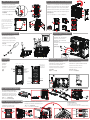
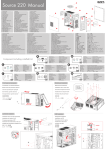
Side panel installation
Front bezel and top cover intallation
Installation der Seitenblende
Installation von Frontblende und oberer Abdeckung
Installation du panneau latéral
Installation du cadre avant et du capot supérieur
Установка боковой панели
Установка передней панели и верхней крышки
Instalación del panel lateral
Instalación de bisel frontal y de cubierta superior
Instalação do painel lateral
Instalação do painel frontal e da tampa superior
安装侧面板
安装前盖和顶盖
サイドパネルの取り外し
フロントパネル及びトップカバーの取り外し
1. Remove the thumbscrew at the
top and bottom of each side.
2. Loosen the middle thumbscrew
at middle of each side and push
down.
3. Slide the side panels towards
the rear.
4. Extended the side panels
outward to remove.
Motherboard installation
Power supply installation
Motherboard-Installation
Netzteilinstallation
Installation de la carte-mère
Installation de l’alimentation
Установка материнской платы
Установка блока питания
Instalación de la tarjeta madre
Instalación de la fuente de
alimentación
Instalação da placa principal
Instalação da fonte de alimentação
安装主板
安装电源
マザーボードの装着
電源の装着
Functions
Expansion card installation
Internal USB3.0 installation
Funktionen
Erweiterungskarteninstallation
USB 3.0-Installation (intern)
Installation de la carte d’expansion
Installation du système USB3.0 interne
Instalación de USB 3.0 interno
Fonctions
SD port
Audio
Mic
Функции
Slide to open vent
Установка платы расширения
Funciones
Slide to close vent
Instalación de tarjeta de expansión
Funções
USB 2.0 port
Back LED Switch
功能
USB 3.0 port
Reset Switch
機能
Instalação de USB 3.0 interno
Instalação da placa de expansão
5.25’ Stealth drive
open/close button
安装扩展卡
安装内部 USB3.0
拡張カードの装着
USB3.0の内部接続
HDD LED
Power LED
Reset Switch
FRONT VIEW
TOP VIEW
3.5’ Hard drive installation
3,5 Zoll-Festplatteninstallation
Installation du disque dur de 3,5’
Установка жесткого диска 3,5’’
Instalación de disco duro de 3,5”
Unidade de disco rígido de 3,5”
安装 3.5’ 硬盘驱动器
3.5“ベイへのHDDの装着
5.25” Optical drive installation
Instalación de unidad de disco de 5,25”
Installation des 5,25 Zoll-Laufwerks
Instalação do controlador da unidade de 5,25
Installation du lecteur 5,25"
安装 5.25 光盘驱动器
Установка дисковода 5,25’’
5.25“ベイへのドライブの装着
1.
2.
3.
4.
5.
6.
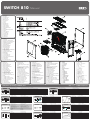
Press the side of the 5.25” stealth cover to unlock.
Remove stealth cover.
Insert 5.25” drive.
Secure using the latch.
Slide the tab to the lock position.
Two thumbscrews can be used for additional security.
LOCK
UN-LOCK