1
9Additional
information
L
REAR
R
Reset the system
If the system works abnormally, reset the
system to factory default settings.
Note
•• If the fuse gets damaged immediately after it is
replaced, an internal malfunction may occur. In such
case, consult your Philips retailer.
1
2
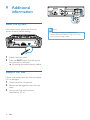
Detach the front panel.
Press the RESET button with the tip of a
ball-point pen or toothpick.
»» All settings are reset to factory default.
Replace the fuse
If there is no power, check the fuse and replace
it if it is damaged.
1
2
3
22
Check the electric connection.
Remove the damaged fuse from the rear
panel.
Insert a new fuse with the same
specifications (15 A).
EN