1
COMMUNICATION
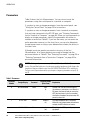
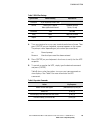
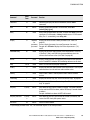
Short
Form
Password
systemmode
inverter
sm i
None*
Enters the Inverter On mode. In this mode, the UPS is converting DC
battery power to AC power for your equipment.
systemmode
linecondition
sm l
None*
Enters the Line Condition mode. In this mode, the UPS provides
conditioned AC power to your equipment, but it does not switch to
battery power if there is a power outage. Instead, the UPS sounds a
Low AC Out alarm.
systemtest
stst
None*
Starts a system test of the logic, inverter and battery.
time
t
None
Shows the current UPS time. To set the time, enter [hour]:[minutes]
after the command.
unshutup
u
None
Turns audible alarm back on.
Command
Function
*If you change parameter 39 to “Yes,” this command requires a user-level password.
Remote Monitoring
Alarm Signal Contacts: These are relay contacts (rated at 25 Vac/Vdc
and 250 mA) that change status on any alarm condition or when the UPS
is turned off. Contacts that close on an alarm are available between
Pins 23 and 24. Contacts that open on an alarm are available between
Pins 24 and 25.
Inverter On Signal Contacts: These are relay contacts (rated at
25 Vac/Vdc and 250 mA) that change status when the inverter turns on.
Contacts that close on inverter operation are available between Pins 12
and 13. Contacts that open on inverter operation are available between
Pins 11 and 13.
Eaton FERRUPS Rack Mount UPS (850 VA–7 kVA) User's Guide S 164201424 Rev 1
www.eaton.com/powerquality
49