1
Quick Reference Guide
5
Capturing Data
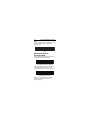
When scanning, the imager projects a red laser
aiming pattern which allows positioning the bar
code within its field of view.
If necessary, the imager turns on its red LEDs to
illuminate the target bar code.
To scan a bar code, center the symbol in any
orientation within the aiming pattern. Be sure the
entire symbol is within the rectangular area
formed by the cross pattern.
1D bar code
symbol
2D bar code
symbol
2D dot peen
DPM symbol



















![RS419 Ring Scanner Quick Reference Guide [English] (P/N 72](http://vs1.manualzilla.com/store/data/005644067_1-e86e54c89d72fd57c6e04e83bb39ce34-150x150.png)
![[English] (P/N 72-155019-01 Rev. A)](http://vs1.manualzilla.com/store/data/006378882_1-efa02e67b6e7b8cc1cb695a615a4da9c-150x150.png)