1
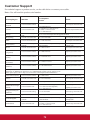
Menu operation
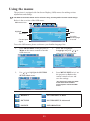
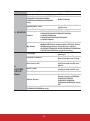
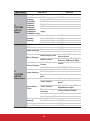
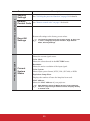
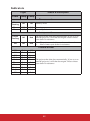
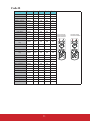
Menu system
Please note that the on-screen display (OSD) menus vary according to the signal type
selected.
The menu items are available when the projector detects at least one valid signal. If there is
no equipment connected to the projector or no signal detected, limited menu items are
accessible.
Main menu
Sub-menu
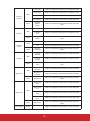
Screen Color
Aspect Ratio
1.
DISPLAY
Keystone
Position
Phase
H. Size
Zoom
3D Sync
3D Sync Invert
TI 3D DLP Link/Off
Disable/Invert
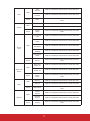
R/G/B/C/M/Y
Primary Color
Hue
Saturation
Gain
PC source: Brightest/PC/ViewMatch/Movie/
Dynamic PC/Dynamic Movie/User 1/User 2
Color Mode
Video source: Brightest/Gaming/ViewMatch/
Movie/Dynamic Movie/User 1/User 2
PC source: Brightest/PC/ViewMatch/Movie/
Dynamic PC/Dynamic Movie
Reference Mode
Video source: Brightest/Gaming/ViewMatch/
Movie/Dynamic Movie
Brightness
Contrast
Color
Tint
Sharpness
Brilliant Color
On/Off
Color Temperature
T1/T2/T3/T4
Save Settings
Color
Management
2.
PICTURE
Options
Off/Blackboard/
Greenboard/Whiteboard
Auto/4:3/16:9/
16:10 (PJD5226w/
PJD6553w/PJD6653w/
PJD6683w only)
46