1
Wireless Pen Tablet for Use with Projectors
Model TB-1
ENGLISH
User’s Manual
Thank you very much for purchasing this tablet.
To ensure safe use of the tablet, please read this manual prior to use.
WARNING
Read the user’s manual prior to use and save it for future
reference.
Misuse of this tablet may result in re, electrical shock or other injury.
Pay attention to the instructions in the user’s manual and on
the tablet. Read and follow all of the instructions.
Misuse of this tablet may result in re, electrical shock or other injury.
NOTE
• Unless specically noted otherwise, in this manual “user’s manual” refers to all
documents that come with the tablet and “this tablet” means the product and all
accessories that come with it.
• The illustrations in this manual are examples for the purpose of explanation and may
differ somewhat to the tablet at hand.
• The content of this manual, including the product specications, are subject to change
without notice in the interest of improvements.
• Please note in advance that the manufacturer does not assume any responsibility for the
results of using this manual.
• The reproduction, transfer or copy of all or any part of this document is not permitted
without express written consent.
1
Cautions on Use
This section “Cautions on Use” provides warnings about important points for the correct
and safe use of the tablet, as well as for preventing personal injury to you or anyone else
and to prevent property damage. Read the manual carefully and understand it fully before
using the tablet.
The manufacturer cannot assume any responsibility for damage that arises from ignoring
the warnings in this manual or misuse of the tablet.
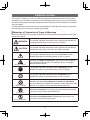
Meanings of Symbols and Types of Warnings
Study the meanings of the following symbols and warnings thoroughly before reading the
rest of the manual.
WARNING
This symbol indicates information that if ignored and the tablet is
mishandled could result in serious injury or death.
CAUTION
This symbol indicates information that if ignored and the tablet is
mishandled may result in an injury or property damage.
This symbol indicates matters that require attention, and a
detailed description is provided nearby in text or gures.
Warning—Explosive
Indicates the danger of explosion. Ignoring the warning where
this is displayed may result in an explosion or re, resulting in
damage and/or injuries.
This symbol indicates something that is mandatory, and a
detailed description is provided nearby in text or gures.
This symbol indicates something that is prohibited, and a
detailed description is provided nearby in text or gures.
Do Not Use
in Bathroom/Shower
Indicates that use in the bathroom or shower is prohibited.
Using this tablet in the bathroom, shower or other wet places may
result in an accident from an electrical shock and/or re.
Indicates do not touch. Touching a part thus labeled may result
in an injury, such as from electrical shock.
Do Not Touch
Do Not Disassemble
Indicates do not disassemble. Disassembly may result in an
injury, such as from electrical shock.
2
Cautions on Use
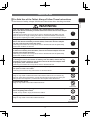
For Safe Use of the Tablet, Always Follow These Instructions
ENGLISH
In the interest of safety, always follow these instructions when handling the tablet.
WARNING
If you ever notice smoke or a strange odor, immediately turn off the tablet,
remove the lithium ion battery from the tablet and remove the wireless adapter
from the projector.
Continuing to use them as is may cause a re or electrical shock. Make sure the
smoke or odor is no longer coming out and then contact the dealer to have them
make repairs. Repairing the tablet yourself is dangerous, so never attempt to do so.
If a liquid, such as water, gets inside the device, immediately turn off the tablet,
remove the lithium ion battery from the tablet, remove the wireless adapter
from the projector and contact the dealer.
Continuing to use them as is may cause a re or electrical shock. Be particularly
careful when children are around.
If foreign matter gets inside the device, immediately turn off the tablet, remove
the lithium ion battery from the tablet, remove the wireless adapter from the
projector and contact the dealer.
Continuing to use them as is may cause a re or electrical shock. Be particularly
careful when children are around.
If you drop the device and the tablet, wireless adapter and/or electronic pen
are damaged, remove the lithium ion battery from the tablet, remove the drycell battery from the electronic pen and/or remove the wireless adapter from
the projector; then contact the dealer.
Continuing to use them as is may cause a re or electrical shock.
If the charger cable is damaged (wires cut or exposed), consult with the dealer
and replace it with a new cable.
Continuing to use it as is may cause a re or electrical shock.
Do not remove the cover of the device.
Doing so may result in electrical shock and/or device failure. Do not remove any
covers or other parts of the device, except as instructed in this manual. Have your
dealer perform all inspections, maintenance and repairs inside the device.
Do Not
Disassemble
Do not alter the device.
Doing so may result in re and/or electrical shock.
Do Not
Disassemble
Never place on top of anything that is not safe and stable, such as a wobbly
table or anything that is tilted.
If it falls, it may result in injury and/or device failure.
Never get the device wet. Do not use it in the bathroom or shower.
Doing so may result in re and/or electrical shock.
Do Not Use in
Bathroom/Shower
3
Cautions on Use
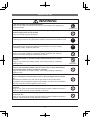
WARNING
If you hear thunder, do not touch this tablet.
Doing so may result in electrical shock. Do not use this tablet when lightening is
expected to strike.
Do Not Touch
Do not put the tablet, charger cable or wireless adapter anywhere where
someone might catch or trip on them.
If they trip and fall, they may be injured.
If the connectors of the charger cable are dirty, clean them before connecting.
Continuing to use it as is may cause the insulation to deteriorate and result in a re.
Use the specied lithium ion or dry-cell batteries.
Using batteries other than those specied for this tablet may result in leaking,
overheating, smoke, explosion and/or re.
Do not use this tablet’s lithium ion battery in anything other than this tablet.
Doing so may result in leaking, overheating, smoke, explosion, re, reduced
performance and/or damage to the device it is used in.
Do not disassemble or otherwise tamper with the lithium ion or dry-cell
batteries.
Doing so may result in the battery leaking, overheating, smoking, exploding or
catching on re.
Do not short circuit the lithium ion or dry-cell batteries. Do not connect the
batteries with something metal, such as a pin or carry or store the batteries
with anything metal, such as a necklace or hairpin.
Doing so may result in the battery leaking, overheating, smoking, exploding or
catching on re.
Do not throw or heat the lithium ion or dry-cell batteries in a re. Do not leave
them in a hot place, such as next to a re, in direct sunlight, next to a heater,
etc.
Otherwise the insulation may melt and the gas exhaust valve and/or safety
mechanisms may be damaged, liquid from the battery may catch re or the battery
may leak, overheat, smoke, explode or catch on re.
Do not immerse the lithium ion or dry-cell batteries in water or seawater or get
them wet.
Doing so may cause an abnormal chemical reaction inside the batteries and/or the
batteries to leak, overheat, smoke, explode or catch re.
Do not charge the lithium ion battery anywhere hot, such as near a re, under
the hot sun, etc.
Doing so may cause an abnormal chemical reaction inside the batteries and/or the
batteries to leak, overheat, smoke, explode or catch re.
4
Do Not
Disassemble
WARNING
Do not strike or step on the lithium ion or dry-cell batteries or puncture
them with a nail. Do not subject the lithium ion battery to shock, such as by
throwing or dropping it.
Doing so may damage or deform them, causing an internal short and/or cause the
batteries to leak, overheat, smoke, explode or catch re.
Do not use the lithium ion or dry-cell batteries if they are deformed or
damaged on the outside.
Doing so may result in the battery leaking, overheating, smoking, exploding or
catching on re.
Do not use the lithium ion or dry-cell batteries with their polarities (+/–)
reversed.
Doing so may cause an abnormal chemical reaction inside the batteries and/or the
batteries to leak, overheat, smoke, explode or catch re.
If the lithium ion or dry-cell batteries leak onto you, rinse the affected part with
lots of water but do not rub it, then immediately seek medical treatment.
Leaving it on you will cause physical injury.
Do not recharge the dry-cell battery.
Doing so may result in the battery leaking, overheating, smoking, exploding or
catching on re.
Do not leave this tablet within the reach of children or pets.
Misuse may result in re, electrical shock or other injury. Further, swallowing a
battery or other part will have adverse physical affects. If you think something has
been swallowed, immediately consult with a physician.
Do not put anything heavy on the charger cable or run it under the tablet or a
pad/rug.
Doing so may damage the cable or cause a re or electrical shock. If it is run under
something, a heavy object may be put on it without noticing the cable.
Do not damage the charger cable, tamper with, bend excessively, twist, pull on
or heat it.
Doing so may damage the cable or cause a re or electrical shock.
Do not leave outside.
This tablet is for indoors use only. Leaving it outside may result in re, electrical
shock, and/or device failure.
Do not use outside the designated country or region.
This tablet is designed for a specic country or region. Check the “Rules and
Regulations” (8) and use the tablet accordingly.
5
ENGLISH
Cautions on Use
Cautions on Use
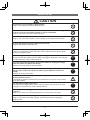
CAUTION
Do not leave in a very humid or dusty location.
Doing so may result in re and/or electrical shock.
Do not leave in a location where oil or water vapor or drops of water will get on
the device, such as on a kitchen counter or next to a humidier.
Doing so may result in re and/or electrical shock.
Do not run the charger cable near a heater.
Doing so may cause the insulation to melt, resulting in re and/or electrical shock.
Do not plug/unplug the charger cable with wet hands.
Doing so may result in electrical shock.
Do not pull on the cable to unplug the charger cable.
Doing so may damage the cable and cause a re or electrical shock. Always grasp
the plug to unplug the cable.
When moving the device, always unplug the charger cable.
Move the device after making sure the cable is unplugged. Otherwise it may damage
the cable and cause a re or electrical shock.
To ensure safety during cleaning, rst turn the tablet off, unplug the charger
cable and remove the lithium ion battery.
Failure to do so may result in electrical shock.
To ensure safety if you will not use the device for a long time, unplug the
charger cable, remove the lithium ion and/or dry-cell batteries and put it in
storage.
Leaving it as is may cause a re.
After purchase, consult with your dealer about periodic inspections and
cleaning inside the device.
If dust builds up inside the device and is not cleaned for a long time, it may cause a
re or device failure.
Plug the charger cable all the way in.
If the cable is not plugged all the way in, dust may stick to it and cause a re. Also,
touching the connectors may result in electrical shock.
If the charger cable is plugged all the way in, but it is still loose, do not
connect it.
Doing so may cause it to overheat resulting in re. Consult with your dealer.
Do not charge the device for longer than the specied time.
Doing so may result in the battery leaking, overheating, smoking, exploding or
catching on re.
6
Cautions on Use
Do not place on an electromagnetic cooker, or in a microwave or highpressure container.
Doing so may damage the lithium ion battery, causing it to leak, overheat, smoke,
explode or catch on re.
ENGLISH
CAUTION
Warning—Explosive
Replace the dry-cell battery once a year.
Failure to do so may result in it leaking.
Do not dispose of lithium ion or dry-cell batteries in your household garbage.
Do not dispose of the tablet with the lithium ion battery mounted in it.
Dispose of them properly according to national and regional regulations.
Lithium Ion Battery
The lithium ion battery is a rechargeable battery. It is readily affected by temperature
and humidity, so always use and store it in the following conditions.
• Temperature: During use, 0 to 40°C. In storage 15 to 25°C
• Humidity: 30 to 90% (no condensation forming)
The lithium ion battery has a life span. When the usable time gets markedly shorter, or
when the power won’t come on, buy a new lithium ion battery at your dealer.
• The lithium ion battery is considered a consumable, so its replacement is
not covered even within the warranty period.
• Frequently topping off the charge of the lithium ion battery will shorten its life span.
• The lithium ion battery gets warm during and after charging and during use.
About Waste Electrical and Electronic Equipment
This mark is in compliance with the Waste Electrical and Electronic Equipment
Directive 2002/96/EC (WEEE). The mark indicates the requirement NOT to
dispose of the equipment, including any spent or discarded batteries or
accumulators, as unsorted municipal waste, but use the return and collection
systems available.
If the batteries or accumulators included with this equipment display the chemical symbol
Hg, Cd, or Pb, then it means that the battery has a heavy metal content of more than
0.0005% Mercury or more than 0.002% Cadmium, or more than 0.004% Lead.
7
Cautions on Use
Wireless Adapter
This tablet comes with a wireless adapter designed for it. Do not connect it to any port
other than the USB TYPE A port of the specied projector.
Radio waves used by the tablet
The tablet uses radio waves in the 2.4 GHz band. A radio license is not required for
using the tablet, but follow the instructions below.
1. Do not use in close proximity to the following devices. Electromagnetic interference
may cause the device(s) to malfunction and the tablet may become difcult to use.
• Aircraft
• Industrial, scientic or medical devices, such as microwave ovens, pacemakers, etc.
• Indoor wireless stations used for motion detection on factory production lines (radio
station requiring a license)
• Specic low-power radio stations (radio station not requiring a license)
• IEEE802.11g/b wireless LAN equipment
2. Some usage environments may experience deteriorated transmission speeds and/
or impaired transmission due to electromagnetic interference. Electromagnetic
interference occurs readily around metals, such as reinforced steel, and concrete
structures.
3. The region or country where the tablet is used will have restrictions based on
their radio laws. Check the “Rules and Regulations” below and use the tablet
accordingly.
Rules and Regulations
The tablet may not be used in countries or regions other than the following: United States,
Canada, EU, Saudi Arabia, Japan, Malaysia, Singapore and Australia. For more detail,
consult with your dealer.
For other rules and regulations, refer to “Regulatory Notices” at the end of this manual.
8
Introduction
This tablet is an interactive tool for use with Hitachi projectors; it offers effective features for
making classroom and business presentations more fun and easier to understand.
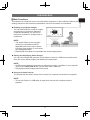
Drawing on projected images
You can draw pictures or text on images
projected by our projectors. Because
it operates wirelessly, you are free to
draw from anywhere in a large class or
boardroom.
NOTE
• The authorization by the copyright
owner(s) is required pursuant to
applicable laws for the use of works
including visual images, if such works
are copyrighted works.
• Drawing with this tablet is not possible with some image signals.
Saving and displaying drawn images
You can save images with pictures or text drawn on them to a USB memory device and
then call out the saved images and display them again later.
NOTE
• A USB memory device is necessary to utilize this function. In addition, if your projector
only has one USB TYPE A port, you will also need a USB hub.
• Copyright protected images cannot be saved.
Using as a simple mouse
The product can be used in place of the mouse of a computer connected to a projector.
NOTE
• To use this function, a USB cable is required to connect the computer and the
projector.
9
ENGLISH
Main Functions
Before Use
Checking Package Contents
The following items come packaged with the tablet. After purchase, please rst check the
contents of the package and if anything should be missing, contact your dealer right away.
Tablet
Lithium ion battery
Charger cable
Wireless pen tablet
TB-1
ENGLISH
User’s Manual
Please read this user’s manual thoroughly to ensure the proper use of this product.
Manuel d’utilisation
Nous vous recommandons de lire attentivement ce manuel pour bien assimiler le
fonctionnement de l'appareil.
Bedienungsanleitung
FRANÇAIS
DEUTSCH
Um zu gewährleisten, dass Sie die Bedienung des Geräts verstanden haben, lesen Sie
dieses Handbuch bitte sorgfältig.
ESPAÑOL
Manual de usuario
ITALIANO
Lea atentamente el manual de usuario del proyector para garantizar un uso adecuado del
mismo.
Manuale d'istruzioni
Vi preghiamo di leggere attentamente il manuale d'istruzioni per garantire una corretta
comprensione delle istruzioni.
NORSK
NEDERLANDS
Brukerhåndbok
Vennligst les denne brukerhåndbok grundig for å være garantert driftssikker bruk.
PORTUGUÊS
Gebruiksaanwijzing
Lees deze gebruikershandleiding grondig door, zodat u de werking ervan begrijpt en correct
gebruik verzekerd is.
Instruções do proprietário
SVENSKA
Leia atentamente o presente manual do utilizador para garantir a utilização correcta por via
da sua compreensão.
РУССКИЙ
Bruksanvisningens
SUOMI
Läs denna bruksanvisning noga för att förstå alla instruktionerna för ett korrekt bruk.
Руководство пользователя
POLSKI
Пожалуйста, внимателъно прочтите данное руководство полъзователя для
ознакомления и нравильно использования.
Käyttäjän ohjekirja
Lue käyttäjän ohjekirja huolellisesti varmistaaksesi, että
ymmärrät miten laitetta käytetään oikein.
Electronic pen
Podręcznik użytkownika
Spare tips × 3
Regulatory
notices
取扱説明書
ご使用の前に、必ず本書をよくお読みになり、
ご理解のうえ正しくお使いください。
Wireless adapter
AAA Alkaline
battery × 1
日本語
Przeczytaj dokładnie i ze zrozumieniem niniejszy podręcznik
użytkownika, aby zapewnić prawidłowe użytkowanie urządzenia.
Tip replacement tool
10
User’s manual
Before Use
Tablet (top)
Power button/Power LED
Turns the tablet on/off. Press the button for three seconds or so
to turn the tablet off.
The LED turns blue when the power is on. It ashes when the
battery is running low.
USB port
Connects to a projector or computer for recharging the tablet.
Status LED
Indicates the wireless status or recharging status of the battery.
Blinking (every 1 sec. approx.): Communication is not
successful. Press the wireless settings button on the tablet.
Fast blinking (every 0.5 sec. approx.): The tablet is waiting for
the reply from the wireless adapter. Press the wireless settings
button on the wireless adapter.
Off: It is communicating now.
Function keys
Switches the functions of the tablet.
Operation area
Tablet (bottom)
Pen slot
For storing the electronic pen.
Wireless adapter storage slot
For storing the wireless adapter.
Wireless settings button
Used when making communication settings with the wireless
adapter.
Battery box/Battery cover
Where the lithium ion battery is installed.
Electronic pen
Battery cover
Insert the AAA alkaline battery.
Eraser button
Pressing this button and dragging allows you to erase what
you’ve drawn.
Wireless adapter
Wireless settings button
Used when making communication settings with the tablet.
Press this button while the status LED is fast blinking.
11
ENGLISH
Names of Parts
Preparations for Use
Getting the Tablet Ready
Battery
cover
When using this tablet for the rst time, the
lithium ion battery must be installed and charged.
n Installing the lithium ion battery
Lithium ion
battery
Refer to Fig. 1 and insert the lithium ion
battery that comes with the tablet into its
battery box.
Tablet bottom
Fig. 1 Inserting the lithium ion battery
o Charging
Refer to Fig. 2 and connect the tablet via its
charger cable to a projector or computer.
When charging begins, the status LED lights
up. (Charge time: about 4 hours)
Charging is complete when the status LED
turns off. Disconnect the charger cable.
Fig. 2 Charging
NOTE
• When the tablet is on and the power LED does not light or it blinks, check whether
the lithium ion battery is installed correctly. If it is installed correctly, then it does not
have enough remaining power, so charge it. And when the power LED lights normally
instead of blinking, the battery has enough power. If you overcharge the lithium ion
battery, it may wear out prematurely, so avoid doing so.
• When using a Hitachi projector, set “STANDBY MODE” to “NORMAL”.
WARNING
• Use the specied lithium ion battery.
• Take care to insert the lithium ion battery in the correct
direction.
• Once the battery is charged, disconnect the charger cable
from the tablet.
• Do not use a damaged or deformed lithium ion battery.
• Only open the battery cover when necessary.
• Remove the lithium ion battery for transport or when it will
not be used for a long time.
• Disconnect the charger cable from the tablet when using
the tablet.
CAUTION
• Do not use tweezers or a screwdriver during lithium ion
battery installation/removal.
12
Preparations for Use
Getting the Electronic Pen
Ready
Battery
ENGLISH
Battery cover
Refer to Fig. 3 and install the battery
in the electronic pen.
Only use the following battery:
AAA Alkaline battery × 1
NOTE
• As the battery loses power, the
electronic pen ceases to function
properly. Replace the battery
with a fresh one.
Replace the battery once a year.
Fig. 3 Inserting the battery
• Use a AAA alkaline battery.
• Take care to insert the battery in the correct direction.
WARNING
CAUTION
•
•
•
•
•
Do not use a damaged or deformed battery.
Do not short or attempt to charge a dry-cell battery.
Do not use a rechargeable battery (Ni-Cd, etc.).
Only open the battery cover when necessary.
Remove and store the battery when it will not be used for a
long time or for transport.
• When removing the battery cover, take care not to drop the
battery.
• Take care to prevent children or pets from putting small
parts into their mouths.
• Do not use tweezers or a screwdriver during battery
installation/removal.
13
Preparations for Use
Mounting the Wireless Adapter and USB Memory Devices
Connect the tablet’s wireless adapter to a USB TYPE A port on your projector.
When you wish to save an image that has been drawn, a USB memory device must also
be connected to a USB TYPE A port of the projector.
If the projector only has one USB TYPE A port, use a USB hub to connect both devices.
NOTE
• Some USB memory devices and/or USB hubs may not operate properly.
Connecting the Computer and Projector with a USB Cable
In order to use the tablet in place of the computer’s mouse, connect a USB TYPE B port of
the projector with a USB port (Type A) of the computer with a USB cable.
Then select “MOUSE” for the projector’s “USB TYPE B” function setting.
NOTE
• For information on the projector’s “USB TYPE B” settings, refer to the user’s manual
of the projector.
Wireless
adapter
USB memory
device
USB hub
USB
(A)
Tablet
Computer
Projector
USB TYPE A
USB TYPE B
Fig. 4 Example of connections
14
Preparations for Use
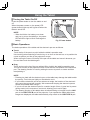
Changing the Pen Tip
ENGLISH
When the tip of the pen becomes
rounded, replace it with one of the spare
tips that come with the tablet.
Use the tip replacement tool for replacing
pen tips that comes with the tablet.
• When replacing a pen tip,
always use the spare tips
that come with the tablet.
• Take care to prevent
children or pets from
CAUTION
putting small parts into their
mouths.
Storing the Wireless Adapter and Electronic Pen
The electronic pen and the wireless
adapter can be stored in the tablet.
Face the wireless settings button to
the tablet side and store the wireless
adapter.
The lock for preventing it from falling
engages.
Tablet bottom
CAUTION
• When storing the wireless adapter, press it rmly into the bottom of the tablet,
taking care that it does not fall out while being carried.
15
Using the Tablet
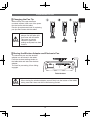
Turning the Tablet On/Off
Press the power button to turn the tablet on and
off.
When the power comes on, the power LED
(power button) lights up and it goes off when the
tablet is turned off.
NOTE
• When the lithium ion battery runs down
and you try to turn the tablet on, the power
LED will fail to light or blink. Recharge the
battery.
Fig. 5 Power button
Basic Operations
The basic operations of the tablet and the electronic pen are as follows.
Touch
Touch the tip of the pen to a point inside the tablet’s operation area.
Use touching when selecting a function key or an icon on the tool bar, or to position the
cursor anywhere you like on the projector’s screen.
When moving the cursor, lift the tip of the pen off the tablet and move it wherever you
like and then touch the tablet again.
Drag
Touch and move the tip of the pen without lifting it within the tablet’s operation area.
The cursor moves on the projector screen in line with the movements of the electronic
pen. The drawing function is used by setting the cursor to pencil or eraser and then
manipulating it.
NOTE
• Pressing too hard with the electronic pen on the tablet may damage the tablet and/or
the pen tip. Touch the pen lightly on the tablet to use it.
• If you hold the electronic pen at too extreme an angle, the location of the electronic
pen cannot be recognized correctly. We recommend keeping the electronic pen as
vertical as possible when using it.
• If you do not use the electronic pen for a certain length of time, it goes into its powersaving mode, but it recovers on one touch, allowing you to use it again.
• The drawing function of this tablet does not allow drawing on images from the LAN
port or the USB TYPE B port of the projector. If you operate the tablet while these
images are displayed, the tablet automatically may switch to the USB TYPE A port.
16
Using the Tablet
The function keys at the top of the
tablet’s operation area have the following
functions. To use a function key, touch it
for about one second.
1.
Fig. 6 Function keys
Projector Power On/Off
Toggles the projector off and on.
If you toggle this key to off, a conrmation message appears on the projector screen. If
you leave the message as is, it will disappear after a few seconds, but touching this key
again while it is displayed turns the projector off.
NOTE
• This key can be used instead of the STANDBY/ON buttons on the projector’s control
panel or the remote control. For more information, cross-reference with the projector’s
user’s manual.
• If you turn the projector off while using the drawing function, any unsaved drawings
will be lost.
2.
Start Drawing Mode
Enables the drawing function and displays the tool bar on the projector’s screen.
3.
Thumbnail Display
Displays les saved on a USB memory device connected to the USB TYPE A port
of the projector as a thumbnail as an input signal. You can display an image onto the
projector screen by touching its thumbnail.
NOTE
• If the USB TYPE A port is selected rst, thumbnails are displayed automatically. For
more detailed information on thumbnail display, refer to the explanation in “PC-LESS
Presentation” in the user’s manual of the projector.
• If multiple USB memory devices are connected to a projector, and the image
displayed on screen is from an USB memory device, it will display the saved content
of that USB memory device. If the image displayed on screen is from a source other
than the USB memory devices, it will display the content saved on the rst USB
memory device detected by the projector.
17
ENGLISH
Using the Function Keys
Using the Tablet
4.
Saving Drawings
Saves the image on the projector screen, along with any text or pictures drawn, onto a
USB memory device connected to the projector.
Files are saved with the le name “Pxxx.bmp” (where xxx is a consecutive number)
into a folder named “PJ_Capture”. If it does not already exist, a “PJ_Capture” folder is
created automatically.
NOTE
• Copyright protected images cannot be saved.
• If more than one USB memory device are connected to the projector, and an image is
being displayed from a USB memory device, that USB memory device is selected to
save to. If the image is being displayed from somewhere other than a USB memory
device, it selects the rst USB memory device detected to save to.
• Before removing a USB memory device with les saved to it from the projector, be
sure to run the projector’s “REMOVE USB” function. The time stamp of saved les
are as per the date and time settings of the projector. If you do not run the “REMOVE
USB” function and remove the USB memory device, the time stamp may not be
recorded correctly. For more details, refer to the user’s manual of the projector.
• Nothing drawn using this function is saved to the projector’s “MyScreen”. For more
details, refer to the user’s manual of the projector.
5.
Tablet Status Display
Displays the tablet’s signal strength and remaining
battery power.
6.
Exit Drawing Mode
Closes the tool bar and exits the drawing function.
Fig. 7 Status display
NOTE
• Any unsaved drawings are lost when the drawing mode is exited.
18
Using the Tablet
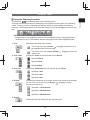
Touching the
function key starts up the drawing mode.
A tool bar like the gure below is displayed on the projector screen while in the drawing
mode. Touching an icon on the tool bar with the electronic pen enables the following
functions. Touching anywhere on the tool bar except an icon and dragging moves the tool
bar.
NOTE
• Images may be copyrighted, in which case, permission from the copyright holder is
necessary for use, in accordance with the copyright act and other applicable laws.
1. Pen
Selects the electronic pen function.
The cursor turns into a Pencil
; dragging it draws a line of
the specied pen color and size.
2. Pen color
The cursor turns into a Laser Pointer . Dragging it does not
draw a line.
Selects the Color of the line drawn by the Pencil.
Species Black.
Species Red.
Species Blue.
3. Pen size
Selects the Thickness of the line drawn by the Pencil.
Species 1-dot.
Species 3-dot.
Species 5-dot.
4. Eraser
Switches the electronic pen function to that of an eraser and species
its size. The cursor turns into an Eraser ; dragging it erases
previously drawn lines.
Species a 12-dot Eraser.
Species a 20-dot Eraser.
Species a 28-dot Eraser.
5. Erase
Erases all the lines drawn with the electronic pen.
19
ENGLISH
Using the Drawing Function
Using the Tablet
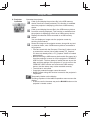
6. Projector
Operation
Operates the projector.
Calls up and display the previous le in the USB memory
device from that currently selected. This function is available
when the projector is displaying a le from a USB memory
device.
Calls up and display the next le in the USB memory device
from that currently displayed. This function is available when
the projector is displaying a le from a USB memory device.
Displays thumbnails of les recorded on a USB memory
device.
You can display an image onto the projector screen by
touching its thumbnail.
Saves the image on the projector screen, along with any text
or pictures drawn, onto a USB memory device connected to
the projector.
• Files are saved with the le name “Pxxx.bmp” (where xxx is
a consecutive number) into a folder named “PJ_Capture”.
If it does not already exist, a “PJ_Capture” folder is created
automatically.
• Before removing a USB memory device with les saved to it
from the projector, be sure to run the projector’s “REMOVE
USB” function. The time stamp of saved les are as per the
date and time settings of the projector. If you do not run the
“REMOVE USB” function and remove the USB memory
device, the time stamp may not be recorded correctly.
• The tool bar is not saved.
• Copyright protected images cannot be saved.
• Nothing drawn using this function is saved to the projector’s
“MyScreen”.
Temporarily blanks out the display.
Touching anywhere in the tablet’s operation area recovers the
display.
• It can be used in the same way as the BLANK button on the
projector’s remote control.
20
6. Projector
Operation
(Continued)
Turns off the projector.
Touch the icon for three seconds or so.
• Works the same way for turning the projector off as the
tablet’s
function key, but no conrmation message is
displayed.
• If you turn the projector off while using the drawing function,
any unsaved drawings will be lost.
Toggles between display/hide the Pattern (grid lines).
7. Mouse
Operation
Cycles through the display source signals.
• It can be used in the same way as the INPUT button on
the projector’s control panel. However, images cannot be
selected from a LAN port or a USB TYPE B port.
When the computer screen is displayed, this function operates the
computer like a simple mouse or keyboard.
• In order to use this function, connect a USB TYPE B port of the
projector with a USB port (Type A) of the computer with a USB
cable. Then select “MOUSE” for the projector’s “USB TYPE B”
function setting.
Works like the Page Down button on a keyboard.
Works like the Page Up button on a keyboard.
Works like the left-click button on a mouse.
Works like the right-click button on a mouse.
Moves the mouse’s cursor in the direction of the arrow.
8. Exit
9. Minimize
Closes the tool bar and exits the drawing function.
• Exits the drawing function in the same way as the tablet’s
function key.
• When exiting the drawing mode, all unsaved drawings are lost.
Minimizes the tool bar.
Touching the minimized tool bar icon displays the tool bar again.
21
ENGLISH
Using the Tablet
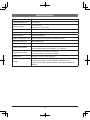
Specications
Model
TB-1
Usage temperature
0°C to 40°C
Reading range
8.0 × 5.0 inch
(203.2 mm × 127.0 mm)
Radio band used
2.4 GHz
Transmission range
About 15 m (varies with conditions of use)
Power source
Lithium ion battery
Time in continuous use
About 16 hours (varies with conditions of use)
Auto power-off time
About 30 minutes
Time to full charge
About 4 hours
Power consumption
When using USB: 5 V 500 mA
When using the lithium ion battery: 3.7 V 60 mA
Compatible models
CP-AW251N, CP-A301N, CP-A221N
For other models, contact your dealer.
Dimensions
315 (W) × 257 (D) × 23 (H) (mm)
Weight
670 g
(including the tablet, wireless adapter, electronic pen,
electronic pen’s AAA alkaline battery, and tablet’s lithium ion
battery)
22