1
EX
EX--1316HMV
English
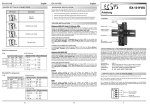
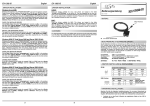
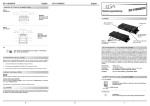
JUMPER SETTING & CONNECTORS:
12 Volt Connector:
EX
EX--1316HMV
English
DRIVER INSTALLATION:
Windows 98/ 98SE/ ME:
+7V ~ 40V Terminal Block:
ATTENTION !!!
Use only the original
power supply !!!
GND (Ground)
+7V ~ 40V
Windows will recognize a new “FT232R USB UART“ and open the hardware assistant.
Please choose manual installation and put the driver CD into your CD-Rom drive (as
sample D:) . Now enter the Path “D:\USB_to_IO\FTDI\Win98_ME” into the box for the
Path/Source and click at >next/continue<. Now Windows search for the drivers in the
specified directory. Follow the hardware assistant and finish the installation. If Windows
recognizes other new devices repeat the above described steps. Attention! Restart
Windows in any case after installing the drivers.
Serial 9 Pin male connector
Pin
Signal
Pin
Signal
Pin
1
CDC
4
DTR
7
Signal
RTS
2
RXD
5
GROUND
8
CTS
3
TXD
6
DSR
9
RI
USB B-Connector:
USB 2.0 B-Connector
Pin
Signal
Pin
Signal
1
VCC
3
DATA+
2
DATA-
4
GND
Attention!
Never plug in with
force or in wrong
direction.
HARDWARE INSTALLATION:
Because there are large differences between PC’s, we can give you only a general installation guide for the EX-1316HMV. Please refer your computer’s reference manual whenever
in doubt.
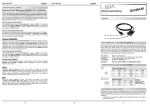
1. Connect the USB cable to the USB B-Port of the module an lock the screw.
Vers. 1.1 / 25.01.12
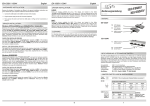
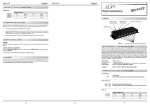
AUFBAU:
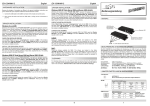
Vorderseite:
CHECK THE INSTALLED DRIVER:
DB 9M:
Bedienungsanleitung
Click at Start<>Run< then enter “compmgmt.msc“ and click at >OK<. In the windows
that open select >Device Manager<. Under ”Ports (COM and LPT)“ you should find
one more new „USB Serial Port„ as sample (COM3). If you see this or similar entries
the module is installed correctly.
Metallbügel zum Einbau in ein 19“ Rack
LINUX:
There are drivers available for Linux. The drivers are located in the folder
“D:\USB_to_IO\FTDI\Linux x86_64“ on the driver CD. They are supported by the most
versions of Linux. Because each individual distribution and kernel version of Linux is
different, sadly we cant provide a installation instruction. Please refer to the installation
manual for standard IO ports from your Linux version !
S1-S16: 9 Pin Seriell RS-232 Stecker
Rückseite:
MAC:
There are drivers available for MAC. The drivers are located in the folder
“D:\USB_to_IO\FTDI\MAC OSX or Mac_OS_9_8“ on the driver CD. They are supported by the most versions of MAC OS. Because each individual version of MAC OS is
different, sadly we cant provide a installation instruction. Please refer to the installation
manual for standard IO ports from your MAC OS version !
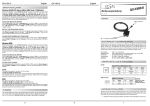
Betriebs LED
USB B-Buchse
PC-Anschluss
(Verschraubbar)
CLEANING:
For cleaning please use only a dry fluff less cloth and remove the dirt with gently pressure. In the area of the connectors please make sure that no fibres from the cloth remain in the connectors. Attention! Never use a moist or wet cloth for cleaning!
12V Buchse für Netzteil
+7V ~ 40V
Power Anschluss
2. Now connect the other end from the USB cable (A-Plug) to the A-Port at your PC.
Installation auf einer Trägerschiene:
DRIVER INSTALLATION:
Windows XP/ Vista/ 7 (32&64-bit)/ 2000/ Server 2003 & 2008:
Windows will recognize a new “FT232R USB UART“ and open the hardware assistant.
Please choose manual installation and put the driver CD into your CD-ROM drive. Enter
the Path "D:\USB_to_IO\FTDI\(32_64bit)Win7_XP_Vista_2008_2008R2_2003_2000”.
into the box for the Path/Source and click at >next/continue<. Now Windows search for
the drivers in the specified directory. Follow the hardware assistant and finish the installation. If Windows recognizes other new devices repeat the above described steps.
Attention! Restart Windows in any case after installing the drivers.
BESCHREIBUNG & TECHNISCHE DATEN:
Die EX-1316HMV ist ein Modul zur Umsetzung von USB 2.0 auf sechzehn RS-232
Schnittstellen mit FIFO 16C550 Ports für den Anschluss von High Speed Seriellen RS232 Peripherie Geräten (z.B. Modem, Plotter usw.). Die USB Module sind Hot Plug &
Play fähig. Für die Einstellungen der I/O Adressen und Interrupts sind keine Jumper und
Einstellungen notwendig. Sie werden vom System BIOS und beim installieren des
Betriebssystems automatisch vorgenommen. Die EX-1316HMV ist zusätzlich mit
verschraubbarem USB-Anschluss ausgerüstet.
CHECK THE INSTALLED DRIVER:
Click at Start<>Run< then enter “compmgmt.msc“ and click at >OK<. In the windows
that open select >Device Manager<. Under ”Ports (COM and LPT)“ you should find
one more new "USB Serial Port„ as sample (COM5). If you see this or similar entries
the module is installed correctly.
INSTALL THE PERIPHERAL DEVICE:
The speed from the serial ports can be set to the maximum baud rate of 115.2Kbaud.
With double click select for example >Device manager< > USB Serial Port (COM5)<.
Now you can select the different settings of baud rate, stop/start-bits etc. This setting
you can use also for the other COM ports.
Kompatibilität:
Betriebssysteme:
Anschlüsse:
CHANGE PORT NUMBER (NOT WIN98 & ME):
If you like to change the port number for example COM3 to COM5, open the >Device
Manager< click at >COM3<, >Settings< and then >Advance<. There you can choose
between COM3 up to COM256.
5
6
USB 2.0 Anschluss
WIN 9.x/ ME/ 2000/ XP/ Server 2003 & 2008/ Vista/ 7/ Linux/ MAC
16x 9 Pin D-Sub Stecker, 1x USB B-Buchse, 1x 12V Buchse,
1x 7V bis 40V Power Anschluss (Terminal Block)
Lieferumfang:
EX-1316HMV, Treiber CD, Anleitung, USB Kabel
Zertifikate:
CE / FCC / RoHS / WEEE
1
DE97424562 / WHQL