1
EAR & FOREHEAD THERMOMETER 201
12 KENMERKEN
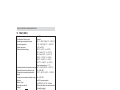
HV-T68
Infrarood
32 °C ~ 42,9 °C (89,6 °F ~ 109,3 °F)
5 °C ~ 59,9°C (41 °C ~ 139,8 °F)
0,2 °C of 0,4 °F
35,5 °C ~ 42 °C - (+/- 0,2 °C)
32 °C tot 35,4 °C - (+/- 0,3 °C)
42,1 °C tot 42,9 °C - (+/- 0,3 °C)
95,9 °F ~ 107,6 °F -(+/- 0,4 °F)
89,6 °F ~ 95,8 °F - (+/- 0,5 °F)
107,7 °F ~ 109,3 °F - (+/- 0,5 °F)
Kamertemperatuur +/- 1 °C
Bereik bedrijfsomgevingstemperatuur 15 °C ~ 40 °C (59,0 °F ~ 104,0 °F)
Bereik bedrijfsomgevingsvochtigheid 30 ~ 80% RV
Bereik opslagomgevingstemperatuur -10 °C ~ 55 °C (-14,0 °F ~ 131,0 °F)
Bereik opslagomgevingsvochtigheid 30 ~ 85% RV
Laatste 30 metingen
Geheugen
1 x CR2032 – DC 3 V – lithium
Batterijtype
30 seconden na de laatste meting
Automatische uitschakeling
65 g (met batterij)
Gewicht
• Type BF
Classificatie
• Klasse IIa
• Toestel met interne voeding
• IPX0
• Niet geschikt voor gebruik in de
nabijheid van ontvlambare
anesthetische mengsels met lucht
of zuurstof of lachgas.
• Continu bedrijf met korte
belastingcyclus
13 CE-MARKERING
De CE-markering op het toestel, de handleiding en de verpakking geeft aan
dat het toestel voldoet aan de basiseisen van de medische richtlijn 93/42/EEG.
De verklaring van overeenstemming treft u aan op:
http://www.topcom.net/cedeclarations.asp
19
NEDERLANDS
Model
Temperatuursensortype
Temperatuurmeetbereik
Kamertemperatuur
Afleesnauwkeurigheid
Meetnauwkeurigheid