1
TRAXXAS TQ 2.4GHz RADIO SYSTEM
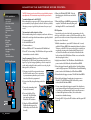
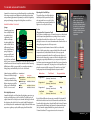
TQ 2.4GHz Binding Instructions
For proper operation, the transmitter and receiver must be
electronically ‘bound.’ This has been done for you at the factory.
Should you ever need to re-bind the system or bind to another
transmitter or receiver, follow these instructions. Note: the receiver
must be connected to a 4.8-6.0v (nominal) power source for binding
and the transmitter and receiver must be within 5 feet of each other.
1. Press and hold the transmitter’s SET button as you switch
transmitter on. The transmitter’s LED will flash red slowly.
Release the SET button
2. Press and hold the receiver’s LINK button as you switch on
the speed control (by pressing the EZ-Set button). Release the
LINK button.
3. When the transmitter and receiver’s LEDs turn solid green, the
system is bound and ready for use. Confirm that the steering and
throttle operate properly before driving your model.
Steering Sensitivity (Exponential)
The Multi-Function knob on the TQ 2.4GHz transmitter has
been programmed to control Steering Sensitivity (also known
as exponential). The standard setting for Steering Sensitivity is
“normal (zero exponential),” with the dial full left in its range of
travel. This setting provides linear servo response: the steering
servo’s movement will correspond exactly with the input from
the transmitter’s steering wheel. Turning the knob clockwise from
the left will result in “negative exponential” and decrease steering
sensitivity by making the servo less responsive near neutral, with
increasing sensitivity as the servo nears the limits of its travel range.
The farther you turn the knob, the more pronounced the change
in steering servo movement will be. The term “exponential” comes
from this effect; the servo’s travel changes exponentially relative
to the input from the steering wheel. The exponential effect is
indicated as a percentage—the greater the percentage, the greater
the effect. The illustrations below show how this works.
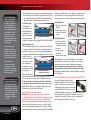
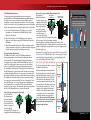
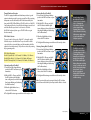
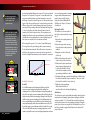
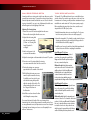
Normal Steering Sensitivity (0% exponential)
In this illustration,
the steering servo’s
travel (and with it,
the steering motion
of the model’s front
wheels) corresponds
precisely with the
steering wheel. The ranges are
exaggerated for illustrative purposes.
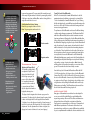
Decreased Steering Sensitivity (Negative Exponential)
By turning the
Turning Range
Effective Turning
at Transmitter
Range on Model
Multi-Function knob
clockwise, the steering
sensitivity of the model
will be decreased. Note
that a relatively large
amount of steering
wheel travel results in
a smaller amount of
servo travel. The farther
you turn the knob, the more pronounced the
effect becomes. Decreased steering sensitivity
may be helpful when driving on low-traction surfaces, when
driving at high speed, or on tracks that favor sweeping turns where
gentle steering inputs are required. The ranges are exaggerated for
illustrative purposes.
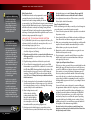
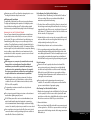
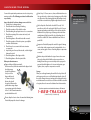
To prevent loss of radio range
do not kink or cut the black wire,
do not bend or cut the metal tip,
and do not bend or cut the white
wire at the end of the metal tip.
Correct
No
No
No
Experiment! Try varying degrees of exponential. It’s easy to go back
to “zero” if you don’t like the effect. There’s no wrong way to adjust
exponential. Any setting that makes you more comfortable with
your car’s handling is the “right setting.”
SETTING UP THE ANTENNA
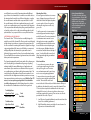
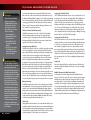
The receiver antenna has been set up and
installed from the factory.
When reinstalling the antenna, first slide
the antenna wire into bottom of antenna
tube until white tip of antenna is at top of
tube under the black cap. Insert the base
of the tube into the antenna post. Take
care not to crimp the antenna wire. Slide
the crimp nut over the antenna tube and
screw it onto the antenna post. Use the
supplied tool to tighten the crimp nut
on the post just until the antenna tube
is securely in place. Do not over tighten
or crush the antenna wire against the
chassis. Do not bend or kink the antenna
wire! See the side bar for more information.
Do not shorten the antenna tube. The
minimum height is 62mm.
Antenna
Tip
Antenna
Tube
Antenna
Wrench
Antenna
Crimp Nut
Antenna
Post
SUMMIT • 15