1
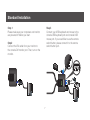
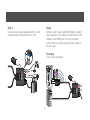
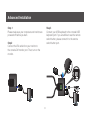
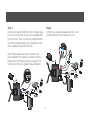
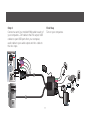
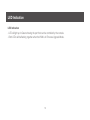
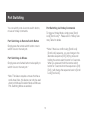
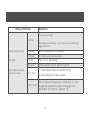
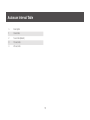
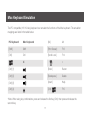
Installation Guide 2-Port USB Dual-Link DVI-D Cable KVM Switch with Audio and Microphone Support GCS982U PART NO. M1196 Table of Contents Package Contents 4 Firmware Upgrade 20 System Requirements 5 Upgrade Fail 24 Overview 6 25 Standard Installation 7 Federal Communications Commission (FCC) Statement Advanced Installation 9 CE Compliance 26 LED Indication 12 SJ/T 11364-2006 27 Limited Warranty 28 Contact 29 Port Switching 13 Hotkeys Summary Table 14 Autoscan Interval Table 16 Mac Keyboard Emulation 17 Sun Keyboard Emulation 18 Factory Default Settings 19 3 Package Contents • • • • 1 x 2-Port USB Dual-Link DVI-D Cable KVM Switch 1 x Remote Switch Button 1 x Installation Guide 1 x Warranty Card 4 System Requirements Console • DVI-D supported monitor • USB keyboard and mouse • Powered speakers and microphone (optional) Computers • Two USB ports • A DVI-D supported connection • 3.5mm audio and microphone connections (optional) Operating System • Windows XP • Windows Vista (32-bit / 64-bit) • Windows 7 (32-bit / 64-bit) • Mac OS X or greater • Sun Solaris workstation • Linux, UNIX and other USB supported systems* *Additional drivers and support may be needed 5 Overview 1. 2. 3. 4. 5. 6. 7. 8. LEDs Console DVI-D Video Port Console USB Mouse Port Console USB Keyboard Port Console Mic. Port Console Audio Port Remote Switch Button Port Remote Switch Button 9. CPUs USB Keyboard connection 10.CPUs USB Mouse connection 11.CPUs DVI-D connection 12.CPUs Audio connection 13.CPUs Mic. connection 1 2-Port USB Dua l-Lin k DVI -D Cab le KVM PC2 PC1 2 3 4 5 6 7 8 6 9 10 11 12 13 Standard Installation Step 1 Please make sure your computers and monitor are powered off before you start. Step 3 Connect your USB keyboard and mouse to the console USB keyboard port and console USB mouse port. If you would like to use the remote switch button, please connect it to the remote switch button port. PC1 PC1 7 PC1 PC2 2-Port USB Dual-Link DVI-D Cable KVM PC2 2-Port USB Dual-Link DVI-D Cable KVM Step2 Connect the DVI cable from your monitor to the console DVI monitor port. Then, turn on the monitor. Step 4 Connect your powered speaker and mic. to the console audio port and console mic. port. Step 5 Connect a set of your molded KVM cable to each of your computers – DVI cable to the DVI output, USB cables to open USB ports from your computer, audio cable to your audio output and mic. cable to the mic. input. PC1 8 PC1 PC2 2-Port USB Dual-Link DVI-D Cable KVM PC2 2-Port USB Dual-Link DVI-D Cable KVM Final Step Turn on your computers. Advanced Installation Step 1 Please make sure your computers and monitor are powered off before you start. Step 3 Connect your USB keyboard to the console USB keyboard port. If you would like to use the remote switch button, please connect it to the remote switch button port. Step2 Connect the DVI cable from your monitor to the console DVI monitor port. Then, turn on the monitor. PC2 2-Port USB Dual-Link DVI-D Cable KVM 9 PC1 PC1 PC2 2-Port USB Dual-Link DVI-D Cable KVM PC1 Step 4 Connect a powered USB hub to the console mouse port, then connect the mouse to any available USB port in the hub. Then, connect any peripherals that you want to share between your computers to the other available USB ports in the hub. Step 5 Connect your powered speaker and mic. to the console audio port and console mic. port. PC1 PC2 2-Port USB Dual-Link DVI-D Cable KVM 10 PC1 PC2 2-Port USB Dual-Link DVI-D Cable KVM Note: Please make sure mouse emulation has been disabled for this setup to function correctly. Please refer to HotKeys summary on page 14 for instructions on how to disable mouse emulation. 11 PC2 PC1 Final Step Turn on your computers. 2-Port USB Dual-Link DVI-D Cable KVM Step 6 Connect a set of your molded KVM cable to each of your computers – DVI cable to the DVI output, USB cables to open USB ports from your computer, audio cable to your audio output and mic. cable to the mic. input. LED Indication LED Indication - LED will light up in Green showing the port that can be controlled by the console. - Both LEDs will be flashing together when the KVM is in Firmware Upgrade Mode. 12 Port Switching Port Switching via Hotkey Commands You can switch ports via remote switch button, mouse or hotkey commands. To trigger a Hotkey Mode, simply press [Scroll Lock] [Scroll Lock]**. Please refer to Hotkey Summary Table for details. Port Switching via Remote Switch Button Simply press the remote switch button once to switch focus to the next port. **Note: If there is a conflict using [Scroll Lock] [Scroll Lock] sequence, you can change to the alternative sequence [Ctrl] [Ctrl] by press and holding the remote switch button for 3 seconds. When you press and hold the remote switch button for 3 second when the sequence is [Ctrl] [Ctrl], it will change the sequence back to [Scroll Lock] [Scoll Lock]. Port Switching via Mouse Simply press scroll wheel button twice rapidly to switch focus to the next port.* *Note: This feature requires a mouse that has a scroll wheel. Also, this feature can only be used when both Mouse Emulation Mode and Mouse Port-Switching Mode are enabled. 13 Hotkeys Summary Table Hotkey combination Switch KVM and audio focus to the next port [k] [Enter] Switch KVM focus to the next port [s] [Enter] Switch audio focus to the next port [a] [Enter] Activate Autoscan Mode. It will toggle between the two computers every 5 seconds [a]/[n], [Enter] Activate Autoscan Mode. It will toggle between the two computers with the specific time depending on the interval [n] that you have input. Please see Autoscan Interval Table for details. [x] [Enter] Change hotkey sequence to the alternative sequence [m] [Enter] Enable/disable mouse emulation [d] [Enter] Capture and store monitor’s EDID on specific port [Scroll Lock] [Scroll Lock] + or [Ctrl] [Ctrl]* + *Note: If alternative hotkey sequence is chosen Description [Enter] Enable/disable mouse port-switching function [w] [Enter] Note: If you enable this feature when Mouse Emulation Mode is disabled, Mouse Emulation Mode will be enabled automatically [F2] [Enter] Enable Mac keyboard emulation [F3] [Enter] Enable Sun keyboard emulation 14 Hotkey combination Description List out current settings [F4] [Enter] Note: Please have a Notepad or word document opened before you trigger this function. [Scroll Lock] [Scroll Lock] + [F5] [Enter] Perform a USB keyboard and mouse reset or [F10] [Enter] Auto detect keyboard operating system [Ctrl] [Ctrl]* + [r] [Enter] Reset to factory default settings [E]/[e], [Enter] Enable/Disable Power On detection function *Note: If alternative hotkey sequence is chosen [N]/[n], [Enter] [F6]/[nn], [Enter] 1. Enables/Disable Keyboard emulaion function 2. Default Keyboard emulation enabled Set the keyboard language layout. Where [nn] is a 2 digits number that represents the keyboard language code. (US English: 33, French: 08, Japanese: 15). 15 Autoscan Interval Table n Description 1 3 seconds 2 5 seconds (default) 3 10 seconds 4 20 seconds 16 Mac Keyboard Emulation The PC compatible (101/104 key) keyboard can emulate the functions of the Mac keyboard. The emulation mappings are listed in the table below. PC Keyboard Mac Keyboard [Alt] Alt [Shift] Shift [Print Screen] F13 [Crtl] Ctrl [Scroll Lock] F14 = [Ctrl] [1] [Enter] Return [Ctrl] [2] [Backspace] Delete [Ctrl] [3] [Insert] Help [Ctrl] [4] [Ctrl] F15 *Note: When using key combinations, press and release the first key (Ctrl), then press and release the second key. 17 Sun Keyboard Emulation The PC compatible (101/104 key) keyboard can emulate the functions of the Sun keyboard. The emulation mappings are listed in the table below. PC Keyboard Sun Keyboard [Ctrl] [F9] Find [Crtl] [t] Stop [Crtl] [F10] Cut [Crtl] [F2] Again [Crtl] [1] [Crtl] [F3] Props [Crtl] [2] [Crtl] [F4] Undo [Crtl] [3] [Crtl] [F5] Front [Crtl] [4] [Crtl] [F6] Copy [Crtl] [h] [Crtl] [F7] Open [Crtl] [F8] Paste Help Compose *Note: When using key combinations, press and release the first key (Ctrl), then press and release the second key. 18 Factory Default Settings Function Default Setting Autoscan Interval 5 seconds Hotkeys [Scroll Lock] [ Scroll Lock] Keyboard Operating Platform PC compatible Mouse Emulation On Mouse Port-Switching Off Keyboard Emulation On (Gaming mode: Off) Power on Detection Enable Keyboard Language US English 19 Firmware Upgrade Step 3 Note: In order to perform a firmware upgrade, you need to use a computer that’s not connected to the KVM. Press and hold the remote switch button of the KVM while connecting the 2 USB connections of a set of KVM cable to the computer that you will use to perform the firmware upgrade. When you see the 2 LEDs are flashing on the KVM, you can now release the remote switch button. Step 1 Go to www.iogear.com to download the latest available firmware or the specific firmware that you wish to upgrade to. Note: The computer used to perform the firmware upgrade must be powered on before you connect the 2 USB connections to it. Step 2 Please make sure all the computers that are connected to the KVM are completely shutdown. 20 Step 4 Step 5 Windows will now install all the required drivers. You may see the below message in the system tray icon area. After you see the below message “Your new hardware is installed and ready to use.”, extract the downloaded file with WinRAR or compatible software. Then double click on the execute file to begin with the Firmware Upgrade Utility. 21 Step 6 Step 7 Read the License Agreement and click “I Agree” then click “Next” if you wish to continue with the firmware upgrade. Otherwise, click “Cancel” to exit. Choose the correct KVM that you wish to perform firmware upgrade from the “Device List” and then click “Next” to continue. Then the Firmware Upgrade Utility will verify if there is a KVM connected to the computer by the firmware upgrade cable. (Check Firmware Version checkbox is optional) 22 Step 8 If you have checked the “Check Firmware Version” checkbox, then the utility will check the current firmware that is on your KVM. If the current firmware is newer than the firmware that you wish to upgrade to, you will be prompted and asked if you wish to proceed. Simply click “Yes” to start the upgrade and “No” to cancel the upgrade. Step 9 When the firmware upgrade is done, you will see “Firmware upgrade OK” in the “Status Messages” window. Then simply click “Finish” to complete the whole firmware upgrade process. Note: If you did not check the “Check Firmware Version” checkbox, utility will perform the upgrade automatically no matter what version of firmware you have in the KVM. Final Step Now the KVM will reset by itself and it will be ready for usage after the reset. 23 Upgrade Fail If the upgrade fails to complete, unplug the 2 USB connections from your computer that has performed the firmware upgrade. Then, repeat the firmware upgrade process by following the procedure of Firmware Upgrade section starting from step 3. 24 Federal Communications Commission (FCC) Statement This equipment has been tested and found to comply with the limits for a Class B digital device, pursuant to Part 15 of the FCC Rules. These limits are designed to provide reasonable protection against harmful interference in a residential setting. This product generates, uses, and can radiate radio frequency energy and, if not installed and used as directed, it may cause harmful interference to radio communications. Although this product complies with the limits for a Class B digital device, there is no guarantee that interference will not occur in a particular installation. 25 CE Compliance This device has been tested and found to comply with the following European Union directives: Electromagnetic Capability (89/336/EMC), Low Voltage (73/23/EEC) and R&TTED (1999/5/EC). 26 SJ/T 11364-2006 The following contains information that relates to China. 有毒有害物质或元素 部件名称 铅 (Pb) 汞 (Hg) 镉(Cd) 六价 (Cr(VI)) 多溴联苯 (PBB) 多溴二苯醚 (PBDE) 电器部件 ● ○ ○ ○ ○ ○ 机构部件 ○ ○ ○ ○ ○ ○ ○:表示该有毒有害物质在该部件所有均质材料中的含量均在SJ/T 11363-2006规定的限量要求之下。 ●:表示符合欧盟的豁免条款,但该有毒有害物质至少在该部件的某一均质材料中的含量超出 SJ/T 11363-2006的限量要求。 ×:表示该有毒有害物质至少在该部件的某一均质材料中的含量超出SJ/T 11363-2006的限量要求。 27 Limited Warranty WE’RE HERE TO HELP YOU! NEED ASSISTANCE SETTING UP THIS PRODUCT? Make sure you: 1. Use the live chat at www.iogear.com to try and solve any issues you may be having with the product 2. Visit the Tech Info Library/FAQ on www.iogear.com (under the Support tab) 3. Call the tech support line at 1(866) 946-4327 (U.S. only) or (949) 453-8782 Warranty Information This product carries a 3 Year Limited Warranty. For the terms and conditions of this warranty, please go to http://www.iogear.com/support/warranty or call 1-866-946-4327 Register online at http://www.iogear.com/register Important Product Information Product Model Serial Number 28 Contact IOGEAR 19641 Da Vinci, Foothill Ranch, CA 92610 P 949.453.8782 F 949.453.8785 Visit us at: www.iogear.com © 2011 IOGEAR® Part No. M1196 IOGEAR, the IOGEAR logo, are trademarks or registered trademarks of IOGEAR. Microsoft and Windows are registered trademarks of Microsoft Corporation. All other brand and product names are trademarks or registered trademarks of their respective holders. IOGEAR makes no warranty of any kind with regards to the information presented in this document. All information furnished here is for informational purposes only and is subject to change without notice. IOGEAR assumes no responsibility for any inaccuracies or errors that may appear in this document. 29 About Us FUN IOGEAR offers connectivity solutions that are innovative, fun, and stylish, helping people enjoy daily life using our high technology products. GREEN IOGEAR is an environmentally conscious company that emphasizes the importance of conserving natural resources. The use of our technology solutions helps reduce electronic waste. PART NO. M1196 © 2011 IOGEAR®