1
6 Update the
firmware
through Philips
Songbird
SOUNDDOT is controlled by an internal
program called firmware. Newer versions of
the firmware may have been released after you
have purchased SOUNDDOT.
Through Philips Songbird, you can check for
and install firmware updates for SOUNDDOT
over the Internet.
Tip
•• Your music files are not affected by a firmware update.
5
Follow the onscreen instructions.
»» Downloading and installation of
firmware update start automatically.
»» The SOUNDDOT restarts after the
firmware is updated and is ready for
use again.
Note
1
2
3
4
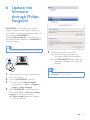
Make sure that you have connected your
PCto the Internet.
•• Wait until the update is completed, then disconnect the
SOUNDDOT from the computer.
Connect SOUNDDOT to the PC.
On the PC, launch Philips Songbird.
• If necessary, click Start > Programs >
Philips > Philips Songbird.
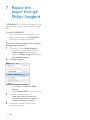
Click SOUNDDOT in the Player pane.
Then, select Tools > Check for updated
firmware in the pop-up window.
»» Philips Songbird checks for updates
from the Internet.
EN
15