1
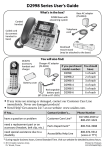
D3097 Series User's Guide
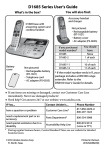
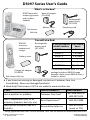
What's in the box?
D3097 base with
answering system
and cordless
handset
Not shown:
Belt clip
Base AC adapter
(PS-0034)
Rechargeable
battery pack
(BT-1025)
Battery cover
Telephone cord
You will also find:
DCX309
accessory
handset and
charger
Rechargeable
battery pack
(BT-1025)
Battery cover
Charger AC adapter
(PS-0035)
Not shown: Belt clip
If you purchased You should
model number:
have:
D3097
None
D3097-2
1 of each
D3097-3
2 of each
:
:
:
:
D3097-12
11 of each
* If the model number ends in R, your
package includes a DRX100 range
extender. Refer to the DRX100 User’s
Guide for details.
If any items are missing or damaged, contact our Customer Care Line
immediately. Never use damaged products!
Need Help? Get answers 24/7 at our website: www.uniden.com.
If You...
Contact Uniden’s...
have a question or problem
Customer Care Line*
need a replacement part or an
accessory (headset, belt clip, etc.)
need special assistance due to a
disability
Phone Number
817-858-2929 or
800-297-1023
Parts Department*
800-554-3988
Accessibility Help Line
800-874-9314
(voice or TTY)
* During regular business hours, Central Standard Time. Visit our website for detailed business hours.
©2012 Uniden America Corp.
Ft. Worth, Texas
Printed in Vietnam
U01UN411BZA(0)
What's in the manual?
Getting Started.................................. 3
Installing Your Phone........................................... 3
Getting to Know Your Phone........................... 4
Using the Menus.................................................... 7
Entering Text on Your Phone.........................10
Using Your Phone............................10
Using Caller ID and Call Waiting....................11
Using the Phonebook........................................12
Using Special Features....................13
Using the Base Ringers......................................13
Using the Audio Boost.......................................13
Silent Mode............................................................13
Using Caller Announce......................................13
Call Blocking..........................................................14
Using Multi-Handset Features........................15
Using Voice Message Notification................16
Using an Optional Headset.............................16
Staying in Range..................................................16
Using the Answering System..........17
Answering System Options (Answering
Setup).....................................................................17
Accessing the Answering System.................18
Recording Your Personal Greeting...............18
Getting Your Messages.....................................19
Using the System While You're Away
from Home..........................................................20
Important Information....................21
Solving Problems.................................................21
Resetting a Handset...........................................23
Registering a Handset.......................................23
Compliance Information..................................25
One-year Limited Warranty.............................26
Important Safety Instructions!
When using your telephone equipment, basic safety precautions should always be
followed to reduce the risk of fire, electric shock and injury to persons, including
the following:
This unit is NOT waterproof. DO NOT expose it to rain or moisture.
Do not use this product near water, for example, near a bath tub, wash bowl,
kitchen sink or laundry tub, in a wet basement or near a swimming pool.
Avoid using a telephone (other than a cordless type) during an electrical storm.
There may be a remote risk of electric shock from lightning.
Do not use the telephone to report a gas leak in the vicinity of the leak.
Use only the power cord and batteries indicated in this manual. Do not dispose
of batteries in a fire. They may explode. Check with local codes for possible
special disposal instructions.
Do not place the handset in any charging cradle without the battery installed
and the battery cover securely in place.
SAVE THESE INSTRUCTIONS!
CAUTION! Risk of explosion if battery is replaced by an incorrect type!
Dispose of used batteries according to the instructions. Do not open
or mutilate the battery. Disconnect the battery before shipping this
product.
For more details, see the Important Information section.
2 - English
Getting Started
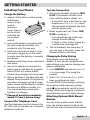
Installing Your Phone
Test the Connection
1. Pick up the handset and press TALK/
Charge the Battery
FLASH. The handset sounds a dial
1. Unpack all handsets, battery packs,
tone, and the display shows Talk.
and battery
-- If you don't hear a dial tone or the
covers. If you
display says Check Tel Line, check
need to
the connection between the base
remove a
and the phone jack.
cover, press in
2.Make a quick test call. (Press TALK/
on the notch
FLASH to hang up.)
and slide the
-- If you keep hearing a dial tone,
cover down
change to pulse dialing.
and off.
If there’s a lot of noise, check for
2. Line up the battery connector with
interference (see page 22).
the jack inside the handset; the
3. Test all handsets the same way. If
connector only fits one way.
you can't get a dial tone, move the
3. Push the connector in until it clicks
handset closer to the base.
into place; tug gently on the wires
to make sure the battery is securely Changing to Pulse Dialing
connected.
Your phone uses tone dialing by
4. Replace the battery cover and slide it default. If your phone company uses
into place.
pulse dialing, you need to change your
5. Use an AC adapter to connect the
phone’s dial mode.
power jack on the base to a regular
1. Press MENU/OK and select Advanced
indoor (120V AC) power outlet.
Setup (see page 7 for using the
Connect any chargers the same way.
menus).
6. Place a handset in the base with the 2. Select Dial Mode then Pulse. You’ll
display facing forward. If the battery
hear a confirmation tone.
icon does not begin cycling through To send DTMF tones during a call (e.g.,
levels, reseat the handset or connect for an automated response system),
the base to a different outlet. For
press to temporarily switch to tone
2 or more handsets, place each
dialing. When you hang up, the phone
handset in a charger.
automatically returns to pulse dialing.
##Charge all handsets completely
Attaching Optional Wall-Mount
(about 15 hours) before using.
Bracket
Connect the Telephone Cord
You can order a wall-mount bracket
Use the telephone cord to connect the from the Uniden website. Follow the
TEL LINE jack on the base to a standard instructions that come with the bracket.
telephone wall jack.
English - 3
Getting to Know Your Phone
Parts of the Base
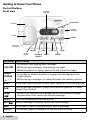
Front view
Message
counter
PLAY/STOP
Speaker
Volume
Up/Down
Cradle
SILENT
Charging
Contacts
REPEAT
Visual
Ringer
ANSWER
ON/OFF
SKIP
GREET
FIND HS
SLOW
DELETE
Key (icon) What it does
xxIn standby: start playing new messages.
Play/stop xxWhile playing a message: stop playing messages.
xxWhile the phone is ringing: ignore this call (mute the ringer).
Volume
Up/Down
( +, - )
xxIn standby or while the phone is ringing: increase/decrease the
ringer volume.
x
While
playing a message: increase/decrease the speaker volume.
x
In standby: press and hold to turn Silent Mode on or off (see page 13).
During message playback: change the playback speed to 0.7 times
SLOW
slower than normal.
Repeat
xxIn the first 2 seconds of a message: go to the previous message.
)
(
xxAnytime after that: restart the current message.
Turn the Answering system on and off.
ON/OFF
) While a message is playing: skip to the next message.
Skip (
In standby: record a new greeting or switch greetings.
GREET
Find HS
xxIn standby: page all handsets so you can find a lost one.
Silent
4 - English
Key (icon) What it does
xxWhile playing a message: delete this message.
Delete
xxIn standby: delete all messages.
xxWhile outgoing greeting is playing: Delete the greeting.
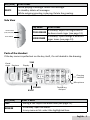
Side View
Key name
What it does
In standby: adjust the brightness of
Visual Ringer
the base visual ringer (see page 13).
In standby: cycle through 4 different
Audio Ringer
ringer tones (see page 13).
VISUAL RINGER
(HIGH/LOW/OFF)
AUDIO RINGER
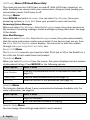
Parts of the Handset
If the key name is spelled out on the key itself, it's not labeled in the drawing.
Visual
ringer Earpiece
TONE
Display
Charging
contacts
Microphone
SPEAKER
BOOST
Key (icon)
Tone
MENU/OK
Twelve-key
dial pad
What it does
xxDuring a call: adjust the audio tone (see page 22).
xxIn standby: open the menu.
xxIn any menu or list: select the highlighted item.
English - 5
Key (icon)
END/CLEAR
#/Silent
mute/Delete
Boost
Speaker
Talk/Flash
*/TONE
Redial/pause
VOL Up (
)
VOL Down (
)
What it does
xxDuring a call: hang up.
xxIn any menu or list: exit and go back to the previous operation.
xxWhile entering text: delete the last character, or press and hold
to delete all the characters.
xxWhen entering text: insert a space.
xxWhen entering a number: insert a 2-second pause.
xxWhen displaying Caller ID information: toggle Caller ID area
code display on and off.
xxWhen in standby mode: press and hold for 2 seconds to display
the Silent Mode menu. See page 13 for details.
x
x When dialing: Adds/removes area code.
xxDuring a call: mute the microphone.
xxWhile the phone is ringing: ignore this call (mute the ringer).
xxDuring a call: boost the volume of the earpiece (see page 13).
xxSwitch a normal call to the speakerphone (and back).
xxIn standby: start a telephone call (get a dial tone).
xxDuring a call: switch to a waiting call.
xxIn text edit mode: changes upper and lower case.
xxWhen dialing: Adds/removes long distance code and
international calling number.
xxDuring a call: temporarily switch between tone dialing and
pulse dialing.
xxIn standby: open the redial list.
xxDuring a phone number entry: insert a two-second pause.
xxIn standby: increase the ringer volume.
xxDuring a call: increase the volume.
xxIn any menu or list: move the cursor up one line.
xxIn standby: decrease the ringer volume.
xxDuring a call: decrease the volume.
xxIn any menu or list: move the cursor down one line.
Reading the Displays
Status
icons
The table below shows some of the possible
Current
icons and what they mean. Since the icons appear based on what you're doing
call info
with the phone, you won't ever see all of these icons at the same time.
Status
Info
6 - English
Icon
What it means
The volume of the earpiece is boosted (see page 13).
The ringer is turned off: this handset will not ring when a call comes in.
You have a voice message waiting (see page 16).
P
Privacy Mode is on: no other handset can use the line or join your call.
The speakerphone is on.
The battery is 1) fully charged, 2) half charged, 3) getting low, or 4)
empty.
T-coil mode is on.
ANS ON Answering system status.
You have a new answering system message (see page 19).
Using the Menus
Your phone displays different menus depending on whether you are on-hook or
off-hook. Off-hook menus are Hold/Transfer, Recent Calls, Phonebook ,and Call
Privacy. Hold/Transfer and Call Privacy are unique to off-hook menus but Recent
Calls and Phonebook are common to both off-hook and on-hook menus
To open the menu, press MENU/OK on
the handset (or MENU on the base).
Off-Hook Menus
Hold/Transfer
Recent Calls
Phonebook
Call Privacy
Use UP and DOWN
to move the cursor.
To select the
On-Hook Menus
highlighted
option, press
Messages
MENU/OK (or
Recent Calls
OK on the base).
OR
To close the
menu, press
END/CLEAR.
Phonebook
Intercom
Use UP and DOWN
to move the cursor.
The phone exits the menu after 30 seconds if no keys are pressed.
Press END/CLEAR during a call to back out of a menu without hanging up.
Hold/Transfer Menu (Off-Hook Menu Only)
This menu option only displays when you are off-hook or on a call and you press
MENU/OK. Hold/Transfer lets you page a specific handset or base to transfer the call
to or page the base and all the handsets.
English - 7
Call Privacy Menu (Off-Hook Menu Only)
This menu lets you turn Call Privacy on and off. With Call Privacy turned on, no
other handsets can connect with your conversation. Going on-hook (ending your
conversation) resets Call Privacy to off.
Messages Menu
Press MENU/OK and select Messages. You can select Play Message (from your
answering system) or Voice Mail (from your provider's voice mail service).
Answering System Messages
When you select Play Messages from the Messages menu, the system announces
the number of incoming messages stored and begins playing them back. See page
19 for details.
Voice Mail Messages
When you select Voice Mail from the Messages menu, the system automatically
dials the voice mail access number you entered. If you have not set one up, then
the Voice Mail Dial Register screen displays. You can enter or edit this number
through Advanced Setup/Edit Voice Mail, also.
Recent Calls Menu
The Recent Calls menu lets you view the Caller ID list (up to 50) or the Redial list, a
list of the last 10 calls made from that handset.
Phonebook Menu
When you select Phonebook from the menus, the system displays the total number
of phonebook listings. Press MENU/OK for the following options.
Menu Option
View Number
Create New
Delete All
What it does
Displays the phonebook entries in alphabetical order (see
page 12).
Create a new phonebook entry (see page 12).
Delete all entries in the phonebook (see page 12).
Intercom Menu
The Intercom feature allows 2-way communication between handsets only. For
more information, see page 16.
Menu Option
All
Handset
What it does
Pages all handsets.
Lists the handsets available for paging.
Handset Setup Menu
You can change these settings separately for each handset.
8 - English
Menu Option
T-coil
Ringer Tones
Personal Ring
AutoTalk
Any Key Answer
Banner
Language
Key Touch Tone
LCD Contrast
Caller Announce
What it does
Turn on T-coil mode to reduce noise on hearing aids
equipped with a telecoil (T-coil) feature. T-coil mode
shortens talk time, so keep your battery fully charged.
Choose this handset's ring tone. As you highlight each ring
tone, you hear a sample. To confirm, press MENU/OK.
Turn on personal ring so you can assign a special ring tone to
people in your phonebook. With Caller ID, this handset uses
the assigned tone when the person calls.
Have this handset answer a call when you pick it up from the
cradle (without pressing any keys).
Have this handset answer a call when you press any key on
the 12-key dialpad.
Change the name used on the handset's display.
Change the display language.
Have your keypad sound a tone when you press a key.
Choose the contrast of the display from ten different levels.
Turn on the Text-To-Speech (TTS) feature (see page 13).
Answering Setup Menu
Refer to page 17 for details on setting up your answering system.
Date & Time Setting
You need to set the clock so messages get the correct time stamp. Setting the date
and time on the base or any handset will set it on all handsets/bases.
When you select Date & Time, the system displays the date and time with the first
digit of the date flashing. Use the 0 - 9 keys to enter the date and time. When you
enter a number, the curser moves to the next position. Press VOL UP to move to
the the previous position or VOL DOWN to accept the current entry and move to the
next position. Press MENU/OK to accept the date and time you just entered.
Advanced Setup Menu
The settings on this menu affect all the handsets and the base. Only one handset
at a time can change these settings.
Menu Option
Dial Mode
Set Line Mode
VMWI Reset
What it does
Choose tone or pulse dialing (see page 3).
Do not change this setting unless instructed to by customer
service.
Reset the Visual Message Waiting Indicator (see page 16).
English - 9
Menu Option
Edit Voice Mail
Time Adjustment
What it does
Edit your voice mail access number (see page 14).
Select Set by Caller ID to allow phone network to
automatically set cordless phone system time.
Call Blocking Menu
See page 14 for a detailed description of the Call Blocking feature.
Entering Text on Your Phone
Use the 12-key dial pad anytime you want to enter text into your phone (a name
in the phonebook, the handset banner, etc.).
To...
Press...
To...
erase the character
at the cursor
DOWN.
erase the entire
entry
switch between upper
*/TONE.
and lower case letters
enter a blank
space
enter a symbol
Press...
and hold Mute/Delete.(or
select Hold/Transfer from
the off-hook menus).
Pound (#).
0 repeatedly.
Using Your Phone
To...
Earpiece
Speaker
make a call, dial the number, then Press TALK/FLASH.
Press Speaker.
answer a call
Press TALK/FLASH.
Press Speaker.
Press END/CLEAR or place the handset in the
hang up
cradle.
Press mute/messages or END/CLEAR while the
ignore the call (mute the ringer)
phone is ringing.
switch to/from the speaker
Press Speaker.
Press mute/messages.
mute the microphone
Press again to turn the microphone back on.
put a call on hold
Press Menu/OK, then select Hold/Transfer.
return to a call on hold
Press TALK/FLASH.
Press Speaker.
*After 5 minutes on hold, the call will be disconnected.
10 - English
Changing the Volume
To change the...
When...
earpiece volume for each handset you are listening to that
earpiece or speaker
speaker volume
(playing messages, etc.)
ringer volume*
the phone is in standby
Press...
Up to increase
the volume.
Down to
decrease it.
*If you turn the ringer all the way down, that particular ringer turns off.
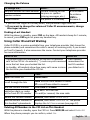
##If you want to change the volume of Caller ID announcements, change
the ringer volume.
Finding a Lost Handset
With the phone in standby, press Find on the base. All handsets beep for 1 minute;
to cancel, press Find again or press any handset key.
Using Caller ID and Call Waiting
Caller ID (CID) is a service available from your telephone provider that shows the
phone number (and sometimes the caller’s name) of incoming calls; if you turned
on Text-To-Speech, it also announces the name. Contact your telephone provider
for more information.
Caller ID list
xxThe phone saves the information for the last 50 received
calls to the CID list. An asterisk ( * ) marks any calls received
since the last time you checked the list.
xxIn standby, all handsets show how many calls came in since
the last time you checked the CID list.
To...
open the redial list
scroll through the lists
dial the current number
add other digits or codes
at the front of CID number
delete the current number
add the current number to
this handset's phonebook.
Redial list
xxEach handset
remembers the
last 10 numbers
you dialed on it.
Press...
Redial/Pause.
DOWN to scroll from newest to oldest.
UP to scroll from oldest to newest.
TALK/FLASH or speaker.
to add 1 for a toll call.
# to add (or remove) the area code.
MENU/OK, then select Delete Entry.
MENU/OK, then select Store Into Pb. The phone
displays the Edit Name screen (see page 12).
Deleting All Numbers in the CID List on This Handset
With the phone in standby, open the CID list. Press MENU/OK and select Delete All.
When the phone prompts you to confirm, select Yes.
English - 11
Using Call Waiting
If you get a Call Waiting call, the phone can sound a tone and display any CID
information received for the waiting call. Press TALK/FLASH to switch between your
current call and the waiting call; remember, each time you switch, there is a short
pause before you're connected to the other caller.
Using the Phonebook
Each handset can store up to 200 entries in its phonebook.
To...
Press...
open/close the phonebook Phonebook.
Down to scroll through the entries from A to Z.
scroll through the entries
Up to scroll from Z to A.
jump to entries that start
the number key corresponding to the letter you want.
with a certain letter
dial the current entry
TALK/FLASH or Speaker.
edit the current entry
MENU/OK, then select Edit.
delete the current entry MENU/OK, then select Delete. To confirm, select Yes.
Adding/Editing Phonebook Entries
To add a new phonebook entry (with the phone in standby), open the phonebook.
Press MENU/OK and select Create New. Enter a name and number, then select a
personal ring.
To add the current number to the phonebook, press MENU/OK and select Store into
Pb. The Edit Name screen displays. Edit the information.
Enter the phone number (up to 32 digits) exactly as you would dial it.
If you need to enter a pause between the numbers, press Redial/pause; you’ll
see P in the display. (The dialing will pause for about 2 seconds per a digit.)
To edit the number, press End/Clear or MUTE/DELETE to back up the cursor and
delete numbers. Re-enter the correct numbers.
Deleting All the Phonebook Entries
With the phone in standby, open the phonebook. Press MENU/OK. Select Delete All.
To confirm, select Yes.
Chain Dialing
If you often have to enter a series of digits or a code number during a call, you can
save that code number as a regular phonebook entry and use the phonebook to
send the code number.
1. Make your call normally. When you hear the prompt that asks you to enter
your code number, open the phonebook and find the entry.
2. Press MENU/OK to send the code. If you change your mind, just close the
phonebook.
12 - English
Using Special Features
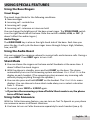
Using the Base Ringers
Visual Ringer
The visual ringer blinks for the following conditions:
New messages
Incoming call - outside line
Incoming call - page
Incoming call - intercom or intercom hold
You can change the brightness of the base visual ringer. The Visual Ringer switch
is on the right-hand side of the base. Slide the switch to High, Low, or Off. (It
doesn't affect the audio ringers.)
Audio Ringer
The AUDIO RINGER key is also on the right-hand side of the base. Each time you
press the key, it will cycle the base ringer tones through 4 steps: High, Medium,
Low, and Off.
Using the Audio Boost
You can increase the earpiece volume for normal calls and intercom calls. During a
call, press Boost. Press Boost again to turn it off.
Silent Mode
You can silence the ringers on the base and all handsets at the same time. It
doesn't affect the visual ringers.
With the phone in standby, press and hold Silent on the base. The phone
automatically turns on the answering system and shows Silent Mode On in the
display on each handset. (The answering system answers any incoming calls
without playing anything through the speaker.)
You can also press and hold #/SILENT on the handset. The Silent Mode menu
displays. You can choose to have silent mode always on or select a duration
from 1 - 9 hours.
To cancel, press Silent or #/SILENT again.
##If you turn the answering system off while Silent mode is on, the phone
turns off Silent mode.
Using Caller Announce
With the Caller Announce feature, you can turn on Text To Speech so your phone
can announce names in different situations.
You have to turn on Caller Announce separately for each handset (see p. 8).
English - 13
To change the volume of CID announcements, change the ringer volume.
To change the volume for all Caller Announce features, change the speaker
volume.
To make sure it doesn't interrupt a call or an intercom page, the phone only
uses Caller Announce when it starts out in standby.
It takes at least 2 rings for the phone to receive CID information and announce
it. If the phone is answered before the end of the second ring, the phone won't
announce the name of the caller.
The Caller Announce feature only uses English, regardless of the language for
the display or the answering system prompts.
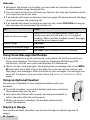
Setting Caller Announce
1. Press MENU/OK and scroll to Handset Setup. Press MENU/OK to select it.
2. Scroll to Caller Announce; press MENU/OK to select it.
3. Select ON or Off and then press MENU/OK to select it
Call Blocking
If you subscribe to Caller ID, you can save phone numbers to the call block list.
When a call comes in, the phone compares the received phone number to the
numbers on the call block list. If the phone number is on the list, the phone
replaces the caller's name with Call Blocked and blocks the call.
The call block list holds 30 entries, and all handsets share the same list. You can
add entries by selecting Add Call Block in the CID menu that displays after you have
viewed the CID record or through the Call Blocking menu (see below). (Only one
handset can edit the call block list at a time.)
Call Blocking Menu Options
With the phone in standby, open the menu and select Call Blocking. Choose one of
these options:
Menu Option
View Number
Create New
Private Number
Unknown Number
What it does
See the numbers on your call block list.
Add an entry to your call block list. The phone will prompt
you to enter a name & phone number.
Block all calls from numbers reported by CID as "Private."
(This does not count as one of the 30 entries.)
Block all calls from numbers reported by CID as "Unknown."
(This does not count as one of the 30 entries.)
Call Blocking Entry Options
With the phone in standby, open the menu, select Call Blocking then View Number;
scroll through the entries. Press Menu/OK to open the individual entry. Choose one
of these options:
14 - English
Choose this...
Edit
Delete
To...
Edit this entry. The phone will prompt you to edit the name &
phone number.
Erase this entry from the list & allow calls from this number.
Blocking a Number
With the phone in standby, open the menu, select Call Blocking, then Create New.
Enter the name and number to be blocked. Press Menu/OK to save the entry
Using Multi-Handset Features
##To use the features in this section, you need at least 2 handsets.
Expanding Your Phone
Your base supports a total of 12 cordless handsets, including any that came
with your phone.
You must register accessory handsets to the base before using them. Handsets
that aren’t registered display a "not registered" message. For registration
instructions, see page 23 or the accessory handset manual.
Using Conference Calling
When an outside call comes in, two handsets can join in a conference call with
the outside caller.
To join the call, just press TALK/FLASH. To leave the conference call, hang up
normally; the other handset remains connected to the call.
Using Privacy Mode
To activate Privacy Mode on a call in progress, press MENU/OK twice. As long as
privacy mode is on, no other handsets can join your call.
Privacy Mode turns off automatically when you hang up or put the call on hold;
you can also turn it off by pressing MENU/OK twice again.
Call Transfer
To...
Press...
Select Hold/Transfer from the off-hook menus. The
system puts the call on hold and prompts you to select
all handsets or a specific handset to page. When the
transfer a call
other handset accepts the page, you'll be connected in an
intercom call. Press TALK/FLASH to transfer the outside call
to the other handset.
cancel a transfer
TALK/FLASH to return to the call.
accept a transferred Talk/flash to answer the page and speak to the other
call
handset. Then, press TALK/FLASH to speak to the caller.
English - 15
Intercom
Whenever the phone is in standby, you can make an intercom call between
handsets without using the phone line.
You can make an intercom call from any handset, but only two handsets can be
in an intercom call at any time.
If an outside call comes in during an intercom page, the phone cancels the page
so you can answer the incoming call.
If an outside call comes in during an intercom call, press TALK/FLASH to hang up
the intercom call and answer the outside call.
To...
make an intercom page
cancel a page
answer an intercom page
leave an intercom call
Press...
Select Intercom in the main menu. Select the
handset you want to talk with, or All to page all
handsets. When another handset accepts the page,
you will be in an intercom call.
END/CLEAR.
Talk/Flash.
END/CLEAR. Both handsets return to standby.
Using Voice Message Notification
If you subscribe to a voice mail service, your phone can notify you when you
have a new message. This feature supports Frequency-Shift Keying (FSK)
notification. Contact your voice mail provider for information.
When you have new messages, the display shows a message icon. Press Menu/
OK and select Voice Mail. The system dials the voice mail access number and
then plays your messages. After you listen to your messages, the message icon
turns off. If it doesn't, you can reset it from the Advanced Setup/Reset VMWI
menu.
Using an Optional Headset
You can use a standard 2.5 mm telephone headset with your
handsets.
To install a headset, remove the headset jack cover and insert
the headset plug into the jack.
Just make and receive calls as usual, and use your headset to
talk to the caller after the call connects.
While you connect a headset, the handset automatically
mutes the earpiece.
Staying in Range
Your system will alert you when you are out of range (or about to go out of
range).
16 - English
If...
Then...
the handset and base are connected the handset sounds an error tone and Out
(intercom call) and no signal from
of Range displays.
the base
the outside line is put on Hold for 30
the handset is in Talk mode and
seconds and then dropped. The LCD
alternately displays Out of Range and
moves out of range
Check Base Power.
the handset and base are in standby the LCD alternately displays Out of Range
mode and the handset does not get and Check Base Power.
a signal from the base for 5 seconds
the handset sounds an error tone. The
audio deteriorates
LCD alternately displays End of Range and
Move toward base.
call data displays and then an error tone
you are trying to go off-hook
sounds. The LCD alternately displays Out
of Range and Check Base Power.
Talk mode continues for 5 seconds and
you are trying to go on-hook
then END displays.
Using the Answering System
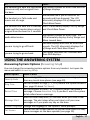
Answering System Options (Answering Setup)
You can change the answering system options from any handset. Just open the
menu and select Answering Setup.
Menu Option
What it does
Enter a 2-digit PIN so you can access your answering system
Security Code
from any touch-tone phone (see page 20).
Set the number of rings (2, 4, or 6) before the system answers
Ring Time
(see page 20 about Toll Saver).
Set the amount of time (1 or 4 minutes) callers can leave a
message. Choose Announce Only if you don't want the system
Record Time
to let callers leave a message.
Have the base beep every 15 seconds when you have a new
message. The alert stops after you listen to all your new
Message Alert
messages or if you press any key on the base.
Answer Language Change the language of the system's voice prompts.
Turn on the call screen feature so you can hear callers as they
Call Screen
leave messages on the base speaker (see page 20).
English - 17
Menu Option
What it does
Turn your answering system on or off. (To turn your system
Answer On/Off
on or off from the base, just press On/off.)
Record Greeting Record an outgoing message or greeting (see below).
Greeting Options Switch greetings or delete your greeting (see below).
Accessing the Answering System
With the phone in standby, you can access your system from the base or remotely
from any handset. Only 1 handset or the base can access the system at a time.
During remote access;
The system beeps so you know it's waiting for your next command.
You can press the number key shown next to each command instead of
scrolling through the screens.
1. Press Menu/OK and select Messages/Play Messages to
listen to your answering system messages. The LCD
Anderson, Jim
displays CID information for the current message.
11:35 AM
1/04
2. The LCD also displays actions you can take while the
1:Repeat
3:Skip
message is playing. Press the number on the keypad
that corresponds to the action you want to take. If
4:Delete
5:Stop
you stop the message, the LCD displays 2:Play instead
of 5:Stop.
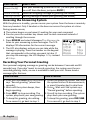
Recording Your Personal Greeting
Your personal outgoing message or greeting can be between 2 seconds and 30
seconds long. If you don't want to record a greeting, the system uses the prerecorded greeting: Hello, no one is available to take your call. Please leave a
message after the tone.
From the base
1.Press and hold Greet until the system
says "Record greeting" (about two
seconds).
2.Wait until the system beeps, then
begin speaking.
3.Press Greet to stop recording. The
system plays back your new greeting.
4.To keep this greeting, do nothing.
To re-record it, go back to step 1.
18 - English
From a handset
1.Access the answering system. Wait until
the system finishes its announcements,
or press 5 (number key) to skip them.
2.Press 8. Wait until the system says
"Record greeting" before speaking.
3.Press 5 to stop recording. The system
plays back your new greeting.
4.To keep this greeting, press END/CLEAR.
To re-record it, go back to step 2.
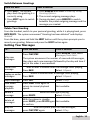
Switch Between Greetings
From the base
1.Press Greet. The system
plays back the greeting it is
currently using.
2.Press Greet again to switch
greetings.
From a handset
1.Press MENU/OK and select Answering Setup/
Greeting Options.
2.The current outgoing message plays.
3.During playback, press MENU/OK to switch
between the preset outgoing message and the
message you created.
Delete Your Greeting
From the handset, switch to your personal greeting; while it is playing back, press
MUTE/DELETE. The system announced "Greeting has been deleted" and displays
Deleted!
From the base, press and hold the GREET button until the system prompts you to
record your greeting. Release and press the Greet button again.
Getting Your Messages
To...
From the base
From a handset
Press Menu/OK, then select
Press Play/stop.
Messages/Voice Mail.
play new
The system announces the number of new and old messages,
messages
then plays each new message (followed by the day and time if
set) in the order it was received.
Wait at least 5 seconds after the message starts playing,
restart this
message
Press Back.
Select 1:Repeat.
Within 2 seconds after a message starts playing,
replay an earlier
messages
Press Back.
Select 1:Repeat.
skip a message Press Skip.
Select 3:Skip.
slow down
Press Slow. Press again to
message
return to normal playback
Not available.
playback
speed.
While the message is playing,
delete a
message
press Delete.
select 4:Delete
With the phone in standby,
delete all
press Delete; press Delete again Not available.
messages
to confirm.
After the system plays the new messages,
play old
messages
press Play/stop again.
select 2:Play.
English - 19
To...
stop playback
From the base
Press Play/stop.
From a handset
Select 5:Stop.
Screening Your Calls
You can use the answering system for call screening. While the system takes a
message, you can listen on the base speaker (if you turn on Call Screen) or from a
handset. Only one handset can screen calls at a time. If another handset tries to
screen the call, it beeps and returns to standby.
To...
From the base
turn on Call Screen
NA
hear the caller leaving
a message
answer the call
mute the call screen
without answering
Just listen to the caller over
the speaker.
Not available
Press Play/stop.
From a handset
Press MENU/OK then select
Ans. Setup/Call Screening
menu. Turn call screen on
or off.
Press Mute/Delete.
Press TALK/FLASH.
Press END/CLEAR or return
the handset to the cradle.
If you mute the call screen, the system continues taking the message: it just
stops playing through the speaker.
Using the System While You're Away from Home
You can also operate your answering system from any touch-tone phone. Before
you can use this feature, you have to program a security code.
Programming a Security Code
1. With the phone in standby, open the menu. Select Answering Setup, then select
Security Code.
2. Use the number keypad to enter a two-digit security code (01 to 99). Press
MENU/OK when you’re finished.
##Remember to make a note of your new security code!
Dialing in to Your System
1. Call your telephone number and wait for the system to answer.
-- If you have the Ring Time set to Toll Saver, the system answers after 2 rings if
you have new messages and 4 rings if you don’t. You can hang up during the
third ring.
-- If your answering system is off, it will answer after about 10 rings and sound
a series of beeps instead of your greeting.
2. During the greeting (or beeps), press 0 and immediately enter your security
code. (If you enter it incorrectly 3 times, the system hangs up and returns to
standby.)
20 - English
3. The system announces the time, the number of messages in memory, and a
help prompt. It beeps intermittently to let you know it's waiting for a
command.
01 Repeat message
05 Stop playback
4. When you hear
06 Turn the system on
beeping, enter a 2-digit 02 Play message
command from the
03 Skip message
09 Turn the system off
chart:
04 Delete message
10 Hear help prompts
##If you don't press any keys for 15 seconds, the phone will hang up and
return to standby.
Important Information
Solving Problems
If you have any trouble with your phone, check this section first. If you need help,
call our Customer Care Line listed on the front cover.
General problems
No handsets can make or
receive calls.
A handset can’t make or
receive calls.
Possible solutions
xxCheck the telephone cord connection.
xxDisconnect the base AC adapter for a few
minutes; then reconnect it.
xxMove the handset closer to the base.
xxMake sure the ringer is turned on.
xxMake sure Silent Mode is turned off (see page 13).
xxCharge the battery for 15-20 hours.
A handset is not working.
xxCheck the battery connection.
The phone keeps ringing when xxYou may have to change the line mode.
I answer on an extension.
Contact Customer Service for instructions.
A handset can make calls, but
it won’t ring.
Audio issues
Callers sound
weak or soft.
Possible solutions
xxMove the handset closer to the base.
xxKeep the handset’s battery fully charged.
xxIncrease the earpiece volume.
English - 21
Audio issues
Possible solutions
xxCheck for interference from appliances (microwave ovens, TVs,
etc.) or wireless devices (baby monitors, WiFi equipment, etc.).
Move the handset or base away from the interference source.
xxTry to adjust the audio tone. During a call, press Tone to cycle
There’s a lot of through the three audio tone options: Low Tone, Natural Tone
noise or static (recommended for hearing aid users), or High Tone. (The tone
on the line
setting appears in the display as you do this.)
xxIf you use a telecoil hearing aid, turn on T-coil mode (see page 9).
xxIf you have any service that uses the phone line, add a DSL or
telephone line filter (see page 23).
Caller ID problems
Possible solutions
Caller ID information xxLet calls ring twice before answering.
does not display.
xxMake sure your Caller ID service is active.
Caller ID displays
xxYou may have to change the line mode. Contact
briefly and then clears. Customer Service for instructions.
xxMaking sure Caller Announce (Text-To-Speech) is
Caller ID displays, but
turned on (see page 13).
I can't hear the CID
x
Increasing the ringer volume so the CID announcements
x
announcements.
are louder.
Multi-handset problems
Possible solutions
I can’t transfer calls.
xxReset all the handsets (see page 23).
Two handsets can’t talk to a caller. xxSee if any handset is in Privacy Mode.
xxMove the handset closer to the base.
A handset says Unavailable.
xxSee if any handset is in Privacy Mode.
xxReset the handset (see page 23).
xxReset the handset (see page 23).
I can’t register a new handset.
xxSee if you have 12 registered handsets.
Answering system problems Possible solutions
The answering system does xxMake sure the answering system is on.
not work.
xxMake sure the base is plugged in.
xxSee if Record Time is set to Announce Only.
The system won't record
messages.
xxDelete messages (memory may be full).
xxSee if another handset is using the system.
A handset can't access the
answering system.
xxMake sure the phone is in standby.
22 - English
Answering system problems Possible solutions
My outgoing message is
xxIf there was a power failure, re-record your
gone.
personal outgoing message.
xxMake sure call screening is turned on.
I can’t hear the base
speaker.
xxChange the base speaker volume.
xxIncrease the Record Time.
Messages are incomplete.
xxDelete messages (memory may be full).
The system keeps recording
xxYou may have to change the line mode.
when I answer on an
Contact Customer Service for instructions.
extension.
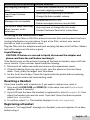
Installing a Line Filter or DSL Filter
A telephone line filter or DSL filter prevents services that use the phone line from
causing interference on your phone. To get a line filter, contact your service
provider or look in an electronics store.
Plug the filter into the telephone wall jack and plug the base into the filter. Make a
test call to make sure the noise is gone.
Liquid Damage
CAUTION: If the base is covered in liquid, disconnect the adapter and
phone cord from the wall before touching it.
If the liquid is only on the exterior housing of the base or handset, wipe it off and
use as normal. If you can hear liquid inside the housing:
1. Disconnect all cables and cords and remove all compartment covers.
2. If liquid is leaking from any vent or hole, turn the phone so that vent faces
down. If not, place the largest vent face down.
3. Let dry for at least 3 days. Check for liquid inside the phone before replacing
compartment covers and reconnecting cords.
Resetting a Handset
If you have trouble with a handset or if you want to replace one, reset it:
1. Press and hold END/CLEAR and Pound (#) at the same time until System Reset
displays (about 5 seconds).
2. If you still have the base the handset is registered to, select Deregister HS, then
select the handset you want to reset. If you don't have that base anymore,
select Base Unavailable.
3. To confirm, select Yes. The handset displays Handset not registered.
Registering a Handset
If you see a “not registered” message on a handset, you must register it to a base
before using it.
English - 23
1. Place the handset in the base;
the display should say Handset
Registering.
2. Wait until the handset display says
Registration Complete (about 30
seconds), then pick up the handset
and press TALK/FLASH.
##If you don’t hear a dial tone or
the display says Registration Failed,
charge the battery completely,
then try again.
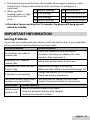
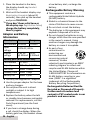
Adapter and Battery
Information
AC adapter
Part number
Input
voltage
Output
voltage
Base
PS-0034
Charger
PS-0035
120V AC, 60 Hz
7.8V AC 8V AC
@ 450mA @ 300mA
Battery pack (with normal use)
Part number BT-1025
Capacity
400mAh, 2.4V DC
Talk time
about 7 hours
Standby time about 7 days
Battery life
about 1 year
Use only the supplied AC adapters.
Use the proper adapter for the base
and any chargers.
Do not place the unit in direct
sunlight or subject it to high
temperatures.
Replace the battery when the talk
or standby time becomes noticeably
reduced. For replacements, call the
Parts Department (see the front
cover).
If you hear a strange beep during
a call, check the display. When the
battery gets low, the handset shows
24 - English
a low battery alert; recharge the
battery.
Rechargeable Battery Warning
This equipment contains a
rechargeable Nickel-Metal-Hydride
(Ni-MH) battery.
Nickel is a chemical known to the
state of California to cause cancer.
Do not short-circuit the battery.
The batteries in this equipment may
explode if disposed of in a fire.
Do not charge the batteries in any
charger other than the one specified
in the owner's manual. Using
another charger may damage the
battery or cause it to explode.
As part of our
commitment to
protecting our
environment and
conserving natural
resources, Uniden
voluntarily participates in an RBRC®
industry program to collect and
recycle used Ni-MH batteries within
the United States. Please call
1-800-8-BATTERY for information on
Ni-MH battery recycling in your
area. (RBRC® is a registered
trademark of the Rechargeable
Battery Recycling Corporation.)
Rechargeable Batteries Must Be
Recycled or Disposed of Properly.
Uniden works to reduce lead
content in PVC coated cords in our
products and accessories.
Warning! The cords on this
product and/or accessories
contain lead, a chemical known
to the state of California to
cause birth defects or other
reproductive harm. Wash hands
after handling.
Compliance Information
FCC Part 68 Information
This equipment complies with Part 68 of the FCC
rules and the requirements adopted by the ACTA.
On the bottom of this equipment is a label that
contains, among other information, a product
identifier in the format US: AAAEQ##TXXXX. If
requested, this number must be provided to the
phone company.
An applicable Universal Service Order Codes
(USOC) certification for the jacks used in this
equipment is provided (i.e., RJ11C) in the
packaging with each piece of approved terminal
equipment. A plug and jack used to connect this
equipment to the premises wiring and telephone
network must comply with the applicable FCC
Part 68 rules and requirements adopted by the
ACTA. A compliant telephone cord and modular
plug is provided with this product. It is designed
to be connected to a compatible modular
jack that is also compliant. See installation
instructions for details.
The REN is used to determine the number of
devices that may be connected to a phone line.
Excessive RENs on a phone line may result in
devices not ringing in response to an incoming
call. In most but not all areas, the sum of RENs
should not exceed five (5.0). To be certain of the
number of devices that may be connected to a
line, as determined by the total RENs, contact the
telephone provider. The REN for this product is
part of the product identifier that has the format
US:AAAEQ##TXXXX. The digits represented by ##
are the REN without a decimal point (e.g., 03 is a
REN of 0.3).
If this equipment causes harm to the telephone
network, the telephone company will notify
you in advance that temporary discontinuance
of service may be required. But if advance
notice isn't practical, the telephone company
will notify the customer as soon as possible.
Also, you will be advised of your right to file
a complaint with the FCC if you believe it is
necessary. The telephone company may make
changes in its facilities, equipment, operations
or procedures that could affect the operation of
the equipment. If this happens the telephone
company will provide advance notice in order for
you to make necessary modifications to maintain
uninterrupted service.
Please follow instructions for repairing, if any
(e.g. battery replacement section); otherwise do
not substitute or repair any parts of the device
except as specified in this manual. Connection
to party line service is subject to state tariffs.
Contact the state public utility commission,
public service commission or corporation
commission for information. This equipment is
hearing aid compatible.
If you experience trouble with this equipment,
contact the manufacturer (see the cover of this
manual for contact information) or an authorized
agent. If the equipment is causing harm to the
telephone network, the telephone company may
request that you disconnect the equipment until
the problem is resolved.
If your home has wired alarm equipment
connected to a phone line, be sure that
installing the system does not disable your
alarm equipment. If you have questions about
what will disable alarm equipment, contact your
telephone company or a qualified installer.
Any changes or modifications to this product not
expressly approved by the manufacturer or other
party responsible for compliance could void your
authority to operate this product.
NOTICE: According to telephone company
reports, AC electrical surges, typically resulting
from lightning strikes, are very destructive to
telephone equipment connected to AC power
sources. To minimize damage from these types
of surges, a surge arrestor is recommended.
FCC Part 15 Information
This device complies with part 15 of the FCC
rules. Operation is subject to the following two
conditions: (1) This device may not cause harmful
interference, and (2) This device must accept
any interference received, including interference
that may cause undesired operation. Privacy of
communications may not be ensured when using
this phone.
FCC PART 15.105(b): Note: This equipment has
been tested and found to comply with the limits
English - 25
for a Class B digital device, pursuant to part 15
of the FCC Rules. These limits are designed to
provide reasonable protection against harmful
interference in a residential installation. This
equipment generates, uses and can radiate radio
frequency energy and, if not installed and used
in accordance with the instructions, may cause
harmful interference to radio communications.
However, there is no guarantee that interference
will not occur in a particular installation. If this
equipment does cause harmful interference
to radio or television reception, which can be
determined by turning the equipment off and
on, the user is encouraged to try to correct the
interference by one or more of the following
measures:
xx Reorient or relocate the receiving antenna.
xx Increase the separation between the
equipment and receiver.
x
x Connect the equipment into an outlet on
a circuit different from that to which the
receiver is connected.
xx Consult the dealer or an experienced radio/TV
technician for help.
RF exposure Information
This product complies with FCC radiation
exposure limits under the following conditions:
xx The base must be placed to allow a minimum
of 20 cm (8 inches) between the antenna and
all persons during normal operation.
xx The base must not be collocated or operated
in conjunction with any other antenna or
transmitter.
xx The handset is designed for body-worn
operation and meets FCC RF exposure
guidelines when used with any belt clip,
carrying case, or other accessory supplied
with this product. (All necessary accessories
are included in the package; any additional
or optional accessories are not required
for compliance with the guidelines.) Third
party accessories (unless approved by the
manufacturer) should be avoided as these
might not comply with FCC RF exposure
guidelines.
Industry Canada (I.C.) Notice
Terminal equipment
NOTICE: This equipment meets the applicable
Industry Canada Terminal Equipment Technical
Specifications. This is confirmed by the
registration number. The abbreviation IC before
the registration number signifies that registration
was performed based on a Declaration of
Conformity indicating that Industry Canada
technical specifications were met. It does
not imply that Industry Canada approved the
equipment.
NOTICE: The Ringer Equivalence Number (REN)
for this terminal equipment is marked on the
equipment itself. The REN assigned to each
terminal equipment provides an indication of
the maximum number of terminals allowed
to be connected to a telephone interface.
The termination on an interface may consist
of any combination of devices subject only to
the requirement that the sum of the Ringer
Equivalence Numbers of all the devices does not
exceed 5.
Radio equipment
The term IC before the radio certification
number only signifies that Industry Canada
technical specifications were met. Operation is
subject to the following two conditions: (1) this
device may not cause interference, and (2) this
device must accept any interference, including
interference that may cause undesired operation
of the device. "Privacy of communications may
not be ensured when using this telephone".
One-year Limited Warranty
Evidence of original purchase is required for
warranty service.
WARRANTOR: UNIDEN AMERICA CORPORATION
("Uniden")
ELEMENTS OF WARRANTY: Uniden warrants, for
one year, to the original retail owner, this Uniden
Product to be free from defects in materials
and craftsmanship with only the limitations or
exclusions set out below.
WARRANTY DURATION: This warranty to the
original user shall terminate and be of no further
effect 12 months after the date of original retail
sale. The warranty is invalid if the Product is (A)
damaged or not maintained as reasonable or
necessary, (B) modified, altered, or used as part
of any conversion kits, subassemblies, or any
configurations not sold by Uniden, (C) improperly
installed, (D) serviced or repaired by someone
other than an authorized Uniden service center
for a defect or malfunction covered by this
warranty, (E) used in any conjunction with
equipment or parts or as part of any system
not manufactured by Uniden, or (F) installed or
programmed by anyone other than as detailed
by the owner's manual for this product.
STATEMENT OF REMEDY: In the event that the
product does not conform to this warranty
at any time while this warranty is in effect,
warrantor will either, at its option, repair or
replace the defective unit and return it to
you without charge for parts, service, or any
other cost (except shipping and handling)
incurred by warrantor or its representatives
in connection with the performance of this
warranty. Warrantor, at its option, may replace
the unit with a new or refurbished unit. THE
LIMITED WARRANTY SET FORTH ABOVE IS THE
SOLE AND ENTIRE WARRANTY PERTAINING
TO THE PRODUCT AND IS IN LIEU OF AND
EXCLUDES ALL OTHER WARRANTIES OF ANY
NATURE WHATSOEVER, WHETHER EXPRESS,
IMPLIED OR ARISING BY OPERATION OF LAW,
INCLUDING, BUT NOT LIMITED TO ANY IMPLIED
WARRANTIES OF MERCHANTABILITY OR FITNESS
FOR A PARTICULAR PURPOSE. THIS WARRANTY
DOES NOT COVER OR PROVIDE FOR THE
REIMBURSEMENT OR PAYMENT OF INCIDENTAL
OR CONSEQUENTIAL DAMAGES. Some states do
not allow this exclusion or limitation of incidental
or consequential damages so the above
limitation or exclusion may not apply to you.
LEGAL REMEDIES: This warranty gives you
specific legal rights, and you may also have
other rights which vary from state to state. This
warranty is void outside the United States of
America and Canada.
PROCEDURE FOR OBTAINING PERFORMANCE OF
WARRANTY: If, after following the instructions
in the owner's manual you are certain that the
Product is defective, pack the Product carefully
(preferably in its original packaging). Disconnect
the battery from the Product and separately
secure the battery in its own separate packaging
within the shipping carton. The Product should
include all parts and accessories originally
packaged with the Product. Include evidence
of original purchase and a note describing the
defect that has caused you to return it. The
Product should be shipped freight prepaid, by
traceable means, to warrantor at:
Uniden America Service
4700 Amon Carter Blvd.
Fort Worth, TX 76155
As an Energy Star® Partner, Uniden
has determined that this product meets the
Energy Star® guidelines for energy efficiency.
Energy Star® is a U.S. registered mark.
®
xx Uniden is a registered trademark of Uniden
America Corporation.
xx Call waiting, CID, CIDCW, and Voice Mail are
telephone line services. Your phone
supports these services, but you have to
arrange for them through your telephone
provider. Contact your provider for details.
xx The pictures in this manual are for example
only. Your phone may not look exactly like the
pictures.
English - 27
28 - English