1
GB
LT
Trouble Shooting
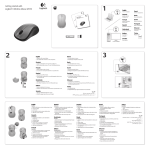
Prijungimas
1. Check Nano receiver connection; try to inserting Nano Receiver to another USB port on your
computer.
2. Connection between the mouse and the Nano Receiver. Re-insert the Nano Receiver. Take out
the battery and reinstall it.
1. Įkiškite nano imtuvą į savo kompiuterio USB prievadą.
2. Atidarykite baterijų skyrelio dangtelį ir įdėkite baterijas.
Note. This device complies with Part 15 of the FCC rules. Operation is subject to the following two
conditions:
(1) This device may not cause harmful interference
(2) This device must accept any interference received, including interference that may cause
undesired operation.
Safety instructions:
• Do not disassemble the product or remove any parts
• Do not put the product into water or any liquid. Should this happen, take the product off
computer and contact your vendor or after sales service center for maintenance
• Do not put the product close to heat source, or expose it to high temperature.
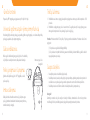
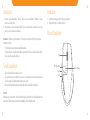
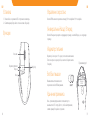
Pelės funkcijos
Ratukas
Galios indikatorius
Pirmyn
Dpi pasirinkimas
Atgal
Caution!
The manufacturer is not responsible for any radio or TV interference caused by unauthorized
modifications to this equipment. Such modifications could void the user authority to operate the
equipment.
6
7