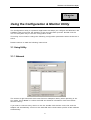
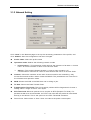
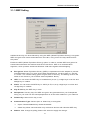
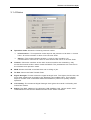
1
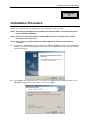
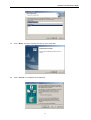
Wireless LAN CardBus Card User Manual Version: 2.0 (June. 2004) Wireless LAN PCMCIA Adapter Copyright Copyright 2004 by this company. All rights reserved. No part of this publication may be reproduced, transmitted, transcribed, stored in a retrieval system, or translated into any language or computer language, in any form or by any means, electronic, mechanical, magnetic, optical, chemical, manual or otherwise, without the prior written permission of this company This company makes no representations or warranties, either expressed or implied, with respect to the contents hereof and specifically disclaims any warranties, merchantability or fitness for any particular purpose. Any software described in this manual is sold or licensed "as is". Should the programs prove defective following their purchase, the buyer (and not this company, its distributor, or its dealer) assumes the entire cost of all necessary servicing, repair, and any incidental or consequential damages resulting from any defect in the software. Further, this company reserves the right to revise this publication and to make changes from time to time in the contents hereof without obligation to notify any person of such revision or changes. All brand and product names mentioned in this manual are trademarks and/or registered trademarks of their respective holders. I Wireless LAN PCMCIA Adapter Federal Communication Commission Interference Statement This equipment has been tested and found to comply with the limits for a Class B digital device, pursuant to Part 15 of FCC Rules. These limits are designed to provide reasonable protection against harmful interference in a residential installation. This equipment generates, uses, and can radiate radio frequency energy and, if not installed and used in accordance with the instructions, may cause harmful interference to radio communications. However, there is no guarantee that interference will not occur in a particular installation. If this equipment does cause harmful interference to radio or television reception, which can be determined by turning the equipment off and on, the user is encouraged to try to correct the interference by one or more of the following measures: 1. Reorient or relocate the receiving antenna. 2. Increase the separation between the equipment and receiver. 3. Connect the equipment into an outlet on a circuit different from that to which the receiver is connected. 4. Consult the dealer or an experienced radio technician for help. FCC Caution This equipment complies with FCC radiation exposure limits. However, in order to avoid the possibility of exceeding the FCC exposure limits, this device and its antenna should not be co-located or operating in conjunction with any other antenna or transmitter.” This device complies with Part 15 of the FCC Rules. Operation is subject to the following two conditions: (1) this device may not cause harmful interference, and (2) this device must accept any interference received, including interference that may cause undesired operation. Any changes or modifications not expressly approved by the party responsible for compliance could void the authority to operate equipment. This device complies with Part 15 of the FCC Rules. Operation is subject to the following two conditions: (1) this device may not cause harmful interference, and (2) this device must accept any interference received, including interference that may cause undesired operation. Any changes or modifications not expressly approved by the party responsible for compliance could void the authority to operate equipment. R&TTE Compliance Statement This equipment complies with all the requirements of DIRECTIVE 1999/5/CE OF THE EUROPEAN PARLIAMENT AND THE COUNCIL of March 9, 1999 on radio equipment and telecommunication terminal Equipment and the mutual recognition of their conformity (R&TTE) The R&TTE Directive repeals and replaces in the directive 98/13/EEC (Telecommunications Terminal Equipment and Satellite Earth Station Equipment) As of April 8, 2000. Safety This equipment is designed with the utmost care for the safety of those who install and use it. However, special attention must be paid to the dangers of electric shock and static II Wireless LAN PCMCIA Adapter electricity when working with electrical equipment. All guidelines of this and of the computer manufacture must therefore be allowed at all times to ensure the safe use of the equipment. EU Countries Intended for Use The ETSI version of this device is intended for home and office use in Austria Belgium, Denmark, Finland, France, (with Frequency channel restrictions) Germany, Greece, Ireland, Italy, Luxembourg, the Netherlands, Portugal, Spain, Sweden, and the United Kingdom. The ETSI version of this device is also authorized for use in EFTA member states: Iceland, Liechtenstein, Norway, and Switzerland. EU Countries Not intended for use None. Potential restrictive use France: Only channels 10,11,12, and 13 III Wireless LAN PCMCIA Adapter Manual Contents Chapter 1 Introduction ………………………………………………… 1 Chapter 2 Installation Procedure ………………………………………………… 2 Chapter 3 Using the Configuration & Monitor Utility ………………………….. 5 Using Utility ……………………………….. 5 3.1.1 Network ………………………………………………………………………………. 5 3.1.2 Status setting ………………………………………………………………………………. 7 3.1.3 WEP Setting ………………………………………………………………………………. 8 3.1.4 Status ………………………………………………………………………………. 9 3.1.5 Information ………………………………………………………………………………. 10 3.1 3.2 Configuration & Monitor Utility Under Windows XP …………… 11 3.3 Using WinXP Wireless Zero configuration for WPA setup …………… 12 Chapter 4 Technical Specifications ………………………………………………… 15 Chapter 5 Troubleshooting ………………………………………………… 16 Chapter 6 Glossary ………………………………………………… 17 IV Wireless LAN PCMCIA Adapter Chapter 1 Introduction Thank you for purchasing the Wireless LAN CardBus Card. This device features the innovating wireless technology that can help you build a wireless network easily! Please follow the step-by-step instructions. The manual will guide you through the driver installation and utility configuration. Package Contents z z z Wireless LAN CardBus Card Installation Software CD (Driver & Utility + User Manual) Quick Installation Guide If any of the above is missing, please contact your supplier. System Requirements z z z PC-compatible desktop computer or laptop with one available PCMCIA port. Operating System: Windows 98/Me/2000/XP. Minimum Disk Space: 2000kbytes for utility and driver installation. Safety Precaution Only use the accessories in the device package. Otherwise, the device may not function. If you accidentally lose or damage any item, please contact with your supplier. 1 Wireless LAN PCMCIA Adapter Chapter 2 Installation Procedure Before you proceed with the installation, it is important for you to know… Note1: The following installation was operated under Windows 2000. (Procedures will be the same in Windows XP/Me/98.) Note2: If you have installed the Wireless LAN CardBus Card driver & utility before, please uninstall the old version first. Note3: Be sure not to connect the Wireless LAN CardBus Card before the installation is finished. A. Execute the “Setup.exe” program under the “Driver & Utility” folder. The InstallShield Wizard will check the operating system version first. Please follow the directions after it finishes checking. B. Click “Next” to install the driver. If you want to install this into a different folder, click “Browse” and select another folder. Then click “Next.” 2 Wireless LAN PCMCIA Adapter C. Click “Next” to begin copying the files to your hard disk. D. Click “Finish” to complete the installation. 3 Wireless LAN PCMCIA Adapter E. You may see the driver doesn’t have the Microsoft Digital Signature. This software is tested and works correctly with Windows. Select “Yes “. F. Restart the computer and connect the Wireless LAN CardBus Card to your computer. Please wait for 2-3 minutes for the system to find the device. The Wireless LAN CardBus Card is now successfully installed. Note: When you complete the installation, the Utility icon will appear on the system tray. If not, it means that the installation failed. Please uninstall the driver and repeat the process. 4 Wireless LAN PCMCIA Adapter Chapter 3 Using the Configuration & Monitor Utility The Configuration Utility is a powerful application that helps you configure the Wireless LAN CardBus Card and monitor the statistics of the communication process. Double-click the icon on the system tray to view the configuration mode. This utility can be used to change the following configuration parameters when the device is active. Please continue to read the following instructions. 3.1 Using Utility 3.1.1 Network The screen at right shows all the Access Points or Adapters nearby when operating in AdHoc mode. Click “Scan” to collect the SSID and Channel information of all the wireless devices near by. If you want to connect to any device on the list, double-click the item on the list, and the adapter will automatically connect to the selected device and create a profile at left windows automatically. 5 Wireless LAN PCMCIA Adapter The left window shows you the available profiles that you have create. UP: Up the priority of the profile you select. Down: Down the priority of the profile you select. New: Create a new profile (It will pop up a new windows let you configure the Network setting and WEP setting). Edit: edit the profile you select (It will pop up a new windows let you configure the Network setting and WEP setting). Delete: delete the profile you select. 6 Wireless LAN PCMCIA Adapter 3.1.2 Network Setting Click “New” in the Network page to set up the necessary parameters of the profile, and click “Submit” after the configuration has been changed. Profile name: Name the profile name Operation mode: Selects the following network modes ¾ Infrastructure – This operation mode requires the presence of an 802.11 Access Point. All communication is done via the Access Point. ¾ Ad-Hoc –This mode indicates the 802.11 peer-to-peer operation. All communication is done from client to client without the use of an Access Point. Channel: Shows the numbers of the radio channel used for the networking. Only Access Points and Ad-Hoc nodes create the BSSID. The parameters are not active in the infrastructure operation mode. SSID: Shows the SSID of the BSS that one is willing to join. Tx Rate: Shows the Data Transfer Rate. Fragmentation Threshold: The size at which packets will be fragmented. Choose a setting within a range of 256 to 2312 bytes. RTS Threshold: Minimum packet size to require an RTS (Request To Send). For packets smaller than this threshold, an RTS is not sent and the packet is transmitted directly to the WLAN. This is the option for the RTS Threshold activation. Power Save: Select None or Save. Save can reduce the power consumption. . 7 Wireless LAN PCMCIA Adapter 3.1.3 WEP Setting Additional security can be achieved by using the WEP (Wired Equivalent Privacy) encryption. WEP encrypts each frame transmitted from the radio, using one of the keys entered from this panel. Enable the WEP (Wired Equivalent Privacy) option in order to activate WEP encryption for transmissions between the stations and the Access Point. WEP is an authentication algorithm, which protects authorized Wireless LAN users against eavesdropping. Encryption: Wired Equivalent Privacy (WEP) is implemented in the adapter to prevent unauthorized access. For more secure data transmissions, set encryption to “128-bit” or “64-bit.” The 128-bit setting gives a higher level of security. The setting must be the same for all clients in your wireless network (Default: None). HEX: You can enter the WEP Key in hexadecimal (0~9,a~f),13 digit keys in 64 bits and 26digit key in 128bits. ASCII: You can enter the WEP Key in ASCII (A~Z,0~9,a~z),5 digit keys in 64 bits and 10 digit keys in 128bits. Key #1~#4:Key the WEP key in here. Passphrase: Security keys for WEP encryption are generated from your Passphrase string, so you must use the same passphrase on all the other stations in your network. Default Key: select which key to use Authentication Type: Select Open or Share Key to encryption. ¾ Open- Communicates the key across the network. ¾ Share Key-Allow communication only with other devices with identical WEP key Submit: After change anything please click submit to apply the change. 8 Wireless LAN PCMCIA Adapter 3.1.4 Status Operation mode: Shows the following network modes ¾ Infrastructure – This operation mode requires the presence of an 802.11 Access Point. All communication is done via the Access Point. ¾ Ad-Hoc –This mode indicates the 802.11 peer-to-peer operation. All communication is done from client to client without the use of an Access Point. Channel: Shows the numbers of the radio channel used for the networking. Only Access Points and Ad-Hoc nodes create the BSSID. The parameters are not active in the infrastructure operation mode. SSID: Shows the SSID of the BSS that one is willing to join. Tx Rate: Shows the Data Transfer Rate. Signal Strength: This bar shows the signal strength level. The higher the blue bar, the more radio signal been received by the Wireless LAN CardBus Card. This indicator helps to find the most comfortable antenna/workstation position for quality network operation. Link Quality: The measured Signal Strength level gives the overall Link Quality and Connection Status. Status: The MAC Address of the Wireless LAN CardBus Card. Unique 48-bit, hardcoded Media Access Control address known as the station identifier. 9 Wireless LAN PCMCIA Adapter 3.1.5 Information It shows the current Firmware , Driver, Application, DLL Version and MAC Address of the device. 10 Wireless LAN PCMCIA Adapter 3.2 Configuration & Monitor Utility Under Windows XP A. Click on the network icon in the System Tray Icon. B. Next, click the “Properties” Button. C. If you want to stop using the Windows XP built-in application, un-check the “Use Windows to configure my wireless network settings” option. When you uncheck that option you are able to use the Wireless LAN CardBus Card’s Configuration & Monitor Utility under Windows XP. Note1: When you want to change back to the Windows XP built-in application, check the above option and you are able to use the built-in application of Windows XP. 11 Wireless LAN PCMCIA Adapter 3.3 Using WinXP Wireless Zero configuration for WPA setup Step1: A. Check and make sure that the Wireless Zero Configuration service is running. Click Start Æ Settings Æ Control Panel Æ Administrative Tools Æ Services Since WPA security standard has been defined after Windows XP lunch date, then you should also update your current Wireless Zero Configuration utility version to the latest. In order to do so, you must run the patch file which be included the CD or please visit the following website for download it. http://www.microsoft.com/downloads/details.aspx?displaylang=en&FamilyID=5039EF4A-61E04C44-94F0-C25C9DE0ACE9 Once the above steps are complete, please proceed to the following page. 12 Wireless LAN PCMCIA Adapter B. Open the Wireless utility Click Advanced and the following screen will appear. Over the WPA wireless Network, click Configure. 13 Wireless LAN PCMCIA Adapter C. Verify that the Network Authentication is WPA and the Data encryption is TKIP or AES. (The encryption type should match the WPA setting of your Access Point.) D. Click Authentication tab to select EAP type. (The EAP type should match the authentication server before access the authenticated network.) After clicking OK, the Wireless workstation will be able to associate with the AP previously get authenticated by a authentication Server. 14 Wireless LAN PCMCIA Adapter Chapter 4 Technical Specification z Standard: IEEE802.11b\g z Frequency Band: 2.400 GHz ~2.4835GHz z Data Rate: Up to 54Mbps z Transmission Range: Outdoor: 100~300M, Indoor: 40~100M z LED Indicators: Power, Link z Operating Temperature : 0℃ to 55℃ z Storage Temperature : -20℃ to 70℃ z Operating Humidity: 0% to 70% Non-Condensing z Storage Humidity: 0% to 95% Non-condensing z Data Encryption: 64 bit/128 bit WEP Encryption z Software: Configuration Utility software z Compatibility: Windows 98/Me/2000/XP, Linux (Kernel 2.4.18-3) z Certification: FCC, CE z Dimensions: 95mm x 65mm x 13mm 15 Wireless LAN PCMCIA Adapter Chapter 5 Troubleshooting This section provides solutions to problems usually encountered during the installation and operation of this Wireless LAN CardBus Card. Read the description below to solve your problems. 9 If you encounter difficulty using / installing the Wireless LAN CardBus Card, this may be related to various causes: z Out-of range situation, which prevents the card from establishing a wireless connection with the network. z Configuration mismatch, which prevents the card from establishing a wireless connection with the (correct) network. z Absence of, or conflict of the Wireless LAN CardBus Card driver. zA problem or conflict with the connector, which prevents the Wireless LAN CardBus Card from powering on. zA 9 conflict of the hardware with another device. What does IEEE 802.11 feature support? z CSMA/CA plus Acknowledge Protocol z Multi-Channel z Automatic z RTS/CTS Roaming Rate Selection Feature z Fragmentation z Power Management 9 Can Wireless products support printer sharing? Wireless products perform the same function as LAN products. Therefore, Wireless products can work with Netware, Windows NT/2000, or other LAN operating systems to support printer or file sharing. 9 Would the information be intercepted while transmitting on air? WLAN features two-fold protection in security. On the hardware side, as with Direct Sequence Spread Spectrum technology, it has the inherent security feature of scrambling. On the software side, WLAN series offer the encryption function (WEP) to enhance security and Access Control. Users can set it up depending upon their needs. 9 What is DSSS?What is FHSS?And what are their differences? Frequency-hopping spread-spectrum (FHSS) uses a narrowband carrier that changes frequency in a pattern that is known to both transmitter and receiver. Properly synchronized, the net effect is to maintain a single logical channel. To an unintended receiver, FHSS appears to be short-duration impulse noise. Direct-sequence spreadspectrum (DSSS) generates a redundant bit pattern for each bit to be transmitted. This bit pattern is called a chip (or chipping code). The longer the chip is, the greater the probability that the original data can be recovered. Even if one or more bits in the chip are damaged during transmission, statistical techniques embedded in the radio can recover the original data without-the need for retransmission. To an unintended receiver, DSSS appears as low power wideband noise and is rejected (ignored) by most narrowband receivers. 16 Wireless LAN PCMCIA Adapter Chapter 6 Glossary A Ad-Hoc Mode - A client setting that provides independent peer-to-peer connectivity in a wireless LAN. An alterative setup is where PCs communicate with each other through an access point. An Ad-hoc integrated wireless LAN is a group of computers, each has a Wireless LAN adapter, Connected as an independent wireless LAN. Ad hoc wireless LAN is applicable at a departmental scale for a branch or SOHO operation. B Bandwidth - The transmission capacity of a given facility, in terms of how much data the facility can transmit in a fixed amount of time; expressed in bits per second (bps). Bit - A binary digit. The value (0 or 1) used in the binary numbering system. Also, the smallest form of data. BSSID - A specific Ad hoc LAN is called a Basic Service Set (BSS). Computers in a BSS must be configured with the same BSS ID. D Default Gateway - The routing device used to forward all traffic that is not addressed to a station within the local subnet. DHCP server and client - DHCP stands for Dynamic Host Configuration Protocol. This protocol is designed to automatically load parameters for the TCP/IP network, including the IP address, host name, domain name, net-mask, default gateway, and name server address. The machine that provides this service is called the DHCP server, and its client computers are called DHCP clients. If client computers support DHCP, a TCP/IP configuration is not needed on each client computer. Domain - A sub-network comprised of a group of clients and servers under the control of one security database. Dividing LANs into domains improves performance and security. Driver - A workstation or server software module that provides an interface between a network interface card and the upper-layer protocol software running in the computer; it is designed for a specific NIC, and is installed during the initial installation of a networkcompatible client or server operating system. DSSS (Direct-Sequencing Spread-Spectrum) - DSSS operate over the radio airwaves in the unlicensed ISM band (industrial, scientific, medical). DSSS uses a radio transmitter to spread data packets over a fixed range of frequency band. 17 Wireless LAN PCMCIA Adapter E Encryption - A security method that applies a specific algorithm to data in order to alter the data's appearance and prevent other devices from reading the information. Ethernet - The most widely used LAN access method, which is defined by the IEEE 802.3 standard. Ethernet is normally a shared media LAN meaning all devices on the network segment share total bandwidth. Ethernet networks operate at 10Mbp using CSMA/CD to run over 10Base T cables. F Firmware - Program that is inserted into programmable read-only memory (programmable read-only memory), thus becoming a permanent part of a computing device. Fragmentation Threshold Value - Indicates how much of the network resources is devoted to recovering packet errors. The value should remain at its default setting of 2,432. If you experience high packet error rates, you can decrease this value but it will likely decrease overall network performance. Only minor modifications of this value are recommended. Fragmentation - Breaking a packet into smaller units when transmitting over a network medium that cannot support the original size of the packet. I IEEE - The Institute of Electrical and Electronics Engineers IEEE 802.11b standard - The IEEE 802.11b Wireless LAN standards subcommittee formulating standards for the industry. The objective is to enable wireless LAN hardware from different manufacturers to communicate. Infrastructure Mode - A client setting providing connectivity to an Access Point. As compared to Ad-Hoc Mode where PCs communicate directly with each other clients set in infrastructure Mode all pass data through a central Access Point. The Access Point not only mediates Wireless network traffic in the immediate neighborhood but also pro-vides communication with the wired network. An integrated wireless and wireless and wired LAN is called an Infrastructure configuration. Infrastructure is applicable to enterprise scale for wireless access to central database, or wireless application for mobile workers. IP Address - An IP address is a 32-bit number that identifies each sender & receiver of information that is sent across the Internet. An IP address has two parts: the identifier of a particular network on the Internet and one identifier of a particular device (which can be a server or a workstation within that network). ISM band - The FCC and their counterparts outside of the U.S. have set aside bandwidth for unlicensed use in the ISM (Industrial, Scientific and Medical) band. Spectrum in the vicinity of 2.4 GHz, in particular, is being made available worldwide. This presents a truly revolutionary opportunity to place convenient high-speed wireless capabilities in the hands of users around the globe. L 18 Wireless LAN PCMCIA Adapter LAN - A local area network (LAN) is a group of computers and associated devices that share a common communications line and typically share the resources of a single processor or server within a small geographic area (for example, within an office building). M MAC Address - 12-digit hexadecimal number that identifies a networking product on the network. Mbps (Megabits per second) - One million bits per second; unit of measurement for data transmission. N Network - A system that transmits any combination of voice, video and/or data between users. Node - A network junction or connection point, typically a computer or work station. O Open System - Is when the sender and the recipient do not share a secret key. Each party generates its own key-pair and asks the receiver to accept the (usually randomly) generated key. Once accepted, this key is used for a short time only; then a new key is generated and agreed upon. P Packet - A unit of data routed between an origin and a destination in a network. PCMCIA - Personal Computer Memory Card International Association Plug and Play - The ability of a computer system to configure expansion boards and other devices automatically without requiring the user to turn off the system during installation. R Roaming - The ability to use a wireless device and be able to move from one access point's range to another without losing the connection. RTS/CTS Threshold Value - Should remain at its default setting of 2,347. A preamble is a signal used to synchronize the transmission timing between two or more systems. A series of transmission pulses is sent before the data to indicate that “someone is about transmit data.” This ensures that systems receiving the information correctly when the data transmission starts. S Shared Key - Is when both the sender and recipient share a secret key. Both units use this key for an extended length of time, sometimes indefinitely. Any eavesdropper that discovers the key may decipher all packets until the key is changed. 19 Wireless LAN PCMCIA Adapter Signal Strength - The signal level indicates the strength of the signal as received at the wireless network interface. SNMP (Simple Network Management Protocol) - A standard network protocol that can be used to manage networks locally, or worldwide via the Internet. Spread Spectrum - Spread Spectrum technology is a wideband radio frequency technique developed by the military for use in reliable, secure, mission-critical communication systems. It is designed to trade off bandwidth efficiency for reliability, integrity, and security. In other words, more bandwidth is consumed than in the case of narrowband transmission, but the trade off produces a signal that is, in effect, louder and thus easier to detect, provided that the receiver knows the parameters of the spread-spectrum signal being broadcast. If a receiver is not tuned to the right frequency, a spread –spectrum signal looks like background noise. There are two main alternatives, Direct Sequence Spread Spectrum (DSSS) and Frequency Hopping Spread Spectrum (FHSS). SSID (Service Set Identifier) - Is the unique name shared among all points in a wireless network. The SSID must be identical for all points in the network. It is case sensitive and must not exceed 32 characters. Static IP Address - A permanent IP address that is assigned to a node in an IP or a TCP/IP network. Subnet - A subnet is a logical sub-division of a Local Area Network that has been divided by means of routers or gateways. A subnet may include multiple LAN segments. Each subnet is identified by the Subnet Mask. T TCP/IP (Transmission Control Protocol/Internet Protocol) - The basic communication language or protocol of the Internet. It can also be used as a communications protocol in a private network (either an intranet or an extranet). When you are set up with direct access to the Internet, your computer is provided with a copy of the TCP/IP program just as every other computer that you may send messages to or get information from also has a copy of TCP/IP. W WEP (Wired Equivalent Privacy) - A data privacy mechanism based on a 40 bit shared key algorithm, as described in the IEEE 802 .11 standard. The optional cryptographic confidentiality algorithm specified by IEEE 802.11 used to provide data confidentiality that is subjectively equivalent to the confidentiality of a wired LAN medium that does not employ cryptographic techniques to enhance privacy. Windows workgroup - A Windows workgroup can consist of either wireless or wired network connections or a combination of the two. Usually a Windows workgroup consists of members who are related because of a shared function, e.g. members of the same department. For a Windows workgroup it is not relevant where the workgroup participants are located, since the members of a Windows workgroup are identified by their workgroup name only. 20