1
Parent unit power supply
ENGLISH
2.3
IMPORTANT
Installing the rechargeable battery pack and charging it fully before use
is recommended. This will allow the unit to operate on battery in the event
of a power failure.
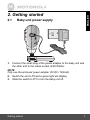
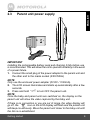
1. Connect the small plug of the power adapter to the parent unit and
the other end to the mains socket (230V/50Hz)
NOTE
Only use the enclosed power adapter (5V DC / 1000mA).
2. The LCD screen illuminates and starts up automatically after a few
seconds.
to turn OFF the parent unit.
3. Press and hold
NOTE
Once the baby and parent units are switched on, the display on the
parent unit will show the video captured by the baby unit.
If there is no connection or you are out of range, the video display will
go off, the
icon on the LCD display will flash and the parent unit
will beep continuously. Move the parent unit closer to the baby unit until
the link is re-established.
F
Getting started
9