1
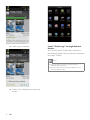
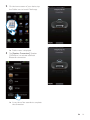
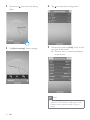
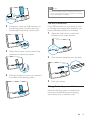
Sync music from PC to Androidpowered device Note Next time when your Android-powered device is connected to this computer, music is synchronized from PC to the device automatically. Note Make sure that both your computer and Androidpowered device are installed with Songbird application. 1 Connect your Android-powered device to the computer with a USB cable. » A prompt window appears. Use more features with Fidelio app 2 Select [Managing device using Philips Songbird] (Managing device using Philips %$ With Fidelio app, you can also listen to Internet radio, set alarm timer and sleep timer. Set alarm timer With Fidelio app, you can set multiple alarms and know the latest weather. It even alerts you when weather conditions are suitable for your favorite outdoors activity. 1 Launch Fidelio application. » The Songbird user interface is displayed. 3 Select [Auto Sync Music] (Auto Sync [Sync all music and playlists] $ 4 Click [Sync] interface. » The music on your computer is synchronized into your Androidpowered device. EN 18