1
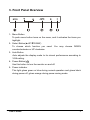
3. Front Panel Overview
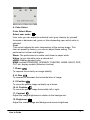
1、Menu Button
To push menu button turns on the menu, and it activates the items you
highlight.
2、Select Button(▲UP/▼DONW)
To choose which function you need. You may choose DOWN
counterclockwise or UP clockwise.
3、Auto Button
Auto adjusts the display mode to its utmost performance according to
VGA setting.
4、Power Button( )
Use this button to turn the monitor on and off.
5、Power indicator
This light glows green or blue during normal operation and glows black
during power off, glows orange during power saving mode.
User’s Guide
3