1
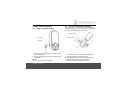
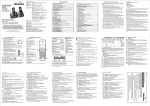
Overview of your Parent unit
1
3 GREEN and 2 RED LEDs turn on and off in real
time to indicate the noise level in baby's room.
When audio is being picked up by microphone of
baby unit, the LEDs light up to in indicate audio level
with reference to the sensitivity setting. The more
LEDs light up, the stronger the sound is.
If no LED lights up it means the sound level in baby's
room does not exceed the thresholds set through the
parent unit.
1
2
10
The LEDs are also used for indicating the speaker
volume setting on parent unit. The louder you set the
speaker volume, the more LEDs light up.
3
2
3
5
7
Link Indicator
Flashes when the parent unit is out of range from
baby unit.
6
8
LCD Display
On when the parent unit is powered on and linked to
the baby unit.
4
9
Sound Level LED
Off when the parent unit is powered off.
4
Up / Volume +
In idle mode: Press to increase the speaker volume.
In menu mode: Press to view the previous menu item.
5
Back
In menu mode: Press to cancel settings and back to
the previous level.