1
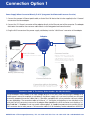
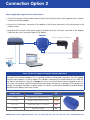
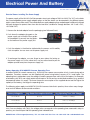
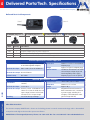
Connection Option 1 Power Supply When Connected Directly To A PC (Integrated And Patented Crossover Function) 1. Connect the camera's Ethernet patch cable, or that of the PoE device that is to be supplied, to the "Camera" connector of the blue adapter. 2.Connect the "PC/Power" connector of the adapter directly to the Ethernet port of the computer. The adapter eliminates the need for the crossover cable thanks to the integrated crossover function. 3.Plug the RJ45 connector of the power supply unit/battery into the "LAN/Power" connector of the adapter. PC/Power Using battery or power supply RJ45 LAN/Power RJ45 Adapter PC Camera Power supply RJ45 Fuse 2.5 A slow for example, via in-line fuse switch - + Crossover function All that is required to connect to the computer is a standard Ethernet cable with RJ45 connectors since the adapter already has an integrated crossover function (replaces special crossover cable). Battery (alternatively) Camera/PoE device Connection cable to the battery Make sure that cable only comes into contact with pins 4/5 and 7/8 of an RJ45 connector. 4 5 + 7 8 - 1 23 4 56 7 8 + - Connection Cable To The Battery (Order Number: MX-CBL-NPA-BAT-2) The blue adapter works reliably in an input voltage range of 12–42 volts. When connecting the adaptor to a mobile power source (for example, a car battery), the power supply unit is not used. Instead, you will need a correctly prepared connection cable that is, if possible, equipped with a fuse protection concept suitable for your application. The connection cable must have a "+/‑" connection to the battery on one side and, on the other side, an RJ45 connector to connect to the adapter. Pins 4 and 5 on the RJ45 connector must display a "+", pins 7 and 8 a "-." Caution: Do not use a patch cable as pins 1, 2, 3 and 6 may not come into contact with the RJ45 connector due to safety reasons. The connection cable (2 m) to the battery can be ordered from MOBOTIX. MOBOTIX AG • 67722 Langmeil, Germany • Tel.: +49-6302-9816-103 • Fax: +49-6302-9816-190 • [email protected]