1
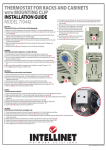
19” Rackmount Digital Thermostat • User Manual
English
Thank you for purchasing the INTELLINET NETWORK SOLUTIONS™ 19”
Rackmount Digital Thermostat, Model 710459. To view a datasheet with a
full list of specifications, go to www.intellinet-network.com.
hardware Installation
Power
Sensor
Fan
1
Fan
2
19” Rack
The Digital Thermostat is designed to fit in 19” racks. It uses 1 height unit of
space. The package includes 4 mounting screws. Be sure to use two on each
side of the rack.
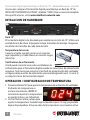
Temperature Sensor
Connect the red sensor wire to the red sensor
connector (left) and the white sensor wire to black
sensor connector (right).
Cooling Fans
You can connect one or two cooling fans to the
Digital Thermostat using regular power connectors. Simply plug the power
plug of the fan into into either of the designated universal power ports (Fan 1
or Fan 2) on the rear of the Digital Thermostat.
operation / temperature setting
1. Press the SET button once to set the fan activation temperature. The
temperature display will start
flashing. NOTE: The thermostat
displays and measures temperature
in Celsius, not Fahrenheit.
2. Use the arrow-up and arrow-down
keys to adjust the temperature. When done, wait for 10 seconds and the
display will stop flashing. The new temperature value is now in effect.
2
ENGLISH