1
MC3190G
Quick Start Guide
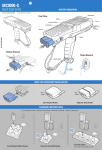
FEATURES
http://www.motorola.com/mc3100
See User Guide for more information
MC3190G
Display
Indicator LED Bar
Scan Button
Keypad
Scan Indicator
POST IN WORK AREA
Trigger
Strap Lanyard
Comm/Charge
Cables
Stylus
Trigger
Stored in handle
Speaker
Speaker
Headset Connection
Stylus
Removal
Rubber Boot
BATTERY REMOVAL/INSTALLATION
1
2
3
4
5
6
CHARGING INSTRUCTIONS
LED Indicators: Slow Flash = Normal Charge Solid Amber = Full Charge Fast Flash = Charging Error
Charge LED
Indicator
Charge LED
Indicator
Spare Battery
Charging LED
Spare Battery
Charging LED
Four Slot Spare Battery Charger
Single Slot Serial Cradle
Four Slot Cradles
Charge-Only Cradle and Ethernet Cradle
OPTIMUM SCANNING POSITIONS
HEADSET CONNECTION
1
2
3
ALTERNATE LEFT AND RIGHT HANDS
TAKING BREAKS AND TTASK ROTATION RECOMMENDED
OPTIMUM UPRIGHT BODY POSTURES
Avoid Extreme Wrist Angles
AVOID EXTREME
WRIST ANGLES
OPTIMUM BODY POSTURE
Optimum Body Posture
for Low Scanning
Optimum Body Posture
for High Scanning
Alternate left
and right knees
POST IN WORK AREA
AVOID BENDING
Use a ladder
AVOID REACHING
Motorola, Inc.
One Motorola Plaza Holtsville, New York 11742-1300, USA
MOTOROLA and the Stylized M Logo and Symbol and the Symbol logo are registered in the U.S. Patent and
Trademark Office. All other product or service names are the property of their respective owners.
© Motorola, Inc. 2009
72-124276-02 Rev A September 2009
MC3190G
Alternatete left
and right hand
Taking breaks and task rotation recommended
http://www.motorola.com/mc3100
Local Contact:
Recommended Usage Guide


![MC3100 Series Regualtory Guide [English] (P/N 72-124293](http://vs1.manualzilla.com/store/data/006151726_1-09b74da6e93171f99865574312a18d6c-150x150.png)