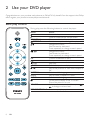
1
Eng lish
Video options
During video play, press
OPTIONS to access the following options.
W [Info]: Display the current play information.
W [PBC]: Display or skip the content menu for VCD and SVCD.
W [Aspect ratio])?
$
W [Volume]: Change a volume level.
W [Angle]: Select a camera angle from which video is viewed.
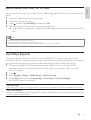
Play a musical slideshow
Play music and pictures simultaneously to create a musical slideshow.
1
2
3
4
5
Y"?4/
Press
4
Select a picture from the same disc or USB, and press OK to start slideshow.
Press
to stop slideshow.
Press
again to stop music play.
Control photo play
During a photo slideshow, use the remote control to control the play.
Button
/
OPTIONS
OK
Action
Rotate a picture horizontally/ vertically.
Rotate a picture anti-clockwise/ clockwise.
Access to select [Color] to display a picture in color or black and white.
Access to select [Photo preview] to display pictures in thumbnail.
Zoom in or out of a photo.
Play pauses in zoom mode.
Start or resume a play.
Stop a play.
Repeat play
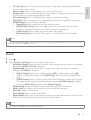
During play, press REPEAT/REPEAT A-B repeatedly to select a repeat play option.
W Repeat the current title, chapter, or track.
W Repeat all the contents on a disc or a USB storage device.
W 1
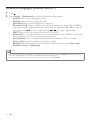
Press REPEAT/REPEAT A-B repeatedly to select
as a start point.
EN
9