1
Turntable Operation
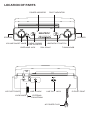
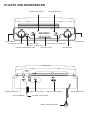
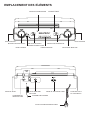
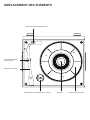
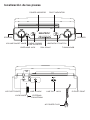
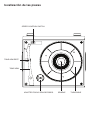
Turn the unit on by rotating the VOLUME ON/OFF KNOB located on the front panel
to the ON position
1 Set the FUNCTION SWITCH to PHONO mode.
2 Set the SPEED CONTROL SWITCH to the desired speed (33 1/3, 45 or 78 rpm).
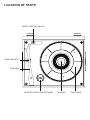
Place your record onto the turntable.
3 Move the TONE ARM slightly to the right side until you hear a click sound to activate the turntable.
4 Move the TONE ARM by hand over the record to the point you want the record to start. Adjust the
VOLUME ON/OFF KNOB to your desired listening level.
5 At the end of the record, the TONE ARM will stop automatically. You must return
the TONE ARM to the arm rest by hand.
ACCESSORY SUPPLIED:
Adaptor for 45 rpm records
This adaptor allows you to play 45 RPM records.
1 Place the 45 RPM adaptor over the spindle.
2 Gently place your 45 RPM record onto the turntable.
3 Follow the steps under turntable operation to your record.
Radio Operation
1 Set the FUNCTION SWITCH to RADIO mode.
2 Set the AM / FM / FM.ST SWITCH to the desired Band.
3 Select the desired radio station by rotating TUNING KNOB .
4 Adjust the VOLUME ON/OFF KNOB to the desired sound level.
Antenna
Antenna: for FM reception, the unit is provided with a FM WIRE ANTENNA , move the wire until the
reception is clear and with no interferences. For AM reception, the unit is provided with a directional
build-in ferrite antenna. Rotate the set to find the position in which the best reception is obtained. Do
not connect the EXTERNAL FM ANTENNA to any outside antenna.