1
4
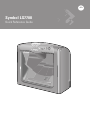
Symbol LS7708
Controls
The Volume Control & Wakeup button adjusts the volume of the beeper and wakes the
scanner from rest or sleep mode.
When the scanner is operating, depress this button to adjust the volume. Hold down the
button until the desired volume is obtained (approximately five seconds). There are
three volume levels. The scanner beeps twice at each volume level before cycling to
the next.
If the scanner is in a rest or sleep mode, briefly depressing the Volume Control &
Wakeup button also awakens the scanner.
Connections
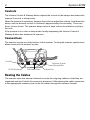
The scanner’s ports are at the bottom of the scanner. Turning the scanner upside down
allows access to the scanner’s ports.
Host Port
Secondary Scanner
(Synapse) Port
RS-232 Aux Port
EAS Interlock Port
Power Port
Routing the Cables
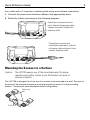
The scanner case has several channels to route the outgoing cables so that they are
organized and don’t hinder the scanner’s placement. After placing the cable connectors
in the appropriate scanner ports, route the cables through the nearest channel.