1
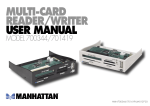
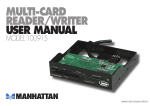
MULTI-CARD
READER/WRITER
USER MANUAL
MODEL 175432/175906
MAN-175432/175906-UM-0107-03
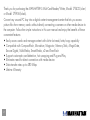
Thank you for purchasing the MANHATTAN Multi-Card Reader/Writer, Model 175432 (silver)
or Model 175906 (black).
®
Convert any unused PC bay into a digital content management center that lets you access
picture files from memory cards without directly connecting a camera or other media device to
the computer. Follow the simple instructions in this user manual and enjoy the benefits of these
convenient features:
• Easily access cards and manage content with slot-to-slot read/write/copy capability
• Compatible with CompactFlash, Microdrive, Magicstor, Memory Stick, MagicGate,
Secure Digital, MultiMedia, SmartMedia, xD and TransFlash
• Supports automatic card detection, hot swapping and Plug and Play
• Eliminates need for direct connection with media device
• Data transfer rates up to 480 Mbps
• Lifetime Warranty
2
SOFTWARE INSTALLATION
Windows 98SE and 2000:
1. Place the enclosed installation CD in the CD-ROM and double-click on the "Driver" folder.
2. Double-click "Setup.exe." This will display the InstallShield Wizard status screen.
3. When the Welcome screen appears, plug in the Multi-Card Reader/Writer; click "Next."
4. When the Card Reader Utility prompt appears, click "OK."
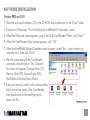
6. After the restart and with the Card Reader
connected, double-click on "My Computer."
Four icons will appear: Compact Flash (CF),
Memory Stick (MS), Secure Digital (SD)/
MultiMedia Card and Smart Media.
7. Insert your memory card(s) in the corresponding
slot(s) on the front panel of the Card Reader,
then double-click on the matching icon to
access the files.
‡
5. When the InstallShield Wizard Complete screen appears, select "Yes, I want to restart my
computer now"; then click "Finish."
Removable Removable
Disk (F:)
Disk (G:)
Removable Removable
Disk (H:)
Disk (I:)
3
Windows Me and XP:
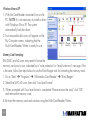
2. Four removable disk icons will appear on the
My Computer screen, indicating that the
Multi-Card Reader/Writer is ready for use.
‡
1. With the Card Reader connected, turn on the
PC. NOTE: It is not necessary to install a driver
with Windows Me or XP. The system
automatically finds the driver.
MMC/SD
(F:)
Compact
Flash (G:)
SmartMedia MS/MS Pro
(H:)
(I:)
Memory Card Formatting:
SM (SMC) and xD users may need to format the
memory card prior to use, indicated by a "write protection" or "read/write error" message. If this
is the case, follow the steps below to use the Flash Ranger tool for formatting the memory card.
1. Go to "Start" ‡ "Programs" ‡ "Multimedia Card Reader" ‡ "Flash Ranger."
2. Select the SMC/xD icon, then click "Low Level Format."
3. When prompted with "Low level format is completed. Please remove the card," click "OK"
and remove the memory card.
4. Re-insert the memory card and continue using the Multi-Card Reader/Writer.
4
Mac 10.3 or Above:
If using a Mac operating system of 10.3 or above, a driver is not needed for installation.
Simply connect the Multi-Cart Reader/Writer as instructed above and insert the memory card(s).
5
SPECIFICATIONS
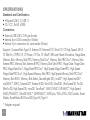
Standards and Certifications
• Hi-Speed USB 2.0, USB 1.1
• CE, FCC, RoHS, WEEE
Connections
• External USB USB 2.0 A-type female
• Internal 4-pin USB connection (Molex)
• Internal 5-pin connection for card reader (Molex)
Supports: CompactFlash Type I/II, Extreme CF, Extreme III CF, Ultra II CF, CF High Speed, XS-CF,
CF Elite Pro, CF PRO I/II, CF Picture, CF Wa, CF UltraX*, IBM and Hitachi Microdrive, MagicStore,
Memory Stick, Memory Stick PRO, Memory Stick Duo*, Memory Stick PRO Duo*, Memory Stick
Extreme PRO, Memory Stick Extreme III PRO, Memory Stick Ultra II PRO, MagicGate, MagicGate
PRO, MagicGate Duo*, MagicGate PRO Duo*, High Speed MagicGate PRO, High Speed
MagicGate PRO Duo*, High Speed Memory Stick PRO, High Speed Memory Stick PRO Duo*,
Memory Stick ROM, Memory Stick Select, SecureDigital (SD), miniSD*, High Speed miniSD*,
miniSDHC*, SDHC, Extreme SD*, Extreme III SD, Ultra II SD, Ultra-X SD, Ultra Speed SD, Pro SD,
Elite Pro SD, High Speed SD, microSD, TransFlash*, MMC/MMC II, RS-MMC*, High Speed
MMC/RS-MMC*, Ultra RS MMC*, DV-RS MMC*, MMCplus/100x/200x, MCCmobile, SmartMedia, SmartMedia ROM and XD/Type M/Type H
* Adapter required
6
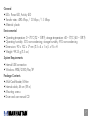
General
• LEDs: Power LED, Activity LED
• Transfer rates: 480 Mbps / 12 Mbps / 1.5 Mbps
• Material: plastic
Environmental
• Operating temperature: 0 – 70˚C (32 – 158˚F); storage temperature: -40 – 70˚C (-40 – 158˚F)
• Operating humidity: 50% non-condensing; storage humidity: 95% non-condensing
• Dimensions: 90 x 102 x 17 mm (3.5 x 4 x 1 in.) L x W x H
• Weight: 99.25 g (3.5 oz.)
System Requirements
• Internal USB connection
• Windows 98SE/2000/Me/XP
Package Contents
• Multi-Card Reader/Writer
• Internal cable, 46 cm (18 in.)
• Mounting screws
• Driver and user manual CD
7
www.manhattan-products.com
Are you completely satisfied with this product?
Please contact your MANHATTAN dealer with comments or questions.
®
Copyright © MANHATTAN
All products mentioned are trademarks or registered trademarks of their respective owners.