1
English
User’s Manual
1
Federal Communications Commission
(FCC) Statement
English
This Equipment has been tested and found to comply with the limits for a
class B digital device, pursuant to Part 15 of the FCC rules. These limits are
designed to provide reasonable protection against harmful interference in a
residential installation. This equipment generates uses and can radiate radio
frequency energy and, if not installed and used in accordance with the instructions, may cause harmful interference to radio communications. However,
there is no guarantee that interference will not occur in a particular installation. If this equipment does cause harmful interference to radio or television
reception, which can be determined by turning the equipment off and on, the
user is encouraged to try to correct the interference by one or more of the
following measures:
• Re-orient or relocate the receiving antenna.
• Increase the separation between the equipment and receiver.
• Connect the equipment into an outlet on a circuit different fromwhich
the receiver is connected to.
• Consult the dealer or an experienced radio/TV technician for help.
Warning :
Use only shielded signal cables to connect I/O devices to this equipment.
You are cautioned that changes or modifications not expressly approved by
the party responsible for compliance could void your authority to operate the
equipment.
2
3
Table of Contens
English
Getting Started7
Quick Installation Guide (QIG)11
Installing Software and Driver
11
Installing Hardware
12
Loading the slides into the Magazine
13
Loading the Magazine into the Scanner
15
Additional Features
18
One Button Scan
18
How to Scan Slides
23
STEP 1 - Aquire Driver
23
STEP 2- Select Film Type
23
STEP 3 - Optional Prescan
23
STEP 4 - Set Scan Settings
24
STEP 5 - Scan
25
STEP 6 - Exit
26
User Interface29
I Main Window Area
30
II Preview Window Area
40
III Active Frame Setting Area
42
IV Thumbnail Panel Area
43
Technical Support45
4
5
Getting Started
Check the package content before getting started.
For Quick Installation please refer to Quick Installation Guide. (Ref. Pg. 11)
English
Important! Save the original box, receipt and packing material for
future shipping needs.
Package Contents
• Slide Scanner.
• Magazine.
• Power Adapter [HIGH POWER HPA-401234U3 or LINEARITY LAD6019AB4]
Warning! Using any other power adapter may severely damage the
scanner and will void the product warranty.
• Power Cord.
• USB 2.0 Cable.
• CyberView X -MS Driver. (MS stands for Multiple Slide capability)
• Application software CD.
• Printed User’s Manual.
NOTE:
• Application software means the imaging software such as Adobe®
Photoshop® Elements, this is subject to change without notice.
• The orange adapter on the transport arm and the arm itself are ex-
cluded from guarantee.
GENERAL GUIDANCE:
• Only use the supplied USB-Cable. Connect the computer to the scan-
ner directly using the USB 2.0 cable.
• Do not use a Hub or extension cable. Only use the USB ports on the
rear of desktop computers.
• If there are any other devices (multifunction device, printers, scanners,
webcam) connected to the computer through USB disconnect them.
• A minimum of 1GB RAM (Windows) 1GB RAM (Mac) is required.
• When scanning Kodachrome or Black and white film disable Magic
Touch.
6
7
Operating Ambient Temperature Range 50º to 104ºF (10º to 40ºC)
English
Note: Do not turn on the scanner unless it is within this range. If the
scanner has been stored or transported outside of this range, allow
it to return to within this range before turning it on.
Operating Ambient Humidity Range 15% to 76% relative
humidity (non-condensing)
Note: If the scanner is stored or to be transported in cold temperature
and then brought into a warm / humid environment condensation
may occur.
This device is designed solely for private use and is not intended for commercial or communal use. The warranty is reduced from 2 years to 1 year if errors
or defects arising from inappropriate use, improper operation or stress occur.
8
9
Quick Installation Guide (QIG)
INSTALLING SOFTWARE AND DRIVER
English
for PC (Windows) User
WINDOWS SYSTEMS INSTALLATION DURING DRIVER INSTALLATION
A WARNING DIALOGUE BOX MAY APPEAR, IF THIS IS THE CASE
PLEASE SELECT “INSTALL THIS DRIVER ANYWAYS”.
Be sure to install the Application Software BEFORE installing the scanner
driver CyberView X 5.0.
You may install the scanner driver directly if you have already installed TWAIN
compliant application software in your computer. Mac users can use iPhoto for
editing.
1. Place the application software DVD into the DVD drive. If you have
CD autoplay switched off then you will need to explore the DVD
and double click the file “AutoPlay.exe” and follow the on-screen
instructions to complete the installation.
2. Place theCyberView X 5.0 CD into the drive which will autoplay.
If you have autoplay switched off on the CD drive then you will
need to explore the CD EXAMPLE: D:\Install\Drivers\Package\
CVX_MS.exe and double click the file “CVX_MS.EXE”and follow the
on-screen instructions to complete the installtion.
Notice:
1. In “Found New Hardware Wizard” window, select “Search automatically or Browse computer for driver software.”
2. In “Completing the Found New Hardware Wizard” window, click
“Finish”.
NOTE: Not all PC’s will display the found new hardware window, some will
install in the background
10
11
INSTALLING SOFTWARE AND DRIVER
for Mac (OSX) User
Before Installing the Scanner Driver...
English
Installing Scanner Driver
a. Insert insert driver CD into the computer CD/DVD drive and explore the
contents.
b.Double click the ”CyberView X 5.0” icon to begin the installation process. Follow the onscreen prompts to complete the installation process.
NOTE: Make sure the scanner is NOT connected to the computer during the
CyberView X 5.0 driver installation.
c. Restart computer once the installation process is complete.
Installing Hardware
General Recommendations:
• Cardboard based slides should be used with the Universal Magazine
DIN 108.
English
If you choose to use the provided application for image editing, install the
application software (ex: Adobe® Photoshop® Elements) by inserting the
application CD into the computer’s CD/DVD drive. Follow the instructions that
will be displayed in a window that opens automatically.
Loading slide(s) into the magazine
• Glass framed slides that are attached to glass frames may cause compli-
cations due to the hard edges.
Compact Magazine
a. As illustrated below, turn the magazine with the embossed lettering
“COMPACT MAGAZINE 50” and the white strip on the right facing
towards the top.
b.Hold the slide right side up, facing forward so the image is NOT
reversed. Rotate the slide as illustrated and Insert each slide, one at a
time, into the magazine.
Warning: Load slides into the magazine properly and make sure the slide mounts are in
good condition. Improperly inserted slides or slides with distorted/damaged slide mounts
may cause the scanner to jam and potentially damage both the slide and the scanner.
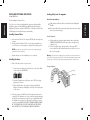
a. Connect the slide scanner to a power source.
1. Locate the power switch on the lower left side of the scanner. Make
sure the scanner is TURNED OFF.
Compact Magazine
Lettering
White Strip
2. Plug the AC adapter into an AC power source FIRST before plugging it into the scanner.
3. Attach the USB cable to the computer using the stadard USB
adapter end. Attach the USB adapter end of the cable to back panel
of the scanner.
12
b.Ensure the scanner does NOT have a slide magazine loaded, turn the
scanner ON. The calibration cycle on the scanner will start automatically
and will take several minutes to complete. A green light will flash while
the calibration is in progress. The slide transport arm will move in and
out of the scanner. MAKE SURE THERE IS ENOUGH ROOM IN FRONT
OF THE SCANNER FOR THE SLIDE TRANSPORT ARM TO EXTEND
FULLY, DO NOT PUSH THE ARM BACK DURING CALIBRATION.
13
Loading slide(s) into the magazine
Loading slide(s) into the magazine
CS Magazine
Universal Magazine
English
English
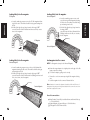
a. Locate the numbering sequence text on the
top of the Universal slide magazine indicating
the slide order. The numbers should be facing
up and starting from the left.
b.Hold the slide right side up, facing forward so
the image is NOT
reversed. Rotate the slide as illustrated below
(180 deg) and Insert each slide, one at a time,
into the magazine.
a. Locate the numbering sequence text on the CS slide magazine indicating the slide order. The numbers should be facing up and starting from
the left.
b.Hold the slide right side up, facing forward so the image is NOT
reversed. Rotate the slide as illustrated and Insert each slide, one at a
time, into the magazine.
Numbering
CS Magazine
Universal Magazine
Numbering
Load magazine into the scanner
Loading slide(s) into the magazine
PaximatS Magazine
NOTE: For all magazines (except for the Universal Magazine)
a. Locate the numbering sequence text on the top of the Paximat slide
magazine indicating the slide order. The numbers should be facing up
and starting from the left.
b.Hold the slide right side up, facing forward so the image is NOT
reversed. Rotate the slide as illustrated below (180 deg) and Insert each
slide, one at a time, into the magazine.
Numbering
Paximat Magazine
• Return the orange adapter to its original position at the grip of the slide
transport arm after scanning.
• To release the adapter, gently press its outer tip.
a. Remove the cover from scanner exposing the slide magazine loading
area.
b.Load the magazine into the scanner as illustrated below.
Note: Orientation of scanner in the diagrams is from the back of the unit. Take note of
the magazine slide opening also facing towards the back of the scanner for correct orientation when loading into the scanner.
General Recommendations:
• Braun Paximat S (especially for cardboard frames and framed slides up
to 1/16 inch thickness.
• Paximat Magazine for framed slides up to 1/8 inch thickness.
• CS Magazine for CS/CS2-framed slides.
14
15
Load the magazine into the scanner (Continued)
Compact Magazine
NOTE:
• Use only Universal Magazines with the DIN 108 label. Other magazines
may result in problems and VOIDing the warranty.
English
English
(embossed letters facing up and the white stripe near the front panel of the scanner).
Universal Magazine
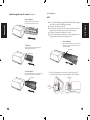
• Pull out the slide transport arm fully.
• Gently press the orange adapter on the slide transport arm. Move the
adapter on the slide transport arm to the front until it snaps in.
• Push the slide transport arm back into the scanner.
• Load the magazine from the back in the respective guiding rails of the
magazine tunnel until it hits the slide transport arm.
Universal Magazine
Slide order numbers printed on top of magazine on the
right hand side of magazine towards the front of the scanner when loading.
CS Magazine
Slide order numbers printed on magazine facing towards the back of the scanner.
Numbering
Numbering
PaximatS Magazine
Slide order numbers printed on top of magazine on the
right hand side towards the front of the scanner.
c. Place the slide magazine into the scanner from the left side until it
touches the slide transport arm and the magazine “clicks” into place.
Slide Holder
Numbering
Slide
Transport
Arm
16
17
Additional features
English
Manual Control Panel
Please Note: When installing your new scanner onto a Windows system that already
has another USB Flatbed scanner or All-in-one Scan/Copier/Printer device installed, it
may be necessary for you to disconnect the other scanner from the USB port for the Film
scanner to work properly,
One Button Scan
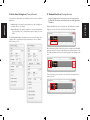
Open the CyberView X 5.0 driver program FIRST and press the scan button to
scan the film or slide.
a. Open the CyberView X 5.0. (Ref. page 23 to acquire theCyberView X
5.0 driver program)
1. Select the film type and resolution.
1. Select the film type and resolution you want to scan.
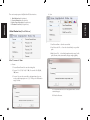
1-1.Press the scan button and it will pop-up the “Save To File“
settings window. Input the save to path, file name and file type.
(Ref. Pg.11 to change the settings)
English
Manual Control Panel
a. You can advance or reverse the slide by pressing the navigation button
or and scan manually with the scan button to enable one button
scan function.
b.Select “Start > Programs >CyberView X 5.0_MS“ and select “CyberView X 5.0“ to open theCyberView X 5.0 application
1-2.After setting up, click “OK“ to scan the image to file.
1-3.Press the scan button until you are requested to input the qty.
that you want to scan to file then release, then push the “OK” to
get to the next setting window.
NOTE: If you do not open CyberViewX 5.0 FIRST, the scan button will not function.
c. Slide Viewer
The scanner has a built in mini light panel which allows the slides to be
manually previewed with a backlight before inserting into the tray for
scanning.
Insert the slide into the slide viewer for previewing. The scanner has to
be switched on. Gently press down on the top of the slide to engage
the back light for viewing the slide.
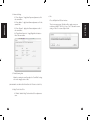
2. Press the scan button ( ), the scanner software will automatically
display a pop up setting window as below.
2-1.Select the Scan to directory, file format (TIF or JPG)
Mini Light Panel
3. Press the scanner button ( ) until you are requested to input the
amount that you want to scan to file. Release the button then select
the “OK” in the next window that appears on the screen.
3-1.If “To Host” is selected, the slide will be scanned, sending the
data to the opened application software.
3-2.If “To File” is selected, the slide will be scanned, saving the
data to the preset path.
18
19
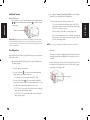
d.Single Slide Scanning
• Load the empty magazine into the tunnel FIRST until it touches the
English
slide transport arm completely. Slide the magazine forward to be sure
that the transport arm is in the first slot of the magazine.
• Press the eject button [I] to make the slide holder open exposing the
loaded slide.
• Place the slide as illustrated [I] into the slide holder and press the slide
holder down [II].
• Open the CyberView X 5.0 driver program to scan the slide.
Attention! When using the single slide scanning function, please check the slide transport arm has been moved completely into the unit and the cover for magazine tunnel is
taken off.
I.
II.
Slide
Holder
Eject
Button
20
21
HOW TO SCAN SLIDES
STEP 1 – Acquire Driver
English
(For PC User)
Open CyberView X 5.0 from Start – All Programs –CyberView X 5.0
(For MAC User)
Open Macintosh Hard drive – Applications –CyberView X 5.0_MS –CyberView
X 5.0
STEP 2 – Select Film Type
Select the film type to be scanned - Positive, Negative or B&W (Black and
White).
STEP 3 – Optional Prescan
Select the “Prescan Current Frame“ to prescan the slide currently loaded into
the scanner or “Prescan...“ to prescan slide or slides at specific positions in
the magazine.
22
Pre-Scanning should be used to manually adjust color/edit settings for each
slide before doing the final scan. It’s possible to set different settings for each
slide to be scanned.
23
STEP 5 – Scan
STEP 4 – Set Scan Settings
Choose “Scan Current Frame” to scan the slide loaded into the scanner or
“Multi-Scan…” to input the number of slides to be scanned based on their
location in the magazine.
English
English
a. Resolution
The default scanning resolution is 1000dpi, additional resolution options are listed below.
Notice: Higher scanning resolutions result in greater scanning time and hardisk
space requirements.
b.Color Depth
Choose between 8 and 16bit. A higher color depth setting will result in
a larger range of colors in the final scanned image.
Note: Color image file size of different resolutions and color depths:
Scanning
Resolution
Color Depth
250dpi
8 bit
~350Kb
500dpi
8 bit
~1Mb
625dpi
8 bit
1000dpi
8 bit
1250dpi
16 bit
2500dpi
16 bit
5000dpi
16 bit
File Size TIFF
Multi Scan to file - allows input of the number of the slide to scan, the destination, file format (TIF or JPG).
(no compression)
~11Mb
~52Mb
Scans include Auto Balance and Digtal Noise
Reduction on:
Processor: AMD 9650 Quad-Core 2.3GHz
Memory:2GB
System type:Vista 64 bit
Scan Mode – Normal mode produces a scan in jpeg format while Quality
produces a non-compressed, “loss-less” TIF image.
24
25
STEP 6 – Exit
All scaned images will be saved to the directory location set previously, The
factory default locations are:
English
Windows: C:\Users\[YOUR NAME\Documents;
MAC: Mac HD\Users\[YOUR NAME]\Pictures\Cyberview Images),
Select “Scan > Exit” to close the driver. Scanned image files can be open/
edited with any image editing software.
NOTE: If using the supplied image editor, for help with this application see the users
Help from within the application or browse the supplied DVD for the help documentation.
26
27
USER INTERFACE
English
28
29
There are four major parts of theCyberView X 5.0 user interface:
b.Scan
English
English
I. Main Window Area [Fixed Windows]
II. Preview Window Area [Fixed Window]
III.Active Frame Setting Area [Floating Window]
IV.Thumbnail Panel Area [Floating Window]
I. Main Window Area [Fixed Windows]
1. Scan Current Frame > Scan the current slide.
2. Scan Selected to File… > Scan the selected slide(s) to a specified
path.
3. Multi-Scan to File… > Scan slide(s) numbers and/or range. Set file
path, file name, Index, start number, file type and jpeg quality.
Menu Commands - Scan
a. Prescan
1. Prescan Current Frame: Pre-scan the existing slide.
2. Prescan 1 – 36 (1 - 50, 1 - 80, 1 - 100): Pre-scan the 1-36 (50, 80 ,
100) frames.
3. Prescan…Pre-scan the current slide or designate frame(s) you entered, possible input options are 1, 3, 5-12 for specific slides and/or
ranges of slides.
3-1.Select Browse and choose the designated folder to save the
scanned image to.
3-2.Enter the file name.
30
31
3-3.Trailing Index after Base File Name
1. Scan Settings
• Digits: Defines the length of the file name and numbering
sequence up to 6 digits Example image1 or image000001.
• Options:
•
Use Film Index: Use the number assigned to the slide
based on it’s position in the cartridge.
User Defined Start Number: Enter a specific start number.
3-4.Choose the file type , “TIF” or “JPG”. (TIF uncompressed or
JPG Compressed)
1-2.“Using default real scan resolution“ - Enables default scan
resolution setting.
English
English
•
1-1.“Prescan Resolution“ - Default pre-scan resolution.
1-3.“Color Depth“ – Default color depth while scanning.
1-4.“Scan Mode“ – Default scan mode while scanning.
3-5.Choose image quality for JPEG. (Good, Better, or Best)
c.Revert
Discards all modifications and restores the image back to the original
state.
d.Preference
Attribute setting windows.
32
33
2. Advanced Setting
2-1.”Auto Exposure” - Apply Auto Exposure adjustment to all of
the scanned films.
English
2-3.“Auto Contrast” - Apply Auto Contrast adjustment to all of
the scanned films.
Closes theCyberView X 5.0 user interface.
There is a message pop-up “Would you like to apply current scan
resolution to default?“ click “Yes“ to save , “No“ to discard the current
setting or “Cancel“ to return to Cyber View X.
English
2-2.”Auto Balance” - Apply Auto Gamma adjustment to all of the
scanned films.
e.Exit
2-4.”Digital Noise Reduction” – Apply Digital Noise Reduction
filter to all scanned films.
3. Default Scanning Area
Adjust the scanning size as well as adjust the “Scan Offset” setting
to move the image position of slide.
(ONLY AVAILABLE ON OLDER UNITS WITH DIGITAL ICE3™ TECHNOLOGY BUILT IN.)
4. Magic Touch / Auto Color
4-1.Enable / disable Magic Touch and Auto Color adjustment to
scans.
34
35
Menu Commands - Preview
2. Color Balance
To adjust the brightness, contrast, saturation, and color (CMY or
RGB) of the image. Comparisons between before and after adjusted
images are shown for reference.
English
English
1. Zoom In: Magnify image.
2. Zoom Out: Reduce image.
3. Rotate 90 Left: Turn the image 90° counter clockwise.
4. Rotate 90 Right: Turn the image 90° clockwise.
5. Flip Horizontal: Flip the image horizontally.
6. Flip Vertical:Flip the image vertically.
a. Image Adjustment
1. Variations: Generates different views of image with options to make
changes to highlights, midtones, etc.
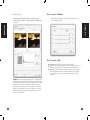
Example: If a previewed image appears too dark, use the “Brightness” slider
in the “Color Balance” window to adjust the image by selecting the slider
in the center and moving it to the right. The image’s “After” view becomes
lighter. Select “OK” to accept the changes which will be sent to the scanning
hardware. This can also be used to adjust each of the functions in “Color Balance” by contrast, saturation and specific color ranges of cyan, magenta and
yellow.
36
37
3. Curves and Levels
1. Exposure Setting: To adjust the exposure time (R, G, B) press ”Reset” to
restore to the default setting.
English
English
Adjust image settings by moving Curve and Levels settings.
Comparison between before and after adjustment is displayed for
reference.
Menu Commands - Windows
Menu Commands - Help
• User Manual: Opens the electronic version of this user’s manual.
• Update: Firmware: Upgrade the firmware version, select the path where the file of
firmware has been saved. (These files may be downloaded from our website)
• About: Displays system information (including operation system, CPU), product
information (including product name, model name, hardware version, firmware
version, software version, device information including interface and optical
resolution).
Example: When the previewed image appears to be too dark, adjustments
with the Input slider in the Curves and Levels window can be made to correct
the image. Selecting the Gray slider in the center and moving it to the left will
result in changes in the “After” view resulting in a lighter image. Once the
adjusted image is acceptble select “OK” to send changes to the scanning
hardware. The same method can also be used to adjust each color channel
independently, using the channel drop down menu “RGB = All colors” R =
Red, G = Green, and B = Blue.
38
39
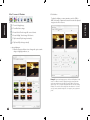
Function Bar Diagram
ROC: Automatically restores original colors by analyzing the base image and
applying corrections to the faded colors. (ONLY AVAILABLE ON OLDER
UNITS WITH BUILT IN DIGITAL ICE3™ TECHNOLOGY.)
GEM: Automatically enhances the clarity of a scanned film image while preserving its colors, gradations and sharpness. (ONLY AVAILABLE ON OLDER
UNITS WITH BUILT IN DIGITAL ICE3™ TECHNOLOGY.)
In order to optimize scanned image quality, please select your film type and
brand from the toolbar:
English
Prescan: Pre-scan the current film, press drop down for more options.
Scan: Scan film, press drop down button for more options.
Image Adjustment: Press drop down button for more options.
Output Preview: To display the output preview image.
Backward One Frame: Moves film back one frame.
Forward One Frame: Moves film forward one frame.
Reload Magazine: Reset the frame number, the location number will be
English
Negative
Positive (also known as Slide)
Black and White
Note: GEM will only have obvious effect on 1800 dpi or above.
Preview Window
Preview the image you pre-scan, you can select the measurement unit „in“„cm“-„px“ by clicking the upper-left corner.
returned to 1.
Set Current Position: Change the current slide position number in the
magazine.
Go to: A pop-up dialogue box will prompt to enter which frame to change to.
Status line:
Displays the RGB (Red, Green, Blue) values in the image on the lower right
hand corner of the window.
II. Preview Window Area [Fixed Windows]
Toolbar Diagram
Select scan area, more than one selection can be made at a time.
Zoom In: To magnify the image where the cursor is currently located. The
image will be magnified with every click until the maximum multiple (1000%)
is reached.
Zoom Out: To reduce the size of the viewed image click the Zoom Out cursor
to the desired area, the image will reduce by half with every click until the
lowest multiple (25%) is reached.
Rotate 90 Left: To rotate the image counter clockwise 90 degrees.
Rotate 90 Right: To rotate the image clockwise 90 degrees.
Flip Horizontal: To Flip the image 180 degrees horizontally.
Flip Vertical: To Flip the image 180 degrees vertically.
Revert: Discard all modifications and restores the image back to the original
state in preview windows.
40
Status Line
In the lower left hand corner, the color level (RGB: red, green, blue) and
coordinates of the location [ex: I] are displayed. The zoom scale, the current
slide magazine location and how many areas selected to scan (2 or or higher
indicates: Multiple scan areas on one slide [ex: II].
I.
II.
41
III. Active Frame Setting Area [Floating Windows]
A comprehensive advanced mode is available to allow for more user defined
adjustments.
English
Images only appear here in Prescan mode, scan to file goes directly to
the hard drive, this window remains blank as does the main Cyberview X
5.0 window.
English
Normal mode [ex: I] to input the basic parameter to scan (including scan
resolution, film size, color depth).
Advanced mode [ex: II]to input the parameter of scan and output (including scan resolution, size, color depth and output resolution, size, scan
mode).
IV. Thumbnail Panel Area [Floating Windows]
Displays thumbnail view of pre-scanned images. By default all pre-scanned
images are selected. Note the small check mark below each image.
The “Active Frame Setting” only imitates in the current preview image, click
“Apply to All” to set parameters in all previewed images, does not apply to
direct scanning to file.
When scanning more than 6 frames (6 at a time are viewable in the thumbnail
panel) you may scroll to view more by clicking on the right arrow button. The
left / right arrow buttons allow you to scroll throught pre-scanned images with
ease.
To de-select frames you do not wish to scan click on the check mark box to
remove selection.
42
43
TECHNICAL SUPPORT
CyberView X 5.0
English
For information regarding the film scanner and CyberView X 5.0 driver, please
visit www.reflecta.de.
Bundled application software
For questions regarding bundled application software, you can refer to the
HELP function on the application menu bar or visit the software company’s
website.
**This user manual has also been archived in the packaged CD.
44
45