1
Using your tuner
T31 AM/FM RDS TUNER
PRESET
1–9
2 – 10
3 – 11
4 – 12
5 – 13
6 – 14
7 – 15
1
FM MUTE
STEREO
SIGNAL TUNED
8 – 16
MHz
TUNING
67
8
BAND
9
RDS
MONO
STORE
bk 2 3 4 5
POWER
bl bm
POWER bl
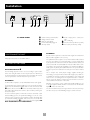
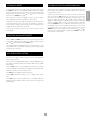
FRONT PANEL CONTROLS
Switches the mains power to the unit on or off.
Preset Memory buttons 1
Power indicator bm
Directly select up to 32 preset stations (16 AM, 16 FM). Press briefly
for stations 1–8, press and hold for more than one second for stations
9–16.
This glows green to show that the unit is ready for use. The indicator
glows red in standby mode when the tuner is switched off via the
remote control, or configured in a custom installation.
BAND 2
Selects FM or AM frequency band. The appropriate letters appear on
the display.
OPERATION
RDS 3
The T31 radio tuner can be controlled from the front panel buttons or
from the remote control handset (see ‘Using the remote control’).
Switches between RDS modes on FM if RDS is available. See the
section ‘RDS: Radio Data System’.
MONO 4
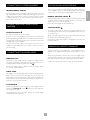
TUNING TO A STATION
Selects mono or stereo output. Stereo is only available on FM radio
stations. If a weak station is received in stereo the background hiss can
be reduced (and in most cases eliminated) by selecting ‘MONO’.
Pressing the TUNING button toggles between the two tuning modes
of the unit – ‘Preset’ or ‘Tune’. The selected mode is briefly shown in
the display.
In mono mode, FM muting is suppressed when tuning between
stations and the ‘FM MUTE’ indicator is switched off.
PRESET MODE
STORE 5
In Preset mode, press the 5 or 6 buttons on the front panel (or
< or > on the remote control handset) to cycle up and down the
preset stations.
The STORE button allows you to assign radio stations to preset
numbers. See the instruction ‘Storing a preset’
See ‘Storing a preset’ and ‘Deleting unused presets’, below.
Preset indicator 6
Indicates the number of the preset currently selected.
TUNE MODE
Signal strength 7
Automatic tuning:
A seven-step indicator shows the strength of a tuned station. Good
FM reception and locking onto RDS data generally requires five or
more bars.
Press the5 or 6 buttons on the front panel (or < or > on the
remote control handset) for longer than one second to engage
automatic tuning. The tuner searches for a radio station signal of
sufficient strength and stops. To skip to the next station, press one of
the buttons again. Automatic tuning is available for both the FM and
AM bands.
Tuning 8
Switches between Tune and Preset mode for the down/up buttons.
Preset mode is indicated by PRESET on the display.
Manual tuning:
Tune down/up 9
Used to either scroll through presets, or to tune up and down the
broadcast band, depending on the current mode. See ‘Tuning to a
station’ for more details.
Tap the 5 or 6 buttons for manual tuning. This can be used for
tuning to a specific frequency. It is also useful if you are trying to
select a station that is too weak for the auto search mode.
Frequency/ RDS display bk
Regardless of the mode used to tune your T31, when it is accurately
tuned to a station ‘TUNED’ lights up in the display.
Indicates the frequency of the selected station in MHz (FM) or kHz
(AM); it also displays RDS information when present.
6