1
LCD Monitor
User Manual
BL2201PT
BL2400PT
Welcome
Copyright
Copyright © 2010 by BenQ Corporation. All rights reserved. No part of this publication may be
reproduced, transmitted, transcribed, stored in a retrieval system or translated into any language
or computer language, in any form or by any means, electronic, mechanical, magnetic, optical,
chemical, manual or otherwise, without the prior written permission of BenQ Corporation.
Disclaimer
BenQ Corporation makes no representations or warranties, either expressed or implied, with
respect to the contents hereof and specifically disclaims any warranties, merchantability or fitness
for any particular purpose. Further, BenQ Corporation reserves the right to revise this publication
and to make changes from time to time in the contents hereof without obligation of BenQ
Corporation to notify any person of such revision or changes.
Please follow these safety instructions for best performance,
and long life for your monitor
Power Safety
• The AC plug isolates this equipment from the AC supply.
• The power supply cord serves as a power disconnect device for pluggable equipment. The
socket outlet should be installed near the equipment and be easily accessible.
• This product should be operated from the type of power indicated on the marked label. If you
are not sure of the type of power available, consult your dealer or local power company.
• An approved power cord greater or equal to H03VV-F or H05VV-F, 2G or 3G, 0.75mm2 must
be used.
Care And Cleaning
• Cleaning. Always unplug your monitor from the wall outlet before cleaning. Clean the LCD
monitor surface with a lint-free, non-abrasive cloth. Avoid using any liquid, aerosol or glass
cleaners.
• Slots and openings on the back or top of the cabinet are for ventilation. They must not be
blocked or covered. Your monitor should never be placed near or over a radiator or heat
source, or in a built-in installation unless proper ventilation is provided.
• Never push objects or spill liquid of any kind into this product.
Servicing
Do not attempt to service this product yourself, as opening or removing covers may expose you to
dangerous voltages or other risks. If any of the above mentioned misuse or other accident such as
dropping or mishandling occurs, contact qualified service personnel for servicing.
Table of Contents
Copyright .......................................................................................................................... 2
Disclaimer ......................................................................................................................... 2
Getting started .................................................................................................................. 4
Getting to know your monitor ........................................................................................ 6
Front view ........................................................................................................................................6
Back view .........................................................................................................................................6
How to assemble your monitor hardware ...................................................................... 7
Adjusting the monitor stand height .............................................................................................11
Rotating the monitor ....................................................................................................................12
Viewing angle adjustment .............................................................................................................13
How to detach the stand base .......................................................................................................14
Using the monitor wall mounting kit ..........................................................................................15
Getting the most from your BenQ monitor ................................................................. 16
How to install the monitor on a new computer ..........................................................................17
How to upgrade the monitor on an existing computer ..............................................................18
How to install on Windows 7 system ...........................................................................................19
How to install on Windows Vista systems ...................................................................................20
How to install on Windows XP system ........................................................................................21
Picture optimization ...................................................................................................... 22
How to adjust your monitor .......................................................................................... 23
The control panel ..........................................................................................................................23
Hot key mode ................................................................................................................................24
Main menu mode ..........................................................................................................................25
Troubleshooting ............................................................................................................. 42
Frequently asked questions (FAQ) ...............................................................................................42
Need more help? ............................................................................................................................44
1. Getting started
When unpacking please check you have the following items. If any are missing or damaged, please
contact the place of purchase for a replacement.
BenQ LCD Monitor
Monitor Base
Quick Start Guide
CD-ROM
Power Cord
(Picture may differ from product
supplied for your region.)
Video Cable: D-Sub
4
Getting started
Video Cable: DVI-D
(Optional accessory for models with
DVI inputs, sold separately)
Audio Cable
Video Cable: DP
(Optional accessory for models with DP
inputs, sold separately)
Consider keeping the box and packaging in storage for use in the future when you may need to transport
the monitor. The fitted foam packing is ideal for protecting the monitor during transport.
Getting started
5
2. Getting to know your monitor
Front view
1.
2.
3.
4.
3
4
2
Power button
Control buttons
Speakers
Light sensor / ECO sensor
31
Back view
5. AC Power Input jack
6. Cable clip
7. Line In
8. Headphone jack
9. DisplayPort socket
10.DVI-D socket
11. D-Sub socket
12.Lock switch
5
6
7 8 9 10 11
12
• Above diagram may vary depending on the model.
• Picture may differ from product supplied for your region.
6
Getting to know your monitor
3. How to assemble your monitor hardware
If the computer is turned on you must turn it off before continuing.
Do not plug-in or turn-on the power to the monitor until instructed to do so.
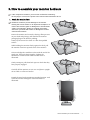
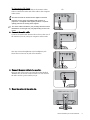
1. Attach the monitor base.
Please be careful to prevent damage to the monitor.
Placing the screen surface on an object like a stapler or a
mouse will crack the glass or damage the LCD substrate
voiding your warranty. Sliding or scraping the monitor
around on your desk will scratch or damage the monitor
surround and controls.
Protect the monitor and screen by clearing a flat open area
on your desk and placing a soft item like the monitor
packaging bag on the desk for padding.
Gently lay the screen face down on a flat clean padded
surface.
While holding the monitor firmly against the desk, pull
the monitor stand arm upwards clear of the monitor.
Orient and align the stand base socket with the end of the
stand arm, then push them together. Tighten the
thumbscrew on the bottom of the monitor base as
illustrated.
Gently attempt to pull them back apart to check that they
have properly engaged.
Carefully lift the monitor, turn it over and place it upright
on its stand on a flat even surface.
Extend the stand to the maximum extended position. And
rotate the monitor 90 degrees counterclockwise as
illustrated.
How to assemble your monitor hardware
7
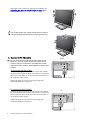
You might want to adjust the monitor stand height. See
Adjusting the monitor stand height on page 11 for
more information.
You should position the monitor and angle the screen to
minimize unwanted reflections from other light sources.
-5 ~ +20
O
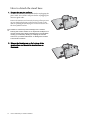
2. Connect the PC video cable
Either
Do not use both DVI-D cable and D-Sub cable on the
same PC. The only case in which both cables can be
used is if they are connected to two different PCs with
appropriate video systems. (Not available for analog-only
models).
To Connect the D-Sub Cable
Connect the plug of the D-Sub cable (at the end without
the ferrite filter) to the monitor video socket. Connect the
other end of the cable (at the end with the ferrite filter) to
the computer video socket.
Tighten all finger screws to prevent the plugs from
accidently falling out during use.
To Connect the DVI-D Cable
Connect the plug of the DVI-D cable (at the end without
the ferrite filter) to the monitor video socket. Connect the
other end of the cable (at the end with the ferrite filter) to
the computer video socket.
Tighten all finger screws to prevent the plugs from
accidently falling out during use.
8
How to assemble your monitor hardware
Or
O
To Connect the DP Cable
Connect the plug of the DP cable to the monitor video
socket. Connect the other end of the cable to the computer
video socket.
Or
The DVI-D format is used for direct digital connection
between source video and digital LCD monitors or
projectors. The digital video signals produce a superior
quality picture than analog video signals.
The video cable included in your package and the socket
illustrations on the right may vary depending on the LCD
model.
3. Connect the audio cable.
Connect the audio cable between the socket on the rear of
the monitor (Line In) and your computer audio outlet.
You may connect headphones to the headphone jack
found next to the Line In jack of the monitor.
4. Connect the power cable to the monitor.
Plug one end of the power cord into the socket labelled
‘POWER IN’ on the rear of the monitor. Do not connect
the other end to a power outlet just yet.
5. Route the cables via the cable clip.
How to assemble your monitor hardware
9
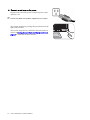
6. Connect-to and turn-on the power.
Plug the other end of the power cord into a power outlet
and turn it on.
Picture may differ from product supplied for your region.
Turn on the monitor by pressing the power button on the
right of the monitor.
Turn on the computer too, and follow the instructions in
Section 4: Getting the most from your BenQ monitor on
page 16 to install the monitor software.
10
How to assemble your monitor hardware
Adjusting the monitor stand height
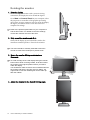
If you prefer to lower the monitor stand height, push the
stand downward while holding both left and right sides of
the monitor.
Avoid placing hands near the bottom of the monitor stand
as the descending stand might cause personal injuries.
Keep children out of reach of the monitor while performing
this operation.
To extend the monitor stand to a higher position, press
the lower part of the height release on the stand while
holding the bottom of the monitor at the same time. And
pull the stand and the monitor upward together to the
desired height.
Height release
If the height release in the proceeding operation cannot
be pressed down, press the top of the monitor once as
illustrated on the right before you proceed.
How to assemble your monitor hardware
11
Rotating the monitor
1. Pivot the display.
Before rotating the monitor with a portrait viewing
orientation, the display has to be rotated 90 degrees.
Go to Start and Control Panel on your computer, select
the properties or controller of the graphics processing
units (GPU) on your computer. Select to rotate the display
90 degrees, and follow the on-screen instructions to
complete the settings.
Refer to the product specifications of your computer to
find the GPU name. For details on the GPU settings,
contact the customer service of the GPU.
2. Fully extend the monitor and tilt it.
Gently lift the display up and extend the stand to the
maximum extended position. Then tilt the monitor.
The stand should be vertically extended to allow the
monitor to rotate from landscape to portrait mode.
3. Rotate the monitor 90 degrees clockwise as
illustrated.
To avoid the edge of the LCD display hitting the monitor
base surface while it is being rotated, do tilt and extend
the monitor to the highest position before you start to
rotate the display.
You should also make sure there are no obstacles around
the monitor and there is enough room for cables. You
might need to route the cables again via the cable clip
after the rotation.
4. Adjust the monitor to the desired viewing angle.
12
How to assemble your monitor hardware
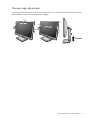
Viewing angle adjustment
You may position the screen to the desired angle with -5° to +20° monitor tilt, 90° (left and right
total) monitor swivel, and 130 mm monitor height.
-5 ~ +20
O
O
-45 ~ +45
O
O
130 mm
How to assemble your monitor hardware
13
How to detach the stand base
1. Prepare the monitor and area.
Turn off the monitor and the power before unplugging the
power cable. Turn off the computer before unplugging the
monitor signal cable.
Protect the monitor and screen by clearing a flat open area
on your desk and placing a soft item like a towel on the
desk for padding, before laying the screen face down on a
flat clean padded surface.
Please be careful to prevent damage to the monitor.
Placing the screen surface on an object like a stapler or a
mouse will crack the glass or damage the LCD substrate
voiding your warranty. Sliding or scraping the monitor
around on your desk will scratch or damage the monitor
surround and controls.
2. Release the thumbscrew on the bottom of the
monitor base and detach the monitor base as
illustrated.
14
How to assemble your monitor hardware
Using the monitor wall mounting kit
The back of your LCD monitor has a VESA standard mount with 100mm pattern, allowing the
installation of a wall mount bracket. Before starting to install a monitor wall mounting kit, please
read the precautions carefully.
Precautions:
• Install your monitor and monitor mounting kit on a wall with flat surface.
• Ensure that the wall material is stable to support the weight of the monitor.
• Turn off the monitor and the power before disconnecting the cables from the LCD monitor.
1. Remove the monitor base.
Lay the screen face down on a clean and well-padded
surface. Detach the monitor base as instructed in How
to detach the stand base on page 14.
2. Remove the monitor stand.
Use a a cross-pointed screwdriver to release the
screws that fixing the monitor stand to the
monitor.The use of a magnetic-head screwdriver is
recommended to avoid of losing the screws.
Then pull the monitor stand backward away from the
monitor.
In case you intend to use your monitor on the stand in the
future, please keep the monitor base, monitor stand, and
screws somewhere safe for future use.
3. Follow the instruction manuals of the wall mount
bracket you purchased to complete the installation.
How to assemble your monitor hardware
15
4. Getting the most from your BenQ monitor
To gain the most benefit from your new BenQ color LCD flat screen monitor, you should install
the custom BenQ LCD Monitor driver software as provided on the BenQ LCD Monitor CD-ROM.
The circumstances under which you connect and install your BenQ LCD Monitor will determine
which process you need to follow to successfully install the BenQ LCD Monitor driver software.
These circumstances relate to which version of Microsoft Windows you are using, and whether
you are connecting the monitor and installing the software onto a new computer (without existing
monitor driver software), or whether you are upgrading an existing installation (which already has
existing monitor driver software) with a newer monitor.
In either case however, the very next time you turn on your computer (after connecting the
monitor to your computer), Windows will automatically recognize the new (or different)
hardware, and will launch its Found New Hardware wizard.
Follow the wizard instructions until it asks you to select a monitor model. At that point, click the
Have Disk button, insert the BenQ LCD Monitor CD-ROM and select the appropriate monitor
model. Further details and step-by-step instructions for either an automatic (new) or upgrade
(existing) installation, see:
• How to install the monitor on a new computer on page 17.
• How to upgrade the monitor on an existing computer on page 18.
• If you require a User Name and Password to login to your Windows computer, you must be logged
on as an Administrator or as a member of the Administrators group in order to install the monitor
driver software. Furthermore, if your computer is connected to a network which has security access
requirements, network policy settings may prevent you from installing software on your computer.
• To check the name of the purchased model, refer to the specification label on the back of the
monitor.
16
Getting the most from your BenQ monitor
How to install the monitor on a new computer
This instruction details the procedure for selecting and installing the BenQ LCD Monitor driver
software on a new computer which has never had a monitor driver installed before. This
instruction is only suitable for a computer which has never been used before, and for which the
BenQ LCD Monitor is the first ever monitor to be connected to it.
If you are adding the BenQ LCD Monitor to an existing computer that has already had another monitor
connected to it (and has monitor driver software installed), you should not be following these instructions.
You should instead be following the instructions for How to upgrade the monitor on an existing computer.
1. Follow the instructions in How to assemble your monitor hardware on page 7.
When Windows starts, it will automatically detect the new monitor and launch the Found New
Hardware Wizard. Follow the prompts until it displays the option to Install Hardware Device
Drivers.
2. Insert the BenQ LCD Monitor CD-ROM into a CD drive on the computer.
3. Check Search for a suitable driver for my device option, and click Next.
4. Check the option for CD-ROM drives (uncheck all others) and click Next.
5. Look to confirm that the wizard has selected the correct name of your monitor and click
Next.
6. Click Finish.
7. Restart the computer.
To find the suitable driver files for the purchased model, refer to the following table.
Driver files
Suitable models
BL2201
BL2201, BL2201PT,
BL2201M
BL2400
BL2400PT
Getting the most from your BenQ monitor
17
How to upgrade the monitor on an existing computer
This instruction details the procedure for manually updating the existing monitor driver software
on your Microsoft Windows computer. It is currently tested as compatible for Windows XP,
Windows Vista, and Windows 7 Operating System (OS).
The BenQ LCD Monitor driver for your model may well function perfectly with other versions of Windows,
however, as at the time of writing, BenQ has done no testing of this driver on other versions of Windows
and cannot guarantee its operation on those systems.
Installing monitor driver software involves selecting an appropriate information file (.inf) on the
BenQ LCD Monitor CD-ROM for the particular model monitor you have connected, and letting
Windows install the corresponding driver files from the CD. You need only steer it in the right
direction. Windows has an Upgrade Device Driver Wizard to automate the task and guide you
through the file selection and installation process.
See:
• How to install on Windows 7 system on page 19.
• How to install on Windows Vista systems on page 20.
• How to install on Windows XP system on page 21.
18
Getting the most from your BenQ monitor
How to install on Windows 7 system
1. Open Display Properties.
Go to Start, Control Panel, Hardware and Sound, Devices and Printers and right-click the
name of your monitor from the menu.
Alternatively, right-click the desktop and select Personalize, Display, Devices and Printers, and
right-click the name of your monitor from the menu.
2. Click the Hardware tab.
3. Click Generic PnP Monitor, and then the Properties button.
4. Click the Driver tab and the Update Driver button.
5. Insert the BenQ LCD Monitor CD-ROM into a CD drive on the computer.
6. In the Update Driver Software window, select the option Browse my computer for driver
software.
7. Click Browse and navigate to the following directory: d:\BenQ_LCD\Driver\ (where d is the
drive letter designator for the CD-ROM drive).
The drive letter for your CD drive may differ from the example above depending upon your system - it may
be 'D:' or 'E:' or 'F:' etc.
8. Select the correct folder name of your monitor from provided driver list, and click Next.
This will copy and install the appropriate monitor driver files to your computer.
9. Click Close.
You may be prompted to restart your computer after the driver update is complete.
Getting the most from your BenQ monitor
19
How to install on Windows Vista systems
1. Open Display Settings.
Right-click the desktop and select Personalize from the popup menu.
Select Display Settings from the Personalize appearance and sounds window.
The Display Settings window will display.
2. Click the Advanced Settings button.
The Generic PnP Monitor Properties window will display.
3. Click the Monitor tab and the Properties button.
4. Click Continue in the prompted User Account Control window.
5. Click the Driver tab and the Update Driver button.
6. Insert the BenQ LCD Monitor CD-ROM into a CD drive on the computer.
7. In the Update Driver Software window, select the option Browse my computer for driver
software.
8. Click Browse and navigate to the following directory: d:\BenQ_LCD\Driver\ (where d is the
drive letter designator for the CD-ROM drive).
The drive letter for your CD drive may differ from the example above depending upon your system – it may
be ‘D:’ or ‘E:’ or ‘F:’ etc.
9. Select the correct folder name of your monitor from provided driver list, and click Next.
This will copy and install the appropriate monitor driver files to your computer.
10. Click Close.
You may be prompted to restart your computer after the driver update is complete.
20
Getting the most from your BenQ monitor
How to install on Windows XP system
1. Open Display Properties.
The quickest shortcut to Display Properties is through the Windows desktop.
Right-click the desktop and select Properties from the popup menu.
Alternatively, the Windows menu to Display Properties is located in Control Panel.
In Windows XP version, Control Panel is located directly under the main Start menu item.
The menu options displayed will depend upon which type of view is selected for your system.
•
•
Under the Classic view, click Start | Control Panel | Display.
Under the Category view, click Start | Control Panel | Appearance and Themes | Change
the screen resolution.
The Display Properties window will display.
2. Click the Settings tab and the Advanced button.
The Advanced Display Properties window will display.
3. Click the Monitor tab and select the Plug and Play Monitor from the list.
If there is only one monitor in the list, it will already be selected for you.
4. Click the Properties button.
The Monitor Properties window will display.
If the driver provider is listed as BenQ, and the model matches that of your new monitor, the proper
drivers are already installed, and you need do nothing further. Cancel out of these property windows.
However, if BenQ is not listed as the manufacturer, or the correct model is not currently shown, you
will need to continue with these instructions.
5. Click the Driver tab and the Update Driver button.
The Hardware Update Wizard will display. Follow the wizard instructions noting the steps below:
6. Insert the BenQ LCD Monitor CD-ROM into a CD drive on the computer you attached the
monitor to.
7. Check the option Install from a list or specific location and click Next.
8. Check the option Search for the best driver in these locations and also check Search
removable media, then click Next.
Please wait while the wizard searches for drives and the BenQ LCD Monitor CD inserted in step 6.
When completes, the wizard should have found and selected the BenQ driver on the CD appropriate to
your monitor model.
9. Select (single-click) the correct name of your monitor from provided driver list on the CD,
and click the Next button.
This will copy and install the appropriate monitor driver files to your computer.
10. Click Finish.
This will close the wizard and return you to the Monitor Properties window.
11. Click Close, OK, and OK.
This will close the Display Properties windows. You may be prompted to restart your computer
after the driver update is complete.
Getting the most from your BenQ monitor
21
5. Picture optimization
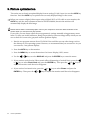
The easiest way to obtain an optimal display from an analog (D-Sub) input is to use the AUTO key
function. Press the AUTO key to optimize the currently displayed image to the screen.
When you connect a digital video output using a digital (DVI or DP) cable to your monitor, the
AUTO key and the Auto Adjustment function will be disabled, because the monitor will
automatically display the best image.
Please ensure that the connected graphic card on your computer is set to the native resolution of the
monitor when you use the AUTO key function.
If you wish, you can always adjust the screen geometric settings manually using geometry menu
items. To assist you in this endeavour, BenQ has provided a screen test image utility which you can
use to check for screen color, grayscale and line gradient display.
1. Run the test program auto.exe from CD-ROM. You could also use any other image, such as
the desktop of your operating system. However, we recommend that you use auto.exe. As you
run auto.exe, a test pattern displays.
2. Press the AUTO key on the monitor.
3. Press the MENU key to access the monitor On-Screen Display (OSD) menu.
4. Use the
or
keys to select DISPLAY and press the ENTER key to enter the menu.
5. If you notice a vertical noise (like a curtain effect-shimmering of vertical lines), press the
or
keys to select Pixel Clock and press the ENTER key. Then press the
adjust the monitor until the noise disappears.
6. If you notice a horizontal noise, press the
ENTER key. Then press the
22
Picture optimization
or
or
or
keys to
keys to select Phase and press the
keys to adjust the monitor until the noise disappears.
6. How to adjust your monitor
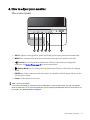
The control panel
1
2
3
4
5
6
1. AUTO: Adjusts vertical position, phase, horizontal position and pixel clock automatically.
2. MENU key: Activates OSD main menu and return to the previous menu or exit OSD.
3.
/Custom key: For Up/Increase adjustment. The key is the hot key for designated
functions. See Custom Key on page 37 for more information.
4.
/Display Mode key: For Down/Decrease adjustment. The key is the hot key for Display
Mode.
5. ENTER key: Enters sub menus and select items. For models with DVI inputs, this key is also
the hot key for Input.
6. Power: Turns the power on or off.
OSD = On Screen Display.
The hot keys will display a graduated scale for adjusting the value of that setting, and will only operate
while the OSD menu is not currently displaying. Hot key displays will disappear after a few seconds of no
key activity. See Hot key mode on page 24.
How to adjust your monitor
23
Hot key mode
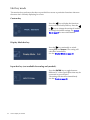
The monitor keys perform as hot keys to provide direct access to particular functions whenever
the menu isn't currently displaying on-screen.
Custom key
Press the
key to display the functions
that can be accessed by this key. Press the
or
keys to change the settings if needed.
To change the default settings, see Custom
Key on page 37 for more information.
Display Mode hot key
Press the
key continually to switch
among Full and Aspect. The setting will
take effect immediately.
See also Display Mode on page 32.
Input hot key (not available for analog-only models)
Press the ENTER key to toggle between
different PC video signal inputs that may be
connected to your monitor.
The setting will take effect immediately.
See also Input on page 35.
24
How to adjust your monitor
Main menu mode
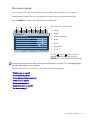
You can use the OSD (On Screen Display) menu to adjust all the settings on your monitor.
Available menu options may vary depending on the input sources, functions and settings.
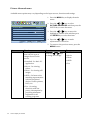
Press the MENU key to display the following main OSD menu.
1
2
3
4
5
6
7
There are 7 main OSD menus:
1. Display
DISPLAY
MODE: Standard
2. Picture
3. Picture Advanced
Auto Adjustment
H. Position
50
V. Position
52
Pixel Clock
50
Phase
18
4. Audio
5. System
6. Ergonomics
Move
ENTER
Select
MENU
Exit
7. ECO
Use the
(up) or
(down) keys to
highlight a menu item, and press the
ENTER key to enter the Menu item settings.
The OSD menu languages may differ from the product supplied to your region, see “Language on page
36” under “OSD Settings” for more details.
For more information on each menu, please refer to the following pages:
• Display menu on page 26
• Picture menu on page 28
• Picture Advanced menu on page 30
• Audio menu on page 34
• System menu on page 35
• Ergonomics menu on page 39
• Eco menu on page 41
How to adjust your monitor
25
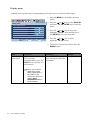
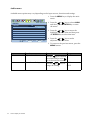
Display menu
Available menu options may vary depending on the input sources, functions and settings.
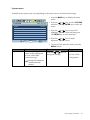
1. Press the MENU key to display the main
menu.
DISPLAY
MODE: Standard
Auto Adjustment
H. Position
50
V. Position
52
Pixel Clock
50
Phase
18
Move
ENTER
Select
2. Press the
or
keys to select DISPLAY
and then press the ENTER key to enter the
menu.
3. Press the
or
keys to move the
highlight to a menu item and then press
the ENTER key to select that item.
MENU
Exit
4. Press the
or
keys to make
adjustments or selections.
5. To return to the previous menu, press the
MENU button.
Item
Auto
Adjustment
Function
Optimizes and adjusts the
screen settings
automatically for you. The
AUTO key is a ‘hot key’ for
this function.
When you connect a
digital video output
using a digital (DVI or
DP) cable to your
monitor, the AUTO key
and the Auto
Adjustment function
will be disabled.
26
How to adjust your monitor
Operation
Press the ENTER key to
select this option and make
adjustment.
Range
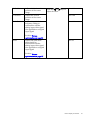
H. Position
V. Position
Pixel Clock
Phase
Adjusts the horizontal
position of the screen
image.
Adjusts the vertical
position of the screen
image.
Adjusts the pixel clock
frequency timing to
synchronize with the
analog input video signal.
Not applicable to a digital
input signal.
See also: Picture
optimization on page 22.
Adjusts the pixel clock
phase timing to
synchronize with the
analog input video signal.
Not applicable to a digital
input signal.
Press the
or
adjust the value.
keys to
0 to 100
0 to 100
0 to 100
0 to 63
See also: Picture
optimization on page 22.
How to adjust your monitor
27
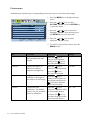
Picture menu
Available menu options may vary depending on the input sources, functions and settings.
1. Press the MENU key to display the main
menu.
PICTURE
MODE: Standard
3
Sharpness
3. Press the
or
keys to move the
highlight to a menu item and then press
the ENTER key to select that item.
2.2
Gamma
Color
AMA
ON
Move
Select
keys to select
to enter the menu.
50
Contrast
or
PICTURE and then press the ENTER key
100
Brightness
2. Press the
Back
4. Press the
or
keys to make
adjustments or selections.
5. To return to the previous menu, press the
MENU button.
28
Item
Brightness
Function
Adjusts the balance
between light and dark
shades.
Contrast
Adjusts the degree of
difference between
darkness and lightness.
Press the
key to
increase the contrast and
press the
key to
decrease the contrast.
0 to 100
Sharpness
Adjusts the clarity and
visibility of the edges of
the subjects in the image.
Press the
key to
improve the crispness of
the display and press the
key to have softness
effect on the display.
1 to 5
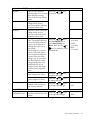
Gamma
Adjusts the tone
luminance. The default
value is 2.2 (the standard
value for Windows).
Press the
key to
increase the gamma value
(tone becomes darker)
and press the
key to
decrease the gamma value
(tone becomes lighter).
1.8 ~ 2.6
How to adjust your monitor
Operation
Press the
key to
increase the brightness
and press the
key to
decrease the brightness.
Range
0 to 100
Color - Press ENTER to enter the Color menu
Normal
Bluish
Reddish
User Mode
Allows video and still
photographs to be viewed
with natural coloring.
This is the factory default
color.
Applies a cool tint to the
image and is factory
pre-set to the PC industry
standard white color.
Applies a warm tint to the
image and is factory
pre-set to the news print
standard white color.
Tailors the image color
tint. The blend of the Red,
Green and Blue primary
colors can be altered to
change the color tint of
the image.
Decreasing one or more
of the colors will reduce
their respective influence
on the color tint of the
image. (e.g. if you reduce
the Blue level the image
will gradually take on a
yellowish tint. If you
reduce Green, the image
will become a magenta
tint.)
Hue: Adjusts the degree of
how we perceive colors.
Saturation: Adjusts the
purity degree of colors.
Reset Color
Resets the User Mode
custom color settings to
the factory defaults.
Press MENU to leave the Color menu.
AMA
Improves the gray level
(BL2400PT only)
response time of the LCD
panel.
Press the
or
keys
to select this option.
Press the
or
keys
and the ENTER key to
select Red, Green, or
Blue. Then use the
or
keys to make the color
adjustments.
• Red
(0 to 100)
• Green
(0 to 100)
• Blue
(0 to 100)
Press the
or
keys
to adjust the value.
0 to 100
Press the
or
keys
to adjust the value.
0 to 100
Press the
or
keys
to change the settings.
• YES
Press the
or
keys
to change the settings.
• ON
• NO
• OFF
How to adjust your monitor
29
Picture Advanced menu
Available menu options may vary depending on the input sources, functions and settings.
1. Press the MENU key to display the main
menu.
2. Press the
PICTURE ADVANCED
MODE: Standard
Picture Mode
OFF
RGB
3. Press the
or
keys to move the
highlight to a menu item and then press
the ENTER key to select that item.
MENU
4. Press the
or
keys to make
adjustments or selections.
0
Dynamic Contrast
Display Mode
Color Format
Move
ENTER
Select
keys to select
ENTER key to enter the menu.
Standard
Senseye Demo
or
PICTURE ADVANCED and then press the
Exit
5. To return to the previous menu, press the
MENU button.
Item
Picture Mode
Function
Selects a picture mode that
best suits the type of
images shown on the
screen.
• Standard - for basic PC
application.
• Movie - for viewing
videos.
• Photo - for viewing still
images.
• sRGB - for better color
matching representation
with the peripheral
devices, such as printers,
DSCs, etc.
• Eco - for saving
electricity with low
power consumption by
providing minimum
brightness for all
running programs.
30
How to adjust your monitor
Operation
Press the
or
keys
to change the settings.
Range
• Standard
• Movie
• Photo
• sRGB
• Eco
Senseye Demo
Dynamic
Contrast
Displays the preview of
screen images under the
selected mode from
Picture Mode. The screen
will be divided into two
windows; the left window
demonstrates images of
Standard mode, while the
right window presents the
images under the specified
mode.
The function is to
automatically detect the
distribution of an input
visual signal, and then to
create the optimal
contrast.
Press the
or
keys
to change the settings.
• ON
Press the ENTER key to
select this option. Press
0 to 5
• OFF
the
or
keys to
change the settings.
How to adjust your monitor
31
Display Mode
This feature is provided to
allow aspect ratios other
than 16:9 or 16:10
(depending on the
purchased model) to be
displayed without
geometric distortion.
• Overscan - Slightly
enlarges the input image.
Use this feature to hide
annoying edge noise if
present around your
image.
• Full - Scales the input
image to fill the screen.
Ideal for 16:9 or 16:10
(depending on the
purchased model) aspect
images.
• Aspect - The input image
is displayed without
geometric distortion
filling as much of the
display as possible.
Depending on the
purchased model, 16:9
or 16:10 images will fill
the screen horizontally
while 4:3 or 5:4 images
will fill the screen
vertically.
To find out the monitor
aspect ratio of the
purchased model,
please check the
Specification document
on the provided CD.
32
How to adjust your monitor
Press the
or
keys
to change the settings.
When the signal
source is from a
DVI or D-Sub
source, and the
input image is of
non-wide aspect
ratio:
• Full
• Aspect
Or
When the signal
source is from a DP
Video or D-Sub
(VGA converted
from Component)
source:
• Overscan
• Full
• Aspect
Color Format
Determines the color space
(RGB or YUV) based on
the following detected
video signal:
Press the ENTER key to
select this option. Press
• RGB
• YUV
the
or
keys to
change the settings.
• D-Sub (VGA) from PC:
The default Color
Format is RGB.
• D-Sub (Component)
from a video device: The
default Color Format is
YUV.
You might need to
manually set the Color
Format if colors shown
on the monitor screen
do not display properly.
• DVI (for models with
DVI inputs): Color
Format is automatically
set to RGB.
• DP: Color Format is not
selectable. In other
words, Color Format is
automatically set
depending on the input
video source.
How to adjust your monitor
33
Audio menu
Available menu options may vary depending on the input sources, functions and settings.
1. Press the MENU key to display the main
menu.
AUDIO
MODE: Standard
10
Volume
Mute
OFF
2. Press the
or
keys to select AUDIO
and then press the ENTER key to enter
the menu.
3. Press the
or
keys to move the
highlight to a menu item and then press
the ENTER key to select that item.
Move
ENTER Select
MENU
Back
4. Press the
or
keys to make
adjustments or selections.
5. To return to the previous menu, press the
MENU button.
Item
Volume
Function
Adjusts the audio volume
Mute
Mutes the audio input
Operation
Range
Press the
key to increase 0 ~ 100
the volume and press the
key to decrease the volume.
Press the
or
keys to • ON
change the settings.
34
How to adjust your monitor
• OFF
System menu
Available menu options may vary depending on the input sources, functions and settings.
1. Press the MENU key to display the main
menu.
SYSTEM
MODE: Standard
Input
D-sub
OSD Settings
DDC/CI
OFF
DP Auto Switch
Information
2. Press the
or
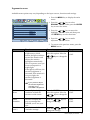
keys to select SYSTEM
and then press the ENTER key to enter the
menu.
3. Press the
or
keys to move the
highlight to a menu item and then press
the ENTER key to select that item.
Custom Key
Reset All
Move
ENTER Select
Back
4. Press the
or
keys to make
adjustments or selections.
5. To return to the previous menu, press the
MENU button.
Item
Input
Function
Use this to change the
input to that appropriate
to your video cable
connection type.
Operation
Press the
or
keys to
change the settings.
Range
• DVI
• D-sub (VGA)
• DisplayPort
Analog-only models do
not have the Input
function.
How to adjust your monitor
35
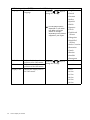
OSD Settings - Press ENTER to enter the OSD Settings menu.
Language
Sets the OSD menu
language.
Press the
or
keys to
change the settings.
• English
• French
• German
• Italian
• Spanish
• Polish
The language options
displayed on your OSD
may differ from those
shown on the right,
depending on the product
supplied in your region.
• Japanese
• Czech
• Traditional
Chinese
• Hungarian
• Simplified
Chinese
• Serbo-Croatian
• Romanian
• Dutch
• Russian
• Swedish
H. Position
V. Position
Display Time
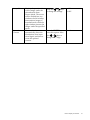
Adjusts the horizontal
Press the
or
keys to
position of the OSD menu. change the settings.
Adjusts the vertical
position of the OSD menu.
Adjusts the display time of
the OSD menu.
• Portuguese
0 to 100
0 to 100
• 5 Sec.
• 10 Sec.
• 15 Sec.
• 20 Sec.
• 25 Sec.
• 30 Sec.
36
How to adjust your monitor
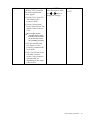
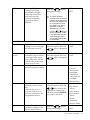
OSD Lock
Prevents all the monitor
settings from being
accidentally changed.
When this function is
activated, the OSD
controls and hotkey
operations will be
disabled.
Press the
or
keys to
change the settings.
• YES
• NO
To unlock the OSD
controls when the OSD is
preset to be locked, press
and hold the "MENU" key
for 15 seconds to enter
the "OSD Lock" option
and make changes.
Alternatively, you may
use the
or
keys to
select "NO" in the "OSD
Lock" submenu from the
"OSD Settings" menu,
and all OSD controls will
be accessible.
Press MENU to leave the OSD Settings menu.
DDC/CI*
Allows the monitor
Press the ENTER key to
settings to be set through
select this option. Press the
the software on the PC.
or
keys to change the
DP Auto
Switch
Information
When this function is
activated, DP port will be
in the input auto select
loop. Otherwise, DP can
only be selected by input
select or by hot key.
Displays the current
monitor property settings.
settings.
Press the ENTER key to
select this option. Press the
• ON
• OFF
• ON
• OFF
or
keys to change the
settings.
• Input
• Current
Resolution
• Optimum
Resolution
(best with the
monitor)
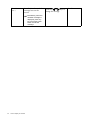
Custom Key
Sets the functions to be
accessed by the custom
key.
After the key is set, it
becomes a shortcut to
activate or deactivate the
designated function.
Press the ENTER key to
select this option. Press the
or
keys to move the
highlight to a menu item
and then press the ENTER
key to select that item.
• Model Name
• Eye Protect
• Eye Protect
Meter
• ECO Sensor
• ECO Sensor
Meter
• Smart
Reminder
Reset All
Resets all mode, color and
geometry settings to the
factory default values.
Press the
or
keys to
change the settings.
• Picture Mode
• YES
• NO
How to adjust your monitor
37
*DDC/CI, short for Display Data Channel/Command Interface, which was developed by Video Electronics
Standards Association (VESA). DDC/CI capability allows monitor controls to be sent via the software for
remote diagnostics.
38
How to adjust your monitor
Ergonomics menu
Available menu options may vary depending on the input sources, functions and settings.
1. Press the MENU key to display the main
menu.
ERGONOMICS
MODE: Standard
Eye Protect
OFF
Eye Protect Meter
OFF
Smart Reminder
Time Intervel (min.)
Move
OFF
MENU
keys to select
key to enter the menu.
3. Press the
or
keys to move the
highlight to a menu item and then press
the ENTER key to select that item.
20
ENTER Select
or
ERGONOMICS and then press the ENTER
5
Duration (sec.)
2. Press the
Exit
4. Press the
or
keys to make
adjustments or selections.
5. To return to the previous menu, press the
MENU button.
Item
Eye Protect
Function
Your monitor comes with
a light sensor, which
detects the light condition
around the monitor and
adjusts the monitor
backlight automatically.
This is to protect your eyes
from overexposure to
bright light.
If the light is sufficient, the
monitor brightness is
increased. If the monitor is
in a poor light, the
monitor brightness is
decreased.
Operation
Press the ENTER key to
select this option. Press the
Range
• ON
• OFF
or
keys to change the
settings.
If you prefer to adjust
the monitor brightness
manually, go to
PICTURE > Brightness.
Eye Protect
Meter
Smart
Reminder
Time interval
(min.)
Sets to display the light
condition around the
monitor on the screen.
Press the ENTER key to
select this option. Press the
• ON
Decides to display the
pop-up message that
reminds you to rest your
eyes.
Sets the interval of the
reminder message.
Press the
or
keys to
change the settings.
• ON
Press the
or
keys to
change the settings.
20 ~ 100
• OFF
or
keys to change the
settings.
• OFF
How to adjust your monitor
39
Duration
(sec.)
Sets the time the reminder
message lasts on the
screen.
Alternatively, when the
reminder message is
displayed, press any
key except the power
button to hide the
message.
40
How to adjust your monitor
Press the
or
keys to
change the settings.
5 ~ 25
Eco menu
Available menu options may vary depending on the input sources, functions and settings.
1. Press the MENU key to display the main
menu.
ECO
MODE: Standard
ECO Sensor
OFF
ECO Sensor Meter
OFF
Sensor Range
Far
Move
ENTER Select
MENU
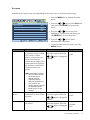
2. Press the
or
keys to select ECO and
then press the ENTER key to enter the
menu.
3. Press the
or
keys to move the
highlight to a menu item and then press
the ENTER key to select that item.
Exit
4. Press the
or
keys to make
adjustments or selections.
5. To return to the previous menu, press the
MENU button.
Item
ECO Sensor
Function
Your monitor comes with
a proximity sensor (called
ECO sensor), which
detects your presence in
front of the monitor
within the set range. If the
sensor detects no presence,
the monitor is turned off
in 40 seconds to save
power.
Operation
Press the ENTER key to
select this option. Press the
Range
• ON
• OFF
or
keys to change the
settings.
If the monitor is turned
off by the ECO sensor,
the power button
flashes in green.
If the ECO sensor
detect no presence for
over 2 hours, the
monitor will be powered
off. Press the power
button to turn on the
monitor.
ECO Sensor
Meter
Sensor Range
Sets to display the
countdown to turn off the
monitor.
Decides how far the sensor
can detect.
Press the ENTER key to
select this option. Press the
or
keys to change the
settings.
Press the ENTER key to
select this option. Press the
or
keys to change the
settings.
• ON
• OFF
• Near
• Middle
• Far
How to adjust your monitor
41
7. Troubleshooting
Frequently asked questions (FAQ)
The image is blurred:
Read the instructions on the link "Adjusting the Screen Resolution" on the CD, and then select the
correct resolution, refresh rate and make adjustments based on these instructions.
How do you use a VGA extension cable?
Remove the extension cable for the test. Is the image now in focus? If not, optimize the image by
working through the instructions in the "Adjusting the refresh rate" section on the link "Adjusting
the Screen Resolution". It is normal for blurring to occur due to conduction losses in extension
cables. You can minimize these losses by using an extension cable with better conduction quality
or with a built-in booster.
Does the blurring only occur at resolutions lower than the native (maximum) resolution?
Read the instructions on the link "Adjusting the Screen Resolution" on the CD. Select the native
resolution.
Pixel errors can be seen:
One of several pixels is permanently black, one or more pixels are permanently white, one or more
pixels are permanently red, green, blue or another color.
• Clean the LCD screen.
• Cycle power on-off.
• These are pixels that are permanently on or off and is a natural defect that occurs in LCD
technology.
The image has a faulty coloration:
It has a yellow, blue or pink appearance.
Select MENU > PICTURE > Color > Reset Color, and then choose “YES” in the “Caution”
message box to reset the color settings to the factory defaults.
If the image is still not correct and the OSD also has faulty coloration, this means one of the three
primary colors is missing in the signal input. Now check the signal cable connectors. If any pin is
bent or broken off, please contact your dealer to get necessary support.
No image can be seen:
Is the prompt on the display illuminated in green?
If the LED is illuminated in green and there is a message “Out of Range” on the screen, this means
you are using a display mode that this monitor does not support, please change the setting to one
of the supported mode. Please read the “Preset display modes” section from the link "Adjusting
the Screen Resolution".
Faint shadow from the static image displayed is visible on the screen:
• Activate the power management function to let your computer and monitor go into a low
power "sleep" mode when not actively in use.
• Use a screensaver to prevent the occurrence of image retention.
42
Troubleshooting
Is the prompt on the display illuminated in orange?
If the LED is illuminated in orange, the power management mode is active. Press any button on
the computer keyboard or move the mouse. If that does not help, check the signal cable
connectors. If any pin is bent or broken off, please contact your dealer to get necessary support.
Is the prompt on the display not illuminated at all?
Check the power supply mains socket, the external power supply and the mains switch.
The image is distorted, flashes or flickers:
Read the instructions on the link "Adjusting the Screen Resolution" on the CD, and then select the
correct resolution, refresh rate and make adjustments based on these instructions.
You are running the monitor at its native resolution, but the image is still distorted.
Images from different input sources may appear distorted or stretched on the monitor running at
its native resolution. To have the optimal display performance of each type of input sources, you
can use the "Display Mode" function to set a proper aspect ratio for the input sources. See Display
Mode on page 32 for details.
The image is displaced in one direction:
Read the instructions on the link "Adjusting the Screen Resolution" on the CD, and then select the
correct resolution, refresh rate and make adjustments based on these instructions.
The OSD controls are inaccessible:
• To unlock the OSD controls when the OSD is preset to be locked, press and hold the “MENU”
key for 15 seconds to enter the “OSD Lock” option and make changes.
• Alternatively, you may use the
or
keys to select “NO” in the “OSD Lock” submenu
from the “OSD Settings” menu (under SYSTEM), and all OSD controls will be accessible.
No sound can be heard from the built-in speakers:
• Check whether Line In is properly connected.
• Increase the volume (volume may be muted or too low).
• Remove your headphone and/or external speakers. (If they are connected to the monitor, the
built-in speakers are automatically muted.)
No sound can be heard from the connected external speakers:
• Remove your headphone (if the headphone is connected to the monitor).
• Check whether the headphone jack is properly connected.
• If the external speakers are USB-powered, check whether the USB connection is OK.
• Increase the volume (volume may be muted or too low) on the external speakers.
No sound can be heard from the built-in speakers:
• Check whether Line In is properly connected.
• Increase the volume (volume may be muted or too low).
• Remove your headphone and/or external speakers. (If they are connected to the monitor, the
built-in speakers are automatically muted.)
Troubleshooting
43
No sound can be heard from the connected external speakers:
• Remove your headphone (if the headphone is connected to the monitor).
• Check whether the headphone jack is properly connected.
• If the external speakers are USB-powered, check whether the USB connection is OK.
• Increase the volume (volume may be muted or too low) on the external speakers.
The light sensor of the monitor does not work well.
The light sensor is located at the front bottom of the monitor. Please check:
• If the Eye Protect function is set to ON. Check Ergonomics > Eye Protect.
• If there are any obstacles in front of the sensor that keep the sensor from detecting the light
properly.
• If there are any objects or clothing in bright colors in front of the sensor. Bright colors
(especially white and fluorescent colors) reflect light and the sensor cannot detect the main
light sources.
The ECO sensor of the monitor does not work well.
• The ECO sensor is located at the front bottom of the monitor.
Check if there are any obstacles in front of the sensor that keep the
sensor from detecting your presence properly.
• The colors and the materials of your clothes may affect the
detection. Adjust the sensor range if needed. See Sensor Range on
page 41 for more information.
• Adjust the distance between you and the monitor.
If none of the proceeding actions works, it is probably because the
materials of your clothes are unique and cannot be detected by the ECO sensor. Please be noted
that this is neither a manufacturing defect nor is the sensor damaged. You should turn off the ECO
sensor for now in Eco > ECO Sensor.
Need more help?
If your problems remain after checking this manual, please contact your place of purchase or
e-mail us at: [email protected].
44
Troubleshooting