1
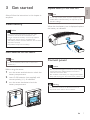
Always follow the instructions in this chapter in
sequence.
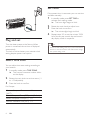
Install battery
Replace battery of the main unit
English
3 Get started
Note
•• You can only use AC power as power supply. The pre-
installed lithium CR2032 battery can only back up clock
and alarm settings.
When the low battery icon is displayed, replace
the battery as indicated.
Caution
•• Risk of explosion! Keep batteries away from heat,
sunshine or fire. Never discard batteries in fire.
•• Danger of explosion if battery is incorrectly replaced.
Replace only with the same or equivalent type.
•• The battery contains chemical substances, so it should be
disposed of properly.
•• Keep children away from the battery.
Insert batteries into the sensor
Note
•• Do not mix batteries (old and new or carbon and
alkaline, etc.).
Before using the sensor,
1
2
3
turn the screw anticlockwise to unlock the
battery compartment.
insert 2 AA batteries (not supplied) with
correct polarity (+/-) as indicated.
turn the screw clockwise to lock the
battery compartment.
Connect power
Caution
•• Risk of product damage! Ensure that the power voltage
corresponds to the voltage printed on the back or
underside of the clock radio.
•• Risk of electric shock! When you unplug the AC adapter,
always pull the plug from the socket. Never pull the cord.
Warning
•• To reduce the risk of fire or electric shock, do not
expose this clock radio to rain or moisture.
EN
7