1
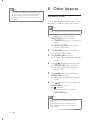
Note 8 Other features Y< \%* < \ \%\ < \% ‘Movie.srt’. Set alarm timer This unit can be used as an alarm clock. You can select DISC, TUNER or USB as alarm source. Note Make sure that you have set the time correctly. 1 In standby mode, press and hold SLEEP/TIMER for three seconds » [TIMER SET](timer set) scrolls on the display. » [SELECT SOURCE] (select source) scrolls on the screen. 2 Press SOURCE repeatedly to select a source: DISC, USB, TUNER. 3 Press SLEEP/TIMER % » The hour digits are displayed and begin to blink. 4 Press / repeatedly to set hour, then press SLEEP/TIMER? % » The minute digits are displayed and begin to blink. 5 Press / to set minute, then press SLEEP/TIMER % » VOL (volume) is displayed and begins to blink. 6 Press / to adjust volume, then press SLEEP/TIMER % » is displayed. » To deactivate alarm timer, press SLEEP/TIMER again. Note Alarm timer is not available in MP3 LINK mode. If DISC/USB source is selected and the track cannot be played, tuner is activated automatically. 22 EN