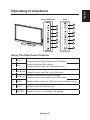
1
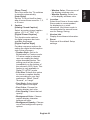
EPG
Press to display the Electronic
Program Guide in TV mode. It shows
the current channel name, program
name, time, rating, and summary,
depending on the information
provided by the broadcaster.
Freeze
Press to freeze the displayed picture.
MTS
Press to activate the NTSC tuner
sounds such as Stereo, SAP, Monotone, and languages of the digital
tuner.
Wide
Press to choose the display aspect
ratio: Wide Screen/4:3/Panorama/
Zoom/Automatic/Dot by Dot. (Ratio
availability varies by video inputs.
Refer to the Picture Format Table
below for details.)
Picture
Press to choose the picture mode:
Sports/Standard/Movie/Power Saver/
User.
Audio
Press to choose sound mode: Rock/
Pop/Live/Dance/Techno/Classic/Soft/
Off.
Ch-List
Press to display the Channel List.
C.C.
Press to activate the Closed Caption.
Picture Format for Each Input Source
Aspect
Input Signal
Automatic Wide Screen
4:3
Panorama Zoom
Dot by Dot
Yes
Yes
Yes
Yes
Yes
No
SD
Yes
Yes
Yes
Yes
Yes
No
HD
Yes
Yes
No
No
Yes
No
Yes
Yes
Yes
Yes
Yes
No
480i, 480p
Yes
Yes
Yes
Yes
Yes
No
720p, 1080i, 1080p
Yes
Yes
No
No
Yes
No
640x480, 800x600, 1024x768,
1280x1024
No
Yes
Yes
No
No
Yes
720x400, 1280x720, 1280x800,
1440x900, 1680x1050
No
Yes
No
No
No
Yes
1366x768 (For E322 model)
No
Yes
No
No
No
Yes
1920x1080
No
Yes
No
No
No
Yes
480i, 480p
Yes
Yes
Yes
Yes
Yes
No
720p, 1080i, 1080p
Yes
Yes
No
No
Yes
No
640x480, 800x600, 1024x768,
1280x1024
Yes
Yes
Yes
No
Yes
No
720x400, 1440x900, 1280x720,
1280x800, 1680x1050
Yes
Yes
No
No
Yes
No
1366x768 (For E322 model)
Yes
Yes
No
No
Yes
No
1920x1080
Yes
Yes
No
No
Yes
No
ATV
DTV
Composite
Component
PC IN
HDMI 1
HDMI 2
HDMI 3
English-19
English
Color buttons
Follow the on-screen instruction to
operate.