1
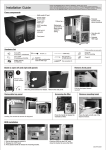
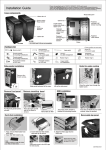
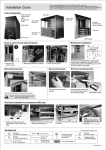
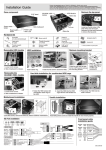
Hard disk installation
Put anti-vibration rubbur
pad for reduce noise level.
Close the gate to secure the HDD
cage.
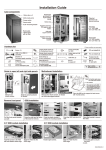
Insert the HDD into
the HDD cage
Open the plastic brackets
on HDD cage.
Close the plastic brackets
to secure.
Slide the HDD cage into the
HDD rack.
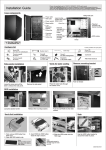
Secure the
2.5” HDD to
HDD cage with
screws.
(Open the plastic bracket to release
the HDD from HDD cage)
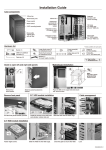
Remove HDD cage (HDD cage can be rotate 90 degree)
Loose three screws to release the
tool-less HDD cage .
Loose thumb screw to release
the gate.
Rotate the HDD cage 90 degree
to specific mounting point
Secure the HDD cage with screw as hown
above
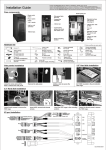
Cable clamp installation
Insert the gate to the HDD cage, secure it with the thumb screw.
Insert the cable clamp into
specific mounting point
Use cable clamp to tidy up
the cables.
* Remove clamp, use
tweezers to release the
cable clamp
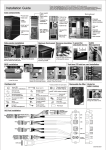
Front panel cable installation guide
!
!
!
Note: For area where hard
to reach use the
long thumb screw
GROUND
PWR
WHITE
GRAY
GROUND
Reset
PLED-
WHITE
BLUE
WHITE
NC
GREEN
PLED+
IDE_LED- WHITE
IDE_LED+ ORANGE
Speaker
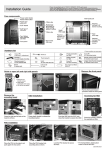
Secure the stand-off on the M/B tray which match
with the M/B fix points, place the M/B on the stand-off
fasten with the thumb screws to secure.
+5V
BLACK
NC
NC
RED
POWER SW
RESET SW
POWER
LED
H.D.D LED
SPEAKER
I/O port installation
AC 97AUDIO
Optional accessories from Lian Li
EX-332N
EX-H34
TR-5
BZ-U02B
CR-36
C50.K5800.11E-2