1
10
ENGLISH
ENGLISH
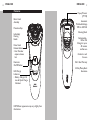
LED Multi-Purpose Display
The display provides the following information:
Before First Use
◗ Charging Indicator
C When
the razor is charging, the charging light
blinks green.
C
◗ Low Battery Indicator
C When
battery is almost empty (5 or less
shavingthe
minutes left), the charging light starts to
blink orange. When you turn the razor OFF the
charging light blinks orange for a few seconds.
w Quick Charge Indicator
When you charge the empty battery, the
charging light alternately blinks orange and green.
After approximately 3 minutes, the charging light
continues to blink green.
- The razor now contains enough energy for a 5-minute shave.
◗ Charge the razor before you start using
it (see ‘Charging’). Make sure the razor is
switched off before you start charging it.
Important
◗ Full Charge Indicator
When the battery is fully charged, the charging
light lights up continuously. After approximately
30 minutes, the charging light goes out to save
energy.
11
◗ Only use the power cord provided to charge
the razor.
◗ The power plug transforms 100-240V AC to
less than 24V DC.
Charging
◗ Charging or recharging at temperatures below
40ºF or higher than 95ºF adversely affects
lifetime of batteries.
◗ Charging or recharging requires eight full
hours.
◗ A fully charged razor has a cordless shaving
time of up to 40 minutes.
◗ When charging razor for the first time or
after a long period of non-use, charge until
the charging light lights up continuously.
◗ Do not charge razor in a pouch.
◗ Do not charge/recharge or use razor until
fully dried.