1
2.4
1.
Connecting the cables
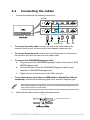
Connect the cables as the following instructions:
VE248Q
VE228Q
Audio-in
Display port
HDMI
Earphone jack
VGA
•
To connect the audio cable: connect one end of the audio cable to the
monitor’s Audio-in port, the other end to the computer’s audio-out port.
•
To connect the power cord: connect one end of the power cord securely to
the monitor’s AC input, the other end to a power outlet.
•
To connect the VGA/HDMI/Displayport cable:
a. Plug one end of the VGA/HDMI/Displayport cable to the monitor’s VGA/
HDMI/Displayport port.
b. Connect the other end of the VGA/HDMI/Displayport cable to your
computer's VGA/HDMI/Displayport port.
c.
•
Tighten the two screws to secure the VGA connector.
To use the earphone (only when an HDMI cable or DisplayPort cable are
connected): connect the end with plug type to the monitor’s earphone jack.
When these cables are connected, you can choose the desired signal from the
Input Select item in the OSD menu.
2.
Gather all the cables with the cable management slot.
cable management slot
ASUS VE248Q/VE228Q Series LED Monitor
2-3